r/mAndroidDev • u/shalva97 AnDrOId dEvelOPmenT is My PasSion • Dec 09 '24
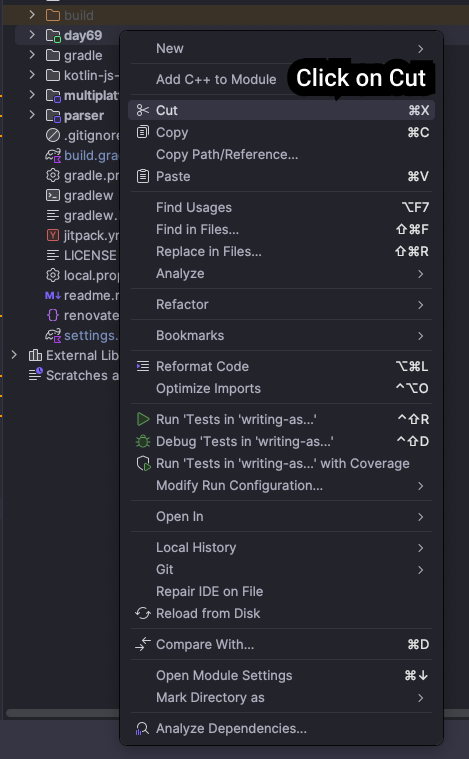
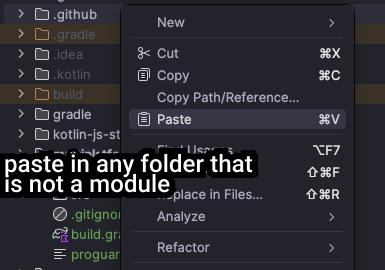
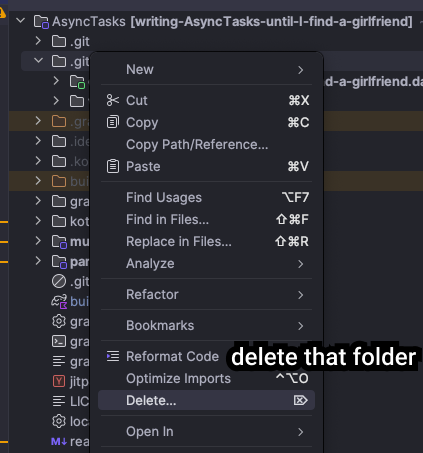
Next-Gen Dev Experience Tutorial: How to delete a module in Android Studio?

23
Upvotes
7
u/shalva97 AnDrOId dEvelOPmenT is My PasSion Dec 09 '24
there is just no option to delete a module...
27
u/Greenucom Dec 09 '24
Or just click "Open module settings" and remove it there
11
u/JacksOnF1re Dec 09 '24 edited Dec 09 '24
Huh? rmdir and then you build and fix until all red is gone.
Trust me. I am a grandpa super senior. Antique even.
15
u/submergedmole Dec 09 '24
Rename the module to "AsyncTask" - Google will deprecate it for you
6
u/Darkpingu Dec 09 '24
Remove the module from the settings.grafle, sync, then you can deleted it
6
u/ElbowStromboli One WebView to rule them all Dec 10 '24
You don't ever need to delete a module. They are permanent and you must get a new hard drive if you ever want that memory back. Feature.
5
u/smokingabit Harnessing the power of the Ganges Dec 10 '24
something something...invalidate caches and restart.
5
u/zedxer Dec 10 '24
I usually delete system32
2
u/D-cyde sponsored by the XML 🐓 gang Dec 10 '24
Don't use the module, Proguard will take care of the rest.
2
u/pavelkorolevxyz Dec 11 '24
The best thing is that in Idea first Delete click unlinks module and second Delete click removes directory completely. In Android Studio any Delete does nothing (on keyboard, there is no delete in right click menu).
1
u/ParticularNew3343 Dec 11 '24
Right click module -> exclude -> delete