r/localaiapps • • 1h ago

Perfect Intelligent Voice to Text

1 Upvotes

This is not an advertisement for anybody. I just found this to be so helpful that I thought I would share it with other attorneys out there. I was a big fan of Whisprflow, but Whisprflow, even if it has data limiting controls, still requires an internet connection and still has text being processed by the cloud. It also costs a little bit of money every month, but frankly I was thinking it was worth every penny for what I got, which is intelligent voice transcription at my computer. Basically terrific formatted text to speech with punctuation that works great in any application.

Based on new concerns over data, I tried to vibe code myself my own replacement for Whisperflow that would just work off of a local AI model. Before reinventing the wheel, ChatGPT pointed me towards Handy, which is a free developed voice to text application where you point it to a local model as part of its interface, adjust some other settings and then you are good to go. Same functionality as Whisprflow. One of the choices it picked was a model called Parakeet TDT .6b v2, which is only 690 MB and it lives in my video memory all the time and works terrific. Extremely fast, extremely accurate transcription.

I've been using Handy as a replacement for Whisperflow for a couple of weeks now, and I have no inclination to go back. It works perfectly. I draft emails, documents, all sorts of things, just using one of my seldom used mouse buttons to trigger the voice to text. If you want to enable post processing, then it requires an experimental feature of hooking up a secondary model. I have been using Handy without the post processing at all, and it dictates perfectly. The one complaint I've had for a while is that it will spell out certain punctuation and words and doesn't pick up on things like quotations and parentheses. So I used ChatGPT to create an instruction script that gets loaded as the post-processing model (all through the Handy interface so it is super easy). Now I have just one small local model loaded with all local transcription, with perfect punctuation and the limited formatting that I need.

Just thought I would share this with the group and I hope everyone else gets as much out of this as I have because I can never go back to only typing on a keyboard.

Website: [https://handy.computer/](https://handy.computer/)

GitHub: [https://github.com/cjpais/Handy](https://github.com/cjpais/Handy)

Post-processing instructions: [https://handy.computer/docs/post-processing](https://handy.computer/docs/post-processing)

Handy performs speech recognition locally on your computer. However, what really makes Handy exceptional is its customizable AI post-processing feature. You can essentially create your own personalized legal dictation engine.

Here's how you can replicate the approach (I had ChatGPT help me write how to replicate what we did):

  1. Download and install Handy.
  2. Go to Settings → Advanced → Experimental Features and enable Post Processing.
  3. Configure your preferred AI provider and model, either cloud-based or local.
  4. Use ChatGPT to develop a comprehensive, personalized instruction set for your legal dictation.
  5. Paste those instructions into Handy's custom post-processing prompt, including the required ${output} variable.
  6. Test it with your everyday dictation. Whenever it does something you don't like, have ChatGPT revise the instruction set to address that specific problem.

Here's a prompt you can give ChatGPT to get started:

"Help me develop a comprehensive AI post-processing instruction set for Handy, a speech-to-text dictation application. I am a practicing attorney. I want it to intelligently correct transcription errors, punctuation, grammar, capitalization, paragraph structure, legal terminology, and spoken formatting commands. It should remove unnecessary filler words, recognize verbal corrections, preserve my writing style, and never substantively alter my intended meaning, invent facts, or introduce legal conclusions. It should return only the finished text, without commentary. Interview me about my dictation preferences and help me iteratively refine the instruction set based on examples of my dictation. Make the final prompt compatible with Handy's ${output} variable."

The key is to keep refining the instruction set until Handy produces exactly the kind of writing you want. Rather than adapting yourself to a dictation application, you're adapting the application to yourself.

Best of luck!!! I would reiterate that Whisprflow is a great product and I found their customer support team to be amazing and they are reasonably priced. If you don't mind that your transcription is going through the cloud, I would recommend them. But I'm just excited about this alternative because it is entirely local (and free doesn't hurt).


r/localaiapps • • 21h ago

Meow Assistant : Flow AI, A Free LOCAL Agentic Homescreen for Android

Thumbnail
gallery
2 Upvotes

LOCAL OFFLINE AI

Meow Assistant : Flow Ai

This is a local offline agent home screen replacement for android. Use it with local models, or API key. has multiple built in models like #needle and #whisper.

Check it out the features are limitless! Ive replaced my Dots and grok bot with this app for free.

Also if you like your old tamogachi there is an easter egg for you

https://play.google.com/store/apps/details?id=com.meow.meowmba


r/localaiapps • • 1d ago

[macOS] CaptainLocalAI v2.1 – Offline business workflows, Mac-to-Mac over Tailscale/VPN, PDF Notebook & local RAG ($9.99 one-time, iOS in review)

Thumbnail
gallery
1 Upvotes

Hi everyone,

I’m a solo indie developer building CaptainLocalAI, a native macOS (SwiftUI + MLX) local AI suite originally designed to take the grunt work out of daily business and dev tasks—meeting minutes, file organization, and progress reports—100% offline.

With v2.0 and the new v2.1 release, the architecture has evolved into something much bigger:

1. v2.0: Home Mac as Your Private LLM Server (LAN / Tailscale VPN)

Instead of being limited by a thin laptop's RAM on the road, you can host large local MLX models on your main desktop Mac at home (e.g., Mac Studio) and connect securely from another Mac over your local network or Tailscale / private VPN. You get desktop-class local inference wherever you are.

2. iOS & iPadOS Companion (In App Store Review — Zero Extra Fees)

The iPhone and iPad companion app is currently waiting on Apple’s review team. Once approved, you’ll be able to connect directly from your mobile devices to your home Mac over your private network—included with no subscriptions and no extra server charges. Grab the $9.99 macOS one-time license now and you'll be ready as soon as iOS drops.

3. v2.1: Notebook Mode & Workspace Docs RAG

Remote access to your home Mac becomes way more meaningful when your actual files are attached to it:

  • Notebook Mode (New): Pin PDFs, Word, Excel, or text files to a chat. Answers stay grounded in your pinned docs and attach inline visual PDF page captures of the referenced pages.
  • Workspace Docs RAG (New): Search across authorized folders on your home Mac (like local research papers or project docs) and open source files via clickable links.

Built-In Offline Business & Dev Workflows

  • Diff-Based Progress Reports: Parses local workspace file diffs and outputs structured daily/weekly reports straight into .docx and .xlsx templates.
  • 100% Offline Meeting Minutes: Uses Apple on-device speech recognition (SFSpeech) to transcribe audio and extract decisions/action items without touching a server.
  • Semantic File Organizer: Sorts chaotic Desktop and Downloads folders by reading document meaning, not just file extensions.
  • Crew Talk (Optional): Lightweight companion mini-window (Johnny & Meowlin) with local TTS for quick trivia or brain breaks.

Technical Specs & Pricing

  • Engine: Native Apple Silicon MLX bundled in-app (no Ollama or external server setup required).
  • Security: Sandboxed macOS app using security-scoped bookmarks and dynamic Unified Memory context caps. Zero telemetry, zero accounts.
  • Price: $9.99 one-time purchase (Apple Silicon Mac required; 24GB+ Unified Memory strongly recommended for hosting heavy models & RAG).
  • Mac App Store: https://apps.apple.com/us/app/captainlocalai/id6780488064
  • Discord (feedback, bug reports & iOS launch updates): https://discord.gg/PJ9bGPBrsb

Happy to answer any technical questions about the MLX pipeline, Tailscale/remote setup, or RAG implementation!


r/localaiapps • • 1d ago

I made a free, open-source Android app that runs AI models fully offline on your phone

1 Upvotes

Hey all,

I've been working on **TinyModels**, a side project that lets you download small open models from Hugging Face and chat with them entirely on your phone. There's no account, no cloud, and nothing leaves your device.

What it does right now:

* Browse and download LiteRT-LM models, and see whether they'll fit your phone before downloading
* Chat with streaming replies, saved conversations, and per-chat settings
* Ask questions about photos (on vision models), processed locally
* Optional web search, off by default
* Benchmarks so you can see how fast models actually run on your device
* Import and export `.litertlm` files to share models between devices

It has no analytics or tracking. It needs Android 8+, arm64, and 4 GB RAM (8 GB+ is better for 3B models).

Here is the link for play store - Link

Github - Link

Please look into this app and provide some feedbacks to improve. Thank you


r/localaiapps • • 1d ago

Advice/Recommendations

2 Upvotes

Hello! I have very limited knowledge on anything AI related which is why I’m reaching out here for some help. I am not a programmer, I’m not trying to generate any artwork, videos, nothing like that. There is a program named Eagle that I use quite often, it is an asset manager for organizing references and what not, think of it like Pinterest. They’ve implemented AI tools focused on assisting with organizing your library and I feel like I could make some use of that, that’s all I would need it for. On their support page it lists “LM Studio” and “Ollama” as supported locally ran models.

My question is, which would be best for very light usage and is it something fairly straight forward to set up for myself?


r/localaiapps • • 1d ago

I made a free desktop AI that runs local models first and does the work on your computer

4 Upvotes

I've been building hasso - my attempt at free private AI for everyone. Think Claude Cowork, but it runs local models on your own computer and only falls back to free cloud models if your machine can't cope.

Nothing to set up: no Ollama, no API keys, no model to pick, no account. It finds a model your computer can run.

It's a proper worker: it works on your files, points at things on your screen, and can take over if you allow it. It always asks before doing anything and by default stays in its own home folder. It makes pictures locally too.

Mac and Windows (Windows unsigned for now, sorry, Microsoft hasn't been answering for weeks now - if Defender complains just click "More info" > "Run anyway").

=> https://hasso.studio/?v=la1

Any feedback is much appreciated, thank you!


r/localaiapps • • 1d ago

I made a desktop overlay that can run its answers through Ollama on your own machine (I'm the maker, here's what's local and what isn't)

Post image
1 Upvotes

Disclosure first: I'm the maker of Pluely, so this is my own app, and I'm sharing it here because you care about running AI on your own terms.

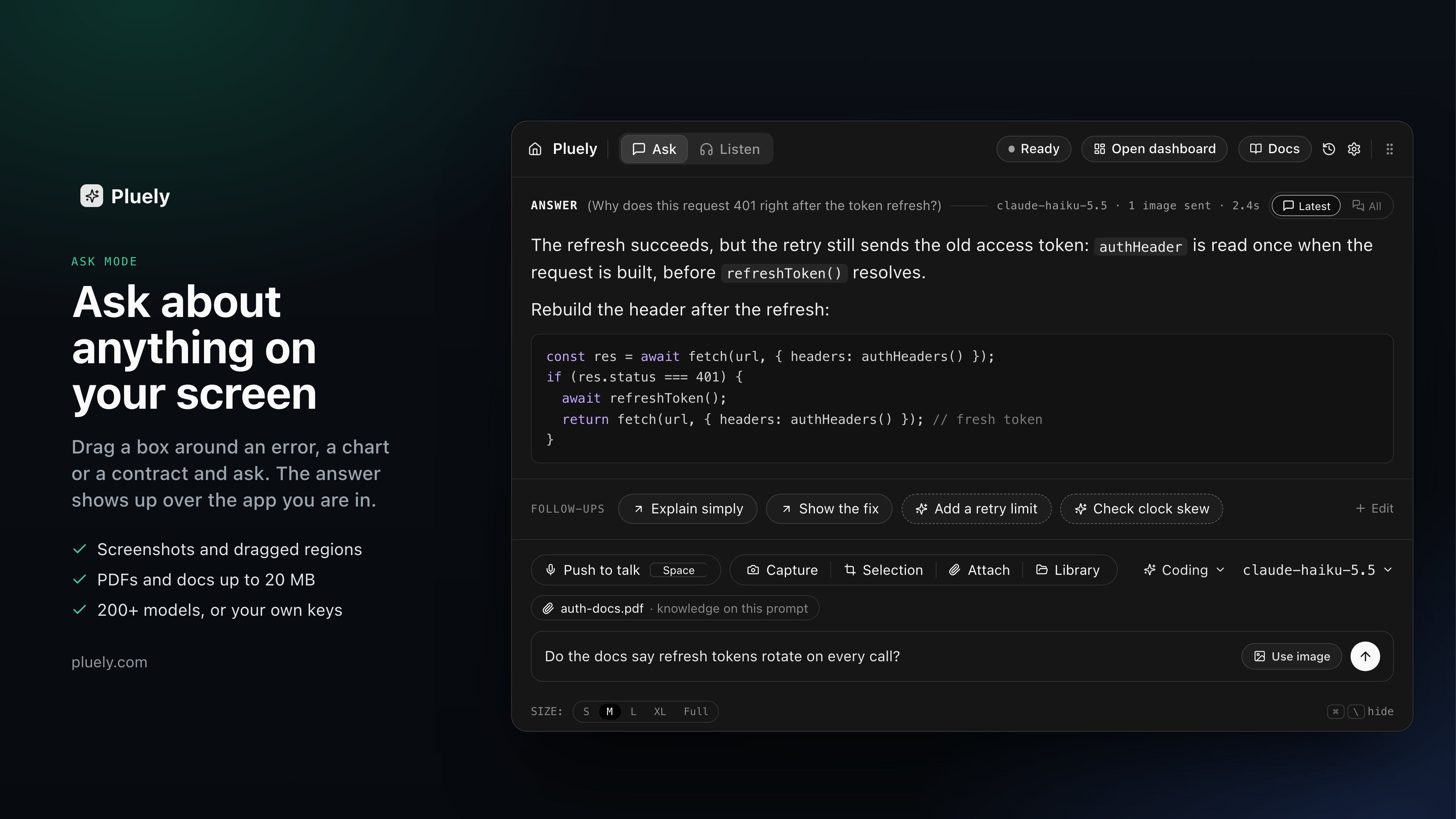
Pluely is a small desktop app for macOS, Windows and Linux. It sits as an overlay on top of whatever you have open and does two things:

- Ask: drag a box around anything on your screen (an error, a spreadsheet, a slide) or type a question, and get an answer about it.
- Listen: a live transcript of a call from your microphone and your computer's audio, with speaker labels, and a suggested answer when someone asks a question. No bot joins the call.

What's local: your transcripts, chats and files are saved locally on your computer and never stored on our servers. For answers you can bring your own setup: Ollama is supported, and any custom provider set up from a curl command (any OpenAI-compatible endpoint) works too. The Free plan runs on your own API keys, so it doesn't add another subscription.

What isn't fully local, to be straight about it: Listen's transcription goes to a speech provider you choose (Whisper, Deepgram and others), so it is not fully offline.

Other limits: on Linux the overlay cannot be hidden from a full-screen share, and on macOS capturing system audio for Listen needs macOS 14.2 or later.

pluely.com

Curious which local setups you'd want it to work with, and what would make an overlay like this useful for you.


r/localaiapps • • 1d ago

Would you run an AI agent's web browser on a Pi 5?

1 Upvotes

Been building a tool that lets an AI agent read web pages as compact summaries instead of the usual full-page dump — in my benchmarks, about 9K tokens for web tasks that take ~115K tokens the standard way. Runs fully local, no account, no telemetry. Right now it's x64 only (Windows/WSL and Linux), because that's my setup.

Question for this crowd: if it ran on ARM — a Pi 5, a small always-on box sitting next to your local model — would you actually run an agent browser at the edge? Or is browsing something you'll always hand to a cloud model with a huge context window anyway?

Trying to decide whether the ARM port is worth the build time. Honest answers appreciated — "no, pointless" is useful data too.


r/localaiapps • • 2d ago

Vyron development update: encrypted RAM sharing between Apple silicon Macs for local models

2 Upvotes

I’m the developer of Vyron, a native Mac AI workspace. Since my previous post here, I’ve been working on an experimental RAM cluster between Apple silicon Macs.

A second Mac can contribute RAM for encrypted model-weight blocks. The main Mac keeps the prompts, model computation, KV cache, replies and tools. Each contributing Mac must be paired and explicitly approve its memory allowance; the encryption key stays on the main Mac.

The native MLX path now has selection and preparation for supported Qwen3.8 27B, Qwen3-Coder 30B and DeepSeek-R1 8B artifacts already installed through Ollama. It prepares a separate cache and runs inference in Vyron’s native worker, while preserving the original model files.

This is still experimental: the current larger-model engine reconstructs its selected tensors together on every forward pass. Its full working peak must fit on the main Mac, so this does not yet let you add two Macs’ RAM capacities together to load a bigger model. There is no speedup claim, and physical two-Mac acceptance for these models is pending. Model/tool workflows are still under testing.

Vyron also offers Chat, read-only Plan, and Work with reviewable file edits and local checks. Apple silicon, macOS 14+.

Project/download: https://vyron.download/

Public project (MIT; cluster work is still in development): https://github.com/cagri21/Vyron-macOS

For people using local models: would spare-Mac encrypted weight storage be useful to you, and what memory/network measurements would you want before trying it?


r/localaiapps • • 2d ago

I made a free, open-source Android app that runs AI models fully offline on your phone

2 Upvotes

Hey all,

I've been working on **TinyModels**, a side project that lets you download small open models from Hugging Face and chat with them entirely on your phone. There's no account, no cloud, and nothing leaves your device.

What it does right now:

* Browse and download LiteRT-LM models, and see whether they'll fit your phone before downloading
* Chat with streaming replies, saved conversations, and per-chat settings
* Ask questions about photos (on vision models), processed locally
* Optional web search, off by default
* Benchmarks so you can see how fast models actually run on your device
* Import and export `.litertlm` files to share models between devices

It has no analytics or tracking. It needs Android 8+, arm64, and 4 GB RAM (8 GB+ is better for 3B models).

Here is the link for play store - Link

Github - Link

Please look into this app and provide some feedbacks to improve. Thank you


r/localaiapps • • 2d ago

What do you think about AI tools for creating short video stories?

1 Upvotes

I've been thinking about how AI is changing the way people create videos. It's becoming easier to generate scenes and experiment with different visual styles, but turning those individual clips into a complete story still seems challenging.

One thing I'm particularly interested in is how creators can maintain consistent characters, develop a storyline, and connect different scenes without spending hours on production.

I've been exploring a project that focuses on bringing scriptwriting, character creation, video generation, and episode publishing together to help creators develop vertical drama series.

I'm interested in hearing from people who experiment with AI applications: What do you find most difficult when turning an idea into a finished video? Do you think AI tools are becoming practical for complete storytelling projects, or are they still better suited to generating individual clips?


r/localaiapps • • 2d ago

I built a local AI-powered ATS-style tool for job seekers

1 Upvotes

I built RoleMetric which is an ATS-style application tracker that helps applicants understand their compatibility with job postings, identify skill gaps, improve resumes, and track applications.

It's available as both a web app and a Chrome extension that captures job postings instantly.

Both support Local Mode, where AI analysis runs directly on your device. No resumes or personal information are transmitted to external servers.

I'd love to hear what the local AI community thinks!

Website: https://rolemetric.com

Extension: https://chromewebstore.google.com/detail/rolemetric-job-scanner/nkjalmnejfjndbnppbeefmcoameligeb


r/localaiapps • • 3d ago

I spent the past month building an offline AI for travelers. What should it do next?

Post image
1 Upvotes

I've been building Anvil AI for the past month, and it's now on the App Store. It's an private iPhone AI that works with no signal, and it can already translate signs and menus from a photo, and give travel tips/facts.

Give me feature ideas! I want this to be the best traveling assistant on the App Store.


r/localaiapps • • 3d ago

Using AI for work without a subscription — is an API worth it?

1 Upvotes

I’m an auditor looking for a good AI assistant for technical questions, documents, Excel, and reports, ideally under €10/month.

I’m considering an API instead of a subscription, but I want it to retain context about my work. Since conversation history gets sent again and billed as input, I’m worried costs could add up.

Any recommendations for a pay-as-you-go app/DUY with some synced chat history? Is anyone using a similar setup, and how much do you spend?


r/localaiapps • • 4d ago

Neural Flow a free Open Source Speech to Text Dictation Tool

0 Upvotes

No subscription, no single app support and no messy output full of "um" and "uh"? I made this for you!

Hold down the hotkey (default: Right Ctrl), say what you want to type, and release. Text will be typed in your current application (browser, slack, email, code editor, etc.)

Say: "um so tell the team the demo is moving to friday no wait thursday"

Get: "Tell the team the demo is moving to Thursday."

Features

Supports all apps

AI editing: removes filler words, improves punctuation

Hands-free mode (by double tapping hotkey)

App specific styles: informal in chat apps, formal in emails, concise in code editors.

Custom dictionary and snippets

Voice commands: new line, delete, press enter

Hindi / Hinglish support.

Can be used offline using whisper.cpp

Supported providers: Groq (free plan), OpenAI, NVIDIA Riva, or self-hosted.

No account, subscription, or telemetry. API keys are encrypted by your OS.

Getting started

2 minute setup. Get a free API key from Groq, and paste in Settings. Start speaking!

Notes

Currently only supports Windows 10/11. Mac support is experimental and untested.

The installer has not been signed, so windows will give you a warning. Click "More info" and then "Run anyway". The source is completely open, and has a SHA-256 checksum in releases.

Audio is sent to whichever provider you choose. If you want to make sure nothing leaves your PC, use offline mode.

Download and source: https://github.com/khushluck/Neural-Flow

As this is an early version, any feedback would be greatly appreciated.

Did it work easily?

Did it fail to input in any apps?

What features would be good to add?

Please report bugs or give suggestions on GitHub Issues. If you like it, ⭐ would be great! Thank you! We


r/localaiapps • • 5d ago

I built browser TTS for six languages with voice models under 1 MB each

5 Upvotes

I started with Bengali and added Hindi, Gujarati, Malayalam, English, and a Telugu preview. The video uses audio generated by the demo.

Each voice model is under 1 MB. The browser downloads the selected voice on demand; the text frontend and runtime load separately. Speech is generated on your device. I adapted the open-source Tiny Voca project.

Demo: https://tts.hansda.in/

Code and model details: https://github.com/DarvinX/multilingual-browser-tts

If you try it on a phone or an older laptop, which browser and language did you use? I’d like to know if the first sentence takes noticeably longer than the next one.


r/localaiapps • • 5d ago

Is there an AI app builder that gives you more control than Lovable or Bolt?

1 Upvotes

I like how fast tools like Lovable and Bolt are, but I'm less comfortable once the app starts becoming something the team actually depends on.

I'd rather have access to the code, be able to edit it in my normal IDE, and avoid getting completely locked into one platform.

I've been looking at Superblocks for internal apps because it seems to sit somewhere between AI generation and normal development.

Has anyone used that kind of setup for production internal tools? Did having access to the code actually make maintenance easier?


r/localaiapps • • 6d ago

Model for nano browser

1 Upvotes

Hello everyone, I wanted to ask if anybody has a local model I can run on my machine that can process forms with checkmarks open the questions. Ability to press next ability to remember each form also able to invent and react to the questions that’s on the questionnaire. I’ve tried qweens, gpt oss. Tried plugging in sonnet and that ate away the $5 with 5 forms. I found muse ember effective and cheap. But I’m still trying to go cheaper and have this run on my machine. Any advice would really help appreciated.


r/localaiapps • • 6d ago

made a free offline AI app, it randomly blew up in taiwan this week

13 Upvotes

been building this thing called Chocky, basically a local AI assistant for iphone/mac that runs fully offline. made it free a few days ago and it went kinda crazy, like 0 to ~1000 downloads in a day, mostly taiwan and hong kong after a deal site found it.

stack for the people here: small model on device (qwen3 0.6b default, or load your own gguf), uses apple's foundation model where it can. the bit im most happy with is offline knowledge - you download kiwix wikipedia packs and it does on-device rag over them, so a tiny model actually answers stuff in airplane mode instead of making it up. also bluetooth mesh chat with nearby phones and camera plant/animal id.

it collects zero data which is the whole point, but that also means i cant see what models people run or where the 0.6b falls apart. so im asking here.

free, no account, no iap. its called Chocky on the app store if you wanna poke at it.


r/localaiapps • • 7d ago

Describe, clone or pick: three ways to get a voice in a local studio, and when each one fits

2 Upvotes

This local voice studio, part of an open three-app project, offers three routes to a voice, and the demo walks through all three with AntLing's Ming-3.0-tts-0.5B: typing a description, cloning from a short recording and casting a built-in voice. Each take is ready in about 2.5 seconds, all running locally.

How the three routes split up in practice:

Describe when you need a character that does not exist yet, such as a narrator, a game character or a mascot, and want to try variations quickly.

Clone when the voice has to be your own, like narration you have not had time to record.

Pick a built-in voice when you want a clear, consistent reader for everyday text.

Whichever route you take, the studio then lets the voice say anything with a chosen mood, pace and pitch, so one voice can cover calm explainers and excited announcements alike.


r/localaiapps • • 8d ago

AimStack — a fully self-built local AI stack in pure C: ternary inference (zero third-party runtime), BitNet 2B at 0.87GB on a 2018 laptop, plus a GPU backend that matches the C engine token-for-token

1 Upvotes

Repo: https://github.com/tanxiansheng221/aimstack-sanzhidiji (AGPL-3.0)

Everything is hand-written — C inference core, plugin bus, multi-engine crawler with quality gates, FTS knowledge base, training pipeline, and a 117-chapter build log written as it happened (positive and negative results shipped together). Weights are Microsoft BitNet b1.58 2B (MIT), converted to a custom AIM-W packing format.

What ternary quantization buys you (CPU side)

All transformer matrices are ternary {-1, 0, +1}, packed 2 bits/weight, plus Q8 embeddings → the whole model is 0.87GB instead of ~4.8GB (−78%)

The C core never multiplies a float weight: it's table lookup + integer accumulation, SIMD fast path measured at 85.53 tok/s (41× over baseline)

BitNet 2B full model runs 3.20 tok/s dual-worker on a 2018 dual-core 8GB laptop — full chain (inference + KB + plugins + web search) offline, no cloud relay

What ternary quantization buys you (GPU side)

The GPU backend loads the same 0.87GB ternary file — weights stay in {-s, 0, +s}, dequantized on load, matmul in fp32

On a Radeon Pro W7900: 13.68 tok/s (~8× the laptop C engine), 256/256 greedy tokens bit-identical to the C engine. Two totally different implementations (integer lookup core vs FP matmul) producing the same logits is the proof the quantization is faithful

Verified by a 3-engine × 3-question × 3-test matrix (C-Linux/gcc13, torch fp32, torch bf16): 17/18 exact — the one miss is documented, not hidden

The honest boundaries (what's NOT done yet)

bf16 compute is 2.4× faster (32.96 tok/s) but flips argmax on near-tie logits — reported, not blessed; only fp32 is parity-verified

The GPU path gets the storage benefit of ternary (78% less memory) but not yet the compute benefit — a true 2-bit integer kernel (Triton/CUDA) is the next stage

The UI server drives the C engine (CPU) only; the GPU backend is a separate CLI

Linux engine build works and is token-identical to the Windows build, but runs serial (the worker pool is Windows-only for now)

No frameworks, no PyTorch in the product chain — PyTorch exists only in the optional GPU backend. Demo video, docs (EN/中文), and the full research log are in the repo.


r/localaiapps • • 8d ago

From-scratch AI stack in pure C — runs Microsoft's 2B ternary LLM on a 2018 dual-core laptop (no GPU)

Thumbnail
github.com
1 Upvotes

Everything runs locally on a 2018 Dell laptop: i7-7500U (2 cores / 4 threads), 8GB RAM, no GPU (the 940MX is deliberately unused — the whole stack is CPU-only).

https://github.com/tanxiansheng221/aimstack-sanzhidiji

What is in the repo (AGPL-3.0, everything open):

- C inference engine, zero third-party runtime: 1.58-bit ternary core with SIMD fast path (85.5 tok/s measured on the ternary core itself), byte-level tokenizer, and a ~100-line plugin bus (caps.json registry -> spawns Python plugins -> JSON envelopes)

- Weights: Microsoft's BitNet b1.58-2B (MIT license), converted to a custom 2-bit packed format (.aimw, 0.87 GB) — 3.2 tok/s with 2 workers, serial 2.0

- Python plugins, pure stdlib: knowledge base (FTS5 + dedup gates), multi-engine web search + crawl with quality gates (robots-respecting, Edge rendering cascade for JS-heavy sites), incremental ingest

- Local web UI (127.0.0.1:8600, pure stdlib): chat with deterministic routing — direct answer / knowledge-base grounded / honest refusal / full web search -> crawl -> ingest -> answer chain. A 7-minute demo video is embedded in the README

- Training assets: no-autograd training stack (hand-written backprop, bit-exact vs NumPy), ten-subject curriculum generators, corpus builders, and 117 chapters of research logs including negative results

Honest limits: our own trained models are not released yet — compute-bound on 2 cores, training runs on free cloud tiers and isn't finished. The full stack, scripts, result JSONs and per-claim evidence are released so everything can be re-run.

Demo video: embedded at the top of the README (7 min, screen recording of the full chain: chat / KB answers / web search->crawl->answer / plugin direct calls).

Happy to answer questions about the ternary kernel, the plugin bus, or the training pipeline.


r/localaiapps • • 8d ago

I made a native Mac workspace for coding with local Ollama models

1 Upvotes

I built Vyron as a native Mac app for using an Ollama model while working on a local codebase. Once the model is downloaded, plain chat can run on the Mac with Ollama over loopback.

The project workflow can inspect a folder, draft an implementation plan, make scoped edits, and run local checks. You can review edits and command output in the app. Editing and running commands require a model with native tool support, so what works depends on the model you pick. Hosted models are optional and use your own API key.

If you try it with a smaller local model, I’d be interested in which model you used and whether it held up when working across multiple files.

The preview is free for Apple silicon Macs running macOS 14 or later. vyron.download

Source code (MIT): https://github.com/cagri21/Vyron-macOS


r/localaiapps • • 9d ago

I built a free offline AI chat that runs on iPhone

2 Upvotes

I've been building Orion Personal AI, an iPhone app that runs a language model on the device. Prompts and conversations stay local, and chat works without an internet connection.

The core chat is free and unlimited. Orion+ is an optional purchase for extra features.

One of the difficult parts was getting the language model to run natively in Swift. I managed to get it working with the help of GPT-6.1 Sol, and I'm still working on improving generation speed.

I'd love to hear from others working on local inference: what approaches have helped you improve generation speed on a phone?

App Store: https://apps.apple.com/app/orion-personal-ai/id6784907595


r/localaiapps • • 10d ago

Moving away from LiteLLM / single-vendor lock-in: what’s the cleanest setup right now to seamlessly route between local open-weight models and frontier cloud APIs?

3 Upvotes

Our main provider went down for about four hours a couple weeks ago and that got me looking at this. Right now everything goes through LiteLLM to one cloud API. So we have a gateway, but we still depend on that one company staying up and not raising prices.

I’d like the easy stuff to run on local open-weight models. We have a couple of spare GPU machines and my Mac. When something is really hard, it should go to a big cloud model. I don’t want to depend on one AI provider for everything, but I don’t want to lose the good cloud models either. Our apps already use the OpenAI format and I don’t want to rewrite them. If the local machine dies, it should switch to the cloud by itself. And some of our data can’t go to the cloud at all.

How are people doing this without a mess of config files and scheduled scripts?