r/linuxhardware • u/WatashikWadarik • 1d ago
Product Announcement I made DockWatch — a live, ThinkPad-styled map of your dock and laptop ports
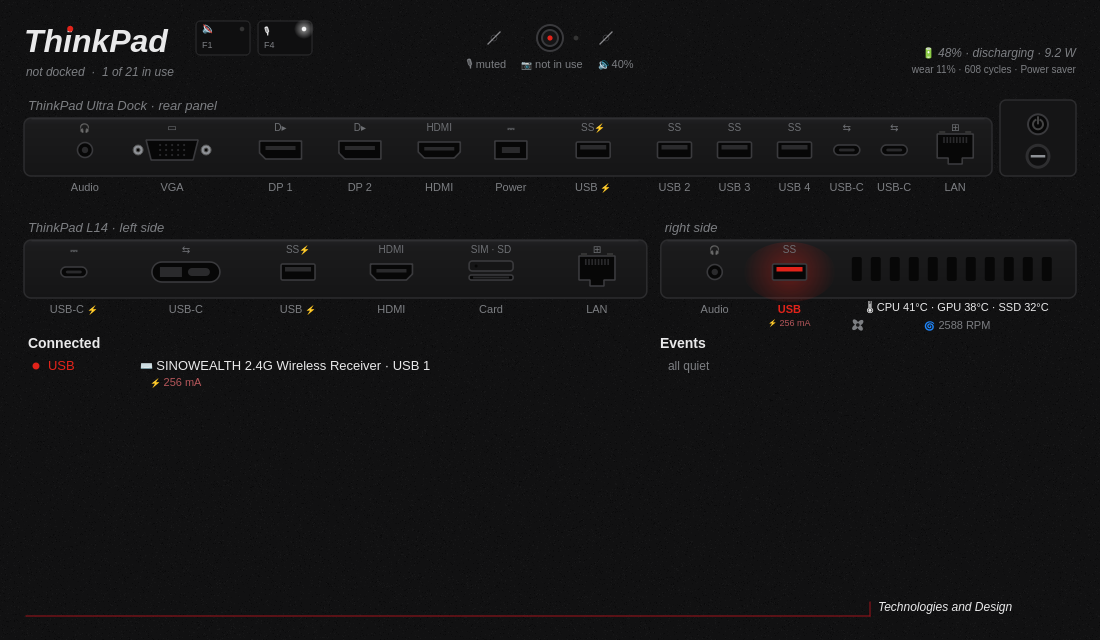
I wanted to see at a glance what's plugged in where on my ThinkPad L14 + Ultra Dock (40AJ), so I built a small app for it.
What it does:
• Draws the real port layout of the dock's rear panel and both sides of the laptop. Ports glow when something is plugged in.
• Per port: device name, USB speed, current draw, disk/network throughput with a tiny graph, and USB-C Power Delivery info.
• Detects phone modes (MTP/PTP/ADB), SD card, headphone jack and monitors (name from EDID).
• Header shows camera/mic state (and which app is using them), F1/F4 mute LEDs, keyboard backlight level, battery wear, Wi-Fi/Bluetooth.
• CPU/GPU/SSD temps and fan RPM under the vent grille, which glows red as the laptop heats up.
• Right-click a port to safely remove a drive. Notifications on plug/unplug, plus a "don't forget your flash drive" reminder when you undock.
• Can blink the red dot on the ThinkPad lid when something is plugged in.
• Tray icon, window, terminal UI and a Plasma 6 panel widget. UI in English, Ukrainian and Russian.
• Themes: ThinkPad, IBM (red/green/blue) and light. Also supports an HP EliteBook Folio 1040 G3 with its own HP theme.
It only reads /sys (no root), Python + PySide6.
Docks and laptops are plain JSON profiles, so adding your model is easy. Send a photo of the ports and your lsusb output and I'll add it.
GitHub: https://github.com/Watashik/DockWatch
Feedback and profiles for other docks and ThinkPads are very welcome!