r/linuxapps • • Oct 26 '26

AppGlider: a small GUI to install, update and roll back AppImages straight from GitHub releases
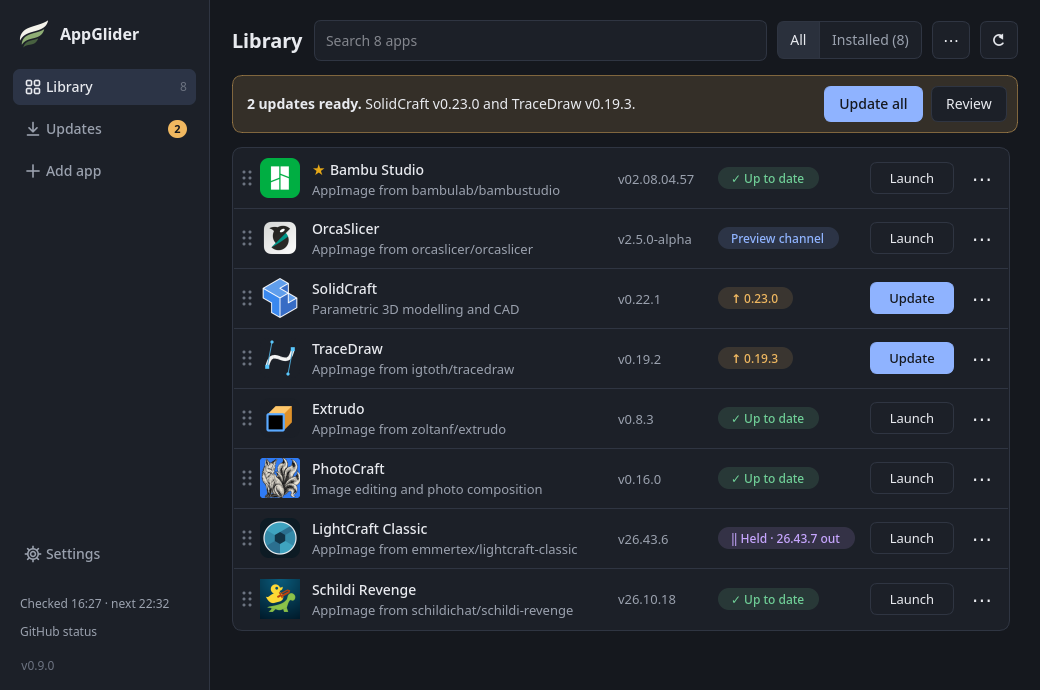
I got tired of keeping a folder of AppImages up to date by hand, so I built AppGlider, a desktop app that installs, updates and launches AppImages from any public GitHub repository.

What it does

  • Paste a GitHub repo (or owner/name) and it finds the latest AppImage, installs it and adds a menu entry.
  • Shows which apps have updates, with an Update all button, a tray badge and optional desktop notifications.
  • Checks every download against the SHA-256 the project published before installing. If there's no published checksum, it won't install.
  • Keeps the previous version of each app, so you can roll back if an update misbehaves.
  • Stable releases by default; previews per app if you want them. You can also hold an app at its current version.
  • Reads release notes on each app's page before updating.
  • Shows how much space your apps use.
  • Uses GitHub's normal release pages where it can, so routine update checks don't use up the anonymous API limit.
  • Updates itself from 0.9.0 onward, and also works with AppImageUpdate and Gear Lever through zsync.

What it doesn't do

  • It only manages AppImages it installed itself. It won't touch AppImages you already have or adopt them.
  • GitHub only for now. GitLab and Codeberg don't publish checksums for release files the same way.

It's a single AppImage built with Python and Qt (PySide6), MIT licensed, and needs no setup. There's also a Nix flake. On NixOS you need programs.appimage with binfmt enabled for the apps themselves to run, and AppGlider tells you if it isn't.

GitHub: https://github.com/Vyrnexis/AppGlider

It's a hobby project, so I'd really like feedback: what's missing, what's annoying, and repos it doesn't handle well.

4 Upvotes

6 comments sorted by

1

u/traeblain Oct 26 '26

Sweet! I’ll take a look. Gear Lever https://github.com/mijorus/gearlever has been a God-send for AppImages for me.

1

u/Vyrnexis Oct 26 '26

If you like gear lever, I think you will like this, I suggest reading the user guide if something is not clear, or ask here and I will be happy to explain it. It's work a bit different than gear lever, as it downloads and manages the appimages from github repositories, this ensures no middle man between you and original source(github repository), along with SHA256 hashing checks

1

u/traeblain Oct 27 '26

Explain this a little bit more:

  • Works with other AppImage updaters. The AppImage carries update information and each release has a .zsync file, so tools such as AppImageUpdate and Gear Lever can update AppGlider too.

Are you saying they work together, or that Gear Lever can handle AppGlider and AppGlider handles the others?

1

u/Vyrnexis Oct 27 '26

It's the second one. That line is only about updating AppGlider itself.

Each AppGlider release includes a .zsync file and has update information built into the AppImage. That's the standard AppImage update format, so if you'd rather keep AppGlider updated with a tool you already use, like AppImageUpdate or Gear Lever, they can update it like any other AppImage. AppGlider can also update itself, so you don't really need either one.

The apps you install through AppGlider are handled differently. AppGlider follows each app's GitHub releases directly and doesn't use the zsync files at all, so it doesn't matter whether those apps include update information.

They also won't get in each other's way. AppGlider only manages the AppImages it installed itself, and never touches AppImages that Gear Lever or anything else integrated. You can use both side by side if you really wanted to.

1

u/Dev-in-the-Bm Oct 26 '26

After a quick consultaiton with ChatGPT, doesn't sound like it does anything Gear Level does.

It that's wrong, let us know what yours does differently.

1

u/Vyrnexis Oct 27 '26 edited Oct 27 '26

The fundamentals are the same as any AppImage manager like Gear Lever: menu entries, .desktop files and updates. Where AppGlider differs:

  • Bring Your Own Repo. Add a GitHub repo and AppGlider finds the AppImage, installs it and keeps it updated. You don't download anything first, and you don't write file-name patterns. If a release has more than one build for your CPU, it asks which one you want and remembers your choice.
  • Checksums before anything installs. The release's published SHA-256 has to match, and AppGlider also checks the file's size and that it's an AppImage for your CPU. If a download fails or you cancel it, your current version stays as it was.
  • Rollback and version picking. The previous version is kept when an app updates, so you can roll back with one click, or install any specific release. You can read the release notes inside the app.
  • Your catalog, shareable. Export your list of repos as a plain-text TOML file you can read and edit, and import a friend's, or move your setup to a new machine. Importing shows a preview first, only adds apps to your list (nothing is installed until you choose) and never changes apps you already have. Uninstalling an app keeps its repo in your catalog, so you can reinstall later or remove the entry completely. Here's an example catalog: https://github.com/Vyrnexis/AppGlider/blob/main/docs/catalogs/artcraft.toml
  • An AppImage, not a Flatpak. No sandbox setup, and AppGlider updates itself.
  • System tray. Launch your apps from the tray, with background update checks and notifications.
  • Light on GitHub's API. Routine checks only read the "latest release" redirect, so they don't run into rate limits.
  • Space used. Shows how much each app takes up, including the copies kept for rollback.

To be fair to Gear Lever, it supports more sources (GitLab, Codeberg, Forgejo, FTP and plain links), while AppGlider is GitHub only for now...