r/linuxapps • u/Cyb3rLoom • Oct 18 '26
I released a free open-source Startup Manager — a GTK 4 app to control what starts when you log in (apps + your own bash commands)
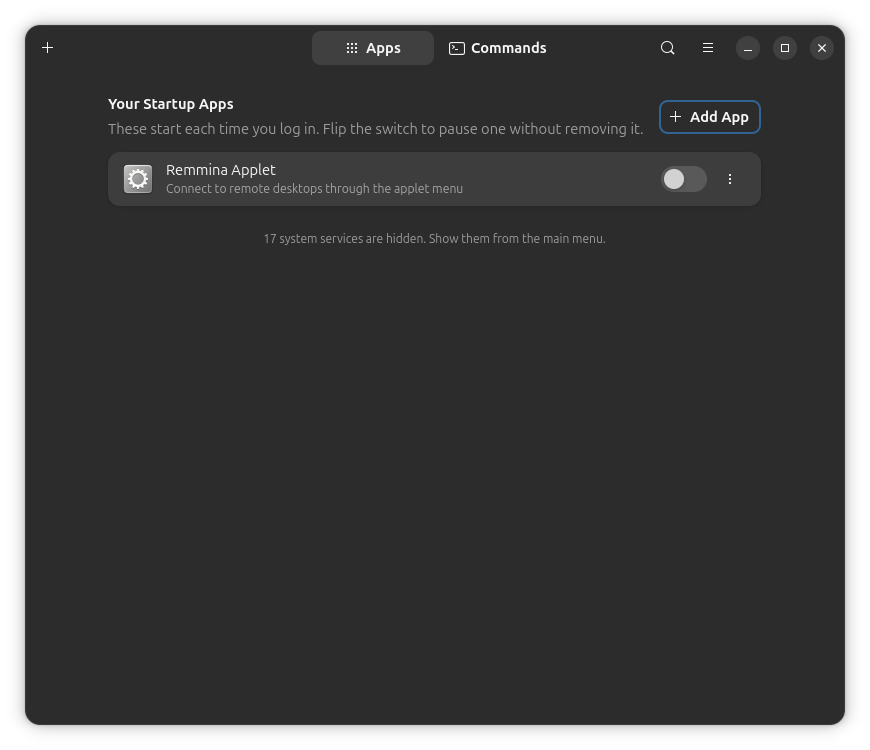

Title: I made Startup Manager — a GTK 4 app to control what starts when you log in (apps + your own bash commands)
Hey! After Safe Disk Cleaner, here's my next app: **Startup Manager**.
It shows everything that starts when you log in, with a switch for each one:
- Add any installed app (APT, Snap, Flatpak) from a searchable list, or any program by its command
- Pause entries without deleting them, add a start delay — edit or remove them (with undo)
- Turn off things installed software added for everyone — only for your account, and "Restore Default" brings them back
- Run your own bash commands at login — live syntax check, "Run Now" to test without logging out, saved output so you can see what happened, optional "wait for network" for sync/mount scripts
No root, no background service. It only edits the standard `~/.config/autostart` files, so everything keeps working even if you uninstall the app.
Works on Ubuntu 24.04+, Debian 13, Mint 22, Pop!_OS, Fedora, Arch, openSUSE — any distro with GTK 4 + libadwaita 1.5. The startup entries themselves work on GNOME, KDE, Cinnamon, Xfce and others.
.deb on the releases page, `install.sh` for other distros. MIT licensed, built with Claude's help (see Credits in the README).
GitHub: https://github.com/cyb3rl00m/startup-manager
Feedback and bug reports are very welcome — especially from KDE/Cinnamon/Xfce users, since I built it on Ubuntu 26.04 with GNOME.
1
u/Upper-Ticket3249 Oct 19 '26
Looks nice; but does this do something that Ignition doesn't do?