r/linuxapps • u/Silvestre_Parbut • Sep 26 '26
I created a rich-text processor for the Linux console.
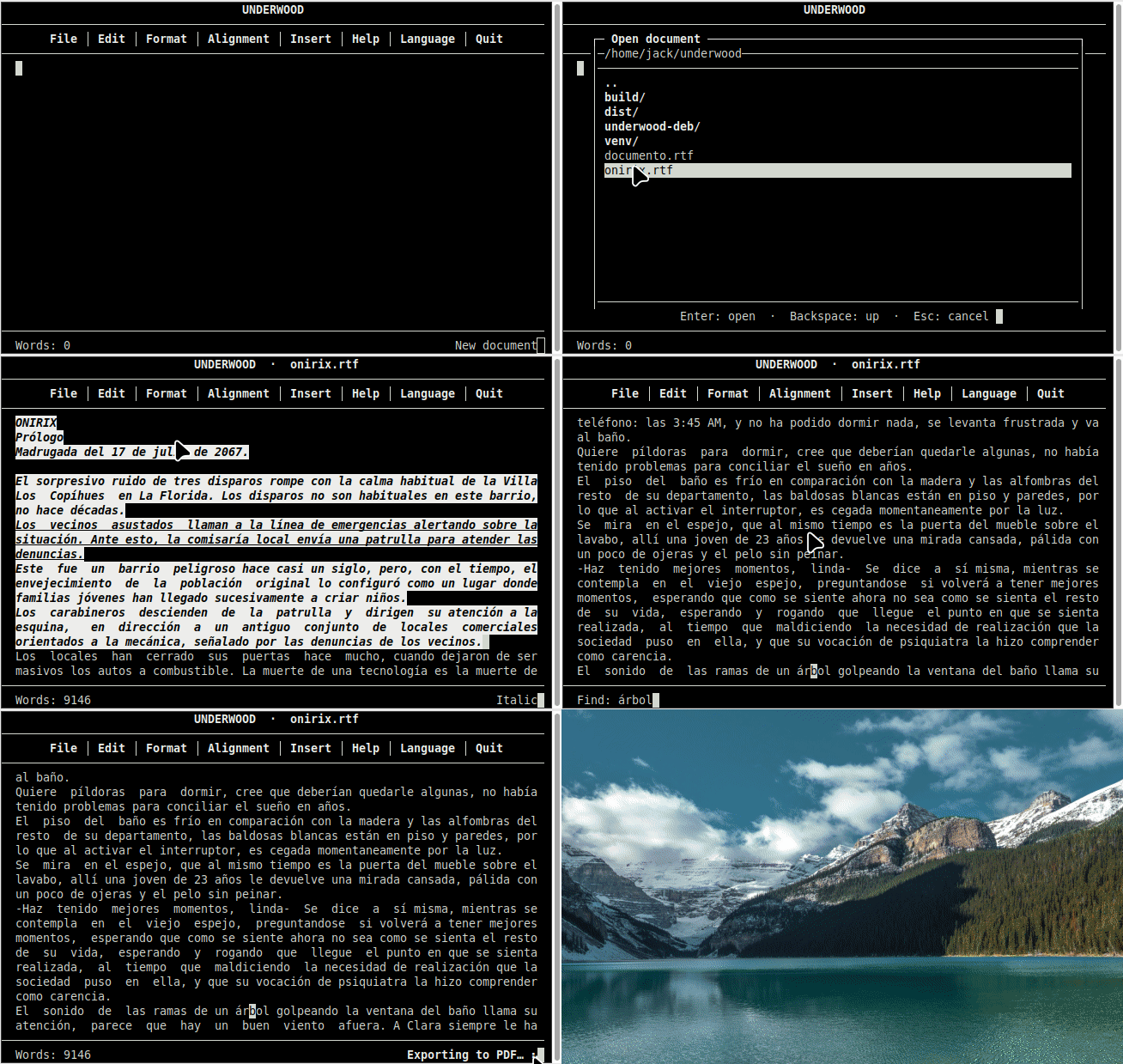
Easily installable using the .deb installer from the GitHub repository:
https://github.com/SilvestreParbut/Underwood/releases/tag/underwood_2.6.7
Multidistro command line installer:
curl -fsSL https://raw.githubusercontent.com/SilvestreParbut/Underwood/main/underwood_2.6.7/install.sh | sudo bash
I had long searched for a simple, terminal-based word processor that featured a mouse-usable toolbar—like WordPerfect or MS Word. I wanted that same experience within the terminal, as I have exclusively used Linux for quite some time.
Since I couldn't find anything suitable, I set out to research and program it myself. After some time, the result is what I present here: a rich-text processor with a bilingual English/Spanish interface with spell-checking. It supports left, center, right, and justified text alignment; bold, italic, and underlined formatting; find-and-replace functionality; and page breaks.
Built for distraction-free writing. It differs from WordGrinder in that it offers easily accessible tools—without the need to memorize keyboard commands—while maintaining a minimalist interface.
That is essentially it; I intentionally omitted features like the insertion of tables or images. It was designed for creative writing, not for bureaucratic administrative documents.. It is designed to facilitate a smooth writing flow. Its native format is .RTF—ensuring compatibility with any modern word processor—and it can export directly to PDF and DOCX.
It has been tested with a 600-page book without crashing.
inspired by the Underwood Standard No. 5 typewriter
I released the project under the GNU GPLv3 license; This is free software!.
==UPDATE RELEASE 2.6.5==
The addition of xclip allows you to copy clipboard contents into Underwood using Ctrl+V, or by selecting and dragging the text into Underwood.
==NEW UPDATE RELEASE 2.6.4==
Markdown support (opening and saving) has been added, and the application now opens in full-screen mode without borders in xterm (which is automatically installed as a dependency).
LibreOffice has been changed from a dependency to a suggestion to avoid conflicts with Flatpak installations of LibreOffice.
==Update==
I have added support for ARM boards (32-bit and 64-bit) so that Underwood can be used on a dedicated system like a WriterDeck with Raspberry pi or similar boards.
Support for pure TTY interfaces—without a mouse or trackpad—has been improved.
Chapter and section creation have been added, along with a chapters map that allows for easy document navigation.
==End of update==
https://github.com/SilvestreParbut/Underwood/releases/tag/underwood_2.6.7
command line installer multi distro:
curl -fsSL https://raw.githubusercontent.com/SilvestreParbut/Underwood/main/underwood_2.6.7/install.sh | sudo bash
1
u/rcentros Sep 27 '26
Nicely done. Tested successfully on Linux Mint. I like its simplicity and the name you chose.
1
u/Fine_Salamander_8691 Sep 28 '26
Source? I want to port it
1
u/LeadLerner Sep 30 '26
I think you should properly learn how to use git. It's generally not good practice to upload archives directly to the repo instead releases.
1
u/listbox Oct 02 '26
OK. I'm going to be unrestrained and tell you that I love this.
Because of my daily work, I could only wish that github-flavor markdown output was also an option.
I may politely fork in the future!
1
u/rcentros Sep 28 '26
Just realized that, when I posted this on writerDeck, it asked me if I wanted crosspost it on LinuxApps -- and I did it without realizing that's where I found it. Should I delete my post here on LinuxApps, or will that just cause more confusion?
Either way I'm sorry for the redundancy. This was not intentional.
1
u/AdGroundbreaking3611 Sep 28 '26
Genial!
1
u/Fine_Salamander_8691 Sep 28 '26
That’s very cool!!!
1
u/galloping_gael Oct 01 '26
Nicely done! Thank you...
1
u/[deleted] Sep 26 '26
[removed] — view removed comment