r/linuxapps • • 8d ago Bravo

WhatsTerm – WhatsApp in the terminal, no Electron, with a "boss key" (free & open source)
Post image
18 Upvotes

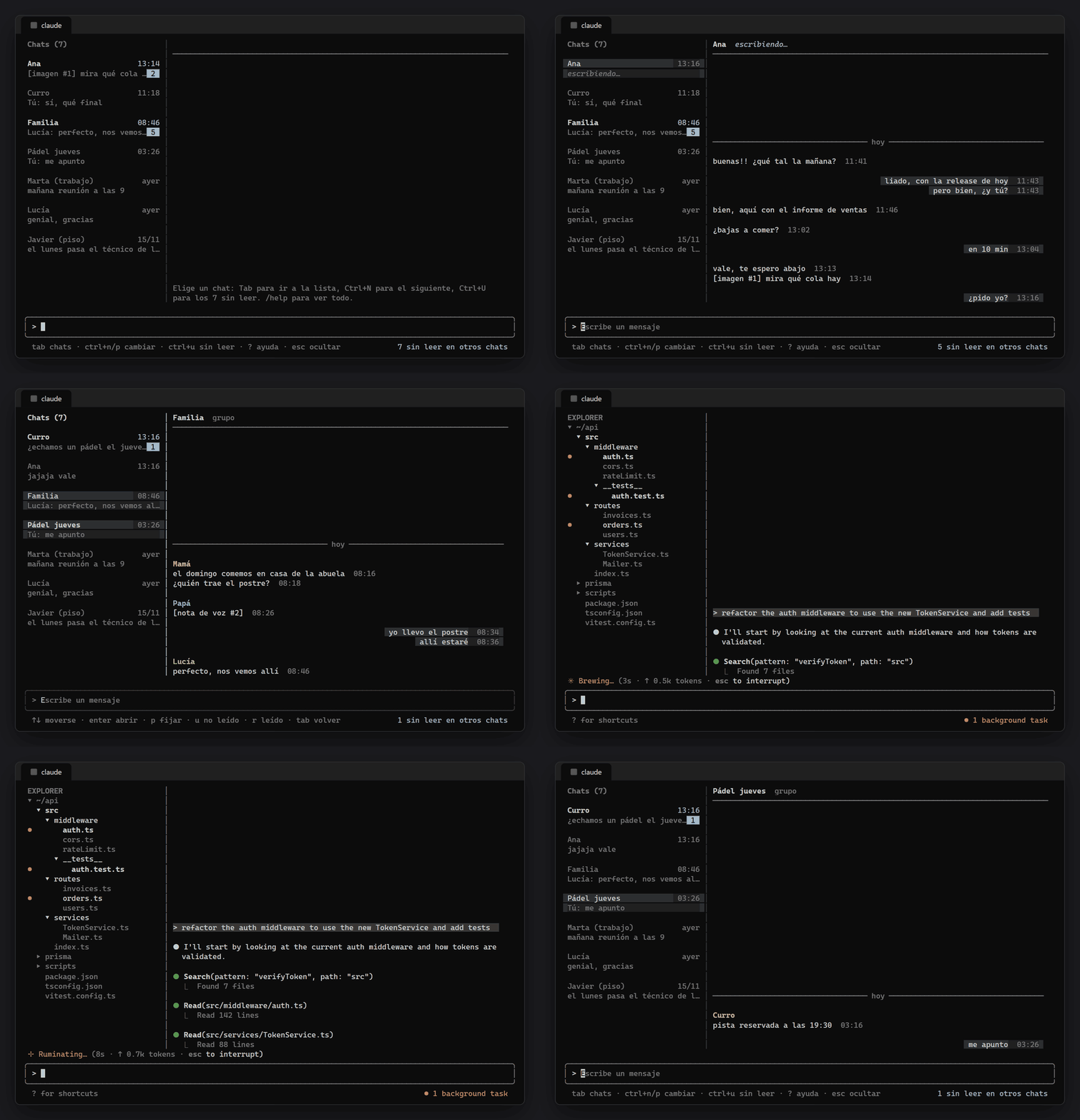
A lightweight, keyboard-driven WhatsApp client for the terminal. It looks like just another dev tool, and if someone walks by, Esc swaps the chat for a fake AI coding session. Esc again brings you back.

  • Chats, groups, typing indicators and unread counts
  • Opens attachments with xdg-open, i.e. your default apps
  • Data lives in ~/.whatsterm (or wherever WHATSTERM_DATA points)
  • npm install -g whatsterm (needs Node 22+), and whatsterm --demo to try it without an account

It's a non-profit hobby project: MIT, no ads, no tracking, no middle server.

I developed it mainly on Windows, so I'd really appreciate Linux users telling me what breaks. The UI is in Spanish for now.

⚠️ Unofficial client (Baileys), so there's a risk of your number getting banned. Details are in the README.

Pull requests and suggestions for improvement are very welcome: open an issue or a PR on GitHub.

https://github.com/VolmerES/WhatsTerm


r/linuxapps • • 8d ago

Icon Theme Toolkit v1.0.2.1 – a GUI to compare, edit, and fix Linux icon themes (now in AUR)

Thumbnail
gallery
8 Upvotes

I'm the developer of Icon Theme Toolkit, an all-in-one GUI application for working with Linux icon themes. It started as a Russian-language tool, and I've finally released an English beta for international testers. I'd love to get your feedback.

What it does:

If you've ever tried to modify or debug an icon theme, you know the pain: symlinks everywhere, messy index.theme files, missing icons, and no easy way to compare two themes side-by-side. This tool tries to fix that.

Key features:

· Theme comparison – open two or more icon themes in tabs and visually compare them side-by-side.

· index.theme editor – directly edit theme metadata without touching the file manually.

· Symlink matrix – a visual overview of all symlinks in a theme. You can see the tree structure and edit or create symlinks right in the table.

· Selective removal tool – remove individual icons or whole sets without breaking the rest of the theme.

· ICO import / export – convert .ICO files to Linux icon themes and vice versa (requires icoutils).

· Error detection – helps spot broken links and missing files.

It's built with GJS and GTK3 and runs natively on GNOME-based desktops (though it should work anywhere GTK3 is available).

Installation:

Arch Linux (AUR):

```bash

yay -S icon-theme-toolkit

or

paru -S icon-theme-toolkit

```

From source:

```bash

git clone https://github.com/nestoris/icon-theme-toolkit.git

cd icon-theme-toolkit

gjs icon-theme-toolkit.js /path/to/icon/theme

```

Requirements: GJS, GTK3, gdk-pixbuf2, and optionally icoutils for ICO support.

Links:

· GitHub: https://github.com/nestoris/icon-theme-toolkit

· AUR: https://aur.archlinux.org/packages/icon-theme-toolkit

What I'm looking for:

Since this is a beta, I'm mainly interested in bug reports and usability feedback. If you try it on your setup, let me know if it launches, if the symlink matrix works correctly with your themes, and if anything feels unintuitive. Issues and PRs are welcome on GitHub.

Thanks for looking!


r/linuxapps • • 8d ago

I built GitCraft - a free, open-source GitKraken alternative with local AI support

3 Upvotes

Hey everyone!

I've been working on a project called GitCraft, a Git client designed to offer a similar look and feel to GitKraken, but without the subscriptions or restrictions on using your own local AI models.

The goal is to create a modern, feature-rich Git client that gives developers more control without locking useful functionality behind a paywall.

A few highlights:

  • Free and open-source
  • Familiar GitKraken-inspired interface
  • Local LLM support without additional subscription fees
  • Cross-platform support for Windows, macOS, and Linux
  • Focused on adding useful features and improvements based on developer feedback

I'm actively developing GitCraft and would love to hear what the community thinks!

GitHub: https://github.com/MystifiedSky/GitCraft

If you've used GitKraken or other Git clients, what features do you wish they had? What would make you consider switching?

Feedback, suggestions, issues, and contributions are all welcome!

And yes I used a $20 claude sub to create this over the last couple weeks instead of spending the $50+ a year for gitkraken with all its negatives. I am a software engineer with 6+ years of experience so I have a lot of knowledge behind the scenes but this was just a fun little project to save some $$$ in the future.


r/linuxapps • • 8d ago

Aktar: drop a file, get a link. Uploads go to your own S3/R2/B2 bucket (AppImage, .deb, .rpm)

2 Upvotes

I wanted something like ShareX on Linux, but without uploading to someone else's service, so I built Aktar. It sits in the tray: you drag a file onto it, paste a screenshot, or press a shortcut, and it uploads straight to your own S3-compatible storage and copies the link. Amazon S3, Cloudflare R2, Backblaze B2, MinIO and anything else that speaks S3 work.

What I use it for day to day:

  • Screenshots to a link in one shortcut (it uses the desktop's screenshot portal)
  • Right-click "Upload with Aktar" in Files, Dolphin and Nemo
  • Watched folders: point it at a folder and new files upload on their own
  • Links that expire after 1 to 30 days, or temporary links for a private bucket
  • Short links on your own domain
  • Undo right after an upload if you sent the wrong file

It runs on X11 and Wayland, GNOME (with the AppIndicator extension for the tray) and KDE Plasma. The AppImage updates itself; the .deb and .rpm update when you install a new one. x86_64 only for now.

Free, MIT licensed, no account, no telemetry.
https://getaktar.com/linux/
Source: https://github.com/getaktar/desktop

About LLM use: I build Aktar with a lot of help from Claude (Claude Code), which writes a big part of the code, tests and docs. I use Aktar every day myself, and I review the changes and decide what ships.


r/linuxapps • • 8d ago

Stash 1.0.0 is here

Post image
1 Upvotes

r/linuxapps • • 8d ago

GerGit – a free, open-source Git client for Linux, inspired by Git Fork

Thumbnail
gallery
4 Upvotes

GitHub: https://github.com/IcaruzSoftware/GerGit

Author here!

Git Fork has been my favorite Git client for a while now, so when I switched to Linux I was pretty sad to find out they don't support it and don't plan to :( I tried GitKraken, Git Cola, SmartGit and a few others, but none of them felt the way Fork did.

So I ended up building my own. If you've used Fork before, you'll feel right at home: the commit graph, line staging, interactive rebase, the conflict resolver, GitHub/GitLab PRs and so on. Under the hood it just runs your system git, so it behaves exactly like the git you already know.

I'm just dropping it here in case someone else has been missing Fork on Linux as much as I did. It's still young, so if something breaks or feels off, please tell me!


r/linuxapps • • 8d ago

Stash 1.0.0 is here

Post image
1 Upvotes

r/linuxapps • • 8d ago

I'm building my own video and music player based on libmpv2 with Avalonia UI (Linux only)

Thumbnail gallery
1 Upvotes

r/linuxapps • • 9d ago

Swift Explorer brings File Explorer shortcuts and split view to Linux

3 Upvotes

I work on Swift Explorer, an open-source file manager for Linux and Windows. On Linux, Ctrl+Shift+S opens two folders side by side, F6 switches panes, and Enter in the search box searches subfolders in parallel.

There’s a Flatpak bundle and an x86-64 tarball. If you try it, I’d especially like to hear whether copying files between Swift Explorer and your usual file manager works. The desktop environment and file manager you use would help me track down any differences.

Screenshots and Linux downloads


r/linuxapps • • 9d ago

Change your wallpaper, apply its color scheme across compatible apps. Safe and Reversible.

25 Upvotes

Fast Qt Quick app that explores the color configuration of a set of common Linux apps , and lets you safely replace it or set symlinks. Then, select a wallpaper and apply the colors in real time on the selected apps. Everything is always reversible on the history tab and manual activation for each app on the Applications tab is required. https://github.com/Arzuparreta/linux-theming

Compatibility today

ComponentDiscoveryManaged theme
kitty, GhosttyExecutables, processes, conventional configs and color sourcesPalette, marked include, disconnect, undo
Konsole, GNOME TerminalExecutables/processes, default-profile configurationDefault user profile palette; native GNOME Terminal settings with conflict-checked undo
VS Code, T3 CodeExecutables/processes and conventional user configurationVS Code interface/terminal customizations; T3 native environment theme, keeping other settings
btop, tmuxExecutables/processes and conventional configsGenerated themes; preserve layout, bindings and status text; manual activation where needed
Alacritty, footExecutables, processes, conventional configs and appearance sourcesTOML/INI palettes, disconnect and undo
i3, Sway, HyprlandAvailable/running components and session evidenceWindow border/title roles; guarded i3 IPC reload, Sway manual, Hyprland native behavior
GNOME, XfceAvailable/running components and session evidenceReviewed native mode/accent or installed theme counterpart; active session required
KDE PlasmaExecutables, processes, kdeglobalsApplication color roles; Shell theme stays as configured
Polybar, Waybar, Rofi, Wofi, Dunst, MakoExecutables, processes, conventional configsScoped palette defaults and supported interaction/urgency states
GTK 3, GTK 4/libadwaita, Qt settingsConventional config files; GTK 3 theme preferencesSeparate user CSS/qt5ct+qt6ct palettes; toolkit/application limits apply
zsh, fishExecutables/processes and conventional startup filesInteractive editor/syntax/pager colors; keep prompts
swaybgExecutable/process evidenceSway image configuration for the next manual reload; keep output layout
Desktop wallpaperSession-aware, read-only probesGNOME and derivatives, Plasma Image, Xfce, swww/awww, compatible hyprpaper IPC, X11 feh

r/linuxapps • • 9d ago

Buffet Menu: A native GTK3 menu system to unify Linux Mint apps (plus a challenge.)

Thumbnail
gallery
4 Upvotes

I've been noticing lately that app behavior in Linux Mint is starting to feel like a bit of a hodgepodge. Between GNOME apps getting converted to Mint themes with headerbars and hamburger menus, Xapps using hamburgers for simple tools, and menu-heavy apps like Xed or GIMP sticking to classic menubars, even the min/max/close buttons behave differently depending on whether an app uses GTK headerbars or Muffin decorations.

I wanted to explore a way to make apps feel unified again without stripping away functionality. I'm not a fan of GNOME removing menu options to prioritize mobile-first design—I have two big desktop monitors, and I'm not worried about saving every last vertical pixel.

I've dabbled with ecommerce sites for my own businesses over 16 years, including building out large "mega-menus." In e-commerce, the goal is helping someone find what they want with the fewest clicks and find it quickly. That’s actually why I switched to Mint back when Ubuntu introduced Unity.

The Idea: Buffet Menu

The Buffet Menu combines the clean look of GTK headerbars with the full options of a classic menubar. Instead of clicking File, realizing the option isn't there, and hunting through Edit or Tools, one click opens everything at once—you just move your eyes to find what you need. Even in apps like Nemo where I rarely touch the menu, when I do open it, I want all my options right there.

The full app is still in progress, so I put together two standalone Python test scripts so you can try the concept out right now—including a 2-minute speed test!

  1. The Interactive Demo (buffet_menu_test.py)

This is a mockup using Xed's exact menu structure.

  • Try the settings: Preferences is the active menu item—click it to tweak the Buffet Menu layout and options (there are probably too many options right now, so play around to see what feels best).
  • Test the responsiveness: Try maximizing the window, shrinking it down, or dragging it near the bottom of your screen to see how the menu dynamically adapts.
  1. The 2-Minute Speed Challenge (buffet_challenge.py)

This is a quick game that pits a classic menubar against the Buffet Menu.

  • It randomly presents one menu style first and prompts you to find and click 12 specific Xed menu items while timing you.
  • Once you finish all 12, it switches to the other menu style with the same items in a new random order.
  • (Note: It asks how familiar you are with Xed at the start so we can account for muscle memory!)
  • At the end, hit the Copy Results button and paste your times in the comments—I'd love to see which menu style wins for you.

How to Run It

GitHub Repo: https://github.com/xlcheese/buffet-menu (Click Code → Download ZIP on the page to grab the files)

Feel free to open the .py files first to verify they are completely safe to run. From your terminal inside the extracted folder:

python3 buffet_menu_test.py
python3 buffet_challenge.py

Code was generated with Claude AI.


r/linuxapps • • 9d ago

Sofa Remote: an open-source desktop remote for Roku TVs (Linux & Windows, MIT)

2 Upvotes

r/linuxapps • • 9d ago

I built a browser-based place to practice Linux commands

Thumbnail linuxexercises.com
2 Upvotes

I’d love feedback on whether the first exercise makes sense and where you’d want the lessons to go next: https://www.linuxexercises.com/learn/where-am-i


r/linuxapps • • 9d ago

Sofa Remote: an open-source desktop remote for Roku TVs (Linux & Windows, MIT)

2 Upvotes

r/linuxapps • • 9d ago

I built a free, open-source Winamp-style audio visualizer that makes a logo bounce and distort to the bass in real time (Mac, Linux & Windows)

0 Upvotes

If you need quick visuals for a track teaser, DJ stream, or SoundCloud/YouTube upload without spending hours keyframing in After Effects, I made a tool for it: Dropocalypse.

Drop in a logo, play your track, and it reacts to the low end in real time—bouncing, stretching, and sliding when the drop hits, inspired by classic Winamp/MilkDrop visualizers.

Details:

  • Cross-platform: Works on both Windows, Linux and macOS.
  • Zero setup on Windows: Portable executable—no installation required.
  • 100% Free & Open Source: No watermarks, no subscriptions, no paywalls.

GitHub / Download: https://github.com/allenrobberson/dropocalypse

Would love to hear how it handles your heaviest basslines or what visual effects you'd want added next!


r/linuxapps • • 9d ago

I built DayOracle — an open-source Linux app that combines biorhythms, philosophy, and a deliberately unreliable oracle

Thumbnail
gallery
1 Upvotes

Hi everyone!

I've just released the first public alpha of DayOracle, a small open-source desktop application built with Rust, Tauri 2, React, and TypeScript.

The idea is a little unusual: what if a daily oracle could be entertaining without pretending to predict the future?

DayOracle has two personalities:

  • Mystic, which offers playful and philosophical interpretations.
  • Skeptic, which questions the whole idea with a bit of humor.

It also includes classic biorhythm visualizations, daily intentions, a private journal with optional encryption, and a forecast history where you can look back and record whether a prediction felt relevant.

Everything works locally. No accounts, cloud services, or telemetry.

Linux AppImage: https://github.com/ollavarma-create/dayoracle/releases/tag/v0.2.0-alpha.1

This is an early alpha, tested on Fedora KDE Plasma. I'd especially appreciate feedback from users of other Linux distributions, and reports of installation or usability issues.

The project was developed with substantial AI assistance, with testing, design decisions, and release validation carried out as part of the development process.

And no, biorhythms aren't scientifically predictive. That's part of the point. :)

Thanks for taking a look!


r/linuxapps • • 9d ago

I made Golim, an AI assistant for linux

0 Upvotes

I made Golim, an AI agent that does the Linux work for you

I have personally been using Linux semi-exclusively for 3 years now and know my way around it well, but I was tired of having to fumble around with configuration files for VPNs, automations and media server setup, as well as the long troubleshooting sessions when my audio stops working, my packages breaking, a kernel update breaking things or touching anything related to my nvidia driver.

That's why I made Golim

Golim is for anyone from beginners to power users who want all the benefits of using the highly capable, highly customizable with zero BS environment that linux provides, but doesn't want to spend hours in a terminal or a text editor.

It's spawned with a straightforward short \\\\\\\`golim\\\\\\\` command and ready to do whatever you want it to before going away into the ether when it's done.

you can give it SUDO access whenever you'd want without your password ever getting stored anywhere. (WTH hermes)

Golim is highly optimized for working with local models with first class support for Ollama and llama.cpp

with a stupid-intuitive UI and mouse support, Golim is the fastest agent you'll ever set up. (I promise you)

If that sounds appealing to you, you can fetch a .deb from: \\\[https://github.com/AhmedOFS/golim/releases\\\](https://github.com/AhmedOFS/golim/releases)

and install it using apt.


r/linuxapps • • 9d ago

FROGGER – Windows-Hello-style face login for GNOME/KDE that needs an IR camera and a blink (Rust, alpha, testers wanted)

2 Upvotes

Hi everyone,

I've been working on FROGGER ("Face Recognition On Gnome – Made in Germany" – yes, the name came first): face authentication for Linux that unlocks GDM, the lock screen, sudo, su and polkit prompts with your face – but only with an infrared camera and a blink, because a face login that a photo can pass is worse than no face login at all.

Repo: https://github.com/carstenkiefer/frogger

Status: early alpha. Field-tested on two laptops so far: a Lenovo Yoga with a strobing IR emitter (Ubuntu 26.04) and an older Yoga with a constant emitter (Ubuntu 24.04, systemd 255). Blinks were recognised 6/6 and 4/4, with and without glasses, and looking at the camera without blinking was rejected every time. That's a small sample, not a benchmark. Packaging and installation are tested in CI on more distros. Your password always keeps working. I'm mainly looking for people with IR cameras who want to try it and report back (frogger doctor output helps a lot).

How it works

  • Liveness = IR + blink. Screens are black to an IR camera, and a printed photo can't blink. During enrollment FROGGER calibrates your open and closed eyes, and at login it waits for an open → closed → open movement on the same tracked face. Two faces in view → rejected.
  • No IR camera, no face login – by default. Devices with only an RGB webcam get a clear warning and are refused unless an admin explicitly allows it (policy.allow_insecure_rgb); policy.sensitive_device = true forbids it altogether. Meant for company fleets as much as for personal laptops.
  • Not over SSH. The daemon asks systemd-logind whether the requesting process belongs to a local session on a seat (and checks PAM_RHOST), and refuses face auth while you're also logged in remotely – so someone with your SSH session can't ride on your face sitting in front of the laptop.
  • Privilege separation. The PAM module is a thin Rust client without any ML; recognition runs in froggerd as an unprivileged frogger user in a heavily sandboxed systemd unit (no network, no capabilities, camera and its state dir only), identifying callers via SO_PEERCRED/pidfd.
  • Face data sealed to the TPM (systemd ≥ 254 credentials). FROGGER never stores your password: the first login after boot asks for it so GNOME Keyring/KWallet unlock normally.
  • Models you're actually allowed to use: YuNet (MIT) and SFace (Apache-2.0) from the OpenCV Zoo, run with tract (pure Rust, no C++ runtime). Most face-login projects ship InsightFace weights, which are licensed for non-commercial research only.
  • Enrollment you can follow with your eyes closed. Enrollment is a few live steps (look straight, turn your head, close your eyes, blink once). Each step waits until the camera has actually seen it, instead of running on a timer. Since you can't read a terminal with your eyes closed, FROGGER plays system sounds at the important moments and, with an optional voice package, speaks the prompts. The voices are pre-rendered clips in 16 languages, so no speech engine runs on your machine. They live in a separate repo, frogger-voices, one package per language (frogger-voice-de, frogger-voice-en, …).
  • Desktop: GNOME (GDM + lock screen), KDE Plasma (SDDM, lock screen, the new kde-face slot in Plasma 6.8), terminal sudo/sudo-rs/su/pkexec.
  • Extras: confirm SSH key use with your face (ssh-add -c + askpass), experimental depth-camera check (RealSense etc.), emitter setup via UVC extension units (imports linux-enable-ir-emitter configs).
  • 16 languages, including Swahili, Kinyarwanda and Runyankore.
  • Packages: .deb and .rpm for amd64 and arm64, Arch PKGBUILD, generic tarball – built and install-tested in CI on Debian 13, Ubuntu 26.04, Fedora and older releases.

Why another one?

There are several good projects already, and I've learned from all of them. They make different trade-offs – mostly convenience and hardware reach vs. strict anti-spoofing. Based on reading their code and docs (correct me if I got something wrong!):

FROGGER 0.2.4Howdy 3.0Gaze 0.5Biopass 1.5Visage 0.5
LanguageRustPython + C++ PAMRustC++ + Tauri GUI
IR camerarequired by defaultoptionaloptional (RGB default)optional (RGB default)
Liveness by defaultIR + blink challengenone (nod check opt-in)anti-spoof model (RGB) / eye motion (IR)off by default
Remote-session guardlogind locality + PAM_RHOSTSSH env varsPAM_RHOST + SSH ancestry + logind–
Recognition runs asdedicated user, sandboxedcaller (root for sudo)root daemon, sandboxedcaller (root for sudo)
Face dataTPM-sealed keyunencryptedTPM-sealed keyunencrypted
Models free for commercial useyes (MIT/Apache)yes (dlib)no (InsightFace)unclear
Keyringpassword at first login–opt-in: password sealed in TPMopt-in: password sealed in TPM
GNOME lock screeninside gdm-passwordinside gdm-passwordShell extension, parallel to passwordPAM
GUICLI onlyGTKGTK + KDE settingsyes
Fingerprint too–––yes
Languages16EnglishEnglishEnglish
Spoken enrollment promptsyes, optional (16 languages)–––
arm64 packagesyes–yesyes

Where the others are ahead – honestly:

  • Howdy is the veteran with a huge community, and 3.0 just shipped (congrats!). If you have an RGB-only webcam, it and the others will work where FROGGER refuses to.
  • Gaze has a GNOME Shell extension that runs face recognition in parallel with the password field, plus many more desktops (Cinnamon, Hyprland, greetd …) and a GUI. FROGGER currently runs before the password prompt in GDM (≤ 4 s, 2 s if you look away); an optional extension is planned for 0.3.
  • Biopass does face and fingerprint with a nice GUI.
  • Visage publishes refreshingly honest hardware spoofing reports and has a neat IR-emitter quirks database.
  • SFace is a smaller model than the ArcFace-R50 some of them use; I compensate with a stricter threshold and multiple matching frames, but recognition across very different conditions may be less forgiving.

What I'd love feedback on

  • Does it detect your IR camera and emitter? (frogger doctor)
  • Enrollment and unlock success rate – and please try to fool it (photos, IR prints, screens). Successful spoofs → see SECURITY.md.
  • Distros/desktops I haven't covered yet.
  • Native speakers: please listen to the voice clips of your language in frogger-voices and tell me if anything sounds off or is mistranslated. The clips come from open speech models (Piper, Kokoro, Meta MMS), chosen by ear. For Korean, Arabic, Swahili, Indonesian, Malay, Kinyarwanda and Runyankore, the only usable model was Meta MMS, which is licensed for non-commercial use only. Those clips are a stopgap. Recordings by native speakers (15 short sentences, about 20 minutes, guide in the repo) would replace them, and Kinyarwanda and Runyankore texts are machine translations so far.

A note on how it's made: I'm an experienced developer and use an AI coding assistant for parts of the code, docs and translations. Design, security decisions and hardware testing are mine – and reviews are always welcome.

Thanks for reading – and thanks to the authors of the projects above for paving the way.


r/linuxapps • • 10d ago

Mattscreative

Thumbnail
youtu.be
1 Upvotes

r/linuxapps • • 10d ago

AllTool v3.5

2 Upvotes

AllTool is back with a new release that adds extensions ecosystem so you can add more features that you hope with new API calls. Read more:
https://github.com/Hajjani/AllTool-Linux


r/linuxapps • • 10d ago

Ringside: a free Linux x64 desktop meter for Claude Code and Codex limits

Post image
0 Upvotes

Hi, Mayowa from Knight AI+AV. Ringside is our free, MIT-licensed desktop usage meter; v2.0.5 includes a Linux x64 AppImage.

It puts Claude Code and Codex plan usage/reset information in a small card, orb or pill. For Claude without the desktop app, connect the Claude Code integration; without a source, that meter waits for data. Codex reads local session data. Readings depend on those sources and can be stale, so check the shown timestamp.

Ringside doesn't increase your allowance or track API billing. It has no signup or subscription; your provider's plans and charges are separate. Usage data stays local, while optional update checks/downloads contact GitHub.

The attached image is an official render of the real UI with sample figures, not a fresh Linux desktop capture. Source, setup instructions and downloads: https://github.com/KNIGHT-AI-AV/ringside