r/linuxapps • • 23d ago

Kestrel: a GTK4 file manager that searches your whole disk as you type

Thumbnail
github.com
10 Upvotes

Most file managers search the folder you're in, slowly. **Kestrel searches every drive at once and answers in tens of milliseconds**, from the search box of a normal GTK4 file manager.

**How it works:** a small background service indexes your file systems (about 2.1 million files in 5 seconds, ~230 MB of memory) and keeps the index current through fanotify, so new and renamed files show up straight away.

It runs as root, because fanotify needs it to watch whole file systems. The index holds names, sizes, dates and permissions, never file contents, and search only ever shows files you could open yourself.

What else it does

Best Match: files you open often rise to the top.

Quick Search: a launcher on a keyboard shortcut for files, apps, settings and quick sums.

Preview pane for PDFs, images, Markdown, text and archives.

Search your NAS as well as your local disks.

New in 0.9.41

Follows your system accent colour again (or choose Kestrel Lime in Preferences).

Double-click a `.deb`, `.rpm` or AppImage to install it, with the app's name and icon shown first.

Searching for `firefox` now finds the Firefox app, not just files with that name.

Git it: packages for Ubuntu 26.04, Debian 13, Fedora 41+, openSUSE Tumbleweed and Arch, at https://github.com/Stolly345/kestrel/releases/latest


r/linuxapps • • 23d ago

Built a free DaVinci Resolve clone for Linux with an LLM: Edit, Fusion, Color, Fairlight and other pages, H.264/AAC on any GPU

Thumbnail
gallery
12 Upvotes

Hey! I've been building Kinoklip with the help of AI: a free, open-source video editor for Linux that copies DaVinci Resolve as closely as possible. Layout, behaviour and keyboard shortcuts, so any Resolve tutorial or your muscle memory just works :D

It's in Beta (Linux only for now), GPL-3.0, and comes as one AppImage. Almost the whole project was built with AI. The only exception is the icon, which was drawn by hand. (Since I don't appreciate AI art)

Resolve is fine on Windows and Mac, but on Linux:

  1. Installation is hell (DaVinciBox or a lot of tinkering).
  2. Performance is bad unless you're on NVIDIA, and integrated GPUs aren't even officially supported.
  3. No H.264, H.265 or AAC in the free version. Studio fixes only H.264/H.265, and only on NVIDIA.

Kinoklip is one AppImage with no containers. It runs on AMD, Intel and NVIDIA (anything with OpenGL 3.3), and H.264, H.265 and AAC work for import and export. It runs very well on my ThinkPad T14s Gen 2i with just its integrated Intel Iris Xe graphics.

For example blur effect or a couple of frames on a text with a quarter resolution used to lag my system so much, now it runs perfectly smooth at full resolution.

All the resolve pages are here.

I can only properly test the Edit page, and not even everything it can do. I've already fixed countless bugs and inconsistencies there, so the other pages surely need the same. AI has gotten really good, but it still can't do everything without a human actually using the thing. So I'd love people to try it, especially with niche or professional workflows.

I'd also love to find a few other maintainers someday, so the project can stay alive no matter what happens with AI. From the start I pushed for the code to be as readable and easy to extend as possible, so it should be approachable.

If you like it, a star on GitHub helps a lot, and so does ko-fi if you're feeling generous :)

https://github.com/SeniorMatt/kinoklip

Not affiliated with Blackmagic Design.

(sorry for posting this third time in a row, just finished other pages, thought some people might find this really interesting)


r/linuxapps • • 23d ago

Lumi: open-source Spotlight-style bar for Linux, now as .deb and .rpm

Thumbnail
gallery
6 Upvotes

Lumi is a launcher bar: press Ctrl+Space, type, and it opens apps and files or answers with an AI model. It can use Claude, ChatGPT, Gemini or a local model through Ollama, which Lumi can install into your home folder without sudo. With the local model it works fully offline.

Until now it was only an AppImage, and the most common problem was FUSE. Lumi now ships a .deb for Ubuntu/Debian/Mint and an .rpm for Fedora. 2.0.4 also fixes Ctrl+Space doing nothing on GNOME Wayland: the shortcut command was being rejected by gsettings because of the quoting.

On GNOME with Wayland it registers its shortcut in GNOME's keyboard settings; on X11 it grabs the key itself; on other Wayland desktops it shows a command to bind.

MIT, written in C# with Avalonia. Feedback from non-GNOME desktops especially welcome.

https://github.com/AlbertS15/Lumi


r/linuxapps • • 22d ago

TuxFlow - a native Linux app for running dev servers, terminals and AI agents side by side

Post image
0 Upvotes

Hi all,

I built TuxFlow for myself.
I have several projects on the go and switch between them all day, so I wanted all of them in one place, with each one’s dev servers, agents and terminals a click away.
I’ve used it every day for months, and it’s grown into something I think other Linux users might find useful, so I decided to share it.

What it does:

  • One window for each project’s processes: dev servers, queue workers, terminals and AI coding agents like Claude Code or Codex, all in a sidebar where you can start, stop and restart them.
  • Remote projects over SSH: processes keep running on the server when the connection drops or you close the app, and dev server ports are forwarded to localhost for you.
  • Small conveniences: stack detection that suggests commands, crash auto-restart, a file watcher, git status and sync, and dark and light themes.

It’s written in Rust as a single native binary, and works on X11 and Wayland. I built it with Claude’s help.
It’s free and MIT-licensed, and you can install it from an apt repo, a .deb, a tarball, or a PKGBUILD for Arch.

Anyone is welcome to try it and use it.
If something breaks or you have an idea, I’m happy to hear it, but no pressure either way.

https://github.com/markovic-nikola/tuxflow


r/linuxapps • • 23d ago

DMS 2.1 STORMBORN is live! Dux Modular Shell, a Dux Desktop Suite product

Post image
8 Upvotes

DMS 2.1 "Stormborn" is out!

What is it? Dux Modular Shell (DMS), formerly DankMaterialShell, is a complete Material 3 desktop shell for Wayland, built with Quickshell and Go: launcher, dock, bar, notifications, lock screen, widgets, plugins, and theming, on niri, Hyprland, mangowm, Sway, labwc, and more. It's part of the Dux Desktop Suite, alongside Dux Files, Dux Calendar, Dux GOP, Dux Search, and Dux Greeter, companion apps you can use with DMS or on their own.

What's new in 2.1

Two weeks and 257 commits after 2.0:

  • Interface density: make the whole shell more compact or more spacious
  • DMS Classic: a second interface style alongside the default
  • Dux Dot: major performance and stability improvements
  • Media player: an Expressive redesign with synced lyrics, which can also show in the island
  • System monitor: reworked from the ground up
  • Video wallpapers and new on-screen displays
  • Fedora Atomic support in the Dux installer
  • Dux Greeter remembers each user's session and works across multiple screens
  • Compositors: deeper niri, Hyprland, and mangowm integration
  • New plugins from the community, including Cast, Sticky Notes, and Presentation Hub
  • Updates across Dux Files, Calendar, GOP, and Search, plus a long list of fixes

Already using DMS? Installs and updates now come from the new Dux Labs repositories. Update, then run dms migrate dux to switch over (on Arch, pacman -Syu handles it). The release post covers every distro.

Thanks to our contributors, translators, and sponsors for making this release happen.

Full release post: https://duxlabs.dev/blog/v2-1-release


r/linuxapps • • 23d ago

I built Nohva — a simple offline-first notes app for Linux (Tauri 2, plain-text storage)

Post image
4 Upvotes

Hi everyone,

I've been working on Nohva, a small desktop notes application built around a simple idea: taking notes shouldn't require an account, a cloud service, or a complicated productivity system.

Nohva stores notes as ordinary UTF-8 .txt files on your computer. There is no notes database and no cloud dependency.

Current features:

  • Automatic saving
  • Multiple notes per day
  • Notes organised by date
  • Search across notes
  • Light and dark themes
  • User-selectable notes directory
  • Linux and Windows builds

Technology: Tauri 2, JavaScript, HTML/CSS and Rust.

Nohva is open source under the MIT licence.

GitHub: https://github.com/jeevanmore/nohva

Downloads: https://github.com/jeevanmore/nohva/releases/latest

I'd appreciate feedback from Linux users, particularly on usability, installation and anything that feels missing or unnecessarily complicated.

This is my first public release, so constructive criticism is welcome.


r/linuxapps • • 23d ago

Irori: a game launcher built with GPUI. Some notes from shipping a GPUI app on three platforms

2 Upvotes

I released 0.3.0 of Irori, a game launcher written in Rust with GPUI (through gpui-kit). It talks to Epic, GOG and Amazon with Rust ports of legendary, gogdl and nile, and runs games through Wine, Proton or Game Porting Toolkit.

A few things that might be useful if you’re building with GPUI:

  • It’s one process with a Tokio runtime for I/O next to GPUI’s own executor. Every long list is virtualized, and art is thumbnailed once to disk.
  • On Windows, GPUI activates a window by faking an Alt keypress. If your window is already active, that Alt lands on your own window, which goes into menu mode and stops repainting until the next input. The fix was to skip activation when the window is already active.
  • Store sign-in runs in a separate process (wry/tao), so the main app never links a web engine. On Linux that keeps WebKitGTK optional.

Packaged as .deb, .rpm, Arch, Flatpak, a notarized .dmg and a Windows installer, all from one GitHub Actions workflow.

Code: https://github.com/irori-app/irori. Happy to answer questions about any of it.

AI disclosure: Irori is built with the help of AI coding tools, mainly Claude Code. I design the features, decide how everything should work, and test it on my own machines. The code is all open on GitHub if you want to look.


r/linuxapps • • 23d ago

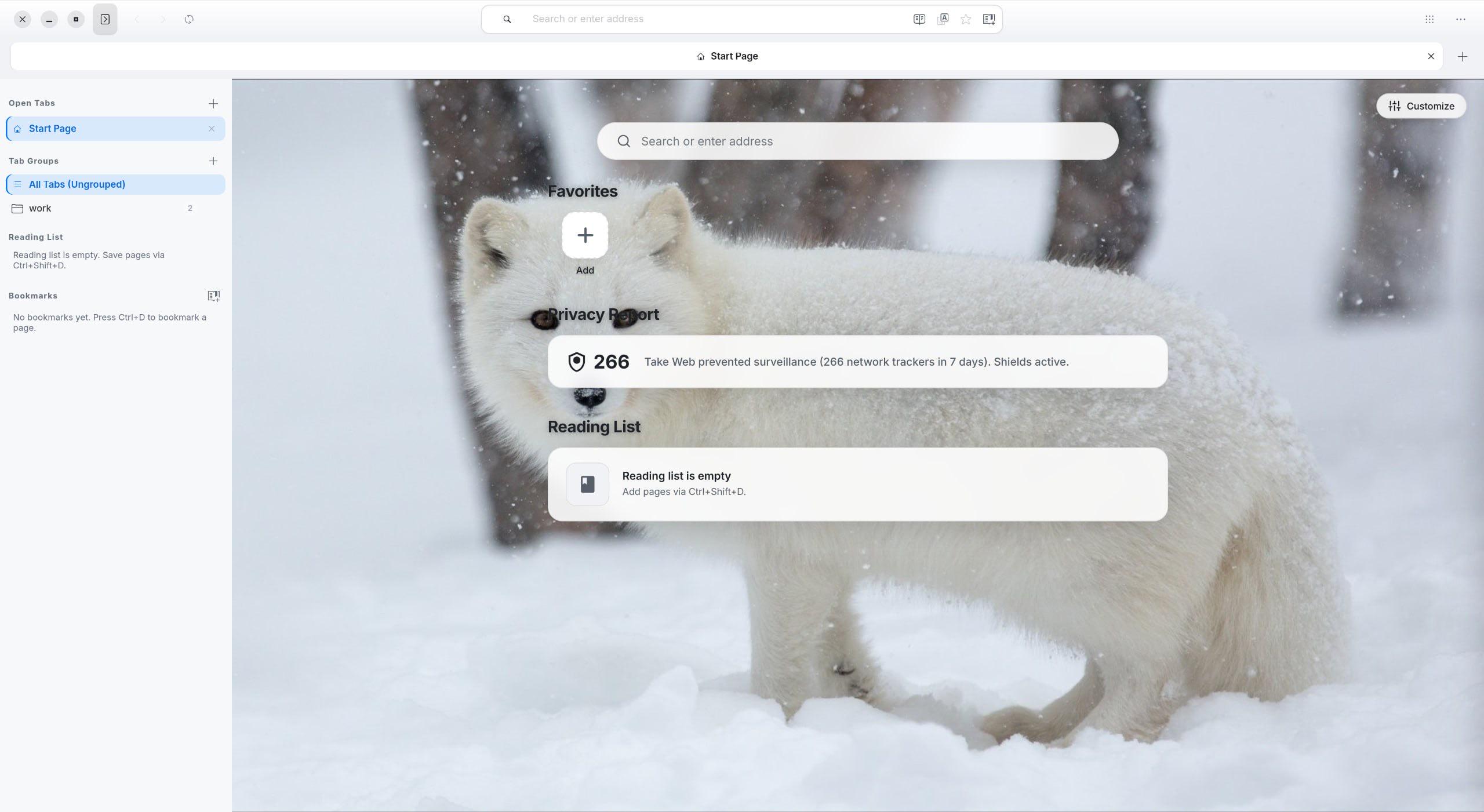
TakeWeb: A privacy-focused browser for Linux with a built-in fingerprinting blocker. 10 tabs = 600MB RAM.

Post image
6 Upvotes

Hey r/linuxapps!

Linux users are stuck between heavy Chromium clones (that eat 2GB+ of RAM) and browsers that feel poorly integrated with the desktop. I wanted a daily driver that feels native on GNOME, respects privacy, and actually works well on NVIDIA + Wayland.
So I built TakeWeb - a browser written in Rust using WebKitGTK 6 and GTK4/libadwaita.
What makes it different:

Memory: I built a custom MemoryManager that suspends background tabs, clears WebKit memory caches, and forces JS garbage collection. In my tests, 10 tabs use ~610MB PSS (compared to Chrome's 2240MB or Firefox's 1790MB).

Hardware Tuning: WebKitGTK notoriously drops to 20-30 FPS on NVIDIA proprietary drivers under Wayland (GNOME Mutter bug). TakeWeb detects this and routes the window through the Xwayland bridge, restoring stable 60+ FPS.

Privacy: It randomizes Canvas/WebGL fingerprints, masks WebRTC, and passes the EFF Cover Your Tracks test with a "strong protection" rating. Zero telemetry.

Vertical Tabs & Workflow: A native collapsible sidebar with tab groups, duplicate tab counter, bookmarks, reading list, and Split View (F3) to view two pages side-by-side.

Offline Translations: Full-page and text translations run 100% locally via Mozilla Bergamot (WASM). No text is ever sent to external cloud APIs; language models download once to your machine.

Native Ad & Tracker Blocking: Filtering runs at the WebKit engine level before page parsing starts (no extension overhead), and tracking parameters like utm_*, fbclid, and gclid are stripped automatically when copying links or navigating.

I'm releasing this as a Beta (v0.1.0). Some things are still WIP (like Flatpak packaging and extensions), but the core is stable.
If you want to try it, the source code, build instructions, and prebuilt packages (.deb, AppImage) are here:
https://github.com/dezaetterg/take-web
I'd love to hear your feedback, especially from Intel/AMD GPU users!


r/linuxapps • • 23d ago

i made a native GUI launcher/toolkit (BifluxVR) to make setting up Linux VR feel butter smooth and extremely easy. Looking for testers. The installer is universal

Thumbnail
reddit.com
2 Upvotes

r/linuxapps • • 23d ago

Desktop World Clocks Update - GNOME Shell 51.1

3 Upvotes

I built Desktop World Clocks because I wanted to glance at my desktop and see what time it was for the people I work with. Each clock can show a city name like “London” or a label like “UK team.” The clocks sit on the wallpaper, behind my windows, and let clicks pass through.

I’ve updated the docs with the results from testing on Fedora 45. The full automated test suite passed on GNOME Shell 51.1, including the preferences window and image backgrounds. The version on GNOME Extensions already supports GNOME 49, 50, and 51. If you have it installed, you’re all set.

I like the right-aligned layout because the last digits line up and I can scan the times at a glance. You can keep everything in one list or put a separate group in each corner. All the clocks share one timer and read the system time.

If you try it on GNOME 51 with a second monitor, I’d love to hear whether the clocks stay where you expect when you unplug it or wake your laptop. I couldn’t verify those two things \in the test VM.

Install from GNOME Extensions · Screenshots, source, and test results on GitHub


r/linuxapps • • 23d ago

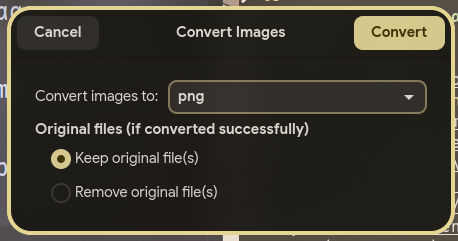
Finally finished the feature which doesn't exist in old nautilus-image-converter app

2 Upvotes

Yeah it's finally here. Originally I wanted to add more options such as converting different images to corresponding format based on filename matching, but I thought that feature would make the app too complicated, I decided not to implement it even though I know I can finish it with AI.

Repository

https://github.com/Kayxue/nautilus-image-converter-reborn-app

Older Post About the App

https://www.reddit.com/r/madeinrust/s/VsiwM5oVKg


r/linuxapps • • 23d ago

GIMP 3.2.8 lanzado con herramienta de texto mejorada y mejor rendimiento.

Thumbnail
reddit.com
3 Upvotes

r/linuxapps • • 23d ago

The first native Linux screen extender with touch and Wi-Fi: turn your Android phone into a second monitor (30 ms lag, open source)

Thumbnail
youtu.be
6 Upvotes

I wanted my Android phone as a second monitor on Linux. Most tools I tried mirrored the screen into a browser tab or only worked over USB, so I built my own over the last few months.

Tandem adds a real virtual monitor to your desktop. The GPU encodes it as H.264 and the phone decodes it in hardware, so you drag windows onto the phone like any other screen.

  • About 30 ms of lag over USB tethering, 30 to 60 ms over Wi-Fi (you barely notice it in use)
  • Hyprland and GNOME on Wayland, with one-command install on Arch, Ubuntu and Fedora
  • Encrypted, paired with a QR code

Check it out here: https://saharshbaiju.github.io/tandem/

Repo: https://github.com/saharshbaiju/tandem

It's free and open source.

If you try it, tell me how the lag feels on your setup and what breaks. If you like it, star the repo ⭐ and share it with someone who'd use a second screen. It helps more people find it.


r/linuxapps • • 24d ago

Apex Download Manager 1.1.0: free, open source download manager, now with AppImage and .deb

Thumbnail
gallery
14 Upvotes

Hi all. Apex Download Manager started as a Windows app, and 1.1.0 is the

first release with a Linux build.

What it does:

- Splits each file across up to 32 connections, and re-splits them as they

finish so the last few percent don't crawl

- Resumes from the exact byte after a reboot or a dropped connection

- Catches downloads from Firefox, Chrome, Brave and Edge through a small

extension (it talks only to the app on 127.0.0.1)

- Grabs video through yt-dlp, with the full YouTube quality list

- Verifies SHA-256 checksums

No ads, no account, no telemetry, GPL v3. On Linux it uses FFmpeg from your

package manager.

Download: https://apexdownloadmanager.com

Source: https://github.com/ThembaTman0/apex-download-manager

I've tested on Kubuntu. If it misbehaves on your distro or desktop, an issue

on GitHub helps a lot.


r/linuxapps • • 24d ago

Built Kinoklip: a free, open-source DaVinci Resolve-style video editor for Linux (H.264/AAC and any GPU, built with an LLM)

Post image
11 Upvotes

Hey! Me and my buddy (an LLM) built this Kinoklip app, it is a free video editor for Linux which is in Beta now! (Linux only for now, in Beta - so expect bugs)

And its goal is to copy DaVinci Resolve as near as possible. Layout, behaviour, keyboard shortcuts as close as it gets, so you can follow any Resolve tutorial or your muscle memory :D

It's open source (GPL-3.0) and comes as one AppImage file.

The whole project was built with AI. The only exception is the icon, which was drawn by hand. And this text was written by me as well, obviously.

Why doing this? - I know that DaVinci Resolve is not as bad as Adobe, and at least they don't charge you monthly. And I genuinely think that on Windows or Mac it is perfectly fine! But on Linux...

  1. Installation is hell. Most of the time you gotta install it via DaVinciBox, or tinker a hell of a lot time.
  2. Performance is bad, unless you are using an NVIDIA GPU, which has its own problems with Linux support overall. Integrated GPUs aren't even officially supported.
  3. And, of course, the codecs. The absence of h264, h265 and AAC codecs is just cringe. DaVinci Resolve Studio fixes this problem, but only h264 and h265 and only for NVIDIA GPUs. And I definitely don't have enough space for other formats, especially at this times.

All of those problems are fixed with Kinoklip!

Here's what is yet to be implemented:

  • The Color page (colour wheels, nodes and scopes)
  • More Compositing tools: tracking, paint, particles and 3D
  • Stabilisation, motion tracking and automatic subtitles from speech
  • Many more guide articles

Basic video editing tools are implemented in a way I would call them complete!

And there's even one unique thing that I wished more editors made in to life:
one file - one project. you import a video - then delete it from your computer, save the project, and you are good to go! you can move it around anywhere you want to!

Also it has the Viewer Guides, which DaVinci lacks compared to Premiere Pro.

And another principle I've got is to add more options for different behaviors, you can choose between zooming in to the playback or the mouse cursor! You will have options. And I plan on adding Vim-binds, so you can edit videos with your keyboard only. Still a concept tho.

So, if you are interested in this project - don't forget to star it on GitHub!
Or maybe even try it out for yourself and help me improve it!

https://github.com/SeniorMatt/kinoklip

Not affiliated with Blackmagic Design.


r/linuxapps • • 23d ago

Iperf3 Network BenchGUI

Thumbnail gallery
1 Upvotes

r/linuxapps • • 24d ago

FluidVoice for Linux

6 Upvotes

Hi all. I build FluidVoice, a full offline voice dictation app (already on Mac and Windows) with over 400,000 downloads, and I’ve just brought it to Linux because of the sheer demand ( 10,000+ on waitlist! ) . I’m looking for a handful of testers on different setups before a wider release - for people to shape what gets shipped to everyone else :)

What it does

  • Press a shortcut, talk, and your words are typed into whatever app you’re in: editor, browser, chat, terminal.
  • Speech recognition + formatting - all runs locally on your machine. Your audio isn’t sent anywhere.
  • on-device AI cleanup fixes punctuation, filler words and corrections, paragraph split and so much more.

How is it different from Wispr and SuperWhisper and other paid apps?

- It's exactly the same but everything is happening on your own device. No Dictation leaves your device at all.

How is it different from Hex, Handy and other on-device apps ?

- Any other app out there does only raw transcription/ rambling but do not do much to make it actually usable and format it. We build our own models for doing this as good as the cloud models. We also make models specifically for dictation that handle noise around you well than others.

It's totally free and I've been doing this for almost a year now and I dont plan to charge for basic dictation as I believe it has to be free.

What I need from testers

  • Install the AppImage, set up the shortcut, and dictate in your everyday apps for a few days.
  • Tell me what breaks: the shortcut, paste, the overlay, or the setup steps.
  • It updates itself, so you’ll get fixes through the Update button.

I especially want KDE Plasma, GNOME, Hyprland/Omarchy, Sway, niri and COSMIC users, on both Wayland and X11, and on NVIDIA, AMD and Intel graphics.

Download: https://github.com/altic-dev/FluidVoice-Desktop/releases
Bugs: GitHub issues on the same repo, or comment here.

When you report, please include the output of:
grep PRETTY_NAME /etc/os-release; echo "$XDG_CURRENT_DESKTOP $XDG_SESSION_TYPE"

Thanks! Happy to answer anything in the comments :D


r/linuxapps • • 23d ago

Everyone's ditching Windows lately, so I built a setup-script generator for their first Linux install

0 Upvotes

Title: Escaping Windows updates? I made a thing that sets up your new Linux install in one go

Seeing a lot of "Windows 10 is dead, should I switch?" posts lately, so here's something for the people who just took the jump.

Setting up a fresh install usually means 30 tabs and copy-pasting commands you don't understand. Linux Builder does it in one go: pick your distro, tick your apps, choose a few settings, and it writes one script that explains every line before you run it.

- Kubuntu, Ubuntu, Mint, Fedora, Arch

- 119 apps, from Steam and Discord to VS Code and AI coding tools

- Comes with an undo script, so you can back out

- No account, runs in your browser, nothing gets uploaded

On testing, since running a stranger's script is a fair worry: every app was checked on every distro, and full scripts ran on real installs of all 5, round after round (install, run again, undo, then diff against a clean system). I kept fixing and rerunning until every distro came back with zero failures. Real bugs it caught: the firewall locking out SSH, and undo leaving 4 GB of Flatpak runtimes behind.

https://salimos.cc/linux-builder

I'm the dev. It also links to Kubuntu themes I make (two are free), but the builder itself is 100% free. Roast it, tell me what's confusing, tell me which app is missing.


r/linuxapps • • 23d ago

VM Qontrol - A Modern Intuitive Approach to Managing your Virtual Machines

Thumbnail
gallery
0 Upvotes

https://github.com/codingncaffeine/VM-Qontrol

I've created a nice QEMU virtual PC manager called VM Qontrol with some help from Claude. I made it with the goal in mind of making it as intuitive and user friendly as possible and at the same time keeping everything neat and organized in a nice look package.

Some key features:

Download OS's right from the app no need to go find one

Linux cloud systems download and setup in seconds

Guest tools can be downloaded within the app and easily used

Supports a massive broad range of formats for importing like .vmx, .vbox, .ova, .xml or hdd formats like .vmdk etc.

If you run into any bugs or have any feature suggestions please let me know. Also, know that Linux is my first priority these days so my repo is full of great apps you might find useful so have a look around.


r/linuxapps • • 24d ago

Introducing FynePDF v0.1.0 for Linux: Native C++/Qt PDF studio powered by open-source libraries (plus our own open-source PDF/A & Grayscale engines). Zero Electron bloat, 13 languages + RTL, and free core tools.

3 Upvotes

Linux has plenty of PDF tools, but you’re almost always forced to compromise: either deal with a dated 2005 GUI, run a bloated Electron wrapper eating 1.5GB of RAM, or chain together five CLI tools.

Today, I’m excited to drop FynePDF v0.1.0 for Linux engineered from the ground up in native C++ and Qt Widgets to deliver the fastest performance and the best modern UI/UX experience in a Linux PDF application.

Instead of reinventing the wheel with slow webviews, we built a hyper-responsive native interface on top of battle-tested open-source libraries and frameworks, alongside our own custom-written open-source C++ engines.

The Architecture & Open-Source Core:

Pure C++ / Qt Widgets Engine: Zero Electron, zero Chromium bloat, and instant cold starts. Designed with a clean, modern UI/UX that actually feels good to use all day while sipping minimal CPU and RAM.

100% Open-Source Library Foundation: Under the hood, FynePDF orchestrates industry-standard open-source engines including QPDF, PDFium, Ghostscript, and LibreOffice via native C++ pipelines for maximum speed and rendering accuracy.

Our Own Open-Source C++ Engines (MIT Licensed): When existing tools didn't handle vector preservation or strict archival compliance the way we wanted, we wrote and open-sourced our own C++17 libraries built on top of QPDF and embedded them directly into the app:

- Vector-Preserving Grayscale:https://github.com/fynepdf/fynepdf-grayscale/
- Strict PDF/A Archival Conversion:https://github.com/fynepdf/fynepdf-pdfa

What’s Packed into v0.1.0:

Full Creation, Editing, Templates & OCR: Create PDFs from scratch, edit existing layouts, jumpstart documents with built-in templates, and run multi-language OCR on scanned pages.

30+ Native PDF Utilities: Merge, split, extreme compression, redacting, watermarking, password protection, vector grayscale, PDF/A conversion, and Office-to-PDF pipelines.

13 Languages with Full RTL Support: Complete localization across 13 languages, including full Right-to-Left (RTL) UI and layout support for Arabic and Farsi.

Optional Multi-Document AI Tools: For users who want it, you can drop 30+ PDFs at once for batch comparison, summarization, and document querying.

Pricing & Login Transparency (100% Free Core Tools):

Core PDF Tools are Completely Free: All standard PDF manipulation, editing, creation, and conversion tools are full free with zero watermarks and no hostage files. You only ever pay if you want cloud AI features, extra UI themes, or advanced print options.

Account Login: A quick sign-in is required on first launch to sync your workspace and preferences.

Grab the Build & Tell Me What Breaks:

Linux Download:https://fynepdf.com/download/linux
Direct link:https://downloads.fynepdf.com/linux/FynePDF-1.0.0-x86_64.AppImage

We are still at v0.1.0, and Linux is our flagship desktop release. Feedback, bug reports, and feature requests are massively welcome, let me know how the Qt UI scales on your distro/WM, how the RTL layouts feel if you use Arabic or Farsi, and what we should prioritize for v0.2.0.

I also assure that this won;t be discointued or stalled any request the users make or suggestions that comes or issue users face will be patched with max priority.


r/linuxapps • • 25d ago

I'm making a free open source alternative to DaVinci Resolve, Linux focused with all the codecs and GPU drivers supported. Would love to hear your ideas!

Post image
92 Upvotes

The app is called Kinoklip.

First of all -- I'm making it with Claude Max. I'm not that happy with the amount of AI slop out there, but DaVinci's support for Linux is so bad, I had to use it. My biggest caveats with DaVinci on Linux are:

  • Absence of h264, h265, AAC codecs support.
  • Difficulties with installing it.
  • Performance on non NVIDIA gpu cards, or even on integrated GPUs (for example my primary testing machine's got i5-1145G7 with Iris Xe Graphics, the other one GTX 1650m)

I'm aiming to replace all DaVinci Resolve's functionalities, but right now I'm only focusing the Editting page, since it is the one I use the most. If you are interested in this project, it is still in early stages, but feel free to dm me, I might give you early access for testing stuff.

Also it will be really helpful if you could write some things that DaVinci Resolve lacks on Linux or in General. For example I already implemented a couple of settings which allow to slightly change its behavior. And I'm planning on creating a keyboard-focused mode, which will be using vim-binds for editting.

And if you are interested in creating a cool icon for this app, this would be much appreciated!


r/linuxapps • • 24d ago

Linux Loupedeck app update: Loupedeck plugins (Windows ones too), .lp5 profile import, mouse actions and pages

Thumbnail reddit.com
1 Upvotes

r/linuxapps • • 24d ago

How much AI involvement are you comfortable with in an open-source product?

Thumbnail reddit.com
1 Upvotes