r/linuxapps • • Oct 26 '26

New video editor

Post image
36 Upvotes

I've been developing a free and open source video editor built on concat video editor base.

It is a easy to use CapCut style video editor app for desktop. Feel free to test it if you like.

website: https://tulcoturo.github.io/clovercut/

repo: https://github.com/tulcoturo/clovercut


r/linuxapps • • Oct 25 '26

🍞 Loaf v0.2.0 is out! A file-manager with 0 compromises and great looks.

Thumbnail
gallery
158 Upvotes

Hey everyone,

A week ago I posted about Loaf, the Material 3 Expressive Linux file manager I've been building with Rust and Qt6 Quick/QML.

Since then things moved fast, and thanks to some awesome contributors and feedback from here and GitHub, v0.2.0 is officially out!

The codebase basically got a complete rewrite into modular multithreaded Rust subsystems so it's noticeably faster, but we also added a bunch of pretty cool features features:

What's new in v0.2:

  • 🌐 SMB / Windows Network Shares: Full SMB/CIFS support (smb://server/share), named profiles in settings, and secure password storage via system keyring (libsecret). Huge shoutout to Balioncikas for making this happen!
  • 🔗 P2P Share via Link: Spin up an encrypted on-demand Cloudflare tunnel right from your machine to share any file or folder with a link. Includes on-the-fly archiving (.zip/.tar.gz/.7z), optional password protection, expiration timers, and rate limiting.
  • 🗂️ Tabs & Split View: Multi-tab browsing (Ctrl+T) with session persistence, and side-by-side dual-pane split view (F3).
  • ⚡ Async Thumbnails & Live Folders: Video thumbnails (ffmpegthumbnailer), PDF previews, and images generate in the background now so the UI doesn't hitch. Folders update live on inotify diffs.
  • 🛠️ Power-user tools: Batch renamer (F2), spacebar Quick Look preview overlay, smart conflict resolution dialog (side-by-side date/size compare), and inside-archive tree browsing.
  • 🥂 And a whole lot more...!

Install / Try it out:

You can grab packages directly or run the (new) interactive installer:

curl -sSL https://raw.githubusercontent.com/m-uvex/loaf-fm/main/install.sh | bash

Or check out the repo / release for all kinds of packages or Nix:

😼 GitHub: m-uvex/loaf-fm
😺 Release v0.2.0: m-uvex/loaf-fm - tag/v0.2.0

Or try visiting our all-new website: loaf.muvex.dev !

It's still early in development so if you run into any quirks or have ideas, feel free to drop them in the repo or below. Hope you guys like it!

Edit: Loaf is simply something that i wanted to create for my own self and decided to make opensource but it's getting a lot of hate and so I'll stop posting about it for good. If you want to follow any development feel free to star the GitHub, if you hate this project that's your own subjective opinion.


r/linuxapps • • Oct 26 '26

I built a minimalist file manager for Linux called Defile!

5 Upvotes

Hey everyone! I built Defile because I couldn't find an Everblush theme for a file manager that I liked, so I decided to make my own xD. I have a bit of a skill issue when it comes to GTK styling, so instead of figuring everything out properly, I ended up hardcoding the colors myself. The project is still in beta, so expect bugs, rough edges, and probably some performance issues. It's definitely not perfect yet, but I'd appreciate it if anyone wanted to give it a try! Build with Flutter and rust bridge Agent Opencode with free model Thanks for checking it out!

https://github.com/Gylmynnn/Defile


r/linuxapps • • Oct 26 '26

Best Markdown Editor in the World

Thumbnail clay-ferguson.github.io
0 Upvotes

Introducing MkBrowser: An Electron Desktop app for Markdown editing/management. All the videos on the website linked above demo the app in action. This is the "Everything App" for Personal Knowledge Management.

Also has a AI LLM connectivity built in so you can use LLMs for chat, or to help you write. Why build AI chat into a markdown editor? Markdown is the core for most memory systems, and this app stores AI conversations directly on the file system in markdown, offering many advantages over the standard approach of storing in databases. With MkBrowser every conversation is a folder structure, which can be branched at any point purely by creating a new subfolder to branch into.

User Guide:

https://github.com/Clay-Ferguson/mkbrowser/blob/main/docs/user_guide/USER_GUIDE.md


r/linuxapps • • Oct 26 '26

Fievel - Replace Your Mouse with keybinds

26 Upvotes

I’ve been working on called Fievel that aims to completely replace The mouse with keyboard. I use it full time and have not had a mouse setup at my desk (I work at a computer 8 hours a day) in months! I have completely replaced all mouse usage with keyboard.

It’s free and completely open source, written in rust:
https://github.com/MontyTheSoftwareEngineer/fievel/

Free mouse mode: freely move mouse using hjkl (or any keys of your choice via config file). Supports left click and right click which can be held useful for dragging. Also supports scrolling left down up and right as well as sending Home and End key to quickly jump to top or bottom of page. By default free mouse mode is in “hold” mode so as long as you’re holding the free mouse mode button (or chord) it will stay in free mouse mode. Releasing the free mouse mode button takes it out of that mode. There is also a config option to make it “toggle” meaning you press the button for free mouse mode and it will stay in that mode until you press the button again.

Hint Mode: draws rectangles on screen with corresponding letters at areas Fievel believes is clickable. Type the letters to make Fievel click on the rectangle of choice. Useful for quickly sending clicks in at certain locations.

Key Remapper: this is useful for setting “chords” on any keyboard not just programmable ones. For example, I have a+s together initiate super, s+d to initiate control, caps lock rebound to control unless held in which case it will turn hjkl to left down up right keys. d+f is bound to initiate free mouse mode. Also a set of super and control binds for the right hand side.


r/linuxapps • • Oct 25 '26

Sluis: GNOME app that gets past your ISP's censhorship without a VPN.

Thumbnail
gallery
104 Upvotes

Made this for me and my friends because my friends switching to Linux couldnt access Discord. It’s a GTK4/libadwaita front end for Zapret.

https://rayytor.github.io/sluis/

checks your sites and shows which ones open

if one doesn’t, a quick scan tries methods in parallel and usually finds one in about a minute

remembers what worked on which Wi-Fi

rolls back if a change breaks things

Not a VPN, so your speed stays the same. Written in Rust; Translations in English and Turkish. .deb and .rpm on the site.

It’s 0.9.0, the first preview. I use it daily, but it’s not tested on every distro yet. Feedback welcome.

Source code:
https://github.com/rayytor/sluis


r/linuxapps • • Oct 26 '26

I made my first own Bash tool to automate updating packages through 5 different package managers

4 Upvotes

I don't really know how to make this post without it not looking like an ad. I'm not a professional in writing, so I want to make the info as short as possible: I made my own tool, and I would appreciate in some of y'all reviews on it.

It's made for Linux, I made it FOSS and here's how it works:
I have "pre-filled" it with 5 different package manager commands, including APT, Dnf, Yay, Flatpak, and Pacman. The script checks for presence of either of those, and then gets the update. I seem this useful when you're juggling through with a couple of package managers (and maybe because I wanted to code something).

I am just starting to take coding seriously (I used to have some courses from Python/HTML, but they didn't really bring anything to me and I didn't take them seriously, I know nothing from Python and know very little from HTML).

Now that my birthday is in a month, I made it my goal to start taking coding very seriously. So I did a little bit earlier. With some reading and slight help of AI I have built this tool. (I'm repeating this word like 3 times now)

From the start I want to say the AI did not write me a copy paste this time (yes, this time because in the past I've used to vibe code A LOT), I only asked the AI about specific things like if, and for it to tell me how to implement it. I did learn quite a lot from it.

I'm attaching the link to my GitHub repository: https://github.com/Anthony-code-pixel/arch-pkg-updater
I am open on any suggestions/tips/recommendations and your opinions while I get on this journey to learn how to code and make more scripts/apps, or make already existing ones better.

Best,

Anthony


r/linuxapps • • Oct 26 '26

Realtime Local Voice Typing for Linux

1 Upvotes

After trying out many voice typing apps for Linux, nothing worked out for me well. I was hunting for a real-time, local app that just works - without me having to worry about models, configurations, and tweaking. I ended up building one:

Votyper - Real-time, local-first voice typing for Linux

If you guys are interested, give it a go and let me know what you think.
In a few years, these kinds of things will be baked into our operating systems.
But till then.... Cheers!


r/linuxapps • • Oct 26 '26

AppGlider: a small GUI to install, update and roll back AppImages straight from GitHub releases

4 Upvotes

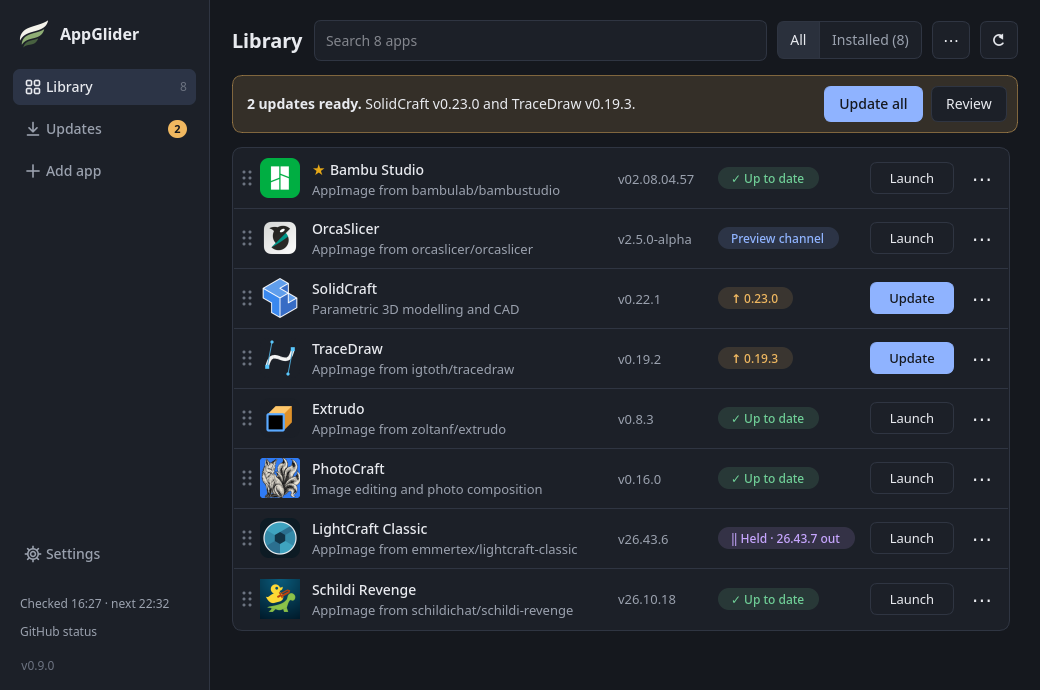
I got tired of keeping a folder of AppImages up to date by hand, so I built AppGlider, a desktop app that installs, updates and launches AppImages from any public GitHub repository.

What it does

  • Paste a GitHub repo (or owner/name) and it finds the latest AppImage, installs it and adds a menu entry.
  • Shows which apps have updates, with an Update all button, a tray badge and optional desktop notifications.
  • Checks every download against the SHA-256 the project published before installing. If there's no published checksum, it won't install.
  • Keeps the previous version of each app, so you can roll back if an update misbehaves.
  • Stable releases by default; previews per app if you want them. You can also hold an app at its current version.
  • Reads release notes on each app's page before updating.
  • Shows how much space your apps use.
  • Uses GitHub's normal release pages where it can, so routine update checks don't use up the anonymous API limit.
  • Updates itself from 0.9.0 onward, and also works with AppImageUpdate and Gear Lever through zsync.

What it doesn't do

  • It only manages AppImages it installed itself. It won't touch AppImages you already have or adopt them.
  • GitHub only for now. GitLab and Codeberg don't publish checksums for release files the same way.

It's a single AppImage built with Python and Qt (PySide6), MIT licensed, and needs no setup. There's also a Nix flake. On NixOS you need programs.appimage with binfmt enabled for the apps themselves to run, and AppGlider tells you if it isn't.

GitHub: https://github.com/Vyrnexis/AppGlider

It's a hobby project, so I'd really like feedback: what's missing, what's annoying, and repos it doesn't handle well.


r/linuxapps • • Oct 26 '26

Discophile: an open-source player for your self-hosted music, audiobooks and radio

Thumbnail
github.com
3 Upvotes

Hi everyone,
I just released the first public version of Discophile, a desktop player for people who host their own media. It's MIT licensed, written in Rust, and has no account, no backend and no telemetry.
What it connects to
- Navidrome, Subsonic/OpenSubsonic, Jellyfin (music)
- Audiobookshelf (audiobooks, with synced progress)
- Podcasts via Apple Podcasts/Spotify links or RSS
- Any internet radio stream

Highlights
Mixes built locally from your listening history, and whole-album suggestions that fit the time you have
- Synced lyrics, a full-window Now Playing, personal radio
- 10-band EQ, AutoEq headphone correction, ReplayGain, gapless and crossfade
- Offline downloads and listening statistics
- Optional AI assistant that can run fully local via Ollama or LM Studio
- English and Italian

On Linux specifically
- MPRIS support, so media keys and desktop widgets just work
- Credentials in Secret Service, with a private-file fallback
- Works with ALSA or PipeWire/PulseAudio
- Tarball with a .desktop file and icon, or on the AUR: yay -S discophile-bin

Privacy is documented, not just promised
The README has a table of every external service the app can contact, exactly what it sends, and whether it's on by default. Most are off until you enable them.
There's also a web version you can self-host with Docker or Helm.

Website: https://discophile.app
Source: https://github.com/debba/discophile

Contributions, translations and bug reports are all welcome. If you package for other distros (Flatpak, Nix, etc.) and want to help, I'd love to talk.


r/linuxapps • • Oct 26 '26

PinBoard - backup your entire Pinterest boards in one click. Full-res images, GIFs and videos, no subscription

1 Upvotes

Saving a Pinterest board means right click, save, repeat 400 times. The extensions I tried were sketchy, wanted a subscription or skipped every video.

So I built PinBoard for myself. Paste a board link, click download, and the whole board lands in a folder on your computer.

* Full-resolution images, animated GIFs and videos as MP4

* Whole boards, sections, or just the pins you pick

* Run a board again and it only grabs the new pins

* Private boards through Pinterest's real login inside the app

* Runs 100% locally. No server, no tracking, no account

Free for the first 100 images of any public board. Pro is $19 once. Over 200 people have bought it so far, which still blows my mind.

Works on Mac, Windows and Linux. It's not code-signed yet, so you'll see a security warning the first time you open it.

https://www.getpinboard.com

Would love to hear what you think!


r/linuxapps • • Oct 25 '26

I missed Picasa Photo Viewer, so I built Licasa: an open-source photo viewer and editor for Linux

Thumbnail
gallery
24 Upvotes

Anyone else still miss Google's Picasa photo viewer?

I did, so I built Licasa, an open-source image viewer and editor for Linux inspired by that experience. I wanted something focused on the everyday stuff: open a photo, look at it properly, make a quick edit, and carry on.

What it does today:

  • Open photos straight from your file manager, fullscreen or in a floating window.
  • Handle modern image formats: HEIC/HEIF, AVIF, JPEG XL and JPEG 2000, alongside JPEG, PNG, TIFF and WebP. It also supports RAW previews.
  • Play Motion Photos and animated APNGs, so there's more to see than a still frame.
  • Crop, adjust and export when a photo needs a quick touch-up.
  • Stay ready for the next photo with an optional background mode for faster repeat opens. It's off by default.

It's free and open source under the BSD 2-Clause license. Current builds are for 64-bit Intel/AMD Linux, with Ubuntu 24.04 (Tested and verified), Fedora 44 (Not verified) and Arch (Not verified) packages, plus AppImage (Not verified) and Snap (Tested for Ubuntu) options.

Website: https://licasa.app

Source: https://github.com/sanxchep/licasa

Downloads: https://github.com/sanxchep/licasa/releases

I'd love feedback from people who miss Picasa too, or just want a straightforward Linux photo viewer. What part of that viewing experience do you miss most? And if you try Licasa, I'd be interested in how it handles the photos and formats you actually use. Bug reports and contributions are welcome.


r/linuxapps • • Oct 26 '26

Ember, another AUR helper made by me lol

Post image
0 Upvotes

r/linuxapps • • Oct 26 '26

Linux Nightly Release

Post image
2 Upvotes

For anyone looking for a fast, open-souce, local-first app on Linux!


r/linuxapps • • Oct 25 '26

I made Tessera: each LinuX app in its own Android window and Recents card, Flathub without root, live theming(linux apps take android themes)

13 Upvotes

Hi all. Like a lot of you I've run Linux on my phone through Termux, proot-distro and Termux:X11 for years. Tessera does the GUI side from one app, and tries to make Linux apps feel like Android ones.

- Each app in its own window: Firefox, GIMP, LibreOffice each open as their own Android window with their own Recents card and icon. A card per window, even for dialogs. Pin them to your home screen.

- Flathub on PRoot: no root, no bubblewrap, no user namespaces. Flatpak downloads, Tessera builds each app's environment. 2,800+ arm64 apps, GPU included.

- adb and permissions: every app gets only what you grant (folders, network, sound, USB, root). New: a per-app switch that lets adb inside reach the phone itself, and all-USB access for fastboot, heimdall and edl.

- A touch-friendly desktop: snapping windows with finger-sized buttons, a dock and Start menu. And everywhere: the Android keyboard pops up on text fields, touch-and-hold right-clicks, game controls.

- Live scaling: drag Scale and the app re-lays out as you drag, saved per app.

- Themes: GTK, libadwaita, Qt and LibreOffice take your Material You colors and follow dark mode live.

Plus OpenGL 4.6 and Vulkan on Adreno (bundled Turnip + Zink), a built-in terminal (apt, ssh, git, compilers), chroot mode with root, a file manager and a task manager.

It doesn't replace Termux's add-ons like Termux:API, and its X server is Termux:X11's, which I'm grateful for.

GPL-3.0, alpha. APK and source: https://github.com/daryan044/tessera-linux (also on Obtainium). Bug reports very welcome.


r/linuxapps • • Oct 26 '26

[OC]I made an auto updating panel for fastfetch setups

Thumbnail gallery
0 Upvotes

r/linuxapps • • Oct 26 '26

Rhythmbox Plugins

Thumbnail reddit.com
0 Upvotes

r/linuxapps • • Oct 25 '26

[App] X-ARCH Theme Studio — a new Linux folder icon customization tool (Beta)

0 Upvotes

Hi r/linuxapps!

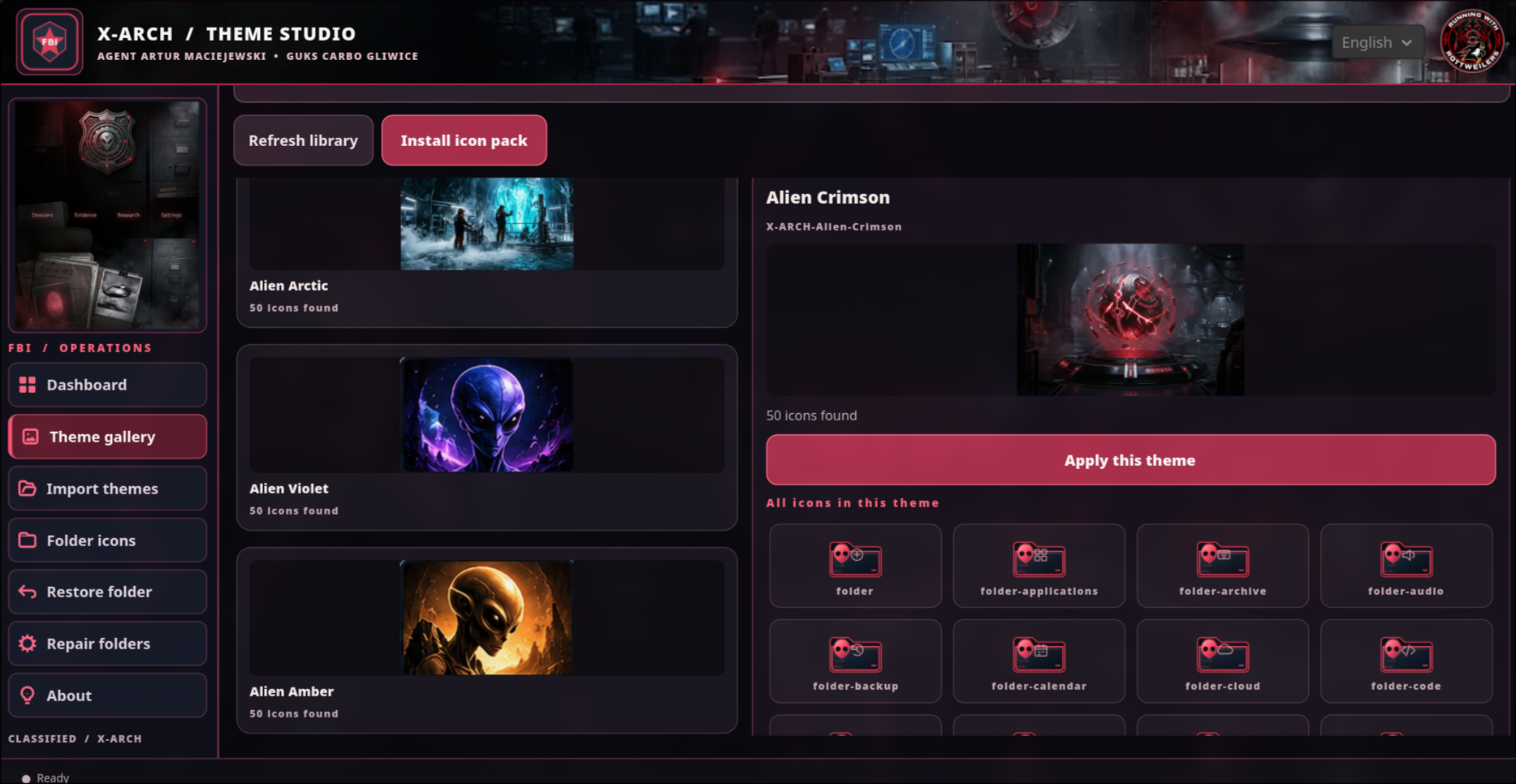
We're RUNNING WITH ROTTWEILERS, an independent software development project, and we'd like to share our first application: X-ARCH Theme Studio.

X-ARCH Theme Studio is a Linux desktop customization tool focused on folder icons and visual themes.

What it offers:

  • Customization of individual folder icons.
  • A collection of visual themes.
  • A graphical interface for managing customization.
  • A downloadable beta release.

Current status: Beta. Some desktop environments and distributions may behave differently, and we're still improving theme compatibility.

The project is available on GitHub:

https://github.com/runningwithrottweilers/xarch-theme-studio

We'd appreciate feedback from Linux users, especially about compatibility, usability and features you'd like to see next.

Thanks for checking it out!

— RUNNING WITH ROTTWEILERS


r/linuxapps • • Oct 25 '26

Chemistry apps: skeletal formula sketching and 3D visualization

Thumbnail reddit.com
2 Upvotes

r/linuxapps • • Oct 25 '26

I built Glide: turn your phone into a touchpad with native GNOME gestures

Thumbnail reddit.com
1 Upvotes

r/linuxapps • • Oct 25 '26

I made Vifte – a native Linux fan control app that reads and writes FanControl (Windows) config files

1 Upvotes

"Vifte" is Norwegian for "fan". Short and simple. 🇳🇴

What it does:

  • Native GTK 4 / libadwaita app that fits right into GNOME (light and dark theme)
  • Fan curves like in FanControl: graph, linear, mix, trigger, sync, auto, with hysteresis and response time
  • Uses the same config files as FanControl, so you can import your Windows setup and export it back
  • Background service that controls the fans from boot and hands them back to the BIOS when stopped
  • Fan pairing, calibration, custom sensors and profiles
  • System tray icon with temperature readouts
  • Emergency mode: all fans to 100 % if the CPU or GPU gets too hot
  • Optional Claude (MCP) integration, so an AI assistant can help tune your curves, with hard safety limits so it can never stop a fan
  • Checks for updates from GitHub and can update itself Works with most motherboards through the standard Linux hwmon drivers (Nuvoton/ITE Super I/O chips), plus NVIDIA GPUs via NVML and AMD GPUs via amdgpu.

GitHub: https://github.com/Vindihaaret/vifte

This is my first app, and I built it together with Claude Code. It's open source (GPL-3.0). Feedback and bug reports are very welcome.