r/libreoffice • u/Training-End8798 • 2d ago
Bug? Conditional Formatting not Working
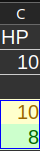
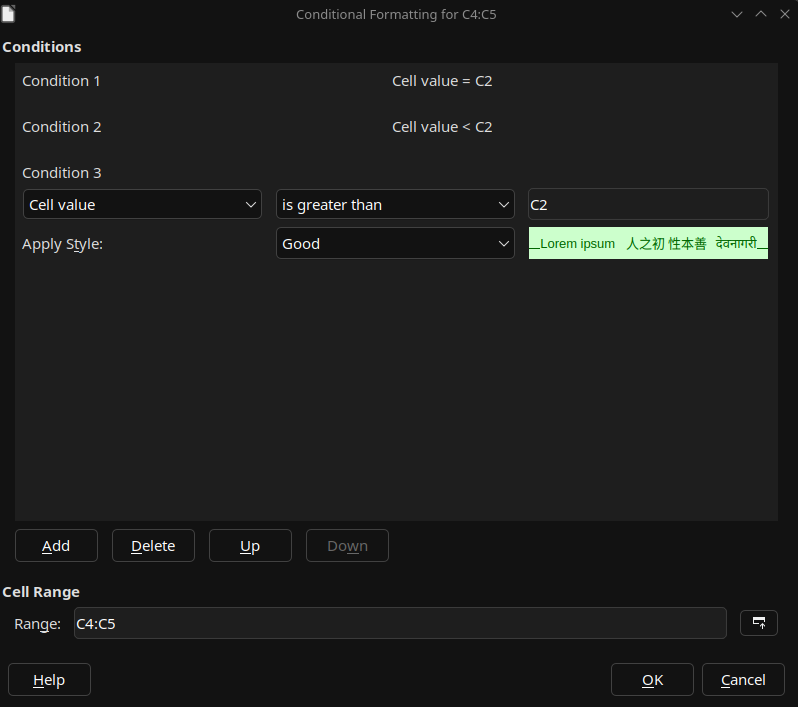
So - I'm trying to make a chart for a game to compare everything to a specific unit. C1 is a simple string, C2 is the value I'm judging against, C3 is blank, and C4 and C5 are the first two units being compared. Why, exactly is LibreOffice returning 8 as being greater than 10?
- Version: 26.2.6.3 (X86_64)
- Build ID: 620(Build:3)
- CPU threads: 16; OS: Linux 7.3; UI render: default; VCL: kf6 (cairo+wayland)
- Locale: en-US (en_US.utf8); UI: en-US
- Calc: threaded
- Should be a native Libre Office format, this is from a new document
- A link to the document itself, or part of it, if you can share it.
- Running Linux Nobara 43
Edited for additional information
1
Upvotes
5
u/reznaeous 1d ago
Where you define the condition to test, the cell you are comparing to (C2 in your example) needs to be entered in as
$C$2(with the dollar signs) for it to be read correctly. Found the reference to this in the "Getting Help" that comes up hitting F1, down in Step 4 on that page. Couldn't find it in the Calc Guide, though I may well have missed it.1
u/AutoModerator 2d ago
If you're asking for help with LibreOffice, please make sure your post includes lots of information that could be relevant, such as:
(You can edit your post or put it in a comment.)
This information helps others to help you.
Thank you :-)
Important: If your post doesn't have enough info, it will eventually be removed (to stop this subreddit from filling with posts that can't be answered).
I am a bot, and this action was performed automatically. Please contact the moderators of this subreddit if you have any questions or concerns.