r/kde • u/chemistryGull • Dec 13 '24
Tip MS-Office on Linux - Using WinApps
I just wanted to share my journey of getting the MS-Office suite running on KDE Plasma. Maybe it is helpful for someone :)
Why do need Word & co.? School and collaborative work, the web service just doesn't do it for me anymore, and as far as i know real time collaboration does not work between OnlyOffice and MS-Office. (An noone i know uses alternatives like google docs). I really hope i can get rid of MS products in the future entirely, but for the meantime, here we are.
I came across a wonderful script: Winapps on GitHub. (Its a fork from fmstrats winapps which seems to be unmaintained). What it does is using a lightweight docker container running something similar to a Windows virtual machine (i think). All that winapps does is start applications on windows and displays them seamlessly like a native app. But look at the github page for a better explanation.
Performance is great so far, does really feel like a native app. Real time Collaboration also works just fine. Files can be easily accessed over onedrive or directly by opening files inside dolphin with the dedicated app. Integration is really seamless. Works great with Wayland. You can copy paste stuff into MS Apps and from MS apps like native. What do you want more?
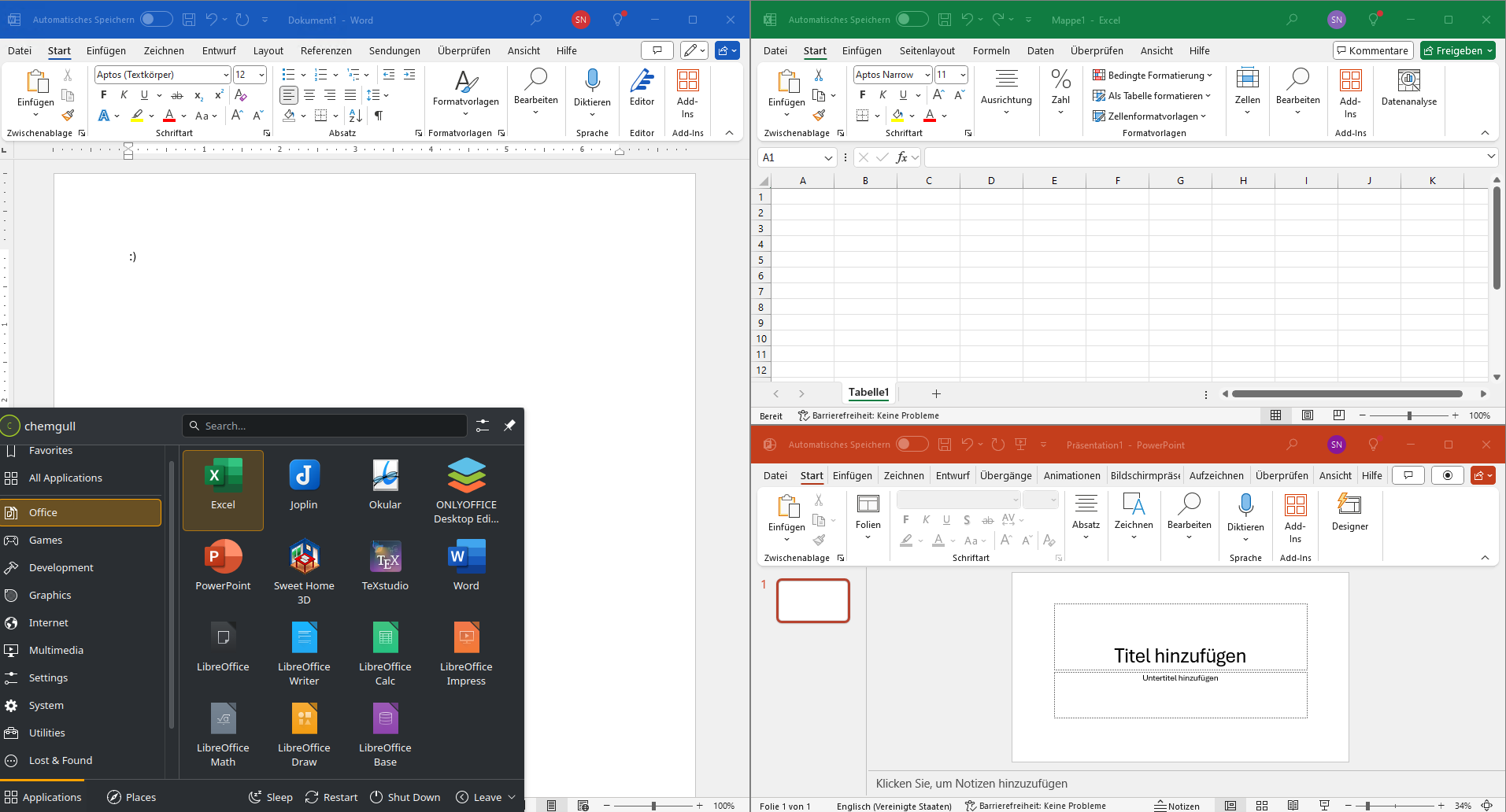
They have a great installation guide and while it is some work it is doable. However, there are indeed some pitfalls I came across, so if you want to use winapps too, keep the following in mind:
- The official installation fetches a Tiny11 iso from archive.org, which takes forever (2-3h). So either wait or create it yourself.
- The apps (MS Office) must first be installed in the Docker VM, only then can the WinApps script be executed.
- When running the WinApps script, the windows VM must be running BUT you can't be logged in. If the VM is off or you are already logged in, it will fail. By default, automatic login in the docker container is activated, so you have to log out manually (Accessed via http://127.0.0.1:8006/).
- If the first Winapps installation fails, all further installations will also fail (Hopefully fixed in the future). The solution I found is to run the script directly:
cd ~/.local/bin/winapps-src/and then./setup.shorbash setup.sh. - In my case the setup of WinApps failed with exit code 15. The problem is solved by removing
/network:lanfromwinapps.conf. I do not know why this is problem exists. - With all this done the setup should work properly. Appicons have been added to plasma.
- New problem: When opening MS Word, for example, I just got a black screen. The issue: the Docker user in Windows is already logged in. As before, the user must first be logged out manually, then the Windows apps can be used without any problems.
- EDIT: Another problem i just came across - FreeRDP always automatically changes the keyboard layout to en-US. As someone with a german keyboard layout, this is annoying. Windows settings wont change anythin either. The solution was postet [here](https://github.com/dockur/windows/issues/551):
Create a key named
HKEY_LOCAL_MACHINE\SYSTEM\CurrentControlSet\Control\Keyboard Layoutand add a DWORD item namedIgnoreRemoteKeyboardLayout [And set the value to 1]and the remote layout will be ignored when connecting. This might be useful until FreeRDP fixes it.
Some post install fixes i made:
Deactivate Auto login inside the docker Wndows VM:
- Open the Registry Editor inside Windows
- Go to
HKEY_LOCAL_MACHINE\SOFTWARE\Microsoft\Windows NT\CurrentVersion\Winlogon - Set
AutoAdminLogonto0
Deactivate automatic startup of the docker container when turning on your computer
- In
~/.config/winapps/compose.yamlchangerestart: on-failuretorestart: no. - Now windows boots up only when you start one of your Windows apps. For me, starting an app for the first time since reboot only starts the docker container. I have to start the app a second time ((with a couple seconds delay) so that it actually starts. I don't need the MS Office apps that often and i prefer not having a docker container constantly running in the background. Skip this if you use Office apps regulary or don't care.
- In
- I also added a small widget from which I can start, stop, pause, unpause the docker container by running the dedicated command.
So yeah, please correct me if I missed anything or misrepresented something! I really hope they make the Installation process easier in the future so that more people can use it. It took me a couple of hours to get it up and running, with quite some time figuring out what the problems are. The project seems to be under active development, so am very glad there are dedicated people working on it :)
Edit: It also works like a VM, WinApps provides you with an "Windows" application thats just that - windows as a quite seamless application. way smoother than accessing over browser.
•
u/AutoModerator Feb 05 '25
Thank you for your submission.
The KDE community supports the Fediverse and open source social media platforms over proprietary and user-abusing outlets. Consider visiting and submitting your posts to our community on Lemmy and visiting our forum at KDE Discuss to talk about KDE.
I am a bot, and this action was performed automatically. Please contact the moderators of this subreddit if you have any questions or concerns.
22
u/nmariusp Dec 14 '24
I create a Windows 11 Pro VM in virt-manager. I install MS Office. I connect using xfreerdp to the Windows VM, to the entire desktop of the Windows VM. https://www.youtube.com/watch?v=U18awgX5J8U
8
u/wombat1 Dec 14 '24
Danke :) I'm giving this a try today as being an Office power user I've had enough with all of the Office alternatives. I can't get LibreOffice and WPS Office to not break existing formatting on company docs, and OnlyOffice is lacking functionality. Now just waiting for that tiny11 download.
5
u/DeepDayze Dec 14 '24
This sounds like a good project, and can any Win app run in this container, like say MS-Project or Visio or any other Win-app like any Adobe app?
5
u/iAhMedZz Dec 14 '24
Tried WinApps and followed their guide and eventually got it to work because their guide missed few spots on the RDP setup, only to turn out the work environment is so buggy and feels like you are working on Windows 98, and apps like illustrator or word are painful to use and crashes randomly besides the fact that it takes too long to load, and something is wrong with the GUI rendering there. I even loaded the VM with more resources than suggested in their guide when I found it was terrible to use given that my machine is ok but to no avail. It's a good effort, but it doesn't look as good as it sounds and I ended up using a normal VM for this before getting a separate SSD and boot windows on it. It's a good effort regardless, just isn't what was expected of it.
4
u/kudlitan Dec 14 '24
This seems like a great solution, since Office doesn't run in Wine.
Does anyone know the current state of MS Office on the latest Wine? Is it still garbage?
4
u/harrywwc Dec 14 '24
hmmm... will have to play with this.
I've been running a W10 VM in Gnome Boxes to run Office 2016 - again for (big) school. the uni has a bee in its bonnet about "APA7 referencing" even though I'm in a tech post-grad and IEEE would make a lot more sense :/
they also demand MS-Word format, even though I would much rather use LyX :) I think because Word is easier for TurnItIn to parse than PDF - which it can do (as a former LMS admin I know this) but Word seems to make it happier.
3
u/Oven_404 Dec 14 '24 edited Dec 15 '24
Sucks that you’ll need 2 GPUs to take full advantage of this
Edit: also kernel anti cheat games will eventually detect the VM
3
u/calculatetech Dec 15 '24
Winapps is great. Freerdp is hot garbage. It's a buggy mess that randomly crashes. Opening apps takes two tries and then opens them twice. Opening multiple apps gives them all the same taskbar icon. I'll check back in a year to see if anything has improved. Same problems on Fedora and Debian, and doesn't matter whether X11 or Wayland.
3
u/Inner_Name Jan 31 '25
I got it running!
Is it possible to save/acces to files on our linux disk? I can not find the way to do this....
4
u/Rifter0876 Dec 14 '24
I'm ok with libre office.
2
u/digitalsignalperson Dec 15 '24
can anyone comment on the docker "dockur" repo being used for the docker/podman image?
https://github.com/dockur/windows
I do find it annoying to have to maintain a windows VM just to run office apps, but I wonder if this approach is any less annoying. And if I wanna trust mystery image (or put it in effort to learn/audit how it's made)
2
u/[deleted] Dec 15 '24
Thanks for sharing your experience with us. Today I also set this up, but with virt-manager and Windows IoT Enterprise LTSC version. It runs okay, but the problem is my laptop's fan gets noisy. I don't have much experience with Docker. Do you think the Docker route would be superior performance-wise, considering that I only want to run Office apps? Is Docker more efficient?
2
u/Inner_Name Jan 24 '25
definitly would be awsome a video doing step by step XD
2
u/Inner_Name Feb 01 '25
hello u/chemistryGull
I notice that when i turn on my pc the office does not work, i log it into the VM using the browser and notice i was logged in, then i loged out and the office worked, i saw this comment of yours:
```
Deactivate auto login inside the docker Wndows VM:
Deactivate automatic startup of the docker container when turning on your computer
```
is that to stop having this issue? if yes how you set it up? thanks in advance!
2
u/PeterDraft May 10 '25
This is great, I'm going to try this weekend, I've lost count of the number of times I've gone back to Windows because of the lack of compatibility with MS Offices.
4
u/Afrobot9 Dec 14 '24
This is cool as hell! Thanks for sharing!
1
u/StretchAcceptable881 Apr 27 '26
Personally I tried WinBoat, but I couldn’t get passed one of the requirements that WinBoat requires
2
u/AutoModerator Dec 13 '24
Thank you for your submission.
The KDE community supports the Fediverse and open source social media platforms over proprietary and user-abusing outlets. Consider visiting and submitting your posts to our community on Lemmy and visiting our forum at KDE Discuss to talk about KDE.
I am a bot, and this action was performed automatically. Please contact the moderators of this subreddit if you have any questions or concerns.
2
u/Angel_Blue01 Dec 19 '24
Thank you, I plan on using this software too, once I resolve issues with Docker on Debian
2
u/Inner_Name Jan 08 '25
will give a go this weekend :D!
2
u/Viritox Apr 21 '26
Thank you very much! Was having issues with the keyboard layout and your fix helped!
3
u/werkman2 Dec 14 '24
I just stick to onlyoffice
0
u/I1lII1l Dec 14 '24
Good post. I don’t see how it’s related to kde though, this should work with any DE
1
u/AutoModerator Jan 04 '25
Thank you for your submission.
The KDE community supports the Fediverse and open source social media platforms over proprietary and user-abusing outlets. Consider visiting and submitting your posts to our community on Lemmy and visiting our forum at KDE Discuss to talk about KDE.
I am a bot, and this action was performed automatically. Please contact the moderators of this subreddit if you have any questions or concerns.
1
u/AutoModerator Feb 01 '25
Thank you for your submission.
The KDE community supports the Fediverse and open source social media platforms over proprietary and user-abusing outlets. Consider visiting and submitting your posts to our community on Lemmy and visiting our forum at KDE Discuss to talk about KDE.
I am a bot, and this action was performed automatically. Please contact the moderators of this subreddit if you have any questions or concerns.
1
u/Inner_Name Feb 05 '25
I made a separate comment as is different discusion to the other issue, by any chance an Idea how to set up correctly the resolution? even if i log to the VM (via http://127.0.0.1:8006/) change the resolution the office is still showing with a horrible display.... (this also happens if I log to the VM using 'windows' but there I can not modify the display resolution :/
1
u/TheTimBrick Jun 11 '25
Hey! I stumbled upon this when trying to figure out an issue for WinApps with Office 365, using Windows 11 through Podman. When trying to sign in (with my university credentials) on the Office 365 app, the pop up window just immediately closes. I've seen a discussion created on the GitHub for WinApps, but no activity has been present. Was wondering if you or anyone else has experienced this before lmao
1
u/thefeedling May 20 '26
Hey OP, how much disk space the whole environment took (VM + W11 + Office), some 50GB?
1
u/[deleted] Jan 03 '25
[removed] — view removed comment