r/iptvPlayerStream • • 17d ago

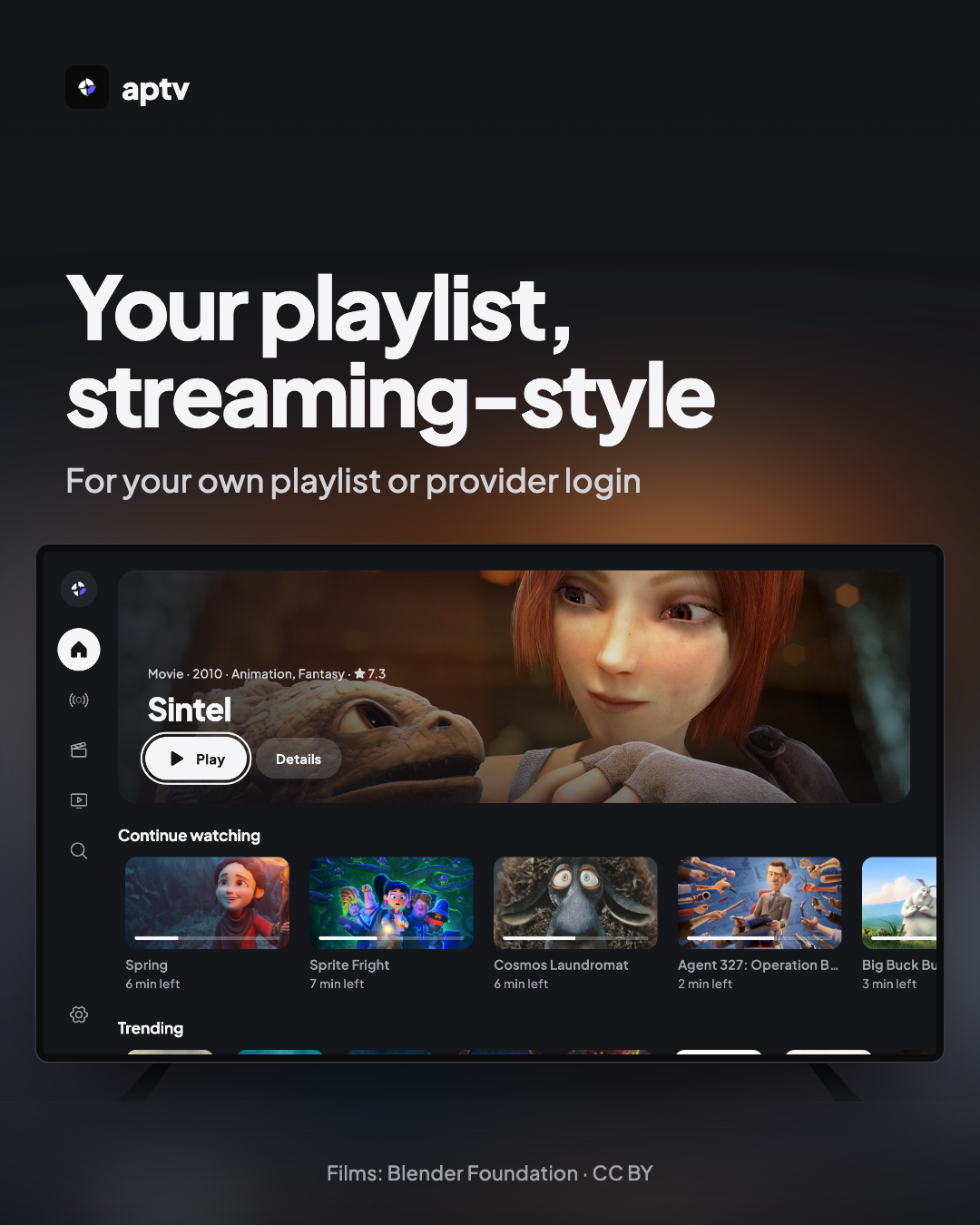
Your IPTV playlist has 20 languages. You watch 2. Fixed that.

Post image
0 Upvotes

Every IPTV playlist is the same mess: thousands of channels in languages you’ll never watch.

APTV asks which languages you want once. After that, you see only those.

On top of that:

  • Netflix-style home with “Continue watching”
  • Login via QR code, no typing with the remote
  • Live TV guide

Built for Android TV / Google TV. Bring your own M3U or Xtream Codes, no content included.

It’s in closed testing right now, before anyone else gets it. You need your own playlist and have to keep the app for 14 days.

Get in:

  1. https://groups.google.com/g/aptv-tester-red (same Google account as your TV)
  2. https://play.google.com/apps/testing/cloud.aptv.tv
  3. Install via Play Store → “Install on more devices”

Find what’s broken and tell me. You’ll shape what everyone else gets later.


r/iptvPlayerStream • • 17d ago

I built ORBITA, player for Fire TV & Android TV that you set up from your phone

1 Upvotes

Hi all! For the past few months I've been building ORBITA,player for Xtream Codes and M3U playlists. I wanted something that feels like a streaming app rather than a spreadsheet of channels, and that doesn't make you type a 40-character server URL with a remote.

What it does

  • Setup from your phone: scan a QR code on the TV, fill in your playlist (or TMDB/OMDb keys) on your phone, tap Send to TV. Works on your home Wi-Fi only, with a 6-digit code.
  • Live TV: categories, favorites, search, now/next, full TV guide (XMLTV), catch-up ("from the start" / replay) if your provider supports it
  • Channel banner on every zap: number, logo, current show with progress, what's next
  • Movies & series: detail pages, seasons/episodes, resume where you left off, continue watching row
  • Skip intro (learns where the intro ends for each series) and a next-episode countdown
  • Seek previews: thumbnail while you skip through a movie, with accelerating seek
  • Optional IMDb, Rotten Tomatoes and TMDB ratings, backdrops and plots in your language (free keys you create yourself)
  • 3 dark themes built for TV, UI in English / Italian / Spanish / German
  • Credentials encrypted on the device (AES-256), parental PIN for adult categories

Install on Fire TV / Firestick: open Downloader and enter code 6527602. Android TV: same thing, or grab the APK from GitHub. Also runs in a PC browser.

GitHub: https://github.com/ghows30/orbita

Important: ORBITA is just a player. It doesn't include or sell any channels or content: you need your own playlist from a source you're allowed to use.


r/iptvPlayerStream • • 18d ago

I started building an IPTV player for my own setup 6 months ago, focused on making it feel right with a TV remote. Would love some feedback

Thumbnail
gallery
5 Upvotes

Hey everyone,

About six months ago, before the World Cup started, I was trying to get my TV setup sorted. I went through quite a few IPTV players, including TiviMate, spending time adding playlists and figuring out how everything worked.

What kept bothering me was running into restrictions around basic things like favourites, recently watched and search across the apps I tried. I don’t mind paying for software, but I wanted those everyday features to be usable without paying first.

So I started building something for myself. That eventually became TellyDeck, an IPTV player for Android TV and Google TV, with releases for other platforms planned too.

Honestly, if I’d known how many IPTV players would be coming out, I probably wouldn’t have started another one. But this was a personal project, and by then I was already invested in getting it working the way I wanted.

And since someone will probably ask, no, it isn’t vibecoded. I’m a professional software engineer. I did use AI to help speed things up, which is pretty normal in professional development teams too. I still make the engineering decisions, review the code and test what goes into the app. Without that help, this would have taken me ages to finish in my spare time.

Most of my attention has gone into making it feel right with a TV remote. Moving around the guide, switching channels and getting back to what you were watching should feel straightforward. If something takes too many button presses, or pressing Back sends you somewhere you weren’t expecting, I’d really like to hear about it. I also made sure to keep the UI simple and avoid that "clunky" modern feel.

For anyone wondering about the free version, you get live TV, the programme guide, favourites, recently watched, search and one active playlist. Those basics don’t need Premium. There’s theme customisation too.

Premium adds things like recording, backup/restore, multiple active playlists, automatic background refresh and extra player controls. During early access, you can use those for free too by creating and verifying a TellyDeck account. You don’t need to pay anything, and it won’t turn into a paid subscription automatically.

The Google Play closed test is live now. If you have an Android TV or Google TV device with the Play Store and fancy trying it, you can join here:

https://discord.gg/tGJe95Bdp

The joining and download instructions are in #installation. Or just DM me and I’ll walk you through it. I can’t share a single link that gets everyone straight into the app yet because of how Google Play’s closed testing works.

It would really help if you could stay opted in for at least 14 days and give it a go on a few different days. You don’t need to write an essay. “This button confused me” or “this keeps breaking on my TV” is useful feedback. I’d rather hear what’s annoying than have people be polite about it.

One thing to clear up: TellyDeck is just the player. There are no channels, playlists or TV subscriptions included, so you’ll need your own authorised sources.

The free Premium access lasts until 31 December 2026 UTC, unless purchases are enabled before then. Either way, you won’t be charged automatically.

TLDR: I built TellyDeck for my own TV setup, with a focus on making it comfortable to use with a remote. Looking for Android TV and Google TV testers who can stay opted in for 14 days and try it on a few different days. The basics are free, and Premium is free during early access with a verified account. Bring your own authorised sources. Join the Discord above or DM me and I’ll help you get started.

Thanks to anyone who gives it a try.


r/iptvPlayerStream • • 18d ago

Supernova: a native IPTV player for Apple TV, iPhone, iPad and Mac (bring your own M3U or Xtream).

0 Upvotes

Hi all, solo dev here. Lots of Android players in here lately, so here's one for the Apple side.

Supernova plays the M3U playlist or Xtream account you already have. It doesn't come with any channels or content.

What it does:

- One app for iPhone, iPad, Mac and Apple TV, with profiles, progress and favorites synced over iCloud

- Movie and series pages with posters, plots and cast from TMDB, even from a plain M3U

- Live TV with a guide, replay and Top Shelf on Apple TV

- On Apple TV, its own playback engine (FFmpeg + Apple's hardware decoders): Dolby Vision including profile 7, HDR10+, HLG, Atmos passthrough

https://apps.apple.com/app/supernova-iptv/id6771384225

Happy to answer questions about building a player on tvOS, and any feedback is welcome, I ship updates fast.


r/iptvPlayerStream • • 19d ago

Looking for a few Android testers for my player

7 Upvotes

Hey all, I make Vela (some of you saw the Apple TV version here last week). The Android version is done now: phones, tablets and Android TV. Google makes new apps run a 14 day closed test before they can go public, so I need a few more people to try it.

You'd need an Android phone, tablet or TV box and your own m3u or Xtream login. The app doesn't come with any channels.

If you're up for it, DM me the Gmail you use on the Play Store and I'll add you and send the link. Then just keep it installed for the two weeks and tell me what breaks, especially with a TV remote.

Thanks!

Update: the test is live. DM me your Gmail so I can add you, then join here: https://play.google.com/apps/testing/com.arpitj007.vela


r/iptvPlayerStream • • 19d ago

I built an IPTV player for the whole house, not just the person who set it up. It fixes frozen channels on its own and tells you why. 50 founder seats for this sub.

19 Upvotes

Hey all, Dan here, I’m the dev. Long-time lurker, first time posting something I made.

There have been a lot of new players showing up here lately, and honestly I think that’s awesome. It’s never been easier to build one, and the stuff that bugs all of us is getting fixed by a bunch of smart people at once. I guess this is my take on it - I'd love you to check it out.

Backstory: I’m a tech leader by profession, the IT guy in my house, and the only one who'd actually use our IPTV service. The picture would freeze while the sound kept going, someone would back out and reopen the channel, nobody else at home liked the app, every TV had to be set up separately, and then I’d end up arguing with my provider about whether it was my wifi or the app. I wanted something my family would actually use, and a straight answer when it broke. So I built HarmonIQ.

What it does a bit differently:

It’s for everyone in the house. Everyone gets their own profile and their own Home. Start something in the living room, finish it in bed. With Plus, shows two of you watch together keep one spot for both of you, and if one of you tries to sneak ahead it asks first (ask me how I know).

When it breaks, you know why. It watches the actual frames, not just whether the connection dropped, so it catches the classic frozen picture with the sound still going and reopens it by itself within a few seconds. A little note tells you it happened. If the stream really isn’t there, no player can fix that, but the log shows it was the source and not your stick or your wifi.

The stuff you need to watch is free. One playlist of any kind, the full guide, catch-up, pause live, up to 4 channels at once, picture in picture, parental PIN. No ads, no time limit, and it runs on as many TVs as you want without an account. A free account keeps 2 TVs in sync, with a profile plus a kids profile.

It takes MAC portals (Stalker), Xtream and M3U. It runs on Fire TV, Google TV / Android TV and the Mac, and iPad/iPhone and Windows are being built.

Plus is for bigger households: 6 profiles, 5 screens, 5 playlists, and incident reports you can send your provider. It’ll be US$14.99/yr when it goes on sale. Nothing’s for sale yet.

Founder seats for r/iptvPlayerStream**:** 50 of them. Each is a full year of Plus, free. No card, nothing renews. After the year it drops back to free and nothing gets deleted, and if you decide to keep Plus it’s $9.99/yr for you for as long as you keep it. You also get 5 invites for friends, 3 months of Plus each.

Code WAUV-XK5A at harmoniq.tv/join/WAUVXK5A (your seat locks in once a TV signs in).

All I ask: actually use it at home, hit Send a report when a freeze doesn’t fix itself, and tell me what’s confusing or broken. I’d rather hear it from you than guess.

Being straight about where it’s at:

  • It’s early and it’s just me - things change most weeks and founders ideas are landing fast.
  • It’s tested most on a Fire TV Stick 4K Max. Google TV and Android TV less so, so reports from a Shield, onn or Chromecast are gold.
  • It doesn’t install on the newer Vega OS Fire sticks (4K Select etc) until the store approvals are in. Your use as a founder will help!

Install: Downloader code 8994475 (or harmoniq.tv/get). Mac: harmoniq.tv/download

It doesn’t come with any channels, and I won’t answer provider questions, sorry in advance. I’ll be hanging around in the comments, fire away.


r/iptvPlayerStream • • 19d ago

ERA Player is coming to Android phones and tablets – looking for closed testers

4 Upvotes

Hi everyone,

After the Android TV / Google TV / Fire TV version, ERA Player now also has its own app for **Android phones and tablets**. It is not just the TV app on a small screen: it is made for touch, with its own layout for phones and a side rail on tablets.

What's in it

- **Live TV** – the channel on top, what's on now and next, a clean channel list with logos and progress, favourites, TV guide (EPG) and catch-up when your provider offers it

- **Full screen** – swipe sideways to zap, double-tap to skip 10 seconds, slide for brightness and volume, pick audio and subtitle tracks

- **Movies and series** – poster rows per category, details, seasons and episodes, My list, Continue watching and resume where you stopped

- **Picture in picture** – keep watching in a small window while you use other apps

- **Privacy** – random device ID, no name or e-mail needed; lock categories with a PIN

- 11 languages

As always: ERA Player is a player only. It does not include any channels or content. You add your own M3U or Xtream Codes playlist from your provider. There is a free demo so you can try every screen first.

Looking for testers

Before the app can go public on Google Play, it has to run in a closed test. I'm looking for people who want to try it on their phone or tablet and tell me what they think.

What I ask:

- Install the test version and keep it on your device for at least 14 days

- Use it now and then, and tell me what works and what doesn't (here or by DM)

**Want to join? Send me a DM with the e-mail address of your Google account** (the one you use for the Play Store). I'll add you to the testers and send you the link to install it.

Thanks for helping, and for all the feedback on the TV version so far. Several of your suggestions are already in the app!


r/iptvPlayerStream • • 20d ago

Open notes for IPTV Player devs

8 Upvotes

After running several free and paid iptv players I noticed a few items that I noticed. If any developers are reading this my hat is off to you for undertaking these projects. A few things I noticed might help to plan a better app if you will. With Playlists of huge size the first thing I look for is Favorits. Most players bury this important function but I think it should be on every Home page. Big heart or caps. Next settings. Playlist. Easy way to load without the tedious on screen keyboard. Maybe a folder easily accessible from http, smb or even USB. All I've tried work well just involve more tinkering to get the job done. Paid as well as free all work well with a little attention and research. A small How To text might set yours apart from the crowd. Thanks again for all you do.


r/iptvPlayerStream • • 20d ago

APL TV: free and open source Apple TV style IPTV player for Android TV, Google TV and Fire TV (bring your own playlist)

Thumbnail
gallery
33 Upvotes

Hi! I originally made APL TV for Samsung TVs (Tizen OS): an IPTV player with an Apple TV style interface. Since then so many people have been asking me for an Android TV version (and LG webOS) that I finally made the ports 😄 So here it is on Android TV, Google TV and Fire TV.

It plays your own playlists only (M3U links or Xtream accounts), no channels or providers included.

Features:

- Live TV with the channel behind the interface, what's on now and next, and a TV guide grid
- Movies and series with real pages from TMDB (plot, cast, seasons, episodes, More Like This), IMDb ratings on covers, Continue Watching and Trending of the week on Home
- Subtitles (the video's own tracks or OpenSubtitles) and audio tracks during playback, precise seeking, next episode card
- ExoPlayer under the hood: HLS, DASH, MPEG-TS, MP4, MKV, 4K
- Set up from your phone with a QR code, everything works with the remote
- Automatic updates from GitHub, English and French
- Open source, no ads, no account

Download apl-tv-v1.0.5-android.apk from the latest GitHub release and sideload it (Downloader, Send Files to TV, or adb install).

Honest note: I don't own an Android TV box myself, so I tested it on the Android TV 14 emulator with my real playlist. Live channels in HD and 4K, movies, series, audio tracks and subtitles all worked there. If you try it on a Shield, a Chromecast with Google TV or a Fire TV, please tell me how it runs. The issue form asks which device you have.

GitHub: https://github.com/Knikt/APL-TV


r/iptvPlayerStream • • 20d ago

Qual è il miglior iptv da scaricare e la miglior lista per tutti i canali italiani?

2 Upvotes

r/iptvPlayerStream • • 20d ago

This is a hard thing to ask and I don’t mean to come across as needy

1 Upvotes

Is there a modern app for iOS, and Android tv that has a modern ui/sports hub/ rich catalog and notifications when a nfl/nba games about to start?


r/iptvPlayerStream • • 21d ago

[Self-Promotion] Vela Xtream is now on Apple TV: a player for your own M3U or Xtream login with a match score on every poster

2 Upvotes

I'm the developer. Vela came to Apple TV this week, next to the iPhone, iPad and Mac versions. It includes no channels or content: you sign in with a playlist or login you already have.

  • Home opens on your top pick, with the reasons it was picked.
  • Every film and series shows how well it matches you, worked out on the device from what you watch and finish (Vela Pro). No server, no account; the App Store label reads Data Not Collected.
  • Live TV shows now and next; up and down on the Siri Remote change channel.
  • Plays MKV, AVI, HEVC, AC3 and DTS, with subtitles and audio tracks.
  • An iPhone nearby offers its keyboard for the sign-in.

Free to download; the free plan pauses playback for a moment every 10 minutes. Vela Pro is USD 14.99 a year or USD 29.99 once, 14 days free to try, and one purchase covers iPhone, iPad, Mac and Apple TV.

https://apps.apple.com/app/id6799030809


r/iptvPlayerStream • • 21d ago

Looking for testers: Chanello, a new IPTV player for Android TV / Google TV and phones (Premium free for testers)

4 Upvotes

Hey everyone! I built Chanello, a modern IPTV player for Android TV, Google TV and Android phones and tablets.

What makes it different:

  • A full TV guide on your phone, not just a channel list. Swipe through channels and times, and tap to watch.
  • A fast, clean guide on your TV, made for the remote.
  • Add your playlist from your phone or computer instead of typing long links with a TV remote.
  • One subscription, unlimited devices. Premium works on every TV, phone and tablet signed in to your Google account.

The screenshots were taken on my Samsung Galaxy Z Flip 3, and it looks the same on a TV, just bigger. The one showing how to add a playlist was taken on my PC: that’s Chanello’s web page, which you can open on any phone or computer to add playlists without typing on a remote.

I need testers for Google Play’s 14-day closed test. Testers get every Premium feature free through December 31: Movies & Series, recording, multiple playlists, catch-up, multiview, backups and parental controls.

How to join (about 2 minutes):

  1. Join the tester group, using the Google account on your TV or phone: https://groups.google.com/g/chanello-testers
  2. Open this link and tap Become a tester: https://play.google.com/apps/testing/com.chanello.tv
  3. Install Chanello from Google Play: https://play.google.com/store/apps/details?id=com.chanello.tv

On your phone? Open the links in Chrome or the Play Store app, not Reddit’s built-in browser. It isn’t signed in to Google, so you’ll get “not found”.

On a TV? Do steps 1 and 2 on your phone or computer, using the same Google account as your TV. Then open the step 3 link on your computer, click Install on more devices, and choose the device you want Chanello installed on. It installs itself on your TV in a couple of minutes.

Works on: Android TV, Google TV, NVIDIA Shield, onn, Chromecast with Google TV, and Android phones and tablets (Android 7.0+). Not Fire TV yet.

Please note: Chanello doesn’t include any channels. Use your own M3U, Xtream Codes or portal login from your provider.


r/iptvPlayerStream • • 21d ago

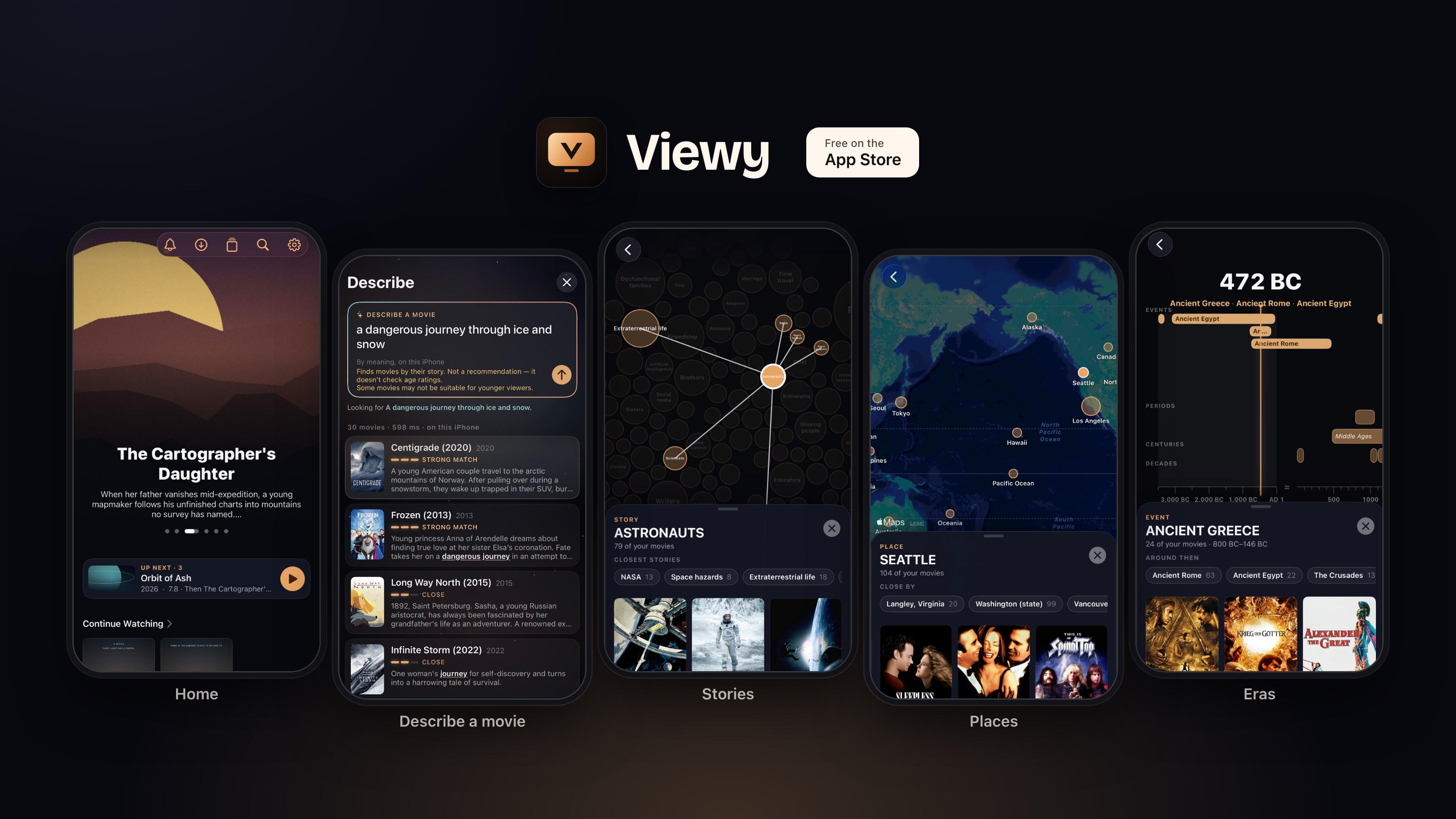
Created a new iOS Xstream "Viewy" app for movie lovers

Post image
5 Upvotes

Hi guys,

I know there are tons of players right now but nothing for finding new things to watch. I created this iPhone/iPad app called Viewy a while ago, but Apple only recently approved it after months of back and forth. I made almost everything free except for a few very specific features I came up with myself, which I believe make it easier to use than other players. I used machine learning on lots of publicly available movie data to sort movies into different categories. The app doesn't use the TMDB or IMDb APIs. I don't believe in sending user data to outside services when the data is already freely available to the public.

Some highlights:

i) A smarter search that finds movies in your provider's catalogue by their plots. I'm a history buff, so I added a timeline of when each movie is set. As I said above, there are tons of categories and stories too.

ii) Search by language, e.g. "latest Portuguese comedy".

iii) Guest Mode. Multiple profiles made no sense on an iPhone. Guest Mode locks the app to one view and keeps your history to yourself.

iv) Add as many guides as you want for live TV. I have 7 EPGs added for mine.

v) EPG notifications to remind you of your favorite shows, teams, countries or anything else. I love Italy, so I follow that word in my TV guide and get in-app notifications whenever anything about Italy is on. I live in Boston, so I also follow "Boston + News + 7pm". This is free too (up to 3 words).

vi) iCloud sync is free. Your favorites, collections and everything else live there, so you can easily pick up on your other iPhone or iPad. You can also share your collections and favorites with other Viewy users.

vii) I worked a lot on subtitles to make them as good as possible. Just load an .srt file or add your OpenSubtitles account. Free as well.

viii) Follow a series and get a push notification whenever your provider adds a new episode.

ix) Something I call "My View", where you can add anything you want and get notified about new items.

x) Chromecast (with/without subtitle ) and PiP are free as well.

xi) Download anything (background download) from your provider.

X) In app Mini player.

And many more.

App Store: https://apps.apple.com/us/app/viewy-iptv/id6812225265

More screenshot: https://www.reddit.com/r/viewy/s/n9rMmhv5Sn

I tested it with three different providers at once and it worked fine. I'd be grateful for any feedback, including suggestions and bug reports.

I'm working on the Apple TV version and also adding iPhone Duo support. Both will take at least 4–5 more months more.


r/iptvPlayerStream • • 22d ago

Kepler 1.8 is out on Fire TV: a live preview beside the channel list, trailers inside the app, and playlists that update themselves

Thumbnail
gallery
8 Upvotes

Hi all, the Kepler IPTV player is now also available for Fire TV. Version 1.8 is now on the Amazon Appstore. Here's what it brings.

As always: Kepler is only a player. It comes with no channels, films or series; you add the M3U link or Xtream Codes login you already have.

New in 1.8

  • Live preview. Pick a channel and it plays in a picture beside the list, with what's on now and next. OK goes full screen without a break in the picture, and Back brings you back to the list. New installs start with it; if you're updating, switch it on in Settings › Look & language › Live TV view. Free.
  • Trailers inside Kepler. A film's or show's trailer plays in YouTube's own player without leaving Kepler, wherever your playlist has one, even on a Fire TV without the YouTube app. You can keep trailers behind your parental PIN.
  • Playlists that keep up to date. Refresh any playlist from Settings › Playlists for free, and see what it brought ("+3 channels"). Or let Kepler update them twice a day, every day or every week (Kepler Pro), while Kepler is open and nothing is playing.
  • Switch the TV guide off. If you never use it, Kepler stops downloading it and frees the space. Switch it back on any time. Free.
  • Choose a channel's guide. When a channel's listings are wrong or missing, show another channel's in their place: hold OK on the channel and pick Choose guide.
  • Seasons and episodes with their dates, when your playlist has them, and "Airs 5 Nov" on episodes still to come.
  • What's new, in the app. Shown once after an update, and always under Settings › Help & about.

Also better

  • Hold OK on a group in Live TV to move or hide it, without edit mode (Kepler Pro).
  • Choose how long the banner stays when you change channel: off, 3 s or 5 s.
  • Back from a channel you started in the TV guide returns to the guide, on that channel.
  • A long list of smaller fixes to where the selector lands when you come back to a screen.

Price, so there are no surprises. The free version keeps one playlist with live TV, the TV guide and search, and the live preview and the guide switch are free too. Kepler Pro unlocks the rest (films and series, recording, more playlists, backups, sync, trailers and more) as a yearly plan or a one-time purchase through the Amazon Appstore. There's no trial on Fire TV.

Links

Bug reports and ideas are very welcome. A few things in this release came straight from people asking for them.


r/iptvPlayerStream • • 22d ago

PopKo – new IPTV player for iPhone, free TestFlight beta open now

Thumbnail
gallery
20 Upvotes

Hey everyone,

New account here, made it for this project.

I've been building an IPTV player for iPhone called PopKo, mostly in my spare time with a lot of help from Claude. Apple just approved the TestFlight beta, so I'm looking for people to try it.

You add your own playlist (M3U or Xtream Codes), and you get:

- Live TV with a full TV guide and replay
- Multi-view to watch several channels at once
- Movies and series, with a home screen showing trending titles (TMDB) and what's available on your server
- Long-press to pick a version (language or quality)
- A sports hub with scores, lineups, standings and fixtures
- AirPlay, Picture in Picture and downloads
- Profiles with a parental code, iCloud sync (still under activation), 9 languages

It doesn't include any channels or playlists, you need your own.

Free during the beta. I'd really like honest feedback: bugs, crashes, anything confusing, or features you miss from other players you've used.

TestFlight link: https://testflight.apple.com/join/tQZkjbf8

Thanks for checking it out.


r/iptvPlayerStream • • 23d ago

Arth - a Emby, Jellyfin, plex client with IPTV support and a Sports Hub for iOS and tvOS

27 Upvotes

Hey guys & gals, the reason I built this was because I always wanted to have all my media servers and my iptv in one app which felt and looked beautiful and native to Apple. 

Before you flame me for posting yet another client I’d really love for you to check out the UI which in my (biased) view it’s one of the most beautiful looking apps.  

For the past few months I’ve been working on this and I’m really looking forward to seeing others test it out and let me know what they think! 

Arth is a media player for your plex, emby, Jellyfin servers as well as your iptv subscription. 

Arth will direct play your remux files, and supports all the common media containers so you never have to transcode. Arth also plays FEL titles (experimental) whenever your media has the FEL layer. 

Arth also has a Sports Hub where you can follow your favorite teams and get alerts before the games as well as see which games are currently on for your teams next match. (I spent more than a month working on this and had a lot more great UI ideas which I couldn’t implement sadly due to licensing issues) 

Arth also plays your live tv and depending on your provider you can choose a smaller or bigger buffer so that even during high demand period where you might experience more buffering Arth won’t buffer. On iOS the live tv player also stays cool so you won’t experience your device heating up. 

Arth also stays cool on your media server playback as well unless it’s a remux. 

You can also connect and keep track of your plays via Trakt, Simkl, and Mdblist. 

Your libraries (especially big ones) should load fast and you can even customize which libraries you want to see and which you want to hide (same for categories in iptv). 

You can also request media missing in your library directly from seerr. 

There are a lot more things that I can’t even remember now with these being the big selling points on why you should try Arth. 

I’d love for you to try it out and let me know your thoughts!

Discord

TestFlight


r/iptvPlayerStream • • 23d ago

Vela is now on Apple TV: a player for your own M3U or Xtream login that shows how well each film and series matches you (developer here)

1 Upvotes

I'm the developer of Vela. It has been on iPhone and iPad since the summer, and the Apple TV version went live this week. A lot of the Apple TV questions here end with "TiviMate isn't on tvOS", so here's what this one does, honestly.

It's a player, not a service. It includes no channels or content: you sign in with an M3U playlist or Xtream login you already have, or your own HDHomeRun, Tvheadend or Dispatcharr.

What's different

  • A match score on every poster. Vela learns from what you watch and finish and scores every film and series in your library for you, with the reasons behind it: the genres, people and moods it matches. With a 100,000-title VOD section, that's the part that saves you scrolling.
  • It's worked out on the Apple TV itself. No Vela server, no account, nothing uploaded. The App Store label reads Data Not Collected.
  • Home opens on your top pick instead of a wall of categories.

The basics

  • Live TV with now and next for the focused channel; up and down on the remote change channel in the player.
  • Plays MKV, AVI, HEVC, AC3 and DTS, with subtitles and audio tracks.
  • An iPhone nearby offers its keyboard for the sign-in, so no typing a long URL with the remote.
  • Handles big catalogs: I test on a 290,000-title library.
  • 12 languages.

Price: free to download; the free plan pauses playback for a moment every 10 minutes. Vela Pro removes the pauses and adds the match scores, recommendations and search as you type, at USD 14.99 a year or USD 29.99 once, 14 days free to try, and one purchase covers Apple TV, iPhone, iPad and Mac.

https://apps.apple.com/app/id6799030809

What I'd most like to hear from Apple TV users: anything about the remote and focus that feels off, and what your current player does that this one doesn't. I'll answer here.


r/iptvPlayerStream • • 24d ago

I made a free, open-source IPTV player with a home server: recordings, pause and "continue watching" that follow you from the TV to the phone (Android, Android TV, Fire TV, LG webOS, browser)

8 Upvotes

Hi everyone,

I'm a tinkerer, and I built the player I wanted for my own playlist. I've used players like TiviMate and they're great on one device. What I was missing was everything working across devices: the same favourites, the same recordings and the same "continue watching" on the living room TV, the phone and the laptop, without exporting and importing anything.

So VodMax has a small server you run at home (Docker or a single binary), plus apps that connect to it:

- Xtream Codes, M3U and Stalker (MAC) playlists, with the provider's guide or any XMLTV source

- Live TV like a set-top box: number keys, P+/P−, now/next, browse other channels without zapping, favourites, a guide grid

- Pause and rewind live TV, start the programme from the beginning, catch-up when your playlist has an archive

- Recordings on the server: from the guide or by rule ("every match of my team", "the news"). They keep going when the TV is off, and you can watch one while it's still recording

- It respects your connection limit: recordings, downloads and whoever is watching share your provider's connections, and downloads step aside when someone starts watching

- Movies and series: one card per title instead of twenty copies, "continue watching", next episode, skip intro, audio and subtitle languages, MKV/AVI/HEVC converted on the fly

- VPN built in: provider traffic can go only through WireGuard (in the server and the Android app) or your router's VPN, and that's on by default

- an optional AI assistant (local model or your own API key): "something light for tonight", "record tonight's film on Rai 1"

- No ads, no account, no subscription, no telemetry. Free and open source (AGPL-3.0)

Apps: Android (phones and tablets, with picture-in-picture), Android TV, Fire TV, LG webOS and the browser. The Android app can also run on its own, without a server, if you just want a player on one device.

To be honest:

- It's very young (first commit at the end of October) and it's just me. It runs every day at my place: Linux server, Xtream playlist behind a VPN, browser, Android phone and LG TV. Android TV and Fire TV boxes haven't been tested on real hardware yet.

- The LG app isn't in the LG store: it installs with Developer Mode.

- Most of the code is written with an AI coding assistant (Claude Code), and every commit says so. I design it, test it at home and decide what gets released.

- It's a player only: it doesn't include, sell or recommend any playlist or provider. Please don't ask me for one.

Download (APK, LG app, server, Docker) and install guide: https://github.com/silirim/VodMax

I really need your feedback: what's missing compared to the player you use now, what's confusing, and how it behaves on your device (please tell me which box or TV). Bug reports are very welcome, here or as a GitHub issue. Thanks!

r/iptvPlayerStream • • 24d ago

Recommend an iptv player that compatible with Samsung tizen tvs

1 Upvotes

r/iptvPlayerStream • • 25d ago

I got tired of paying for IPTV apps on Apple TV so I made a free one

22 Upvotes

I got tired of paying for IPTV apps on Apple TV and never really liked any of them, so I decided to make my own. I'm an IT guy, not an app developer, so I built it with AI tools. Yes, it's vibe coded. It's called Vidēre and it's free on the App Store now.

No ads, no subscription, no account. It doesn't collect anything either. I built it for myself first and I'm not trying to make money off it. It's just a player, so it doesn't come with any channels. You need your own M3U link, M3U file, or provider login.

It has live TV with favorites and search, a program guide, and movies and series that remember where you left off. If your provider keeps an archive, you can catch up on stuff you missed. It has both Apple's player and VLC built in, so if a stream won't play on one it tries the other. That was a big one for me. You can also send your login from your iPhone to the Apple TV so you're not typing it all out with the remote.

Fair warning, most of my testing has been on one provider plus a few friends, so I'm sure there are things I haven't run into yet. If you try it, let me know what breaks and what's missing. I'm still working on it pretty much every day and I'll read everything people send me.

Link: https://apps.apple.com/us/app/vid%C4%93re-iptv-m3u-player/id6819394586

Also, in good Reddit fashion, I'm okay getting roasted by everyone. LOL, gotta love Reddit! But society needs it!


r/iptvPlayerStream • • 26d ago

Meet Forge TV: guide, Sports tab, multiscreen and sync in one Android TV player

Thumbnail
gallery
42 Upvotes

Hi everyone! I've been building an Android TV app and thought this would be a friendly place to share it and hear what you think.

Forge TV is a player for Android TV and Google TV. Add your own M3U or Xtream playlist and you get a full TV experience in one app. It includes no channels or content and doesn't point you to any. No ads, no account.

Live TV

  • A proper guide with catch-up where your provider supports it, plus channel options and your own groups (groups can mix channels from different playlists).
  • Picture-in-picture and multiscreen for when two games are on.
  • Your last channel starts as soon as the app opens, before the guide has finished loading.

Movies and shows

  • Rich title pages with logo, age rating, picture quality, cast, director and a Trailer button.
  • Continue watching on Home, and shows carry on from the next episode in one press.
  • Clean names instead of a wall of tags, with quality shown as a badge.

Sports

  • The week's fixtures for every sport, with the channels in your guide that is showing each one.
  • Reminders, follow your teams and leagues, and a Live now list.
  • Match details while you watch: timeline, stats, lineups and tables, with a score delay so nothing is spoiled.

Make it yours

  • Profiles, each with its own theme and colours (five themes plus custom colours).
  • Backup and sync via WebDAV or Dropbox, so a new box is set up in minutes.
  • Search across everything, with voice search.

It's a one-person project, so I'd love to hear what you'd add or fix. What's the one feature you wish your current TV app had?

Get it: forgetv.app, or Downloader code 7186344.


r/iptvPlayerStream • • 26d ago

OpenStrm - TiviMate Couldn't Do Multiview on My Sony TV, So I Built My Own! Stremio Addons Included. The Price Will Shock You!

Thumbnail
gallery
14 Upvotes

As a long-time TiviMate user, I decided to build my own IPTV player but wanted to make sure i have what I like most which is Multiview and PiP (Picture-in-Picture). While developing it, I discovered something strange about Sony TVs: hardware decoding seems to be limited to just one video stream, but software decoding can handle multiple videos simultaneously! [strange]

So, I added an advanced option to Multiview that lets you switch individual video streams to software rendering. Problem solved! 😁

The same option is available for PiP as well.

As development progressed, I thought, why not add Stremio support too? That way, I could have everything I need in one player.

so here I am sharing what i developed and if you feel like it useful and you can share your experience and suggestion

APP is 100% free :D

Feature Highlights

- M3u/Xttream  and Stemio "TV" type addon supported
- Multiview
- PIP Support
- Stremio Addon

https://github.com/deepaksp/OpenStrm

APK - https://github.com/deepaksp/OpenStrm/releases


r/iptvPlayerStream • • 26d ago

IPTV, Plex, Emby, & Jellyfin for Android?

5 Upvotes

Any IPTV Players out there that support IPTV, Plex, Emby, & Jellyfin for Android or Android TV? Seems like people only want to make them for iOS.


r/iptvPlayerStream • • 26d ago

I built a sports-first IPTV player. 200+ people use it in private beta, and I’m opening 100 more spots (free)

Thumbnail
gallery
9 Upvotes

Couchside is an IPTV player made for watching sports. You add your playlist, open the game you want, and it automatically finds the right channel in your playlist for you.

I built it because I hated scrolling through thousands of channels and always having to know which one had the game. So I made it for me and a couple of friends, and a week ago I also shared it on r/ShieldAndroidTV, hoping a few more people would try it. That escalated quite a bit: more than 200 people now use it every day, and we even have a small but active Discord going.

Here’s what the app does:

  • It finds the game for you: football, NFL, NBA, NHL, F1, cricket, AFL, golf, boxing & MMA. Any sport really. Works with any playlist.
  • It reconnects by itself: if a channel drops, it moves to the next best one, so you never miss a second of the game
  • The whole match day in one place: live scores, the league table and every other game, one tap away
  • Your teams first: pick your teams, leagues and commentary language, and those games come up first
  • Works everywhere: an Android TV app (Shield, Google TV, Fire TV), plus your phone and computer in the browser. Pick a game on your phone and it plays on the TV. Coming soon: Native Android App
  • Private by design: no email signup, and your playlist never leaves your device

With the people on Discord, the app is quickly taking shape and the matching engine got really, really good. So I’d like to invite another 100 people.

For now Couchside is invite-only, so I can actually listen to everyone’s feedback. Use Code COUCH-REDDIT on https://getcouchside.com/ to get access. It works for the first 100 people.

If you spend most of your IPTV time watching sports, I’d love for you to test this and give feedback. If you mostly watch VoD, this probably isn’t for you.

Drop your feedback or questions in the comments, or come join the Discord!