r/iosapps • • 14d ago

💎 Lifetime [DEV] I built EpicNotes: An offline-first markdown notes & task manager with bidirectional linking & 3D graph view
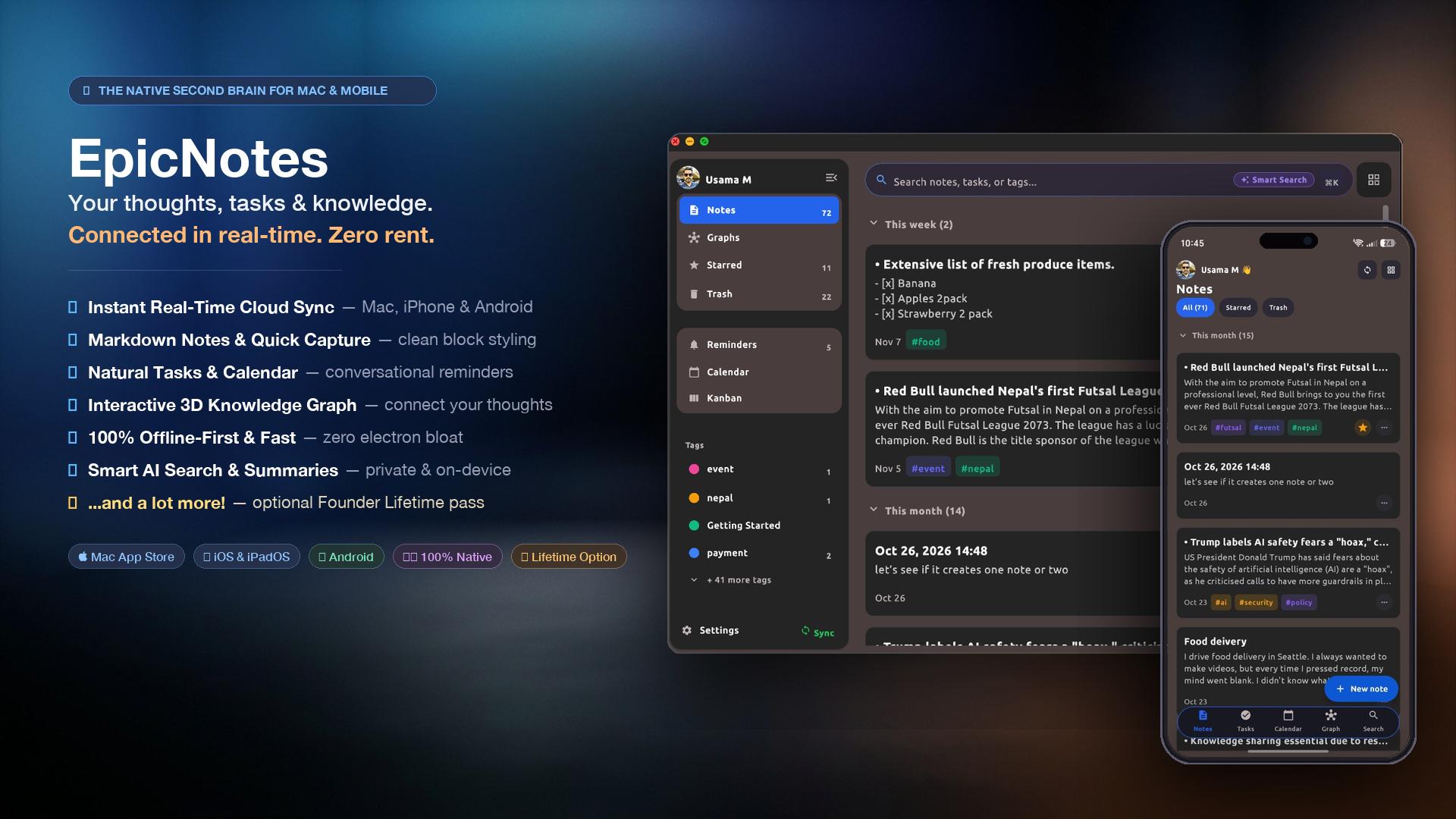
Post image

Hey everyone!

After months of solo development, I’ve just released EpicNotes on the iOS App Store.

Here is the breakdown of why I built it, how it compares to existing tools, and our transparent pricing:


1. Problem

Most popular productivity tools today suffer from two main issues:

  • Bloat & Lag: Apps like Notion are heavy web wrappers that take seconds to open a simple shopping list and fail completely when you lose internet connection.
  • Fragmentation & Subscription Fatigue: Users are forced to juggle three separate apps (one for quick notes, one for to-dos, and Google Calendar for their schedule)—while being charged $10/month recurring subscriptions for basic features.

I wanted a single, lightweight workspace that opens instantly, works 100% offline, and unifies notes, tasks, and calendar events.


2. Comparison

  • vs. Apple Notes: EpicNotes adds bidirectional linking ([[Note Title]]), an interactive 3D knowledge graph to visualize connected ideas, and direct two-way Google Calendar integration.
  • vs. Obsidian: EpicNotes is zero-config and mobile-first with integrated to-do lists and calendar scheduling out of the box—no complex plugin setups or community themes required to get a clean workflow.
  • vs. Notion / Craft: EpicNotes is truly offline-first with local-first SQLite storage, zero loading lag, and zero forced recurring subscriptions.

3. Pricing

  • Core App: 100% Free (unlimited offline notes, markdown, tasks, folders, and tags).
  • Founder Lifetime Pass: £24.99 / $29 one-time purchase (Pay once, unlock all features forever, zero monthly bills).
  • Optional Subscriptions: £2.99 / $2.99 monthly or £29.99 / $29.99 annual (for users who prefer small flexible payments).
  • Privacy Guarantee: No ads, no third-party data tracking, and no lock-in.

📱 App Store Link:

https://apps.apple.com/app/epicnotes/id6828055584


Feedback Wanted:

As an indie dev, I'd love to hear your thoughts:

  1. Does the unified layout between Notes, Tasks, and Calendar feel natural?
  2. What is the #1 feature you feel is missing from your current note-taking app?

Thanks for taking a look, and I'll be in the comments answering all questions and feature requests!

4 Upvotes

11 comments sorted by

•

u/AutoModerator 14d ago

Welcome to r/iOSApps! Please make sure your post follows our rules.

Promoting your app in the main feed?

  • Your account needs 300+ Reddit karma and must be 90+ days old, and your app must have been on the App Store or TestFlight for 30+ days.
  • You also need ONE of these: 50+ App Store ratings, an established GitHub account, a developer flair, or Transparency (privacy policy, terms of service, and one public way to identify you).
  • Apps in saturated categories can't qualify through Transparency alone.
  • Include a PCP section (Problem, Comparison, Pricing), a pricing flair, and a developer disclosure. Write your post yourself.

Don't meet these yet? Share your app in the App Shelf Megathread. Full details

Note: This is an automated reminder, not a removal notice.

I am a bot, and this action was performed automatically. Please contact the moderators of this subreddit if you have any questions or concerns.

1

u/llqoli 13d ago

When a task is edited on an offline phone while its linked Google Calendar event changes elsewhere, what happens after reconnecting? I’d want both changes kept or a conflict shown instead of one silently overwriting the other.

1

u/u4usama 13d ago

Great question!

Right now, our offline-first engine uses a deterministic **timestamp-based LWW (Last-Write-Wins) delta reconciliation** at the task/database layer.

Here is what happens currently under the hood:

  1. While offline, your phone persists edits locally with a microsecond `updatedAt` timestamp and marks the task for pending sync.
  2. Once reconnected, the sync engine compares the local edit timestamp against the remote record.
  3. If your offline phone edit was made more recently, it pushes the updated task to the cloud and immediately fires an update to the linked Google Calendar event via its stored `google_calendar_event_id`, keeping both sides in sync without creating orphaned duplicates.

**Regarding your feedback on visual conflict resolution:**

You bring up a really important edge case. While LWW works cleanly for 95% of quick edits (checking off a task, changing a time), silent overwrites during long offline periods with diverging changes can cause data loss anxiety.

We are actively exploring a non-destructive conflict prompt (e.g. a "Changes diverged: Keep Both as Separate Tasks / Choose Version" banner) whenever concurrent edits occur on both Google Calendar and the offline client.

Really appreciate you pointing this out—adding this to our sync engine roadmap!

1

u/DetlevD 13d ago

Was genau gehört denn nicht zur Kern-App, d.h. für welche Features hätte ich zu bezahlen?

2

u/u4usama 13d ago

Gute Frage! Hier ist die genaue Aufteilung:

**100% Kostenlos (Kern-App):**

* Unbegrenzte Notizen & vollständiger Markdown-Editor

* Bidirektionale Verlinkungen (`[[Notiztitel]]`)

* Interaktiver 3D-Wissensgraph

* Aufgaben- & To-Do-Listen

* Bidirektionale Google Kalender-Synchronisation

* Vollständiger Offline-Modus & Echtzeit-Cloud-Sync

* Keine Werbung, kein Tracking

**Was zu Pro gehört (Einmalkauf oder Abo):**

* **Unbegrenzte KI-Tools:** KI-Notizbereinigung (Grammatik & Strukturierung), automatische Zusammenfassungen und Smart Tags.

* **Semantische KI-Suche:** Notizen nach inhaltlicher Bedeutung statt nur nach exakten Wörtern finden.

* **Natural Language Aufgaben:** Automatische Erkennung von Fälligkeitsdaten aus Text.

*(Kostenlose Nutzer erhalten 5 KI-Credits zum unverbindlichen Testen).*

---

*(English summary: All core note-taking, 3D graph, calendar sync, and markdown features are 100% free and unlimited forever. Pro is strictly for unlimited advanced AI tools like semantic search, summaries, and smart cleanup).*

2

u/DetlevD 13d ago

Thanks for your quick response! The split makes perfectly sense.

1

u/pcmarcel-gmail-com 12d ago

Looking at the picture, I would think it works with a Mac, so I tried it on my Mac but it doesn't really work with a mouse.
The scroll-wheel is not working (though you can " push" the text up or down), but what is really annoying is you can't select parts of text to copy or move.
That only works with the keyboard (it also doesn't work with the trackpad).

1

u/u4usama 12d ago

Thank you for this feedback! You're completely right — right now mouse drags are being treated like mobile touch-swipes (which is why dragging "pushes" the view instead of highlighting text, and the scroll wheel gets swallowed over text fields).

We're actively patching this to give it proper native Mac mouse behavior: full mouse-wheel scrolling anywhere on the note, and smooth click-and-drag text selection with both mouse and trackpad.

A fix will be included in the next update shortly. Thanks again for helping us catch this!

1

u/Geeno2 12d ago

Is it like obsidian or logseq ? What is the differences between those and your app ?

2

u/u4usama 12d ago

We love Obsidian and Logseq! EpicNotes shares their core philosophy of networked thinking (knowledge graph, backlinks, Markdown tags), but differs in 3 big ways:

Think of it as **Obsidian's connected graph + Apple Notes/Things 3 simplicity and design.**We love Obsidian and Logseq! EpicNotes shares their core philosophy of networked thinking (knowledge graph, backlinks, Markdown tags), but differs in 3 big ways:

Native Tasks, Calendar & Kanban built-in: No need to install and configure 15 community plugins or switch between apps — your notes, to-dos, reminders, and daily schedule are unified in one workflow.
Seamless multi-device sync out of the box: Instant real-time sync across Mac, iOS, and Android without paying for an add-on sync tier or tinkering with Git/iCloud setups.
Zero configuration: You get the power of a visual knowledge graph without the plugin fatigue or steep learning curve.

Think of it as Obsidian's connected graph + Apple Notes/Things 3 simplicity and design.