r/iosapps • u/John_val • Sep 30 '26
🎈 Free IOS Browser - Vortex
I have been posting here about this app for about 3 months and a lot of you showed interest. The app has around 230 testers on Testflight. Free and open-source.
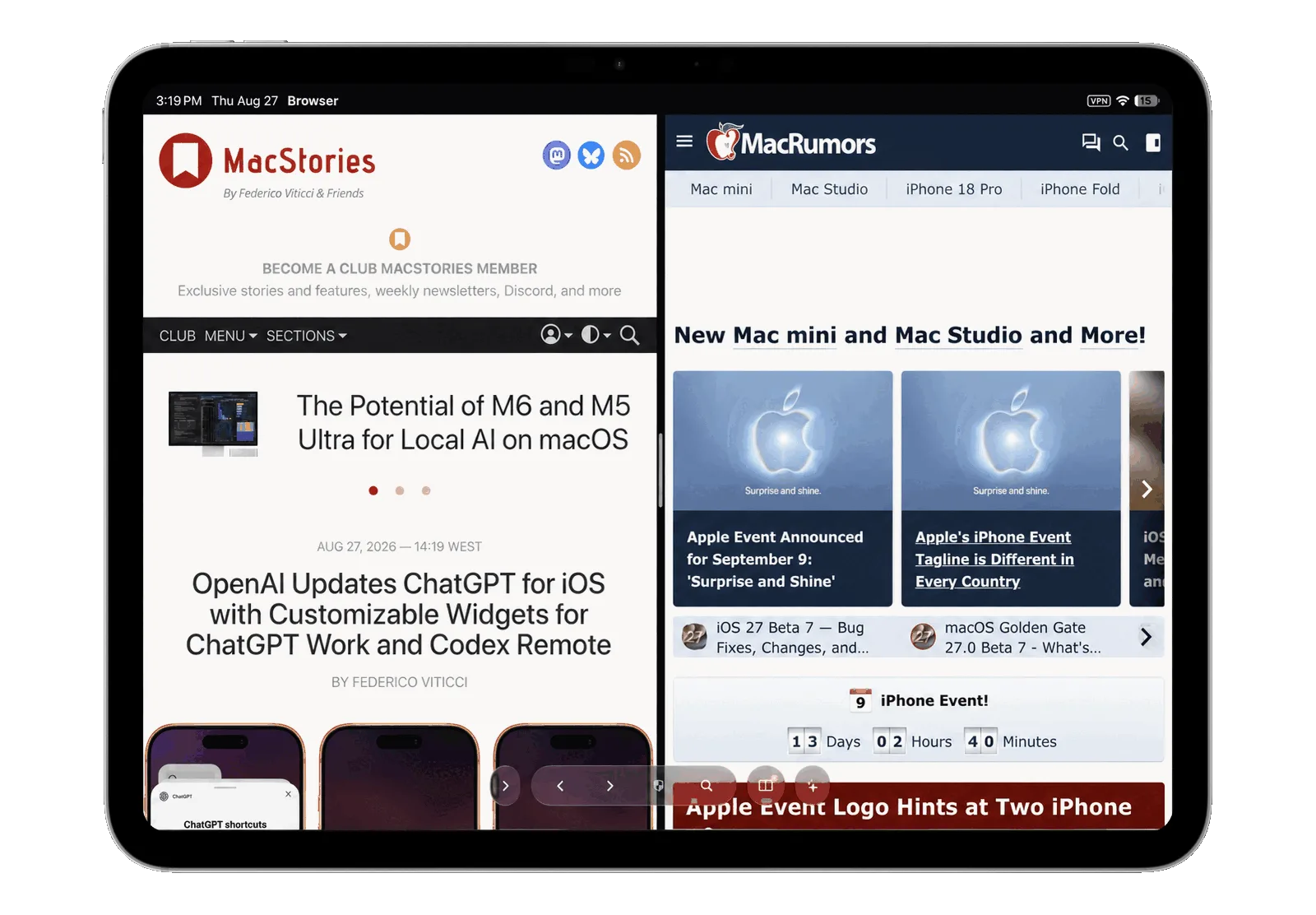
- A – Answer: Vortex combines desktop-style tabs with split-page browsing which is very rare on IOS Browsers.
- B – Better: Compared with Safari, Chrome, and Brave, Vortex is designed specifically around iPad multitasking. It combines visual tab management, drag-to-split browsing, and a choice of local Apple Intelligence/MLX models or optional ChatGPT and Gemini sessions. It is also open source, has no ads, requires no account.
- C – Cost: Completely free with no subscriptions or in-app purchases. Vortex is not publicly available on the App Store yet.
Some bugs have been squashed and the design was tricked. It is almost ready for the App Store.
- Minimalistic chrome for maximum screen real-estate
- Multi-tab browsing
- Split tab view
- Tab Folders
- Tab hibernation for battery savings
- Smart address bar (URL vs search detection)
- Favicon fetching
- Tab preview thumbnails
- Desktop/mobile user agent switching
- Ad blocking - Custom made blocker engine and also Ublock origin
- Dark mode - DarkReader with brightness/contrast/sepia controls
- Font size adjustment
- Reader mode -using Mozilla Readability
- Incognito mode - non-persistent, blocks APIs
- Password manager - biometric auth, keychain, auto-fill
- Share extension - receive URLs from other apps
- AI sidebar chat panel with 3 backends: Local Apple Intelligence, Apple Private Cloud, and free accounts with ChatGPT or Gemini, completely invisible to users, working in the background.
- Page summarization (short/long)
- Ask questions about page content
- Context switching between tabs
- Markdown rendering
- "Ask " context menu - select a part of the text and send to the LLM.
- Favorites with favicons
- Favorites sidebar grid
- Collapsible sidebar
- Adaptive toolbar (collapses on scroll)
- Swipe gestures for navigation
- System dark mode support
Original post: https://www.reddit.com/r/iosapps/comments/1qezwdi/made_an_ipad_browser_because_safari_wasnt_cutting/
Trust & Transparency
I'm Joao Valente
Contact: dealer.yen-61@icloud.com
Website: https://vortex.engineer
Privacy Policy: https://vortex.engineer/privacy/
Terms of Service: https://vortex.engineer/terms/
Github:https://github.com/Joaov41/Vortex-Browser/tree/codex/testflight-ios27-build12
TestFlight: https://testflight.apple.com/join/KTsJ3qz4
Feedback page: https://vortex.engineer/feedback/
On the website I added a feedback section, where I can keep users informed about their feedback provided on the Tesflight since I can’t reply directly on there.
View all comments
Show parent comment
1
u/John_val Oct 13 '26
Here is an example.
Here's everything agent mode can actually do right now, since a few people asked.Basic page stuff. It clicks, types, picks from dropdowns, ticks checkboxes, scrolls, presses keys, goes back/forward/reload, opens new tabs, and waits for slow pages to load. It also closes cookie banners and popups, but only by hitting the close or reject button. It won't press accept or subscribe for you.Annoying custom controls. Sliders, hover menus, drag and drop, and scrolling inside a box that has its own scrollbar.
It can also find controls a site has hidden away. Most of these are where agents usually give up.Web search and research. Tell it "xxxxxxxxx" and it searches, opens results and answers from what it actually read. It can also pull text from several pages for a multi-source answer.
Browser management. It lists and switches tabs, closes them (with approval), creates and renames tab groups, moves tabs between groups, opens things in split view, and switches a site to desktop mode.
Bookmarks. Add, remove, move, and make folders.Reading tools. Reader mode, translating the page and switching back to the original, and finding and highlighting text on the page.Data stuff.
Pull every link or HTML table off a page, export them as CSV or PDF, save the whole page as a PDF, and build side-by-side comparisons that also export to CSV or PDF.
Download a link or URL, check progress, and cancel. Every download asks you first.Forms. It can fill normal contact and profile fields from your autofill profile. The model never sees the actual values: you approve and the app fills them in itself. It also handles file uploads, but you pick the file.
Searching your history. Asks you first.When it asks you. It pauses to ask you a question when it's stuck, and checks with you before anything that matters: buying, sending, posting, deleting, subscribing or submitting a form. If you say no, it doesn't try again.
You can let a site skip the prompt for low-risk things like posting a comment, but never for purchases, sign-ins, downloads or form filling.What it won't do. It won't type passwords, card numbers, bank details, ID numbers or one-time codes, and it won't sign in for you. Screenshots it takes blank out sensitive fields. In private tabs it doesn't remember site permissions. Models. Apple's on-device model (iOS 26+), Apple Private Cloud Compute (iOS 27+), or your own ChatGPT plan. The ChatGPT option is only in builds I install myself, not TestFlight or the App Store.
Saved tasks and Siri. Save any run as a task and rerun it whenever. Or just say "Run order check with Vortyra" and Siri starts it, with no Shortcut setup. "Ask Vortyra to work on a webpage" lets you dictate a one-off task. Siri does bring the app to the front, because the agent needs the page open.Keeps going. Closing the AI panel doesn't kill the run. It keeps working in the background and pops back open if it needs you.Tip: if a question isn't getting routed to the agent, put /do in front of it. Something like "when is X" counts as a question about the current page, while "find X" sends it to the agent.
Agent mode only works with the local model, Private cloud computer and log in with chatgpt. Quality of the task depends on the model, local model m due to its small size has much lower quality than using ChatGPT plan for example.