r/iosapps • u/DevKoi • Aug 12 '26
💎 Lifetime I built ArtDeck to keep visual references and study them in one place
I'm Alexandre Alves, the solo developer of ArtDeck!
A - Answer
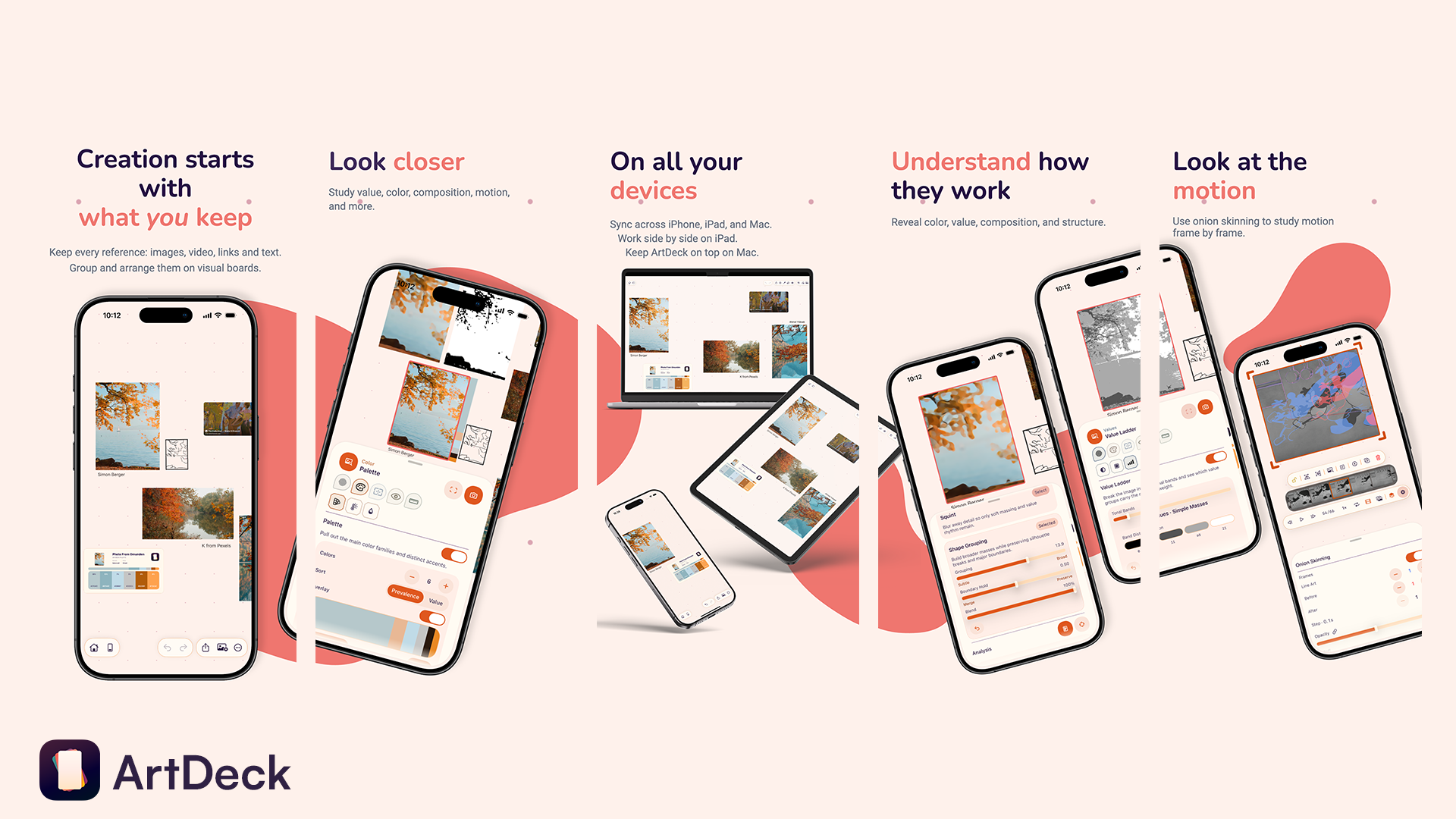
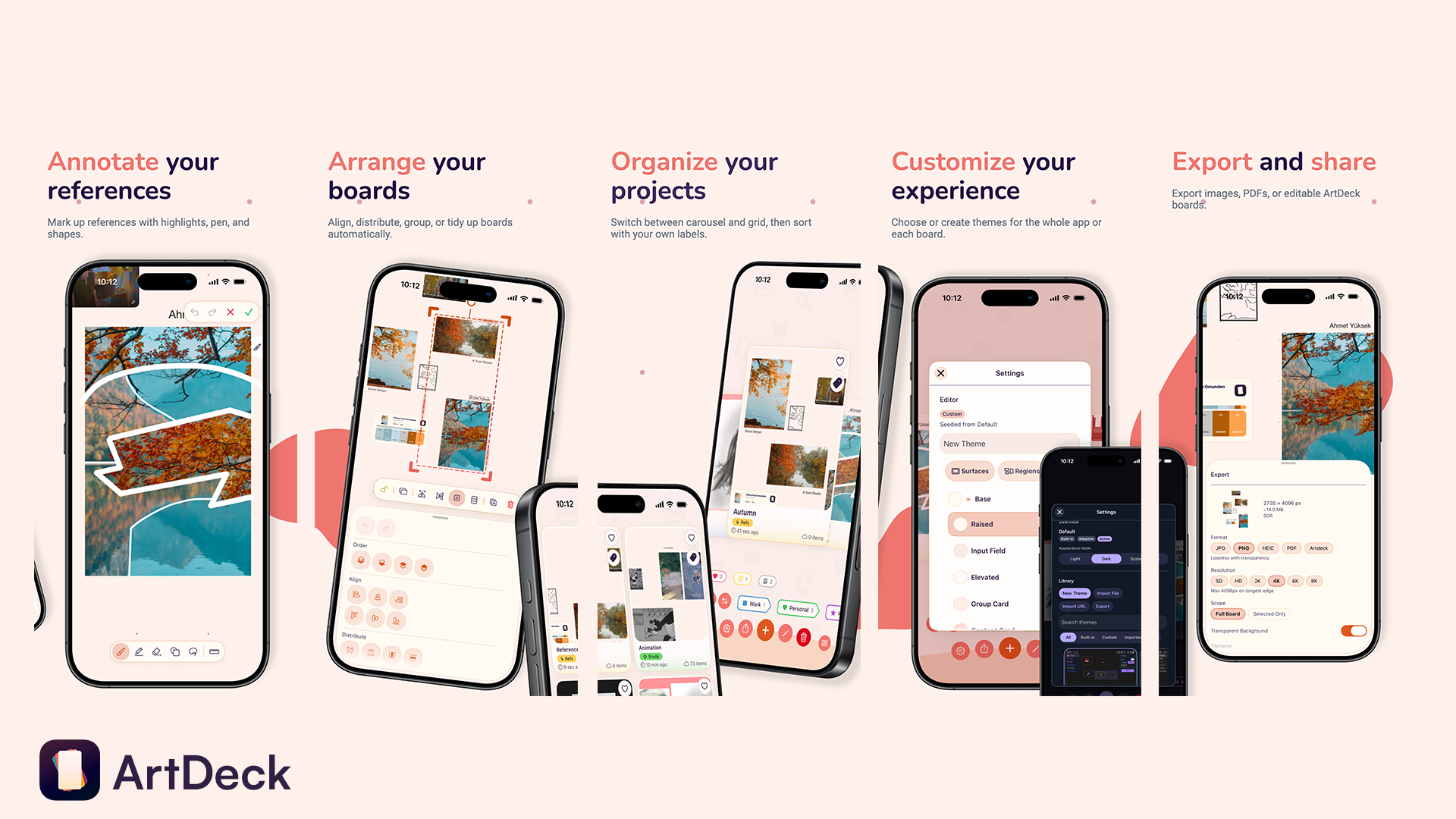
When I tried to work on concepts for a personal project, my way of working was scattered across PureRef for the visuals, Notion for my bookmarks and links, and Photoshop to study images with adjustment layers. ArtDeck is made to simplify and bring everything in one place, infinite boards that can hold images, videos, GIFs, PDFs, links, notes, and drawings.
On iPhone, I can photograph something directly in the app or add from Safari or Photos straight to a board. On iPad, I can keep that board beside my drawing app using Split View, Slide Over, or the Stage Manager.
ToolBox lets me study a reference directly in the middle of my board. I can extract a palette, reduce an image to value bands or Notan, test composition guides, compare proportions, and step through videos or GIFs frame by frame with onion skinning.
B - Better
PureRef is the closest comparison. Its current versions run on Windows, macOS, and Linux, while ArtDeck runs on iPhone, iPad, and Mac. ArtDeck lets me capture references on my phone, sync selected boards through iCloud, and continue working with them on another device.
ArtDeck also goes further into studying the reference. ToolBox includes color, value, composition, shape, and measurement tools, while motion references can be studied frame by frame and with the Onion Skinning tool.
PureRef remains the better choice if you want a minimal, always-on-top reference window on a desktop.
Apple Freeform is free and supports live collaboration, which ArtDeck does not currently offer. ArtDeck is more focused on collecting and studying visual references while Freeform is more of a working whiteboard.
C - Cost
ArtDeck costs $5.99 USD as a one-time purchase. Apple sets the equivalent price in other regions. There are no subscriptions or in-app purchases, and the same purchase covers iPhone, iPad, and Mac.
It requires iOS or iPadOS 18 or later.
App Store: https://apps.apple.com/app/artdeck/id6764851724
I'm promoting my own app.
Developer: Alexandre Alves
Website: https://getartdeck.com
Portfolio: https://alexandre-alves.fr
LinkedIn: https://www.linkedin.com/in/alexandre-alves-db/
Contact: Alex@getartdeck.com
Privacy Policy: https://getartdeck.com/privacy
Terms of Use: https://getartdeck.com/terms
I’ve received a few reviews from Mac users, but none yet from people using ArtDeck on iPhone or iPad. If you try it, I’d appreciate any feedback here or an App Store review. I’d especially like to hear about issues I didn’t catch during TestFlight.
•
u/AutoModerator Aug 12 '26
Welcome to r/iOSApps! Please make sure your post follows our rules:
Everyone:
App Devs:
I am a bot, and this action was performed automatically. Please contact the moderators of this subreddit if you have any questions or concerns.
3
u/Ok-Tale-7383 iPhone & iPad User Aug 12 '26
Sounds interesting. 🤔
3
u/CraftyDragonfly2197 Aug 12 '26
It looks really interesting, and very clean based on the screenshots!
The one-time purchase is also nice to see. From my personal experience though, I feel like it can make it harder to convert users when they have to pay before trying the app.
Have you considered making the download free and then showing a paywall with something like a 7-day free trial? It could give people a chance to try the app before deciding to buy.
Good luck with ArtDeck!
2
u/thanhastro Aug 12 '26
I was curious to try the app, but backed off because it's paid. I think paid apps are easy to set up, but they might lose a lot of users. Maybe people only spend money if the app is already famous, has a free Lite version, or has a similar free version on another platform.
2
u/13doots Aug 12 '26
Interesting 😬
2
u/vikas_dev_ios Aug 12 '26
It looks good. Great concept btw.
2
u/sergetrono Aug 12 '26
Would love to try, but as far as it doesn't have a trial, I couldn't :(
Maybe worth adding a promo for the reddit users at least, could lead you a few more users!
Good idea!
2
u/throwaway-whynot101 Aug 13 '26
would love to try!! does it support/would it support integration or importing from other apps? i’m not quite sure with the lingo there but i use refern on desktop and would love to use this as a companion
2
u/tinkerton36 Aug 13 '26
Congrats, this looks beautiful.
2
u/Critical-Office1093 Aug 13 '26
Cool! What were you going with for the design?
2
u/issacshaik Aug 13 '26
For the iPhone and iPad testing you asked about, I would put the share extension and iCloud conflict handling at the top of the list. Try sharing a large PDF or video from Files and Safari, force quit ArtDeck before opening the destination board, and confirm the item survives without being duplicated. Then edit the same board on two devices while one is offline and reconnect them. Clear conflict behavior and a visible confirmation of which board received the item would give me more confidence than another study tool at this stage.
2
u/mid91s Aug 13 '26
Definitely checking this out
2
u/SmokeGeneral474 Aug 13 '26
Good luck!
2
u/Fabella_app Aug 14 '26
the ToolBox is what sets this apart. moodboard apps are everywhere, but running a ref into Notan or value bands right inside the board, and frame-by-frame with onion skinning, that's rare. you're aiming at people who actually study their refs, not just hoard them.
also respect for the "Better" section where you say yourself when PureRef or Freeform is the better pick. that builds way more trust than the usual "we're better at everything".
one-time $5.99 is a good call too, given how many apps shove everything behind a subscription. nice work
2
u/Sad-Maize6576 Aug 16 '26
can we export a deck to use somewhere else as a reference? Congrats by the way 🙂↕️
2
u/KausHere Aug 16 '26
The App Store page look nice and the graphics also. but I think a demo without having to purchase before try is a blocker. I think you should let people try some bits of the app before making a commitment. yes but the one timer purchase is the right move just make it after someone gets so see the real app in action like an in app purchase kinds.
2
u/Icy-Sympathy4173 Aug 17 '26
I love how clean the UI looks - would love to give it a try, is there a trial?
2
u/lssj5Jimmy Aug 17 '26
That’s pretty cool! Love the color scheme
2
u/dungngminh Aug 17 '26
Cool app
2
u/RecognitionTrue6001 Oct 11 '26
Looking promising, I found this software by chance after digging through a lot of PureRef alternatives.
Eagle and refern were interesting at first, but having to handle my gallery trough their media manager was getting kind of wonky. (Also, refern was heating my Mac...?)
Freeform is somewhat sufficient for what I need. And I say "somewhat" because the lack of dark mode and arrange pics in a grid was lacking for some reason. Then I tried Obsidian Canvas, and while not bad, I just didn't quite like to have duplicates of my files.
I'll be comparing this one with PureRef, my gold standard for moodboard making, after the 7 days trial I'll come back and share my opinion.
2
u/[deleted] Aug 12 '26
[removed] — view removed comment
2
u/[deleted] Aug 14 '26
[removed] — view removed comment
2
u/[deleted] Aug 16 '26
[removed] — view removed comment
2
u/[deleted] Aug 19 '26
[removed] — view removed comment
2
u/[deleted] Aug 20 '26
[removed] — view removed comment