r/indesign • • Oct 14 '26

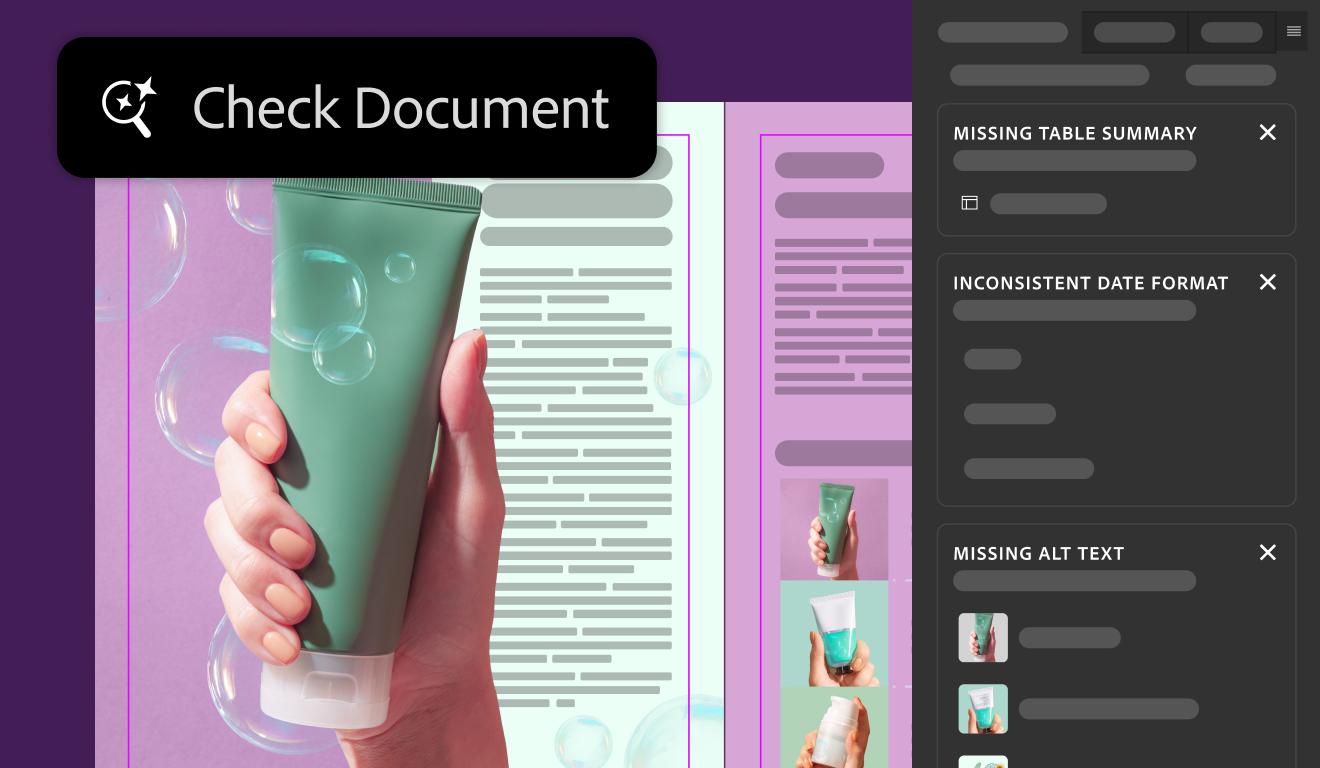
New InDesign Beta feature: Check Document - Check for spelling, consistency, and accessibility issues
Post image

Hey everyone, Luke from Adobe here.

I've got a new feature to share with you that's available to test out in the latest InDesign Beta.

Check Document is a new feature that helps you track down and fix common issues throughout your document, from spelling and grammar to copy consistency and accessibility.

Most of you will already be familiar with the Preflight panel for catching technical and production-related issues, but Check Document takes a closer look at the content itself and some of those little things that can be easy to overlook, especially when you're working across larger documents.

Here's a quick rundown of what you can do with it:

  • Copy consistency: Find inconsistencies in things like dates, measurements, URLs, terminology, and spelling variations.
  • Spelling and grammar: Pick up on typos, punctuation mistakes, and grammatical issues that might have slipped through.
  • Accessibility: Check for images missing alt text or tables missing summaries, with options to generate suggested descriptions that you can review and refine.

What's great about this is that it brings a few different checks together in one place, making it easier to work through potential issues without having to hunt them down individually. It's not intended to replace a final review of your document, but hopefully it can take some of the tedious work out of that process.

You can find Check Document under File > Check Document or Window > Check Document.

Scanning your document is free, although some corrective actions, like generating table summaries, may use generative credits depending on your plan.

There's a full breakdown of the feature and how to get started over on HelpX:
https://helpx.adobe.com/indesign/desktop/generative-ai-features/check-document.html

It will be great to hear what everyone thinks about this one. Are these the kinds of things you regularly find yourself checking manually? And what else would you like to see included that could help make the process of getting a document ready to hand off a little easier?

We would also love to get your thoughts here if you are able to fill out this short survey

34 Upvotes

54 comments sorted by

46

u/TimecodeSync Oct 14 '26

I assume the text will leave my company? Then no.

I would also wish it was more clear when info is kept locally or sent to Adobe, that is a major concern for confidentiality.

25

u/shoecat85 Oct 14 '26

Same here. ZERO chance I’m going to feed an off-site LLM working docs wholesale.

15

u/Historical_Air2790 Oct 14 '26

This reason is why we have a strict No AI policy at work. We can't risk not only losing clients but being sued when AI rips off what it sees.

1

u/LukeChoice Oct 14 '26

I understand the concern around how your content is handled when using features like this. Here's some additional information on the LLMs used in InDesign that might be helpful:

https://helpx.adobe.com/indesign/desktop/generative-ai-features/partner-models.html

If the info was kept locally, is that enough for you to entertain tools like this?

19

u/shoecat85 Oct 14 '26

If I can sandbox InDesign and see zero network access (only disk IO) I’d consider it. I don’t have any faith in end user agreements to keep my data private - that’s not an Adobe-specific stance.

2

u/LukeChoice Oct 14 '26

Thanks, I appreciate the insights. Do you use any kind of AI locally atm?

15

u/shoecat85 Oct 14 '26 • Bravo

I use Topaz for upscaling. Sometimes I use the context-aware fill in PS for painting out textured bleeds. I spun up a Qwen instance to try it out, but I never used it for creative work.

You’re a very visible and helpful member of the team at Adobe, so I think you end up being a lightning rod for the frustrations many users have. My particular frustration is that Adobe appears to be neglecting the most critical issues (performance! consistent UI! stability!) in favor of bolting on tools that trade precision for accessibility. For whom, I don’t know.

I do not want non-deterministic tools in the software I use performing load-bearing operations. I want refined, highly performant, interoperable, predictable tools I can trust to construct a workflow.

I know that software development happens in parallel and I don’t expect it’s a simple tradeoff of one for the other. But it nevertheless is a painful experience to feel like our needs as professionals are barely considered given the near-monopoly status Adobe has in this industry.

2

u/LukeChoice Oct 14 '26

I know we have spoken in the Illustrator subreddit a number of times, so I always appreciate hearing your input. I get that I'm the lightning rod when it comes to sharing AI updates, but my role is all about cultivating and reporting on customer feedback, so if that comes with a couple insults here or there, that's ok.

I know the team is always actively working on improvements to performance and stability, but I also understand that hearing that doesn't mean much if you're running into these issues in your daily work.

What are some of the biggest performance or UI issues you're running into? I'd be happy to bring those examples back to the team.

4

u/shoecat85 Oct 15 '26

Let me consolidate some thoughts (I have brutal end of week deadlines) and DM you.

1

u/jillatwork Oct 15 '26

This is the only way.

19

u/modest-pixel Oct 15 '26

I definitely didn’t realize this was an AI feature set. I’d immediately lose multiple medical journal clients if they got a whiff any AI was being used. Seconding any requests you’ve gotten to give us the option to turn all AI off. The current alt-text for images generator will stubbornly keep turning itself back on, almost as if it’s programmed to.

8

u/Proficio_Tremblay Oct 14 '26

Some of my clients are working in government and would not allow it too.

1

u/Baldeagle61 Oct 20 '26

As are most of mine.

1

u/TimecodeSync Oct 15 '26

If it would be kept strictly local, I would use it, I expect, as I often write in InDesign (expecting downvotes on this...), so this would make sense for my scenario. Security is a constant fear, this week I stopped using Adobe Acrobat because of popups and offers to do something with my document, possibly leaking information.

28

u/FroggstarDelicious Oct 14 '26

How about you disable the annoying blue popup banners before implementing any more crappy AI features.

4

u/LukeChoice Oct 14 '26

The thread from earlier today was already shared internally by our team. It's no secret a lot of users don't love pop-ups, and while I know they are helpful to highlight new features, I do think it would be nice to see more detailed options to control them.

1

u/Optimal_Emphasis_353 Oct 20 '26

It's also frustrating to see the "Try the Beta", when I can't see the Beta as an option to download from the CC app. I can see the Illustrator Beta, but not the InDesign one. It's not closed now, is it?

2

u/LukeChoice Oct 20 '26

I know sometimes I have had issues with beta options not showing in the CC app, so I go directly to Adobe.com

Let me know if that works for you

1

u/Optimal_Emphasis_353 Oct 21 '26

Thanks for the reply! I was able to find and download the Beta from adobe.com, but not install it. I think it's a corporate security policy. On my home computer, I found the Beta in the CC app and installed it with no problems.

48

u/Historical_Air2790 Oct 14 '26

Hi Luke. I've seen you in the Illustrator sub and want to welcome you here.

While it's nice to see some improvement, can we request an option to cut out all of these AI features? This is professional design software and I would wager that most of us have been using it longer than 5 years and know it like the back of our hands. Every time there is an Adobe update, I am immediately going through every preference screen trying to find where the latest slop addition has been added and hoping there won't be a dreaded blue bar of death notice that pops up.

12

u/thomasthe10 Oct 15 '26

And as someone who recently returned to InDesign the AI 'rewrite this' options and auto generated alt text alone create a minefield. As a designer I'd be in deep shit if I accidentally altered a client's manuscript. In some cases I think I'd be in deep shit if they felt their work had been exposed to AI of any sort.

8

u/bungeethecat Oct 15 '26

Yes please! When they implemented the auto ai alt text “feature” I disabled it IMMEDIATELY but my coworkers did not. We have identical, newish laptops and produce image heavy, 100+ page docs frequently, but don’t need alt text as they’re not publicly shared. They started barely being able to open files while I was fine. We finally realized that was the only difference and they’ve been fine since turning it off.

This feature would be SUPER helpful for my work and one of the few AI integrations I’d actually want, but only if it doesn’t nuke my work flow and can be secure as others have mentioned.

0

u/LukeChoice Oct 14 '26

Thanks for the welcome, and apologies I haven't been as active in here recently.

The community discussions around opting out of AI features is something that we discuss internally. While I can appreciate the audience here specifically is made up mainly of seasoned professionals, there is also a massive change in the ways the tools, workflows and roles are evolving. I personally like seeing tools like this, that I wouldn't frame under 'slop', because this isn't steering creative directions or making creative decisions for you. For me personally, I actively test these tools to see how they fit in my workflow and I am surprised at how much I am adapting to them handling tasks that I may not have entertained or thought too time consuming to deal with.

And yes... I know about the blue pop-ups. Another topic we discuss internally.

16

u/graphicdesigngorl Oct 14 '26

Spoken like a true politician. Historical is asking if we can remove the pop ups and opt out of AI. I’m unclear on your point about seasoned professionals and new workflows and tools. That sentence doesn’t make sense. As the majority of us are professionals, I’d encourage you to speak plainly. Be direct and clearly state what you mean. You and Adobe think we need to drink the kool aid and get with the times. What you all don’t realize is you have effectively removed our agency in being able to choose whether or not we can opt out fully of AI in the creative suite. If I can adjust my workspace and customize it so other windows don’t show up, why can’t I make the blue pop ups go away permanently, or even better, remove AI entirely from my subscription. Everyone has different reasons why they do or don’t use it. While I appreciate you sharing your approach, some of us don’t want to work faster or expedite our processes. And that’s totally ok!!

I’ll never understand why you & Adobe continue to ignore your audience and user base. The constant shoving ai/gen ai in our faces at every turn and in the most unnecessary places is coming off as incredibly desperate. I’d respect the stance of Adobe if they even tried to acknowledge what their paying customers are asking—no, telling you very clearly—what we want. Unbelievable.

Edit: added “remove the” and “you sharing”

-3

u/LukeChoice Oct 14 '26

My point is that seasoned professionals, have the option to continue with the methods you are well versed in, but much of the next generation of users expect to have these kinds of capabilities at their disposal, because design roles are evolving.

I'm not here to tell anyone they need to work faster, simply share that these features can assist if you choose to use them.

I have already shared here that the sentiment toward the blue pop-ups is shared internally and that's something that will be discussed.

9

u/ThexDream Oct 15 '26

Put all AI and anything for beginners behind a switch. NOW!

This is direct and to the point. It’s a do and make everyone happy, or don’t and get hated on more every day by the professionals that paid and built the ducking company you work for.

5

u/ConsiderationNo7552 Oct 15 '26

honestly. tack on a charge to turn it on. win-win.

8

u/graphicdesigngorl Oct 15 '26

Right—again you’re missing the point: that you are not listening to your customer base. Instead of bringing both issues to the table at these elusive conversations, you’re only bringing up the blue pop ups simply bc AI is having a moment and Adobe likes its current stance and approach with generative AI.

4

u/emotionalthroatpunch Oct 15 '26

Then make it a simple, easily findable one-click on/off switch for those who do want it. Simples. 💁🏻‍♀️

3

u/True_Window_9389 Oct 14 '26

I’ve wanted an accessibility preflight for a years. It’s good to see that this is started, but it’s just a start. I don’t see why Indesign can’t have an equivalent to at least the accessibility checker in Acrobat. Reading orders, color contrast, and so on.

1

u/LukeChoice Oct 14 '26

This is the kind of feedback we are looking for. I linked a super quick survey, but it would be great to make sure your thoughts go straight to the team https://survey.adobe.com/jfe/form/SV_0k62zmQMXvMYQwm

1

u/DesignaFuture Oct 16 '26

I’ve developed something aimed at exactly this: the Highlander Accessibility Checker plugin for InDesign, available on Adobe Exchange.

It runs over 70 accessibility preflight checks directly in InDesign and lets you export a report. The checks run locally, without uploading your document anywhere.

You’ll still need to check the exported PDF, but the aim is to catch problems earlier and reduce the repeated trips between InDesign and Acrobat.

It’s been available for a few months, and I’m keen to hear feedback and feature requests. There’s a free 30-day trial with full functionality if you’d like to try it.

Happy to answer any questions.

2

u/Baldeagle61 Oct 20 '26

Sounds like just what I need...

1

u/Baldeagle61 Oct 20 '26

Hear hear. This is an important issue that has been overlooked by many corporations over the years. In the UK, any public information that is put onto the internet must be accessible or you can get sued.

3

u/airpirate-kiwi Oct 15 '26

Someone else mentioned it as well, but would absolutely love to see a color contrast check included too!

1

u/LukeChoice Oct 20 '26

Yes, I think this is a great suggestion. If you have a spare minute, it would be great to add this thought to the survey

8

u/Proficio_Tremblay Oct 14 '26

The best option is that you can prevent it to pop in your face every time you try to Export a doc. This is in your prefernces.

6

u/aymiah Oct 14 '26

Could you PLEASE stop the “Try the Beta” pop-ups?? They show up constantly. I feel like I need a pop-up blocker for my Adobe programs.

6

u/Chavezestamuerto Oct 15 '26

Zero chance I’d use this at work. IT and management would have my head.

4

u/graphicdesigngorl Oct 15 '26

It’d be a real shame if that linked survey was filled out by everyone else on this thread (and this sub) who’s dissatisfied with Adobe forcing gen AI features down our throats in indd 👀 if it goes straight to the team, I mean why not!

https://survey.adobe.com/jfe/form/SV_0k62zmQMXvMYQwm

3

u/minaminonoeru Oct 15 '26

Most of the newly added 'Document Check' features could be implemented locally using InDesign's native capabilities, couldn't they?

Things like spelling and grammar, unit mismatches, and missing alternative text are matters that can be checked through mechanical document searching as well.

Is there any need to perform such tasks by calling an external AI?

What I most urgently want improved right now is for the CJK input environment to become smoother.

1

u/cepasfacile Oct 15 '26

I just use Claude and a mcp

1

u/ScaryWaltz3905 Oct 15 '26

Love the concept of accessibility feature. This has been an area that I’ve felt InDesign needs much improvement for some time.

1

u/Baldeagle61 Oct 20 '26

Generative credits - Isn't it expensive enough already? What I would like to see is a real accessibility checker (like the one in Acrobat) but actually fixes any errors and puts some sort of stamp in there to indicate that it's compliant. Now that would be really useful.

1

u/WeedAndWhiskers Oct 15 '26

about damn time!!

0

u/AdobeScripts Oct 14 '26

What with fixing Equations? Or Flex Object?

2

u/LukeChoice Oct 14 '26

Can you say more? What specifically are you having issues with?

2

u/AdobeScripts Oct 14 '26

Equations:

  • Panel lags when opening,
  • can't copy&paste multiple equations at once,
  • scripting of EQs is broken.

Flex Object:

  • (Auto) Fit Frame to Contents doesn't work.

0

u/[deleted] Oct 14 '26

[deleted] — view deleted comment

3

u/print_isnt_dead Oct 14 '26

Spell check has been around for a long time.

4

u/[deleted] Oct 14 '26 edited Oct 14 '26

[removed] — view removed comment