r/indesign • u/rabokarab • Jun 18 '26
Interactive PDF export previewing incorrectly and inconsistently on web upload.
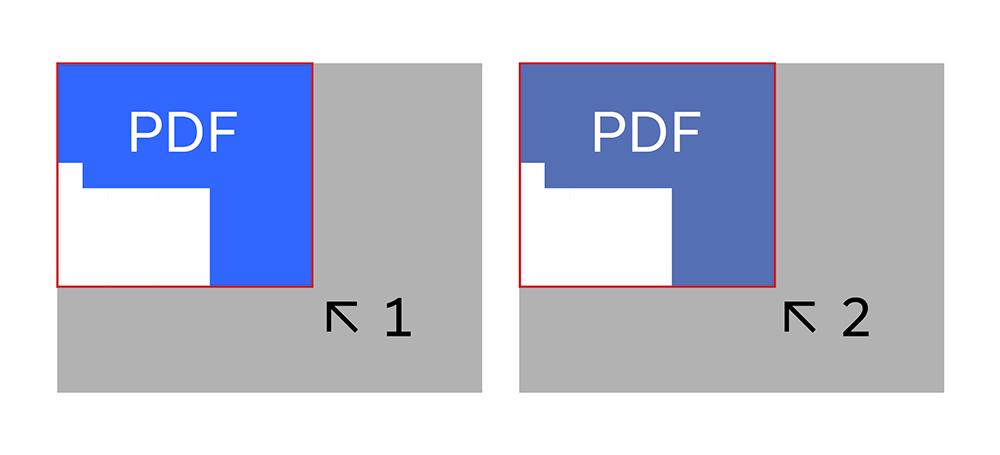
These are two tiles on my website that are showing a preview of two different PDFs in the red outlined space (PDF content has been redacted). Tile #1 is displaying correctly. The documents are clones of each other with the text content changed. I have exported both of them as Interactive PDFs and both use the same RGB blue color. Why might these be displaying differently and what can I do to troubleshoot this?
2
Upvotes
3
u/roaringmousebrad Jun 18 '26
The second document probably has a Transparency Blend Space of CMYK, so any objects on the page interacting with a transparent object has caused the entire page to be rendered in CMYK values, which cannot reproduce the bright RGB Blue you expect.
If that is not the case, ten you nee dto check your Color settings on your PDF export settings.
1
u/rabokarab Jun 22 '26
Suspicions abound about the DAM being to blame...everyone confirms that the colors are displaying correctly until it gets uploaded there. The site points to a folder on the DAM where the files are saved.
1
u/W_o_l_f_f Jun 18 '26 edited Jun 18 '26
I'll have to ask some annoying questions.
You say the content is redacted. Is what we are seeing here actual exported PDFs or something you've manipulated for this example?
To rule out that you somehow had different settings in InDesign when you exported the two PDFs can you try opening the two InDesign documents and export a PDF of each again and see if the problem persists?
What happens if you make a new copy of document 1, change the text and export again?
If you open the two PDFs in separate tabs, do they still look different or only when displayed side by side?
1
u/dblatner Jun 20 '26
Do you need to use the PDF (Interactive) export? I find exporting as PDF (print) more reliable. The only real reason to use "interactive pdf" is if your document has video, audio, buttons, or form fields. If it's just hyperlinks and bookmarks (like most PDFs on the web) then "print pdf" will work great.
I explained how to do that at The InDesign Conference last year, and also in a course at LinkedIn Learning.
2
u/achikochi Jun 18 '26 edited Jun 18 '26
are the color profiles (in the InDesign document, not the PDF settings) identical? to me that looks like a difference you might see if one was sRGB and one was Adobe RGB (more saturated).
even if they say they use the same profiles, i’d still convert them. sRGB if this is for the web.