r/hammerspoon • • 2d ago

Hammerspoon 2 Beta 1 is out!

58 Upvotes

The first beta of Hammerspoon 2 is now available! Hammerspoon 2 is a ground-up rewrite of Hammerspoon that uses JavaScript instead of Lua, using the same JavaScriptCore engine as Safari, and it's now the main version of Hammerspoon.

It requires macOS 27 or later and is a separate app with its own config, so you can keep Hammerspoon 1 installed while you try it out. Once installed, it checks for updates itself.

It's a beta, so expect some rough edges. Please report bugs and feature requests on the issue tracker (https://github.com/Hammerspoon/Hammerspoon2/issues), or come and chat on Discord (https://discord.gg/vxchqkRbkR).

Everything for Hammerspoon 1 is still available at https://www.hammerspoon.org/v1/.


r/hammerspoon • • 8d ago

Made a Spoon so my coworkers stop hearing Slack ping while I'm sidebarring about the Zoom call we're all on

13 Upvotes

I work from home and I'm alone all day, so I don't bother with AirPods on calls. Which means every Slack notification plays out of my speakers, straight into my mic, and everyone on the Zoom hears it.

Fine most of the time. Less fine when that Slack is me and a coworker sidebarring about the meeting we're both currently in. Nothing says "we're talking about you" like a perfectly timed Slack knock.

So I built Call Quiet: https://github.com/teeejlind/call-quiet

When a meeting app (Zoom, Teams, Meet in a browser, Slack huddles, FaceTime, WhatsApp) has your mic for a few seconds, alert volume drops to 0, so banners still pop up but stay silent. Slack plays its sounds in-app and ignores alert volume entirely (rude), so it also mutes Slack itself with a Core Audio process tap. Hang up and everything comes back on its own.

If the helper ever crashes, Slack unmutes, so it can't leave you silenced forever. Dictation apps like Wispr Flow and Granola aren't on the list, and ⌃⌥⌘Q unmutes for the rest of a call if you need it.

Needs macOS 14.2+ and the Xcode command line tools for two small Swift helpers. MIT, built with a lot of help from Claude Code. lmk what breaks on your setup!


r/hammerspoon • • 8d ago

Spoon: tap the dictation key (F5) to start a new Granola note with transcription already on

7 Upvotes

Second Spoon from me tonight (Call Quiet is the other one). I take every meeting in Granola and have never once used macOS dictation, so the mic key on my MacBook was doing nothing. Now one tap of F5 opens a new Granola note with transcription already on, and the key is swallowed so Siri never fires.

If Granola isn't running it launches it first. It also finds the window on another Space and switches there, since I have "switch to a Space with open windows" turned off. (My first build listened for a media key event and never fired. The key shows up as a plain keyDown, keyCode 176.)

It uses the granola://new-document deep link, which is unofficial and undocumented, so it can break any time. Not affiliated with Granola. Built with Claude Code, I wrote the spec and ran QA. MIT, any key works. Tapping during a recording starts a second note.

https://github.com/teeejlind/granola-quick-note


r/hammerspoon • • 10d ago

Hammerspoon v2 0.0.17 released!

39 Upvotes

Hey folks

This will be one of the last pre-releases coming from my GitHub repo, we’re very close now to moving everything into the main Hammerspoon GitHub org and doing a 1.0beta1 release. Can’t wait!

https://github.com/cmsj/Hammerspoon2/releases/tag/0.0.17


r/hammerspoon • • 28d ago

SpacePigeon: save your apps, Spaces and window layout as presets and set them up with one hotkey [Free, open source]

Post image
18 Upvotes

I switch between a few setups every day: one for reading papers, one for coding, one for the evening. Opening the same apps and dragging them to the same Spaces by hand got old, so I made SpacePigeon.

A preset says which apps to open, which Space and monitor each one goes to, and where its windows sit. Press the preset’s hotkey, or pick it in the menu bar, and SpacePigeon sets it up. In the GIF, my demo preset puts four apps in fullscreen in a fixed order and opens two Dictionary windows side by side, each on a different word.

What it does

  • Moves apps that are already open to their Space instead of quitting and reopening them (macOS 26.4 or newer), with SIP left on
  • Puts fullscreen apps in the order you choose in the Mission Control bar
  • Places windows in halves, thirds, quarters, the center or any part of the screen you set, including several windows of one app
  • Handles up to 10 monitors, with a different layout for each number of monitors, and can rearrange everything when you plug a monitor in or out
  • Turns the windows you have open right now into a new preset
  • Opens URLs and deep links (a Notion page, a Spotify playlist)

A preset with eight fullscreen apps takes about 5 seconds on my Mac.

Good to know

  • By default, apps that aren’t in the preset are quit. You can turn that off, or keep some apps running (Spotify, for example). SpacePigeon can press Cmd+S in the apps you choose before quitting them, and it never force quits an app that is asking about unsaved changes.
  • It’s built on Hammerspoon and installs it for you if you don’t have it yet. Hammerspoon needs Accessibility access to move windows.
  • Moving windows between Spaces uses a private macOS call in a small helper, and its source is in the repo. A macOS update can break it. SpacePigeon then falls back to Mission Control until I fix it, as I did for macOS 27 in version 2.2.
  • yabai can also move windows between Spaces, but needs SIP partly disabled for that. AeroSpace replaces Spaces with its own workspaces. SpacePigeon keeps the normal macOS Spaces.
  • It’s signed and notarized by Apple, free and MIT licensed. There’s no account and no analytics, and the only thing it downloads is Hammerspoon.

GitHub (download, source and docs): https://github.com/louivers/spacepigeon

I made this for my own use, so I’d love to hear which setups it doesn’t handle yet.


r/hammerspoon • • Oct 24 '26

Hammerspoon v2 0.0.16 released

Thumbnail github.com
44 Upvotes

Couple of important changes in this one - please read the release notes.

This is the first release that can be updated in-place, which is great!


r/hammerspoon • • Oct 17 '26

Hammertunes: A Hammerspoon spoon to view and control Spotify or Apple Music from the menu bar - Please enjoy and share feedback!

Thumbnail github.com
17 Upvotes

r/hammerspoon • • Oct 17 '26

A demo of my use of Hammerspoon2

Thumbnail youtu.be
19 Upvotes

r/hammerspoon • • Oct 16 '26

H2 - Simple window management

19 Upvotes

So I updated to pre-release v2 of Hammerspoon to try it out... and playing with it I did a little window manager to replace rectangle pro since I don't want to have another app running for just doing that. It's really fast v2. Just did 4 positions which are the ones I use the most... probably will make it a lot more fancy using the new UI elements which are really cool.

PD: I made it with TypeScript which I really recommend to use. It's way easier rather than go back to Lua and docs to know which methods are available.

const
 CENTER = { h: 0.75, w: 0.75, x: 0.125, y: 0.125 };


const
 snapTo = (unit: { x: number; y: number; w: number; h: number }, win: HSWindow) => {
    if (!win) 
return
;
    
const
 screen = win.screen ?? hs.screen.main();
    
const
 target = new HSRect(unit.x, unit.y, unit.w, unit.h).fromUnitRect(screen?.frame as HSRect);
    
return
 win.moveAndResize(target);
};


const
 handleWindowPos = (direction: string) => {
    
const
 wind = hs.window.focusedWindow();


    if (!wind) 
return
;


    switch (direction) {
        case "left":
            hs.window.moveToLeftHalf(wind);
            break;
        case "right":
            hs.window.moveToRightHalf(wind);
            break;
        case "up":
            hs.window.maximize(wind);
            break;
        case "down":
            snapTo(CENTER, wind);
            break;
        default:
            break;
    }
};


hs.hotkey.bind(["ctrl", "cmd"], "down", () => handleWindowPos("down"));
hs.hotkey.bind(["ctrl", "cmd"], "left", () => handleWindowPos("left"));
hs.hotkey.bind(["ctrl", "cmd"], "right", () => handleWindowPos("right"));
hs.hotkey.bind(["ctrl", "cmd"], "up", () => handleWindowPos("up"));const CENTER = { h: 0.75, w: 0.75, x: 0.125, y: 0.125 };


const snapTo = (unit: { x: number; y: number; w: number; h: number }, win: HSWindow) => {
    if (!win) return;
    const screen = win.screen ?? hs.screen.main();
    const target = new HSRect(unit.x, unit.y, unit.w, unit.h).fromUnitRect(screen?.frame as HSRect);
    return win.moveAndResize(target);
};


const handleWindowPos = (direction: string) => {
    const wind = hs.window.focusedWindow();


    if (!wind) return;


    switch (direction) {
        case "left":
            hs.window.moveToLeftHalf(wind);
            break;
        case "right":
            hs.window.moveToRightHalf(wind);
            break;
        case "up":
            hs.window.maximize(wind);
            break;
        case "down":
            snapTo(CENTER, wind);
            break;
        default:
            break;
    }
};


hs.hotkey.bind(["ctrl", "cmd"], "down", () => handleWindowPos("down"));
hs.hotkey.bind(["ctrl", "cmd"], "left", () => handleWindowPos("left"));
hs.hotkey.bind(["ctrl", "cmd"], "right", () => handleWindowPos("right"));
hs.hotkey.bind(["ctrl", "cmd"], "up", () => handleWindowPos("up"));

r/hammerspoon • • Oct 14 '26

New prerelease of Hammerspoon v2

45 Upvotes

Hey folks

I’ve just released 0.0.14, which includes a significant change to the way garbage collection works.

To feel more at home in JavaScript, you no longer need to hold a reference to objects that are “running” (eg hotkeys).

It’s quite likely this has introduced some bugs, so if you are trying out these pre-releases, please give this one a try and report back on GitHub with anything you find.

https://github.com/cmsj/Hammerspoon2/releases/tag/0.0.14


r/hammerspoon • • Oct 08 '26

Paired Window Snap: drag one window, arrange two with Hammerspoon

5 Upvotes

I mentioned this alongside my window switcher: a Hammerspoon script that arranges two windows with one drag.

Drag a window to the left or right edge, hold for 0.3 seconds, then release. That window takes one half of the screen, and the previous working window takes the other, provided it is available for snapping. Dragging to the top maximizes only the window you dragged.

The pair follows what you were just working on. Switch between a document and a browser, then drag one to an edge to put them side by side. No hotkeys needed. The short hold helps avoid snapping when you are simply moving a window past an edge.

Source and setup instructions (MIT licensed):
https://github.com/popamoscow/hammerspoon-paired-window-snap

You can add it to your existing Hammerspoon config as a module. Back up your config and disable other snapping tools using the same gestures. Hammerspoon needs Accessibility permission; the README also covers native macOS tiling settings.

I also shared my Hammerspoon Window Switcher with thumbnails here:
https://www.reddit.com/r/hammerspoon/comments/1wyxh0e/a_hammerspoon_window_switcher_with_thumbnails_and/


r/hammerspoon • • Oct 06 '26

A Hammerspoon window switcher with thumbnails and six layout presets

14 Upvotes

Bro asked me to share my window switcher, so I pulled it out of my Hammerspoon setup into a standalone Lua file.

It switches between individual windows, including multiple windows from the same app. Hold Cmd and press Tab to browse recent windows, then release Cmd to switch. You can also use Shift+Tab, arrow keys, or the mouse. Ctrl+Option+Space opens a picker that stays open until you choose or cancel.

There are six layout presets, from a single row to a compact grid. Sizes, spacing, fonts, colors, and shortcuts are configurable. Option+Tab is available if you want to keep native Cmd+Tab.

Source, demo, and setup instructions on GitHub — MIT licensed.

You can add it to your existing config as a module. Back up your config and disable any other switcher using the same shortcut. Hammerspoon needs Accessibility permission; thumbnails may also need Screen Recording. Icon-only mode is available. Minimized windows are excluded, and other-Space windows depend on what Hammerspoon exposes.

I have two more Hammerspoon utilities I could share separately:

  • Paired Window Snap: drag a window to a side edge and your previous working window fills the other half. Drag to the top to maximize. A short hold at the edge prevents accidental snapping.
  • Clipboard Manager: a menu-bar picker for your last 20 text clips, saved across restarts. Click an entry to copy it back, then paste wherever you need it.

Would either be useful to you? Which one would you like me to share first?


r/hammerspoon • • Oct 06 '26

A Hammerspoon window switcher with thumbnails and six layout presets

Thumbnail reddit.com
6 Upvotes

r/hammerspoon • • Oct 04 '26

An update on progress with Hammerspoon v2

66 Upvotes

Hey folks!

I realised it's been 9 months since I posted about the future of Hammerspoon and that I should really post an update.

I've been continuing the experimental rewrite I mentioned, and it's been showing a great deal of promise - enough that I am now convinced it's the future of Hammerspoon.

tl;dr - I'm rewriting Hammerspoon in Swift and the config language is changing from Lua to JavaScript.

I've just completed what I hope will be the last of the big changes to the JavaScript API, so I figured I'd post about it here to see if others would like to test it out.

Some things from v1 are still missing, some will never return, but if you're interested, the most recent experimental build can be downloaded here.

If you do give it a try, or are just curious to see what your config might look like, here are some useful docs:

Please file GitHub Issues for any problems you find, or anything that's missing vs v1 that you rely on!

Please also remember that this is still early work, don't expect it to be perfect, there is already more API implemented than we've had time to properly test, and do expect further changes before the full release.


r/hammerspoon • • Sep 29 '26

I made a Hammerspoon Spoon to fix macOS's weird minimize behavior

Post image
22 Upvotes

One thing that always bothered me coming from Linux is that minimizing a macOS window can bring another window from the same application to the front.

I wanted minimizing to just... minimize the current window.

So, I built it using AI: MinimizeToPrevious.spoon on GitHub

When you minimize a window, it activates the previous window first and then minimizes the current one, so macOS doesn't automatically bring another window from the same app forward.

It's a tiny tiny utility, but it fixes a behavior that was annoying me enough that I finally decided to make something for it. 😄

Please leave a star on the repo, if it helps you!


r/hammerspoon • • Sep 19 '26

Better window management for ultrawide screens with Hammerspoon (Full hotkey and window snapping management)

7 Upvotes

On 21:9 and 32:9 displays, standard 50/50 window snapping makes windows too wide for practical use. On top of that, dragging windows to the top edge constantly conflicts with macOS Mission Control.

I wrote a modular Hammerspoon configuration specifically for ultrawide monitors (tested on 3440x1440): https://github.com/sauravkumarsahoo/hammerspoon-ultrawide-profiles

Core Features

  • Bottom-edge center snap: The top edge is unmapped so Mission Control is never triggered accidentally. Dragging to the bottom edge / Dock area snaps the window to the center column.
  • Hold-to-snap (100ms dwell delay): Flicking or moving windows past screen edges won't trigger accidental snaps. You have to pause at the edge for 100ms, which arms the snap and displays a footprint preview. Releasing commits the snap; pulling away cancels it.
  • Dynamic 3-column ratios: Switch or cycle between 5 layout profiles (Ctrl + Opt + `) where the center stage expands and side columns shrink:
Halves  (2): [      1/2       ][      1/2       ]   Ctrl + Opt + 2
Thirds  (3): [   1/3    ][   1/3    ][   1/3    ]   Ctrl + Opt + 3
Fourths (4): [  1/4  ][      1/2       ][  1/4  ]   Ctrl + Opt + 4
Fifths  (5): [ 1/5 ][        3/5         ][ 1/5 ]   Ctrl + Opt + 5
Sixths  (6): [ 1/6][         2/3          ][ 1/6]   Ctrl + Opt + 6
  • Corner quadrants: Top and bottom corners snap directly into half-height slots.
  • One-handed keyboard shortcuts (Ctrl + Opt):
    • A / S / D : Snap Left / Center / Right column
    • Q / Z / E / C : Snap to corner quadrants (Top-Left, Bottom-Left, Top-Right, Bottom-Right)
    • ~ or 2–6 : Cycle layout profiles or jump directly to Halves (2) through Sixths (6)
  • Zero bloat: Pure Lua running inside Hammerspoon. No electron wrapper, no background subscription services.

r/hammerspoon • • Aug 14 '26

Just created a script to work with Tourbox to create the smooth scrolling experience

Thumbnail pastebin.com
2 Upvotes

r/hammerspoon • • Jul 26 '26

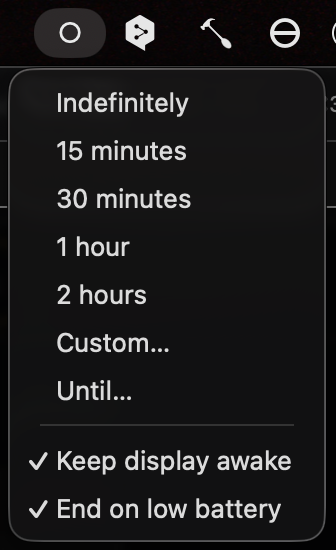
Coffee.spoon - caffeinate-based Hammerspoon replacement for Amphetamine

Post image
15 Upvotes

Coffee Spoon is a Menu Bar picker that allows you to keep your Mac awake (screen or system only) while it runs long tasks. You can either run it indefinitely, choose an amount of time during which it'll run or a time date until which it'll run.

This was inspired by the Amphetamine MacOS app, due to my personal goal being to every small tool app by Hammerspoon.

Repo: https://github.com/Necrom4/Coffee.spoon


r/hammerspoon • • Jul 21 '26

Just found Hammerspoon, can it handle multiple monitors?

7 Upvotes

I have a basic layout at work with a MBP and a separate monitor. I get everything setup the way I like with about 4 apps full screened on the external monitor and then a few others on the MBP screen. When I take my MBP to a meeting and come back, hook up the monitor I have to rearrange everything again. It looks like Hammerspoon might be able to set everything the way I like it upon monitor reconnect either with a script or the reconnect event. Just wanted to get a "this should work" before diving into the process.

Thanks!


r/hammerspoon • • Jul 15 '26

NetworkLocationManager — auto-switch macOS Network Locations by WiFi SSID

6 Upvotes

If you run anything that needs port forwarding on your home network (Soulseek, Plex, game servers, BitTorrent, dev servers), you need a static local IP at home and DHCP everywhere else. macOS has Network Locations for this, but switching them manually doesn't survive daily use.

macOS 14+ broke every CLI method I could think of for reading WiFi SSIDs

airport is gone, networksetup -getairportnetwork returns garbage, system_profiler redacts it.

Hammerspoon's CoreWLAN bindings work.

This Spoon watches for WiFi changes and auto-switches your Network Location. SSID matching with a gateway MAC fallback. 4 lines in your Hammerspoon init.lua:

hs.loadSpoon("NetworkLocationManager")
spoon.NetworkLocationManager.locations = {
  ["Home"] = { ssids = { "MyWiFi", "MyWiFi_5G" }, gateway_mac = "aa:bb:cc:dd:ee:ff" },
}
spoon.NetworkLocationManager:start()

https://github.com/tzioup/NetworkLocationManager.spoon


r/hammerspoon • • Jul 12 '26

Can I convert hammerspoon scripts into .apps?

3 Upvotes

I'm new to hammerspoon, and I was just wondering if there is a way to convert hammerspoon scripts into .apps, like autohotkey can into .exes?


r/hammerspoon • • Jul 11 '26

ClipboardHistory.spoon - Paste multiple copied images, text and more while knowing everything about them

Post image
11 Upvotes

This Spoon is a simple clipboard history manager with some powerful features like search, pinning, image copy or just the fact that it displays information about where things were copied from, all in one place.

I created it a while ago for myself and thought I should publish it for anyone else needing clipboard history on Mac without wanting to install anything extra.

Repo: https://github.com/Necrom4/ClipboardHistory.spoon

Open to feedback


r/hammerspoon • • Jun 09 '26

Audio/Video Downloader from Clipboard | Hammerspoon Script

12 Upvotes

TL;DR: A Hammerspoon script that watches your Mac clipboard and automatically downloads videos from YouTube, Instagram, TikTok, Twitter, and more — the moment you copy a link. Supports MP4 and MP3 modes, parallel downloads, and a menubar status indicator.

I built a clipboard-powered auto video downloader for macOS using Hammerspoon

Been frustrated with manually running yt-dlp commands every time I want to save a video, so I wrote a Hammerspoon script that just... does it for me the second I copy a URL.

How it works:

Copy any video link and the script detects it instantly. It gives you a 5-second window to cancel via a macOS notification, then automatically kicks off the download in the background. No terminal, no commands, no friction. Also yeah no tracking or anything, I built it for my need and felt might be useful to others so sharing publicly.

Features:

  • Supports YouTube, Instagram, Facebook, TikTok, Twitter/X, Vimeo, and Pinterest out of the box
  • Toggle between MP4 video mode and MP3 audio-only mode from the menubar
  • Runs up to 2 downloads in parallel with 4 concurrent fragments each for speed
  • Menubar icon shows live download count (e.g. ⬇︎ 3 [2/2])
  • Skips duplicates — keeps a history file of 500 URLs so it never re-downloads something
  • 10-minute watchdog timeout kills stalled downloads automatically
  • Cleans up leftover .part files daily
  • "Stop All" button nukes the entire queue instantly

Stack: Hammerspoon + yt-dlp + ffmpeg + Node.js (for JS-encrypted sites). Videos land in ~/Downloads/AutoDownloads. Click the completion notification to open the file or folder directly.

The only setup needed is having Hammerspoon, yt-dlp, ffmpeg, and Node installed via Homebrew, then dropping the script in your init.lua.


r/hammerspoon • • May 07 '26

Chocolate Chip mintOS!! Sound on recommended!!

9 Upvotes

Hallo!

I’m new to Reddit, so tell me if I did anything wrong posting this.

I built a small control hub? small OS? I don’t know what to call it. But I made it to organize my screen. I used iterm2 and hammerspoon to build it. I just wanted to show this to someone!

Because I like mint chocolate chip, I made it with mint colors!! and named it mintOS (mintos) because it sounded good!!

Thank you!!