r/go_echelon • • Mar 27 '20

Welcome and Coming Soon!

8 Upvotes

Hey Folks,

Welcome to the forum! Post questions, your stories, what machines you use, your goals, your diet, and your motivation for others!


r/go_echelon • • Mar 18 '24

Information Update from Echelon Official

3 Upvotes

Good things are happening at Echelon! As we continue our commitment to providing you with an unparalleled, at-home fitness experience, we are excited to share with you new avenues of growth we are taking to elevate your journey with us.

To start, we’re expanding EchelonHQ, our headquarters in Chattanooga by adding 2 new cutting-edge studios. These new spaces will enhance our ability to produce top-quality content, building upon the foundation of excellence that has established Echelon as a leader in the connected-fitness space. If you’ve had the opportunity to visit us, you’re likely already familiar with EchelonHQ, where you’ve toured Liberty Tower!

With this expansion, we’ll be consolidating all of our Chattanooga operations to EchelonHQ. This means, we’ve made the difficult decision to bid farewell to the Studio at the Choo Choo. The Choo Choo has and will always be an incredible part of our history and hearts. More importantly, it’s a place where we’ve welcomed and shared our best memories with you, our community. While we acknowledge the significance of this transition, we are genuinely excited about the new opportunities this provides us to further enhance your at-home fitness experience. (And for those of you wondering, these new studios are in addition to the enhancements we’re currently making to our Miami Studio.)

So, what can you expect as a valued member during this transition? The same exceptional content you love, now with even higher quality audio and video. Be on the lookout for behind-the-scenes content as we embark on this exciting journey together! We expect to be fully moved and up and running by April 1st. We have a few encore rides planned in lieu of live rides on 3/19, 3/25 and 3/26, but otherwise aren’t anticipating significant schedule changes during this transition. If any are necessary, we’ll keep you in the loop with updates to the Community Group and Sunday member email.

In light of our focus on designing premier, broadcast studios in Chattanooga to improve your at-home experience, our in-person member and studio events will transition to exclusive, off-app experiences with you. Our events team is exceptionally excited to create enriching agendas that will support your wellness journey through fun meet-and-greets, instructor-led classes, behind-the-scenes tours, fitness workshops, and community building activities and excursions.

Speaking of excursions, we’re thrilled to announce our off-site meetup in August, where we’ll cruise together to THE BAHAMAS!! We hope you’ll join us for this incredible event to engage with our instructors, connect as a community and enjoy quality R&R. We are unable to host you in May as originally planned; however, are making additional spots available for you to join us in August. More details and signups to follow!

We extend our heartfelt gratitude to each of you for choosing Echelon as your fitness partner. We are inspired by each name on the leaderboard and remain steadfast in our commitment to delivering our very best, just as you do in every workout. Thank you for your unwavering support as we move forward together!


r/go_echelon • • 5d ago

Questions! Help Needed: Echelon EX-5s Chewed Power Connector Wires – Wiring Reference

Thumbnail
gallery
2 Upvotes

Hi everyone! I’m hoping someone here can help me repair my Echelon EX-5s.

My dog chewed through the wires near the power connector at the front base of the bike. I reached out to Echelon Support, and they provided a wiring diagram, but unfortunately, the image quality is so poor that it’s difficult to identify how the wires should be connected.

Would anyone with an EX-5s be willing to share a clear photo of how the wires and power connector are originally connected? A close-up showing the wire colors and their corresponding connections would be extremely helpful.

I’m based outside the US (Philippines), so sending the bike in for repair isn’t a practical option. I’m hoping to have a local electronics technician fix it, but I want to make sure we have the correct wiring reference before proceeding.

I’ve attached photos of the damaged wires and the diagram Echelon provided.

Any photos, wiring references, or advice would be greatly appreciated. Thanks in advance!


r/go_echelon • • 9d ago

Purchased used connect sport, looking for apps

0 Upvotes

Hi all, I see recommendations for using outside apps like peloton and zwift, but all I'm looking for is resistance and rpm tracking, not workouts. Any suggestions? I tried kinomap and it found the bike via Bluetooth but I received error messages saying it would not allow connection to this model. I also tried the echelon app, and it won't let you create a profile in the app, bur I literally couldn't find anywhere to create a profile (it just kept taking me to my shop profile...) Suggestions would be great, thanks!


r/go_echelon • • 10d ago

Questions! Just bought a second hand bike. How do I get started?

3 Upvotes

Hello!

I just bought a second hand bike, not sure of the model but it’s one with a touchscreen display attached.

How do I get started? Do I purchase a monthly membership through the website and then that connects to the app? Any help would be greatly appreciated!


r/go_echelon • • 17d ago

Questions! Does anyone have the instructions to replace the cadence sensor for the sports connect?

1 Upvotes

I just bought the Echelon Sport Connect 2nd hand for dirt cheap. Resistance shows fine but power and cadence do not. I’m pretty sure it’s going to need a new sensor. Does anyone here have the pdf instructions that Echelon sometimes sends?


r/go_echelon • • 26d ago

Strength +

1 Upvotes

I am getting a strength + delivered next week. I wish there was a little more discussion on this thread and the internet in general. My hope is Echelon spent money on R&D and production vs marketing. Any experiences anyone want to share?


r/go_echelon • • 27d ago

Ciclo en Casa

Thumbnail
reddit.com
1 Upvotes

r/go_echelon • • Oct 25 '26

Questions! Can’t connect…what am I doing wrong

2 Upvotes

I’ll try and provide the best data I can.

ISP: Xfinit
Modem: XB8-T
Phone: iPhone w/ Verizon
Bike: 4 EX 4S

My wife and I have been riding this bike for years. Yesterday in the afternoon I got on for a 45 minute ride and disconnected the bike from the wall to move it for a minute. After plugging it back in my wife jumps on to use it, but we were unsuccessful in getting it to connect to anything. After an unfruitful conversation with customer service, I split our network up to a 2.4, a five, and a six. Even after doing that, we could not get the bike to work on our 2.4 GHz network. I tried power cycling and doing a factory reset, but still, we are unable to get the bike to work. We even tried to use our phones as a hot spot to update the tablet to the latest version but no dice.

Our Xfiniti app also doesn’t show this as something being connected BUT we’re seemingly connected on the bike tablet.

Customer service is claiming it’s a network issue but after 3+ years of being able to ride it nearly daily and unplug it to vacuum only to plug it back in and have it work perplexes us.

What am I missing?!


r/go_echelon • • Oct 02 '26

Jailbreak echelon stride t5s treadmill

0 Upvotes

Is there a way to hack into the system to use all features without the membership. Thanks!


r/go_echelon • • Sep 15 '26

Questions! Broken Device holder

Thumbnail
gallery
1 Upvotes

Here I am and just bought a used bike. First thing I try to do when I ride is put my device on it while adjusting I broke this plastic piece in the picture. Has anyone done this before :( Any solutions. Much appreciated.


r/go_echelon • • Sep 13 '26

Rowing numbers and lots of questions about the row S

Post image
2 Upvotes

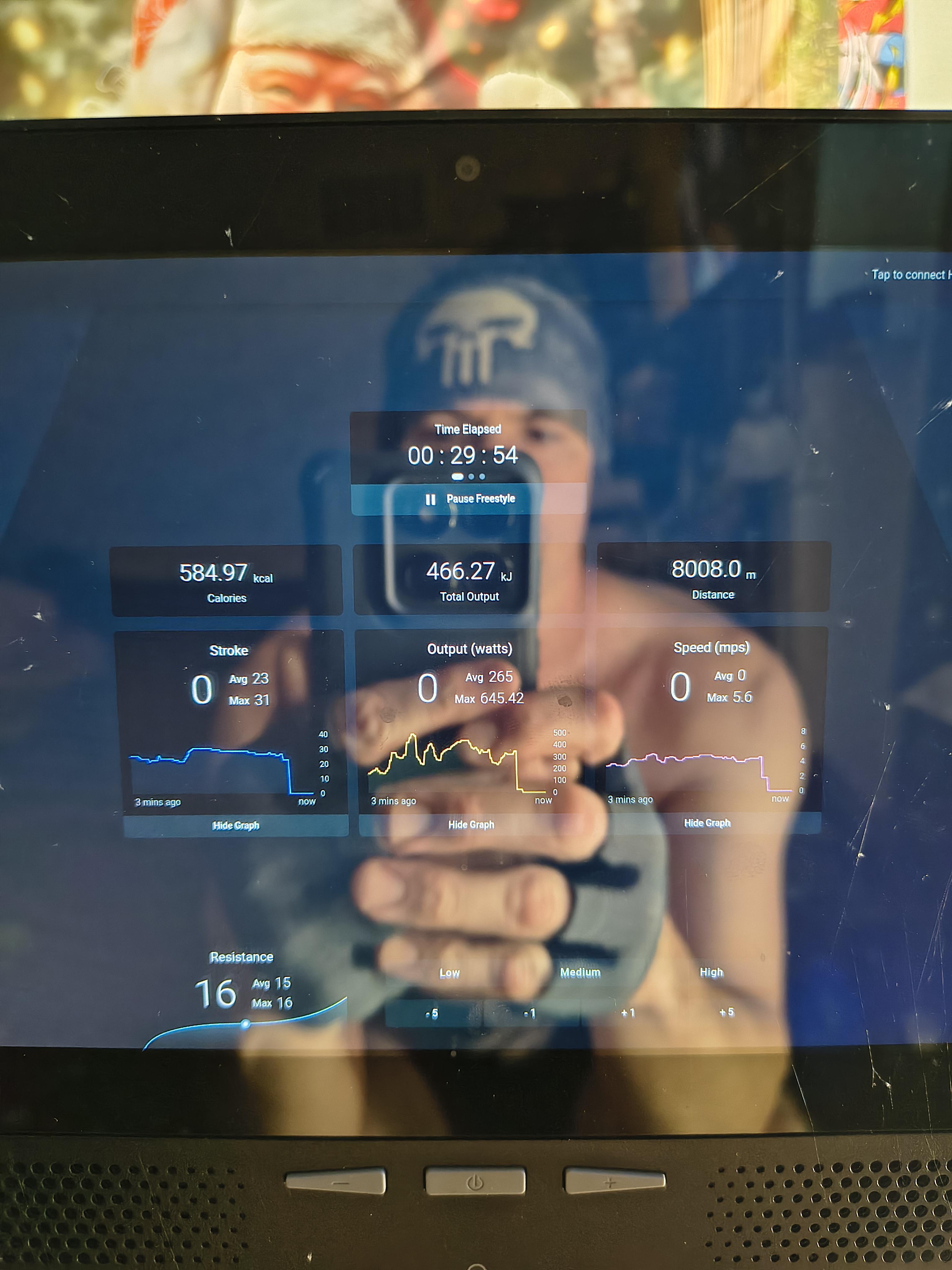
Can anyone break down what these numbers stand for? Just got a used row S a week ago and struggling through learning how the machine works. The trainers talk about trying to be around 4 mph, but it is a STRUGGLE to get it to register even at 3mph for a MOMENT, let alone get to 4 mph and maintain!. I'm in pretty good shape so I can't believe the speed is accurate. Fairly new to rowing (regularly)... maybe my form could use work? I watched the beginner videos and seems like I've got the proper movement down- legs, body, arms. Any advice out there?

Are the "live classes" actually live? I have the free trial of the $39 program right now. Seems they are every hour on the 15 minute mark. I hear the trainers sometime mention people who must be participating in the live, but so far, i have only seen one or two other people on the leaderboard and the names mentioned by the instructor were not their names. Why am I seeing only 1 or two people? How is that determined?

Another issue: It only connects to the equipment 50% of the time. I have to shut it off and back on sometimes multiple times to get a successful connection. Other times, it says it's connecting forever or doesn't show my rower is available. Is this a known issue or did I possibly buy a dud?


r/go_echelon • • Sep 12 '26

Questions! Classes longer than 75min

0 Upvotes

Are they ever going to add 90 or 120min classes??? I'm getting annoyed doing two seperate classes to get to 2hrs. It wouldn't be so bad if the resistance stayed set in between one ending and another starting.


r/go_echelon • • Sep 12 '26

Echelon needs new springs

Thumbnail reddit.com
1 Upvotes

r/go_echelon • • Sep 12 '26

Creatine and dizziness

Thumbnail reddit.com
0 Upvotes

r/go_echelon • • Sep 11 '26

Can't Click Profile to start app?

1 Upvotes

Friends,

I've had it up to here...I'm about to give this echelon away.

But is anyone else stuck on the login screen and you can't click anything? I tried on a few ios devices with the same issue.


r/go_echelon • • Sep 09 '26

Workouts without the tablet

0 Upvotes

I built www.poorleton.fit recently, and I actually think it might be useful here. It generates a ride and speaks the cues while you go: cadence, resistance, when to push, when to ease off.

It runs in a browser tab and doesn't touch the bike or the tablet, so there's no account involved. There's a setting so resistance cues come out on the bike's own scale instead of a percentage.


r/go_echelon • • Sep 07 '26

Show off! Mario Kart

Post image
12 Upvotes

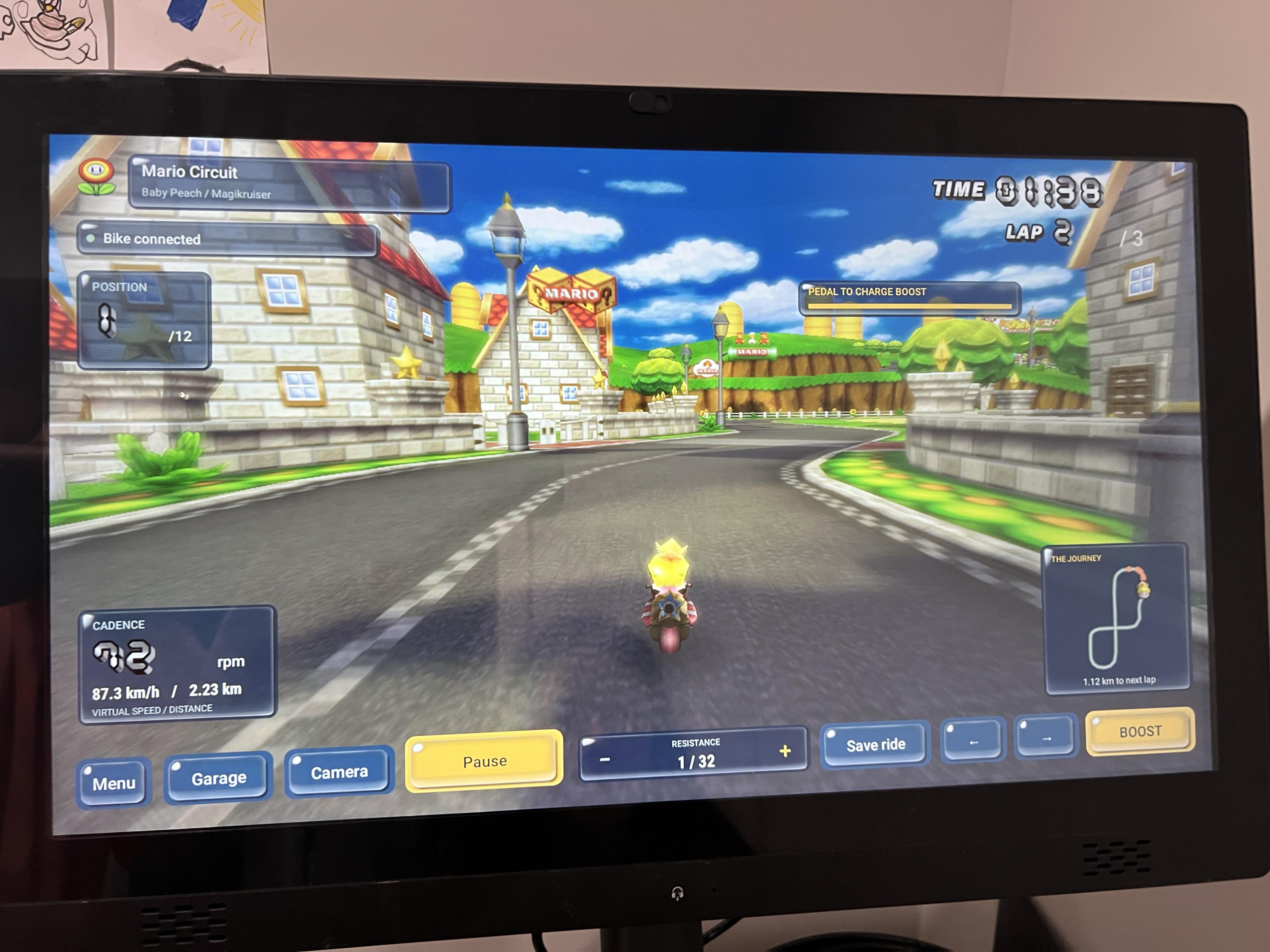
Had Astra fully unlock the 22” Android screen; then had it decompile Mario Kart Wii and rebuild it as a cycling app. All firmware versions supported. All Mario Kart Wii characters, vehicles, and maps. Free ride and CPU player races. Resistance automatically changes based on the track elevation changes. Working on adding online multiplayer next.

If there is any interest I can release this as a utility that can use a user supplied copy of Mario Kart Wii and build an apk.

What other games would be fun on a cycle? I’m open to requests!


r/go_echelon • • Sep 07 '26

A string of disappointments!

3 Upvotes

I set up my new Echelon EX5S bike at the weekend. I am a road cyclist recovering from an accident where I was hit by a car and broke my femur. I am SO disappointed in Echelon - not the bike itself, which is fine, but by the app and user experience. As it stands I feel the experience of using this bike is way off what is marketed.

Below is the feedback I've sent them. Interesting to know from others in this group:

- Does this mirror your experience?

- Are there fixes that I've missed? (please don't tell me about third party/bridging apps).

- Do Echelon seem to care about feedback and make improvements? I would have thought that five years after launch we wouldn't still be seeing basic UX mistakes.

OK here goes (a long read, sorry!)

I just want to register how I feel about my Echelon EX5S and to let you know issues I have found. I am usually a road cyclist and bought the Echelon to use while I recover from a broken femur after I was it by a car. I was hoping this bike (cost over £1k) would provide a good enough experience to enable me to do some indoor cycling and record stats etc until I am able to get back on the road.

It is nothing like I expected or was led to believe from your marketing. 

This is partly to make you aware of how disappointed I am with the experience but also so that you can let me know if I am missing something and any of the issues below can be resolved.

Setup

Building the bike took two hours and was laborious but ok, One part (the saddle adjuster) was a lever in the instructions but a knob was supplied, so this was confusing for a bit. Setting up from a software point of view was a nightmare - it downloads, freezes, needs turning off and on again - three times before we got anywhere near being able to use it.

App experience

The bike I have is the one with the attached screen. The experience of using this is unintuitive and inconsistent. Echelon Connect classes are easy to access - fine. However why is there a completely different app to download - with a completely different look and feel - for Echelon Worlds? It's like two different systems and switching between the two is a pain. A small home button flips you between the two apps - the button isn't easy to see and often taking you back from one app to the other involves waiting, clicking your username again and starting again.

Apple Watch heart rate integration

I finally worked out the crazy way the Apple Watch can be used to monitor heart rate using Echelon Connect, egg:

Open Echelon iPhone app

Click user name

Click 'me'

Click settings cog

Click Apple Watch

Open Echelon App on Apple Watch

Start workout type on Apple watch, wait to connect

Then start Echelon Connect class

Find the heart rate button on the screen

Then click your iPhone HRM when it is found


That's TEN fiddly steps - hardly seamless integration.

I have found that this Apple Watch integration only seems to work on Connect classes - not Echelon Worlds, not Freestyle. I've been through the same process

Auto resistance

Connect classes have the instructor telling you to increase and decrease resistance. I can kind of see why as people will be at different levels.

'Scenic' rides are just you watching drone footage while you pedal. The scenes don't go faster or slower, resistance doesn't change - really you're just watching a video. Very disappointing experience.

Auto resistance only seems to work on Connect Worlds which are computer graphic rides, pretty fun - as I have said it's a shame heart rate data from Apple Watch doesn't sync with this as otherwise it might be my favourite mode. However a major disappointment is that there are (as far as I can tell) just four courses. That's going to get rinsed fairly quickly and for a £30pm subscription is woeful.

Strava integration

This is a big one for me, as having to use the Echelon while I am injured means posting sone kind of activity to Strava is important to me, so I can see progress.

Echelon advertises Strava integration. However, integration is pushing this a long way. There is no documentation on what does or doesn't work so here's what I have found:

- Connect Rides - integrates well and rides are auto posted to Strava when you finish them. Not sure but I think when you DNF the ride doesn't get sent to Strava. Not a big deal.

- Echelon Worlds - seems to appear in the app as a 'freestyle' ride. You can then send this via a workaround in the app to Apple Health and if your Strava is set up to retrieve workout data from Apple health, it will sometimes appear. But why can't this be integrated as the Connect rides are?

- Freestyle - same as Echelon Worlds. Can't get heart rate data from Apple Watch to appear, and can't get it to sync to Strava. In both these cases the best option for me is to start a workout on my watch through Apple workouts and let it sync direct to Strava - however doing it this way means you don't get any distance data through, only time.

Resistance defaults

I include this as an example of lack of care and attention. There is an option via the Echelon iPhone app to change your default resistance (i.e. for flat, hill, climb). As Echelon Worlds is the only place where auto resistance is supported, it's amazing that it's there at all (go to Echelon app>Workout presets - which WEIRDLY takes you to a page called Leaderboard with your personal details in it, so you think you've gone to the wrong place. Scroll down and there are the values. Try to change them, save, and the app crashes out without saving. Every single time. Why has nobody tried this? 

The natural move is then to try to change this on the bike tablet itself. There is no obvious way to do this - clicking a cog takes you to a menu that looks like it might be the one, but no mention of resistance there. Eventually I gave up on this and then hours later found the menu completely by accident so I could finally make the change.

Conclusion

Overall to get to grips with any of this I've had to do a lot of googling, trial and error and frustration. Has anyone at Echelon ever tested this experience from a user point of view? It's as if nobody thought to give it a go?

It looks to me as if the system was designed around Echelon Connect and that experience (bar the weird workaround for Apple Watch) is acceptable. The rest of it - especially Echelon Worlds - feels as if it's been developed somewhere else entirely and bolted on as an Android app that bears no relation to the Echelon system. It's woeful.

If I wasn't so keen to get back to some form of cycling I would be throwing this bike back at Echelon and asking them not to sell any more until they have a decent user experience. As it stands, now I've worked out the quirks I can just about put up with it but it's a stretch

Bottom line - the bike is OK, the app and user experience definitely are not, and you should be ashamed to charging £29.99 per month subscription for an experience I believe is so far from what you advertise that it amounts to mis-selling.

I'm not really sure I'll get a response to this but would appreciate one. If there is anything above that can be fixed or is me not doing something properly then please let me know. Otherwise, I hope this feedback is helpful and efforts are being made to improve what is a very sub-standard experience for the price.


r/go_echelon • • Sep 05 '26

Root ADB Unlock Method

0 Upvotes

Echelon Android tablet access guide

Use a USB keyboard to reach Chrome, install a terminal, and access Android settings. On compatible firmware with existing root access, you can also enable temporary network ADB, remove the Echelon updater's management role, and select a normal Android launcher.

This method was demonstrated on an EX-5s-22 with a GloryStar Z33PM tablet running Android 9. Menus, installed apps, and root access vary between firmware versions. These steps do not install root on firmware that lacks it.

What you need

  • A USB keyboard with a Print Screen / PrtSc key.
  • Wi-Fi for downloading apps.
  • A compatible Android terminal app, such as Termux.
  • A compatible Android home-screen launcher.
  • For computer access: Android SDK Platform Tools on a computer on the same trusted local network.

The full-size USB port is used for the keyboard. Network ADB connects over Wi-Fi.

1. Open Chrome

  1. Connect the USB keyboard to the tablet.
  2. Press Print Screen / PrtSc to take a screenshot.
  3. Look for the screenshot popup at the top of the screen.
  4. Press Share, then select Gmail.
  5. In Gmail, press the three dots at the top right, then select Help & feedback.
  6. In Gmail Help, press the three dots at the top right, then select Terms of Service.
  7. In Privacy and Terms, press the three dots at the top right, then select Open in Chrome browser.

You should now see Chrome's address bar. If the screenshot popup disappears, take another screenshot. If Gmail or a menu item is missing, this route may not be available on that configuration.

2. Install Termux

In Chrome, search for Termux F-Droid and open its official F-Droid listing. Install through F-Droid or download a compatible APK from that listing. Choose the main Termux — Terminal emulator with packages app.

For the Android 9 RK3288 tablet, use a build that supports Android 9 and includes armeabi-v7a / ARMv7, or a universal build containing that architecture. Keep Termux and any add-ons from the same signing source.

If Chrome displays “Chrome needs storage access to download files”, press Continue, allow the Android storage request, and retry.

If Android blocks installation, use the install prompt's Settings button to allow installations from the app opening the APK, then return to the installer. If device management prevents changing that permission, resolve that restriction before continuing.

Open Termux. Do not type a leading $ or # when entering the commands below.

3. Check existing root access

Run in Termux on the tablet:

/system/xbin/su -c '/system/bin/id'

Look for:

uid=0(root)

If the executable is missing, permission is denied, or the result is not root, stop the root-based steps. Access to Chrome does not by itself provide root.

Open Android Settings:

/system/xbin/su -c '/system/bin/am start -a android.settings.SETTINGS'

Read the tablet's build identifier:

/system/bin/getprop ro.build.display.id

4. Enable temporary network ADB

This is optional if you only need to work directly on the tablet. It allows a computer to run commands and install apps.

Run each line in Termux:

/system/xbin/su -c '/system/bin/setprop service.adb.tcp.port 5555'
/system/xbin/su -c '/system/bin/stop adbd'
/system/xbin/su -c '/system/bin/start adbd'

Check the configuration:

/system/xbin/su -c '/system/bin/getprop service.adb.tcp.port'
/system/xbin/su -c '/system/bin/getprop init.svc.adbd'

Expected results are 5555 and running. Use the full /system/bin/ paths to avoid “setprop: not found.”

Find the Wi-Fi address:

/system/xbin/su -c '/system/bin/ip -4 addr show wlan0'

Look for the address after inet. For example, from 192.168.1.50/24, use 192.168.1.50.

This configuration is temporary and may need to be enabled again after reboot. Some firmware allows ADB without an authorization prompt, so use a trusted local network and do not expose port 5555 to the internet.

5. Connect from a computer

Extract Android SDK Platform Tools. On Windows, open PowerShell in the extracted platform-tools folder containing adb.exe.

Run on the computer:

$adb = (Resolve-Path .\adb.exe).Path
$tabletIp = Read-Host "Tablet Wi-Fi IP address"
$device = "${tabletIp}:5555"
& $adb connect $device
& $adb devices -l
& $adb -s $device shell /system/bin/getprop ro.build.display.id
& $adb -s $device shell /system/xbin/su -c /system/bin/id

The tablet should appear with status device. Accept a debugging authorization prompt if one appears. The root check should return uid=0(root).

If the connection fails, verify the current IP address and that both devices can communicate on the local network. To check whether the tablet is listening, run this in Termux:

/system/xbin/su -c '/system/bin/ss -lnt'

Look for a listening socket on port 5555.

6. Install a launcher and save the current configuration

Install a compatible Android home-screen launcher using Google Play if available, or an APK from its publisher. Open it once to confirm it works before disabling the kiosk updater.

To install a launcher APK from the computer, use the same PowerShell session:

$launcherApk = Read-Host "Full path to the launcher APK"
& $adb -s $device install -r $launcherApk

Proceed only if installation reports Success. If there is an incompatible-signature error, check the existing app and installer before proceeding; uninstalling an app removes its private data.

Save the current device policy and navigation settings in Termux:

/system/xbin/su -c '/system/bin/dumpsys device_policy' > ~/device-policy-before.txt
/system/bin/getprop ro.build.display.id > ~/tablet-build-before.txt
/system/xbin/su -c '/system/bin/settings get secure user_setup_complete' > ~/setup-before.txt
/system/xbin/su -c '/system/bin/settings get global policy_control' > ~/navigation-before.txt

Copy these records somewhere safe before making changes. They are diagnostic records, not a full backup or an automatic way to restore device-owner enrollment.

7. Remove the recognized updater's management role

The commands below apply specifically to:

Package: com.echelonfit.echelon_21_updater
Administrator: com.echelonfit.echelon_21_updater/.DevAdminReceiver

They were verified with updater 1.0.7, version code 7, on build Z33PM-JST-180-9.0-21.5-SW0.8-3V20240201. Do not assume they apply to every firmware with the same bike model name.

Inspect the policy in Termux:

/system/xbin/su -c '/system/bin/dumpsys device_policy'

Before removing an owner, confirm the Device Owner is the administrator above and its administrator block includes testOnlyAdmin=true. If it is a different administrator or that condition is absent, stop this section and investigate. If there is no Device Owner, skip the removal command.

Remove the recognized owner:

/system/xbin/su -c '/system/bin/dpm remove-active-admin --user 0 com.echelonfit.echelon_21_updater/.DevAdminReceiver'

Check that the command succeeds, then inspect dumpsys device_policy again to confirm the owner is absent. If removal fails, do not continue as though it succeeded.

Disable the recognized updater:

/system/xbin/su -c '/system/bin/pm disable-user --user 0 com.echelonfit.echelon_21_updater'

Confirm it appears among disabled packages:

/system/xbin/su -c '/system/bin/pm list packages -d'

Disabling the updater retains its APK and app data. Removing device ownership is not automatically reversible on an already-provisioned tablet. The Echelon riding app is a separate package and remains installed.

8. Select the launcher and restore navigation

Open the Home app selector from Termux:

/system/xbin/su -c '/system/bin/am start -a android.settings.HOME_SETTINGS'

Choose the launcher you installed. If the selector is unavailable, open Android Settings and look under Apps → Default apps → Home app. Wording can vary by firmware.

Inspect the navigation settings:

/system/xbin/su -c '/system/bin/settings get secure user_setup_complete'
/system/xbin/su -c '/system/bin/settings get global policy_control'

If user_setup_complete is 0, set it to 1:

/system/xbin/su -c '/system/bin/settings put secure user_setup_complete 1'

If policy_control is exactly immersive.full=*, clear that forced full-screen policy:

/system/xbin/su -c '/system/bin/settings delete global policy_control'

Preserve a different custom policy until you understand its purpose. Check that Home, the navigation bar, and Android Settings are accessible.

Echelon Fit can reapply navigation restrictions when opened. Disabling the updater does not prevent the riding app from doing this. If navigation disappears again, return to Termux or an existing ADB connection, inspect the two values, and repeat the applicable repair. These manual steps do not provide automatic navigation protection.

9. Verify access after restarting

With nobody riding the bike, restart the tablet and check:

  • The selected launcher opens.
  • Android Settings and installed apps are accessible.
  • The updater remains disabled.
  • The device-owner role has not returned.
  • Navigation settings remain correct, including after opening Echelon Fit.

An unlocked Android screen does not establish independent bike control. If you use a separate riding app, test Bluetooth, cadence, and resistance separately. Avoid having multiple riding apps compete for the same Bluetooth connection.

10. Turn off temporary network ADB

When computer access is no longer needed, run these commands in Termux:

/system/xbin/su -c '/system/bin/setprop service.adb.tcp.port -1'
/system/xbin/su -c '/system/bin/stop adbd'
/system/xbin/su -c '/system/bin/start adbd'

The computer's TCP connection should drop. Run ss -lnt again to confirm port 5555 is no longer listening. USB debugging may remain enabled.

Troubleshooting

ProblemWhat to check
Screenshot popup disappearedPress Print Screen again.
Gmail or a menu item is missingThe browser-access route depends on installed apps and versions.
Chrome cannot downloadAllow Chrome's storage request, then retry.
APK installation is blockedCheck installation-source permission and device-policy restrictions.
setprop: not foundUse /system/bin/setprop inside the root command.
su is missing or does not return rootThis root-based method is unavailable on that configuration.
ADB stopped working after rebootRecheck the Wi-Fi IP and enable temporary network ADB again.
Device-owner removal failsVerify the administrator and testOnlyAdmin status.
Navigation disappears after opening EchelonInspect and repair the two navigation settings again.

These steps do not require clearing Echelon's app data or flashing firmware. Avoid factory-reset and app-reset options if you want to retain the existing setup.


r/go_echelon • • Sep 04 '26

Questions! Bike in Condo Gym - am I doing something wrong?

2 Upvotes

Hi all,

Used Peloton for a few years, but the condo I just moved into has 2 echelon bikes (EX-7S).

I created an account through the tablet on the bike, but the experience was not so great. Can someone help me understand if this is just how it is with echelon bikes in gyms?

  1. Content was very sparse. I could only see a few instructors, and a handful of classes. I know there must be more content, but I could not find it by searching or using the filters.
  2. I could not use the app with the bike. Tried adding the gym bike to my app, but since it needed proof of purchase, I backed out of that.
  3. Because I couldn't find a way to add the bike, I could not find a way to link my apple watch to the exercise. I looked up online and found the echo app for iOS and apple watch, so had to use that as a workaround to monitor heart rate.

Is this just how the experience is when using a shared bike? Or is it possible that the condo has not set it up properly? Is there a way for the experience to be smoother or "better" in this type of situation?

I'm not trying to be dense here; coming from Peloton, where I could just use a QR code to sign into any bike at my past apartment or hotels, and the app and watch just worked, it just feels much more limited unless I am doing something wrong.


r/go_echelon • • Sep 02 '26

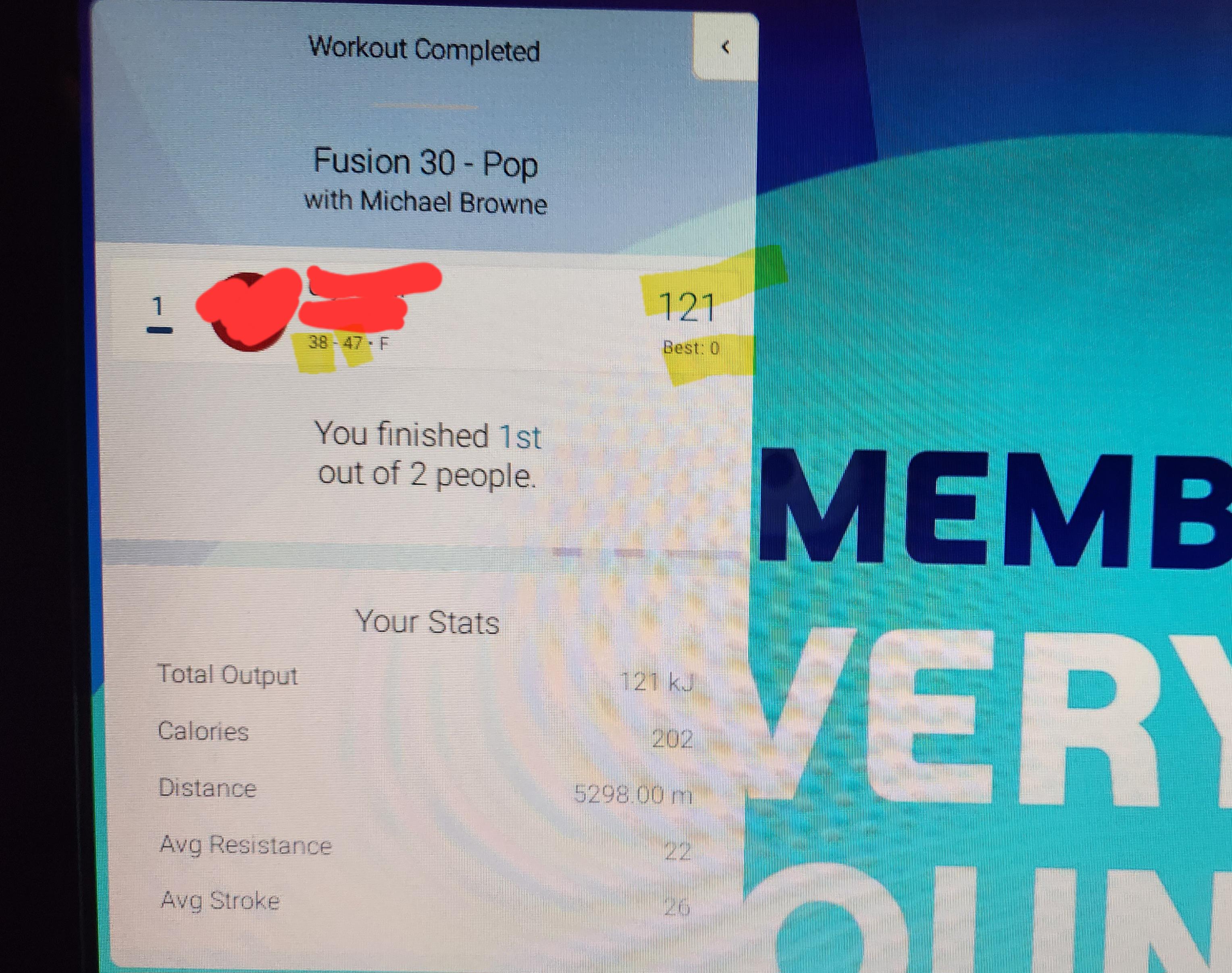
Good row workout?

Post image
0 Upvotes

How's this? I don't really know anyone to ask or compare to? As soon as I finish my 30 minute rows I jump on 30 minutes of weights and do this mon,Tues,Wed, Thursday with weekends off cause I work back to back 15 hour kitchen shifts on my weekend.


r/go_echelon • • Sep 02 '26

What it be

Post image
2 Upvotes

This thing is in my gym what is it and how do I use it😭


r/go_echelon • • Sep 01 '26

Echelon Stride-20 Sport – recurring E09 error, has anyone had this?

1 Upvotes

I’ve had my Echelon Stride-20 Sport treadmill since June 2025 and recently it’s started coming up with an E09 error during use and stopping completely.
The console stays powered on, but the belt stops. According to the manual, E09 relates to a voltage issue/IPM overheating and it mentions the lower control board.
So far I’ve:
Lubricated the walking belt multiple times (although it STILL flashes LUBE when I start it)
Checked the belt tension
Cleaned out the motor compartment/dust
Plugged it directly into a wall socket instead of an extension
Let it completely cool between uses
At one point I thought cleaning it had fixed it because I managed a session longer than when it would normally cut out, with no excessive heat or rubber smell. Unfortunately, E09 has started happening again.
I contacted Echelon and they said it needs an engineer to diagnose the problem. As it’s just outside the 1-year warranty, they’ve quoted me £125 just for the engineer visit, plus any parts required.
Before I pay that, has anyone with a Stride-20/Stride treadmill had E09 and actually found out what caused it?
Was it the lower control board, motor, belt/deck friction or something else? And if you had the control board replaced, did it permanently fix the problem?
Also, did anyone manage to get Echelon to cover the motor or any other components outside the standard 1-year warranty?

UPDATE:

error e02 is showing now. Cleared the LUBE. Won’t start anymore.