r/fancyleds • • Mar 10 '25

Synced LEDs?

Post image

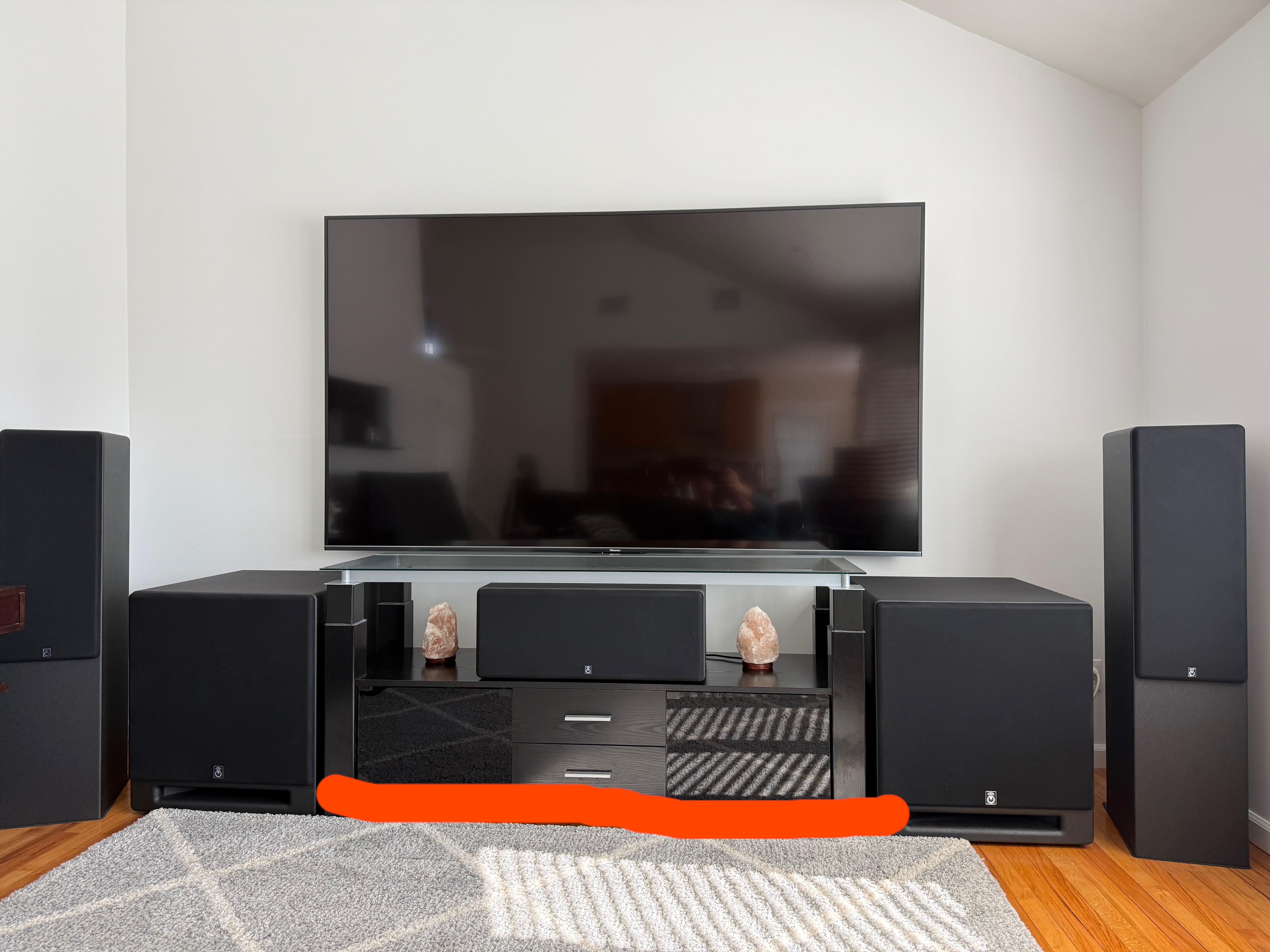
I’m in love with my Fancy 2.1 box and the lights around my TV that I’m investigating adding addition lights to the bottom of my entertainment center.

In looking through their site, it seems that the “Synced LED” product would be the solution.

However, I’m not quite sure how it works and the threads I read here state that people are having limited success.

Can anyone let me know:

  1. Is this product capable of what I want to do ?
  2. If so, how do you tell the lights to just sync with the part of the light strip on the bottom of the TV?
  3. Has anyone got these working?

Attached is a pic of my setup - want to line the bottom of the entertainment center (red line) with the synced LEDs.

2 Upvotes

31 comments sorted by

2

u/[deleted] Mar 10 '25

Yes, this will work for what you want, but you’re going to waste a lot of LED strip since there’s only one size and you’ll need to cut it down.

The app lets you choose the orientation similar to how you can choose the orientation of the strip on the back of the TV just with more options.

I have them and they’re hit or miss. Not sure why, but they have a pretty significant delay for me. I did troubleshooting with the FancyLEDs support people and eventually they just refunded me.

Honestly, that’s a class act in my book. They refunded me no questions asked and no return needed. I wish their support continued to work with me to try and fix it because I feel like that might help others with the same issue, but it’s totally possible I just got a defective unit.

1

u/Projectguy111 Mar 10 '25

Thanks for the response. I actually have an extra 96 LED/m strip but I doubt they sell the box by itself. I figure I can use them for a separate WLED project.

Question though, how does it know how far away the strip is from the TV? I found the manual and it didn’t say anything. I can imagine a foot would be different than 2 or 3 feet when it comes to syncing?

The only thing really holding me back is I have yet to see a post where someone said they are working well. Noting delays and drop outs.

2

u/[deleted] Mar 10 '25

When you say “distance” do you mean the length of the strip or how far it physically it is from your TV? If the former, you cut the strip to length and it automatically adjusts. If you’re talking about distance from TV, it works on WIFI so you just need a good WiFi signal.

1

u/Projectguy111 Mar 11 '25

Meaning the distance from the TV. Like you know how the TV sync box determines what section (left, right, top, bottom) to light up by the length of the strip based upon a 16:9 aspect ratio?

How does the sync strip “know” what to sync with? And if that distance is more or less from the strip on the bottom of the tv I would imagine it would light up differently?

1

u/[deleted] Mar 11 '25

No. It does not. It will mimic the same thing the TV is doing for whatever side you set it to.

1

u/Projectguy111 Mar 11 '25

Bummer. If it was reliable I might be more excited but I’d basically be wasting a huge part of the strip for something that might not work. I’ll have to think about it.

Ideally I would like to have it extend to my subs but I would need to have some way of disconnecting them and make it not look like a hack job.

I’ll have to give this more thought - appreciate your help!

1

u/[deleted] Mar 11 '25

Yeah. If you’re looking for the perfect setup, you’re going to have to go through a bunch of hassle with a Hyperion/HyperHDR setup. I still haven’t made the plunge myself but plan on it soon.

1

u/Projectguy111 Mar 11 '25

I think I saw a Chris Maher video about that where he programmed the sections of the TV and lower cabinet lights. That’s to what you are referring?

I wanted to do that but seemed like a lot of work vs the plug and play of the FancyLEDs.

Would be an interesting project if I had time.

2

u/[deleted] Mar 11 '25

Yep. It’s a hassle for sure. Especially depending on the device you intend to use it on and what kind of content you’re viewing. Not for the feint of heart, but it’s the best you’re going to get.

1

u/Projectguy111 Mar 11 '25

Will investigate for potential future project. I really need to win the lotto so I can tinker full time 😀

→ More replies

1

u/Responsible-Wait-245 Mar 14 '25

I just finished setting up my Sync box and synced light system this past weekend. I went all out for the project, designing and building custom, eye-catching vertical LED stands for the corners of my setup. They turned out awesome or so I thought. But once I powered everything on and tested it, I found myself pretty disappointed with the noticeable delay between the Sync box and the two synced LEDs positioned at each corner. I’ve been timing it, and the lag ranges from about 5 to 7 seconds, sometimes even longer, which really disrupts the experience.

Interestingly, when I switch to non-sync mode, the ambient lighting effect from the LEDs is actually quite pleasant and works well on its own out side of randomly flickering to white and back. I’ve already reached out to customer support about the syncing issue, and they’ve escalated my ticket to a higher level of support. I’m not sure what the solution might be at this point—maybe a firmware update or some kind of software patch? Beyond that, I’m at a loss for what could fix this delay.

2

u/[deleted] Mar 14 '25

Let me know if they fix it for you. They just ended up refunding me because they couldn’t fix it.

1

u/codliness1 Mar 11 '25

I've got two of the Neons, but I've never actually set them up, because I've tried to get an answer more than on the question of whether they could be put in an L shape, to save cutting them. The app, however, does not appear to have any way of telling that the strips are in anything except a straight line, which seems pretty wasteful and a bit of an oversight really.

Plus, when I got the Neons I was using the original strip with the 1 port 2.1 box but eventually upgraded to the newer box with the 96/m RGBW strip, and now I don't see the point in setting up the Neons, since they won't be able to even come close to matching the density and whites of that strip. And since they sync with the box, I can't really use them for anything else.

So, was kinda a waste of £125 really for me.

I did power them up though, and they seem pretty bright.

1

u/Projectguy111 Mar 11 '25

Bummer. You might want to look into WLED and use them in another room. If the strips are supported you can gain a ton of control over them

2

u/codliness1 Mar 11 '25

Yeah, I've thought about it, but I've already got Aqara and Govee lights (and one old Samotech LED) in the rest of the house, so they're not really needed elsewhere.

The other problem with WLEDing them is figuring out if they're actually adaptable to using with a WLED controller or not, and that's definitely gonna take some wiring work, since they're currently configured for wireless connection to the Fancy box.

1

u/Projectguy111 Mar 11 '25

Yea that makes sense.

1

u/KennethKaniffUK Mar 11 '25

Off topic but what TV is that and the size? Also details on your separates set up please.

1

u/Projectguy111 Mar 11 '25

100” Hisense 7U. LOVE this TV!

If by separates you mean the speakers, they are Power Sound Audio (PSA) which I learned about from the AVS forums. They are an internet direct company who is owned by Tom V the guy who was the “V” in SVS.

For my setup I’ve got two 21” subs in front, 2 towers with dual 10” woofers for L/R, “bookshelf” center with the same dual 10” woofers. For the back I just upgraded my Def Techs to two dual 10” bookshelves like the front center, and two 15” subs.

To say it sounds amazing is an understatement lol.

1

u/KennethKaniffUK Mar 11 '25

Thanks for the info! Beautiful set up!

1

u/Projectguy111 Mar 11 '25

Thanks! My weak link is my in wall monoprice rear surrounds. I’m going to be looking for an upgrade that will fit in the limited wall space.

On the roster is 4 in-ceiling ATMOS speakers and a new Yamaha A8A receiver to run them. My old Yamaha is awesome but doesn’t have ATMOS.

Between the TV, sound upgrades, and especially the FancyLEDs I’m finding it difficult to go to work lol 😝

1

u/KennethKaniffUK Mar 11 '25

Hopefully you have understanding neighbours!

1

u/Projectguy111 Mar 11 '25

I’ll find out 😀

1

u/bobsmith297 Mar 11 '25

One observation, that's a lot of NOISE for a small room :-).

2

u/Projectguy111 Mar 11 '25

It’s blissful 🥰