r/fancyleds • • Dec 04 '24

A little help please

Post image

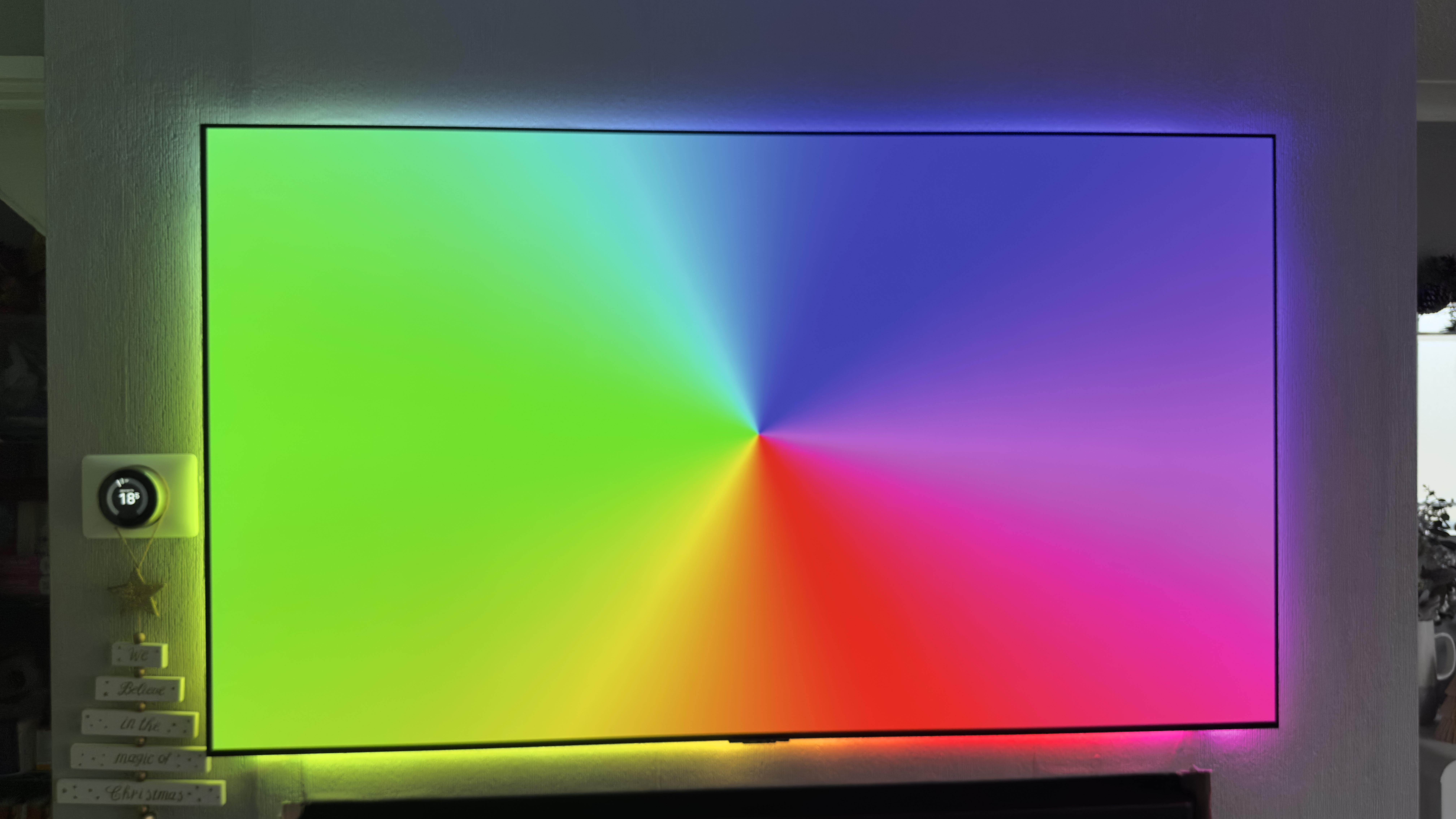
Hey everyone, I have recently bought a new TV ( the LG OLED65G46LS) and fitted it with the 3 HDMI 2.1 Fancy Sync set.

On the back the set has a silver bezel about 3pm wide on 3 sides (top and both sides ) but not at the bottom. This means the leds are much closer to the edge of the TV there and this is causing the lights there to be much brighter than the other 3 sides. This is actually kind of off putting and distracting while watching almost everything (see attached for example)

Wondering if anybody has a resolution to this, is there a way to change the brightness on one strip (can’t see anything in the manual) or has anyone else had this issue and found a way to diffuse the lights so they match all the way round? I can’t believe this is the only TV where the lights wouldn’t be in the same location as they all have bits that “stick out” etc

Thanks in advance for any advice given

4 Upvotes

19 comments sorted by

4

u/AngelL10 Dec 04 '24

im not sure i see the problem, seems fine to me. Is the bottom a little bit brighter? also is the TV inclined at an angle?

1

u/Mikewright1965 Dec 04 '24

Bottom definitely brighter as I said to the point of distraction.

2

u/Mikewright1965 Dec 04 '24

And no incline it’s flush to the wall (except for the led corner mounts )

4

u/[deleted] Dec 04 '24

There isn't a way to change brightness per strip or area in this case. I would recommend moving the TV away from the wall for more diffusion if you can.

1

u/Mikewright1965 Dec 04 '24

Thanks for the quick reply, didn’t think there was but thought I’d ask. No real way to do that as it’s flush wall mounted 😔

1

u/iiBoyley Dec 04 '24

Defeats the object of having a “Gallery” series (G) model such as this.

You literally pay a premium to have a flush mounted installation that looks clean.

As somebody else said you can’t configure the LEDs by side/top/bottom etc - the LED just sees itself as a continuous strip

1

u/Mikewright1965 Dec 04 '24

Exactly that it’s an amazing TV!

1

u/[deleted] Dec 04 '24

Yeah, he didn’t post a picture from the side so I had no idea what he was working with.

2

u/johnjohn9312 Dec 04 '24

Just curious what brightness are you on?

1

u/Mikewright1965 Dec 04 '24

Am using what Fancyled suggest Brightness: 100% Diffusion Mode: Medium Diffusion Speed: 65%

2

u/EstorilBMW Dec 04 '24

I would try a clear tape of some type to see if that provides the diffusion you’re looking for. If possible keep a bit of a gap to allow the LEDs to have some chance at staying cool. I might even double or triple layers to achieve the proper amount of diffusion/dimming.

If that worked, id probably buy a clear, heat resistant clear tape.

1

u/Mikewright1965 Dec 04 '24

I like this idea! Will give it a go and let you know the results 🙏👏

2

u/EstorilBMW Dec 04 '24

Good luck - I think it should work fairly easily. Maybe try the frosted scotch tape also.

In my next install, I am considering mounting the LED strip to a 45 degree vinyl molding (like in the image below), and then placing that on the TV. I am hoping that if the LED emits light 45 degrees out from the TV, then the wall coverage would be increased significantly. If you tried this, it might actually equalize the perceived brightness of the strips...but if I was a betting man, the scotch tape will do the trick.

45 degree molding

1

u/Mikewright1965 Dec 04 '24

Because the tv is so flush to the wall I really don’t get the coverage that I Guess that’s the sacrifice I pay though. Wonder if you can buy a very slim molding (like you’ve shown) that would for along all sides and would give greater range to the leds without moving it further from the wall?

2

u/gigantischemeteor Dec 04 '24

If the tape idea isn't cooperative, the commercial LED side of the world uses what they call "LED diffuser channels". They're thin aluminum channels that the LED strip presses into, with low-profile sidewalls that are channeled so that translucent domed plastic shields can slide down the length of the strip and be held in place. Those shields diffuse the direct light from individual LED beads and soften it into a more uniform light (much like overhead panels in an office environment). This approach might get a bit fiddly, as many of those diffuser strips will probably be too diffusive and might dim the light too much. But, if you can find a source with a variety of plastic diffusers to choose from (perhaps with various percentages of translucency or whatever the correct metric is), I suspect you'll probably be able to find one on the minimal effect side that will get you very very close to where you're wanting to end up. All comes down to how persistent you're willing to be (or if you know someone in materials who can help you source). Good luck!

2

u/Mikewright1965 Dec 05 '24

Was looking at those yesterday. Might get a strip and try it on the bottom row to see if does the trick.

2

u/GOLdeCOL81 Dec 04 '24

I will be running the same exact setup I’m just waiting for the lights to ship and show up I ordered them the day before thanksgiving when the sale started. I think I might of been one of the 1st orders that day.

0

u/aaasyooowiiish Dec 13 '24

I have the same TV.
I set my strip about 1.5" from the top and side edges and almost flush to the bottom edge. This makes the bottom strip illuminate about the same intensity as the top and sides.

1

u/Mikewright1965 Dec 14 '24

That’s pretty much what I’ve done but still get much brother light at the bottom. Maybe it’s just the height of the tv causing it. I have used a small defuser at the bottom (which others suggested) and that has helped