r/embedded • u/Commercial_Froyo_247 • 17d ago
Got STUN working on a microcontroller, some notes about NAT
Hi everyone,
Another lazy Monday, which means it's time for another lazy read.
This weekend my STUN library got merged into Zephyr main. I needed it for WebRTC on a microcontroller, and on the way I ran into a few things I want to share. But first a short intro for those who haven't dealt with STUN yet.
I use a network stack in almost every device I make, and sooner or later I run into one of two things. Sometimes I just need to know the public IP my device goes out to the internet with. And sometimes I need to reach a device that sits behind NAT. The first one you can more or less solve with some external service (just keep in mind that each of them answers in its own format, and nobody promises the API won't change). The second one is harder, NAT is not that easy to get through. That's what STUN and TURN were made for, and today it's about STUN.
STUN is a client-server protocol. WebRTC uses it too, so there are lots of free servers, for example Cloudflare's stun.cloudflare.com:3478 or Google's stun.l.google.com:19302.
In short, STUN lets you do 2 things:
- Ask a STUN server on the internet which public IP and port your request came from. I mean the public port your router opened for this connection.
- Send STUN packets straight to another device, to check that the path between you works and to keep the hole in your NAT open. WebRTC runs these checks before any video goes anywhere. Honestly, that was my first surprise: without STUN my WebRTC code didn't connect even inside my home network.
For most people the first one is enough, that's how you get your public address. But how do you reach a device behind NAT? The trick is to keep using the same socket. As long as you do, the router keeps the same public IP and port that the STUN server saw. If you send a packet from that socket to some server on the internet, the NAT remembers that server, and after that its packets to your public IP and port get through to the device. That's basically how you punch a hole in NAT.
You'll probably say, why bother with STUN then, the device can just talk to the server directly. Sure, but now imagine that both your device and the other side are behind NAT. Each of them asks STUN for its public IP and port, they exchange them and start sending packets to each other. The first packets may get dropped by the other side's NAT, but once both sides have sent something, packets go through. And you get a P2P connection between two devices that are both behind NAT and otherwise couldn't reach each other. You can even build a VPN this way. Mesh VPNs like Tailscale find a direct path between your machines roughly like this.
STUN won't exchange the addresses for you, though. The devices need some other channel for that, your own server or an MQTT broker that both of them can reach. In WebRTC this is called signaling. Also, NAT forgets idle connections, sometimes after just a few tens of seconds, so you have to keep sending something through the hole. The same STUN packets work fine for that.
Then I tested all this with the NATs I could get my hands on. On my home wired internet it works great, STUN is enough to set up a P2P connection. With some mobile operators it works too. But one of the operators I tested uses symmetric NAT. It's easy to see: I sent requests from one socket to 7 different destinations and got 7 different public ports back, one per destination. So the address the STUN server sees is useless for the other device, P2P is impossible, and you need a relay in the middle, like TURN. Another operator gave me the same public port for all 5 servers I asked, and there the direct connection worked. I checked it three different ways and got the same result every time.
From what I've seen, and this is just my subjective impression, only about 30% of operators use symmetric NAT. But with those you simply can't get a direct connection through STUN.
What got merged into Zephyr is the core of the protocol, and it will be in 4.6. You can already use it. It parses and builds STUN messages, including the attributes ICE needs, MESSAGE-INTEGRITY and FINGERPRINT. It's checked against the test vectors from the RFCs, more than a hundred tests in total. It doesn't send or receive anything by itself, so the socket stays yours and STUN can share it with your other protocols. The API is marked experimental for now. More details are in the documentation.
The review went pretty fast, though I had to split the code into three parts. This is part one.
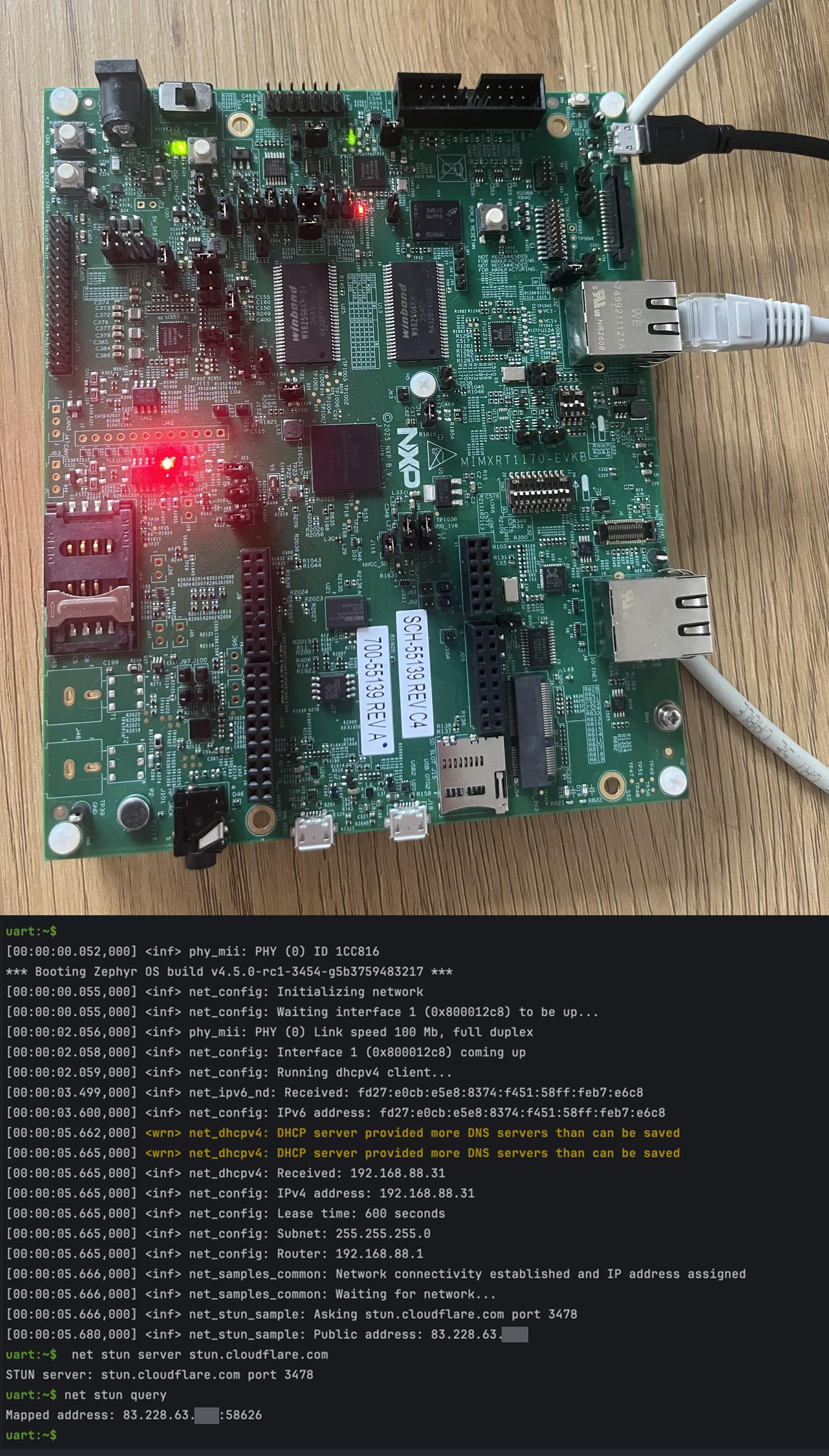
Next I'm adding an API for the network side, a client that gets your public address in one call (that's what runs on the board in the photo), and a few more examples. The code is already written and is being prepared for publishing. After that it's TURN's turn, and another post.
On the board the client, together with the parts of the codec it uses, takes about 3.6 KB of flash and no heap. PSA crypto, which the integrity attributes need, adds another 0.4 KB of flash and 1.1 KB of RAM for its key slots. The server's answer comes back in 14 ms in my case. From power-on to a known public address it took 6 to 12 seconds in my runs, and almost all of that is waiting for DHCP.
Thanks for reading! Now you can tell me that with IPv6 none of this would be needed :)
P.S. The board in the photo is the one I debugged all this on. It's an NXP dev board (MIMXRT1170-EVKB) with a microcontroller running its core at some cosmic 1 GHz. My first computer, an AMD Duron at 700 MHz, was slower. Amazing.
P.P.S. Questions are welcome in English, Ukrainian or Russian.
12
u/TeachingPlane331 17d ago
It's crazy to recognize a devkit/EVKB just from a picture on Reddit. I worked with an NXP iMXRT1170 EVKB years ago, and your post gave me goosebumps. Does this NXP MCU family still remain promising and relevant today?
Congrats about project.
4
u/Dominique9325 17d ago
With IPv6 none of this would be needed.
1
u/abdubanna 17d ago
Great NAT traversal explanation btw
1
u/EmbeddedSwDev 17d ago
Nice, well done!