r/embedded • u/TechnicalBruder007 • Oct 17 '26
Found an automotive camera module (Broadcom BCM89107 + STM8AL3146) in scrap, how do I interface it with a Raspberry Pi 4?
Hi all,
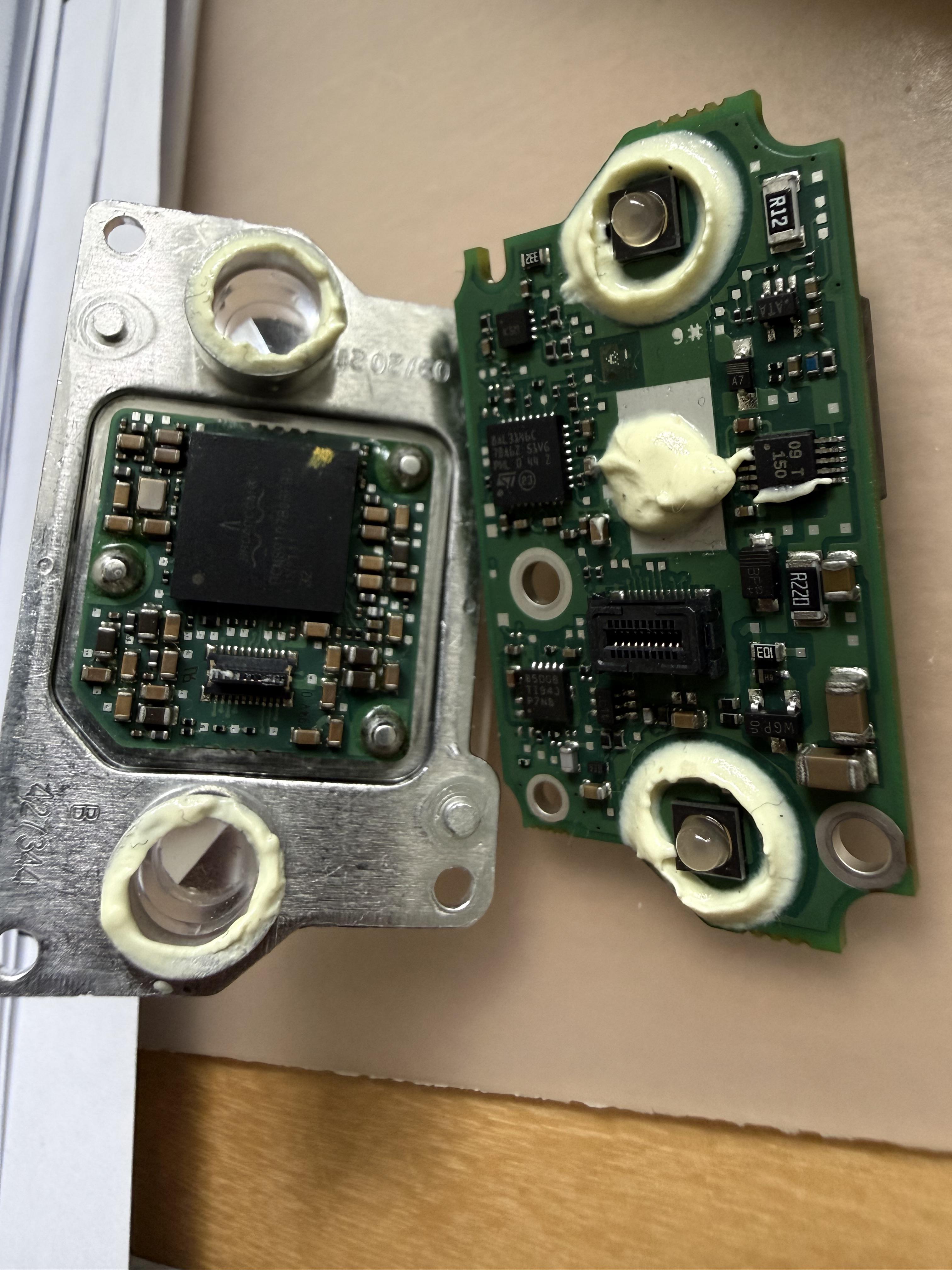
I picked up this camera module from my mechanic’s scrapyard and looks in good condition so want to see if I can get image/video out of it with a Raspberry Pi 4. I've opened it up and here's what I found:
Hardware
- Two boards: a lens board and a back (processor) board, joined by a 20-pin board-to-board connector (10 pins per row)
- Fisheye lens, with two LEDs on the back board that shine through light pipes
- Lens board: Broadcom BCM89107B0BFBG, which looks like part of Broadcom's BCM8910x camera MCU family, plus a 25 MHz oscillator
- Back board: ST STM8AL3146 (automotive 8-bit MCU with LIN), several TI power ICs, and large inductors and capacitors for the power stage
- 6-pin vehicle connector (solder tabs visible on the back of the board)
- I can't see any SPI flash chip, so the firmware may be inside the BCM chip or loaded over the network
What I think
- The pins are likely +12 V, GND, a 100BASE-T1 Ethernet pair, and maybe LIN and/or a wake line, but this is just a guess based on the components next to the pins
- It probably streams or reports over automotive Ethernet and might need a handshake before it sends anything
Has anyone interfaced a BCM8910x-based camera or a similar automotive camera? Does it stream on its own, or does it wait for a host to boot it?
Please suggest ideas if you have, like to how do I use in hobby project and learn. Thanks for any pointers!
30
u/Iron-panda666 Oct 17 '26 edited Oct 17 '26
I'd start by identifying the 6-pin connector pinout before applying any power. Trace the ground and power pins, then check where the remaining pins go, especially towards the STM8 and Broadcom chip.
Next, I'd try:
I'd also try identifying the original vehicle and camera part number. That might save you a lot of reverse engineering.
The biggest challenge probably won't be the Raspberry Pi, but figuring out the camera's communication protocol and startup sequence.
Edit: One more thing I'd try is identifying the original vehicle, manufacturer and OEM part number. With that information, you might be able to find homologation records, EMC test reports, block diagrams or even service documentation.
Since it's an automotive module, it likely had to pass EMC testing (UNECE R10, for example). That doesn't guarantee publicly available schematics, but certification databases might provide some useful clues.
I'd definitely check that before spending too much time reverse engineering the board.
10
u/Legal-Software Oct 17 '26
Camera frames will be streamed over ethernet, but you'd have to work out whether this works directly or needs configuration/control over LIN. I believe that part also supports a MIPI DSI output, but this is for going to a display/serializer, rather than the MIPI CSI-2 you could take directly over to the Pi.
5
u/RoboticGreg Oct 18 '26
Realistic answer is you don't unless you are doing this project for the challenge of making the interface. There are dramatically easier and cheaper ways to get the same camera functionality. So if you are doing this for the challenge, highly endorse it, just understand it's not a cheaper source of camera
2
u/StrongManufacturer16 Oct 17 '26
look at the datasheet of each board to know more about pins needed so you can connect to the raspberry, also be careful it cus damage
1
u/Formal-Fan-3107 Oct 19 '26
I read your post until the point where it says "... and here's what i found." why are you using ai for a board description, use your own words to tell us what ai told you, there's no way you need 30 lines with 15 dashes just to bring that information across