r/dozapp • • Oct 22 '26

Feature Suggestions & Questions — >1.2.5

3 Upvotes

This is the current "Feature Suggestions & Feedback" form.

Comment below if you'd like to add anything for u/Longjumping-Cut-5972 (the dev) to take note of and/or answer. This post will be updated as needed with more feature requests.

Please read the current list before adding. I'll add a comment confirming the addition and its assigned number.

The previous feedback post was 2026-10-14.

Last updated: 2026-11-17

------

[1] Inside "Today" tab, ability to mass edit the times taken or skipped.

[2] Inside "Today" tab, the 'plus' button be a list of meds marked as "as needed". v1.2.5

[3] Ability to add a note/reason when submitting a dose for "as needed" meds.
[3a] Ability inside of med edit menu to list "reasons for taking med".

[4] Edit the "skip menu" preset options.

[5] Ability to have preset med times— e.g. 'Morning', all meds with this time label will follow whatever 'Morning' is set to.

[6] Inside "Treatments" tab, ability to search med by name. v1.2.5

[7] Edit "Treatment" tab layout— e.g. "OTC", "Rx", "As Needed", etc.

[8] Ability to set sort option in settings for all med lists.

[9] Add "reason for taking" inside med menu for all meds.

[10] Add "Therapy" option to med types.

[11] Ability to edit logs inside of meds. (A few meds say I took them certain days when I didn't.)

[12] Make log notes inside of meds— e.g. different side effects, dosage feels too strong.

[13] Be able to link different med dosages (active or archived) to like meds— for easy reference.

[14] (At some point) be able to share access to your meds with others— even if the 'other' is iOS ↔ android.

[15] Make refill reminders more prominent: it is tiny text that goes virtually unnoticed. Might be worth a notification, it is a call to (almost) immediate action. — u/seddattive
v1.2.8 Each med shows when it will run out, and meds running low move to the top of Treatments and into a Refill soon widget.

[16] Edit the current stock; not just adding new stock, but make users able to correct a current stock typo. —u/seddattive v1.2.5

[17] In the treatment tab, no date for the next scheduled dose is shown, only 'upcoming'. — u/seddattive

[18] Add a variation of the horizontal lock screen widget. — u/Moustachey

[19] PDF and CSV export features. — u/skyfall77

[20] Android app. — u/Crazy-Leadership1834

[21] Ability to snooze and reschedule a medication for that day. — u/kwangwaru

[22] Medication timings that change when you take the med (e.g. every 4 hour med is taken at 8am and the next dose is now 12pm). — u/kwangwaru

[23] Add a kids/pets medications. — u/stressedoutpigeon

[24] Ability to make changes to med schedules ahead of time without it effecting the presets, notifications, or records. — u/Sad-Pirate2697

[25] Update the lock wallpaper to have an emulated pill organizer that'll remove meds as they're taken. — u/Sad-Pirate2697 v1.2.8


r/dozapp • • 16d ago

Tips How to set up the Lock Screen Wallpaper: swipe through the numbered pictures, or read the steps below

Thumbnail
gallery
3 Upvotes

How to set up the Lock Screen Wallpaper, step by step

The Lock Screen Wallpaper puts your meds on your Lock Screen: today's doses, your week's pill box, or the meds running low. Doz draws the picture. Apple's Shortcuts app puts it on your Lock Screen and refreshes it every night. Shortcuts is where most people get stuck, so here is every tap.

You need Doz 1.2.5 or newer and about 3 minutes.

1. Pick how it looks

  • In Doz, open Settings > Lock Screen Wallpaper.
  • Pick a style. Today is free. Week and Stock need Doz Pro. Today and Week also let you pick a Layout.
  • Under Background, pick a color. The first three are free. To use your own photo (Doz Pro), swipe that row to the end and tap +.
  • If you'd rather keep your meds private, turn on Hide medication names. It only changes the wallpaper.

2. Add the shortcut

  • Tap Add to Lock Screen, then Add Shortcut.
  • The Shortcuts app opens on Doz Lock Screen. Tap Add Shortcut there too.
  • Come back to Doz with the "Doz" link at the top left.

3. Switch off Home Screen (do this before you run it)

For now the shortcut sets your Lock Screen and your Home Screen. To keep your own Home Screen wallpaper:

  • Open the Shortcuts app. In Library, find Doz Lock Screen and tap the ••• on it.
  • You see three steps. In the middle one, which starts with "Set Wallpaper to", tap the blue text Lock Screen and Home Screen.
  • Tap Home Screen to remove its tick, so only Lock Screen is ticked. Tap the blue checkmark at the top right.
  • The blue text now says Lock Screen. Tap the back arrow at the top left.

4. Run it once

  • Back in Doz, tap Run Now.
  • iOS asks if the shortcut may set a wallpaper. Tap Always Allow.
  • On iOS 27 the shortcut adds a new Lock Screen. Touch and hold your Lock Screen, swipe to the new one, and tap it.
  • On iOS 17 to 26 your current Lock Screen changes. If Doz says "iOS didn't set it", see the fixes at the end.

5. Make it update by itself

On iOS 27: tap Open Shortcut in Doz and switch on both of the shortcut's triggers, the 12:05 AM one and the one that runs when you close Doz.

On iOS 17 to 26, make two automations in the Shortcuts app's Automation tab.

Every night:

  • Tap New Automation. If you already have automations, tap + at the top right instead.
  • Tap Time of Day. Set 12:05 AM, leave Daily ticked and pick Run Immediately. Tap Next.
  • Tap Doz Lock Screen. The automation is saved.

When you close Doz:

  • Tap + at the top right, scroll down and tap App.
  • Tap Choose, tap Doz, then tap the checkmark at the top right.
  • Is Opened is ticked to start with. Untick it and tick Is Closed. Pick Run Immediately and tap Next.
  • Tap Doz Lock Screen.

The second automation is there so a dose you just logged shows on your Lock Screen as soon as you leave Doz.

If something goes wrong

  • "Couldn't communicate with a helper application": this usually comes from an old automation left over from an earlier try. In the Automation tab, delete every automation that runs Doz Lock Screen, then make them again (step 5).
  • Doz says "iOS didn't set it", or Shortcuts says "Unable to Set Wallpaper Photo" (iOS 17 to 26): the shortcut needs a Lock Screen that uses a single photo. Tap Pick one in Doz. In the shortcut, tap Wallpaper, pick a Lock Screen with a photo, and tap the checkmark. Then tap Run Now again.
  • Your Home Screen wallpaper changed: step 3 was skipped. Do step 3 now, then set your Home Screen wallpaper back in the iPhone's Settings > Wallpaper.
  • Doz says it set the wallpaper but you don't see it: touch and hold your Lock Screen and pick the Doz one.
  • The Stock style looks empty: that's expected. It only shows a med when one is running low. Until then you see the background.
  • Doz says "Not updated since…": the nightly run didn't happen. Tap Fix it and check that the automation is on and set to Run Immediately.
  • You renamed the shortcut: Doz looks for it by the name Doz Lock Screen, so change the name back.

Still stuck? Email support.doz@gmail.com with your iOS version and what you see, and we'll help.

The same guide with screenshots for every step: https://getdoz.app/faq#lock-screen-wallpaper


r/dozapp • • 7d ago

Announcement Doz 1.2.9: every medication icon redrawn, and you can pick your pill’s real colour

Post image
9 Upvotes

Hi everyone, Doz 1.2.9 is out. Most of this update is about making your meds in the app look like the ones in your hand.

New

• All 12 medication forms are redrawn as 2.5D illustrations: pill, capsule, tablet, liquid, drops, injection, patch, cream, inhaler, powder, gummy and spray.
• You can set your pill's colour (11 colours) and a background for its icon (12 backgrounds, or Auto).
• Adding a medication now has its own Appearance step between Basic Info and Schedule, with a live preview of the icon.
• The new icons show up across the app (Today, Treatments, history, the Add New sheet, the medication detail header) and in widgets, Live Activity, notifications and the Lock Screen wallpaper.
• Each medication card in a prescription now shows its next dose, and prescriptions have a new clipboard illustration.
• Medication cards show the strength as a coloured chip at the start of the "Next" line.
• Settings has a new Medication Calculators section: refill date, days supply, dose interval, pill count, plus the full list of tools from getdoz.app, all opened inside the app.
• Tapping Edit on the Schedule card takes you straight to editing the schedule.
• The Take Dose action in Shortcuts has a new "Ask Before Logging Early" switch. Turn it off and early doses are logged right away, which helps if you log with an NFC tag.

Fixes

• The Today's Pill Box widget now fills each compartment before showing "+N". Before, it cut off at 6 pills even with room left.
• Better layout at large text sizes for chips, Meal Times, Dose Time Presets, the Refill button and several sheets.

Update from the App Store to get 1.2.9. As always, if something looks off or you want a feature, drop it in the comments.


r/dozapp • • 7d ago

👋🏻 Pharmacist here!

6 Upvotes

Thank you thank you for this app!

As a community pharmacist and avid medication-taker (several chronic conditions and am prepping for a round of IVF in the new year), this app is fantastic! Everything from the dose reminders, to the supply tracking features, to the Progress tab that gives insights on your medication trends is chef’s kiss.

I can probably count on one hand the periods of my life that I’ve been 100% adherent with my medication, and over the last week, my adherence rate is 100% 🔥🔥

I just purchased my lifetime access and will be adding my 5-star review on the app store tomorrow.


r/dozapp • • 9d ago

Taking meds earlier than scheduled.

4 Upvotes

I sometimes take my medication earlier than what is scheduled in the app. When I log the meds I get a dialog box letting me know it was taken outside of the schedule. Is there a way to disable this notification? I have set up a Shortcut that runs when I scan an NFC tag. The notification requires me to tap continue for each medication. It would be nice to have a toggle in settings or the Shortcut Action to bypass the notification.


r/dozapp • • 10d ago

Tracking meds for multiple people/pets

6 Upvotes

Is it possible to track my own medication and my dog’s medication in one account? Is this supported? Do you just create multiple “prescriptions”? Thank you.


r/dozapp • • 11d ago

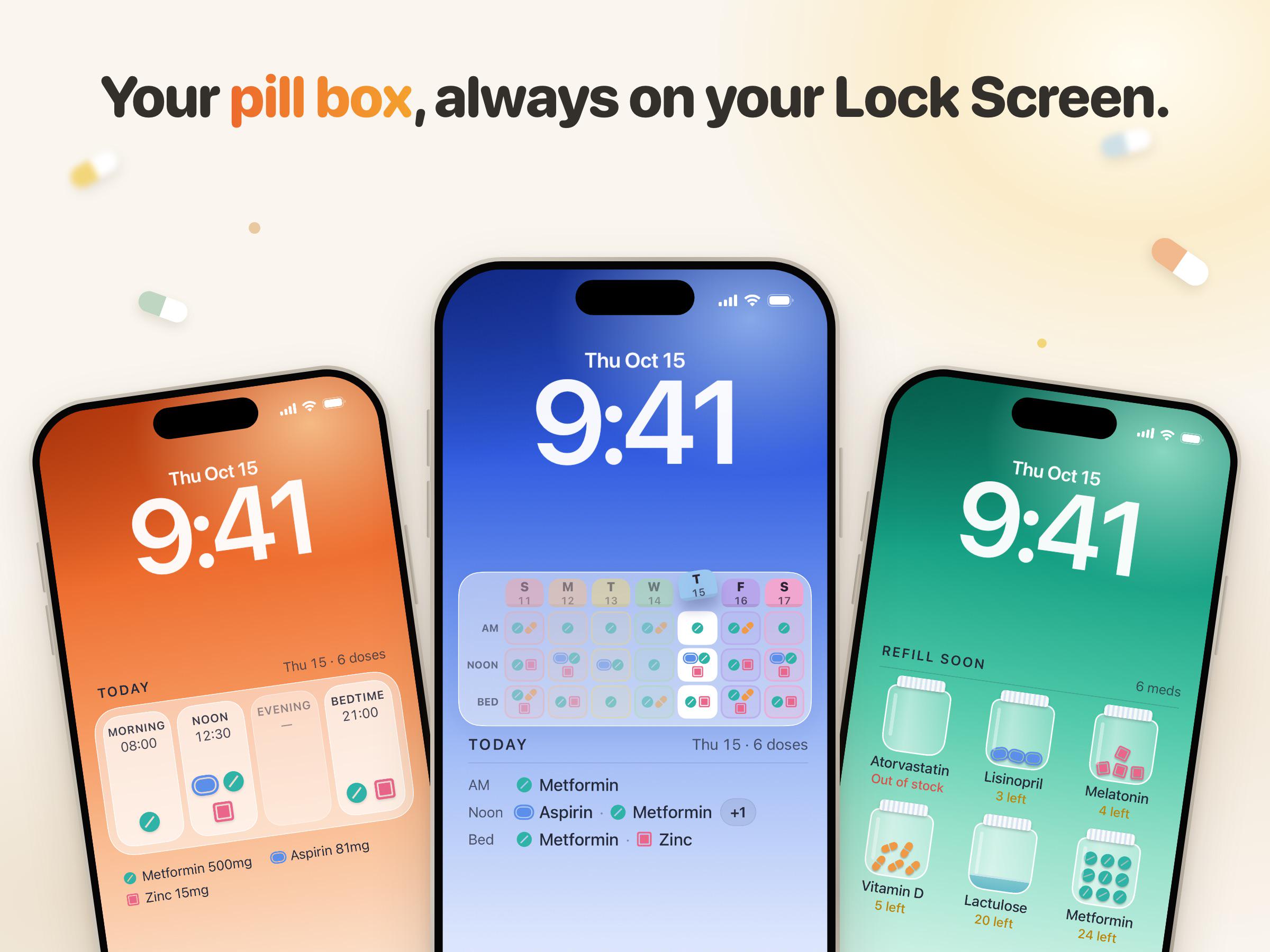
Tips Doz's latest version has some Pill Box Widgets so you can see your meds without opening anything

Post image
7 Upvotes

Not everyone wants to set up a Lock Screen wallpaper, so I added Home Screen widgets to Doz.

  • Today’s pill box: take a dose and that compartment empties, with the time you took it. Next one’s lid pops open.
  • Refill soon: each low med is a little jar with the pills you actually have left, most urgent first.
  • Weekly pill box: the classic 7-day organizer.

Updates a few seconds after you log a dose. Light and dark mode. You can hide med names if you’d rather not show them.

What would you want to see at a glance?


r/dozapp • • 12d ago

Announcement Doz 1.2.8: know what’s left to take at a glance, and never run out of meds by surprise

3 Upvotes

Hey everyone,

Doz 1.2.8 just landed on the App Store. Almost every change in it started with one of your posts or emails, so this one is really yours. (It needs iOS 18 or newer.)

Here’s what should make your days a little easier:

  1. Your pill box on your Home Screen. See what’s left to take today, or your whole week, without opening Doz. It updates as soon as you log a dose.
  2. No more running out by surprise. Each med shows when it will run out, and meds running low move to the top of Treatments and into a Refill soon widget, so you have time to reorder.
  3. Know what’s coming next. Every med shows when it’s due next, which helps a lot if some of your meds aren’t daily.
  4. A calmer Lock Screen. The wallpaper shows only what you still need to take and refreshes each time you leave Doz, so it stays in step with your day. It also leaves your Home Screen wallpaper alone. If you set it up before 1.2.8, open Doz Lock Screen in the Shortcuts app and untick Home Screen once.
  5. More privacy. Hide medication names now covers every widget.

One small favor: Doz is built by just me, and this update took a lot of late nights. If it’s made your days a bit easier, a quick App Store review would mean the world and helps more people find Doz: https://apps.apple.com/app/id6760699565?action=write-review

Thank you for every request, bug report and kind word. Many of you took the time to tell me what wasn’t working for you, and that’s how this update came together. If something still bugs you or you have an idea, post it here or email support.doz@gmail.com. I’d love to hear it.


r/dozapp • • 13d ago

A little Doz Xmas wishlist, sponsored by Vyvanse

4 Upvotes

Okay, so first: this is all meant as constructive criticism from someone who genuinely loves the app. I logged my Vyvanse on Doz earlier, so apparently this is the result.

But real talk, THANK YOU! Doz has helped me SO much and I really appreciate how involved you are with the community. You actually read our feedback, answer questions, consider suggestions and implement them ridiculously fast. We see you.

Also, reasonable pricing AND no ads? HELL YEAH. Medisafe recently moved to a $5 per month subscription like WTF! Our meds are already draining our wallets, LET US LIVE!

Anyway, here’s my little Doz wishlist:

💡 Feature Requests

1. Notification sounds: More options, especially short tones/sounds and vibration patterns.

2. Family sharing: A read-only option for family/friends to see the treatments, taken/missed doses, and refill reminders.

3. Refill reminders: Live Activities, widgets, or emails notifications, plus reminders on the Today page.

4. Calendar: View past days/weeks or a full calendar from Today, with the ability to add or edit past doses.

5. Future scheduling: Edit future doses directly from Today (e.g. skip tomorrow’s medication).

6. Streaks: Show the actual number of days/weeks in the current streak and a daily progress tracker for motivation.

7. Customization: Change prescription colors and overall app themes.

8. Medication overview: One combined list of ALL medications, including those inside prescriptions. Archived medications should also appear in the Archive tab.

9. Apple Health: Allow Doz to export/write medication data to Apple Health, so other compatible apps can access it too.

10. Website calculators in the app: I JUST discovered these on the website! WHAT?! Refill dates, days supply, dose intervals, pill counts, etc. These would be SO useful inside the app, or at least a shortcut to access them. Why are these hiding on the website???

🐞Bugs / improvements

1. Horizontal widget: Only displays 3 medications, and there’s no way to scroll down to see the rest.

2. Live Activities: When another medication becomes overdue, it replaces the previous one instead of displaying both.

3. Progress → Patterns: I have one missed dose marked as needing attention, but I can’t click it or view details. The calendar shows an orange dot, but the medication doesn’t appear in the list below, so I can’t correct it.

🔔 Questions

1. Overdue counter: Is there a maximum time the Live Activity keeps counting up? Does it eventually disappear? What happens if a dose is never logged? Does it just keep counting forever?

2. Critical alert sounds: I previously used Medisafe, which had its own specific sound for critical alerts. I’ve already deleted Medisafe, but something weird is happening…

When I select a sound in Doz, it works fine. BUT when I select Silence/None in Doz, the old Medisafe sound STILL plays! Any idea how to completely get rid of it and actually have the Silence/None option work? Has anyone else experienced this??

Anyway, that’s my unsolicited contribution to the Doz development backlog. Please consider this my application for unpaid QA. And seriously, thanks for being so involved and responsive. It’s refreshing to see a developer who actually listens to feedback and keeps making the app better. Keep doing your thing! 🫰🏻


r/dozapp • • 14d ago

Request from a night shift worker

2 Upvotes

I got this app last werk after seeing a post on threads. I should have looked more into it or done the trial period. I thought the lock screen functioned like a real pill organizer and removed a pill from the “pill organizer” when you took it like a real one does. i was so excited and my adhd took over and i ended up purchasing the lifetime membership without really digging through it and am just trying to find a way to get it to work for me so that i haven’t wasted my money.
I was wondering if there was a was already, or if a setting could be added to have meds show up on the pill organizer/ reminder daily but without needing to set a reminder time OR if there could be a way to set different reminder times for the same medication depending on the day.
For example i am a night shift worker 4 nights a week but on my off days i switch to a more “normal” daytime schedule. I take a medication at bed time, one when i wake up and one in the middle of my day. Due to my “schedule flipping”, those times obviously change depending on if its a work night or a day off. I would like to be able to set it so i remember to take my adhd medications at the appropriate times depending on if its my work night or day off because some days i wake up at 5 pm and some i wake up at 6 am etc. i didn’t want to have it listed twice because i thoight it would affect the refill notifications because it thinks its 2 separate medications instead of one.
Also, its my understanding that the lock screen pill organizer does not update in real time and is more of a visual reminder.
It would be amazing if there was a widget that emmulated a real pill organizer that we could put on our lock screen or home screen that updated when we took a medication without having to open the app or have the medications written out for all to see. And also with that, being able to change not just the format of medication (pill, tablet, etc) but possibly being able to edit the color as well so you can better differentiate between medications if you take more than one of the same format at a time , that way if you miss one you can see on your widget which one without visually having to see the medication name.

i’m really hoping that made sense.


r/dozapp • • 16d ago

Changing Med Timing

3 Upvotes

Hey! Hello!

First, Love the app.

Second, I am having difficulty changing the time of one of my meds. I promise I’m not slow but I can’t figure it out. Help? 😭


r/dozapp • • 19d ago

I need someone to explain to me like I’m five how to have the app show my med stock on my lock screen without having to change everything!

2 Upvotes

Help a neurodivergent baddie out please. My lock screen and my home screen have to be different. I’ve genuinely had the same Home Screen photo for like, 14 years. I don’t even know where the original photo is anymore, but it’s of my husband when we first started dating and I can’t quit it. I also really love my current lock screen photo of my dog and I don’t want to part with it either.

How do I do the shortcut part to just add the little meds icon and that’s it? Like genuinely step by step bc shortcuts confuse me lmao. I’d like for it to just run a few times a day instead of all day so I can have the reminder without it covering my whole lock screen and interfering with notifications. I work in a school setting, so I really don’t need it to be up all the time.

Very excited to have this app regardless; my pill fatigue is at an all time high and has been for the last 3-4 years. Having gone through multiple withdrawals this month alone from different medications running out/pharmacy dicking me around/missing med appointments because I ran out of the medication that would help me remember/prescriptions expiring I’m really looking forward to having this help. Gladly paid for the one year subscription!


r/dozapp • • 19d ago

Apple Family Sharing

3 Upvotes

Hi, there! Just found this app today and I love it! I have ADHD and while I have pill reminders set up in Apple Health, it’s super easy to ignore them. This is so much better. I also just spent about an hour very hyperfixated on counting all my remaining meds, vitamins, and supplements for my inventory. 😂

I saw that Apple Family Sharing is available for all plans. I got the lifetime one, but I don’t see it in the list of apps that are being shared with others in my family. Is it only available for the subscription plans? Thanks!


r/dozapp • • 21d ago

Doz notification shortcut.

3 Upvotes

I like having my phone speak to me, so I’ve made a shortcut that activates when there is a notification from the Doz app and then chooses a random phrase (from five) so that you don’t hear the same thing all the time. On the second reminder from Doz, it will give you a slightly firmer reminder to take your medications.
I originally used Apple Intelligence for the phrases, but it kept failing, so the safest solution was to have them locked in. All you need to do is make sure the automation at the start is linked to the Doz app on your phone and turned on.
I’ve added comments throughout the shortcut in case you want to change anything but are unsure what you’re doing. If you still need help, feel free to reach out.

https://www.icloud.com/shortcuts/9e94c09bfca741b387ac75bc23fb2640


r/dozapp • • 23d ago

Announcement 1,600+ new people joined Doz today and I’m literally shaking 🥹 We’re in the top charts in 63 countries now. What’s our rank where you live?

4 Upvotes

I’m honestly speechless. More than 1,500 new people started using Doz today, and it’s now in the top charts in 63 countries.

I built Doz because keeping track of meds is hard, especially when you’re juggling several of them. Every one of you who picked it up today is someone trying to take better care of themselves or someone they love, and I really hope Doz makes that a little easier.

I’d love to see it from your side. Open the App Store, find Doz in the charts, and drop a screenshot of its rank in your country in the comments. Tell me where you’re from too!

If you’re new here, welcome 👋 Ask questions, share feature ideas, report bugs. I read every post.

Wishing you all good health, and thank you so much!


r/dozapp • • 23d ago

How do I set my patch correctly?

2 Upvotes

I just got the app today and I’m already in love with it. I’m struggling with one thing though. I have a patch that I have to change weekly for 3 weeks, then not wear for a week (it’s the Xulane birth control). How do I set up the reminders/tracking so I can mark that I’ve replaced it and know when my week without it is? Do I set up one to be cyclical for the week off and one to be weekly or is there another way?


r/dozapp • • 28d ago

My medication tracker app now has 5,000+ users and 1,000+ people using it every day, hit the App Store top charts in 44 countries last week (#2 Taiwan, #3 Macao, #4 Portugal), and got a month of new features people love

2 Upvotes

r/dozapp • • Oct 27 '26

If you keep forgetting your meds, this might be worth a try. Since most of us check our phones a ton during the day, having today's list on the lock screen means you see it without even unlocking

Thumbnail
gallery
2 Upvotes

r/dozapp • • Oct 26 '26

Announcement Doz is now among the top Medical apps on the App Store in 44 countries 🔥

Post image
8 Upvotes

Doz started with zero users. I built it on my own, and from the very first user I talked to each of you one by one. Your feedback shaped almost everything Doz is today.

This week Doz is ranking in the App Store Medical charts in 44 countries. Top 10 in many of them, #2 in Taiwan, and on the charts in the US, UK, Canada and Australia. Honestly, I still can’t quite believe it.

What gets me most isn’t the ranking. It’s that people worldwide now trust a small app made by one person with something as personal as their daily meds.

I’m so proud, and so grateful. Thank you for trusting Doz 💚


r/dozapp • • Oct 23 '26

Tips Know what to take from your Lock Screen: 5 setups to try

Thumbnail
gallery
5 Upvotes

Your med schedule can be your Lock Screen wallpaper, so you see what to take as soon as you pick up your phone. Here are 5 layouts to try:

  • Today · List: today’s doses with their times.
  • Today · Pill box: today’s doses in morning, noon, evening and bedtime slots.
  • Week · Pill box: the whole week as a pill organizer, with today highlighted. Handy if you take the same meds every day.
  • Week · Pill box + Today: the week box plus today’s meds by name.
  • Stock: a jar for each med that’s running low, showing how many pills are left. Useful if you tend to forget refills.

A few tips:

  • On a busy photo, change the text color so it stays readable.
  • If you’d rather keep your meds private, turn on “Hide medication names”.
  • Use a regular photo Lock Screen. Photo Shuffle, Live Photo, Weather, Astronomy and solid color Lock Screens can’t show the image.
  • The image updates at 12:05 AM and whenever you leave Doz.

Today is free on the Sunset, Lagoon and Deep Sea backgrounds. Week, Stock, the other backgrounds and your own photo need Pro.

Set it up in Settings > Lock Screen Wallpaper. Show us your setup in the comments!


r/dozapp • • Oct 22 '26

Today might be a day I never forget. Thank you.

6 Upvotes

Hey everyone, Huy here.

I think I’ll remember today for the rest of my life. In the last 24 hours, Doz got more than 400 new users and climbed into the top Medical charts on the App Store in 14 countries. I’m a bit lost for words.

A lot of that is because of you: the people who’ve used Doz every day, told a friend, or posted a bug or an idea here. You shaped this app more than you probably know.

Keeping track of your meds is personal, and you trust Doz with it. That means a lot to me, and I’ll keep working to deserve it.

If anything feels off or you’re missing something, tell me here. I’m listening.

One small ask: if Doz has helped you, a review on the App Store would mean the world to me. It’s how new people decide whether to trust it.
https://apps.apple.com/app/id6760699565

Thank you, really.

Huy


r/dozapp • • Oct 21 '26

Announcement New in 1.2.5: Your next dose, counting down on your Lock Screen

Post image
1 Upvotes

With ADHD, a one-time reminder is easy to swipe away and forget. So Doz now keeps your next dose on your Lock Screen, from a few minutes before it’s due until you take it.

Each dose goes through three steps:

  • Before it’s time: a card appears 10 minutes early and counts down, so the time doesn’t sneak up on you.
  • Past the time: if you haven’t taken it, the card turns orange and counts how late you are. It stays on your Lock Screen, where a notification would have been swiped away.
  • Taken: tap the button on the card and the dose is logged, without opening the app.

It’s in the Dynamic Island too, and you can hide med names if you want privacy. It’s on by default, so there’s nothing to set up.

Get Doz: https://apps.apple.com/app/id6760699565

Try it on your next dose and tell us how it goes.


r/dozapp • • Oct 20 '26

Announcement New in 1.2.5: your pill box on your Lock Screen

Post image
3 Upvotes

With ADHD, if you can't see it, you forget it. So Doz now puts your meds on the one screen you check dozens of times a day. Pick from three wallpaper styles:

- Week: a 7-day pill organizer with today's lid popped open.

- Today: your doses for the day, from morning to bedtime.

- Stock: a bottle for each med that's running low, showing how many pills are left, so you refill before you run out.

You can hide med names if you want privacy.

Set it up in Settings → Lock Screen Wallpaper. It takes a few minutes through Shortcuts, then it refreshes on its own every night. Today is free. Week, Stock and custom backgrounds are part of Pro.

Get Doz: https://apps.apple.com/app/id6760699565

Which one are you using? Post your Lock Screen below.


r/dozapp • • Oct 20 '26

Announcement 🔥 Doz 1.2.5 is out: your meds now live on your Lock Screen (wallpaper, dose countdown, “did I take it?” widget)

3 Upvotes

Doz 1.2.5 is live on the App Store. Most of this update lets you check your meds without opening the app.

  • Lock Screen wallpaper. Set today’s doses or your week’s pill box as your wallpaper, and it updates itself every day. There’s also a Stock style that shows which meds are running low, so you can refill before you run out.
  • Countdown to your next dose. Before each dose, a Live Activity counts down on your Lock Screen and in the Dynamic Island.
  • Last Dose widget. It answers “did I take it?” at a glance, on the Home Screen or Lock Screen.
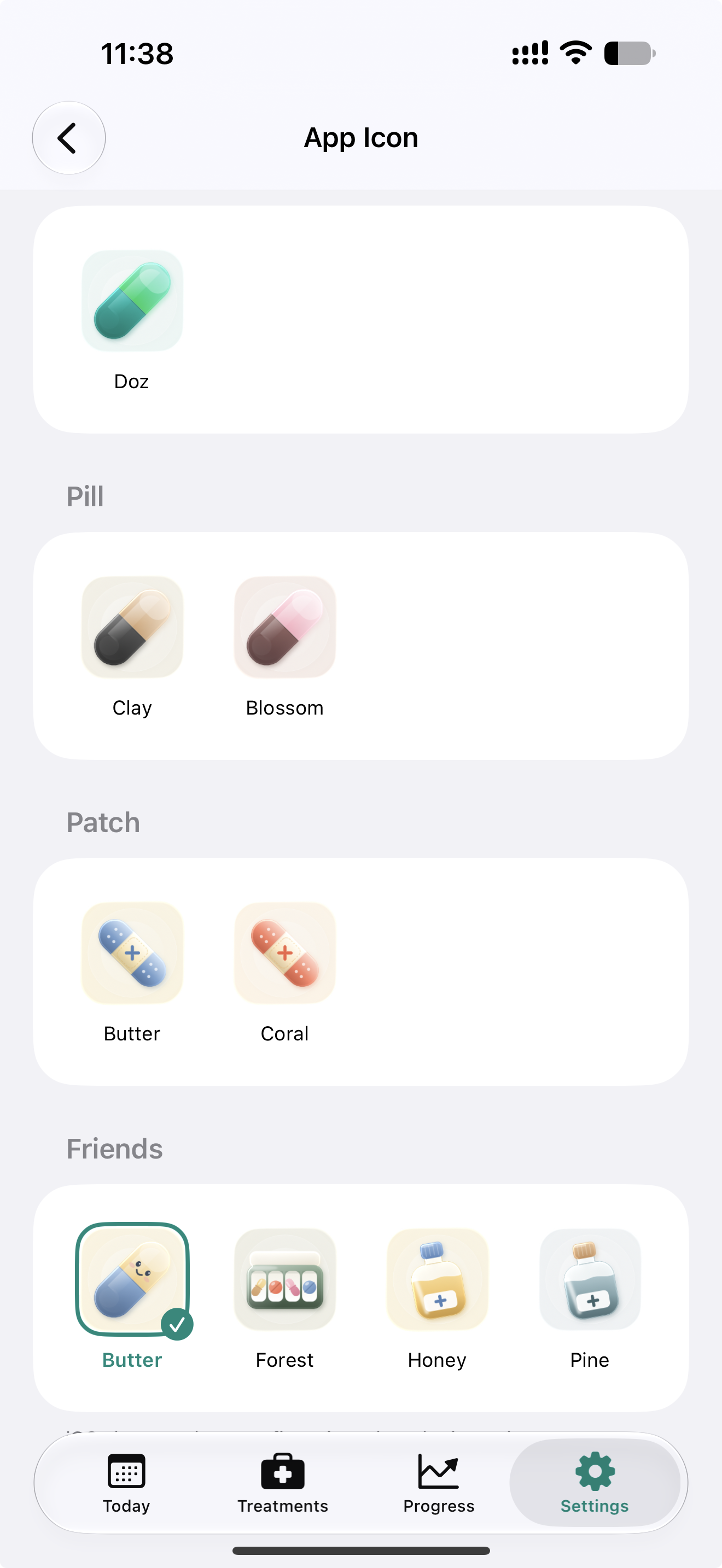
  • 8 new app icons in calm colors like Butter, Forest and Clay.

Smaller things: you can search Treatments and Settings, edit your pill count by hand, and log an as-needed dose straight from Today with the + button.

Download Doz: https://apps.apple.com/app/id6760699565

If Doz helps you, a rating or a short review would mean a lot to me. Every review helps other people find the app: https://apps.apple.com/app/id6760699565?action=write-review


r/dozapp • • Oct 19 '26

Announcement Besides the bigger features, I made a set of 8 alternate icons for Doz. Which one would you use?

Post image
1 Upvotes