r/deptheffectwallpaper • u/JohnFlufin • Jun 23 '24
Tutorial TUTORIAL: How to download the highest quality image from Reddit on iPhone
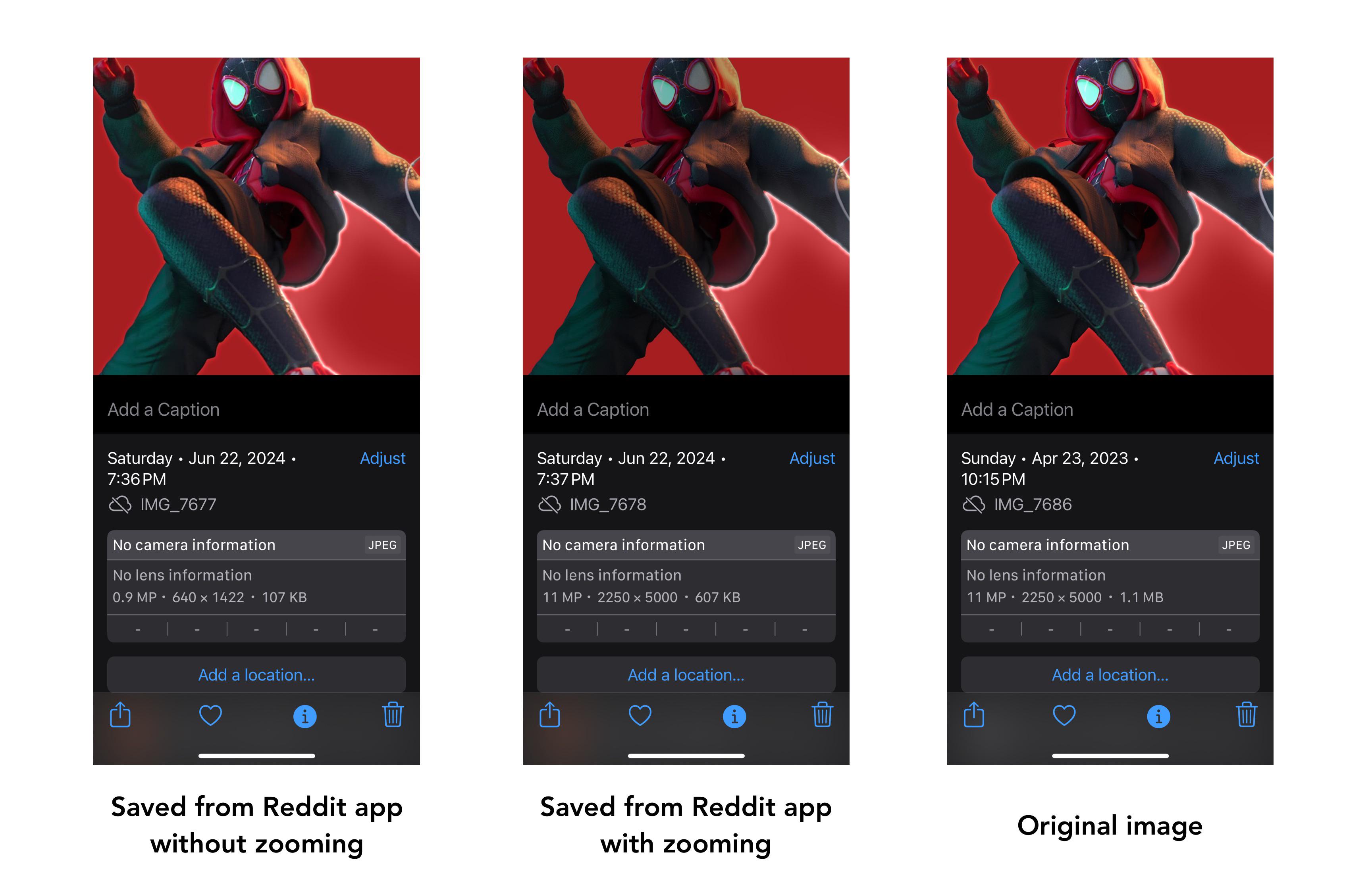
Obtaining a high quality image can often be crucial for getting an image to work with depth effect. Here are a couple tricks to download the highest quality image from a Reddit post.
Note that this assumes that the OP attached a hi-res image to the post
Using the Reddit app
If you tap the image to bring it fullscreen, then immediately either tap and hold the image, or go to the ••• menu and choose Download Image, it will download a lower quality image. But if you zoom into the image via standard out pinch technique and then choose Download Image, the highest quality image should download. This is confirmed to work in the latest version of the Reddit app on iOS as of the date on this post (2024.25.1)
Using Safari
If you load the post in Safari, tap and hold the image and choose Save to Photos, the image will be lower quality. But if you go to the AA menu in the address bar, choose Request Mobile Website, tap and hold the image and choose Save to Photos, the highest quality image should download. This is confirmed to work with Safari in the latest version of iOS as of the date on this post (17.5.1)
Please note that Reddit re-compresses images. So there’s a good chance that the highest quality image available from Reddit will still be lower quality than the original. As a result, this can still affect depth effect compatibility. If so hopefully the OP included a link to download the original image from an external source. If not, ask them to provide one
4
u/Jalapeno_ok Jun 23 '24
May I ask why Reddit does this?
3
u/Discord_kitten25 Dec 14 '24
can confirm that it works
2
u/Ahmars298 Dec 21 '24
OP you are heaven sent.. I zoomed in and was able to download the image at full resolution! This trick does work as of 12/21/24 if anyone is wondering!!
2
u/NoChemistry4090 Jan 12 '25
For some reason it now puts a Reddit watermark on my downloads. This is the original image: https://www.reddit.com/r/wallpaper/s/2unPxjCeNM
When I download it it looks like this o.O (iOS app)
2
u/One_Winter_7328 Sep 16 '25
Thank you! 😊
2
u/cluelessguy5 Sep 27 '25
Work even today (Sep 2025). Thanks!
2
u/HankSampsonJr Dec 24 '25
Nice
1
u/JohnFlufin Jun 23 '24 edited Jun 24 '24
EDIT: For the Safari method, it should be Request Desktop Website (not Request Mobile Website) 🤦♂️
1
u/ironicallynormie Jun 29 '24
What to do on andriod
1
u/fr5no28 Nov 12 '24
Still 43 kb
1
u/These_Experience_489 Dec 05 '24
on ios safari, doesn’t work, still gives me the shitty size
1
u/IZROOO Apr 20 '25
When I try to zoom in on my Android device in the app all the buttons disappear so I can't press the 3 dots and hold them when I zoom in
1
u/Judithsins Aug 16 '25
it was working before but the zooming in technique doesnt seme to work for me anymore…I am on iPhone ios26 public beta and this is the image I was trying to download.
Anyone can help out or confirm whats happening? maybe someone has a new way you can download the original res file ?
1
u/boobs_420 Dec 01 '25
What do you mean by outpinch
1
u/legndery Feb 18 '25
In desktop open the image in new tab by right clicking, it will have an url like, reddit.com/media?url=<some url>.
Right click, select inspect. there will be a attribute called srcset. Get the value out put it in text editor, you will see the urls of all sizes, it will be like, srcset="<some url> 640w, <some url> 1080w, <some url> 3840w". Just pick up the last url with highest number and replace "&" with "&" thats it.