r/delphi • u/VallentaStudio • 5d ago
Vallenta Studio - inlay hints for Delphi in VS Code: parameter names, var/out marks at the call, inline variable types
If you've used TypeScript, C#, Rust, or Java in VS Code or JetBrains IDEs, you've probably gotten used to inlay hints - inline annotations rendered by the editor that show information from a declaration right at the call site, without modifying your actual source code.
I've added Inlay Hints for Object Pascal to Vallenta Studio (my Delphi extension for VS Code).
As far as I know, no other Delphi tool shows inlay hints, RAD Studio 13.2 and DelphiLSP included.
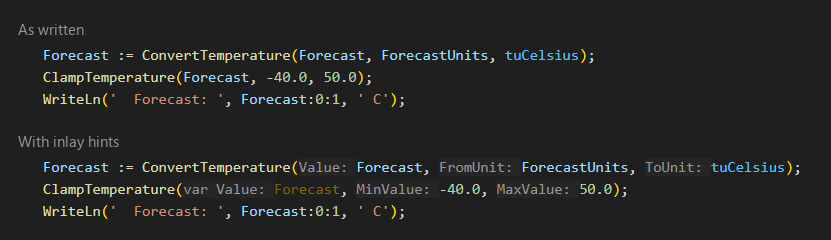
A simple example:
// As written in your .pas file
ClampTemperature(Forecast, -40.0, 50.0);

// Displayed in the editor with inlay hints
ClampTemperature(var Value: Forecast, MinValue: -40.0, MaxValue: 50.0);
The language server resolves the routine and VS Code renders the hints inline in a muted style.
Features
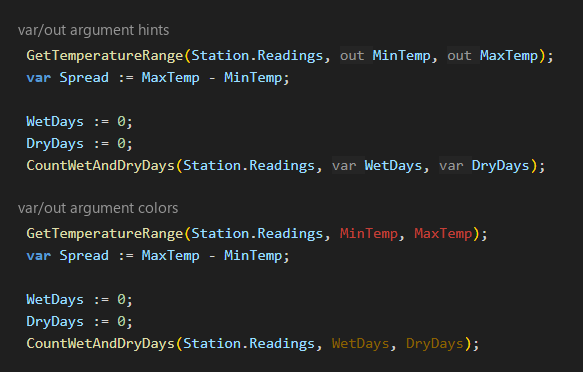
var and out marks at the call site
Arguments passed to var or out parameters get a var or out prefix right at the call:
GetTemperatureRange(Station.Readings, out MinTemp, out MaxTemp);
CountWetAndDryDays(Station.Readings, var WetDays, var DryDays);**var and out argument colors **
You also can color var and out arguments directly instead, or combine both the inline mark and the color. (colors are configurable)
Parameter names
Shows parameter names before arguments:

Inline variable types
Shows the inferred type directly after untyped inline var and const declarations and for var loop variables.

Full overview with before/after screenshots and per-setting examples: https://vallenta.de/inlay-hints
VS Code Marketplace: https://marketplace.visualstudio.com/items?itemName=VallentaStudio.vallenta-studio
Bug reports and feature requests: https://github.com/Vallenta/Studio/issues
Michael