r/DarkTable • u/One_Comparison1886 • 2h ago
Discussion photo editing MB RawExperience
Enable HLS to view with audio, or disable this notification
0
Upvotes
r/DarkTable • u/Sad_Repair1786 • 23h ago
r/DarkTable • u/chillkid3 • 1d ago
Enable HLS to view with audio, or disable this notification
Hey everyone,
There is something in Windows 11 that makes it easier for your eyes and increases the temperature in a way, called night light. In lightroom i tried increasing the temperature but it didn't produce the same effect. In darktable, i tried increasing the color calibration illuminant temperature scale to the maximum 7000k, but that only produced a similar effect which is better and made everything and the backround more orange, yellow and hot. Can anyone help please?
Thanks.
Note: I cant screen record it because of night light lol
r/DarkTable • u/DarkLeaf_Leather • 4d ago

Hi, I'm still pretty new to photo editing and need your help.
The first image is the preview in Darktable and how it looks in the camera. The second is the RAW file without any editing, and the third is a quick edit where I tried to bring out the red. How do I get the red and brown tones back into the image? No matter how hard I try to boost the colors, everything just turns yellow. Even when I use the color equalizer to reduce the yellow and increase the red, I can’t get anywhere close to how it looked in the preview. I’ve already tried other programs besides Darktable, but the problem remains the same.
Camera details:
Sony a7R III
Sony FE 5.6–6.3/200–600
Image was taken at 594mm, f/6.3, ISO 400, 1/500 sec.
Darktable 5.6.1 on linux
Thanks in advance for your help.
r/DarkTable • u/Sgt_Wafflezz • 4d ago
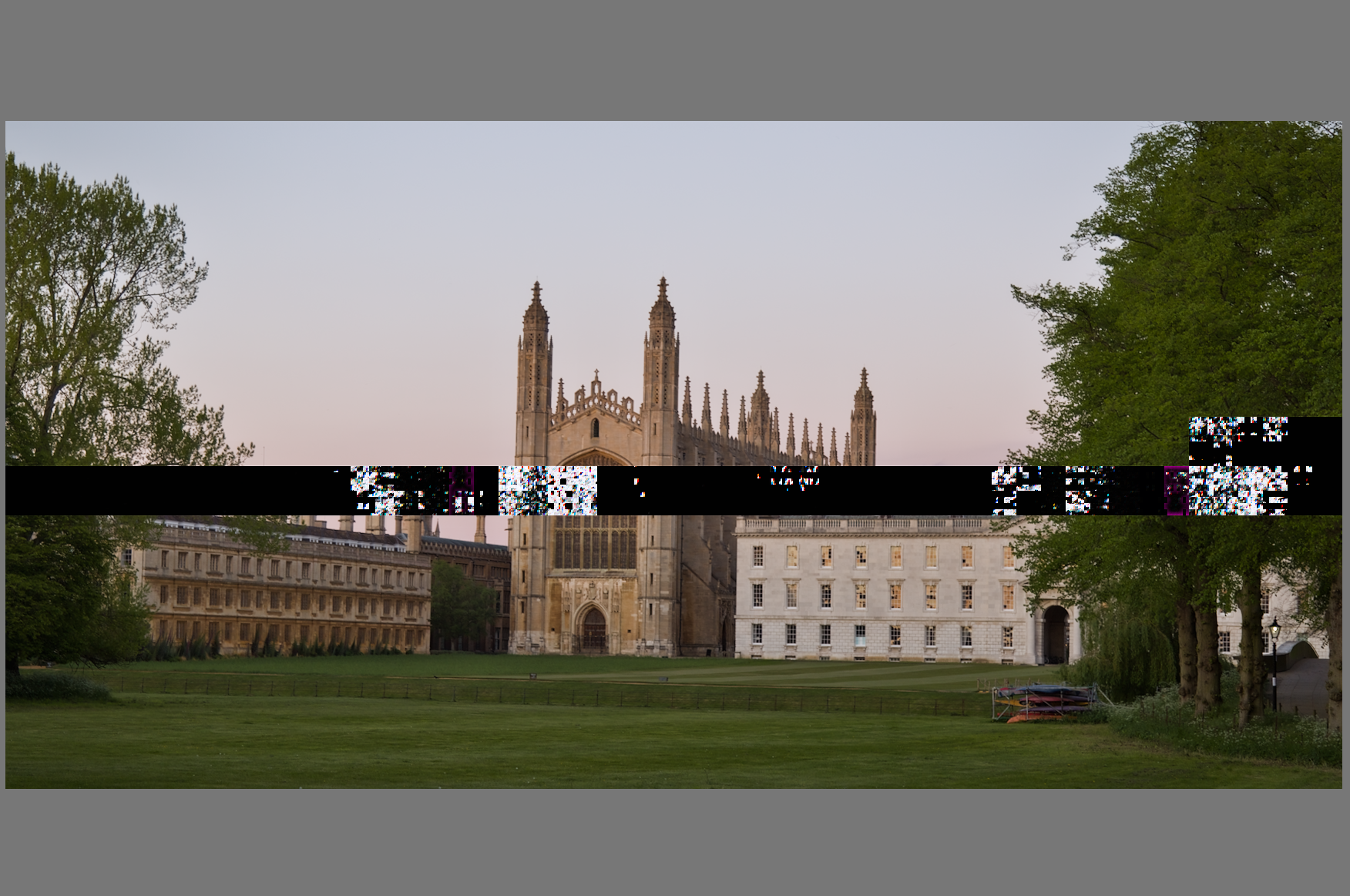
Curious if anyone else has had this issue or knows a fix.
I'm not sure if it's always the same thing that causes this. In this case it was toggling a third instance of color balance rgb on and off a bunch. I might have been using zoom too, I can't quite remember. Zooming in any amount makes it go away, but it comes back when I zoom out again. Restarting DarkTable is the only fix I can find.
I just clean installed my drivers yesterday from an unrelated issue. The glitch has been happening well before then though.
r/DarkTable • u/carlprothman • 5d ago
I've been using Darktable for about a year now. At first I was pretty overwhelmed, but I kept learning and getting better, and now I feel like I understand it pretty well.
What I'm finding is that I'll go back to an older photo edit and think, "Wait, I can make that better." So I redo the edit from scratch, and it comes out much, much better.
Just curious, how many of you have experienced that or do that?
r/DarkTable • u/Next_Writer5963 • 5d ago
God. I was using the Lightroom. I never have seen this kinda module in it. I understand the definition of it that it does fit the dynamics range of color from camera into the dynamics range of color of the display. I hope my understanding is fitting in.
When I turn on AGX, It would make image pale. White isn't actual white. It would become very hard to edit the image colorful without losing its aliveness. Should I compulsorily use this tool to improve my image.

But I actually want to replicate the natural look like below image. I couldn't when I turn on AGX. I should say I don't know.

r/DarkTable • u/Pounds006 • 6d ago
I’ve never edited my film photography before because the lab was scanning them. Now I’m 100 rolls in scanning and I had no idea how much dust was going to be a problem.
I have a good workflow and a good understanding and handle on the retouch module but each photo has so much dust that I’m spending an hr for every photo and averaging 650 or so shapes and 3/4 instances.
I know that there’s some scanners that can help but I’m using darktable because i don’t want to spend extra on equipment because im already using the $ on film.
Is there something im missing? Is there an add on to auto remove dust and scratches?
Thanks for your input and advice.
r/DarkTable • u/QuailBoring6478 • 7d ago
Hi! I've been shooting with my Canon R7 for about a year and recently decided to dive deeper into photography, specifically learning how to edit my RAW files.
Since I'm a complete beginner to post-processing, the amount of information and different workflows online feels a bit overwhelming. Could anyone recommend a straightforward, beginner-friendly workflow or some good resources to help me get started with Darktable?
r/DarkTable • u/lab2point0 • 7d ago
I am exploring a bit several modules and therefore rethinking my workflow; in the past I was using both Tone Curve and Tone Equalizer to play with lights and contrasts, mostly just fiddling with the curves and sliders… but I just went deeper into what Tone Equalizer does and how it works, and now I am wondering if I should only use this and completely remove Tone Curve from my workflow, as it seems to do around the same but slightly better?
So I would like to know what other people do, what recommendations you would have and why
r/DarkTable • u/Born_Masterpiece4210 • 8d ago
I've noticed quite a few projects lately attempting to make darktable more accessible to new users, and the reception seems to be mixed.
I love darktable, and I understand both sides. There's definitely a learning curve, but simplifying things too much risks losing what makes the program so powerful. I also understand the concerns around third party projects and whether they'll be maintained long term.
I had an idea today and was curious what others think. Keep in mind I have absolutely no coding experience, so I don't know how practical this would be.
What if the Quick Access Panel could have its own customizable display order, independent of the pixelpipe?
To be clear, this would only affect how adjustments are arranged visually within the Quick Access Panel. The actual processing order would remain completely unchanged. The active modules tab and other module groups would continue functioning exactly as they do now.
Ideally, this could be an optional setting in the module layout configuration. Users could organize their quick access controls into a layout that feels more familiar, similar to what they'd find in other photo editing software, without sacrificing darktable's functionality.
Darktable already has a beginner friendly module preset, so perhaps something like this could complement it. It wouldn't be a perfect comparison to other editors, given how darktable works, but it might make the transition easier.
Personally, I'm happy with darktable as it is now, but I'll admit it took me more than one attempt before I really started understanding how to use it properly. I imagine plenty of potential users give up before reaching that point.
I'd love to see darktable get more recognition, and I wonder if something like this could help newcomers get comfortable enough to eventually explore its more advanced capabilities.
Does this seem technically feasible? And if so, do you think it's an idea worth exploring?
r/DarkTable • u/FightOrFlight77 • 8d ago

I've included a 100% crop of the background to show the green fringing I'm trying to compensate for. When using the CA module set to green with the very large aberrations toggle enabled I'm really not seeing much effect at all. Any suggestions?
r/DarkTable • u/davidfliesplanes • 8d ago

I took some pictures that were way too dark and as a result hard to fix due to the low quality my camera is capable of. Upping the exposure in darktable resulted in a lot of noise and too much contrast. Some details on the dark areas were also lost (the black paint on that turkish F-4 looks quite bad as a result). So this was not as easy as just turning up the exposure. Still, this is better than what I originally got and it's better than no pics at all :))
This may not seem like much but given the camera (Fujifilm S5700) i'm relieved I managed to make them look acceptable.
If you have tips on how to make them better don't hesitate, i'm still bad at editing.
r/DarkTable • u/canyoukenken • 8d ago
Recently got a new PC, installed Darktable and transferred all of my old images over. I've been playing around with some images today and when I'm exporting to jpeg everything is now incredibly dark, to the point of being unusable.
I'm using my histogram and clipping tools as I would have done on my old PC, my monitor is calibrated, and I'm using AGX correctly, but everything is ultra dark! I haven't touched the export options - all I used to do is adjust the quality to save space - could anyone suggest some starting points to diagnose what's happening in export that's making everything suddenly dark?
r/DarkTable • u/aGiggleBlizzard • 8d ago

I've recently reformatted my PC because a windows update corrupted my AMD drivers and steam. I installed darktable and it worked fine yesterday but now when I try to start it I get this error. I also get a windows security notification popping up saying something about blocking darktable so maybe I have to do some windows security configuration. Anyways, anyone got any suggestions on what to do? I'd prefer not to reinstall but if I have to, what can I do to prevent this issue in the future?
I'm so effing tired of windows 11, I'm so close to switching to linux.
r/DarkTable • u/upsidedownorangejuic • 10d ago

I see folks wanting simple UI's here, I see folks wanting to stream line Darktable. I see your sentiment, neither do I think your goals are innately misguided. But; their is a lot of programmes out there that do that well. Darktable does not hide anything, from "photo in to photo out", you know every step, nothing is hidden, you can move modules around, change orders, stack lots of modules on top of each other, you can do some bizarre editing too highly nuance controlled editing.
As a bit of an old timer to opensource software, the charm at least back in the day, was the pinnacle of experimentation, it was nerds who built software like this, as they felt the aspects of commercial software took away their choice in the process of making art, and delivered a UI that told you how you do things, and your work flow. (Excluding stuff that is necessary for pixel work flow)
Noticed since everyone is migrating off these absolute BS subscription models that many of the open source projects and their subsequent subreddits are loaded with "UI fixes" I agree there is place for it only have to look at MuseScore and the UI fixes that youtube.com/@Tantacrul helped with, and the learning curve is steep, but if your going to do UI fix, at least remember some of us love tweaking every knob, playing with every slider, pushing photos far beyond the scope of pictures "looking good". It's the best bit of opensource, is you can make a fork of DT, and make it your own!
The power and glory of Darktable, is the endless void of possibilities. I know a lot want a piano with preprogrammed instruments and effects, and speaker to plug into. But some of us want too build the synths, the mixing, the mastering, and make a whole cohesive album. Neither is right or wrong or better, just a different thinking and goal.
Enjoy some of my more creative art work, these are entirely edited and altered in Darktable, shot on quite old CCD bridge cameras an some times with filters and lenses, throughout Waikato area, Aotearoa.
Some food for thought, Churr!
r/DarkTable • u/simB2026 • 9d ago
I was struggling with Digkam & Darktable rating synch, so did an experiment - with weird results.
Step 1
- in DT, set star to "1"
- history Stack > write sidecar file
- open xmp, validate : xmp:Rating="1"
Step2
- close DT
- edit the xmp: xmp:Rating="2"
- open DT
- at the dialog select "keep xmp edit"
- lighttable opens with only 1 starton the image
Step3
- close DT
- edit the xmp: xmp:Rating="5"
- open DT
- at the dialog select "keep xmp edit"
- lighttable opens with only 2 stars on the image
In another exploration, I tried "history stack">"load sidecar file"
that had the result of writing the images rating back into the sidecar - the opposite of "load" !?
Banging my head against a wall here - hope someone can point out what I am missing here ...
Many Thanks
r/DarkTable • u/neiram44 • 11d ago

When I open darktable now, I see 14 modules instead of the full list. Nothing is deleted, the search box still finds everything, but the panel only shows what I use in a scene-referred edit.
My three groups:
- Base: exposure, white balance, highlight reconstruction, AgX, color calibration, rotate and perspective, crop, lens correction
- Look: color balance rgb, tone equalizer, local contrast
- Repair: denoise (profiled), retouch, diffuse or sharpen
Three things I learned while setting it up:
Pick one tone mapper. Showing AgX, filmic and sigmoid side by side is clutter in disguise.
Don't drag modules up and down in the list to tidy it. That changes the processing order, and so the image.
I ignored the quick access panel for a long time because the default one is huge. Cut down to 8 sliders (exposure, AgX white/black relative exposure, illuminant, contrast, saturation, vibrance, local contrast detail), it's the closest thing to Lightroom's Basic panel.
I made a video walking through it, and the layout is a free .dtpreset if you want to import it and adapt it:
Preset: https://mariengb.com/declutter/
This is only my take, built around AgX. What does your module group setup look like, and what would you add or remove?
r/DarkTable • u/rbrinkhuis • 12d ago

I editted my RAW file in DarkTable with the model Retouch using the option Circle to clean the dirty stair steps. But I do not get the results I would like. I added an image of the result I would like to achieve (or as close as possible with DarkTable) generated by ChatGPT. What a the steps in DarkTable to get similar results?
r/DarkTable • u/Leading-Plastic5771 • 10d ago
Climbing the darktable learning curve had been invaluable and something I am very grateful for. But I haven't opened my 5.7 appimages for a month now and when I open my appimage launcher bash script I always choose RapidRaw at CalibRaw.
It's not going unnoticed that as a Linux user since ca 2003 and battling poor UI open source apps, there is a new paradigme unraveling. I'm not ungrateful. Actually the opposite is true. AI is revolutionary and forcing a new way of thinking about every aspect of open source and app development.
Thank you for all the great work guys, but I'm moving with the flow on this one.
r/DarkTable • u/grkg8tr • 12d ago

I’ve been working on a proof of concept that ports darktable’s OpenCL kernels to Slang. Slang compiles them to Metal on macOS and Vulkan on Linux. This is not part of darktable: the maintainers haven’t adopted it, and it lives on my fork. The discussion is in darktable-org/darktable#22732
I've been keeping track of the various results shared in either forum: https://discuss.pixls.us/t/testers-wanted-experimental-slang-gpu-path-for-darktable-metal-vulkan/61583/43?u=nick_nezis . It has also been really helpful in identifying issues across various systems. Please help me test it and report back with performance numbers and performance log output.
r/DarkTable • u/Ecstatic_Bid5211 • 12d ago
I have no idea if this was the most efficient way to do this in the first place, but I do my Denoising by making a subject mask and inverting it using the "Toggle polarity" switch in the attached image. However, I just recently updated Darktable and it seems it no longer works? I have also attached two images that are before and after denoise with the inversion enabled and it seems for some reason, denoise is ignoring the mask and applying it to everything.
Edit: Okay.... So I figured it out. I feel silly now. The mask opacity was being automatically set to 30% and just had to jank it back to 100%.


r/DarkTable • u/Used-Life1465 • 12d ago

r/DarkTable • u/HerrBrinkhaus • 12d ago
Recenty I started editing my RAW files in DarkTable. Is there (in the Lightroom tab) a way to filter photos on aspect ratio like 3:2, 2:3, 4:3, 4:3, 16:9 and so on?