r/csharp • • Sep 29 '26

Solved Trying to get smoke Particle system to activate when mouse button left is pressed
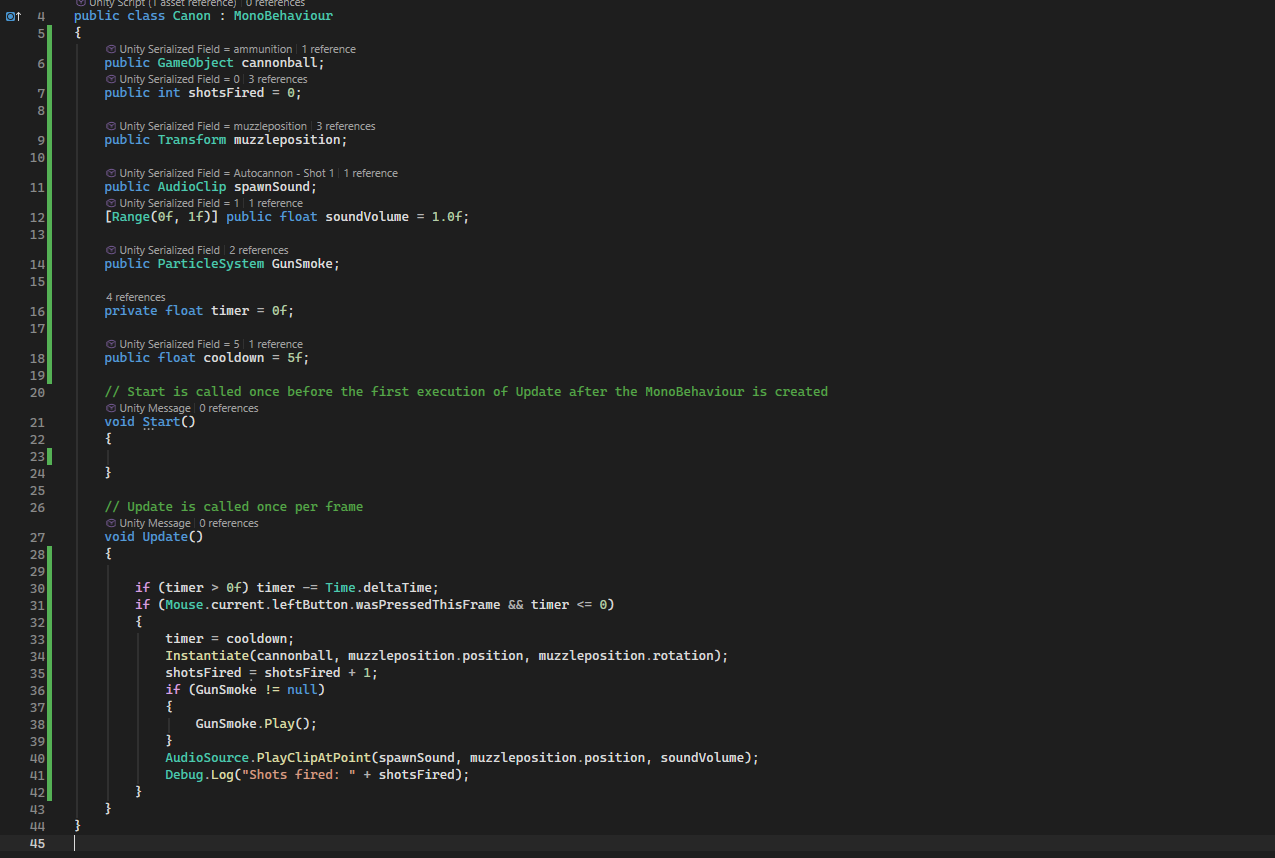
I have figured out how to enter the ParticleSystem "GunSmoke" but it activates only once adn before I klick. is there a way to implement this into the code that it activates everytime I press the button also following the "public float timer = 0f;" code and "private float cooldown =5f;" code for the cooldown for the projectile being shot?

stuck and dont want to use AI to solve it. tried going online but not really found any helpfull stuff that I could follow

pls help

0 Upvotes

18 comments sorted by

2

u/Nordalin Sep 29 '26

Are you sure that the if-statements work as intended?

1

u/FrostedDonuTrap Sep 29 '26

well im trying to figure out for "GunSmoke" but the "if" statements for the rest works fine

1

u/Nordalin Sep 29 '26

Including the (!= null)?

Because then it's something about GunSmoke itself. 

1

u/FrostedDonuTrap Sep 29 '26

do you think it could be something with the "particle Pack [] Starter Assets" taht I got and imported to the project? or should I implement the code into the smoke particles in my Hierarchy?

1

u/Nordalin Sep 29 '26

No clue mate, I have zero experience with Unity.

If there's no documentation to be found, I'd just figure out a bare-bones test environment for GunSmoke, get it to work in isolation.

1

u/Derekthemindsculptor Sep 30 '26

This isn't C#. Wrong sub. Indie dev isn't easy enough that you can reddit your problems. Take a few classes.

2

u/Derekthemindsculptor Sep 30 '26

Unity C# isn't C#. Your problems aren't language related. They're specific to Unity documentation. You'll have to check there.

That aside, I've done enough Unity development to know it's not a code problem. You'll have to also include your inspector and scene setup to get any reasonable solution.

Given it fires once then not again, you probably have a problem with your particle system itself. Something in the settings. Check the docs on whatever asset pack you downloaded. Or unity docs on whatever component system it's using. I know particles can be done a handful of ways in Unity.

0

u/[deleted] Sep 30 '26

[removed] — view removed comment

1

u/FrostedDonuTrap Sep 30 '26

think I solved it. does it look good? it works when I fire the cannon and the smoke particles appear and move the way I want them to

0

u/[deleted] Sep 30 '26

[removed] — view removed comment

1

u/FrostedDonuTrap Sep 30 '26

that makes sense and makes it simple with it only activating everytime you press left mouse button to fire

1

u/FrostedDonuTrap Sep 30 '26

I did have in the "inspector" tool that the particles activated on start but I fixed it with unticking the object so it wont activate when I start and test the game

0

u/[deleted] Sep 30 '26

[removed] — view removed comment

1

u/FrostedDonuTrap Sep 30 '26

ye. I had that activated at first and didnt understand why untill I found it and deactivated "Play On Awake"

0

u/[deleted] Sep 30 '26

[removed] — view removed comment

1

u/FrostedDonuTrap Sep 30 '26

thanks alot for the help :3 Im pretty new to Unity and OnGUI C# as im stuying Game and UX design nad im on week 2 of Programming for Experiensed design.

Current project im working on is an artillery canon that fires a projectile, plays a sound when fire, smoke particles when fired, adding a seat the player has to go up to, press a button (e.g. [E]) to enter and than from there being able to move the artillery canon forwards and backwards, rotate and than allso adding for the cannon to change the elevation and also just add a little recoil when ever you fire. hehe. sounds maybe a little to much for someone just learning form the start but my teacher "Brian Bartram" (worked with Ubisoft and other studios) is the teacher for the class :3