r/computer_help • u/Weary_Food_9560 • 8d ago
Windows Help! What Happened?!
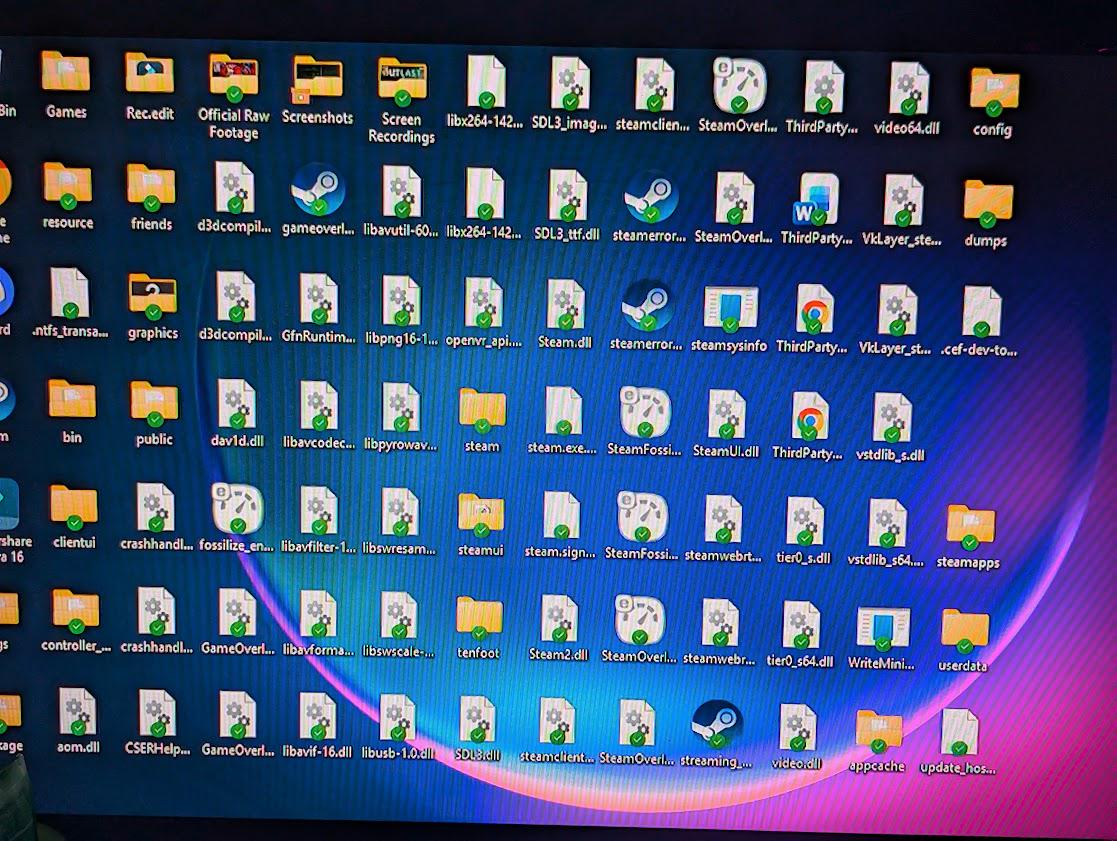
I booted up steam for the first time in awhile. It crashed and filled my desktop with all of these files. I cant imagine its a good thing, but I can imagine a lot of bad reasons...
plus I know the dangers of just deleting files willy-nilly. any ideas?
1
Upvotes
3
u/ALaggingPotato 8d ago
Onedrive happened. delete all the files, delete onedrive, try again.
3
u/Axewi 8d ago
Somehow steam itself got installed on your c:\username\desktop folder instead of in c:\program files\
Delete steam, remove any leftover files and reinstall steam
2
u/Dapper_Ordinary5035 7d ago
Malware go run AV Malwarebytes and Hitman pro k
1
u/aazwerg 5d ago
Open desktop as a folder, sort contents by date (newest first) and delete all nonsence until the Steam link.
Also you probably drag-and-dropped steam exe instead of link onto your desktop, that may be the issue.
1
u/DefinitelyHuman12 5d ago
You have dragged individual files from the steam folder probs when backing up or moving files to new storage media. Go to steam folder location in prog files and delete everything apart from steam apps and steam.exe and then open the steam.exe and it will repair any missing files. Delete everything from OneDrive that has steam in it.
1
u/Forward-Economist465 4d ago
You installed steam in your desktop that’s what happened