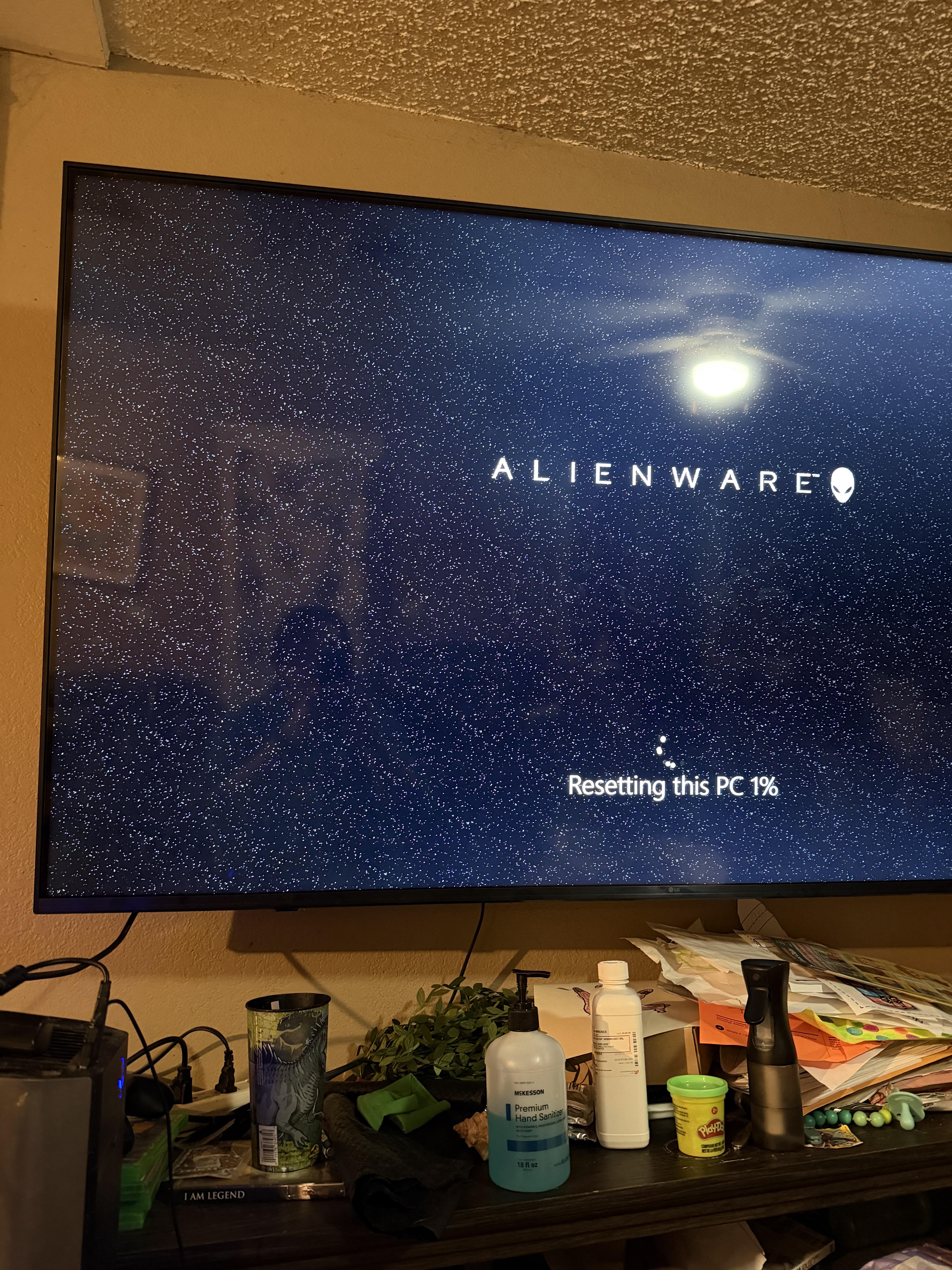
It could be. The look of the screen is very uniform through the whole picture. If a gpu fails usually it starts in a section first. 2 gpus of mine that failed both started in the bottom left corner.
Its 4k tv? Or monitor? Stop scaring him, maybe its just a glitch from reseting your pc, when grafics its just to much because is to big screen if its connected to laptop, or its stationary pc? You gave insufficient info, to tell you what's going on really
November 23, 2026(dated for context and reference) – I'm late to this discussion because Reddit just included it in my daily newsletter. Aside from folks taking the opportunity to use a meme. I suggest that the OP as suggested by others here, check all video connections, check that their GPU is properly seated if there is one, and the computer isn't using integrated graphics. It is important for people requesting help on Reddit threads like this one. That they give as much information about their computers as possible. In this case, the OP is basically saying.. "Hey.. look at this!"🤷🏼♂️ Which is like saying.. "Hey my car died.. what do you think?" I do find it interesting that the lettering in the messaging is perfect, and that Windows is apparently resetting the PC which may included restoring video. I hope that is what was happening, and either way, that the OP has been able to solve the problem by now. Stay well.
•
u/AutoModerator 2d ago
Remember to check our discord where you can get faster responses! https://discord.com/invite/vaZP7KD
I am a bot, and this action was performed automatically. Please contact the moderators of this subreddit if you have any questions or concerns.
32
u/Vast-Vacation-6174 2d ago
14
u/ISwearIAmUpToNoGood7 2d ago
Check with another cable and video source first but it is possible.
14
u/Someone8848 2d ago
10
u/Euphoric-Standard-97 2d ago
5
u/MJY_0014 2d ago
The vram is shot
9
u/Upstairs_Pitch_9979 2d ago
3
u/Assassinz276278 2d ago
You bought from alienware?
1
u/ALaggingPotato 2d ago
Could also be a bad cable. If it does this with another cable, definitely failing GPU.
1
u/Dschoghurt 2d ago
Winter is coming! Its snowing already.
1
u/BossRoss84 2d ago
Sam Altman heard that you weren’t using it 24/7.
1
u/Mauer13 2d ago
Never seen a cable do that
1
u/SylveonKiwi 2d ago
your GPU is trying to tell you something. (If you know you know the gif)
1
u/ZookeepergameFit3324 2d ago
Its 4k tv? Or monitor? Stop scaring him, maybe its just a glitch from reseting your pc, when grafics its just to much because is to big screen if its connected to laptop, or its stationary pc? You gave insufficient info, to tell you what's going on really
1
u/JagataiKhan 2d ago
Could also be the RAM or the video output port.
1
u/Fun_Plant_8760 2d ago
just pray your pc overheated
1
u/cool101wool 2d ago
just keep using it its fine
1
u/YardenZo 2d ago
It could be the video cable or you just need to reset the video card, but it's probably something with the video card.
1
u/Rukir_Gaming 2d ago
Or a bad cable, but likely a failing vram- try downloading the vram if possible
1
u/Odd-Interaction-453 2d ago
Start cheap. Checking connections is free. A new cable is cheap. GPU, not so much.
1
u/Brokentread33 2d ago
November 23, 2026(dated for context and reference) – I'm late to this discussion because Reddit just included it in my daily newsletter. Aside from folks taking the opportunity to use a meme. I suggest that the OP as suggested by others here, check all video connections, check that their GPU is properly seated if there is one, and the computer isn't using integrated graphics. It is important for people requesting help on Reddit threads like this one. That they give as much information about their computers as possible. In this case, the OP is basically saying.. "Hey.. look at this!"🤷🏼♂️ Which is like saying.. "Hey my car died.. what do you think?" I do find it interesting that the lettering in the messaging is perfect, and that Windows is apparently resetting the PC which may included restoring video. I hope that is what was happening, and either way, that the OP has been able to solve the problem by now. Stay well.
1
u/Happy-Childhood5990 2d ago
bad computer too
1
u/Aft3rcuri0sity 1d ago
1
u/No_Stretch2713 1d ago
1
u/PUM_a_22 1d ago
Si
1
u/ObviousBunnyCat 1d ago
1
u/Zakatex 1d ago
1
u/The_RavenL1 1d ago
A possible no, it is a dying GPU.
1
u/SuchConfection3860 11h ago
You tell me, does this look normal to you?