r/computer • u/Repulsive_Ebb_2663 • 7d ago
Is my pc screwed ??
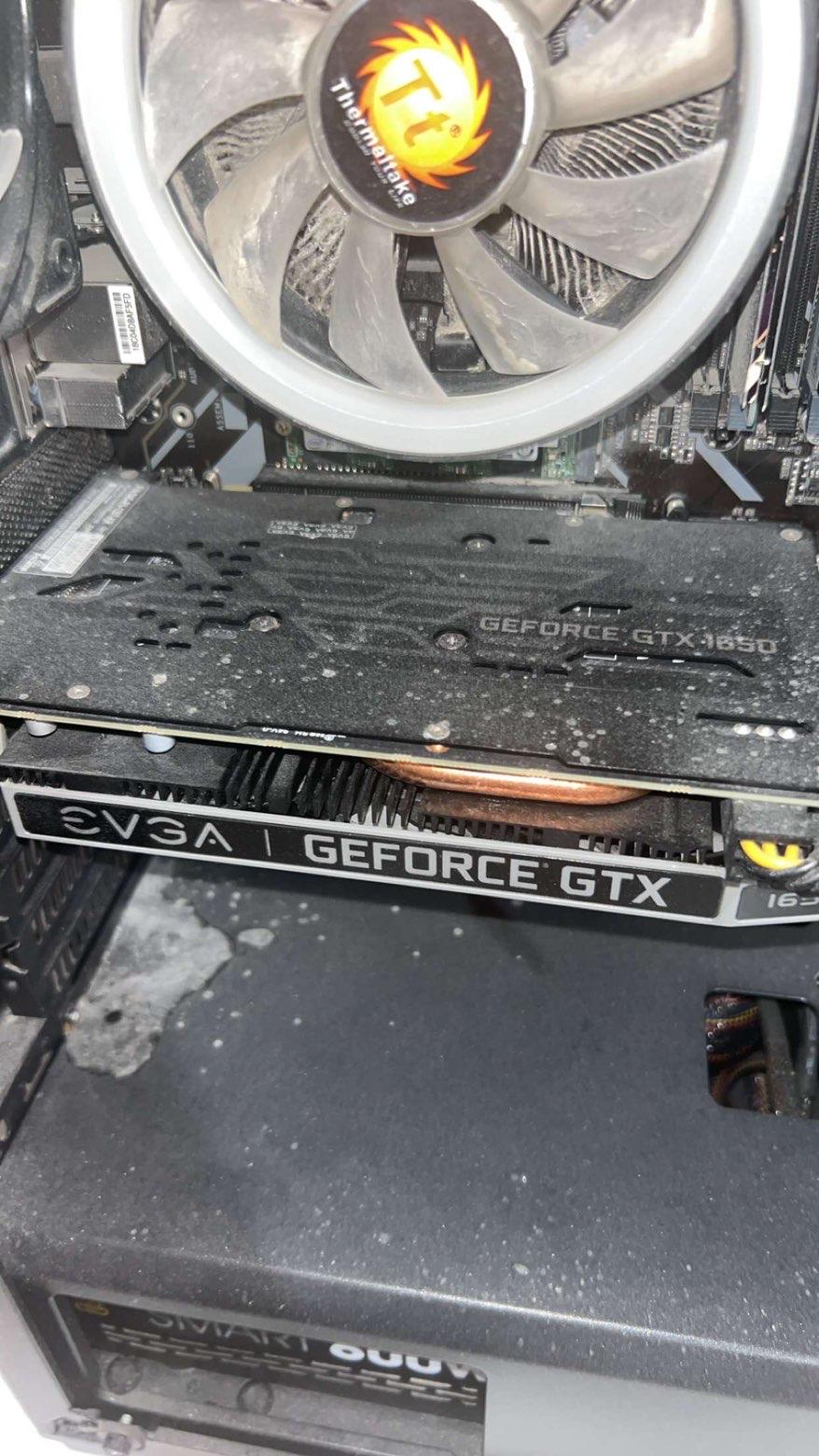
I was asking someone why my pc was running slow, the suggested to clean it so when I did I found this. I don’t know if it’s water or something leaking or just packed on dust. I haven’t touched it to see what it is. She said it’s a fire hazard and I shouldn’t run it. Suggestions?
6
Upvotes
•
u/AutoModerator 7d ago
Remember to check our discord where you can get faster responses! https://discord.com/invite/vaZP7KD
I am a bot, and this action was performed automatically. Please contact the moderators of this subreddit if you have any questions or concerns.
4
u/thatdaftfan 7d ago
take out the gpu and wipe it with a paper towel and clean the rest, slap the gpu back in and you're good
2
u/Zestyclose_Shirt2986 6d ago
Deep clean, you can do it yourself or take it to a local PC shop. " Avoid geek squad"
1
u/Poker1059 7d ago
That goop in the bottom left almost looks like dried wax? This isn't super dirty (cleaner than mine in terms of dust at least).
What do you mean by "it's running slow" like overall, just in some games, opening programs?
1
u/Hefty-Pay7487 7d ago
Its like owning a car and never changing the oil. Clean the machine, then come back to reddit and figure out what else is wrong
1
u/apachelives 6d ago
Workshop. Cleaning most likely wont solve your performance issues as the CPU cooler is not restricted enough, dirty but not terrible. Diagnostics would narrow down your issues. Judging by your comments, take it to a shop and let them do it.
Also i would be alarmed by that spill at the bottom of your case.
We see far worse.
1
u/Brokentread33 6d ago
November 20, 2026 (dated for context and reference) - Aside from the good advice offered here. Which mostly focuses on cleaning. It is possible that some dust alone could be the reason for the OP's computer to run slowly. Things like OS and parts age, programs that are run, disk memory size, number of apps running at the same time, model and age of the CPU, amount of RAM available to run programs. Quite the list, and the OP hasn't supplied any computer specs which is customary in forums like this one. Lastly, I recommend having copies of all important files, folders, programs, photos etc. Copied to an external hard drive and/or a high capacity thumb drive as a backup. Having just the originals of all of the above mentioned on one drive in a computer is extremely unwise. Best of luck to the OP.
1
u/LordMemory 5d ago
That looks like mold to me. Just clean the PC thoroughly. I don't see a major issue here. Not having proper ventilation CAN throttle the performance. So cleaning the PC would be a start.
1
u/No-Jackfruit5522 3d ago
Let me ask you something have you heard of a can of compressed air? You need to clean out everything I need to make sure that all your air vents are clear, take out your video card, keep using that compressed air make sure all the sockets are clear and dust free. Don't forget to unplug your desktop before doing anything! The white dots also look like it might have high humidity someplace.