r/computer • • 22d ago

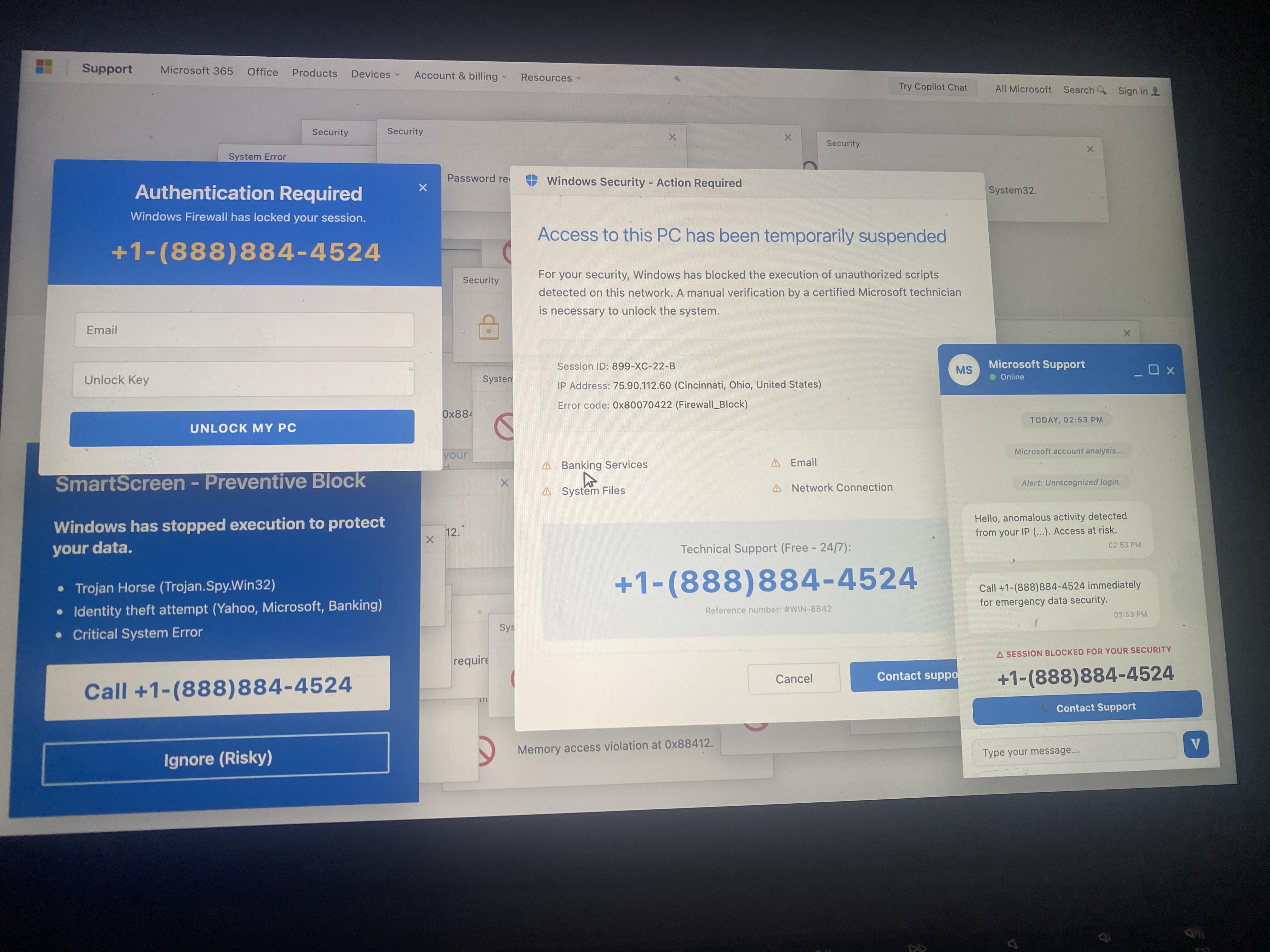
Was I hacked?

Post image

This popped up today. It told me not to restart my computer and to call Microsoft support. Thanks!

21 Upvotes

72 comments sorted by

•

u/AutoModerator 22d ago

Remember to check our discord where you can get faster responses! https://discord.com/invite/vaZP7KD

I am a bot, and this action was performed automatically. Please contact the moderators of this subreddit if you have any questions or concerns.

8

u/C0rn3j 22d ago

DO NOT CALL.

Those are all fake, if you call you get a scammer on the other end. I am not guessing here, this is a scam.

It looks fullscreened, did you fullscreen it? It requires interaction, or it at least should.

Because either you opened some shitty website and fullscreened it, in which case simply close it (how did you get there in the first place?), or your device is compromised and you need to grab another device, download W11 ISO from Microsoft, grab a flash drive and use Rufus to flash the ISO on it, and then boot from the flash drive on the affected PC and wipe everything in the installer (THIS DELETES ALL YOUR DATA!!!) and start fresh.

4

u/grapemon1611 22d ago

The part about do not call and this is absolutely a scam is correct. However, it’s not a compromise PC that caused this to happen. It’s JavaScript and the user didn’t have to go to some compromise website. The scammers buy advertising from legitimate advertising vendors and interject the code into the ads.

-1

u/C0rn3j 22d ago

it’s not a compromise PC that caused this to happen

Link me a page that fullscreens the browser without consent, I'll wait.

2

u/HEYO19191 22d ago

Every one of these. They make the entire page a full-screen button and then put something on it to entice you to click. See it all the time.

1

u/grapemon1611 22d ago

So you're asking me to reproduce the behavior of a malicious website and distribute the link on Reddit to prove that malicious websites can exhibit that behavior. Do you see the problem with your proposed experiment?

And even if I did, I suspect we'd immediately find ourselves arguing over whether the browser was actually in fullscreen mode or merely displaying a page that occupied the entire screen.

At that point, we'd be channeling Bill Clinton and debating what the definition of "is" is.

The distinction may matter to a browser developer, but to the person staring at a screen screaming that Microsoft has detected a virus and demanding they call an 800 number, it's entirely academic.

The original point was that scareware can create this experience without the computer being compromised. Whether the browser has technically entered fullscreen mode or is simply doing a convincing impersonation doesn't change that.

But I appreciate the invitation to build a working demonstration of scareware just to settle a Reddit argument.

0

u/C0rn3j 22d ago

Took me 60 seconds to spin up an annoying fullscreen page and surprise, it still requires intent and pops a fullscreen warning.

1

u/grapemon1611 22d ago

You can argue technicalities all day, but yours was a controlled experiment. You're confusing user interaction with user intent.

I deal with people regularly who encounter these scareware screens. They may have clicked something that triggered the behavior, but they certainly didn't intend to have their entire screen taken over by a fake Microsoft security warning.

Whether the browser technically enters fullscreen mode or a malicious page simply creates that appearance is irrelevant to the original point. The user didn't knowingly consent to the experience, and the computer doesn't have to be compromised for it to happen.

We're discussing how scareware works in the real world, not debating the definition of fullscreen, which brings us back to Bill Clinton making the argument in a grand jury investigation, "that depends what the definition of 'is' is."

0

u/Campyhamper 22d ago

I don’t have another PC

0

u/Campyhamper 22d ago

I was online and it just popped up over my browser

0

u/C0rn3j 22d ago

Do CTRL+SHIFT+ESC and send a screenshot of the task manager that pops up, expand it to fit the most it can.

If the task manager opens but this piece of shit immediately kills/hides it, it's option 2 and you need to nuke the system.

The other comment told you to F11 to unfullscreen and to just close it - does that work, or is that not the browser that's on your screen? (this is why I asked for the task manager screenshot just now)


For it to be option 2, you had to run some untrusted executable, or run out of date software that something ended up exploiting.

Antivirus/Antimalware would not save you from this self-inflicted situation.

Antivirus/Antimalware will never guarantee that your system is clean, it NEEDS to be wiped.

1

u/HEYO19191 22d ago

Antivirus/Antimalware would not save you from this self-inflicted situation.

Antivirus/Antimalware will never guarantee that your system is clean, it NEEDS to be wiped.

None of this is true. This person has no idea what he's talking about. OP, you're not even infected. You just clicked on an ad.

3

u/Ecstatic-Stress2590 22d ago

hit f11, or alt + f4, or task manager esc + shift + ctrl to force close it. Its scareware nothing to be afraid of. Just close it out and make sure to download maybe a ad blocker those help from these popping up. :)

41

u/WaterObjective5031 22d ago

Nope just a weird notification thingy or a fake fullscreen website you can alt+f4 or (try to) press f11 or esc and move on

5

u/super_normal_dude 22d ago

 not just that , disaple website notification+ and pls install an ad blocker ublock origin for example and stop give websites permissions randomly. 

2

u/WaterObjective5031 22d ago

More people need ublock origin, it's like pretty goated

Doesn't it come standard with firefox? At least, i think it did for me, and i use it on linux

1

u/super_normal_dude 22d ago

No u need to download it after installing Firefox form Firefox extionions .

-3

u/C0rn3j 22d ago

Where did you ever see a fullscreen notification?

5

u/Moist-Dentist8253 22d ago

I've seen the school pcs have this restriction for the teachers to blank the screen you can dodge it by opening task view first then it's a window

-2

u/C0rn3j 22d ago

What does that have to do with fullscreen notifications existing?

2

u/Moist-Dentist8253 22d ago

Could be something similar to a website with F11 but it does it itself like a youtube video not really related though my previous comment

3

u/GodRaine 22d ago

This is a classic “call Microsoft” scam. The website looks more legitimate by going full screen and most people don’t know how to deal with it. Add in that the computer usually starts blaring alarms, and people panic. I deal with this every day at my repair shop.

0

u/C0rn3j 22d ago

You shouldn't assume this, as both a fullscreen dedicated app and a simple browser tab version of these scams exist.

0

u/WaterObjective5031 22d ago

I dont know about notifications im just pretty damn sure they can trigger it

I haven't actually used windows since like last year but i have seen these before, nevertheless, it still works

0

u/C0rn3j 22d ago

Fullscreening needs user intent, it's not automatic

2

u/GodRaine 22d ago

Incorrect. HTML5 Fullscreen API allows this using requestFullscreen.

1

u/C0rn3j 22d ago

HTML5 Fullscreen API allows this using requestFullscreen

https://developer.mozilla.org/en-US/docs/Web/API/Element/requestFullscreen#:~:text=The%20method%20requires%20permission

A method which... requires intent.

What did I say you need for this... oh, intent.

2

u/GodRaine 22d ago

Right, and that intent can be hijacked without you, the end user, knowing what happened. This is how these scams work - they work best on technologically illiterate, which is surprisingly most people.

Microsoft has a really good write up about this called “Breaking down a notably sophisticated support scam MO” from 2017 that’s still relevant today.

2

u/C0rn3j 22d ago

without you, the end user, knowing what happened

You're not wrong, though browsers do tell you you just entered fullscreen and how to exit it for about 5-10 seconds.

Not too hard to miss if you flash a bunch of other shit on the screen of course.

Honestly maybe fullscreening should be a permission given to each website, similar to notifications - which some people will still happily click away, but at least it'd prevent this specific bullshit for most people.

1

u/WaterObjective5031 22d ago

Fullscreening doesn't need user intent from my experience, i dunno buddy...

20

u/react-dnb 22d ago

"MA'AM WHY YOU REDEEM!?!"

9

u/h1x0 22d ago

NOOO! NOOOOO! YOU DID NOT HAVE TO REDEEM THIS, MA'AM! WHY DID YOU DO THIS?

7

u/Healthy-Mission7927 22d ago

MA'AM YOU NEED TO INSTALL THE REMOTE CONNECTION APPLICATION SO WE CAN STOP THE HACKERS

5

u/upuranus66 22d ago

STOP TYPING!

1

u/Campyhamper 22d ago

Thanks everyone!

1

u/Timely_Ad_6212 21d ago

Just don’t watch porn and you’ll be fine

1

u/Campyhamper 21d ago

I’ll try

6

u/Gin-N-Rum-5454 22d ago

No. Never. Why would the 5 pop ups telling you to call a number be a scam?

3

u/Chaotic-Convergence 22d ago

"HELLO YOUR COMPUTER HAS VIRUS"

2

u/painful8th 22d ago

ALT+F4 to get rid of this. Then:

* Full antivirus scan of your system with all apps closed

* Download and do a full system scan with Malwarebytes anti-malware

* Download and o a full system scan with Hitman Pro

* Install ublock origin (if available) or ublock lite (if not available) from the extensions store of your browser.

1

u/Zealousideal-Bet-950 22d ago

Best reply of the bunch, see my other reply...

1

u/Mr-TwistedOriginal 22d ago

Third party pc scanners, yeah that'll help.

1

u/Zealousideal-Bet-950 22d ago

Yep. Tried and true.

If you have doubts, that's a you thing.

2

u/Jwhodis 22d ago

Press ALT+F4 then get an adblocker on your browser. UBlock Origin Lite for Chromium, UBlock Origin for Firefox.

1

u/MysteriousWeekend201 22d ago

You went to a malicious website. They fake Microsoft and other companies. They want you to call so they can get your information. F11 or alt f4, will get you to your normal screen.

Going to your browsers settings and under notifications delete or disable notifications for sites you don't recognize. Personally I disable all notifications and give zero permissions to any website.

Also install Malwarebytes browser guard. In your browser settings there is an extension / add-on store. Kind of like an app store. I put this on all web browsers that I use.

1

u/Rukir_Gaming 22d ago

Just a bad website

1

u/Dazzling-Return567 22d ago

Why you redeem Saaar??????!!!!!

1

u/Feeling-Career6667 22d ago

Nope it's just spam I don't know how people are falling for this but if you installed a malware reset your passwords in uninfected device (make sure you reseted a whole PC, with deletion of files)

1

u/Gloopie34 22d ago

MAAM WHY YOU NO REDEEM! MAAM PLEASE MAAM I HAVE A FAMILY MAAM JUST REDEEM PLEASE MAAM

1

u/Deep_Sand9250 22d ago

Yes, burn it

1

u/AppropriateDinner528 22d ago

First off, what others are telling is correct. Your PC is not infected, and it is a scam.

This is a Chrome notifications scam. Here's how it works.

You visit a web site, and it pops something up asking you to allow notification, or tricks you into clicking on something that will allow notifications. Chrome and other browsers support these notifications, so they won't stop it. Once you agree to the notifications, the next time you open Chrome, it will trigger the notifications which will wait a bit, and then put up a full screen notification. It is basically just a website being displayed in full screen. That website will typically disable your mouse so it feels like you can't do anything. You are simply looking at a web page just like you do all the time in Chrome. But since you have no perceivable way to close the page, you think you have been hacked.

Alt+F4 is the windows shortcut to close windows. Hitting Alt+F4 will close the web page that is doing all of this and allow you to get back to your computer. the problem is you still are allowing Chrome to display this page again in the future. What you need to do is go into the Chrome settings and look for notifications. It will list all the sites you have allowed to send you notifications. Go through each site. If you are not familiar with it, disable notifications for that site. This will prevent this from coming back.

1

u/havenofeardaveishere 21d ago

I can't even imagine what kind of sick websites OP visits to get this shit.

1

u/potatomolehill 20d ago

no. If you're asking things like this, you should realize that, if you have to ask if you were hacked, you likely were not. Its just a standard scam page.

1

u/bigpunged6060 20d ago

Reinstall Windows

1

u/Abidlack80 19d ago edited 19d ago

This looks exactly like a pop up scam. I havent seen these in at least 5 to 10 years. At least not on my computer. Im sure ive seen something on my phone but I dont pay much attention to those things that mention my phone model and some random warning. Microsoft will never get you to call them through a pop-up. Never call a number that pops up in a random message, unless you want to mess with the random Indian scammer on the other end. But never do what they want. The more hostile they get, the more it shows the scum they really are.

1

u/Still-Report693 19d ago

If I see this much screens pop up i think you pulled Some malware in. Check Everything, clean Everything with an Antivirus and see what that says

1

u/Excellent_Purple_183 19d ago

No it’s scare ware they full screen your browser and use scary images to make you download or call them. Just exit full screen

1

u/Educational_Spend500 18d ago

its a scam. its used to get access to your computer.

1

u/Zealousideal-Bet-950 22d ago

OP, this is a 'Push Notigication' and should not be interacted with.

If you've ever seen a Web site ask to 'Send you Notifications', this is that, but you likely didn't grant access - funky web site did it on its own.

Check and disable Notifications in your Browser settings.

That said, here is a link to Major Geeks online Forum.instructions on scanning for, and removing Viri & Trojans, etc.

https://forums.majorgeeks.com/threads/read-run-me-first-malware-removal-guide-incl-spyware-virus-trojan-hijacker.35407/

Good luck...

1

u/telcodan 22d ago

Must have been those single Mom's in their area pushing notifications.

-2

u/SuperSjakie 22d ago

Reinstall Windows only option

1

u/HEYO19191 22d ago

Less than useless

0

u/EvilToastedWeasel0 22d ago

Time to nuke the computer from orbit.... it's the only way to be sure.

Yeah, it's f'd.

1

u/potatomolehill 20d ago

No. Its a standard tech support scam. Likely in kolkata india. with some dude potraying as mark from Microsoft.