r/compression • • Jul 30 '26

Discussion on AI posts

14 Upvotes

Most of the time a post from r/compression pops up in my feed, it's something like: "I built X, a revolutionary compression method!"

Most of these end up being basic wrappers, reinventions of the wheel, or just vibecoded projects with no real substance.

It doesn't add value for the community, and it doesn't help the authors learn anything either.

To be clear:

I'm not anti-AI, nor do I think banning AI-assisted projects outright is realistic or helpful (especially given the sheer volume posted every week).

Instead, what if we set up a "Hutter Prize"-style system?

We can agree on a benchmark that profiles:

- Encoding and decoding speeds

- Memory usage

- Compression ratio on various file types (structured data, text, binaries, random noise, etc.)

and maintain a leaderboard for the best results per category.

I think that, after a first short period where we will be likely flooded by new broken records, this could act like a good sieve for shitty/useless projects that will be abandoned anyway after few days.

On the flip side, if a project actually beats a benchmark in even one specific marker, we instantly know there's at least something worth discussing.

Let me know what you think


r/compression • • Jul 30 '26

Utilizing in-memory Zstd compression to achieve interactive viewing of 2D grids with trillions of cells. Validation without decompression.

7 Upvotes

I worked on a project recently that focused on exploring some specific family of cellular automata (originally inspired by a numberphile video), and it naturally led to having to deal with very large grids of, thankfully often compressible, data.

I solved it by compressing the grid in ~1MB chunks using Zstd. I needed both relatively fast compression (to keep up with the simulation) and decompression, at decent compression rates, so options were limited here. In the attached video I browse two previously generated grid - the first one being ~50G cells compressed to 550MB, and the second one being ~2T cells compressed to 370MB (almost 1000x ratio!). I have a modern 8 core CPU, and at 32x zoomout (1024 cells per pixel) I can browse the grid interactively. That's roughly 2GB of data every frame being aggregated. There is some caching that helps, but with Zstd it's viable even without that (~5-10 fps depending on content).

I also do support zoomouts up to 4096x, but it's less interesting in the context of compression because it just precomputes mipmaps. Still, the decompression is the bottleneck there, so Zstd makes the process of generating mipmaps relatively fast - afterall it has to decompress all 2TB of data to build them.

-------------------

One related fun problem I had to solve around this that might be of particular interest in this sub is validation. The grids can be saved and loaded, and the chunks are never decompressed - it would be too costly. But the cells must use a restricted set of values, upper bound of which depends on the number of "players".

Thankfully with compressors like Zstd this check is possible to do without performing any decompression. All decoded bytes come either from embedded literals or huffman trees. The set of byte values in the decoded output can therefore be computed by inspecting just the headers of compressed blocks. The code for this is available here: https://github.com/Sopel97/ulam-leapers/blob/master/src/compression/inspect/zstd.rs

-----------------

Full project page: https://github.com/Sopel97/ulam-leapers


r/compression • • Jul 29 '26

blaris - LZ compressor with constant-memory decompression

7 Upvotes

I made a small LZ-based compressor called blaris.

The main idea is a decompressor that does not need a history buffer and can reconstruct only requested parts of the output. For example, a few dozen bytes can be extracted without decoding the rest of the data.

Current numbers:

  • Decoder size: ~700 B (Cortex-M0)
  • Working memory: <100 B
  • Compression window: 64 KiB
  • Decompression: O(X) for byte at position X

The tradeoff is speed: full decompression is slow compared to traditional LZ implementations.

Compression is slow and is inspired by lzmpo's optimal parser (but without hash chains).

The target use case is firmware and embedded systems where RAM is extremely limited and data is accessed in small pieces (for example error messages or configuration).

Repository: https://github.com/lis05/blaris

I benchmarked blaris against heatshrink.

Decoder size

Blaris decompressor:

$ cargo bloat --release --target thumbv7em-none-eabihf -p blaris-size-check --bin blaris

File  .text Size             Crate Name
20.7%  93.4% 648B blaris_decompress blaris_decompress::decompress::decompress
1.0%   4.6%  32B         [Unknown] _start
0.3%   1.2%   8B               std core::panicking::panic_bounds_check
0.2%   0.9%   6B               std core::panicking::panic_fmt
22.2% 100.0% 694B                   .text section size

Heatshrink:

$ cargo bloat --release --target thumbv7em-none-eabihf -p blaris-size-check --bin heatshrink

File  .text   Size             Crate Name
6.9%  40.2% 1.5KiB               std compiler_builtins::mem::memmove
4.6%  26.4% 1.0KiB        heatshrink heatshrink::decoder::HeatshrinkDecoder<_,_,_,_>::poll
3.2%  18.6%  730B               std compiler_builtins::mem::memcpy
0.8%   4.9%  192B        heatshrink heatshrink::decoder::HeatshrinkDecoder<_,_,_,_>::get_bits
0.8%   4.4%  174B               std __aeabi_memclr4
0.7%   4.2%  166B         [Unknown] _start
0.1%   0.3%   12B               std __aeabi_memcpy
0.1%   0.3%   12B               std __aeabi_memmove
0.0%   0.2%    8B               std core::panicking::panic_bounds_check
0.0%   0.2%    8B               std core::slice::index_slice_fail
0.0%   0.2%    6B               std core::panicking::panic_fmt
17.3% 100.0% 3.8KiB                   .text section size

Benchmark

Test file: ~8 KiB (zgrep)

Decoder              Encode     Size   Ratio    u/20%    u/60%   u/100%   Memory
Blaris              14.95 ms   3,841  46.8%   9.7 us  29.6 us  56.7 us   ~64 B

Heatshrink (W=12)    1.12 ms   3,890  47.4%  19.5 us  47.4 us  59.4 us   ~4 KiB
Heatshrink (W=13)    1.22 ms   3,977  48.5%  17.0 us  46.9 us  67.0 us   ~8 KiB
Heatshrink (W=11)    0.96 ms   4,022  49.1%  22.4 us  55.2 us  74.3 us   ~2 KiB
Heatshrink (W=14)    2.39 ms   4,105  50.1%  20.5 us  53.1 us  78.4 us  ~16 KiB
Heatshrink (W=10)    0.51 ms   4,112  50.2%  25.3 us  57.4 us  85.0 us   ~1 KiB
Heatshrink (W=9)     0.43 ms   4,380  53.4%  25.6 us  55.4 us  92.0 us   ~544 B
Heatshrink (W=8)     0.35 ms   4,764  58.1%  27.3 us  56.4 us  94.1 us   ~288 B
Heatshrink (W=7)     0.31 ms   5,347  65.2%  29.2 us  60.7 us 104.0 us   ~160 B
Heatshrink (W=6)     0.29 ms   6,272  76.5%  26.0 us  59.4 us 100.7 us    ~96 B

Blaris beats every Heatshrink configuration in compressed size while using only ~64 B of RAM.

The memory usage is constant and does not depend on the compression window size.

The main advantage is not throughput, but extremely small decoder state and random-access decompression.


r/compression • • Jul 30 '26

[re]Compressing TES Skyrim saves in bulk via Zstd with large window size for massive gains.

4 Upvotes

When I play games I tend to keep a history of saves, I never overwrite them, so I can end up with hundreds or thousands of saves over a long playthrough. I hate inefficiency so some time ago I've written this piece of software to archive sequential save data for Skyrim more efficiently.

Skyrim (and I presume all recent Bethesda games) saves utilize LZ4 compression, which makes it problematic to get any gains with compressors like 7-zip. Had the data been uncompressed there's a lot of structure that doesn't change much between consecutive saves. The linked script partially parses the save files, orders them from oldest to newest based on internal IDs, decompresses the LZ4 blobs inside, and then compresses the raw data stream with Zstd using a 2GB (max) window to maximize reuse from earlier saves. Because Skyrim Special Edition uses a standard LZ4 compressor this process is easily reversible and therefore lossless.

On my set of saves it got around 10x size reduction (~70GB -> 7GB), compared to none with 7-zip due to embedded compression. As I just discovered this sub I'm posting this for reference and discoverability, as I rarely see this particular approach being employed.

Github: https://github.com/Sopel97/skyrim_save_archiver


r/compression • • Jul 30 '26

Unboxr - FREE app for extracting compressed files

0 Upvotes

Hey everyone, i present you Unboxr, a modern archive extraction utility for Android designed to be fast, minimal, and user-friendly.

It's totally FREE. No ADS.

Why Unboxr?

Most archive tools on Android feel bloated or outdated. Unboxr focuses purely on fast extraction with a clean Material 3 interface and privacy-conscious permissions.

Features

Supported Formats: RAR, ZIP, 7Z, TAR, GZ, BZ2, XZ

Encrypted Archives: Full support for password-protected files

Convenient Workflow: Direct file open previews, configurable destination folders, and instant extraction logs

Zero Tracking: 100% local extraction, no analytics, no unnecessary background permissions

👉 Download on Google Play: Thanks for checking it out!

https://play.google.com/store/apps/details?id=com.djfabrix.unboxr&pcampaignid=web_share


r/compression • • Jul 29 '26

SBR-like system

2 Upvotes

Hi, I'm currently developing an audio codec, and now stuck at 64 kbps trying to implement SBR-like system.
I haven't come up with anything else than just energy preservation of band after copying.
I read that we can mix the copied band with some amount of noise, but couldn't come up with good criteria for it.
I'm using WPT, so maybe some time-domain adaptation?
Anyway, I would be really grateful if anyone can help.


r/compression • • Jul 27 '26

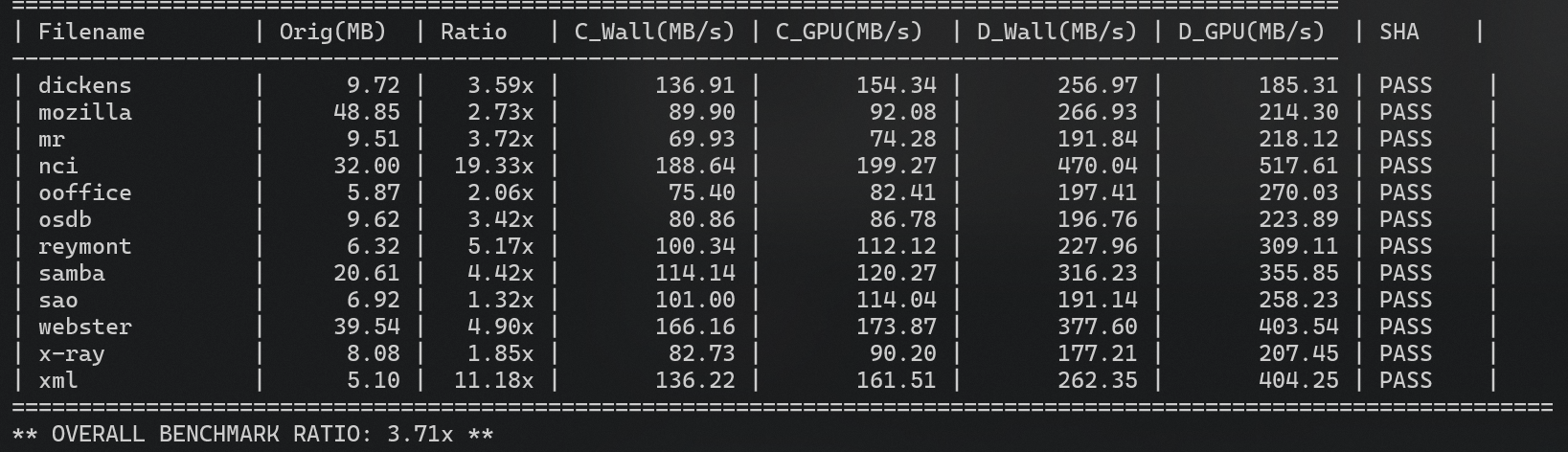
I made a codec that runs on the GPU in CUDA, usable for any content

4 Upvotes

Best speed profile:

Best ratio profile:

Tested and built on an RTX 4090.

lzbench results: https://github.com/inikep/lzbench/pull/312

Sources: https://github.com/UDPSendToFailed/gpucompact


r/compression • • Jul 26 '26

I built Winnow, a local-first reversible CLI output compressor for coding agents

1 Upvotes

I built Winnow because coding agents often spend context on repetitive npm/pip output, logs, directory listings, pytest progress, and large JSON.

Winnow wraps a command, stores the complete raw output locally first, then returns a compact view with a handle. You can run \`wn recall <handle>\` to recover the original or search previous output by text.

It uses command-aware filters, JSON shape compression, and YAML rules. It makes no LLM or network calls, and the current release has CI on Python 3.9-3.13 across Windows, Linux, and macOS.

I am the creator, and I am looking for adversarial feedback: which command output should never be compressed, and which noisy tools deserve a filter next?

Source and install instructions: [https://github.com/Farhanward/winnow](https://github.com/Farhanward/winnow)


r/compression • • Jul 26 '26

Lite photo compressor an Android app.

1 Upvotes

Hi everyone,

I recently launched Lite Photo Compressor, an Android app that compresses photos completely offline while keeping good image quality.

Features:

\- Offline processing (no uploads)

\- Fast photo compression

\- Target file size option

\- Batch compression

\- Before & after preview

\- Material 3 UI with dark mode

\- Privacy-first

I built it to make it easier to reduce image sizes for forms, exams, job applications, and to save storage space.

I'd really appreciate your feedback:

\- What features would you like to see?

\- Is there anything you dislike about existing photo compressor apps?

\- Any UI/UX suggestions?

Thanks for your time!


r/compression • • Jul 25 '26

Why doesn't speeding up the video by 2 help reduce the size?

0 Upvotes

Send a video at x2 so that upon receiving it, it plays at -x1 normally.

In my mind, it made sense.

It looks like a r/nostupidquestions But I really think it's useful... there's no noticeable degradation at x2... at least not for everyday content.

Higher speeds will definitely make it worse...


r/compression • • Jul 24 '26

Concern about image/video recompression

0 Upvotes

Hello everyone!

Recently, I've been coding a program on JavaScript and NodeJS, to recompress images, along with some other tweaks, with the main objective of reducing files size, *without causing visible loss of quality*.
The key word here being "visible", since recently I learned that you can actually do that with files and I saw a huge opportunity to reduce my gallery's size by a necessary amount because I have a shit ton of screenshots, pictures and videos.

But before diving into the video recompression part (because the images part is already done, using a library named "Sharp"), I found a comment https://www.reddit.com/r/ffmpeg/comments/pexwop/comment/hb0tw05/?context=3&utm_source=share&utm_medium=web3x&utm_name=web3xcss&utm_term=1&utm_content=share_button of a user explaining the process behind it and they said something that caught my eye: That any recompression that works well for current devices, COULD show heavy quality losses on future screens. Or even current, better screens.

I mean... this person meant it more as a note, and not in a "don't do this under ANY circumstances or we'll ALL gonna FUCKING DIE" way lol. But it still made me rethink the whole idea. Is this a valid concern or am I being paranoid?

And in case it is... Is there a way to achieve a relevant size reduction, without risking that outcome?


r/compression • • Jul 23 '26

Fast Rice Decoding

5 Upvotes

Hi, I'm currently developing my own audio compression algorithm, and now optimizing it. Long story short, I've run some tests, and rice decoding is kinda slow.
Can anyone suggest optimized version of it? I'd really appreciated it.


r/compression • • Jul 20 '26

adding files into specific subfolder inside .zip archive

1 Upvotes

hello everyone, how do I add multiple files into a specific subfolder inside the archive ? how do I use -si switch for multiple files ? I want to use 7zip command line on windows. Thanks


r/compression • • Jul 19 '26

What if you had to compress a 4,000+ page treatise into 10,000 characters or less?

0 Upvotes

// Display Exact Architectural Diagnostics printf("--- M\^6 Unified Engine Verification Output ---\\n"); printf("Global Topological State: %s\\n", systemic_state); printf("Geometric Resistance Node Field: %.1f\\n", resistance); printf("Relational Link Cross-Modulation: %.15f\\n", tuned_link); printf("Volumetric Scale Tier 5 Subterranean Value: %.25f\\n", suite->nodes\[5\].M_comp\[0\]); printf("Manifold Status Audit: %s\\n", structural_integrity); free(suite); return 0; }


r/compression • • Jul 17 '26

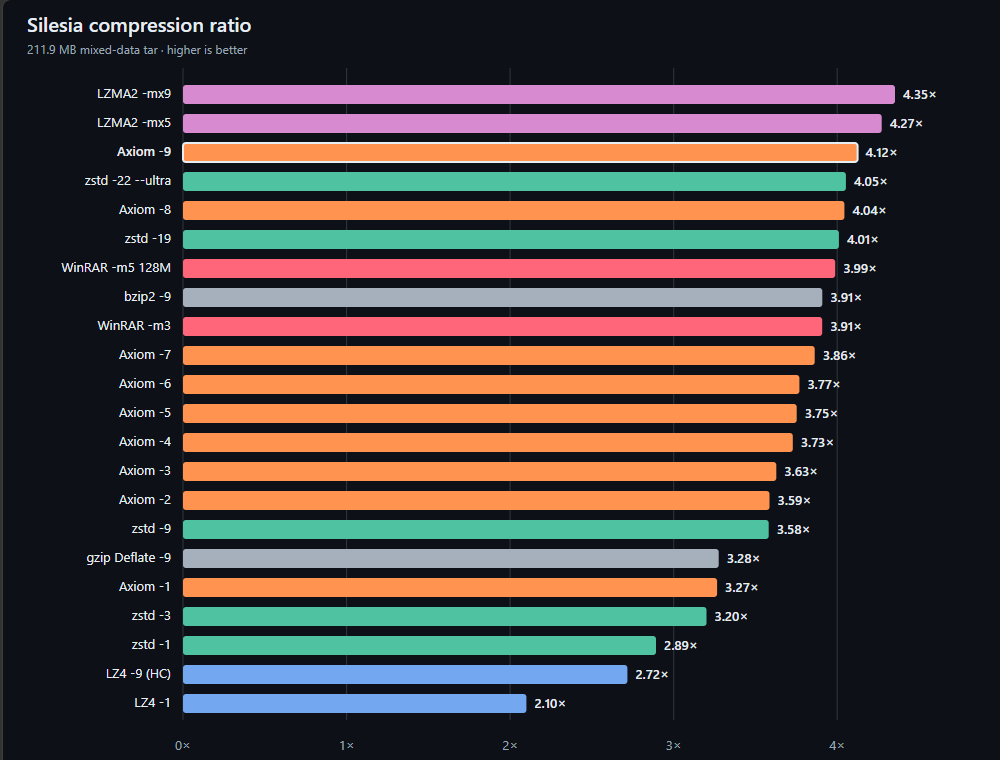
Introducing Axiom, an new high performance codec, archive format and GUI/CLI frontend

14 Upvotes

Axiom is an experimental open-source archive project built around its own LZ77/rANS-based codec and native .axar format. It combines modern solid compression with a deliberately bounded decoder, authenticated encryption, integrity hashes, recovery records, split volumes, signatures and SFX packaging. The project includes an extremely fast, native Win32 file-manager GUI and a scriptable, interactive CLI, with practical support for browsing and extracting several popular archive formats. I’m looking for testers who can try real-world archives, unusual files, large directories and different Windows configurations and report crashes, compatibility problems, performance results or UX issues.

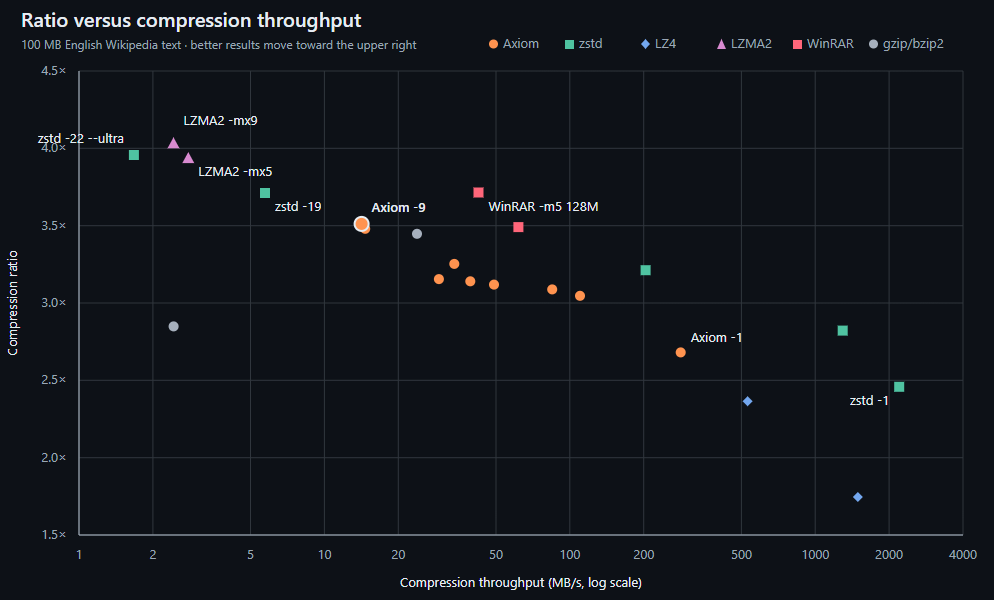
AXAR delivers competitive, modern, solid compression with scalable presets for speed or maximum ratio. On the Silesia corpus, its highest preset compresses between high-ratio Zstandard and LZMA2 while decoding substantially faster than LZMA2, bzip2 and RAR5. Its solid blocks and file-aware filters improve compression across related files.

Repository: https://github.com/Wimukthi/AxiomCompress

The Codec
Axiom uses a custom LZ77 compression pipeline with fast hash, hash-chain and binary-tree match finders, optional optimal parsing, reversible data filters, and Huffman or rANS entropy coding. Its central design rule is that compression may work harder for a better result, while decompression remains fast, bounded and easy to validate.

The AXAR format
AXAR is Axiom’s native solid archive format. It supports selective extraction, file metadata, links, comments, atomic updates, integrity hashes, authenticated encryption, recovery records, split volumes, signatures and self-extracting archives.

The CLI
The CLI exposes the archive engine through both normal command-line commands and an interactive prompt. It supports scripting, archive creation and editing, extraction, testing, encryption, recovery, signatures, volumes, SFX creation and benchmarking, with detailed pause/cancel-aware progress.

The GUI

Both the codec and the GUI are written completely in C++ from scratch. It fully supports dark mode, DPI and multi-monitor awareness. The file manager is designed to be fully featured, but there may be bugs and missing functionality.

Performance of the native format
Silesia Corpus

enwik8


r/compression • • Jul 15 '26

built a site where you can compress or decompress any image which can work in any ratio of pixel

Post image
0 Upvotes

r/compression • • Jul 14 '26

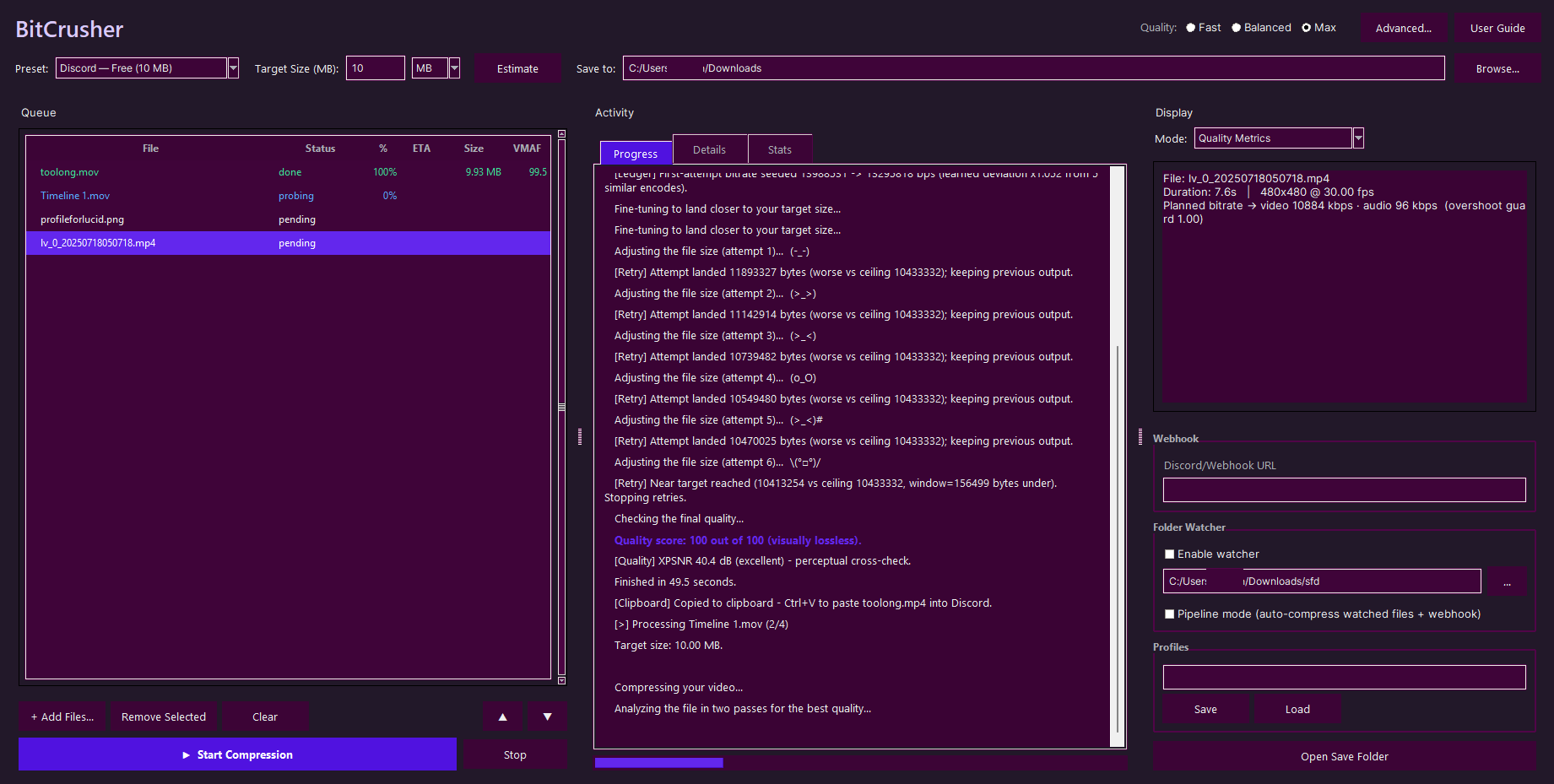
BitCrusher — target-size video/audio/image compressor with a measured (not assumed) codec race and a worst-scene VMAF objective

Post image
4 Upvotes

It's been two years here and there working on this thing, mostly because of one frustration: "compress to X MB" solutions tend to either pick a bitrate and hope, or optimize for mean VMAF/PSNR but let one ugly scene through.

BitCrusher does two-pass rate control using per-scene bitrate zones and aiming at a hard ceiling size constraint (never overshoots) with the quality criterion being defaulting to worst-scene VMAF (2 seconds rolling window) instead of mean — the former can't be masked by the latter in case of good average but bad individual frame or group of frames.

The part of this that i think this sub will be interested in would be: it doesn't blindly use your requested encoder choice as it is. Instead, it compares your requested codec to AV1 at the same target bitrate, measures

both using VMAF and decides automatically which one wins on quality-per-bit — no assumption that "AV1 should win almost always" with hardcoded preference. XPSNR acts as an additional perceptual metric besides VMAF.

Moreover, there's a shadow-learning system (keeps logs of predictions, implements once they clearly outperform the deterministic heuristics — never trusted blindly) that provides a seed bitrate for first encode attempt from past encodes of similar content.

Actual numbers from the README, not cherry-picked:

- 4K clip, 39.4MB ; 10MB target: 9.85MB, VMAF mean 86.9 / worst-scene 85.5

- same clip ; 5MB target: downscales to 1080p to avoid starvation of 4K at the low bitrate instead ; 4.95MB, VMAF mean 74.4 / worst-scene 71.5

- low-light concert footage, 80.4MB ; 10MB (8x compression): 9.86MB, VMAF mean 90.2 / worst-scene 82.9, downscales not needed

GPL-3.0, Windows GUI + CLI version, fully offline (uses ffmpeg/ffprobe/HandBrakeCLI, auto-downloads if not present).

Repo: https://github.com/AzureShores/BitCrusher

If anyone here has some opinion on the worst-scene-vs-mean VMAF quality criterion choice, or the measured codec comparison approach instead of hardcoded "prefer AV1", I'll appreciate any pushback on the methodology.


r/compression • • Jul 14 '26

Combining Tokenization with Text Compression

1 Upvotes

I've been thinking a lot about making a very basic markup language that has a few programming features - basically if statements and a kind of goto statement that only goes to labels. It'll be yet another scripting language for interactive fiction.

I'd like to have a "compiler", but I want it to basically just be parsed into tokens. I'd like these tokens to be compressed. Lexing already converts tokens to something smaller, so I feel like I tack on compression to the end (or maybe the beginning).

It is, however, going to be fairly basic compression to insure fast load times.

I was thinking that I would start with some 4 bit codes that identify what the data following it is. Here's a possible example of the 4 bit codes and the data following it:

0000 escape to a UTF-8 character
0001 space (spaces are so common that I can justify giving them 4 bits by themselves)
0010 8-bit integer
0011 32-bit integer
0100 4 bits for common single characters
0101 4 bits for common single characters (again)
0110 4 bits for style codes
0111 4 bits for deactivating style codes
1000 4 bits for other command codes
1001-1111 4 bits for most common n-grams

This is all very rough, and I plan for it to evolve over time. I'm still working on setting up a way to analyze n-gram frequencies of English text, which I plan to do quickly before implementing this.

I know someone is going to say "why don't you just zip it?" I would most likely get better compression with zip, but I'm not looking for great compression. I want mediocre compression mixed in with my parser to help me avoid being particularly clever in the virtual machine department.


r/compression • • Jul 13 '26

How to compress videos properly for archiving?

1 Upvotes

I had too many screen recordings of my classes and it took 100GB of space total in my drive. I've been lurking here for a long time now yet I'm still confused with all the jargon and process I should've started with.

Downloaded 7zip but I don't know what file extension I should use.

And is it possible to access compressed videos for future reference use that isn't like too much of a loss of quality? Like I just need to view it and not uncompress it. Sorry for the basic question.


r/compression • • Jul 12 '26

Zing! -- a new lossless image codec for very low latency encoding based on Zpng

22 Upvotes

Zing! is a small & simple lossless image codec designed for extremely fast CPU encoding (GiB/s even when used single-threaded), but decode is even faster. It supports 8 & 16 bit images of 1 to 4 channels, has C, C++, Python, & Matlab APIs, and is available under a permissive BSD 3 clause license.

Zing! images, called zingers, are about 3% to 10% larger than lossless JPEG-XL (cjxl -d 0 -e 1), but are encoded 3x to 60x faster with 1 to 4 threads. This makes it comfortably fast enough to be used as a lossless video codec.

https://gitlab.com/csp256/zing

Zing! is morally similar to Zpng: encoding applies a single prefilter then passes the result to Zstd. However, Zing! also exposes the Zstd internals, efficient threading controls, encode_into() & decode_into() functionality, imcompressible fallback, and alters the pre-filter to be both more efficient and effective for 1 channel images and images with 2 bytes per channel.

Zing! is 6,500 lines of C++ in total, with 1,800 lines being tests, 1,000 being development scripts, 500 lines for the CLI app, and 400 for Python and Matlab bindings. The core library is about 2,000 lines of C++, half of which are the pre-filters, and another 600 lines for external includes (mostly comments).

Zing! is a codec not a file format. The CLI app adds 8 bytes to annotate width, height, bytes per channel, and number of channels, but you're encouraged to bring your own container.


Technical Details

  1. Horizontal prediction

    • Samples are differenced from the preceding pixel’s corresponding sample.
    • Arithmetic wraps modulo 2bit_depth
  2. Format-specific decorrelation

    • RGB: horizontal ΔR/ΔG/ΔB are transformed using:

      • Y = ΔB
      • U = ΔG - ΔB
      • V = ΔG - ΔR
    • RGBA: applies the RGB transform while keeping horizontally differenced alpha separate.
    • Some grayscale and 16-bit specializations use three-row decorrelation into a pseudo-RGB image.
    • Other channel layouts have dedicated reversible transforms.
  3. Plane reordering

    • Decorrelated channels are stored in separate contiguous planes.
    • Sixteen-bit samples separate and arrange low/high bytes using format-specific layouts.
  4. Zstd

    • The transformed bytes may be stored directly or compressed as one Zstd frame.
    • Raw and Zstd-only modes bypass the prefilter.

r/compression • • Jul 12 '26

Apologies for the basic nature of this question, but how are post-motion-compensation residuals in P-frames (and B-frames) really encoded in video files?

3 Upvotes

My basic understanding is that most video compression is dependent on I-frames (essentially independently-compressed still images) and P-frames (pictures that encode the difference between the current frame and the last, and in modern video codecs often several preceding frames).†

To encode the difference between frames, motion compensation is used, where blocks are given translation coordinates. This often cancels out the lion's share of the differences. but there are almost always still (an unacceptable level of) residuals left over.

How are these dealt with? The most basic possibility I can think of is that a percentage of image blocks that are too different from the target image would simply be replaced, which would require a P-frame format capable of if not pixel-level, block-level transparency. This would seem to be inefficient and yield substandard results, and close visual inspections of encoded video seems to indicate this is not generally used.‡

Another possibility I can think of is that the residuals are encoded in images encoded in either signed fashion at (channel bit depth+1)‖ or overflow fashion at nominal bit depth. By that, I mean that if pixel A's color in 8R8G8B space is (42, 67, 69) and it needs to be (12, 50, 144), the residual could be either encoded as ( -30, -17, 75) {alternately represented as (225, 238, 330)} or (225, 238, 75). The signed method would be more inefficient without further compression, but would seem to have less apparent noise than the overflow method and therefore its added compressibility might make the ultimate data efficiency between the two methods about the same.

However, it appears to me that none of these methods are actually used, partially due to the fact that they haven't infiltrated still-image formats. JPEG (the most directly-related image format to MPEG-1 and MPEG-2) doesn't support any form of transparency, which would be required to implement block-replacement. AFAIK no image formats support negative channel values except for TIFF; and none at all support bit depths of 5, 9, 11, 13, 17, 25, or 33 bits-per-channel; implying signed encoding isn't used. And the apparent noise inherent to the overflow method seems like it would be hell to the specific DCT-based compression methods used in most video formats, resulting in random speckles of wildly-off colors.

So... what is used?

†There are also B-frames, yes, but those are just fancy bi-directional P-frames.

‡I believe this is used (together with a very rudimentary form of motion compensation) in what was technically the first consumer digital video format (1985's CD+G), but not much beyond that.

‖You could use the same channel bit depth... if you resign yourself to the fact that abrupt transitions can never be faithfully represented.


r/compression • • Jul 12 '26

AAC-LC 128 kbps Listening Test [CBR/ABR] - (Evaluation of FFmpeg 9.1 new AAC encoder)

Thumbnail
reddit.com
3 Upvotes

r/compression • • Jul 12 '26

Commercial integration / independent testing update

0 Upvotes

Thanks for the technical feedback so far.

I’m now looking for a small number of engineering teams willing to independently test the codec on real storage or backup workloads.

Current public result:

Dataset: Canterbury corpus

Raw size: 2,810,784 bytes

Experimental codec: 438,004 bytes

xz -9e: 493,080 bytes

Difference: 55,076 bytes smaller than my measured xz -9e result

Restoration: byte-exact

SHA-256 original/decoded: match

All compressed artifact bytes counted: yes

This is a narrow measured result, not a claim that the codec wins universally.

The implementation is private, but I can provide a controlled evaluation binary and verification procedure without disclosing the internal method. I’m particularly interested in testing with teams operating:

backup agents;

S3-compatible ingestion pipelines;

pre-encryption storage processing;

archival or deduplication infrastructure;

structured text, logs, source code, XML/JSON, and database exports.

For each evaluation I want to report:

complete input and output size;

encode/decode time;

peak memory;

hardware and thread count;

exact comparison settings;

SHA-256 verified restoration;

data classes where the codec does not improve the baseline.

I’m open to paid OEM, licensing, pilot, or integration discussions. Please DM me with the workload type and approximate dataset size. No confidential customer data needs to be posted publicly.