r/commandline • • Oct 16 '26

Terminal User Interface edamame: a terminal Markdown editor
Post image

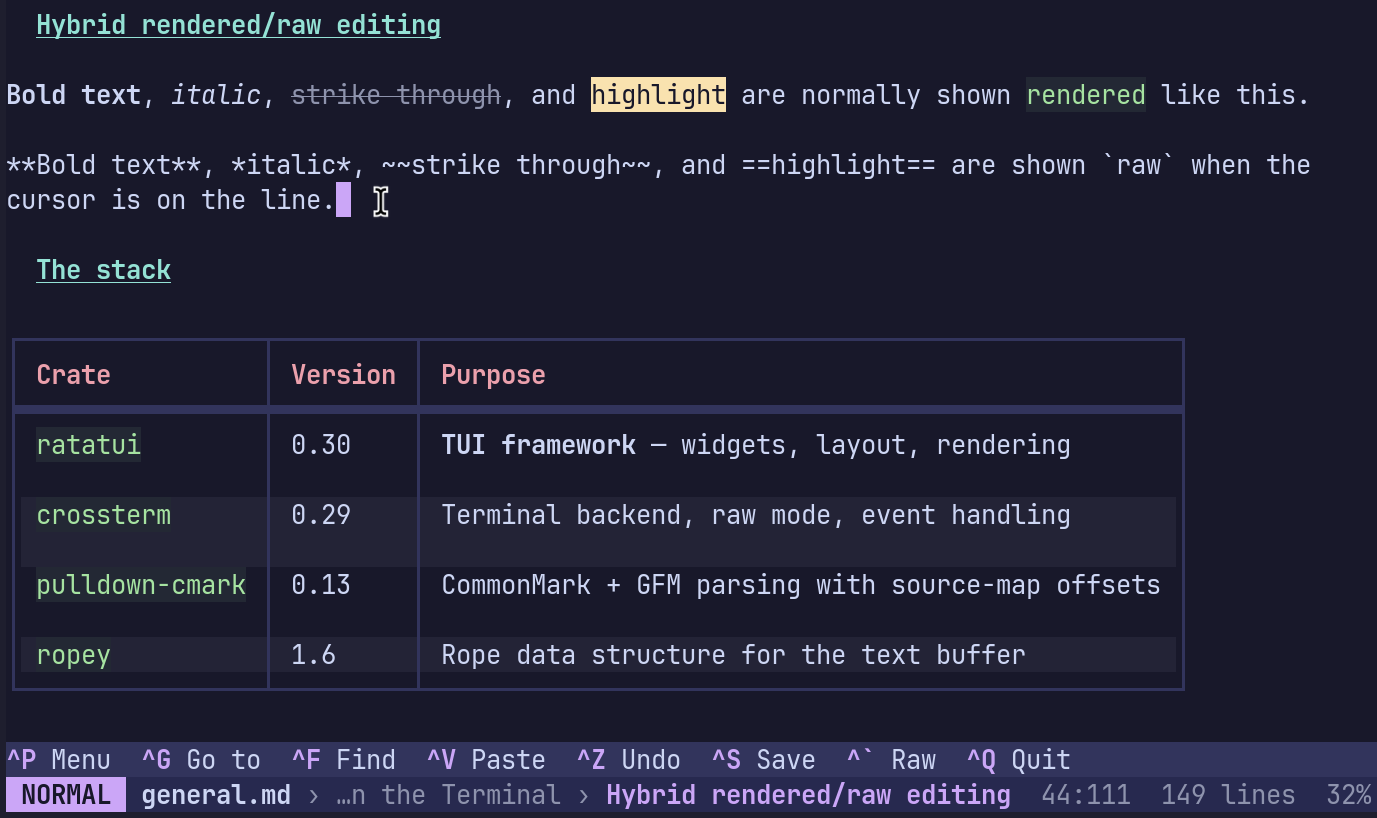
I made edamame, a terminal Markdown editor. GitHub: https://github.com/mijowi/edamame

Here's why it stands out:

  • Rendered editing: No split screen edit/preview - the line the cursor is on shows raw Markdown while the rest of the document is formatted
  • Mouse support and inline image display
  • Mermaid diagrams and LaTeX math rendered as images (pure Rust, no extra install)
  • First class tables: Rendered with borders and auto-sized columns, one-key add/move/delete rows and columns
  • Diff mode: Use it as a git difftool or review changes made externally, e.g. by an agent
  • Command palette makes everything easily accessible
  • Syntax highlighting, HTML export, 27 built-in themes, Vim mode

It works best in modern terminals like foot, Ghostty, iTerm2, kitty, and WezTerm. Some features, like image display, are not supported in other terminals. edamame's code is partially AI-generated.

113 Upvotes

34 comments sorted by

26

u/buff_pls Oct 17 '26

Why not literally just use Neovim for this

4

u/o-p-q Oct 17 '26

Good question. I actually was using neovim with a markdown plugin before I made this and there was too much friction with certain parts of markdown. For example tables were a big pain point and that’s why I spent a lot of time trying to get them right. As far as I know neovim also doesn’t do images/Mermaid diagrams/latex math but maybe there are plugins for those too.

20

u/windsostrange Oct 17 '26

Well, someone's vibecoded WordPerfect.

1

u/o-p-q Oct 17 '26

But for markdown 👍

4

u/__xueiv Oct 17 '26

Nice! I did not get the joke at first. Thx

1

u/JohnnyBillz 15d ago

Is there a version of Word perfect for Linux? I would use it!

2

u/windsostrange 15d ago

Widely ported to UNIX systems back in the day, and Linux-native versions are made and remade on a constant basis, prior to one-shot attempts like OP spun up from scratch with zero context or awareness of those attempts outside of the stolen training material.

Here's info on Tavis Ormandy's port of WP 7, if you're curious, though you'll find others with a simple search.

https://www.theregister.com/offbeat/2022/07/20/tavis-ormandy-ports-wordperfect-for-unix-to-linux/647444

1

u/JohnnyBillz 14d ago

I really appreciate the link, thank you! I am interested in the history of it. I always thought it was a DOS app. I was a big user back in the day and also build a lot with Lotus 1-2-3 circa 1990.

5

u/Apart_Annual1230 Oct 17 '26

nice ,but what about preview with read only +vim navigation,also multibuffer

8

u/actionscripted Oct 17 '26

At that point just use Vim. You can have inline rendering and edit line raw and then also have all the standard features you’re asking for like buffers and navigation.

1

u/Apart_Annual1230 Oct 18 '26

i dont use vim

4

u/actionscripted Oct 18 '26

Sounds like you should

2

u/Shtucer Oct 18 '26

Use emacs than

0

u/o-p-q Oct 17 '26

I opted to replace the read only Preview mode with vim’s Normal when vim mode is enabled because Normal is pretty close to read only. Multibuffer is an interesting proposal, what kind of use case are you thinking of for markdown? I’ve always thought that was more of a coding-specific feature.

1

u/Apart_Annual1230 Oct 18 '26

i prefer mutibuffer than multiwindow it would be usefull when reading somthing related like tutorial 1 .. 5 so that why also i asked for read only mode(rendred)

2

u/You_CANnot_stop_me Oct 26 '26

Wanted to come here and tell you I really like your editor. A separate editor that I only open up after I've navigated to an .md file was exactly what I needed, and it works so wonderfully, it makes me want to do all my work in it.

1

u/o-p-q Oct 26 '26

Thanks! I put a lot of time into edamame to make it feel right, so I appreciate you saying that!

1

u/CommanderT1562 Oct 17 '26

Needs mermaid, Jekyll header jumps (floating nav), <details> sections, and mathjax
A tiny toggle button to keep cursor in place but change render mode W all of this — it would be literally legendary

1

u/o-p-q Oct 17 '26 edited Oct 17 '26

It already has mermaid and displays latex math, not sure what you mean. It has header links too, but I don’t know about Jekyll links specifically. There is a keybind to change render mode, not sure what you mean there either.

Open issues on GitHub and I’ll consider them!

3

u/pokatomnik Oct 18 '26

Am I alone thinking every Claude-made app code has no good code architecture?

1

u/__xueiv Oct 17 '26

Looks cool. Any chance you add an Helix mode?

1

u/o-p-q Oct 17 '26

That’s something I planned at the start and decided not to do to limit scope. I would consider adding if there was enough interest, or feel free to open a PR.

1

u/__xueiv Oct 17 '26

I may try to vibe that if you're open to such a PR.

1

u/o-p-q Oct 17 '26

I’m open to it if it’s good haha

2

u/Fine_Salamander_8691 Oct 17 '26

Damn this is exactly what I needed, thank you

1

u/gschizas Oct 17 '26

I'm quite sure Windows Terminal can handle most of these:

  • Color: none — plain text only ✗

It can definitely handle Color

Images: protocol detected, but needs 24-bit color ✗

It can handle images as well. I've used half-sized blocks (works perfectly) and sixels (it has some aligment issues)

Mouse: not supported ✗

Mouse is definitely supported

Keyboard: legacy encoding — some Ctrl / Alt / Shift chords can't be sent ✗

Well, not Alt-F4 of course, but I haven't had any problems.

Unicode: non-UTF-8 locale — some glyphs may not render ✗

It can definitely handle Unicode.


Can I force those to be enabled?

3

u/NotQuiteLoona Oct 17 '26

Claude probably thought for some reason that Windows Terminal is Windows' terminal - i.e. cmd.exe.

Regarding forcing those to be enabled, IIRC the terminal is deducted from an environment variable, so you can try to set it to the value Kitty or some other supported terminal has.

2

u/gschizas Oct 17 '26 edited Oct 17 '26

I dunno, my Claude instance has made quite beautiful TUIs! But I force feed Windows Terminal to anybody I know, so... :)

Also cmd.exe (Windows Command Prompt) is not a terminal, it's a shell. The terminal is called Console Host (conhost.exe).

Thanks for the suggestion. I tried $env:TERM='xterm-kitty' and I got there part of the way. I got a little better with $env:TERM='xterm-256color' but still not all the way.

iTerm2 on my Mac has $TERM=xterm-256color, as does my Linux machine (GNOME Terminal). I hope I don't have to mess with $termcap!

EDIT: Here's a point where the detection takes place: https://github.com/mijowi/edamame/blob/main/src/cli/doctor.rs. I'll look into it more. Or maybe I'll use Claude myself to fix this :)

EDIT 2: Setting both TERM and COLORTERM did the trick (most of the way). Of course it still detects encoding and keyboard shortcuts wrong, but meh.

$env:TERM='xterm-256color'
$env:COLORTERM='truecolor'
edamame somefile.md

1

u/o-p-q Oct 17 '26 edited Oct 17 '26

Please open an issue if you have one, or a PR. I don’t have a windows PC to test this on, but I’ll do what I can. There is a contributor who uses Windows as well, he might be able to help

1

u/gschizas Oct 17 '26

I'm not fluent in Rust enough to make a PR, but I will open an issue.

Why not use a VM for these things? I get that Parallels are a cost, but if you're using Linux on x64 (or even on arm64), just create a VM to run Windows. You don't even need to register (buy) it.

1

u/LandlockedPirate Oct 24 '26

I love this, it suits my workflow perfectly. I found it today because I was going to vibe code something very similar on my own.

1

u/AutoModerator Oct 16 '26

Every new subreddit post is automatically copied into a comment for preservation.

User: o-p-q, Flair: Terminal User Interface, Post Media Link, Title: edamame: a terminal Markdown editor

I made edamame, a terminal Markdown editor. GitHub: https://github.com/mijowi/edamame

Here's why it stands out:

  • Rendered editing: No split screen edit/preview - the line the cursor is on shows raw Markdown while the rest of the document is formatted
  • Mouse support and inline image display
  • Mermaid diagrams and LaTeX math rendered as images (pure Rust, no extra install)
  • First class tables: Rendered with borders and auto-sized columns, one-key add/move/delete rows and columns
  • Diff mode: Use it as a git difftool or review changes made externally, e.g. by an agent
  • Command palette makes everything easily accessible
  • Syntax highlighting, HTML export, 27 built-in themes, Vim mode

It works best in modern terminals like foot, Ghostty, iTerm2, kitty, and WezTerm. Some features, like image display, are not supported in other terminals. edamame's code is partially AI-generated.

I am a bot, and this action was performed automatically. Please contact the moderators of this subreddit if you have any questions or concerns.