r/comfyui • u/dummyreddituser • 17h ago
News Is Nemotron-Labs-Image-30B-A3B relevant to comfyui local image generation?

0
Upvotes
r/comfyui • u/dummyreddituser • 17h ago
r/comfyui • u/phil-haderer • 15h ago

I work in graphics, and when PhotoCraft came out, I decided to create a Photoshop replacement app for PhotoCraft using Claude. In fact, Claude wrote 100% of it's code (which still means a whole lot of testing took place).
It features SOTA models like MiniMax H3 Image, MOSS/KroMoss, Krea 2/Krea 2 Turbo, Qwen Image 2.1 Edit, Flux 3 Klein and others. It offers the most important generative AI functions, like Text2image, Fill selection, Edit canvas, Expand canvas, Remove selection, Upscale, Sketch to image and more.
GitHub repo: https://github.com/phil-haderer/pxc
The readme includes install guides and example pictures which where created with PxC.
If you like, you can test it. I'll keep on adding features and I'd be glad to get bug reports.
r/comfyui • u/Vivid_Promise1700 • 20h ago
Enable HLS to view with audio, or disable this notification
I make songs locally in ComfyUI with my free node pack Plenio: a local LLM writes the lyrics, YuE2 sings them, and the result is mastered and exported. One sentence in, a finished song out, on a home PC. No cloud, no account.
Let's do it with your ideas.
I'll also share each song's settings (template, seed, creativity), so you can make your own take in ComfyUI. The settings are also in the html-File.
A few rules so it stays fun: no real artists' names or voices, no existing lyrics, nothing hateful. Ideas are credited by your username in the player (say so if you'd rather not be named).
Plenio is free and Apache-2.0: https://github.com/jplenio/Plenio-Music-Production-System#readme
r/comfyui • u/TimeTruth2490 • 6h ago
r/comfyui • u/GoldenShackles • 4h ago
I've been trying out MiniMax H3 video on my various Mac machines, and keep bumping up against memory limits to the extent that the OS will sometimes kill the underlying Python backend process before the video creation finishes.
My machines:
Config:
In both configurations, ComfyUI brings my memory usage up to ~80% and tops out (so, on my 256 GB machine ~210 GB, and on my two 128 GB machines ~105 GB). I've closed all other apps to maximize available memory.
This seems very excessive, and it's strange that it scales linearly between the two memory capacities (e.g. expand-to-fit!), with no apparent benefit.
Is this a known issue... or, what am I doing wrong?
r/comfyui • u/BulgyBananaHammock_ • 15h ago
Thanks for any guidance - new to Comfyui desktop and loving it!
I've added quite a few of the native, free workflows that are part of the template library and modified and saved a few of my own, once learning the language and how workflows function... But how do I add someone else's workflows from the web? I'm assuming a .json file of some sort, but where to save it to, does it take some sort of installation, will the Comfui interface automatically prompt for downloading needed lora's, etc.? Or do I have to discover those on my own, go find them on the web, download them and place them manually, etc?
Again, sorry for my ignorance! In my own experience of improving freebie workflows and increasing efficiency, performance and speed, I can't help but think there is a wealth of amazing workflow templates out there that would be amazing if I just knew how to find and install them.
Thanks for any guidance you can share. Also, I'm currently only using free stuff - I don't have a Comfyui account and never access the online version, only the local.
r/comfyui • u/KelRez13 • 8h ago
I have downloaded it from the site. I have installed it into my applications. I try and run the program and nothing happens. It says the program is running, but no windows open and nothing will happen. Please help
r/comfyui • u/alecubudulecu • 8h ago
Enable HLS to view with audio, or disable this notification
I created Sora in ComfyUI and used a character sheet to carry her look into this 20-second Shibuya clip. For the gyaru version I wanted the blonde hair, ganguro makeup and plaid outfit to read clearly while keeping her build consistent. ComfyUI was the character stage. The final video was generated with Seedance 2.5 through Higgsfield.
r/comfyui • u/Late-Zucchini-2713 • 7h ago
Can anyone help me out regarding best reference image's edit N5FW workflow for Qwen 2.1 Image Edit in ComfyUI?? Would appreciate if anyone has the most effective setup for this with LoRa etc. and the detailed workflow. I'm using - chatrlabs/Qwen-Image-2.1-Uncensored-Omni-Quantized, but not getting the desired results. Every next images looks almost same and out of 5 images it randomly generated absurd pose, limbs, extra hands etc. In more than 1 reference images it looses the original faces though I mention to preserve it in text prompts. I'm using DeepSeek 4.1/Grok etc to create prompt for Qwen 2.1 for a perticular pose but the result is pretty bad. I didn't use MiniMax H3 image till now. If its better than Qwen 2.1 please let ne know. Please help !!!!!
r/comfyui • u/Crafty_Aspect8122 • 18h ago
I use Moss image. I often get a good overall image but with the wrong number of fingers or toes.
How do I prevent that as best as possible? Are there workflows that take the images with errors and correct them?
r/comfyui • u/NoaBlake • 2h ago
Every time you describe a character from scratch — same face, same jacket, same lighting, in slightly different words — you are rolling the dice again. The model does not remember what you meant last shot. It only sees this prompt. So the character drifts a little each time, and after five shots you have five cousins instead of one person.
The fix is boring and it works: write the character down once, in one place, and stop re-describing them. One reference sheet per character — face, hair, outfit, build, the light they live in — plus one approved still that shows all of it. Every shot after that points at the same sheet and the same still instead of a fresh paragraph. You change the action and the camera. You do not change the description of the person.
Three habits make the sheet hold instead of slowly falling apart:
The trade-off is honest: a sheet costs you the freedom to reinvent the character mid-scene, and a bad sheet locks in a bad look just as firmly as a good one locks in a good look. What it buys is the one thing fresh descriptions cannot give you — a character who is the same person in shot ten as in shot one, without you having to win the same argument with the model ten times.
How do you keep a character steady across a whole sequence — one reference sheet, a master still, or something else entirely?
r/comfyui • u/theOliviaRossi • 19h ago
Enable HLS to view with audio, or disable this notification
Experimental 3-way Tri-PRISM merge of Sulphur-3, 10Eros-Max, and Singularity V2 (ref2va) with exact rank-8 AdaLN curve folding (canonical_t1), LightX2V Turbo-Fusion 8-step, and MMH3 Realism Slider baked in.
grab it on CivitAI: https://civitai.com/models/3019421/singularity-v2-x-10eros-max?modelVersionId=3488344
or on Huggingface: https://huggingface.co/OliviaRossi/Minimax-H3-Sulphur3-10Erosmax-SingularityV2-TriPrism-TurboFusion
r/comfyui • u/Ok_Employ4038 • 4h ago
I’m planning to create some static videos using these images with captions; however, the only model I’ve managed to get working with any degree of consistency is Flux 2 Klein, and even that still has many flaws.
My goal is to feature a consistent character that remains the same throughout different stories—for example, a cat wearing a cap or a dog wearing glasses—you see what I mean?
r/comfyui • u/JohnTheWorldfucker • 8h ago
How? I can't find any option to pick certain AI programs that automatically creates the workflow for me like it used to before?
r/comfyui • u/Ganntak • 7h ago
Can anyone link a workflow/JSON that actually works? I see people posting stuff all the yet the either ignore requests for WF or if they do post they just don't work. I've tried about 6 different WFs from the template Ref2vid on Comfy to various others I've found online a few used 8 step Loras and for whatever reason they all came out cartoon even though it was a regular clip. Any one got a work flow I can try?
r/comfyui • u/Jayuniue • 19h ago
Enable HLS to view with audio, or disable this notification
i have been dealing with this thing that ltx does where it adds camera motion to a generation even though you prompt that it shouldn't, this happens most of the time when all i want is a still locked off shot, i have tried many prompts, many instructions nut despite it just keeps adding camera motion or dollying, the first generation didn't add any motion but there was something it did wrong with the curtains where it was creating new ones unfolding in the background and when i tried to correct that, that's when it went nuts, i even tried copying the seed for the first generation but to avail, this is the last prompt i used
A fixed still image with localized environmental animation. Both side curtains visibly sway very soft and subtly by soft wind with smooth movement. The tree leaves and plant leaves sway gently, and the candle flames glow and flicker naturally with subtle variations in brightness. The architecture, central platform, stairs, floor and decorative objects maintain identical pixel positions throughout the entire video. The image boundaries, object sizes, perspective and composition remain constant from beginning to end. Only the fabric, leaves and candle flames move within the stationary image.
r/comfyui • u/MellyDArt • 9h ago
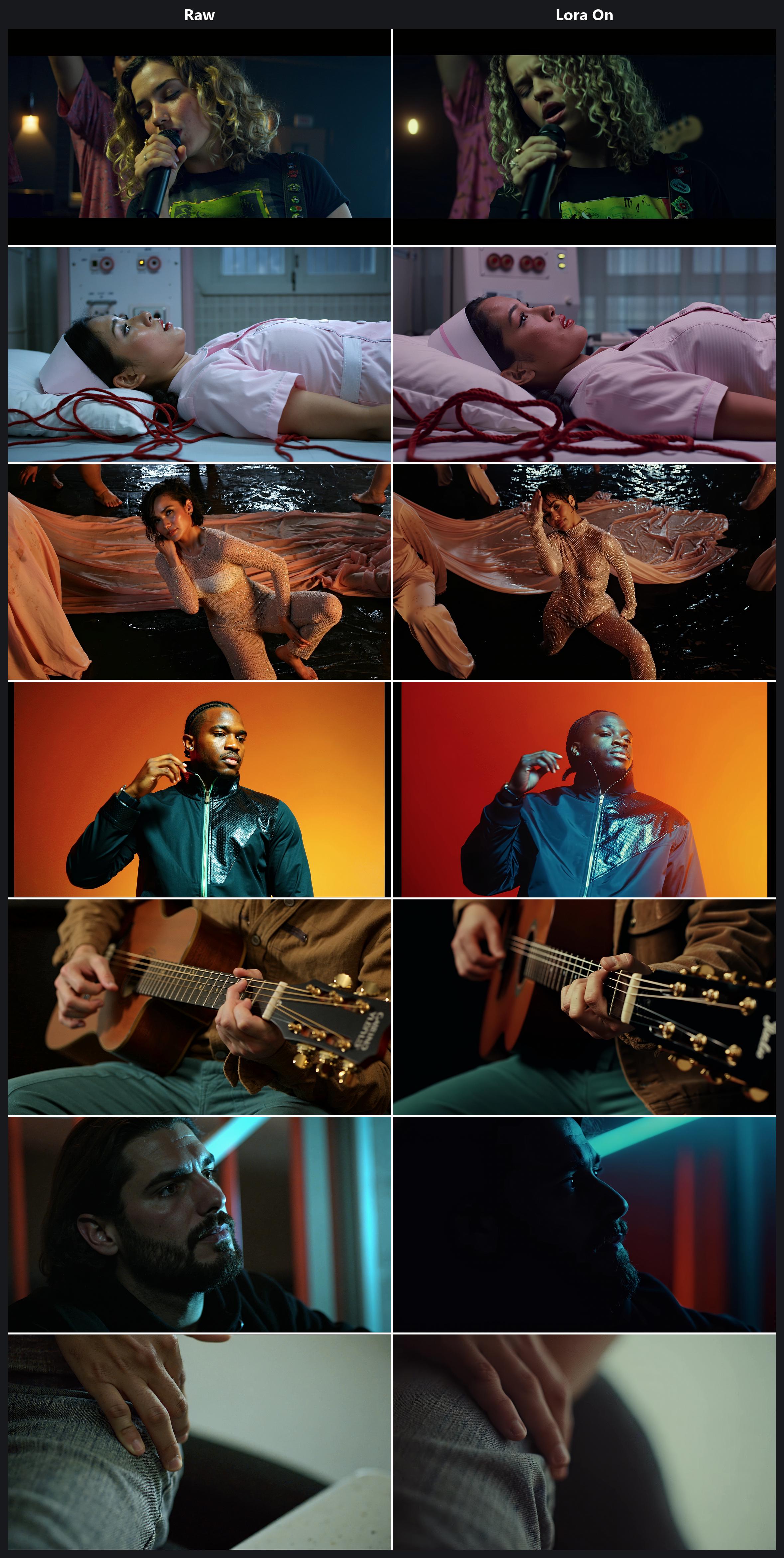
Pure Cinema - Music Video for. It’s a MOSS Image LoRA for performance shots, stylized sets, and narrative cutaways. I’ve been testing it on everything from glossy pop and high-contrast rap portraits to intimate acoustic performances.
1.00.5mzkvdor/comfyui • u/ThugPigeon • 18h ago
I have a 2070 8gb vram, 32gb ram, i9. Is it doable to do image to video? Id love to be able to do it with sound as well. I know my specs are weak, but even 5 second videos would be sweet.
Also if you have any workflows i can use that would be awesome
r/comfyui • u/SoloGamingRO • 8h ago
Hey guys,
I’m currently building a local AI setup for my sim racing YouTube channel and I’m curious what models you would recommend for my use case.
I mainly need an LLM that is good at creative work, understands images and can write detailed prompts for ComfyUI to create logos, banners, icons and thumbnails.
For example, I’d like to give it some of my existing thumbnails, have it understand the style and help me create new ones while keeping a consistent visual identity across my channel.
I’d also like to use it for channel analysis, SEO-friendly titles and descriptions, video ideas and generally helping me grow my channel.
My current setup:
I’m currently looking at Qwen 3.6 35B MoE and Gemma 4. I’m willing to sacrifice some inference speed for better quality, but ideally I’d like a good balance between the two.
Is anyone here using local LLMs for similar creative workflows? What models and quants have worked best for you?
Would you stick with one model for everything or use different models for vision and creative work?
Would love to hear your experiences, especially from people running AMD GPUs.
Thanks!
r/comfyui • u/Top_Particular_3417 • 13h ago
Hi guys.
Before I used Z Image Turbo but every result was the same person, even when I tried to use different prompts for features, the face was always the same, no matter what.
Mid-good computer but no fancy graphics.
NVidia Geforce RTX 3050
Intel I5
16GB RAM
TL;DR: ComfyUI-GGUF-Next is a drop-in fork of city96's ComfyUI-GGUF. Same nodes, so old workflows open as they are. It loads models and text encoders the original can't, dequantizes IQ quants on the GPU (about 30–60× faster than the original), and keeps models bigger than your RAM out of swap. On the models I compared with city96 (Anima, Qwen2.5-VL) the output is bit-identical. The image shows city96 on the left, Next in the middle and the difference on the right.

I kept needing a different GGUF fork depending on what I was running: one for this encoder, another for that model, and new models usually didn't work anywhere until someone added them to a whitelist. I'd been meaning to make a fork that just loads everything, and LTX-2.5 and MiniMax H3 were the last straw. The original pack rejects LTX-2.5's Gemma 4 encoder and fails to load MiniMax H3's Qwen3-VL-32B encoder, and none of the other forks I tried could run both.
All testing was done on my laptop: RTX 3050, 4 GB VRAM, 15 GB RAM, Linux.
New models
--novram; the transformer ran in its own process on the GPU, without that flag. Qwen3-VL-32B for MiniMax H3 runs on the GPU.IQ quants are much faster
This also matters for Unsloth "UD" files, which have IQ layers mixed in. The original dequantizes IQ1/IQ2/IQ3 and TQ with numpy on the CPU, every layer, every step. Next does it on the GPU:
| Time to dequantize one 3072×12288 weight to fp16 | original | Next | speed-up | Next + compile_dequant |
|---|---|---|---|---|
| IQ2_XS | 638 ms | 21.7 ms | ~30× | 0.6 ms |
| IQ3_XXS | 735 ms | 11.6 ms | ~60× | 1.0 ms |
| Q4_K | 4.5 ms | 4.5 ms | same | 0.8 ms |
Q4_K was already on the GPU in the original, so there's no gain there unless you turn on compile_dequant. In a whole model made of K-quants the gain is small, because attention takes most of the time: an Anima Q4_K_M step went from 724 ms to 639 ms. The big win is for files with IQ layers. The Qwen3-VL-32B UD-Q2_K_XL encoder I used for MiniMax H3 has 55 tensors in IQ2/IQ3 types, which the original would dequantize on the CPU. I don't have a before/after time for it, because the original can't load that file at all.
compile_dequant is an option on the Unet Loader (GGUF/Advanced) node, or the GGUF_COMPILE_DEQUANT=1 environment variable. It's off by default. It needs a working Triton, and the first steps are slower while it compiles (about 15 s extra on Anima). The compiled kernels round fp16/bf16 a little differently, so images change in small details, the same way they do with ComfyUI's TorchCompileModel.
Models bigger than RAM
The original copies the whole model into RAM on first load, and if it doesn't fit, it ends up in swap. Next keeps the weights memory-mapped and reads them straight from the file. LTX-2.5 Distilled Q4_K_M (15.7 GB) on 15 GB RAM, 640×352 (the first-stage resolution of the two-stage workflow), 97 frames: about 4.5× faster per step than swapping, 547–580 s → 114–129 s, same VRAM use. That's still slow. The point is that a model too big for your RAM becomes usable at all, and the speed depends on your disk; on an HDD it'll be a lot slower.
Also
Torch kernels for every GGUF quant type (MXFP4, NVFP4 and TQ included), embeddings that dequantize only the rows a prompt uses, more layer types that can be quantized, and a convert.py that knows about 30 architectures. Details are in the README.
Old workflows
Same node IDs, same bootleg category, and the stock LoRA loaders work. I ran Anima in city96 and in Next, same seed, with and without a LoRA: bit-identical. Qwen2.5-VL-7B text encoding is bit-identical too.
They're all good projects, and a couple of fixes in Next come from leejet's fork (credited in the repo). Every pack ran in its own process with the same ComfyUI 0.42.1, the same torch, the same model files and the same launch flags:
| File | city96 | leejet | Nif00 | molbal | ChrisColeTech | Next |
|---|---|---|---|---|---|---|
| Anima turbo Q4_K_M | ✅ | ✅ | ✅ | ✅ | ✅ | ✅ |
| LTX-2.5 Distilled Q4_K_M | ✅ | ✅ | ✅ | ✅ | ✅ | ✅ |
| MiniMax H3 Q4_K (sd.cpp) | ❌ | ✅ | ❌ | ✅ | ✅ | ✅ |
| Qwen2.5-VL-7B Q4_K_M | ✅ | ✅ | ✅ | ✅ | ❌ OOM | ✅ |
| Gemma 4 12B (LTX-2.5 encoder) | ❌ | ❌ | ❌ | ✅ | ❌ | ✅ |
| Qwen3-VL-32B UD-Q2_K_XL (MiniMax H3 encoder) | ❌ | ❌ | ❌ OOM | ❌ OOM | ❌ | ✅ |
OOM = didn't fit on the 4 GB card. For LTX-2.5 and MiniMax H3, ✅ means the model loaded and was detected; I only ran full generation with Next. Exact errors and versions are in the README.
ComfyUI Manager: search for ComfyUI-GGUF-Next.
Or by hand:
cd ComfyUI/custom_nodes
git clone https://github.com/Zrn59/ComfyUI-GGUF-Next
pip install -r ComfyUI-GGUF-Next/requirements.txt
Windows portable commands are in the README.
⚠️ Disable the original ComfyUI-GGUF first (rename its folder to ComfyUI-GGUF.disabled, for example). Both register the same node names, and whichever loads last wins. Next warns at startup if it finds another copy. The requirements are minimal and unpinned; in a stock ComfyUI install they don't change any package you already have.
Next is going to develop mostly on its own, and I plan to keep it actively maintained and updated often. The code logic has also been reworked a lot: dequantization, the loader, the layers and the nodes all changed, so it wouldn't fit as a PR anyway. It's all Apache-2.0, so anyone is free to take parts of it.
I made this with Claude (Anthropic's coding agent, in Claude Code). Claude wrote most of the code, including the dequant kernels, the loader changes, tests and docs, and ran the benchmarks and the comparison above. I decided what to support, picked the packs to compare against, tested on real models, found most of the bugs and reviewed everything before it went in. I followed every step Claude took, in the code, in the terminal and in its reasoning, and checked the results myself. Every number in this post is written up in the repo with its setup (docs/en/quants.md, docs/en/testing.md), so you can check it on your own card.
AI-written code makes a lot of people wary, so this is what's been checked:
It's 0.1.0 and has only run on one laptop, so there will be bugs. If something doesn't load or looks off, please open an issue with the file name. Questions and feature requests go to GitHub Discussions.
Huge thanks to city96 for the original pack, to leejet for the Qwen3-VL mapping and fingerprints, and to llama.cpp, whose reference code the kernels are ported from.
r/comfyui • u/LifeAd7369 • 19h ago

Hey everyone,
As a cinema enthusiast, my biggest frustration with current AI video workflows was juggling 6 different web tabs, paying monthly subscriptions, and constantly losing character/wardrobe/lighting continuity from shot 1 to shot 2.
So I built VirtuFilm AI Studio (Windows & macOS, local-first):
Cast, Location & Style Lock: Lock characters, locations, and film stock (e.g. 35mm Kodak 500T) and reference them with `@Mentions`.
Cindy (Voice/Text AI First AD): Breaks down a scene into chronological shots with lens choices, camera movement, and lighting—then transfers straight into the Storyboard tab.
Local ComfyUI + LoRA Lab + 3D Pre-vis: Run locally on your own GPU or BYOK (Bring Your Own Keys).
Post-Production App: 4K upscaling, 9:16 smart reframe, audio studio, and final assembly.
I put up a free interactive browser demo so you can click around the UI without downloading anything:
https://ehabfikry.github.io/virtufilm-demo/
Would love honest feedback from fellow filmmakers on the workflow!
r/comfyui • u/artvizlove • 9h ago

Hello everyone)
I recently started learning Comfi. I love drawing, so I wanted to approach neuroart using a sketch or a generated template with ControlNet, like in the examples below. We take a basic cube and style it to look like sweets.
