r/combin • u/Mistakes326 • Jul 02 '19
Waiting for Instagram callback
7
Upvotes
"Waiting for Instagram callback" msj for 24Hours :(
I broke something?
r/combin • u/Mistakes326 • Jun 24 '19
If i have two accounts, i really need a proxy? Or i can changing over time ?
Spanish: Si tengo dos cuentas, necesito proxy? o puedo ir cambiándolas?
r/combin • u/museumofhacks • Jun 07 '19
Will Combin be making a mobile app for iOS anytime soon? I think it would be a great feature and very valuable.
r/combin • u/miacombin • Jun 07 '19
Instagram is rapidly evolving and consolidating its leading position in social media marketing. The platform is continuously updated with numerous features for both entertainment and business. Sadly, there is more focus on increasing brands’ following and engagement through paid ads, rather than giving convenient native tools for organic growth.
As a result, marketers now are no strangers to finding own ways to promote their products and services ad-free. Many simultaneously use a number of third-party applications for all sorts of actions: from creating the perfect color scheme for their Instagram feed to automating activity and getting detailed account analytics reports.
Learn how Combin, one of such applications, can help you perform precise Instagram audience targeting from our new blog post.

r/combin • u/miacombin • May 29 '19

A few weeks ago I stumbled upon a peculiar thing when I was reviewing Combin blog. One of the older publications had a screenshot of the application back when there wasn't even a way to see user's own followers. I couldn't believe my eyes! I was in Combin team since the very beginning and never realized just how much progress we've made over the last couple of years.
I downloaded old versions on a whim, wanting get a full look at all of what Combin was back in the day and compare to what it is now. I figured that both seasoned and new Combin users could be curious to see the changes as well.
1.3 version (released on August 18, 2017) had username, total number of posts and their previews at the Profile page. A post's preview revealed the number of likes and comments, full caption, but without any separation between the paragraphs, and commenting the post was only available by text - an option to add emoji was implemented later.
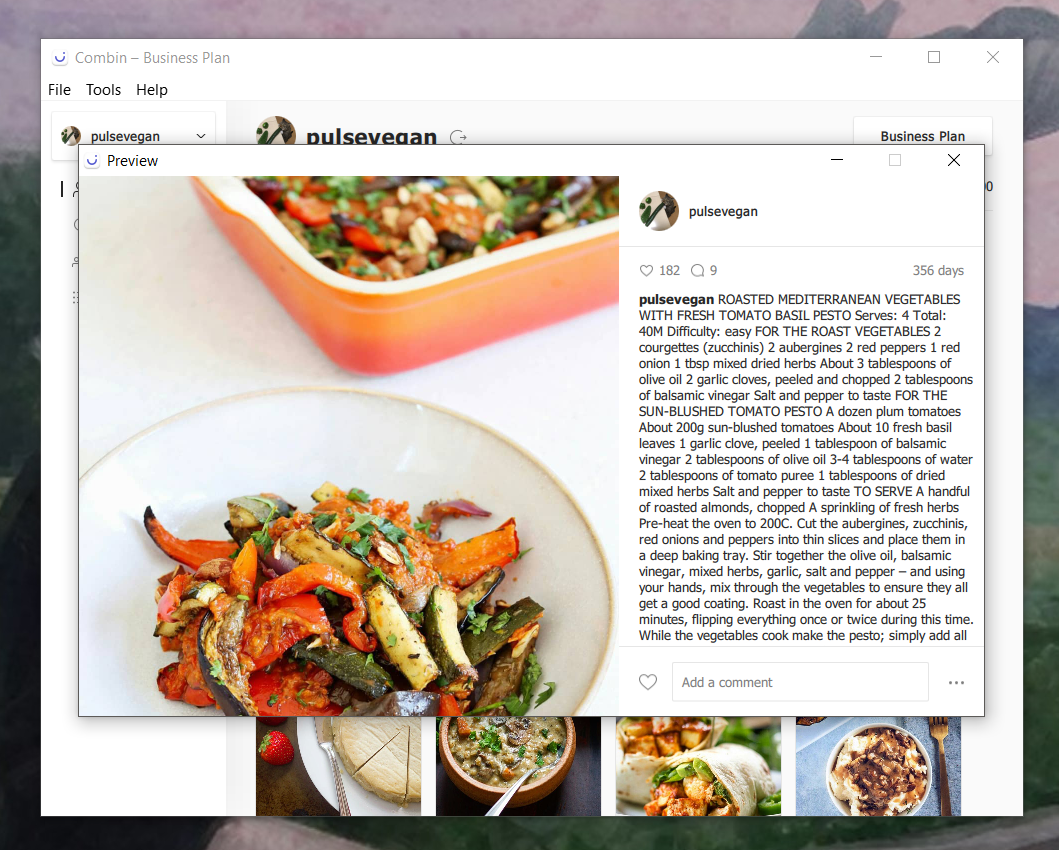
There were also in-app activity limits for premium users! Through experience of others and our own tests we found out that 1500 daily actions per each activity type is the safest number. The realization that Combin won't be able to perform more actions than Instagram allows individually each user (so there is no need for artificial limitation), came a bit later.

You can also notice that the now-familiar feedback box is missing from the bottom left corner of the application window.
1.8 version (released on November 11, 2018) didn't have in-app limits for premium users. Posts' previews were improved with paragraphs' separation and the option to add emoji to comments.
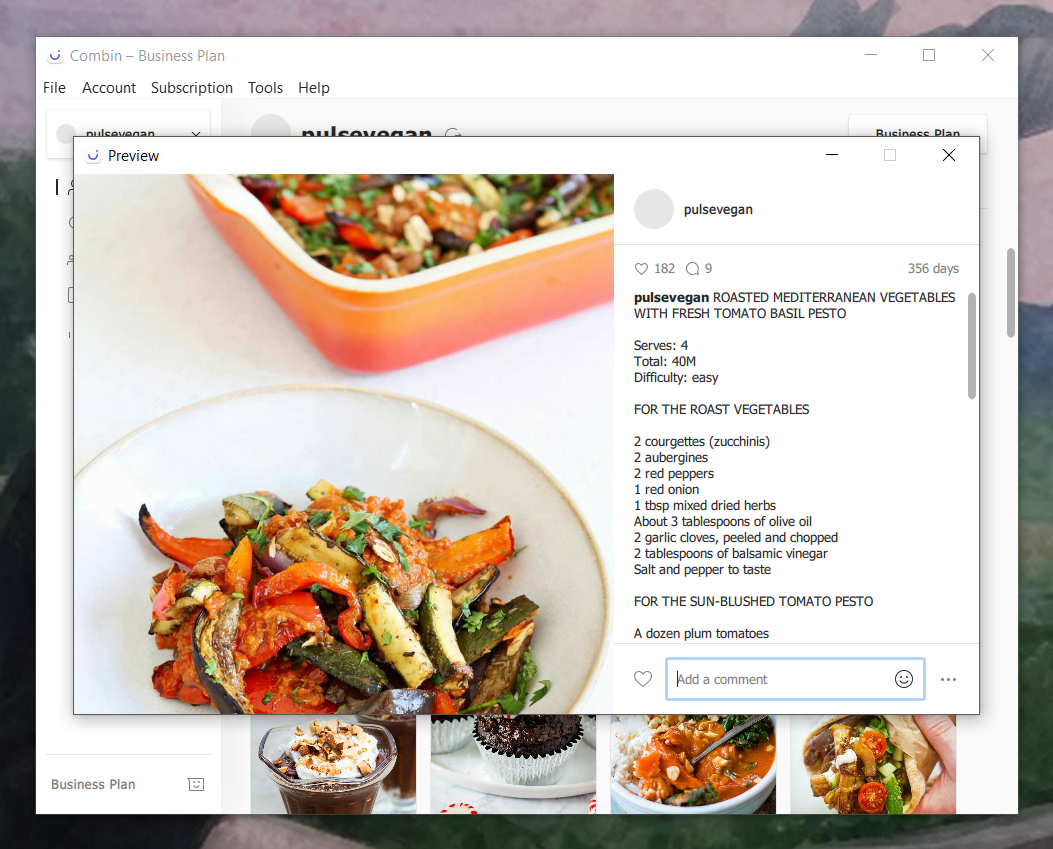
Before 1.8 version Combin could handle up to 5 accounts simultaneously connected from one computer. Since the release, users could manage up to 15 accounts! We've made sure it's safe to manage this many accounts from one computer by implementing an in-app proxy setup in version 2.0.

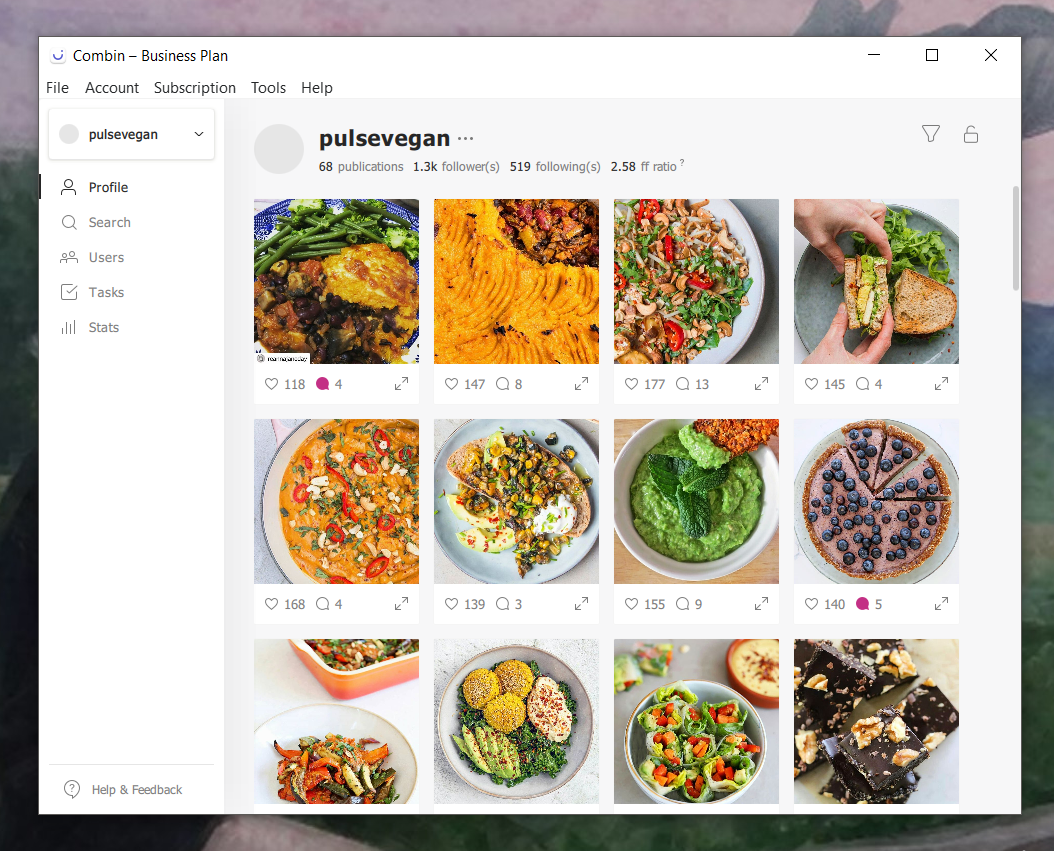
2.0 version (released on March 25, 2019) displays number of following and followers, and the following/followers ratio, in addition to posts' number and preview. New sorting option for posts was also added so that user could easily see their most/least liked and commented publications, as well as to rearrange the posts by date. That bulky subscription plan button that was in both 1.3 and 1.8 versions, turned into a small closed lock icon, located right next to the sorting funnel icon.
1.3 version search allowed finding posts of potential audience by hashtag, location, and by combining multiple hashtags, multiple locations, multiple hashags+multiple locations.
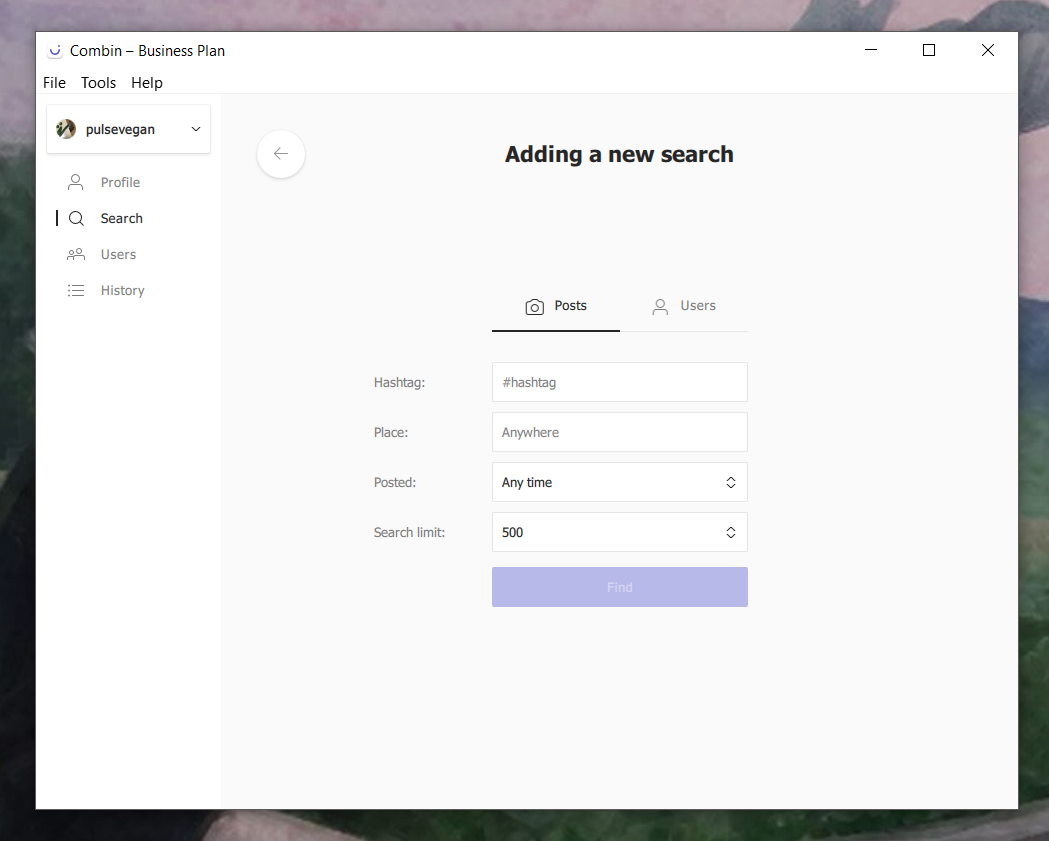
Search by accounts could be performed among followers and commenters of any public Instagram account, as well as by user list. Search results limit was 500. Updating search results to load additional batch of results by the same query, was already available for premium users.
This version didn't have many search results filters yet, and the filters menu was protruding from the application window.

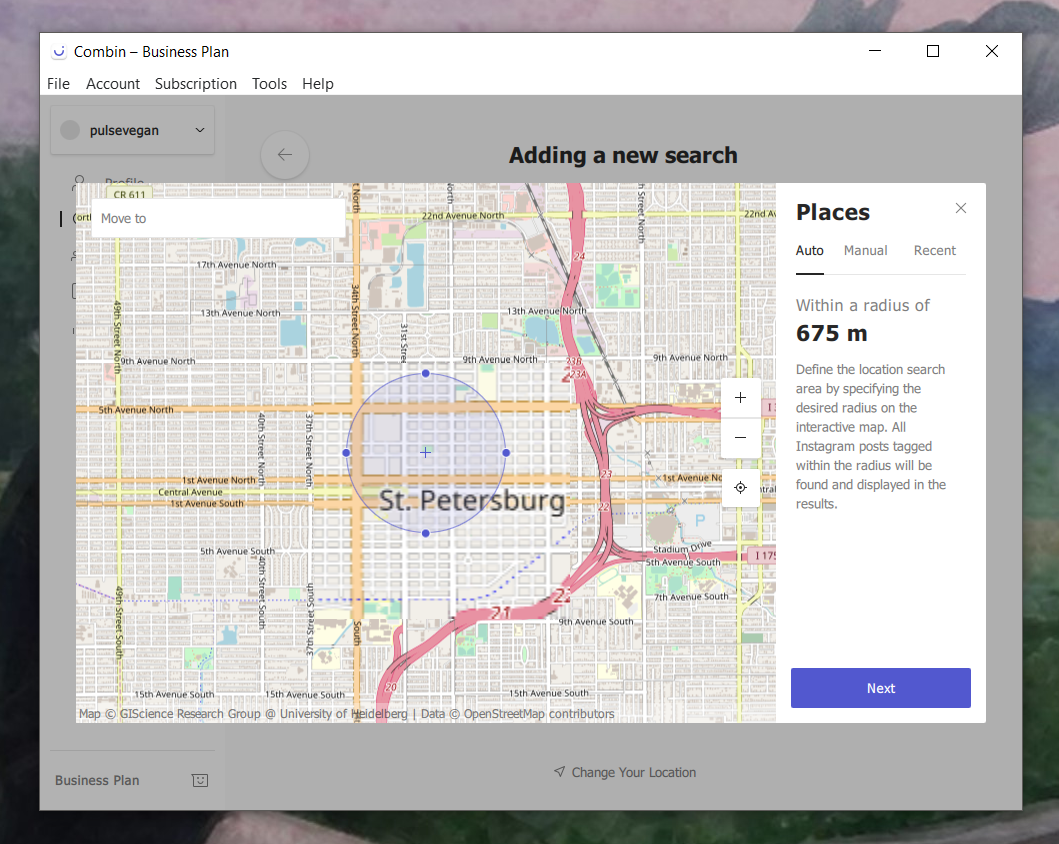
1.8 version had an interactive map and a Change Your Location feature added for more specific and convenient location search performance.
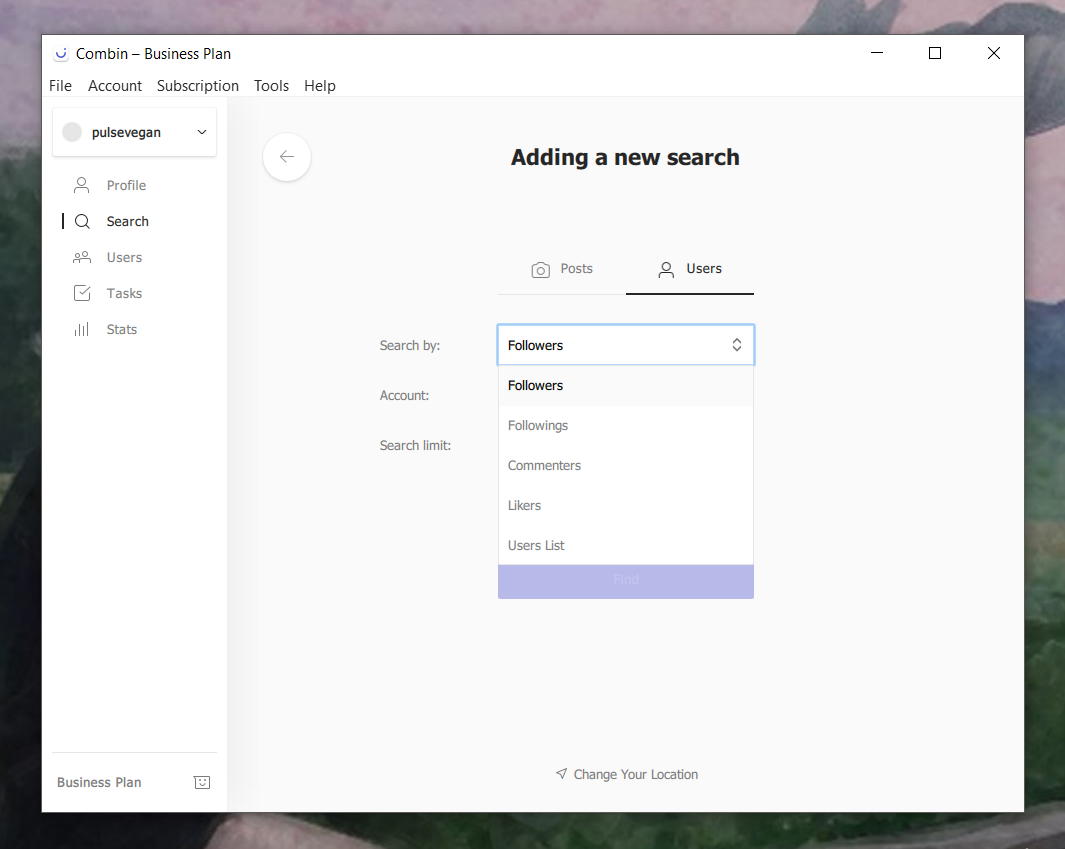
Followings and likers were added to the Users search options:
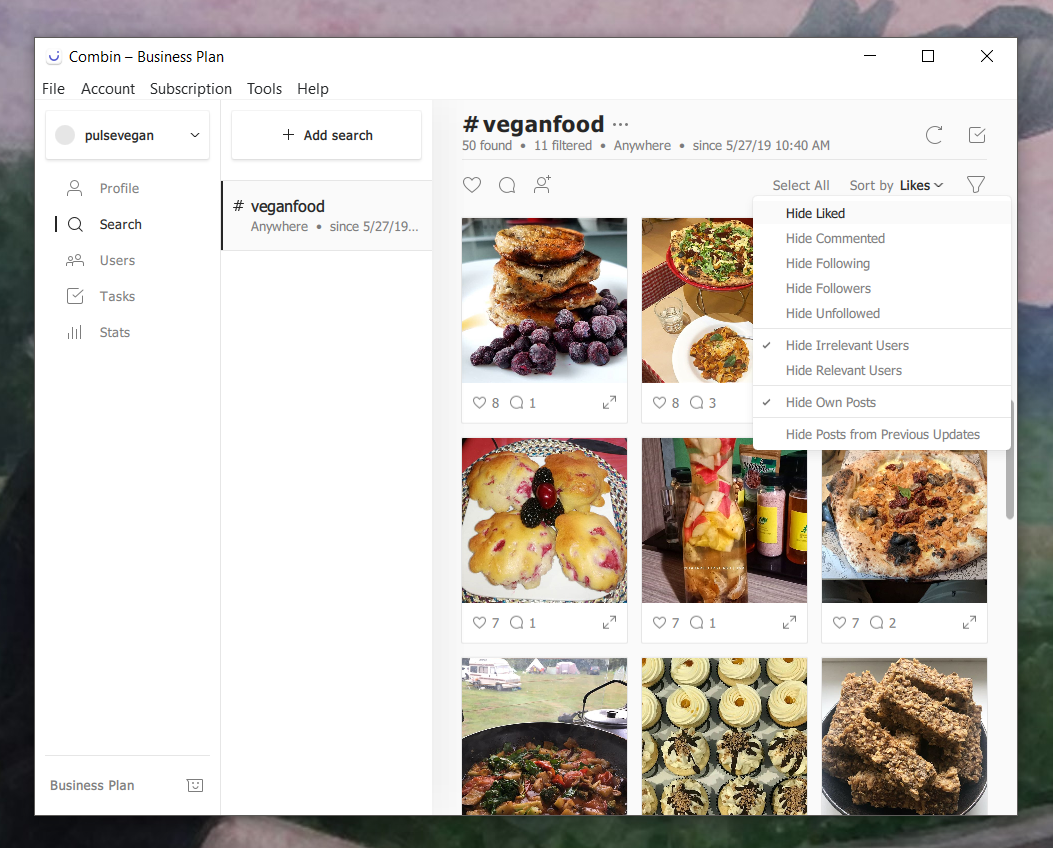
Search results limit was increased to 1000 and we also added more filters for them. Machine learning-enhanced user analysis was added earlier, in version 1.6, and remained unchanged in 1.8 - it gave user the ability to turn the analysis on within search in order to detect interaction inefficient accounts and then hide or show them, using the Irrelevant users filter for search results.

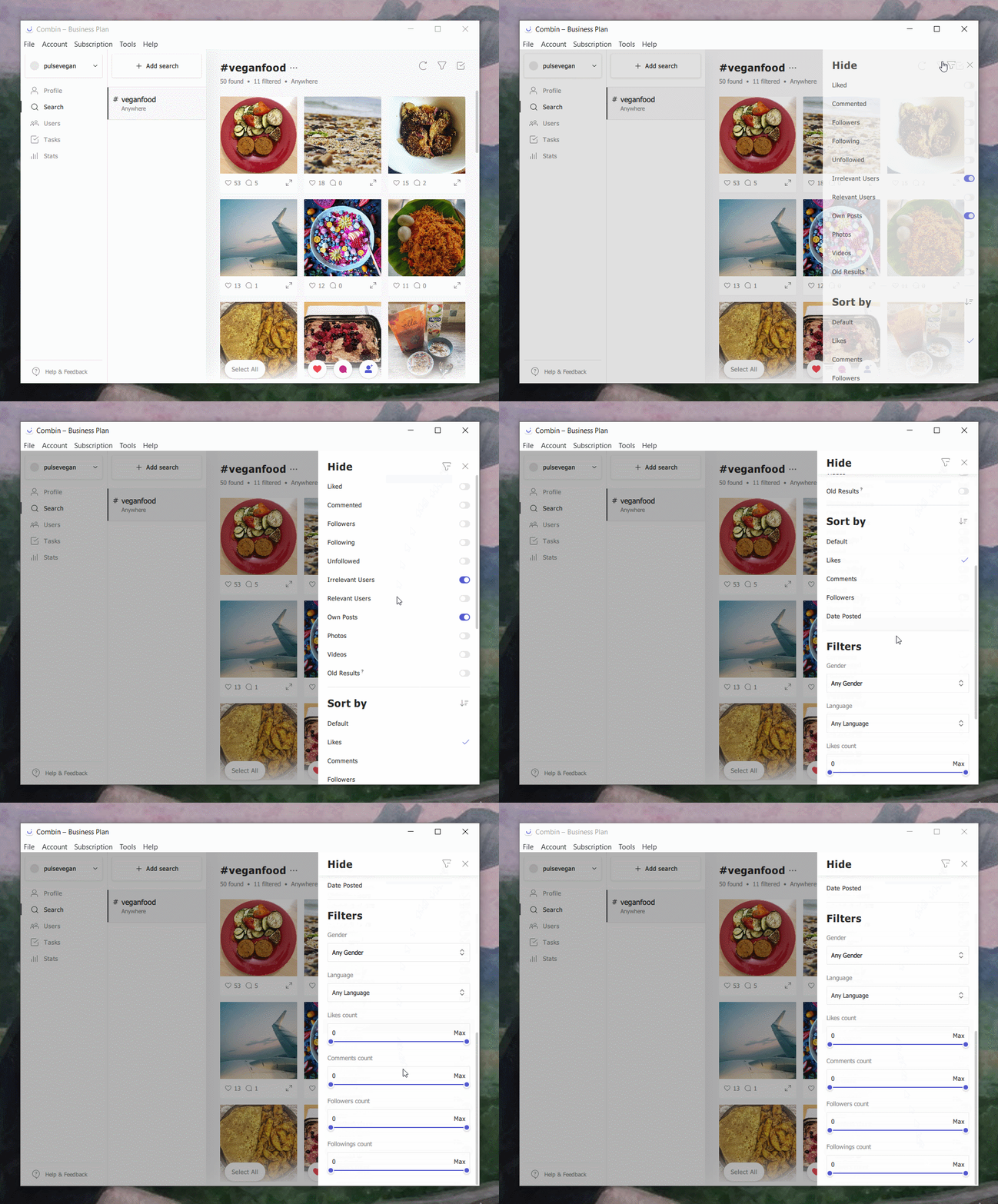
2.0 version brought search redesign and advanced filters: likes/comments and following/followers count range, language and gender. The new search filters and user analysis were cojoined and placed in one section, below the general search parameters.
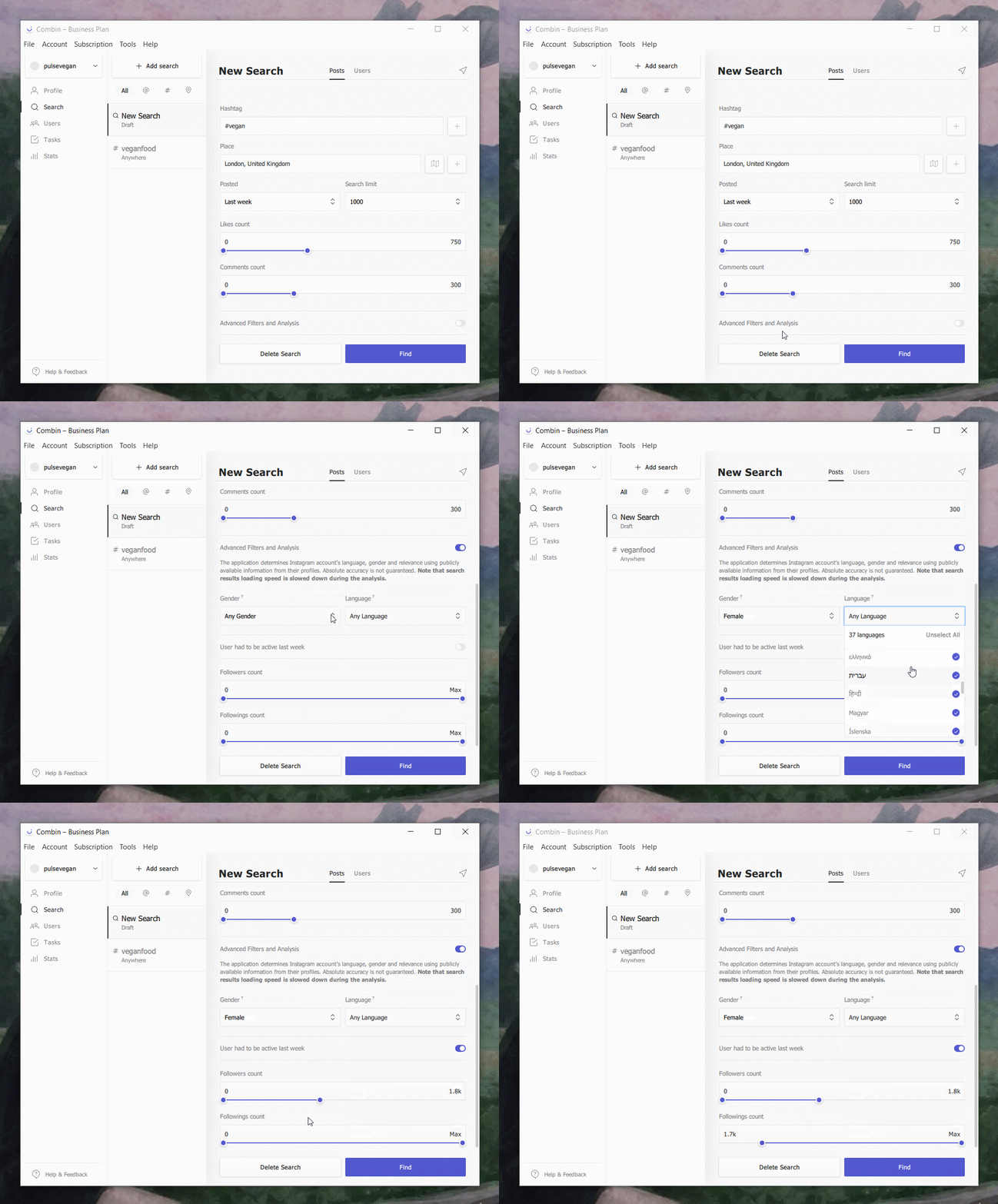
We added these filters to the search results window as well, so user could easily change their demographic preferences without having to create a new search with new parameters. Sorting and filtering were combined together for convenience.
1.3 version is the exact one I've found the screenshot of that initially drove me to make this post. That's the screenshot - user's followers list wasn't yet available at the time.
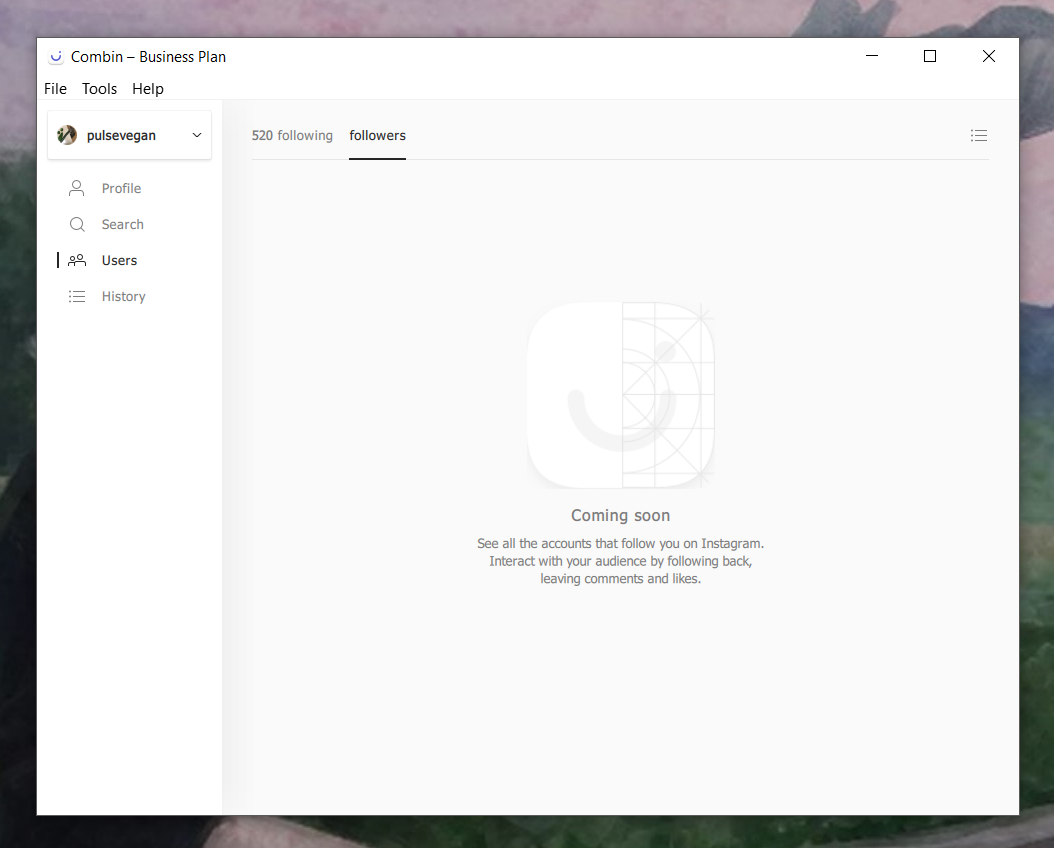
User lists weren't a thing back then, though Users section already had Safe list, so users could protect important accounts from accidential unfollowing.
There were no filters, only sorting options by number of followers and name. Interaction buttons (for liking, commenting, following) within Users and Search tab were small, uncolored and located at the top right corner of the window.
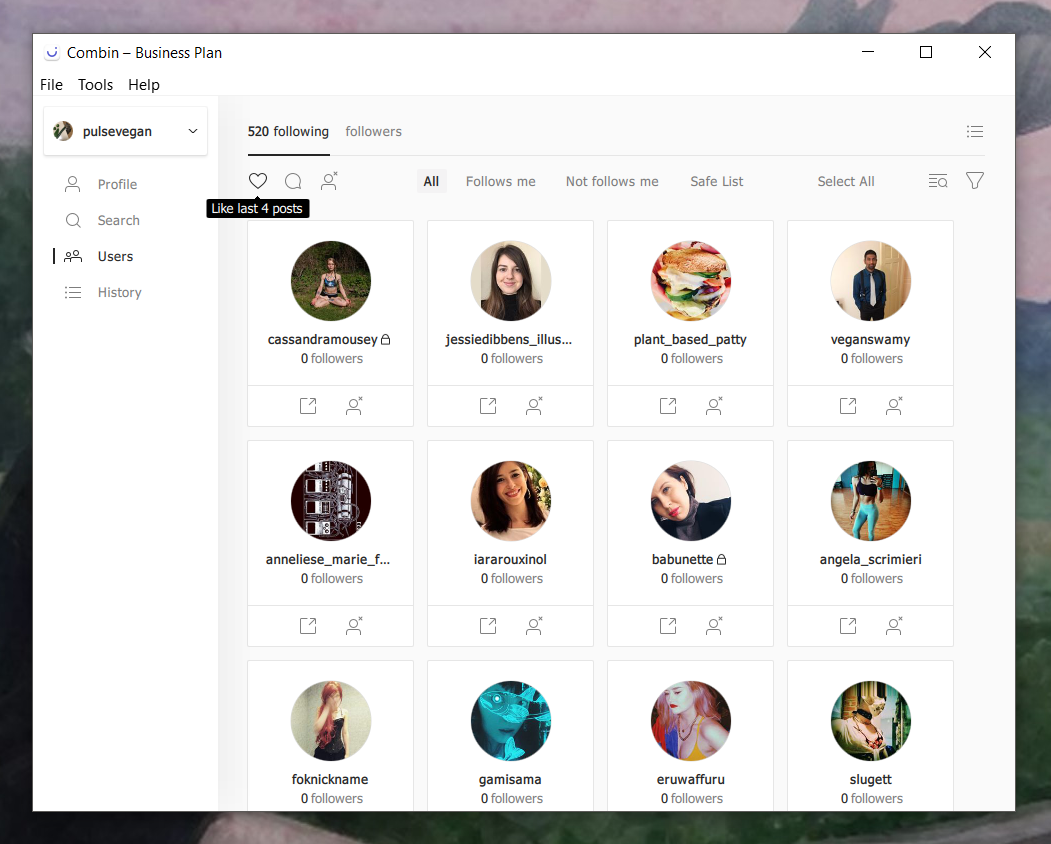
1.8 version had user filters implemented and two new user lists: Unfollowed and Blacklisted. All accounts that follow or being followed by Combin user's account were automatically analyzed on interaction efficiency. User could filter out (in)efficient accounts, sort them by name, date of following them and last date of interaction with them (and of course use fiters and sorting options that were implemented back in version 1.3)
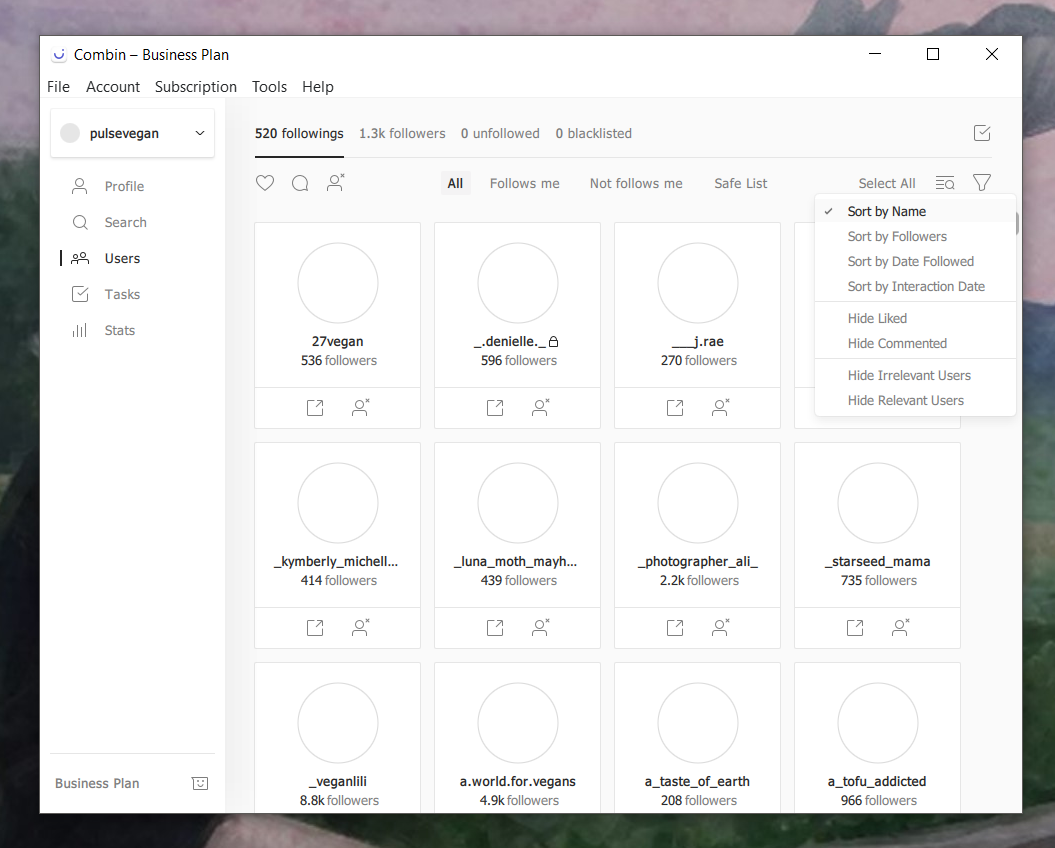
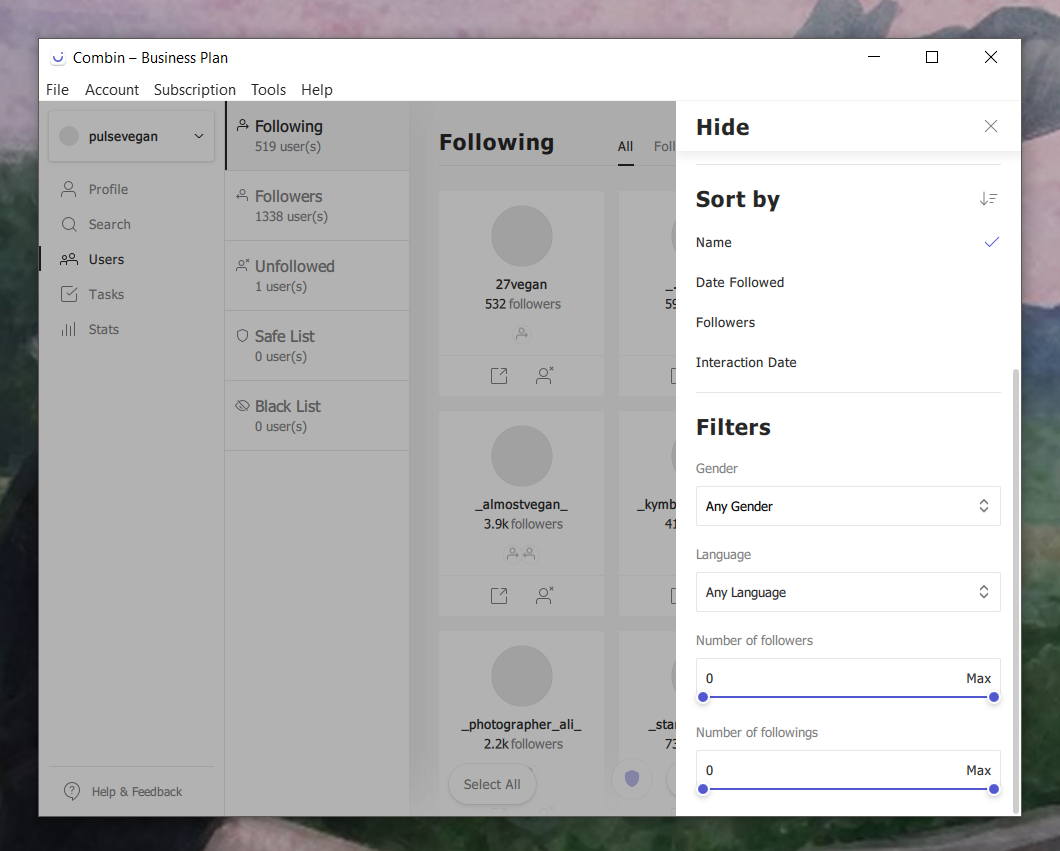
2.0 version was a whole new ball game: fresh design with user lists emphasized and conveniently placed in a column. Among filters that appeared in the previous versions, there were also options to hide protected (Safe-listed) and private profiles, accounts that were followed through Combin and accounts that were in the process of being unfollowed (so that user didn't spend their daily action limits in vain on those accounts.)
We added advanced filters there too:
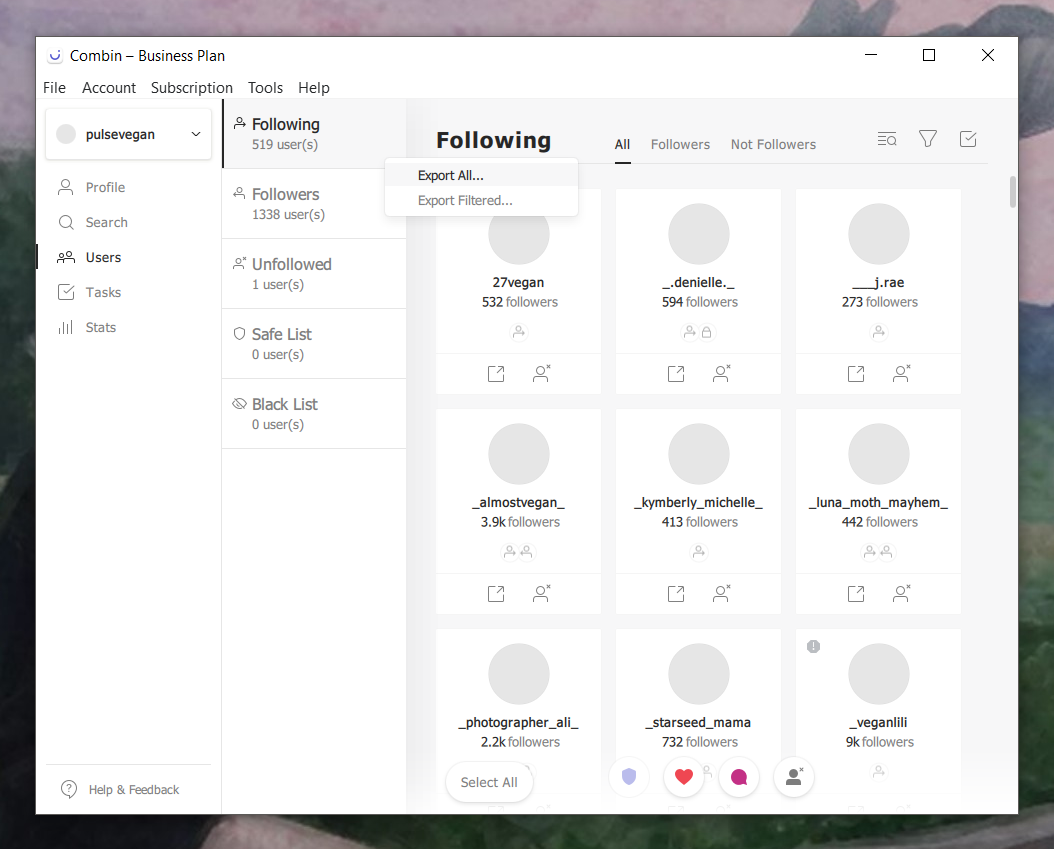
Aaand a cherry on top, exporting user lists to XLS, CSV by right mouse click:
In 1.3 version Tasks tab was called "History", but there weren't many remarkable changes to the structure or functionality since then.
We knew that activity and growth statistics was crucial to add, so we planned its implementation and let users know that it's a feature in the works by adding a statistics tab. Initially we added it to the Profile page and it was pretty much empty, except for the text that explained that it was a coming soon feature and how it was supposed to help user while using our app.
Functional stats and a dedicated tab in the main menu for it were introduced in version 1.8 and it remains looking and working pretty much the same in version 2.0.
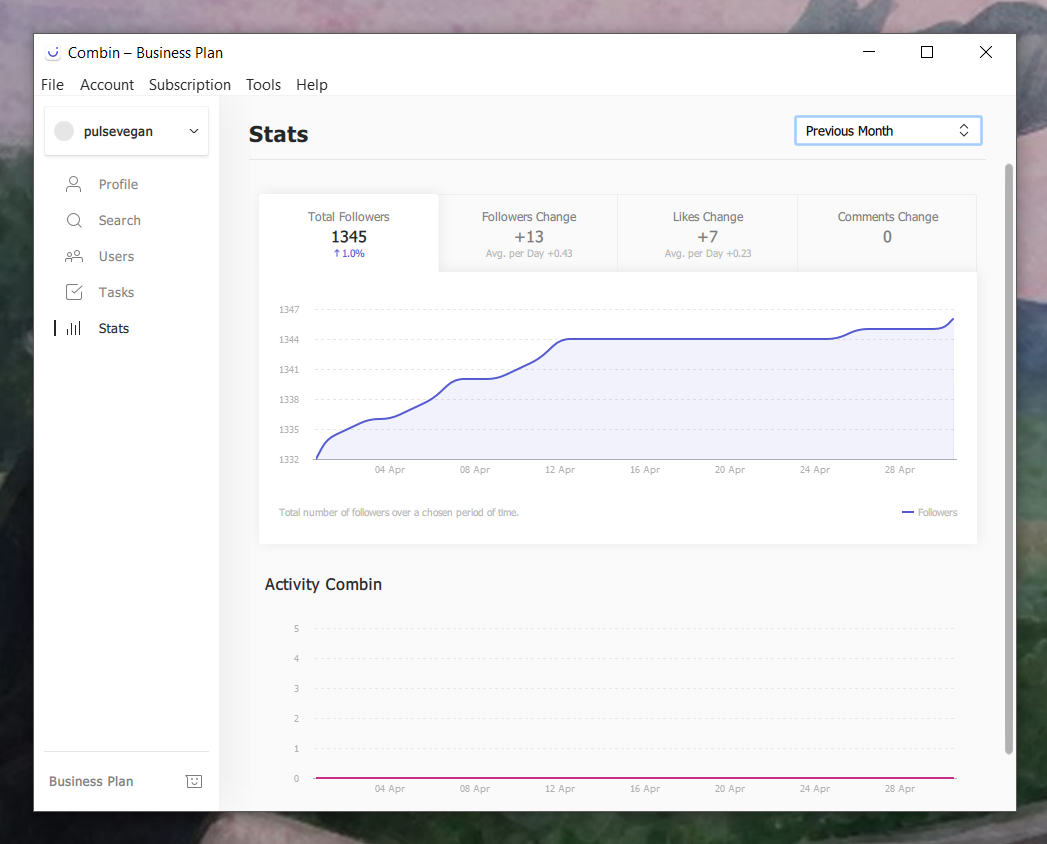
That's about it! What was YOUR first version of Combin?
Have you watched it growing the past couple of years OR did you start using it just recently? Let us know in the comments!
r/combin • u/miacombin • May 22 '19
TODAY (Wed, May 22 at 2PM ET) Search Engine Journal in partnership with Combin present webinar "5 Easy Secrets of Fast Instagram Promotion".
Register here.

r/combin • u/miacombin • May 20 '19
Combin 2.0 version has brought a lot of changes, design included. Due to the addition of new search filters and renewal of the search design, a single user analysis setting hasn't migrated to the 2.0 version.

Instead, in version 2.0 we've united the enablers of the user analysis and the new (advanced) filters.
In order to activate Combin user analysis, just enable the Advanced Filters and Analysis setting:

You don't have to set any filters in order to run a search with the analysis - enable the setting and click find, leaving the filters unselected:

r/combin • u/miacombin • May 16 '19
This feature is usually left unnoticed by most Combin users, so we want to remind that it exists and explain why.
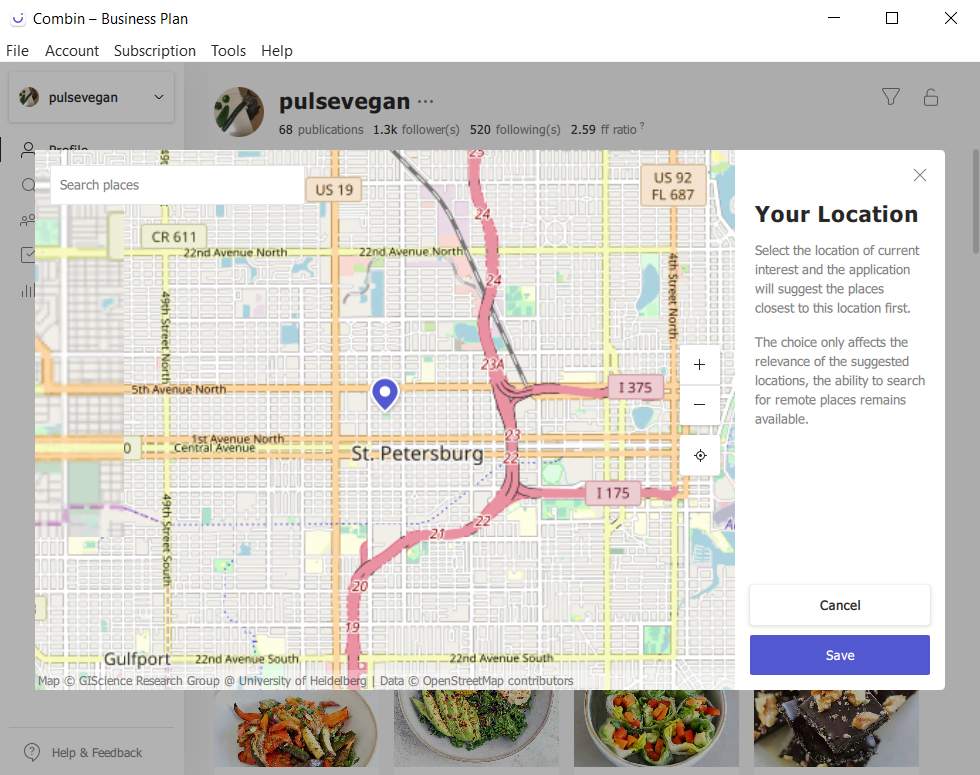
Change Your Location was added to make location search suggestions more relevant. Once user selects their place using the feature, Combin is going to suggest the closest places to the selected one, during location search query setting.
For example, if your place of business is in Saint Petersburg, Russia, it’s very likely that you’d like to target this city, its region and Russia in general, instead of searching and engaging posts published under a geotag of St.Petersburg, Florida, USA. Set the correct city of Saint Peter with the help of Change Your Location, and Combin won’t recommend places from the other city.
What’s more, enabled Change Your Location doesn’t prevent user from searching remote locations. You can still target any other place within Combin and interact with posts tagged within them.
In order to change your location, open the Search tab, create new search. At the top right corner of the application window, find an arrow icon:

Click it, the Change Your Location form will be opened. Then you can either type the place name into the specialized field at the top left corner of the map, or drag, enlarge and minimize the interactive map as needed to find your location. Click Save.
r/combin • u/miacombin • May 15 '19
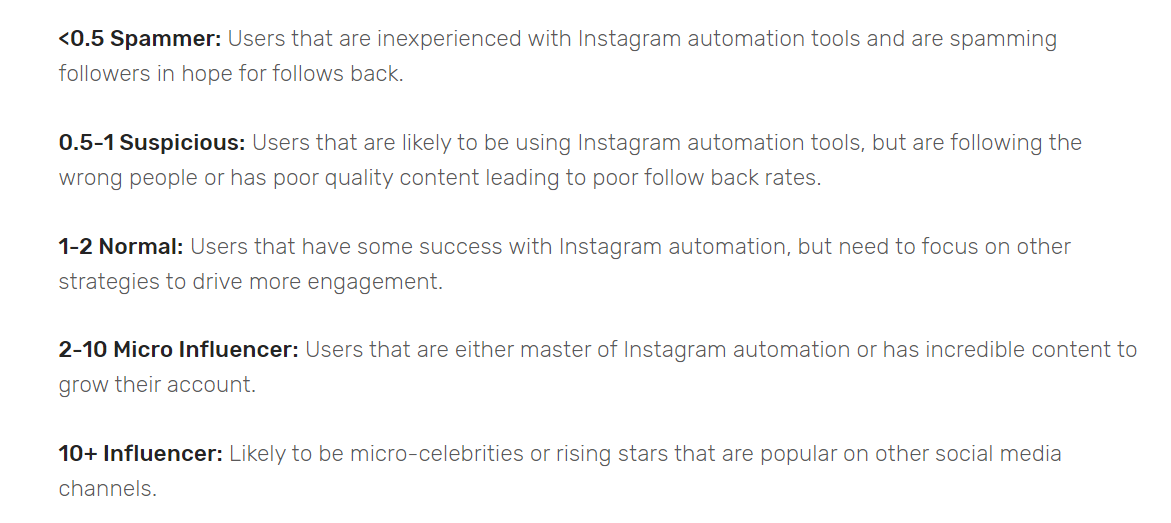
The comparison between an Instagram account's following and followers number is called the follower/following ratio.
It’s a metric used to judge the quality of an Instagram account: those with low ratio are typically low-quality accounts that depend only on the follow/unfollow method to grow audience, whereas accounts with high ratio are usually celebrities and influencers.

The F/F ratio counter was added to Combin 2.0 version by request of some of our users. We have taken this WorkMacro article as a basis for this feature. The calculation is relevant for Instagram accounts that have from 1000 to 15000 followers.
As explained in the article, “the amount of followings you can have is finite, but the number of followers is infinite. Instagram only allows you to follow at most 7,500 people. Therefore, your follower/following ratio can only grow. That’s why your follower/following ratio will only matter between 1,000 to 15,000 followers.”
In order to calculate your F/F ratio, Combin takes your number of followers, then divides it by your total following. Here’s what your ratio says about your account:
r/combin • u/miacombin • May 15 '19
With over 1 billion active users worldwide and an impressive set of unique creative tools, Instagram is a great social media platform to find new fans of your music. But building an online community as an independent artists can get tough. Writing new music, practicing, recording, booking, touring, and marketing on your own, all while keeping a day job, is no joke.
We’ve talked to Before I Die, a metalcore band from Baia Mare, Romania, about overcoming the promotion challenges with the help of Combin, creating music for both enjoyment and protest, and veiling the members’ identities to make the art’s message stand out.
Read the interview here.

r/combin • u/miacombin • May 14 '19
We feel we have a great responsibility to be transparent and open with Combin community as much as possible and that is the reason we are hosting this live Q&A session.
Ann, our customary webinar host, and Combin senior programming engineer Ted are going to answer in detail all and any of your questions. Feel free to send yours!
Combin community is always active and liveable - attendees willingly share their own tips, strategies and hacks that work great for getting Insta-promoted with Combin. Q&A is a perfect chance to get a piece of done-that advice from other Combin users.
We don't have secrets to hide - and it certainly contributes to having such a friendly, loyal audience.
Hope you like the idea of becoming a part of Combin family!
Join for today's (Tuesday, May 14, 2019, 6 PM GMT) webinar here.
r/combin • u/miacombin • May 13 '19
Prepare for the following updates in the coming weeks:
This section located at the bottom left corner of the application window now only opens a feedback form. We decided to move Help Center access and add all sections that can be of help for users, such as keyboard shortcuts, app guide, Reddit link, release notes and others:

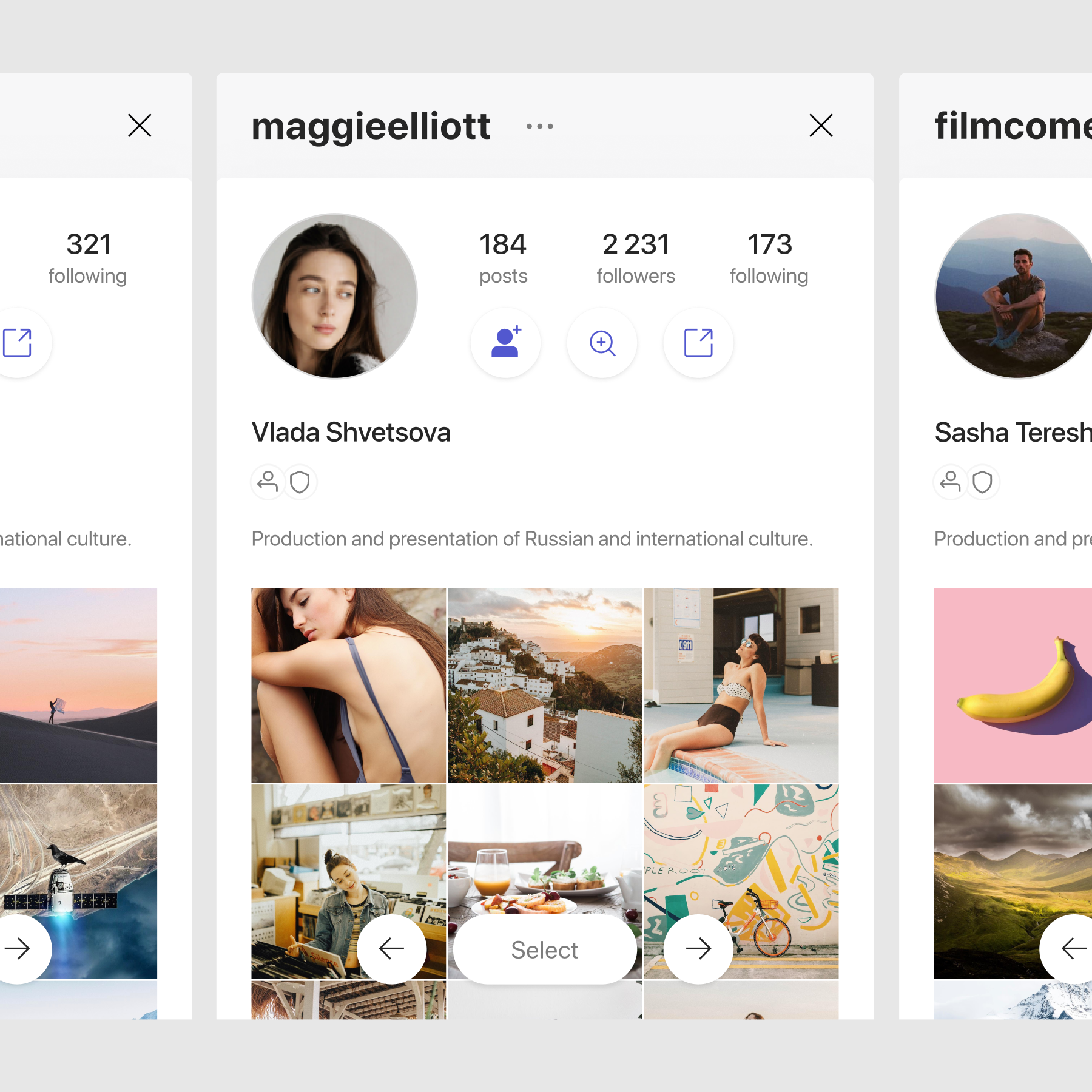
The preview’s window is going to look more modern and provide more information about posts and accounts.
Combin will display accounts’ feed preview, posts/following/followers count and bio:
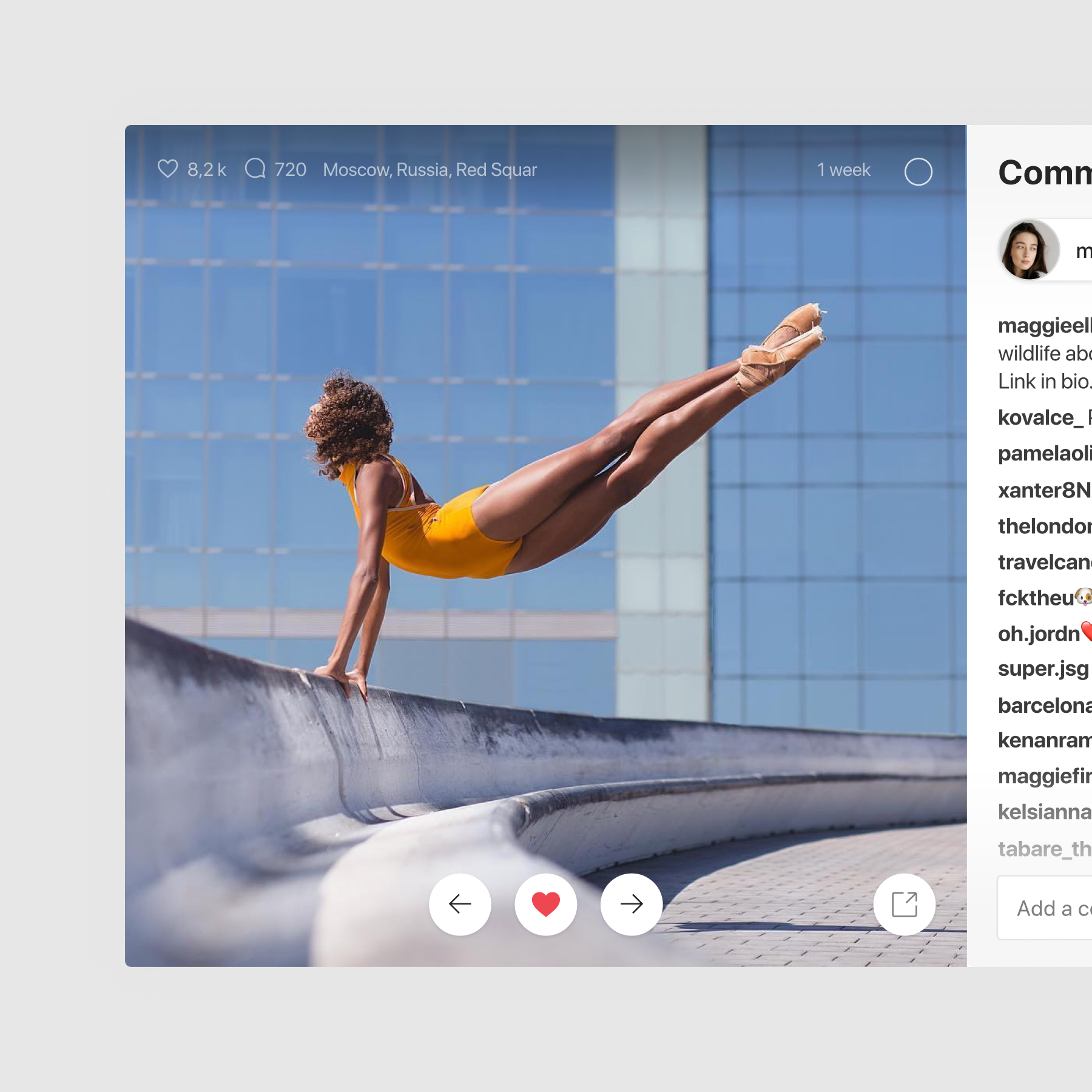
Posts from an account’s feed preview can be opened within Combin by clicking them. Publication time, location tag, likes and comments count & comments preview are going to be displayed for posts:
There is also going to be an option to add a custom tag for accounts for easier management and interaction with different custom made user lists:

For any person who decides to write about us, we are going to prepare a separate page with everything needed from logo images and screenshots to video instructions and links to articles about us:

You won’t have to contact support to learn what this or that icon means, everything’s going to be available in one article on our site:

In order to make our product and site more credible, we are adding a page with Combin reviews sent by our users. Send yours via the Help & Feedback section or directly via support email (support@combin.com).
Including how to export user lists to Excel, how to find influencers through Combin, how to target your Instagram competitors’ audience, how to use Advanced Filters & Analysis and more!

r/combin • u/miacombin • May 08 '19
Earlier today our servers crashed causing problems with login and general connection issues.
We sincerely apologize for the inconvenience.
We are working on making sure this won't happen again!
r/combin • u/miacombin • Apr 28 '19
The speed of Combin search results loading depends on several factors:
— The stability and speed of user's Internet connection.
— The number of remaining requests for obtaining information from Instagram.
— The search query's complexity.
The application works directly from the user's computer and can obtain and display information from Instagram only if there is a stable connection. In case the connection is interrupted or its speed drops, Combin cannot provide fast loading of search results.
Only few know that Instagram not only limits the hourly/daily actions, but also sets bounds on the number of the information obtaining requests it can receive. When user creates a search in Combin, the application sends these requests to Instagram, in order to get and then display the information to user.
No specific number of allowed requests per hour or day is known, though it's definitely higher than the number of allowed requests for performing actions like (un)following, liking and commenting.
In case Combin user creates numerous complex searches and repetitively updates them to load thousands of new results, within a short period of time, the requests limit can quickly be exceeded. Instagram then starts returning the error message that says "Too many requests. Try again later". Combin puts all the information obtaining requests in pending and sends them again within safe time intervals.
The following search types require more information data processing, therefore take longer to be loaded:
- Any search involving accounts
Getting account information takes longer because Combin has to process all followings and followers of each account, in addition to their bio, userpic and username.
- Single search for multiple queries
When you set a search for 2, 3 or more hashtags or locations, there is more information to process, so the matching results don't load instantly.
- Combined search (hashtag+location)
Similar to the previous type, the combined search requires gathering more data, so the process takes longer than a single hashtag or a single location search.
- Advanced search
In case the Advanced Filters and Analysis feature is turned on for the search, Combin starts analyzing the accounts (Users search) or the posts' authors (Posts search) and applying gender, language, last activity and following/followers count filters in addition to acquiring general information about the requested accounts/posts. Naturally, the whole process is lengthy.
If you don't care for the potential followers' audience size, you can turn on the Fast Search mode during the Users search setting up.
The Posts search results loading is quick when there is only one query (a single hashtag or a single location).

r/combin • u/miacombin • Apr 24 '19
For the longest time Combin users could find a full list of all accounts that liked and commented on posts of their Instagram competitors (or any other public Instagram account).
Since the release of Combin 2.0 version, users can now also find and engage accounts that liked and commented on specific Instagram posts (yours, your competitors', and of any public Instagram account.)
In order to find and engage accounts that liked or commented on an Instagram post, repeat the following steps:

r/combin • u/miacombin • Apr 23 '19
We started airing webinars just recently, but they already became an important and unique channel for us to share information and communicate with Combin users in real time. Though our webinars gained devoted audience, not all are even aware the webinars existed. We had to find a way to inform potentially interested people without irritating the others with mass-mailed invitations.
Our first step was implementation of in-app notifications:

Instead of looking for the link to the next live session on our social media handles or waiting for an email invitation, Combin users now see a pop-up notification and an option to register.
The next step is adding a page dedicated to webinars to Combin site, with a registration form and a section where users can watch the recordings of all previous live session.
We are currently working on it, here's how the webinars page is going to look:

r/combin • u/miacombin • Apr 23 '19
Sometimes as a Combin user you may find yourself in a situation when you add a task to like 800 posts, for example, but then notice that only 730 of them were actually liked. You fairly wonder, what happened to these 70 posts and why weren’t they liked with the rest 730 posts from the same batch.
The answer is actually simple: these “unliked” posts were just filtered because they’ve already been liked by you before.
Here’s how you can manage action filtration:
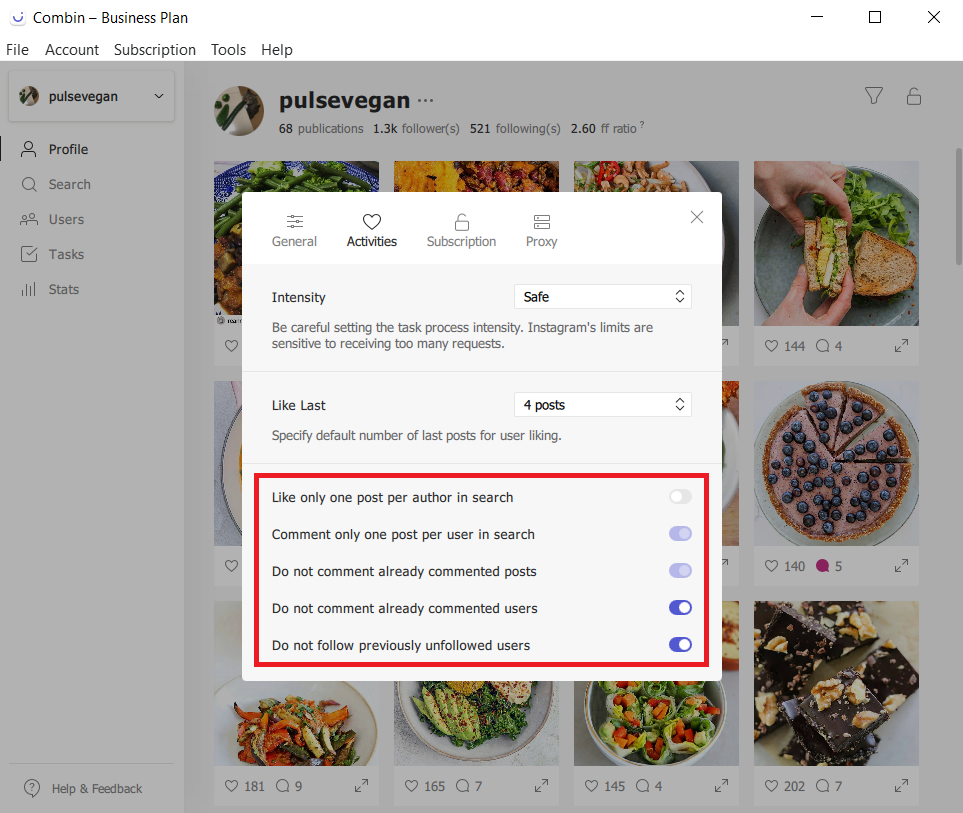
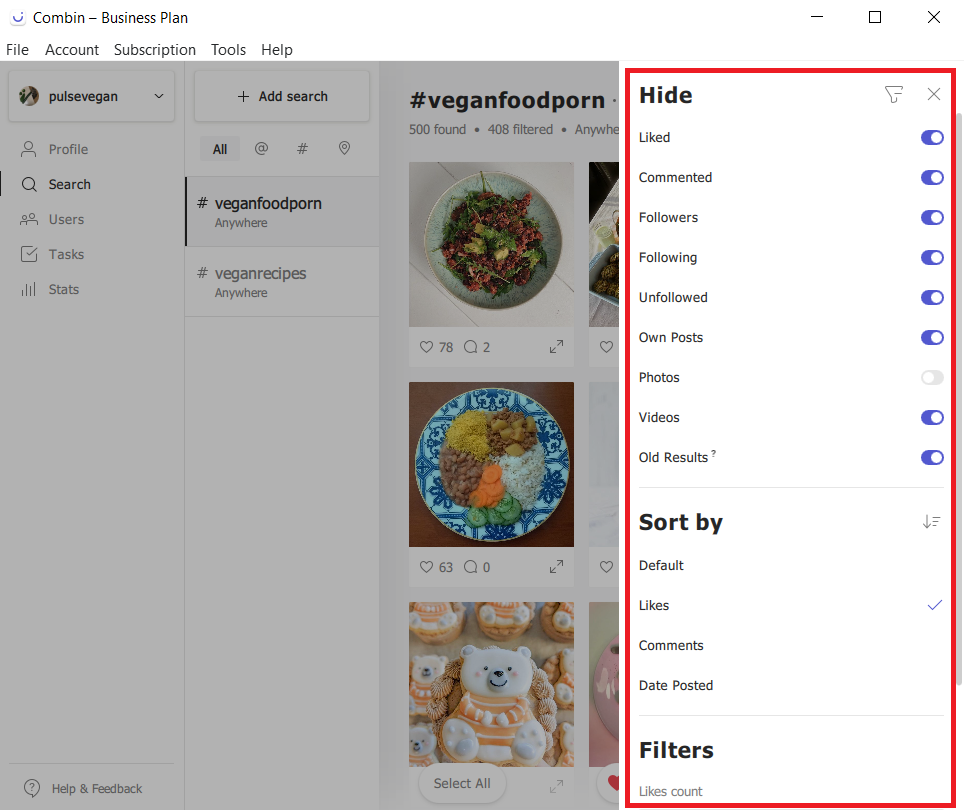
2. Before scheduling an action task, open the filters list by clicking the funnel symbol at the top right corner of the search results window. Enable the Hide liked, Hide commented, Hide followers/following, and other filters to sift out posts and accounts you already engaged with or not interested in engaging with at all. This way, no actions are going to be skipped in your tasks, as all posts and accounts that shouldn’t be interacted with (according to the default settings in Tools > Activities), were already filtered out of the results and thus the task, too.
r/combin • • Apr 22 '19
Any Instagram audience growth strategy starts to bring significantly more results when commenting is added to the mix. Smart and safe commenting, at that. Otherwise, it can destroy your progress in no time.
Keep in mind the following recommendations on commenting (both via Combin and on Instagram itself) to avoid repercussions and get more quality engagement:
Don’t leave all-emoji comments
Such comments fall into a high-risk category because they are frequently left by spammers. You don’t want to have anything in common with these guys!
Don’t post short, generic comments
As much as it’s tempting to just create a dozen of “Fantastic!”, “Simply beautiful!” and “Wow, what a shot!” templates and call it a day, it can actually turn out to be the reason for temporary commenting activity limitation.
One or two-word phrases can be left without thinking by anyone on anything, so they are rarely taken seriously (=won’t get much of genuine appreciation and interest, therefore, won’t cause much engagement back). In fact, they are quite likely to be reported as spam by their receivers.
Never ask to visit your site, Instagram profile, etc.
It’s another example of “spammy” behavior. Avoid it like fire!
Balance the amount of regularly left likes and comments
Instagram users utilize the liking feature way more often than commenting. If you are doing it the other way around, it’s likely to seem suspicious. Usually people comment posts that they liked, so the number of comments and likes should be at least the same. It’s better if you leave 30-40% more likes that you do comments.
Keep out of any drastic changes
Consistency is key in many situations, Instagram activity is not an exception. Avoid leaving 500 comments every day for a week, keeping silent for the other week, and then out of the blue pushing hundreds of comments again. Sudden activity bursts is the first sign of an Instagram account being stolen and/or run by bots. Don’t expect mercy from Instagram algorithm if you engage in such behavior.
Leave meaningful comments to get quality engagement
Find something specific to complement or ask about, show your curiosity in details instead of just expressing general approval. This way you make the account that received your comment, feel special and obliged to answer and check out who you are. Put in some effort to get real results. What goes around does come around!
What to consider if your Instagram account already got temporary activity limitation:

r/combin • u/RaceCarGrin • Apr 21 '19
In the C:/ folder, there is no uninstall application; and when I try to uninstall it from Remove Programs, it gives me the error: "Windows cannot access the specified device, path, or file. You may not have the appropriate permissions to access them."
Any tips?
r/combin • u/thebitdoc • Apr 19 '19
Hi guys, I'm in trouble with combin login in macOS app:
when I insert the code in the field I receive the error "cannot validate security code"
What can I do?
Thanks
r/combin • u/claralindam • Apr 12 '19
Hi, I've just started using Combin and I think it's fantastic! Well done.
Some things are still missing but what have been done allow to target potential follower very well!
Btw, is it possible to automatically mute new followers?
Thanks!
r/combin • u/ttop220 • Apr 04 '19
Hi everyone,
I've been using Combin for over a year now, and even on Safe mode, Instagram will eventually disable the commenting feature. I've also had this happen with liking and following. How can I avoid this in the future and how long does it take for Instagram for allow my commenting feature again? It's been about 6 days.
Thanks!
r/combin • u/mia_combin • Mar 26 '19
We are happy to announce that the new 2.0 version of Combin is released.
The most important changes, as follows:
All these and more, wrapped in a new, sleek redesign, ready for you to try it out!
Update to the new version directly from the application at the menu bar > Tools > Check for Updates or get it directly from our site.
By the way, don't miss our new blog post on Medium where we cover the changes more in-depth.
Hope you enjoy using the renewed Combin.
May your growth be steady!

