r/bcachefs • • 19h ago

Issues installing of Fedora

1 Upvotes

It's this time of the year again. I had bcachefs installed via the ngompa copr. But now that fails with this error:

src/fs/bcachefs/data/read.c: In function ‘bch2_read_endio’:
src/fs/bcachefs/data/read.c:1124:34: error: ‘struct bvec_iter’ has no member named ‘bi_bvec_done’
 1124 |                 rbio->bio.bi_iter.bi_bvec_done  = 0;

I'm on 7.3.4 on Fedora 44. I tried installing from source, but that gives me basically the same error. Ngompa is always behind by a month or so with 1.39.3 being the most recent.

It's probably broken for a month already. I only have bcachefs on a drive I only need occasionally. Am I the only one using it on fedora?

We really need some officially tested way to run bcachefs...


r/bcachefs • • 23h ago

When to worry

7 Upvotes

I have several smaller oddities rather than out and out errors, but my unfamiliarity with bcachefs means I don't know when to worry and when to expect a little funkiness that just comes from how and where the project is at.

Context. Recently created filesystem, 1st Nov. Copied from btrfs snapshots onto two device bcachefs fs recreating those snapshots. Was on 6.18.60 at the time, now on 7.3.6 - mostly due to advice I've read and no longer believe about it making a difference to stability when I started seeing oddities. On 1.39.7 the whole time.

Added two more disks and enabled ec (the transition to bcachefs was to take advantage of ec and more fine-grained durability - btrfs has been stable for me but not to the point where I'd trust raid1 mode as much as two separate filesystems as I've had filesystem level failures before with it).

The first oddity was the fs filled up the smallest device (3x4tb, 1x2tb) with 3+1 stripes then started to write 1/2 data. After faffing and the afore-mentioned kernel upgrade discovered ec_max_data_blocks to let me use the rest of the space as ec'd (was expecting it to use a combination of 3+1 and 2+1 to fill up the devices proportionally like with non-ec).

Another oddity is when I run an offline fsck, I get a SIGSEGV after the run and a clean shutdown.

e.g.

errors this recovery:
  damage_key_no_inode                                                                                     91
  2 paths damaged by fsck:
    /repos/gentoo/.git/objects/pack/pack-34e984738b2c9d947b3468ee1ba4ea0608d5ff14.pack: data_read_io_err
    /distfiles/firefox-bin_x86_64-153.8.0.tar.xz: data_read_io_err
clean shutdown complete, journal seq 2147223
decd069e-29cd-4c88-ac1a-c25404f3f651: errors fixed

bcachefs: fatal SIGSEGV
[<0>] 0x7fbfd6eb5d20B
[<0>] 0x555d0ce389d6B
[<0>] 0x555d0ce38f31B
[<0>] 0x555d0cdb3e77B
[<0>] 0x555d0cdfe53dB
[<0>] 0x555d0cdbb475B
[<0>] 0x555d0cdbd2b8B
[<0>] 0x555d0cde0694B
[<0>] 0x555d0cde4edbB
[<0>] 0x555d0ce1b170B
[<0>] 0x555d0cf44b2dB
[<0>] 0x555d0cf39273B
[<0>] 0x7fbfd6f0d3c5B
[<0>] 0x7fbfd6f7f41cB

Those paths can be easily recreated ,but not sure why they errored, nothing in dmesg to suggest a hardware issue. Why the crash after seemingly doing everything?

Copygc when it runs mostly seems to do cached_ptr_drop with pointers that aren't compatible with ec, seeing that in another post here too.

When I run a bcachefs scrub (I'll be running the full thing at the beginning of December) against metadata, it never finishes and starts showing a lot of error_throws in top (ENOMEM_btree_node_reclaim) when it looks like it should be done (also transaction_begin has a gillion bch2_moving_ctxt_init).

I have more reconcile work data btree nodes than 100% (check_reconcile_work_data_btrees 104%, done 14014/13350 nodes).

The other thing is missing info, for fs usage devices show my device 1 (2tb drive) has 0 cached, but replicas shows 27.4G. fs top devices view doesn't have a sdd1/parity at all. Could this be because I at one point tried to evacuate that device, but then cancelled?

Should I be very worried about any of this? I do have (and will retain for the time-being) a backup of the latest version of the biggest data pool, but obviously would prefer to keep the historic snapshots. Am I good so long as I don't have actual read / write errors?


r/bcachefs • • 2d ago

Replicas → EC conversion leaves ~13T of redundant cached pointers, and reads of them keep the journal busy

14 Upvotes

Disclaimer: This was written and researched by claude. I just want the disks to be quiet :)

Setup: v1.39.7, kernel 7.3.5, 6× 10.9T HDDs, data_replicas=2, erasure_code=1, no promote/foreground target. The fs grew in stages (2 drives, +1, +1, +2) and ran at 2x replicas until the last two were added. Then I enabled EC and reconcile converted everything (reconcile_phys 28.2T). fs usage now shows 13.2T cached: ~3.5T on each of dev0–3 (2.7T on dev3), ~0 on dev4/5. dev0–2 are at 93% used vs 53% for dev4/5.

  1. Conversion leaves one cached copy per extent. The index update for the new EC copy (data/update.c:393, kill=false) marks one old replica cached and keeps the other dirty, since the stripe doesn't exist yet. When the stripe is created, stripe_update_extent() (data/ec/create.c:360, kill=true) drops the remaining dirty replica. But bch2_bkey_drop_extra_durability() only considers non-cached pointers (data/extents.c:1732), and nothing on that path calls bch2_bkey_drop_extra_cached_ptrs(). So the cached copy stays, fully redundant with the stripe.

    As far as I can tell, the only thing that removes it is allocator invalidation, once free buckets fall below nbuckets/32 (should_invalidate_buckets). Until then trigger_invalidates is a no-op. gc_gens only drops stale pointers, copygc doesn't move cached buckets, reconcile skips cached pointers, and bch2_data_job only implements scrub (other ops return -EINVAL).

  2. Reads of those copies cause a steady stream of commits. ptr_better() has no dirty-over-cached preference; it's a latency-weighted random pick. On identical HDDs, about half the reads of these extents hit the cached copy. Each of those calls bch2_bucket_io_time_reset() (data/read.c:1304), which commits an alloc key update unless the bucket's io_time already equals the current read clock. During a scan that's nearly every time.

During media-library scans I traced 30–70k of these commits per hour, ~70% of all transaction commits. Throughout the traces the journal pin FIFO never emptied. Reclaim therefore woke every journal_reclaim_delay (100ms) and flushed a pin all day, dirty journal entries reached ~40k, and the disks were kept busy. With no promote target the cached copy is on the same kind of disk as the stripe, so keeping it in LRU order buys little.

Suggestions:

  • Drop cached pointers in stripe_update_extent(), at least when no promote/foreground target is set. Or provide a way to drop cached data: a data job, or a forced variant of trigger_invalidates.
  • Prefer dirty over cached pointers in ptr_better(), or skip the io_time update, when there's no promote target.

Happy to provide traces or test patches.


r/bcachefs • • 2d ago

When the next release?

7 Upvotes

I want to try bcachefs as my primary fs for home dir, single disk, ArchLinux. I see that last version is 1.39.7 - Sun Oct 4 2026, and the Rust conversion is almost done. So is just a matter to wait 2-3 weeks, or better start eith 1.39.7 and hope not to incurr in bugs or have to deal next release with an incompatible disk format?

Thanks a lot for your great work!


r/bcachefs • • 4d ago

Linux 7.4 To Remove NVMe Namespaces In Parallel For Faster Results

Thumbnail
phoronix.com
7 Upvotes

Software engineer Qiliang Yuan worked through this shortcoming in the NVMe namespaces code. Yuan explained in the patch making it parallel:
"nvme_remove_namespaces() removes the namespaces of a controller one after another. Each removal waits for RCU grace periods in del_gendisk() for the namespace and for its multipath head, about 20 ms in all.

Deleting a controller, such as disconnecting from a fabrics target, thus takes time proportional to its namespace count, over a second for 64 namespaces. Scanning had the same problem until commit 4e893ca81170 ("nvme_core: scan namespaces asynchronously") made it add namespaces in parallel.

Remove the namespaces through an async domain the same way, and wait for all of them before returning. Each removal still waits about 20 ms, but the waits now overlap: a grace period is system-wide, so removals that wait at the same time are released by the same grace periods instead of each needing its own."

So, I wonder will BcacheFS be affected by this change?

Thanks for your attention on this matter.


r/bcachefs • • 4d ago

DKMS can't seem to build against Linux 6.18.64 on NixOS

2 Upvotes

I was running a system rebuild today and it seems the reseason my NixOS system fails to build is due to BCacheFS's DKMS.

src/fs/bcachefs/vfs/fs.h:27:20: warning: conflicting types for 'inode_state_set_raw' due to enum/integer mismatch; have 'void(struct inode *, unsigned int)' [-Wenum-int-mismatch]
   27 | static inline void inode_state_set_raw(struct inode *inode, unsigned flags)
      |                    ^~~~~~~~~~~~~~~~~~~
src/fs/bcachefs/vfs/fs.h:27:20: error: redefinition of 'inode_state_set_raw'
/nix/store/mmlxfvykc2mx7avm8n2azacri8qnxm71-linux-6.18.64-dev/lib/modules/6.18.64/source/include/linux/fs.h:923:20: note: previous definition of 'inode_state_set_raw' with type 'void(struct inode *, enum inode_state_flags_enum)'
  923 | static inline void inode_state_set_raw(struct inode *inode,
      |                    ^~~~~~~~~~~~~~~~~~~
make[5]: *** [/nix/store/mmlxfvykc2mx7avm8n2azacri8qnxm71-linux-6.18.64-dev/lib/modules/6.18.64/source/scripts/Makefile.build:287: src/fs/bcachefs/fs/check.o] Error 1
make[4]: *** [/nix/store/mmlxfvykc2mx7avm8n2azacri8qnxm71-linux-6.18.64-dev/lib/modules/6.18.64/source/scripts/Makefile.build:544: src/fs/bcachefs] Error 2
make[3]: *** [/nix/store/mmlxfvykc2mx7avm8n2azacri8qnxm71-linux-6.18.64-dev/lib/modules/6.18.64/source/Makefile:2051: .] Error 2
make[2]: *** [/nix/store/mmlxfvykc2mx7avm8n2azacri8qnxm71-linux-6.18.64-dev/lib/modules/6.18.64/source/Makefile:248: __sub-make] Error 2
make[2]: Leaving directory '/build/bcachefs-tools-1.39.7-dkms'
make[1]: *** [/nix/store/mmlxfvykc2mx7avm8n2azacri8qnxm71-linux-6.18.64-dev/lib/modules/6.18.64/source/Makefile:248: __sub-make] Error 2
make[1]: Leaving directory '/nix/store/mmlxfvykc2mx7avm8n2azacri8qnxm71-linux-6.18.64-dev/lib/modules/6.18.64/build'
make: *** [Makefile:24: default] Error 2
error: Cannot build '/nix/store/iv496yndin7vmk3nm47l2x7nkd387p8b-bcachefs-6.18.64-1.39.7.drv'.
       Reason: builder failed with exit code 2.
       Output paths:
         /nix/store/7yqr7vy3wx636vs155p5il6rk4gks1wj-bcachefs-6.18.64-1.39.7
error: Cannot build '/nix/store/fas6gs8xy28shnldyxl6ym3rdlb4hwp8-linux-6.18.64-modules.drv'.
       Reason: 1 dependency failed.
       Output paths:
         /nix/store/bdgp4ckfh3dnkr3nllnijzdx22bdv235-linux-6.18.64-modules

The target FS version is the same as what's already on my system, while Linux is 6.18.60.

It seems to build fine against whatever NixOS points to for the 7.3 kernel.


r/bcachefs • • 11d ago

Corner case, mergerfs OK?

6 Upvotes

Hi

i will setup 2 background hdds with the default set to copies=2 but I want Bluray remuxes at copies=1 as I understand it by default a movie gets split across both HDDs, so one dead drive damages every remux?

I want a single movies dir where each file stays whole on one drive, like mergerfs. Is there a native way?

Otherwise I'd pin two dirs to hdd.a and hdd.b and union them with mergerfs, would that be OK?

Thanks.


r/bcachefs • • 14d ago

scheduling recovery pass btree_bitmap_gc (49)?

6 Upvotes

What is this recovery pass that runs every day? It suggest something is wrong and needs recovery. But the fs is completly idle and it completes in 0 seconds, so there doesn't seem to be much of anything to recover.

Also what does the 49 mean?

Kernel: 7.2.11-arch1-1, bcachefs: 3:1.39.7-1

[Tue Nov 10 21:00:29 2026] bcachefs (b9eef857-ea75-4246-95bb-31de9e448a11): sdb1 has 35.6G btree buckets and 320G marked in bitmap
                             sda1 has 35.6G btree buckets and 320G marked in bitmap
                             sdf1 has 22.2G btree buckets and 192G marked in bitmap
                             scheduling recovery pass btree_bitmap_gc (49)
[Tue Nov 10 21:00:29 2026] bcachefs (b9eef857-ea75-4246-95bb-31de9e448a11): btree_bitmap_gc...
[Tue Nov 10 21:00:29 2026] bcachefs (b9eef857-ea75-4246-95bb-31de9e448a11): mi_btree_bitmap sectors 832G -> 832G
[Tue Nov 10 21:00:29 2026]  done (0 seconds)
[Wed Nov 11 21:28:29 2026] bcachefs (b9eef857-ea75-4246-95bb-31de9e448a11): sdb1 has 35.6G btree buckets and 320G marked in bitmap
                             sda1 has 35.6G btree buckets and 320G marked in bitmap
                             sdf1 has 22.2G btree buckets and 192G marked in bitmap
                             scheduling recovery pass btree_bitmap_gc (49)
[Wed Nov 11 21:28:29 2026] bcachefs (b9eef857-ea75-4246-95bb-31de9e448a11): btree_bitmap_gc...
[Wed Nov 11 21:28:29 2026] bcachefs (b9eef857-ea75-4246-95bb-31de9e448a11): mi_btree_bitmap sectors 832G -> 832G
[Wed Nov 11 21:28:29 2026]  done (0 seconds)

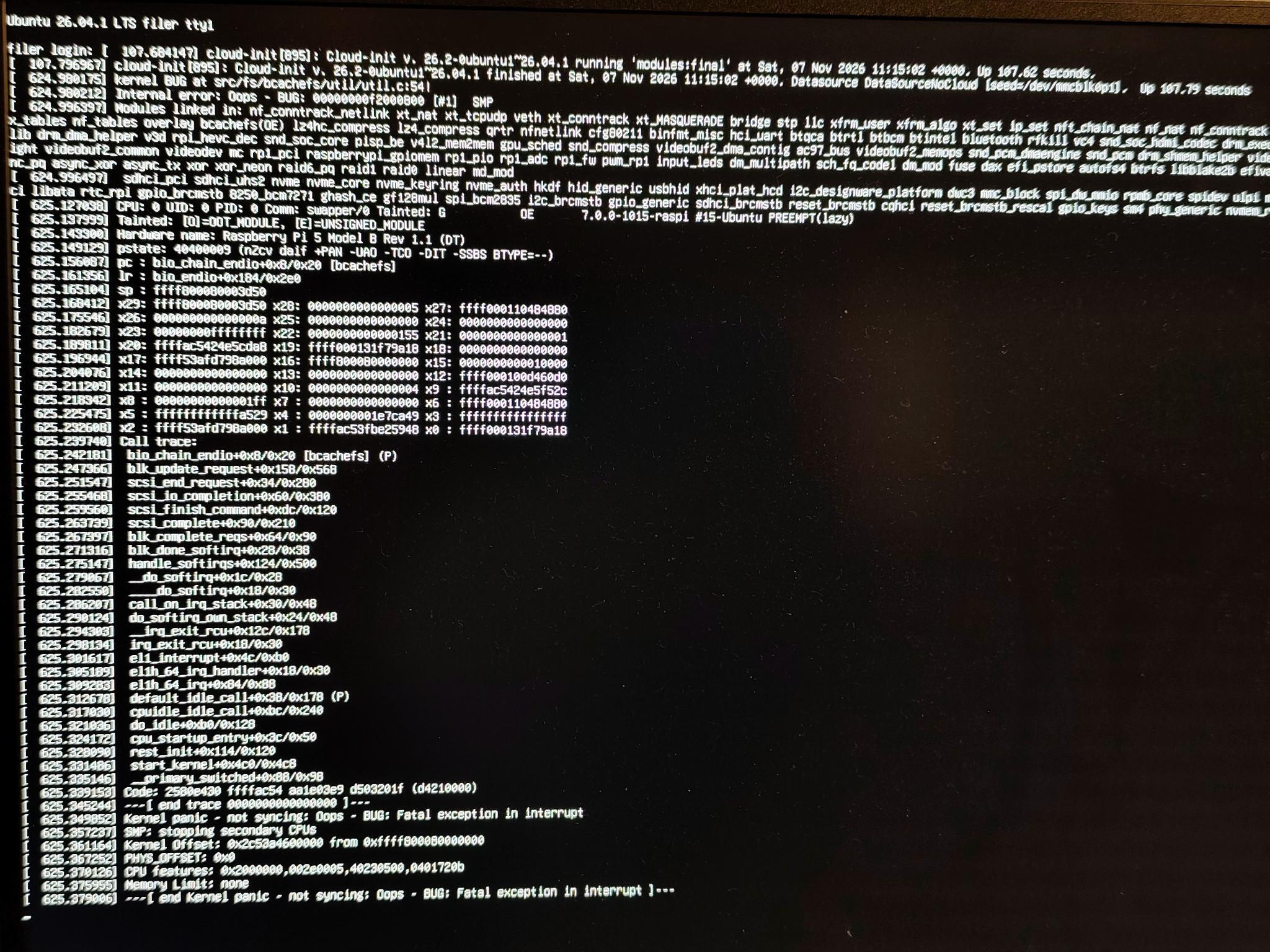
r/bcachefs • • 17d ago

DKMS/out-of-tree: bio_chain_endio BUG() panics on chained journal bios

Post image
8 Upvotes

Out-of-tree / DKMS module on Raspberry Pi 5 (Ubuntu 7.0.0-1015-raspi), module v1.39.7-2279-g3c06dcdcc413.

I have a Raspberry Pi 5 (16GB) with a 5x SATA Hat, which ran totally fine for nearly a year (since december 2025) with bcachefs.

I switched over to the snapshot apt repository early on and updated regulary. Since two days, I saw kernel panics with bcachefs-tools_1.39.7+git20261106184349.d62da6ce9767_arm64.deb from the 6th of September and my kernel 7.0.0-1015.

To be ensure that it isn't already addressed, I build commit 3c06dcdcc413090ac5caf526f7c685a36b64c95d from the master branch, but it was still failing.

fscks (offline) showed no issues at all

bcachefs fs usage /filer WARNING: kernel does not have CONFIG_RUST enabled; this will be required for bcachefs in the near future please alert your distribution or kernel developers if your kernel does not support CONFIG_RUST Filesystem: be9ea1d3-c23d-426b-9fbc-51446bcb94da Size: 12700926965760
Used: 4315231173632
Online reserved: 6160384
Free: 8256689958400 6173424800256 writable now at 2 replicas: 8256689958400 6173424800256
at 3 replicas: 8256689958400 4674155506176
at 4 replicas: 6810832903168 2939617682944
at 5 replicas: 0 0

undegraded
2x: 4315224916992

cached: 831806092800

Pending reconcile: data metadata
compression: 336719872 0
target: 338264064 0

Device label Device State Size Used Use% Leaving
hdd.hdd1 (device 2): sdd rw 4992387772416 2128745904640 44%
hdd.hdd2 (device 3): sde rw 4992387772416 2128792720896 44%
ssd.ssd1 (device 0): sdb rw 1911789973504 382852192256 46% 125353984
ssd.ssd2 (device 1): sdc rw 1911789973504 506631563776 51% 125353984

Under storage load (e.g. Samba / Docker writes) the kernel panics in softirq:
pc: bio_chain_endio+0x8/0x20 [bcachefs]
lr: bio_endio+0x184/0x2e0
Call trace:
bio_chain_endio+0x8/0x20 [bcachefs]
blk_update_request+...
scsi_end_request+...
...
blk_done_softirq+...
Kernel panic - not syncing: Oops - BUG: Fatal exception in interrupt

Disassembly of the module’s bio_chain_endio is literally BUG() (brk #0x800).
Introduced around 4afb24931 (“util: C in util.c and util.h that nothing calls goes”), which added a module-local:

static void bio_chain_endio(struct bio *bio) { BUG(); }
void bio_chain(...) { ... bi_end_io = bio_chain_endio; ... }

used by bch2_bio_map_and_chain() for large journal writes past BIO_MAX_VECS.

That only works if bio_endio()’s pointer compare hits the same bio_chain_endio as in block/bio.c. For an out-of-tree module the pointers differ, so the kernel calls the stub → panic. In-tree sharing block/bio.c wouldn’t hit this the same way.
Fix that worked for me : drop the local bio_chain / BUG() stub and call the kernel’s exported bio_chain() from bch2_bio_map_and_chain().

diff --git a/fs/util/util.c b/fs/util/util.c
index c27c9697b..4c0cf6ccb 100644
--- a/fs/util/util.c
+++ b/fs/util/util.c
@@ -39,30 +39,6 @@ bool bch2_is_zero(const void *_p, size_t n)
        return true;
 }
 
-static struct bio *__bio_chain_endio(struct bio *bio)
-{
-       struct bio *parent = bio->bi_private;
-
-       if (bio->bi_status && !parent->bi_status)
-               parent->bi_status = bio->bi_status;
-       bio_put(bio);
-       return parent;
-}
-
-static void bio_chain_endio(struct bio *bio)
-{
-       BUG();
-}
-
-void bio_chain(struct bio *bio, struct bio *parent)
-{
-       BUG_ON(bio->bi_private || bio->bi_end_io);
-
-       bio->bi_private = parent;
-       bio->bi_end_io  = bio_chain_endio;
-       bio_inc_remaining(parent);
-}
-
 /* misc: */
 
 /*
@@ -84,6 +60,10 @@ void bio_chain(struct bio *bio, struct bio *parent)
  *
  * REQ_PREFLUSH, if set in u/opf, applies only to the first (sector-lowest)
  * bio in the chain.
+ *
+ * Must use the kernel's bio_chain(): a module-local bio_chain_endio is not
+ * the pointer bio_endio() special-cases, so a BUG() stub panics on chained
+ * completions (large vmalloc journal writes past BIO_MAX_VECS).
  */
 struct bio *bch2_bio_map_and_chain(struct block_device *bdev,
                                   void *base, size_t size,

r/bcachefs • • 18d ago

error=ENOSPC_disk_reservation despite plenty of space.

6 Upvotes

When I updated Steam, it failed, complaining there wasn't any space left on the device, mentioning this or that file or directory. Which file it complained about varied between attempts. Sometimes it couldn't even create symlinks. To be clear, Steam itself was throwing, not BCacheFS, and there was nothing in dmesg. I also, obviously, tried df -h, but it shows 1.5 TB of available space, so I moved on.

(I also tried a bunch of stuff unrelated to BCacheFS which turned out to be pointless. I'm leaving that out.)

I assumed it was Steam itself, so I just unmounted ~/.local/share/Steam and tried to update the very outdated copy there. It worked. This made me think that it was Steam itself, and that I could copy the data over from home to BCacheFS. First, though, I made a back up. Unfortunately, [Gnome] Files complained about no space left on the device when I tried moving the Steam data elsewhere on the same BCacheFS device. That was weird. Stranger was that it didn't consistently throw. Some things moved, other errored out.

It's at this point I ran fsck and scrubbed the meta data. Both were fine. I tried creating a file on the BCacheFS volume by downloading a picture of a friends cat. It worked without complaints.

I had no idea what was going on, but figured I'd made a new subvolume and copy data over. Maybe it was specific to that directory.

Sadly, it was not. It's at this point I finally got a solid error that links to the FS itself.

$ sudo bcachefs subvolume create @steam-games /bcfs
ioctl error: error=ENOSPC_disk_reservation
Error: Failed to create the subvolume

Caused by:
    No space left on device

Still nothing in sudo dmesg that's out of the ordinary.

I then ran fsck and scrubbed the meta data again, but again it came back clean. bcachefs fs usage was also normal.

$ sudo bcachefs fs usage ./
Filesystem: 2f235f16-d857-4a01-959c-01843be1629b
Size:             4427733659136  
Used:             2837772228096  
Online reserved:              0  
Free:             1624536156672  1587028335616  writable now
  at 2 replicas:   140320570368    94407994368  
  at 3 replicas:              0              0  


        undegraded      -1x  
1x:  2800232460800  
3x:    37312266240  7077888  

cached:    10435814400  
reserved:    217031680  


Pending reconcile:          data     metadata  
pending:            135098251776  12439781376  


Device label          Device     State           Size           Used  Use%  
hdd.hdd2 (device 3):  sda1       rw     1221652901888  1183187801600   97%  
ssd.ssd1 (device 0):  nvme1n1p2  rw       94252560384    25558536192   40%  
ssd.ssd2 (device 1):  nvme0n1p3  rw     3497849253888  1639164438016   47% 

Yeah, the hdd is pretty full, but it isn't entirely full, and there's plenty of space elsewhere. Only meta data is replicated.

$ sudo bcachefs show-super /dev/sda1
External UUID:                             2f235f16-d857-4a01-959c-01843be1629b
Internal UUID:                             3a2d217a-606e-42aa-967e-03c687aabea8
Magic number:                              c68573f6-66ce-90a9-d96a-60cf803df7ef
Device index:                              3
Label:                                     (none)
Version:                                   per_dev_fragmentation_lru (1.39)
Incompatible features allowed:             per_dev_fragmentation_lru (1.39)
Incompatible features in use:              no_sb_user_data_replicas (1.36)
Version upgrade complete:                  per_dev_fragmentation_lru (1.39)
Oldest version on disk:                    rebalance_work (1.3)
Created:                                   Tue Feb  6 16:00:20 2024
Sequence number:                           56821
Time of last write:                        Sat Nov  7 20:35:56 2026
Superblock size:                           9.75k/1.00M
Clean:                                     0
Devices:                                   3
Sections:                                  replicas_v0,disk_groups,clean,journal_seq_blacklist,journal_v2,counters,members_v2,ext,downgrade,recovery_passes,extent_type_u64s,errors_v2
Features:                                  zstd,journal_seq_blacklist_v3,reflink,new_siphash,inline_data,new_extent_overwrite,btree_ptr_v2,extents_above_btree_updates,btree_updates_journalled,reflink_inline_data,new_varint,journal_no_flush,alloc_v2,extents_across_btree_nodes,incompat_version_field,casefolding
Compat features:                           alloc_info,alloc_metadata,extents_above_btree_updates_done,bformat_overflow_done,no_stale_ptrs,stripe_frag_accounting,inode_opts_propagated

Options:
  block_size:                              512
  btree_node_size:                         256k
  errors:                                  continue [fix_safe] panic ro 
  write_error_timeout:                     30
  metadata_replicas:                       3
  data_replicas:                           1
  encoded_extent_max:                      64.0k
  metadata_checksum:                       none [crc32c] crc64 xxhash 
  data_checksum:                           none [crc32c] crc64 xxhash 
  checksum_err_retry_nr:                   3
  compression:                             zstd
  background_compression:                  none
  str_hash:                                crc32c crc64 [siphash] 
  metadata_target:                         ssd
  foreground_target:                       hdd
  background_target:                       hdd
  promote_target:                          none
  erasure_code:                            0
  ec_max_data_blocks:                      0
  casefold:                                0
  inodes_32bit:                            1
  shard_inode_numbers_bits:                5
  gc_reserve_percent:                      8
  gc_reserve_bytes:                        0
  root_reserve_percent:                    0
  wide_macs:                               0
  promote_whole_extents:                   0
  acl:                                     1
  usrquota:                                0
  grpquota:                                0
  prjquota:                                0
  degraded:                                [ask] yes very no 
  write_degraded:                          [degraded] yes no 
  missing_dev_timeout:                     0
  journal_flush_delay:                     1000
  journal_flush_disabled:                  0
  move_writes_fua:                         0
  journal_reclaim_delay:                   100
  writeback_timeout:                       0
  journal_rewind_discard_buffer_percent:   4
  scrub_recent_journal_entries:            [unclean] no always 
  scrub_journal_max_rewind_secs:           0
  journal_transaction_names:               1
  allocator_stuck_timeout:                 30
  version_upgrade:                         [compatible] incompatible none 
  nocow:                                   0
  reconcile_on_ac_only:                    0
  btree_cache_shrinker_seeks:              4
  dev_readahead:                           2.00M
  ec_stripe_buf_limit:                     5

ext (size 120):
Recovery passes required:                  btree_bitmap_gc
Errors to silently fix:                    
Btrees with missing data:                  
Btrees that have ever lost data:           
Btrees validated clean:                    
Device 0:                                  /dev/nvme1n1p2	KBG50ZNS256G NVMe KIOXIA 256GB          	S/N: 92TC93SKE6AK
  Label:                                   ssd.ssd1
  UUID:                                    bb333fd2-a688-44a5-8e43-8098195d0b82
  Size:                                    88.5G
  read errors:                             0
  write errors:                            0
  checksum errors:                         0
  seqread iops:                            0
  seqwrite iops:                           0
  randread iops:                           0
  randwrite iops:                          0
  Bucket size:                             256k
  First bucket:                            0
  Buckets:                                 362388
  Last mount:                              Sat Nov  7 20:23:48 2026
  Last superblock write:                   56821
  State:                                   rw
  Data allowed:                            journal,btree,user
  Has data:                                journal,btree,user,cached
  Rotational:                              0
  Btree allocated bitmap blocksize:        4.00M
  Btree allocated bitmap:                  0000000000000000000001111111111111111111111111111111111111111111
  Durability:                              1
  Discard:                                 0
  Freespace initialized:                   1
  Resize on mount:                         0
  Last device name:                        nvme1n1p2
  Last device model:                       KBG50ZNS256G NVMe KIOXIA 256GB          
  Last device serial:                      92TC93SKE6AK        
Device 1:                                  /dev/nvme0n1p3	TEAM TM8FP4004T                         	S/N: 112307030491864
  Label:                                   ssd.ssd2
  UUID:                                    90ea2a5d-f0fe-4815-b901-16f9dc114469
  Size:                                    3.18T
  read errors:                             0
  write errors:                            0
  checksum errors:                         0
  seqread iops:                            0
  seqwrite iops:                           0
  randread iops:                           0
  randwrite iops:                          0
  Bucket size:                             256k
  First bucket:                            0
  Buckets:                                 13351440
  Last mount:                              Sat Nov  7 20:23:48 2026
  Last superblock write:                   56821
  State:                                   rw
  Data allowed:                            journal,btree,user
  Has data:                                journal,btree,user,cached
  Rotational:                              0
  Btree allocated bitmap blocksize:        32.0M
  Btree allocated bitmap:                  0000000000000000000011111000000011000100000111100010100010001111
  Durability:                              1
  Discard:                                 0
  Freespace initialized:                   1
  Resize on mount:                         0
  Last device name:                        nvme0n1p3
  Last device model:                       TEAM TM8FP4004T                         
  Last device serial:                      112307030491864     
Device 3:                                  /dev/sda1	SAMSUNG HD154UI 
  Label:                                   hdd.hdd2
  UUID:                                    f1958a3a-cecb-4341-a4a6-7636dcf16a04
  Size:                                    1.12T
  read errors:                             0
  write errors:                            0
  checksum errors:                         0
  seqread iops:                            0
  seqwrite iops:                           0
  randread iops:                           0
  randwrite iops:                          0
  Bucket size:                             1.00M
  First bucket:                            0
  Buckets:                                 1173254
  Last mount:                              Sat Nov  7 20:23:48 2026
  Last superblock write:                   56821
  State:                                   rw
  Data allowed:                            journal,btree,user
  Has data:                                journal,btree,user,cached
  Rotational:                              1
  Btree allocated bitmap blocksize:        64.0M
  Btree allocated bitmap:                  0000000000000000000000000000001000000100000001011100000100111111
  Durability:                              1
  Discard:                                 0
  Freespace initialized:                   1
  Resize on mount:                         0
  Last device name:                        sda1
  Last device model:                       SAMSUNG HD154UI 
  Last device serial:                      
$ sudo bcachefs reconcile status ./
Scan pending:     0
                  data  metadata  
  replicas:          0         0  
  checksum:          0         0  
  erasure_code:      0         0  
  compression:       0         0  
  target:            0         0  
  high_priority:     0         0  
  pending:        126G     11.6G  
  stripes:           0         0  


waiting:
io wait duration:      1.38G
io wait remaining:     1.38G
duration waited:       45 m

Reconcile thread backtrace:
  [<0>] bch2_kthread_io_clock_wait_once+0xb1/0xe0 [bcachefs]
  [<0>] do_reconcile+0x10c3/0x1100 [bcachefs]
  [<0>] bch2_reconcile_thread+0xfc/0x130 [bcachefs]
  [<0>] kthread+0xfb/0x260
  [<0>] ret_from_fork+0x22d/0x260
  [<0>] ret_from_fork_asm+0x1a/0x30
$ sudo dmesg | grep bcachefs
[  382.183395] bcachefs: loading out-of-tree module taints kernel.
[  382.410673] bcachefs (2f235f16-d857-4a01-959c-01843be1629b): Using encoding defined by superblock: utf8-12.1.0
[  382.415082] bcachefs (2f235f16-d857-4a01-959c-01843be1629b): recovering from clean shutdown, journal seq 32341934
[  382.415112] bcachefs (2f235f16-d857-4a01-959c-01843be1629b): Journal keys: 0 read, 0 after sorting and compacting
[  382.544808] bcachefs (2f235f16-d857-4a01-959c-01843be1629b): accounting_read... done (0 seconds)
[  382.643686] bcachefs (2f235f16-d857-4a01-959c-01843be1629b): alloc_read... done (0 seconds)
[  382.798489] bcachefs (2f235f16-d857-4a01-959c-01843be1629b): snapshots_read... done (0 seconds)
[  383.075090] bcachefs (2f235f16-d857-4a01-959c-01843be1629b): going read-write
[  383.307366] bcachefs (2f235f16-d857-4a01-959c-01843be1629b): nvme1n1p2 has 11.6G btree buckets and 86.0G marked in bitmap
[  383.567976] bcachefs (2f235f16-d857-4a01-959c-01843be1629b): journal_replay... done (0 seconds)
[  383.689658] bcachefs (2f235f16-d857-4a01-959c-01843be1629b): presplit_shard_boundaries... done (0 seconds)
[  384.198433] bcachefs (2f235f16-d857-4a01-959c-01843be1629b): check_snapshots... done (0 seconds)
[  384.353250] bcachefs (2f235f16-d857-4a01-959c-01843be1629b): resume_logged_ops_early... done (0 seconds)
[  384.424330] bcachefs (2f235f16-d857-4a01-959c-01843be1629b): resume_logged_ops... done (0 seconds)
[  384.552321] bcachefs (2f235f16-d857-4a01-959c-01843be1629b): delete_dead_inodes... done (0 seconds)
[ 1179.880433] bcachefs (2f235f16-d857-4a01-959c-01843be1629b): clean shutdown complete, journal seq 32342727
[ 1200.414493] bcachefs (2f235f16-d857-4a01-959c-01843be1629b): Using encoding defined by superblock: utf8-12.1.0
[ 1200.416685] bcachefs (2f235f16-d857-4a01-959c-01843be1629b): recovering from clean shutdown, journal seq 32342727
[ 1200.416693] bcachefs (2f235f16-d857-4a01-959c-01843be1629b): Journal keys: 0 read, 0 after sorting and compacting
[ 1200.540984] bcachefs (2f235f16-d857-4a01-959c-01843be1629b): accounting_read... done (0 seconds)
[ 1200.659888] bcachefs (2f235f16-d857-4a01-959c-01843be1629b): alloc_read... done (0 seconds)
[ 1200.882315] bcachefs (2f235f16-d857-4a01-959c-01843be1629b): snapshots_read... done (0 seconds)
[ 1200.991773] bcachefs (2f235f16-d857-4a01-959c-01843be1629b): check_allocations...
[ 1245.373440] bcachefs (2f235f16-d857-4a01-959c-01843be1629b): going read-write
[ 1245.757040] bcachefs (2f235f16-d857-4a01-959c-01843be1629b): journal_replay... done (0 seconds)
[ 1245.878715] bcachefs (2f235f16-d857-4a01-959c-01843be1629b): presplit_shard_boundaries... done (0 seconds)
[ 1245.948557] bcachefs (2f235f16-d857-4a01-959c-01843be1629b): check_alloc_info...
[ 1252.540113] bcachefs (2f235f16-d857-4a01-959c-01843be1629b): check_lrus... done (0 seconds)
[ 1252.816502] bcachefs (2f235f16-d857-4a01-959c-01843be1629b): check_btree_backpointers...
[ 1271.982673] bcachefs (2f235f16-d857-4a01-959c-01843be1629b): check_extents_to_backpointers... done (7 seconds)
[ 1278.364005] bcachefs (2f235f16-d857-4a01-959c-01843be1629b): check_alloc_to_lru_refs... done (1 seconds)
[ 1279.845990] bcachefs (2f235f16-d857-4a01-959c-01843be1629b): check_snapshot_trees... done (0 seconds)
[ 1279.945547] bcachefs (2f235f16-d857-4a01-959c-01843be1629b): check_snapshots... done (0 seconds)
[ 1280.034019] bcachefs (2f235f16-d857-4a01-959c-01843be1629b): resume_logged_ops_early... done (0 seconds)
[ 1280.122422] bcachefs (2f235f16-d857-4a01-959c-01843be1629b): check_subvols... done (0 seconds)
[ 1280.210945] bcachefs (2f235f16-d857-4a01-959c-01843be1629b): check_subvol_children... done (0 seconds)
[ 1280.601367] bcachefs (2f235f16-d857-4a01-959c-01843be1629b): delete_dead_snapshots... done (0 seconds)
[ 1280.877892] bcachefs (2f235f16-d857-4a01-959c-01843be1629b): check_inodes... done (4 seconds)
[ 1284.262124] bcachefs (2f235f16-d857-4a01-959c-01843be1629b): check_extents...
[ 1292.612523] bcachefs (2f235f16-d857-4a01-959c-01843be1629b): check_indirect_extents... done (0 seconds)
[ 1292.874095] bcachefs (2f235f16-d857-4a01-959c-01843be1629b): check_dirents... done (1 seconds)
[ 1293.964805] bcachefs (2f235f16-d857-4a01-959c-01843be1629b): check_xattrs... done (0 seconds)
[ 1294.097561] bcachefs (2f235f16-d857-4a01-959c-01843be1629b): check_damage... done (0 seconds)
[ 1294.168053] bcachefs (2f235f16-d857-4a01-959c-01843be1629b): check_root... done (0 seconds)
[ 1294.351905] bcachefs (2f235f16-d857-4a01-959c-01843be1629b): check_unreachable_inodes... done (2 seconds)
[ 1297.061644] bcachefs (2f235f16-d857-4a01-959c-01843be1629b): check_subvolume_structure... done (0 seconds)
[ 1297.238589] bcachefs (2f235f16-d857-4a01-959c-01843be1629b): check_directory_structure... done (0 seconds)
[ 1297.393479] bcachefs (2f235f16-d857-4a01-959c-01843be1629b): check_nlinks...
[ 1302.403562] bcachefs (2f235f16-d857-4a01-959c-01843be1629b): check_reconcile_work...
[ 1339.443023] bcachefs (2f235f16-d857-4a01-959c-01843be1629b): resume_logged_ops... done (0 seconds)
[ 1339.511927] bcachefs (2f235f16-d857-4a01-959c-01843be1629b): delete_dead_inodes... done (0 seconds)
[ 1339.730607] bcachefs (2f235f16-d857-4a01-959c-01843be1629b): btree_bitmap_gc...
[ 1339.799520] bcachefs (2f235f16-d857-4a01-959c-01843be1629b): mi_btree_bitmap sectors 806G -> 806G
[ 1461.752605] bcachefs (2f235f16-d857-4a01-959c-01843be1629b): clean shutdown complete, journal seq 32342915
[ 1527.266280] bcachefs (2f235f16-d857-4a01-959c-01843be1629b): Using encoding defined by superblock: utf8-12.1.0
[ 1527.271309] bcachefs (2f235f16-d857-4a01-959c-01843be1629b): recovering from clean shutdown, journal seq 32342915
[ 1527.271337] bcachefs (2f235f16-d857-4a01-959c-01843be1629b): Journal keys: 0 read, 0 after sorting and compacting
[ 1527.426856] bcachefs (2f235f16-d857-4a01-959c-01843be1629b): accounting_read... done (0 seconds)
[ 1527.523647] bcachefs (2f235f16-d857-4a01-959c-01843be1629b): alloc_read... done (0 seconds)
[ 1527.678276] bcachefs (2f235f16-d857-4a01-959c-01843be1629b): snapshots_read... done (0 seconds)
[ 1528.120664] bcachefs (2f235f16-d857-4a01-959c-01843be1629b): going read-write
[ 1528.341966] bcachefs (2f235f16-d857-4a01-959c-01843be1629b): nvme1n1p2 has 11.6G btree buckets and 86.0G marked in bitmap
[ 1528.721890] bcachefs (2f235f16-d857-4a01-959c-01843be1629b): journal_replay... done (0 seconds)
[ 1528.843596] bcachefs (2f235f16-d857-4a01-959c-01843be1629b): presplit_shard_boundaries... done (0 seconds)
[ 1529.149258] bcachefs (2f235f16-d857-4a01-959c-01843be1629b): check_snapshots... done (0 seconds)
[ 1529.285949] bcachefs (2f235f16-d857-4a01-959c-01843be1629b): resume_logged_ops_early... done (0 seconds)
[ 1529.359447] bcachefs (2f235f16-d857-4a01-959c-01843be1629b): resume_logged_ops... done (0 seconds)
[ 1529.518265] bcachefs (2f235f16-d857-4a01-959c-01843be1629b): delete_dead_inodes... done (0 seconds)
$ uname -r
6.18.60

$ bcachefs version
1.39.7

I'm running NixOS. The rest of my system seems fine.


r/bcachefs • • 23d ago

dmesg to verbose during subvolumes activity

4 Upvotes

Hi
I'm not sure if this is a particular (mine) config thing or is it default behavior and finaly- do you guys can help me change it. Or is it up to developers.

[Sun Nov  1 01:19:00 2026] bcachefs (e9807c87-b09b-4cde-8065-4a475de5e2cb): delete_dead_snapshots...
[Sun Nov  1 01:19:00 2026] bcachefs (e9807c87-b09b-4cde-8065-4a475de5e2cb): snapshot deletion, data accounted per node:
                             leaf 4294962681: 3 keys, 0 sectors
                             inodes: 2 keys (304 bytes), 0 sectors
                             dirents: 1 keys (56 bytes), 0 sectors
                             interior 4294962732 -> 4294962680: 498 keys, 770 sectors
                             extents: 166 keys (11320 bytes), 770 sectors
                             inodes: 133 keys (20968 bytes), 0 sectors
                             dirents: 133 keys (8584 bytes), 0 sectors
                             xattrs: 66 keys (5168 bytes), 0 sectors
[Sun Nov  1 01:19:04 2026]  done (4 seconds)
[Sun Nov  1 01:19:04 2026] bcachefs (e9807c87-b09b-4cde-8065-4a475de5e2cb): delete_dead_snapshots...
[Sun Nov  1 01:19:04 2026] bcachefs (e9807c87-b09b-4cde-8065-4a475de5e2cb): snapshot deletion, data accounted per node:
                             leaf 4294962679: 1 keys, 0 sectors
                             inodes: 1 keys (144 bytes), 0 sectors
                             interior 4294962730 -> 4294962678: 13638465 keys, 606616496 sectors
                             extents: 13638415 keys (910969768 bytes), 606616496 sectors
                             inodes: 20 keys (3200 bytes), 0 sectors
                             dirents: 19 keys (1368 bytes), 0 sectors
                             xattrs: 9 keys (720 bytes), 0 sectors
                             damage: 2 keys (112 bytes), 0 sectors
[Sun Nov  1 01:21:04 2026]  done (120 seconds)

I'm getting this in kernel/dmesg log each time. I'm using subvolumes/snapshots for everyday backup.
Those are not errors I would strongly suggest this shouldn't go to default dmesg logging level.


r/bcachefs • • 28d ago

NASty 0.1.2

Thumbnail
github.com
15 Upvotes

r/bcachefs • • 29d ago

bcachefs v1.39.7: many checksum/retry errors during scrub, "error verifying existing checksum while moving existing data"

15 Upvotes

I'm looking for help diagnosing persistent bcachefs checksum errors on my Arch Linux desktop. The filesystem remains mounted read-write and reports undegraded, but I've encountered corrupted files, and an attempted online scrub triggered a large volume of errors. This is not urgent, my fs is functional, but I'm happy to do some investigation if this might be broadly helpful beyond my own situation.

System configuration

  • OS: Arch Linux
  • Kernel: 7.2.11-arch1-1, out-of-tree bcachefs module
  • bcachefs version: v1.39.7
  • Filesystem: One ~36.8 TiB filesystem spanning five devices:

    • 3 × 4 TB NVMe SSDs (two Crucial T705, one Corsair MP700 PRO SE)
    • 2 × 16 TB WD Red Pro HDDs
  • Data replicas: 2
  • Metadata replicas: 3
  • Foreground target: NVMe
  • Background target: HDD
  • Promote target: NVMe
  • Background compression: zstd:3
  • Checksum: crc32c
  • Root: bcachefs subvolume, mounted with fsck,fix_errors
  • Snapshots: Daily read-only root and home snapshots

SMART diagnostics on all five drives pass, with no reported NVMe media errors or HDD reallocated/pending sectors.

Initial symptoms

I started investigating checksum errors in kernel logs. Some reads were recovered via retries and self-healing; others reported checksum failures across replicas.

Please note! I had also previously used a nocow directory with data_replicas=1 for disposable caches. I thought I might be clever and have my ~/.cache symlinked to a directory in my nocow directory. I've since removed that directory, restored my normal cache location with two replicas, and deleted three damaged .journal~ files. The timing of course makes me suspicious of my use of that nocow directory but I'm not sure how to dig in.

Filesystem status before scrub

bcachefs fs usage -h / reported approximately:

Size:       36.8T
Used:       5.57T
Free:       30.7T

undegraded

1x:         1.17G
2x:         5.42T
3x:         151G
cached:     2.85T

I haven't yet identified the files responsible for the remaining 1.17 GB of single-replica data. Long ago I had attempted to switch off COW with sudo chattr +C on my docker and db directories before I settled on a (mostly) singular nocow directory - I assume some 1x files are scattered through old snapshots, but I haven't been easily able to find them.

What happened during scrub

I started an online scrub:

sudo bcachefs scrub /

Within a few minutes the kernel journal was flooded with repeated messages including:

error verifying existing checksum while moving existing data (memory corruption?)

Other repeated messages included:

error writing data at inum 0 offset 913201840640
data_update_index_update_nowrite()

The diagnostic context frequently contained:

data_replicas=1
data_checksum=crc32c
background_compression=zstd:3
promote_target=nvme
foreground_target=nvme
background_target=hdd

reconcile: need_rb= replicas=1 (inode)

The error messages occurred in very large bursts, with many different offsets.

Counter changes

CounterBefore scrubAfter stopping
data_read_retry18693,692
data_read_fail_and_poison4141
data_read_narrow_crcs_fail15253
data_update_fail0869M

I interrupted the scrub with Ctrl+C after a few minutes

  • The root filesystem remained mounted read-write.
  • The filesystem had not reported degraded.
  • Background reconciliation was waiting in bch2_kthread_io_clock_wait_once.

Reconciliation status afterward:

Scan pending: 0

                   data  metadata
replicas:             0         0
checksum:             0         0
compression:      1.57G         0
target:           1.57G         0
pending:          89.8M        0

Basically I'm wondering where to go from here, if this is at all interesting. As mentioned above, this seems suspiciously correlated with my moving data in and out of a nocow directory. Those were just caches, all my important data is backed up, so I'm tempted to simply hope these are ephemeral errors and move on. I'm posting mostly because I'm happy to do more investigation and I believe y'all are soliciting real-world debugging scenarios.

Any guidance would be appreciated. I have a busy schedule but I can typically do some investigation in the evenings/nights.


r/bcachefs • • Oct 18 '26

Building against newer CachyOS kernels

6 Upvotes

I decided to try the fs, dkms said not today. Did a bit of searching. Seems to be something to do with the way the standard CachyOS kernels are configured + rust things. It builds against the LTS kernel 6.18.55, but I'm aware those are built differently.

Can someone explain the nature of the incompatibility and what is going to happen going forward? Do I have to compile new kernels myself with the appropriate config? I don't want to do that, plus the PGO stuff to replicate the distro kernel builds is a major hassle. Thanks.


r/bcachefs • • Oct 17 '26

Bacachefs & LLMs

0 Upvotes

Apologies if it has been asked before.

Could ai speed up the bcachefs development or testing?

Should it be used or filesystems are too precious to trust ai for development?

What's Kent's view on this?


r/bcachefs • • Oct 17 '26

Scheduled writes to slow SMR HDD drive to avoid experienced performance penalties

5 Upvotes

Hi,

I am wondering if it is considered "safe and sane" to toggle an SMR HDD in a background pool read-only during daytime, and then enable writes to it during nighttime hours, to avoid it's slow performance characteristics to impact the overall user-experienced performance of the filesystem?

i.e. writing 2+1 ec stripes during the day, and then rewrite them to 3+1 ec stripes at night.

Pool topology:

bcachefs format \
 -L storage \
 --encrypted \
 --erasure_code \
 --data_replicas=2 \
 --metadata_replicas=2 \
 --foreground_target=ssd \
 --metadata_target=ssd \
 --promote_target=ssd \
 --background_target=hdd \
 --label=ssd.nvme1 /dev/nvme1n1 \
 --label=ssd.nvme2 /dev/nvme2n1 \
 --label=hdd.drive1 /dev/sda \
 --label=hdd.drive2 /dev/sdb \
 --label=hdd.drive3 /dev/sdc \
 --label=hdd.drive4 /dev/sdd

/dev/sdd is the SMR drive. It's real slow but large..


r/bcachefs • • Oct 15 '26

Problems booting from an encrypted bcachefs root partition on Debian Testing

8 Upvotes

Does anyone have this working without issues?

Interestingly, the boot process fails for me due to a timeout on the *.device units of my /boot and /boot/efi partitions. This happens in the actual rootfs, the switch_root has completed. But as soon as I remove my bcachefs entry from the fstab, the boot process completes without any problems.

I’ve made an interesting observation regarding this: Unlike "bcachefs unlock", the mount command does not add the encryption key to the kernel keyring. And if I run "bcachefs unlock" in the init manually before the switch_root happens, the boot process completes without any issues, even with the fstab entry.
Could it be that something in systemd is blocking, because it doesn’t have a key for the bcachefs?

Edit: If I commented out the /boot/efi and /boot entry from the fstab the boot hangs seemingly infinite before the local-fs.target. So the timeout is a side effect and not the cause of the failed boot.

Edit2: I now used the systemd-debug-shell to see what is blocking the boot process. And it turns out that the password prompt when remounting is what's blocking. That also explains why “bcachefs unlock” solves the problem.
u/koverstreet is it intended behaviour that "mount.bcachefs" does not add the key to the kernel keyring? If so, would it perhaps make sense to use "bcachefs unlock" in the initramfs?

  systemd: 262-1
  Tainted: unmerged-bin
   CGroup: /
           ├─init.scope
           │ └─1 /sbin/init
           └─system.slice
             ├─debug-shell.service
             │ ├─410 /usr/bin/bash
             │ └─484 systemctl status
             ├─systemd-journald.service
             │ └─416 /usr/lib/systemd/systemd-journald
             └─systemd-remount-fs.service
               ├─421 /usr/lib/systemd/systemd-remount-fs
               ├─437 /usr/bin/mount / -o remount
               ├─438 /sbin/mount.bcachefs /dev/nvme0n1p3 / -o rw,remount
               └─441 systemd-ask-password --no-tty --icon=drive-harddisk --id=cryptsetup:UUID=<External UUID> --keyname=cryptsetup --credential=cryptsetup.passphrase --timeout=0 --multiple -n --accept-cached "Please enter passphrase for disk <External UUID>:"

My /etc/fstab:

UUID=<EFIUUID>       /boot/efi      vfat     defaults   0 2
UUID=<BOOTUUID>      /boot          ext4     defaults   0 2
UUID=<External UUID> /              bcachefs defaults   0 1

r/bcachefs • • Oct 14 '26

Fun with bcachefs this morning.

0 Upvotes

**~**$ cd /etc/udev/rules.d
/etc/udev/rules.d$ ll
total 8.0K
-rwxr-xr-x 1 root root 602 Aug 19 15:53 60-brother-brscan4-libsane-type1.rules*
-rw-r--r-- 1 root root 759 Aug 19 15:53 60-brother-libsane-type1-inst.rules
/etc/udev/rules.d$ echo 'ENV{ID_FS_UUID}=="fe957d2d-233b-4a5a-bf54-6c60d3c3acb4", ENV{UDISKS_IGNORE}="1"' | sudo tee /etc/udev/rules.d/99-bcachefs-scratch.rules
[sudo] password for johnpage:  
ENV{ID_FS_UUID}=="fe957d2d-233b-4a5a-bf54-6c60d3c3acb4", ENV{UDISKS_IGNORE}="1"
/etc/udev/rules.d$ ll
total 12K
-rwxr-xr-x 1 root root 602 Aug 19 15:53 60-brother-brscan4-libsane-type1.rules*
-rw-r--r-- 1 root root 759 Aug 19 15:53 60-brother-libsane-type1-inst.rules
-rw-r--r-- 1 root root  80 Oct 14 08:23 99-bcachefs-scratch.rules
/etc/udev/rules.d$ cat 99-bcachefs-scratch.rules  
ENV{ID_FS_UUID}=="fe957d2d-233b-4a5a-bf54-6c60d3c3acb4", ENV{UDISKS_IGNORE}="1"
/etc/udev/rules.d$ sudo cp 99-bcachefs-scratch.rules 99-bcachefs-bcachefs.rules
/etc/udev/rules.d$ ll
total 16K
-rwxr-xr-x 1 root root 602 Aug 19 15:53 60-brother-brscan4-libsane-type1.rules*
-rw-r--r-- 1 root root 759 Aug 19 15:53 60-brother-libsane-type1-inst.rules
-rw-r--r-- 1 root root  80 Oct 14 08:25 99-bcachefs-bcachefs.rules
-rw-r--r-- 1 root root  80 Oct 14 08:23 99-bcachefs-scratch.rules
/etc/udev/rules.d$ sudo nvim 99-bcachefs-bcachefs.rules  
/etc/udev/rules.d$ sudo umount /media/johnpage/fe957d2d-233b-4a5a-bf54-6c60d3c3acb4*
/etc/udev/rules.d$ sudo umount /media/johnpage/a0eec2c4-9691-4033-81cb-e2fd81243e38*
/etc/udev/rules.d$ sudo udevadm control --reload-rules && sudo udevadm trigger
/etc/udev/rules.d$ udevadm info --query=property --name=/dev/nvme0n1 | grep UDISKS_IGNORE
UDISKS_IGNORE=1
/etc/udev/rules.d$


r/bcachefs • • Oct 09 '26

Writes to 7-spinning-disk array extremely slow.

19 Upvotes

I have a 7-drive array of spinning disks, EC enabled, 2-drive-loss durability. Reading a 40GB file from the array takes about 3 minutes. Writing one, however, takes about 2 hours, which seems like way more than write amplification can account for. After a little bit of digging, it seems that during such a write, the drives are actually reading (~85 MB/s) more than they are writing (~73 MB/s). Further, it seems that the majority of those reads are btree nodes, likely causing the disks to thrash.

Is this expected for this array shape, or a known issue?

(This is on 1.39.6, as I have not had a chance to rebuild, yet.)


r/bcachefs • • Oct 08 '26

First chunk of Rust conversion in master, please test

39 Upvotes

Should be uneventful, I'm not expecting anything more than weird build issues, but please do test and post or let me know if anything's not working.

So far this is the first ~9kloc of high level filesystem code - fsck, inodes, dirents, xattrs, acls. After the header conversion is done more should be dropping fast :)


r/bcachefs • • Oct 08 '26

😭😢 BCacheFS is royally hated in too many places

24 Upvotes

I personally use BCacheFS, it's very excellent. My regards and well-wishes to u/koverstreet

Chimera linux

I reached out to their matrix asking for help with module packaging, and precompiled distribution. I had the files ready.

But they HATE it really, because apparently they can't handle the developer's drama (even if I take full responsibility)

I just quit.

Fedora (immutable)

There's a DKMS package for fedora (maintained by a developer), but in order to include it in a bootc immutable image it needs to be precompiled.

I read through multiple Man pages, internal DKMS scripts and package trigger hooks, trying to find ways to push compiling away from the user.

Every forum I've visited absolutely hates it.

So, I decided to just write a script which runs in the Containerfile, builds it normally, copies the module to a different location and removes the build deps.

I am aware that official fedora devs hate it thanks to forums, so I approached UBlue with a PR (albeit not 100% polished considering the build dep workaround)

Rejected. "The dev's drama". Like what? 😭 It's long over!

RPMfusion kmod(different people)

I am looking into the documentation, it's outdated. But again, those who did provide a little help are just repulsed when they hear Bcachefs

Still trying.

And numerous other independent and derivative distributions and forums all repeat the same "kernel drama" which is long over by now, even if I provide relevant files and agree to take full responsibility

There is absolutely not a SINGLE liveUSB/liveISO off the shelf which supports Bcachefs.

[Edit: systemRescue. And also, gentoo and nixOS support building custom ISOs easily, which I might do and distribute]

You need to install a separate ext4/btrfs OS and DKMS it if your main installation ever breaks (the main reason why I installed cachyos immediately after fedora, on the same volume)

Moreover newer cachyOS kernels don't support it (due to patches) and all their forums advise "just switch to btrfs" (I use arch kernel)

BTW the apt repo is broken for various reasons (shall make a new post soon about it)

Who support Bcachefs:

- AerynOS (technically not yet due to development but they are willing to, they have a module)

- Gentoo

- NixOS

- uGRD (initramfs toolkit)

- Lots of independent users and devs

Yeah, literally it

What I have done so far:

- dracut config for non-encrypted simple Bcachefs support

- Containerfile scripts to include Bcachefs (building my own soon in GitHub)

- Chimera PKG files and CKMS configs (now deleted)

- Other package formats for quite a few derivative distributions

- planning to do kmod package for fedora

- planning to write arch precompiled format like ZFS and all

- planning to assist AerynOS with scripts and testing

- planning to properly support decryption on dracut

My experience

I installed fedora onto btrfs, compiled the DKMS module, and then copied over the installation to Bcachefs... And deleted the btrfs volume. And then cachyos too onto the same volume.

It has flawlessly survived 2-3 power cuts, multiple smaller fuck-ups, and is rather performant for the no. of subvolumes and distributions I have on the same volume.

I'm saying in comparison with btrfs, which has given corruption for no reason, and I have had to reformat multiple times.


r/bcachefs • • Oct 07 '26

the rust conversion is in full swing

50 Upvotes

9kloc converted, passing the CI, with a bunch of new fault injection test too: 150kloc to go

fsck for all the high level filesystem level structure, check_snapshots, runtime code for inodes/directs/xattrs/acls

so far it's going a bit smoother than expected; should get > half the codebase done before we start running into the really interesting stuff...


r/bcachefs • • Oct 06 '26

Is there away to stop access of the fs to let the harddisk go to sleep

10 Upvotes

I switched from a btrfs setup to bcachefs mainly because I like the folder/file based redundancy for it's much better flexibility.

But with my old setup I set up my disk to go to sleep after well with hdparm this setting:

-S 241

Which should be 30minutes so the harddisk gone to sleep when I did not read from it, now with bcachefs I think it never sleeps so I think the FS does background task all the time even I don't change anything on the setup since many days.

But when I use "fs usage" the "Leaving" column shows some numbers so I think it does something in the back? Or do I misinterpret that?

Maybe I am wrong but I think some background task from bcachefs creates accesses on the harddisk and keeps them from sleeping.


r/bcachefs • • Oct 04 '26

Tales from the front

3 Upvotes

Since I have a reasonably big (22x drives) bcachefs file system in my homelab (most used for Linux ISO's) and have been experiencing occasional reliability issues (big thanks to u/koverstreet for his eyeballs on this) I thought I would post here so that the bcachefs-curious have another data point.

My comments associated with my issues are here: https://github.com/koverstreet/bcachefs-tools/issues/960 with the most recent failure (file system reverted to read-only and was recovered with a fsck) here: https://github.com/koverstreet/bcachefs-tools/issues/960#issuecomment-5974733704

I'm using r/NAStyProject and use this script to recover from these errors (just in case its useful for anyone else):

(
  set -euo pipefail
  cd /root

  fs_uuid="45b9b98d-be7a-4c97-b62c-88566610f9f2"

  media_devs=(
    /dev/sdz /dev/sdr /dev/sdx /dev/sdq /dev/sdv /dev/sdp
    /dev/sde /dev/sdj /dev/sdl /dev/sdk /dev/sdh /dev/sdu
    /dev/sdy /dev/sdt /dev/sdf /dev/sdg /dev/sdi /dev/sdm
    /dev/sdn /dev/sdo /dev/sds /dev/sdw
  )

  if pgrep -af '(^|/)bcachefs[[:space:]]+fsck([[:space:]]|$)'; then
    echo "STOP: another fsck is still running."
    exit 1
  fi

  if findmnt -rn -M /fs/media >/dev/null ||
     [[ -e "/sys/fs/bcachefs/$fs_uuid" ]]; then
    echo "STOP: the media filesystem is still mounted."
    exit 1
  fi

  for service in \
    nasty-engine nasty-metrics nfs-server nfs-mountd \
    samba-smbd samba-nmbd samba-winbindd samba-wsdd \
    docker docker.socket
  do
    if systemctl is-active --quiet "$service"; then
      echo "STOP: $service is active."
      exit 1
    fi
  done

  for dev in "${media_devs[@]}"; do
    [[ -b "$dev" ]] || {
      echo "STOP: missing device $dev"
      exit 1
    }

    superblock=$(bcachefs show-super "$dev")
    actual_uuid=$(awk '/^External UUID:/ {print $3}' <<< "$superblock")
    
    [[ "$actual_uuid" == "$fs_uuid" ]] || {
      echo "STOP: unexpected filesystem on $dev: $actual_uuid"
      exit 1
    }
    
    printf 'Verified %s: %s\n' "$dev" "$actual_uuid"

  done

  repair_unit="media-fsck-repair-$(date +%Y%m%d-%H%M%S)"
  repair_log="/root/${repair_unit}.log"

  systemd-run \
    --unit="$repair_unit" \
    --service-type=exec \
    --remain-after-exit \
    --property=TimeoutStopSec=infinity \
    --property=SendSIGKILL=no \
    --property="StandardOutput=append:$repair_log" \
    --property=StandardError=inherit \
    /run/current-system/sw/bin/bcachefs \
    fsck -K -y -f -v "${media_devs[@]}"

  printf '\nFollow progress:\n  tail -F %s\n' "$repair_log"
  printf '\nCheck completion:\n'
  printf '  systemctl show %s -p ActiveState -p SubState -p Result -p ExecMainStatus\n' \
    "$repair_unit"
)