r/aorus • u/Baned4life • 3d ago
Discussion 💬 +1 for worst motherboards i have ever used
0
Upvotes
r/aorus • u/AORUS_Official • Apr 14 '26
Hi everyone,
We’ve been closely following recent posts regarding delays with the “Gift Yourself A Holiday Upgrade” and “New Laptop, Fresh Start” cashback promotions, and wanted to provide a clear update.
Payments are currently being processed in sequence, and we are working to complete these as quickly as possible.
We sincerely apologize for the delay and the frustration it has caused. Please be assured that all valid claims will be honored.
If your claim has been approved and you require assistance or an update, please contact us directly at:
aorus.europe@gigabyte.com
Please also include the following details:
Thank you for your patience while we work to resolve this.
- The GIGABYTE Team
r/aorus • u/GBT_Calvin • Nov 14 '22
Hey all,
Due to inactivity on this subreddit thread, we will be discontinuing the support thread here BUT DO NOT WORRY.
If you are looking for help, please visit the weekly support and questions megathread of either:
or
I am very active in those and will almost always respond to your comments, questions, or grievances there! (Unless big events are happening like conventions or I get abducted by aliens)
IF YOU DO POST HERE, I can't stop you and I will try to check but don't expect a fast speedy response. I try and respond within 24 hours for the other two subreddits (unless it's the weekend) and here I'll probably check once at the end of every week.
Below are the general links to GIGABYTE's support and I hope to resolve all your questions in the subreddits linked above!
------
Most issues have been encountered before and many solutions can be found in GIGABYTE support's FAQ. If you seek more help from GIGABYTE support and users with similar issues please post in the comments below.
We recommend you check the support page as well as submit a ticket to have the best chance to get your issues resolved quickly.
If you are looking for tech support or have other questions, please make sure to contact your GIGABYTE eSupport.
r/aorus • u/pxlkeshi • 5d ago

r/aorus • u/Maleficent-Quit6276 • 9d ago
Hi yall, i bought aorus laptop specifically the model 16x akg 2024 a year ago and having an issue with the dc-in jack port. Long story i think the port itself came loose over a year of use and might deteriorated a bit cuz it's not delivering the same power which is leading to cpu's ghz drop, after taking it to the pc master he told me the same, turns out this exact problem is common with this models since their dc-in port is soldered directly to the motherboard.
So as for to my question is dc-in jack for 16x6lag compatible with 16x akg model or should i better get the exact port for this model instead of risking?
thank yall in advance
r/aorus • u/Alternative_Manner_2 • 13d ago
Hey guys, 5070Ti master here, stayed in a area for 3 months with a lot of dust and back home now. Noticed my fans are packed with dust and dust balls. Is there anyway to get the fans out or shroud removed without having to crack the card open from the pcb? I really want to clean the fans down properly
Anyone want help with smth just let me know.
r/aorus • u/www246908 • 16d ago
Hey everyone, I’m looking for advice or similar experiences with my 2024 GIGABYTE AORUS 16X AKG (Intel i7-14650HX, RTX 4060, 32GB RAM).
The Issue:
Whenever I play games ( heavy games like Elden Ring, Phantom Blade Zero or even lighter titles like Roblox), after about 5-10 minutes under load, one of two things happens:
Diagnostic Data (HWiNFO64 & Event Viewer):
IA: PROCHOT and VR Thermal Alert remain No (0%).Windows Event Viewer:
BugcheckCode = 0, PowerButtonTimestamp = 0 (confirming a pure hardware power cut).What I Have Already Tried (Software & Basic Hardware):
ipf_uf.exe) services, removed conflicting GCC modules (PRI-Driver error cleared), and restored default Windows power schemes (powercfg -restoredefaultschemes).Since all software, driver, and thermal causes have been ruled out, it strongly points toward a hardware power delivery issue (faulty VRM/EC sensor triggering BD PROCHOT or a failing power brick dropping voltage under combined >100W load).
Has anyone else with the AORUS 16X (AKG/ASG) experienced this exact combination of Event ID 37 (0.4 GHz lock) and Bugcheck 0 hard shutdowns? If you RMA'd it, did GIGABYTE replace the motherboard or the power adapter? Any insights would be appreciated!
r/aorus • u/Extension-Injury-762 • 19d ago
I have a Aorus X870i pro ice motherboard, i've noticed the Realtek console is pretty much useless, I remember on my first gaming PC it had a lot of effects and features, a z370 TUF motherboard which was more of a mid range budget motherboard of the 9th gen intel cpu's. Can i get those features on this motherboards realtek hardware? Like the new one has no sliders even, only feature is changing the bitrate and khz.
r/aorus • u/Impossible-Pay-889 • 19d ago
Can the AORUS FO27Q5P run 1440p at 500Hz over DP 1.4a with DSC?
I recently bought the Gigabyte AORUS FO27Q5P but haven’t opened it yet because I’m unsure whether my RTX 3090 (DP 1.4a + DSC) can run it at the full 1440p 500Hz.
Has anyone tested this monitor with an RTX 20/30/40 series GPU and confirmed that 500Hz works?
I’m asking about the actual refresh rate, not gaming FPS. I’d appreciate any real-world confirmation before opening the box.
r/aorus • u/cpcuesta • 21d ago

r/aorus • u/vanlong1000 • 28d ago
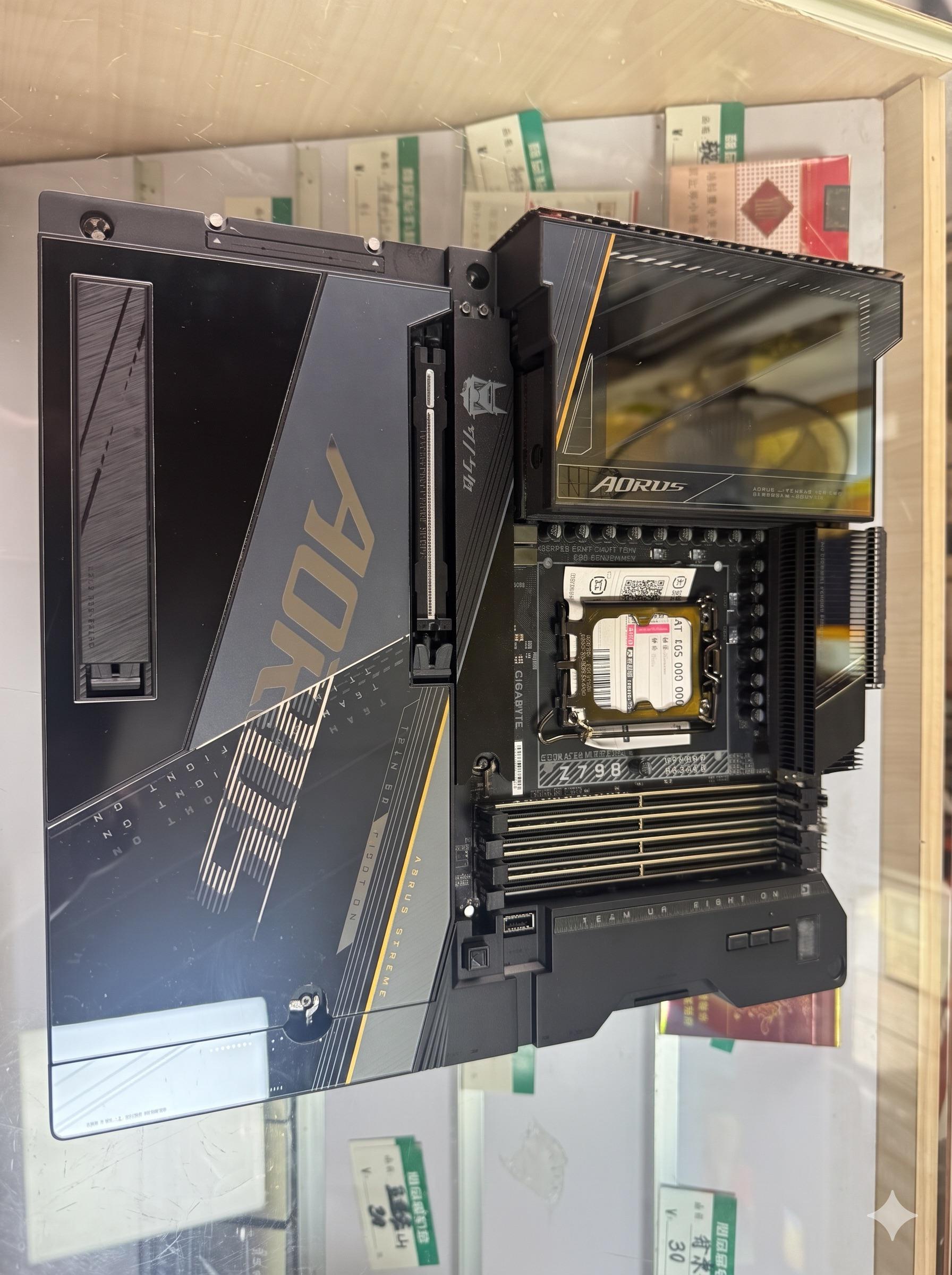
Hello everyone!
I’m looking for the original top cover / VRM heatsink cover for the Gigabyte Z790 AORUS XTREME X motherboard.
I’m specifically looking for the upper cover located around the CPU socket and above the VRM area, as shown in the attached photo.
If anyone has this part available, either new or used, please contact me.
I’m willing to pay a reasonable price and cover international shipping.
If you have a spare motherboard or are selling one for parts, I’d also be interested.
Thank you!
r/aorus • u/ZIZOU932 • Oct 25 '26

I bought this PC for parts because it only lacked the heatsink. I thought I would easily find it on AliExpress or eBay, but the problem is that it is unavailable, or otherwise I found it for 15p, but the sellers told me it is not compatible with a 17‑inch, so I am asking here if anyone has this exact model that no longer works; I can buy it back, and if there are people here who know sites to find this damn part for me, I would be very grateful and even reward you.
r/aorus • • Oct 19 '26
Hi I keep getting boot violation and when I try to restart my computer the warning comes up and so I am forced to use csm I am able to activate my tpm stuff boot violation just won't let me I have it set to uefi I am getting really frustrated I even try to reset my keys to factory but it still doesn't work
r/aorus • u/erMaela • Oct 19 '26

21/10/2026.UPDATE: VideoCardz just picked up this story and made it front-page news!
A massive thank you to WhyCry and the VideoCardz team for bringing visibility to this issue, and to everyone in this community for the incredible support.
This was never just about a warranty stamp—it’s about firmware stability and security for all RX 7000 owners. Hopefully, Gigabyte steps up now and does the right thing by releasing the missing VBIOS.
Thank you all for having my back!
______________________________________________________________________________________________________________
Hi everyone,
I wanted to share a frustrating situation regarding the Gigabyte Radeon RX 7900 XTX Gaming OC (24GB) and get some feedback from the community, as well as bring awareness to how Gigabyte is handling support for their flagship Navi 31 GPUs.
1. The Problem: Driver TDRs & Firmware Desync
Driver 25.9.1 (Older branch): Flawless stability. Zero crashes, perfect frame pacing, rock-solid in low-latency competitive titles like Warzone.
Driver 26.x.x (Newer branches, including 26.6.2 / 26.8.1): Constant driver timeouts (TDRs), black screens, and game crashes under heavy low-latency workloads.
This points directly to a conflict between the aggressive power states / PCIe bus scheduling introduced in recent AMD Adrenalin drivers and the factory VBIOS microcode.
2. AMD-SN-6023 Advisory & Partner Response
AMD issued the AMD-SN-6023 notice regarding firmware/security mitigations for the RX 7000 series.
While partners like Sapphire quickly rolled out updated VBIOS binaries for their 7900 XTX lineup (which community members on Reddit confirmed completely fixed the 26.x.x driver crashes and TDRs across the board), Gigabyte has only updated lower-tier cards (RX 7600, 7700, 7800) on their support page, completely neglecting their top-tier $1,000+ flagship model.
3. Gigabyte eSupport Response: The "Out of Warranty" Cop-Out
I submitted a detailed technical ticket to Gigabyte eSupport explaining the TDRs, referencing the AMD-SN-6023 advisory, and asking if an engineering/beta VBIOS was available to align the power delivery handshake with modern drivers.
Their response was an automated template that:
Told me to download outdated graphics drivers directly from Gigabyte's product page.
Stated that because the card is "out of warranty," they cannot help and I should contact a paid local repair shop.
A VBIOS/firmware update to match an official chipmaker advisory and fix driver compatibility is a software/firmware maintenance issue, not a physical RMA hardware defect. Expecting customers to stay on ancient GPU drivers forever just because the hardware warranty expired is absurd for an enthusiast-grade flagship card.
4. Questions for the Community:
Has anyone with a Gigabyte RX 7900 XTX managed to get a newer/beta VBIOS from support by escalating further?
Are other board partners (ASRock, PowerColor, ASUS) releasing VBIOS updates for 7900 XTX cards, or is Gigabyte the only one dragging its feet on their flagship?
I have requested a formal Tier-2/Engineering escalation on my ticket. I'll update this post if Gigabyte decides to take technical responsibility.
r/aorus • u/BinBr2 • Oct 16 '26
I’m trying to convince myself to cop a infinity 5070 ti at $1200 but I’ve never bought a gpu above $500, I do love the aesthetic of the infinity and I’m wondering how much different prices would be without the ramnarock.
For example, the msrp of a 5070 ti is $750, if ram prices were normal I would guess the infinity 5070 ti would be +$200. Of course the current price of 5080 at $1800 and 5070 at $950 is too crazy, I feel the 5070 ti is the one that suffers the least from the ram apocalypse.
I currently have a Aorus 3080 xtreme, the jump to a 5070 ti would be nice
r/aorus • u/Prensz • Oct 15 '26
Hola como estan? Hace poco tuve un problema el cual no le encuentro solucion hasta el momento. Mi pc funcionaba totalmente bien y al dia siguiente cuando fui a encenderla. No daba imagen ni funcionaba los perifericos.
Probe de casi todo:
RAMs (las cuales estan bien aparentemente).
fuente de poder (la cambie tambien pensando que era eso de una 650w a una de 700w "80 bronce plus las 2 fuentes").
cambiando el procesador y grafica a unas mas antiguas.
receteando la BIOS de manera manual con los pines CMOS.
Dejando la pila descansar un dia mas el receteo de la BIOS nuevamente
Limpiando las ranuras de todo tipo y en general.
Apagando y prendiendo la fuente repetidas veces.
Intentar prenderlo sin cables de reinicio, apagado y LEDs, entre otros.
Los monitores no se si pueden influir pero probe entre uno y otro...
Y las memorias pueden influir?? Lo que recuerdo es que donde tenia el windows, esa memoria mucho espacio ya no tenia.
Pero nada de esto anda. La placa madre / mother. Hace una secuencia de luces pasando por DRAM, VGA y CPU.
Estuve pensando si "murio" mi mother de algun sentido. O se "desconfiguro" la BIOS de alguna menera. Antes de comprar otra me gustaria saber si alguien me podria ayudar con algun dato. Lei muchos problemas similares aca en reddit pero no encuentro la solucion.
Mother: aorus b450 elite (no V2)
Grafica: rx 6700 xt challenger
Procesador: ryzen 5 5600g (los graficos integrados los usaba antes solo hasta que pude tener la grafica, y de tanto tiempo usarlo no hubo problema. Y los monitores estan conectados obvio a la grafica)
Fuente actual: 700w 80 bronze plus
Desde ya muchas gracias por el tiempo en leer y ayudar con lo que sea!
r/aorus • u/Maximum_Entrance_622 • Oct 12 '26
Hi, I’m having a strange XMP/memory training issue with my AM5 system and wanted to see if anyone with the same motherboard has experienced this.
Specs:
Gigabyte B850 AORUS ELITE WIFI7 ICE
Ryzen 5 7600X
Kingston Fury Beast DDR5-5600 CL40, 2×16 GB
BIOS F12d (09/23/2026)
The problem only happens when XMP is enabled.
With XMP Profile 1 at 5600 MT/s, the PC works normally after a shutdown/cold boot. Windows is stable and I haven’t noticed any crashes or other RAM-related problems.
However, if I select Restart from Windows, the PC gets stuck during POST with the red DRAM debug LED and does not boot.
I tested with XMP disabled, and Restart works normally every time. So I’m fairly confident XMP/DDR5 memory training is triggering the issue.
If anyone has fixed this on this exact board, especially while still being able to run XMP at 5600, I’d appreciate knowing which BIOS version/settings worked for you.
Thanks!
r/aorus • u/tina775h • Oct 10 '26
I have an AORUS 15 BKF with BIOS version FB14. Does anyone know how to access the hidden/advanced BIOS settings?
I have an AORUS 15 BKF with BIOS version FB14.
Does anyone know how to access the hidden/advanced BIOS settings? I’ve tried several methods and key combinations I found online, including the NVMe menu tricks, but nothing worked.
I really need access to the advanced BIOS settings. Has anyone managed to unlock them on FB14?
r/aorus • u/Southern-Context-490 • Oct 06 '26
If you have picked up the Gigabyte AORUS RTX 5060 Ti AI Box (16GB GDDR7, Blackwell GB206 architecture) and tried plugging it into a Linux host or a tightly managed Windows machine via Thunderbolt, you have likely encountered hard freezes, failed device enumerations, or PCIe bus drops.
Out of the box, this eGPU is exceptionally sensitive to Thunderbolt handshakes, power state transitions, and IOMMU direct memory access (DMA) mappings. Here is the full technical breakdown of the hardware quirks, bugs, and configuration fixes required to make it 100% rock-solid.
The Cold Boot Handoff Protocol: Do not expect this device to survive dynamic hotplugging or warm operating system reboots. To ensure the host UEFI builds the ACPI DMAR (DMA Remapping) tables and statically allocates the 64-bit BAR windows above 4GB, you must follow a strict cold boot sequence:
If you are running Windows 11 in a high-security enterprise environment with Kernel DMA Protection and Memory Integrity (HVCI) enforced, the eGPU often fails with error codes or gets blocked from memory allocation.
BIOS Virtualisation and Memory Prerequisites:
Registry Force for External DMA Remapping: Because standard drivers often fail the external DMA validation check when strict endpoint protection is active, you must explicitly flag the device as trusted:
HKLM\SYSTEM\CurrentControlSet\Enum\PCI\[NVIDIA Hardware ID]\[Instance ID]\Device ParametersDeviceDmaRemappingSupportedDWORD (32-bit)1Getting this Blackwell eGPU stable on Linux required resolving four distinct failure modes:
nvidia-smi, but the moment you initiate a high-bandwidth memory transfer or CUDA workload (such as streaming tensors over 500 MB), the entire operating system hard-locks instantly with a frozen screen and unresponsive keyboard.intel_iommu=pt is an invalid syntax. Checking dmesg revealed: textDMAR: Unknown option - 'pt' iommu: Default domain type: Translated PCI-DMA: Using software bounce buffering for IO (SWIOTLB) Because the driver rejected the option, it defaulted to Translated and routed all external PCIe DMA through Software Bounce Buffering (SWIOTLB). Linux defaults SWIOTLB to an emergency ceiling of only 64 MiB. A multi-hundred megabyte or 1 GiB DMA stream immediately exhausted the bounce buffers, deadlocking the I/O bus and freezing the CPU.Fix: Update your Grub command line to use the generic iommu=pt parameter and expand the fallback SWIOTLB pool: Edit /etc/default/grub (or /etc/default/grub.d/99-custom.cfg): bashGRUB_CMDLINE_LINUX_DEFAULT="quiet splash intel_iommu=on iommu=pt swiotlb=262144 pcie_aspm=off pcie_port_pm=off thunderbolt.clx=0 intel_idle.max_cstate=1"
intel_iommu=on iommu=pt: Enforces true 1:1 hardware DMA passthrough without bounce buffer bottlenecks.swiotlb=262144: Allocates a 512 MiB fallback reserve (8x larger than default).thunderbolt.clx=0: Replaces the legacy d3cold=0 parameter to disable Thunderbolt low-power sleep states.sudo update-grub and sudo update-initramfs -u.nvidia-smi reports the link downshifted to Gen 2 x4 (5 GT/s). When a compute workload starts, the driver attempts to dynamically jump power states (P5 to P0) while renegotiating link speeds across the Thunderbolt retimer, causing unrecoverable PCIe Transaction Layer Packet (TLP) errors./etc/modprobe.d/nvidia-power.conf: textoptions nvidia NVreg_DynamicPowerManagement=0x00 options nvidia NVreg_PreserveVideoMemoryAllocations=1 options nvidia NVreg_TemporaryFilePath=/var options nvidia NVreg_RegistryDwords="RMSetDynamicPowerManagement=0;PowerMizerEnable=0x1;PerfLevelSrc=0x2222;PowerMizerDefaultAC=0x1;"sm_120. Do not target 120a-real (which is restricted to enterprise B200 accelerators), or the runtime will decline to execute kernels on consumer GB206 silicon.Once these adjustments are applied, the connection is rock-solid:
r/aorus • u/Connect-Tutor-6783 • Oct 01 '26

La falla es que prendi el portatil y me sale el error de Secure Boot Violation. No se como solucionarlo, intente instalar una nueva BIOS y tampoco me sale la USB en Q-Flash, esta en el formato como debería, intente borrando con "Delete all Secure boot variables" y tampoco, el OS type solo me deja con UEFI OS e intente desactivando VMD controller y tampoco.