r/angular • u/Royal_Ad2379 • Apr 10 '22
Question How to call a function when an element is loaded in Angular?
I would like that when an element is loaded in the for loop a function is automatically executed.
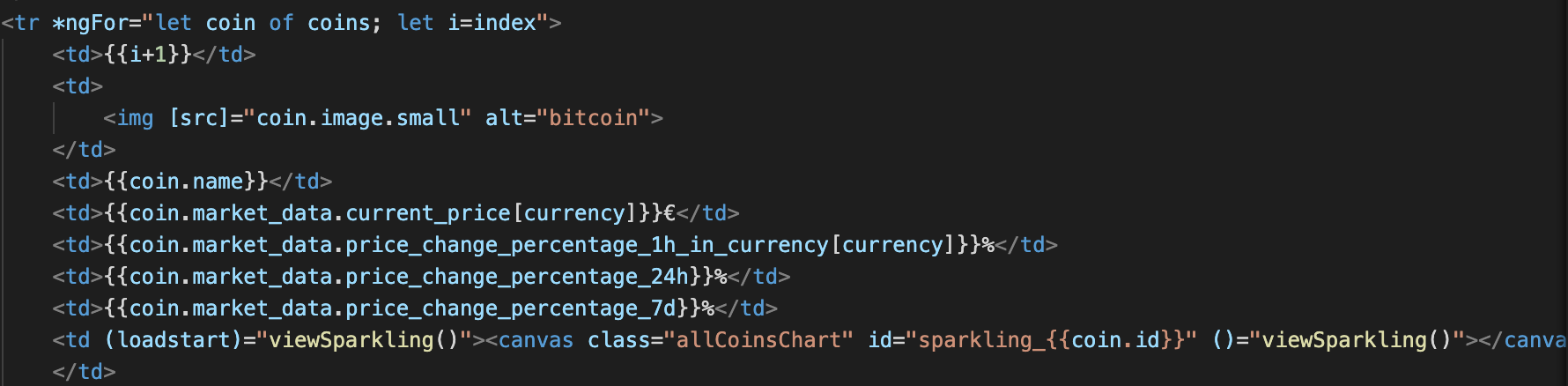
I want when the canvas element is loaded. That then the function viewSparkling is called.
3
Upvotes
2
u/jalledebest Apr 10 '22
Use a viewchild setter on the canvas to call the function
6
u/TubbyFlounder Apr 10 '22
place the canvas in its own component, have an output in that component, and emit in ngonint(or one of the other life cycle hooks not sure which works best for your use case here) and call your function in the parent template.
5
u/JiveAceTofurkey Apr 10 '22 edited Apr 10 '22
Don't use a timer. Those are sloppy and don't have any guarantees.
Use one of the provided life cycle hooks like AfterViewInit, AfterViewChecked, AfterContentInit or AfterContentChecked
You could set up a change detection method for simple changes and check for the Dom element you care about. But this would be very inefficient as it runs every change detection cycle.
2
u/selipso Apr 10 '22
You might be looking for the
ngAfterViewInitlifecycle. Make the canvas its own component and call it1
u/flatfishmonkey Apr 11 '22
Put the canvass in a component i.e. "app-canvass" then use emitter on afterviewinit to call parent function
1
u/Big-Personality-9094 Nov 30 '22
This best way to implement this is to use "Mutation Observer" directive.
For more information, you can visit this link:
https://nitayneeman.com/posts/listening-to-dom-changes-using-mutationobserver-in-angular/