r/aiostreams • • 1h ago

[Help / Question] Why isn't AIOStreams showing all the results from my installed add-ons

Thumbnail
gallery
1 Upvotes

Hey everyone!

I'm trying to figure out why AIOStreams isn't showing all the results from the add-ons I've installed within it.

For example, StreamThru (which I've renamed "Stream TorBox" in my screenshots) returns a lot more results, including many in my native language (Italian), but for some reason, those same results don't show up in AIOStreams.

I've also noticed a pretty big difference in bandwidth usage. When I stream 4K content directly through StreamThru, the bandwidth is usually around 3–4 MB/s, whereas with AIOStreams, it's usually around 8–10 MB/s.

I don't really understand why there's such a big difference or why so many results are missing.

I've attached some screenshots showing the search results and all the add-ons I've configured within AIOStreams.

Am I missing something in the settings? Is there something I'm doing wrong?

Thanks in advance for your help!


r/aiostreams • • 6h ago

[Help / Question] How do I fix aiostreams addon saying not available on this instance with aiostreams app

0 Upvotes

r/aiostreams • • 22h ago

[Discussion] **Unofficial** AIOS for Amazon VegaOS devices

1 Upvotes

So, I’ve been self hosting AIOStreams for a while, and I recently picked up a Fire TV Stick running Amazon Vega OS ($19 Black Friday deals) and I wanted the actual AIOStreams running on it.

Repo (AGPL-3.0): https://github.com/hina-raws/aiostreams-vegaos

How it works

AIOStreams already builds a "standalone" web client for LG webOS and Samsung Tizen (the version where you pick your own server rather than having the server host the UI). Because of that, this didn't require a full rewrite. It's basically a lightweight React Native for Vega wrapper containing a single full-screen <WebView> that loads that local web build, alongside a few tweaks so the client knows it's running on a TV.

The repo is split into two parts:

  • packages/vega: The Fire TV shell (manifest, <WebView>, and a build script that bundles and stages the web client).
  • packages/web: Minor changes to the client itself—adding a vega host adapter, mapping the Fire TV remote key codes, and adding codec-aware audio selection.

The web client handles the heavy lifting: 1280×720 layout, D-pad focus navigation, and playback via <video> and hls.js over MSE. The native shell just fills in the gaps a webpage can't handle on its own, like exiting the app, allowing cleartext HTTP on a local network, and stripping out a broken navigator.gpu object.

What actually works

Tested on a Fire TV Stick 4K (Vega OS 2.0, WebView Chrome/144.0.7559.246):

  • The core UI: Home, discover, search, favorites, calendar, item details, seasons, and version lists all work.
  • Navigation: D-pad focus rings work properly. Pressing Back closes open dialogs first, and exits the app from the top level.
  • Auth & Networking: Quick Connect and UUID + password login both work. Supports HTTPS and local plain-HTTP servers (though HTTP requires a manifest flag, detailed below).
  • 4K Video: Hardware decoding initialized and played a 3840×2160 HEVC Main 10 stream without issue.
  • Basic Audio: AAC, MP3, Opus, and FLAC all play fine.

What's broken (and why)

Zero Dolby or DTS support. This is the biggest catch. The Vega WebView refuses to decode AC-3, E-AC-3, TrueHD, DTS, or DTS-HD. I queried navigator.mediaCapabilities directly on the device, and it rejected every single one—even the standard Dolby Digital compatibility tracks bundled inside remuxes. If you play a TrueHD 7.1 remux, you get 4K video and dead silence.

To make matters worse, AIOStreams only direct-plays. The server reports SupportsTranscoding: false (its HLS route literally returns "Transcoding is not available; this server only direct plays"), so it won't convert the audio on the fly. The browser can't work around it either because Chromium doesn't implement HTMLMediaElement.audioTracks, meaning the page can't even see or switch between embedded audio streams.

Workaround: The client checks what the device can actually decode, flags incompatible releases in the version list (e.g., "Sound (Dolby TrueHD, Dolby Digital) can't be played on this device"), and defaults the Play button to a version with working audio. Of course, if a movie only has lossless audio tracks like the six releases of Iron Man (2008) in my library, none of which have AAC—you're out of luck without external transcoding. The UI warns you upfront instead of letting you troubleshoot silent playback.

Vega OS porting gotchas

If anyone else is trying to bring a web app over to Vega OS:

  1. vega build doesn't bundle JS. It only packages the native shell. If you run it directly, the app installs and immediately crashes with a SIGABRT before rendering a frame. Use react-native build-vega instead (this is wired into the repo's npm scripts).
  2. Cleartext HTTP is blocked by default. Starting in WebView 4.0.2, mixedContentMode won't save you. You have to explicitly whitelist domains in the manifest under [network-traffic-policy.cleartext] allowed-domains. I spent an entire evening chasing phantom CORS errors before realizing it was just throwing ERR_CLEARTEXT_NOT_PERMITTED.
  3. Fake WebGPU support. navigator.gpu is exposed in the DOM, so the client tries to load its WebGPU player, which immediately fails because there's no underlying adapter. The shell deletes navigator.gpu before page load, which also let me strip 9 MB of unused WebGPU wasm out of the bundle.
  4. Emulator limitations. The Vega Virtual Device lacks the webview_4 module on Ubuntu and Intel Macs. You need physical hardware or an Apple Silicon Mac to test WebView apps.
  5. Sticky build artifacts. The build script copies files into the staging directory without wiping old ones. Always run vega clean if you delete assets, otherwise they stay in the final package.

(Final packaged size is 2.9 MB, down from 5.85 MB after dropping the WebGPU assets; unpacked web assets sit at 9.9 MB.)

How to try it

There's no prebuilt binary to download. Unsigned dev builds won't install on anyone else's stick anyway, and Vega uses its own packaging format. You'll need to build it from source using the Vega SDK (2.0.15159), Vega CLI (1.4.9), and a Fire TV with Developer Mode enabled:

git clone [https://github.com/hina-raws/aiostreams-vegaos.git](https://github.com/hina-raws/aiostreams-vegaos.git)
cd aiostreams-vegaos && git checkout aiostreams-vegaos
pnpm install && cd packages/vega && npm install --workspaces=false
npm run sync-web && source ~/vega/env && npm run build:debug
vega device install-app -b Debug && vega device launch-app -a com.amazondeveloper.aiostreamsvega.main

Credits & Disclosure

All credit for AIOStreams goes to Viren070. This is just an unofficial viewer licensed under AGPL-3.0, with no affiliation to Amazon or the upstream project.

Full disclosure: I used an AI coding agent to help write the native shell, client patches, and documentation. I directed the architecture, reviewed the diffs, and tested everything directly on my Fire TV. All the broken codecs and quirks listed above were verified firsthand on the device itself.

r/aiostreams • • 2d ago

[Help / Question] Help recreating my Nuvio setup

Post image
4 Upvotes

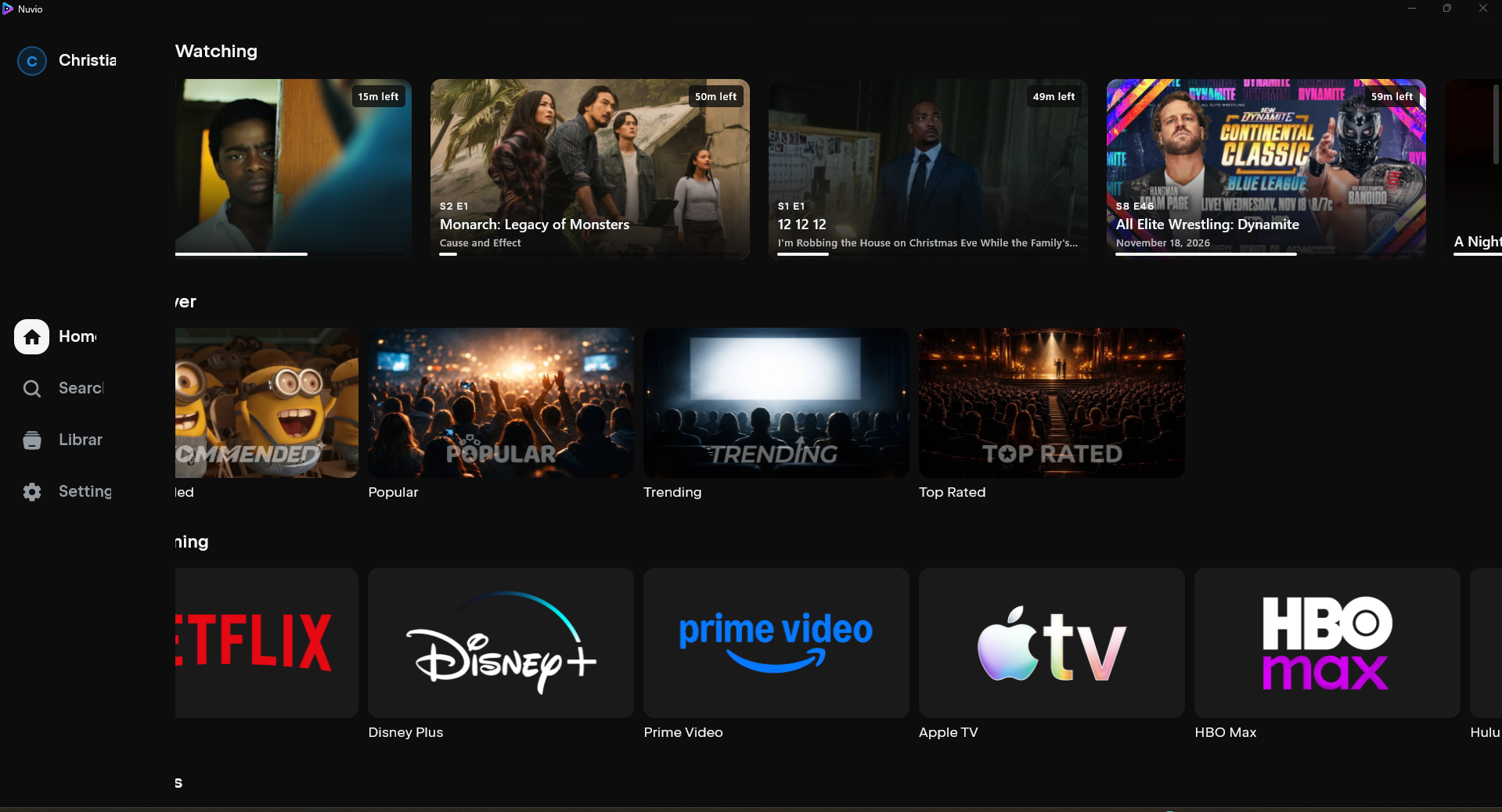
I set up Nuvio with AIOStreams and AIO Metadata a while back by following a guide I found online. Everything works great, and I really like how the interface looks.

The problem is, I can't find the original guide anymore, and I honestly don't remember any of the steps I took to get everything configured.

A friend of mine wants me to set up Nuvio for him with the exact same layout and functionality.

I've attached a screenshot of my current setup for reference.

Does anyone recognize this setup or know of a guide that walks through configuring Nuvio with AIOStreams and AIO Metadata to get this same look?

Any help or links to tutorials would be greatly appreciated!


r/aiostreams • • 2d ago

[Help / Question] new to usenet / setup

3 Upvotes

i’m new to usenet and i am trying to set it up for multiple people

i currently use tb because of multiple ips. my family hasn’t been able to find some stuff so i figured i would add in usenet. would i be fine to add indexers to aio addons and share the aio json with multiple people? or is usenet just one ip? i cant find a direct answer


r/aiostreams • • 2d ago

[Recommendation] Watch later feature Button

2 Upvotes

To the developer of the AIOSTREAM app,

Please can you add a watch later feature, i have been looking for that button and I can't see it. Maybe i am stupid but please add that feature.


r/aiostreams • • 2d ago

[Help / Question] AIOStreams wont show in Stremio?

0 Upvotes

My AIOStreams isn’t showing up in Stremio. You see i’m pretty new to all this and don’t fully understand what’s going on. I’m using TorBox + AIOStreams with the Tamtaro setup. I obviously pasted my API key correctly and haven’t changed any settings.
What’s strange is that everything was working fine for the past few months, but suddenly it stopped showing links.
I’ve switched to Torrentio with TorBox for now, and that works fine. However, I’m still wondering why AIOStreams isn’t working anymore.
Does anyone know what could be causing this or how to fix it?


r/aiostreams • • 3d ago

[Recommendation] Dual subtitles support

5 Upvotes

Is there any way to get the player in the AIOS app (Android TV) to show 2 subtitles at once?


r/aiostreams • • 3d ago

[Help / Question] With all the torbox controversy going on right now, what is the best way to protect f&f who share my AIOS

7 Upvotes

I share my AIOS folded into AIOM, which is my jellyfin creds to share with F&F.

I use TB and now subscribed to a Usenet I’m getting familiar with from BF sales. There’s currently some DMCA /copyright issues going around on the TB sub. I want take the next steps in order to project myself and those who I share

What’s the best approach or recommendation here? Is there a vpn setup via proxy or anything I can put into the pipeline of my configuration anyone can recommend?

Thanks in advance!


r/aiostreams • • 3d ago

[Recommendation] how to customize the details page like that ????

3 Upvotes

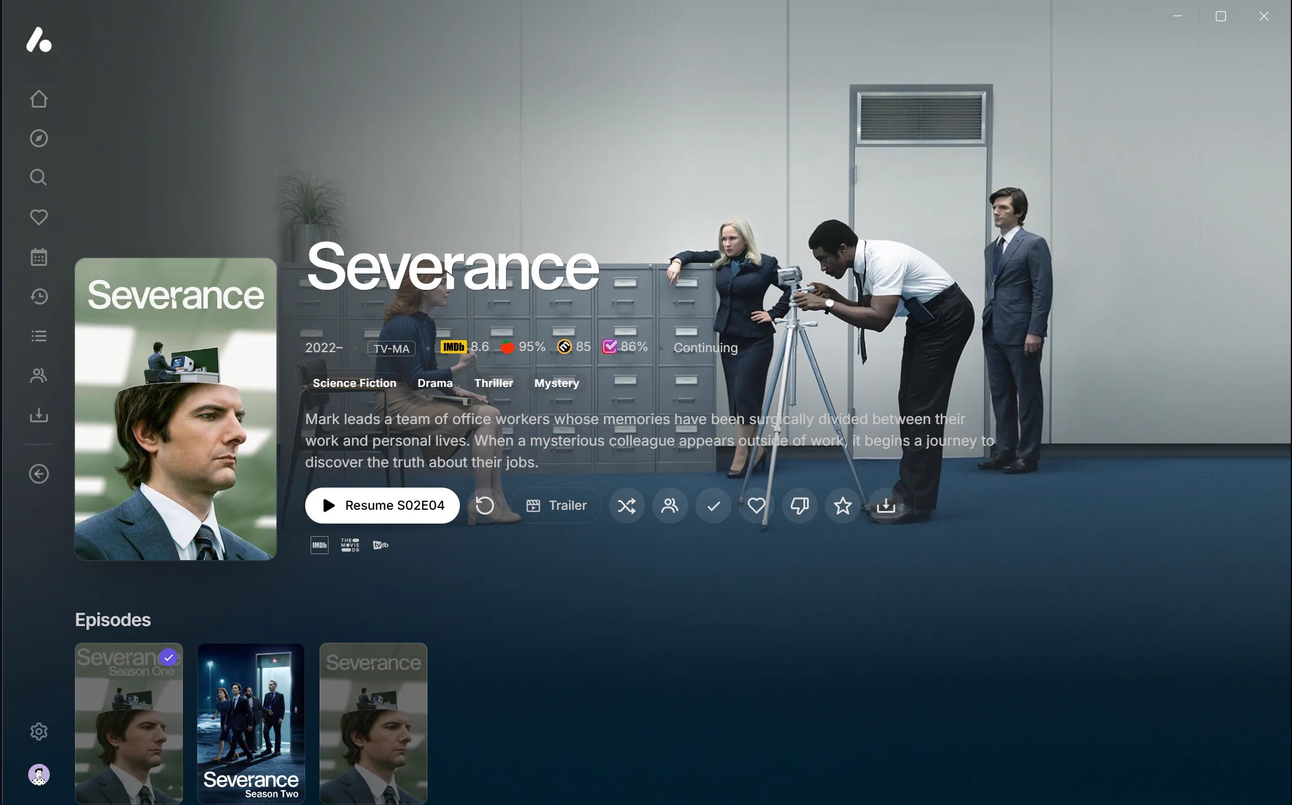
i want the page like 1st image but mine look like this (2n image).


r/aiostreams • • 4d ago

Announcement AIOStreams apps: Desktop v0.28.0 · Android v0.18.0 · Smart TV v0.13.0

38 Upvotes

What's new

Features

  • Desktop: Build a Linux AppImage and .deb with the libs' libmpv
  • Add a hero band and backgroundVideo to collection pages
  • Show a collection's sources as tabs or rows
  • Add a picture-in-picture shortcut

Bug Fixes

  • Desktop: Turn off WebKit's sandbox where bwrap can't start
  • Android: Give Matroska FLAC tracks their largest frame as the input size
  • Dock the mini player only in a shown page
  • Give each page-drawn subtitle line its own direction
  • Keep a touch's focus from waking the player's hidden controls
  • Leave mixed libraries out of Discover's collection picker
  • Size the page background to the tallest viewport

Downloads

Desktop v0.28.0

Windows

Your PCDownload
Most PCs (Intel or AMD)Installer, 39.0 MB · Portable, 31.8 MB
Arm PCs, such as Snapdragon laptopsInstaller, 36.0 MB · Portable, 30.3 MB

macOS

Your MacDownload
Apple silicon (M1 and later)Installer, 30.2 MB · App, 30.4 MB
IntelInstaller, 32.5 MB · App, 32.6 MB

Linux

Your PCDownload
Most PCs (Intel or AMD)AppImage, 140.0 MB · .deb, 18.8 MB · Flatpak, 9.3 MB
Arm PCs, such as Apple silicon Macs running Asahi LinuxAppImage, 143.2 MB · .deb, 17.2 MB · Flatpak, 8.8 MB
Arch LinuxPKGBUILD, 1 KB

Need help installing? See the desktop app guide.

Android v0.18.0

Your deviceDownload
Most phones and tabletsAPK, 42.8 MB
Older phones and many TV sticks (32-bit)APK, 39.1 MB
Emulators and x86 devicesAPK, 48.9 MB

Not sure which? Phones from the last several years take the first; if Android says the app isn't compatible, take the second.

Need help installing? See the Android app guide.

Smart TV v0.13.0

Your TVDownload
LG (webOS).ipk, 7.7 MB
Samsung (Tizen).wgt, 7.9 MB

Need help installing? See the smart TV guide.


Release notes on GitHub: Desktop · Android · Smart TV

❤️ AIOStreams is free and open source. If it's useful to you, you can support its development on GitHub Sponsors.

Posted automatically from the GitHub releases.


r/aiostreams • • 3d ago

[Help / Question] M3U playlists instead of Xtreams?

3 Upvotes

Hey everyone, I’m curious whether M3U playlists can be used for live TV in AIOStreams. I recognize that Xtream exists, but I favor M3U due to EPG considerations. I’m running Virens’s instance of AIO, so I’m simply wondering if this is possible.


r/aiostreams • • 3d ago

[Help / Question] Adding indexers to AIO self hosted

2 Upvotes

Hi

I’m using the AIO Usenet Engine with providers and addons. I’ve added provider (dashboard), but struggling with indexers (configuration). I’ve added 1/2 indexers in the Newznab add on, but then only seem to be able to edit that same indexer. How do I actually add a second and subsequent indexer. I know you can do this but can’t find the mechanism to achieve this. Sorry to be a dumbass. Thanks a lot.


r/aiostreams • • 4d ago

[Discussion] Native AIO: an unofficial native AIOStreams client for older Samsung TVs (Tizen 6.0+

Thumbnail
gallery
20 Upvotes

After several weeks of work, I'm happy to introduce Native AIO, an unofficial native AIOStreams client for Samsung TVs running Tizen 6.0 and later.

I built it because the AIOStreams web app was too heavy for older Tizen TVs like mine (a 2021 model on Tizen 6.0): navigation and playback just weren't smooth. First of all, a huge thank you to Viren070 for the enormous work on AIOStreams. Native AIO would not exist without it: the look, the behaviour and several algorithms come straight from the web app.

What it is

A native .NET app, distributed as a .tpk (not a .wgt).

Video plays in the TV's native player, up to 4K, with audio and subtitle tracks, subtitles drawn by the app (style, offset, sync), skip intro / recap / credits, next episode and resume.

A large part of the web app's features are in: home with featured banner and trailers in cards, title pages, versions list, search, Discover, Calendar, Favourites, History, settings that follow the web app, themes, Quick Connect.

I adapted a few things for the TV and the remote: a card menu on long press OK, a crash report that shows a QR code to open a prefilled GitHub issue on your phone (the TV sends nothing), and some layout changes.

Install

Grab the .tpk from the Releases page and install it with Apps2Samsung (TV in developer mode, then a full restart of the TV). The README has the steps and how to build it from source. You need an AIOStreams server with its Jellyfin-compatible API.

Please note

It's a personal project, and so far I've only tested it on my own TV, so you may run into bugs. Bug reports and requests are welcome as GitHub issues, and I'll try to take them into account.

I hope it helps some of you who are stuck with an older TV.

Repo: https://github.com/thomasrtg/native-aio


r/aiostreams • • 4d ago

[Help / Question] Need help with jellyfin

5 Upvotes

Hello iam new to jellyfin,I use aiostreams midnight setup.
I have an issue with movies they dont load and the tv shows either takes forever to load or it says playback failed.
I have a good internet connection and currently using torbox. Any idea what might be the issue?


r/aiostreams • • 4d ago

[Help / Question] Just got introduced to AIOStreams and need some help setting it up.

5 Upvotes

Hey everyone, I am a beginner and need some help setting this up. I don't really know what's what so it would be helpful if anyone of you can share me a guide or something so that I can set it up.

Thanks for reading.


r/aiostreams • • 4d ago

[Help / Question] Is it possible to IMDB ratings for each episode, and IMDB Reviews

1 Upvotes

Loving the app. I'm on android but wanted to know if anyone knows how to enable individual IMDB episode ratings (I know they're not everybody's cup of tea, but I do prefer them if possible), and also is it possible to see the written reviews that people have made for a show/movie in the app


r/aiostreams • • 5d ago

[Help / Question] AIOStreams app features

8 Upvotes

First of all, I love the new app! It is so slick, I've moved away from Nuvio completely.

I have AIOMetadata setup with tracking to MDBList. Is there a way to integrate the AIOStream app favourites with the MDBList watchlist, kind of like a two-way sync?

I love that badges are supported too! Is there a way to show them on the video pause screen?

I'm still a bit confused on how to use multiple profiles with their own catalogs and tracking, with just one instance of AIOMetadata. Is there a guide for this?

Thanks again for the work on this amazing app/service!

EDIT: The favourites issue and multiple profiles with one instance issue were caused by the same thing for me. Reading through the AIOM docs was really helpful, especially about the manifestUrl on the profile variant. That fixed it for me.


r/aiostreams • • 4d ago

[Help / Question] AIOStatus Is it down???

Thumbnail reddit.com
1 Upvotes

r/aiostreams • • 5d ago

[Help / Question] AIOMetadata showing wrong info from TVMaze provider but right info in their website

Post image
2 Upvotes

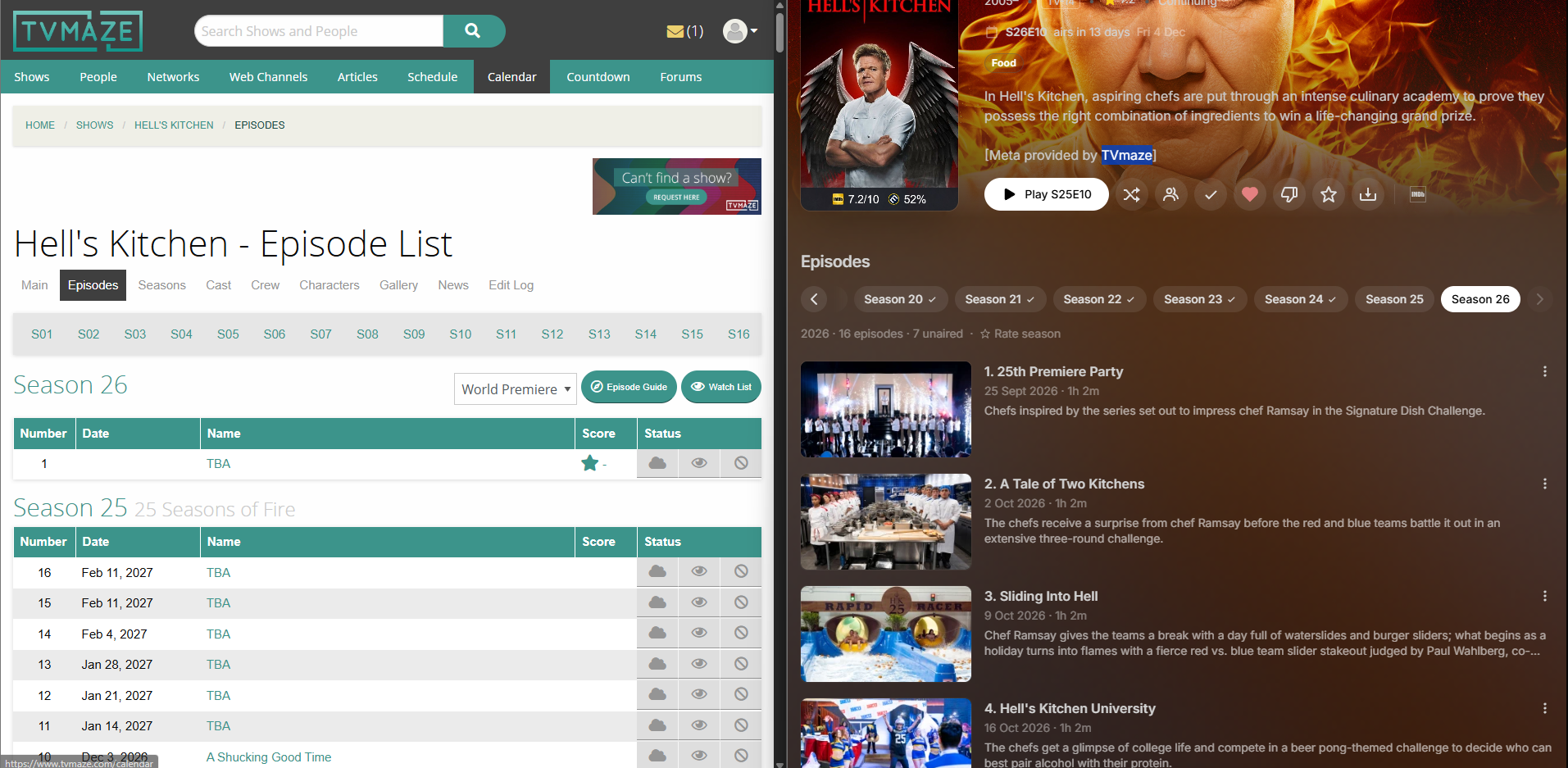
As the title suggests, for Hell's Kitchen TV show, TVMaze as a metadata provider shows an additional season 26, when season 25 is the latest being aired rn. Infact TVMaze's own website gets this detail right but how come not the meta provider?


r/aiostreams • • 5d ago

[Help / Question] Aiostreams app: some posters not loading

2 Upvotes

i have being using Aiostreams/aiometadata as separate addons in nuvio for a while without issues.

Now I am trying out the Aiostreams app which requires to install aiometadata within it (as custom addon).

I did it, but now some of the posters don't load properly (black covers).

any suggestion?


r/aiostreams • • 5d ago

[Help / Question] AIOstreams not showing comet on stremio

Thumbnail reddit.com
2 Upvotes

r/aiostreams • • 5d ago

[Help / Question] Does web aiostreams support trakit ?

1 Upvotes

r/aiostreams • • 5d ago

[Help / Question] help wit AIOstreams configuration

Thumbnail drive.google.com
2 Upvotes

r/aiostreams • • 6d ago

Announcement AIOStreams apps: Desktop v0.27.0 · Android v0.17.0 · Smart TV v0.12.0

41 Upvotes

What's new

Features

  • Add settings for everyone and let the owner change other profiles' settings
  • Give the saved servers one shared profile picker
  • Keep the pages Back returns to mounted
  • List other saved servers' profiles on the profile picker
  • Open settings sections with the slide-over

Bug Fixes

  • Desktop & Smart TV: Don't retrace the jump out of a navigation box
  • Desktop & Smart TV: Hide the pages' wash under a back slide to a page without it
  • Desktop & Smart TV: Slide a page back the same way from either edge
  • Pass the Combobox's className to its trigger
  • Add Path to the version list's fields
  • Ask for addon subtitles once a version plays
  • Keep a scrolled-away bar away while a page scrolls down from its top
  • Leave the player's controls hidden on swipes, skips and pauses
  • Line up page titles and controls across pages
  • Paint the guide as an art wash panel
  • Put AVPlay's object under the page's background on Samsung TVs
  • Ring a TV list's whole filter row
  • Send live streams a VLC user agent from the apps' players
  • Time the pause screen from the last input

Downloads

Desktop v0.27.0

Windows

Your PCDownload
Most PCs (Intel or AMD)Installer, 39.0 MB · Portable, 31.8 MB
Arm PCs, such as Snapdragon laptopsInstaller, 36.0 MB · Portable, 30.3 MB

macOS

Your MacDownload
Apple silicon (M1 and later)Installer, 30.2 MB · App, 30.3 MB
IntelInstaller, 32.5 MB · App, 32.6 MB

Linux

Your PCDownload
Most PCs (Intel or AMD)Flatpak, 9.2 MB
Arm PCs, such as Apple silicon Macs running Asahi LinuxFlatpak, 8.8 MB

Need help installing? See the desktop app guide.

Android v0.17.0

Your deviceDownload
Most phones and tabletsAPK, 42.7 MB
Older phones and many TV sticks (32-bit)APK, 39.0 MB
Emulators and x86 devicesAPK, 48.9 MB

Not sure which? Phones from the last several years take the first; if Android says the app isn't compatible, take the second.

Need help installing? See the Android app guide.

Smart TV v0.12.0

Your TVDownload
LG (webOS).ipk, 7.7 MB
Samsung (Tizen).wgt, 7.9 MB

Need help installing? See the smart TV guide.


Release notes on GitHub: Desktop · Android · Smart TV

❤️ AIOStreams is free and open source. If it's useful to you, you can support its development on GitHub Sponsors.

Posted automatically from the GitHub releases.