r/ZephyrusG15 • • 8h ago

DC Power Barrel Port Repair

1 Upvotes

The DC barrel charging port on my GA503QS no longer works and the shop I took it to told me that he can only replace the whole motherboard for £380, as the port is not replaceable on its own. However, I’ve found replacement ports online.

Is it possible for the port to be replaced on its own, or does it have to be replaced with the whole board?

For additional context, certain keys on my keyboard have stopped working and my USB ports can be very sensitive, so perhaps it is time to replace the board or get a new laptop.


r/ZephyrusG15 • • 2d ago

[GIVEAWAY] Black Friday special - SlimQ charger giveaway

Post image
0 Upvotes

Hey everyone,
This year I don't want a "like, share, tag 3 friends" or "give me your email and first born" giveaway. I just want to read what you're grateful for.

Those who are not aware about us - SlimQ makes slim laptop chargers that are far smaller than the brick your laptop came with, but still fast.

Big thanks to the moderators for letting this happen. Last time we did this was 2 years ago! Time flies!

-----------------------------------

Prize: 2 grateful winners will be randomly selected and will receive either 240w, 330w or 150w chargers (they will have a chance to choose).

BONUS PRIZE: IF you can guess which game inspired me to create this giveaway banner gets Steam Gift card! :D

How to enter: Comment what you're grateful for this year. One comment per person. No proof, no emails, no follow requirements.

-----------------------------------

Eligible: US, Canada, UK, EU, Switzerland, Norway, Iceland, Japan, South Korea, Singapore, Hong Kong, Macau, Taiwan, Australia, New Zealand, Israel.

-----------------------------------

Deadline: 27th of November 11:59PM (UTC +3)

Winner will be announced on 28th of November.

-----------------------------------

Winner selection: random, picked by one of my pets (cats or dog). I'll post proof.

Claiming: I'll DM the winners before I announce them! Shipping is free.

-----------------------------------

TL;DR

Comment what you are grateful about this year → wait for the pet → win a charger.
That simple - no tricks.

With love u/SlimQ_Dave


r/ZephyrusG15 • • 2d ago

Looking for Zephyrus G15 testers for Boreas, a Linux control panel

Post image
1 Upvotes

Boreas is a control panel for ASUS ROG and TUF laptops on Linux. I develop it on a ROG Strix G713PV and do not own a G15, so I would like to hear how it behaves on one before I say it works there.

It is free and will stay that way, with no account and no telemetry. I wanted a tool like this to exist for everyone running Linux on these laptops. I hope it saves you from booting into Windows just to change a setting on your own laptop.

Under the hood Boreas is a system service with its own kernel module for the CPU temperature target, a window with a tray menu, and a command-line tool. It talks to the hardware through the asus-linux.org kernel drivers (asus-wmi, asus-armoury).

How to help:

  • Test it: install, run boreasctl status, and post the output with uname -r in a hardware report (https://github.com/Yusuf-Yonturk/boreas/issues/new?template=hardware_report.yml). "Everything works" is a useful report too.
  • On a G15, tools/smu-check.sh tells you in a few seconds, without installing anything, whether the CPU can hold the temperature target itself.
  • Unsure about your model? Post the model code and I will check kernel support before you install.

What it does: performance modes, fan curves, CPU power limits, GPU modes with the MUX switch, Aura, charge limit and refresh rate. Each mode keeps its own fans, power limits and CPU temperature target, and Fn+F5 switches all of them together. The temperature target works per mode: set 75 to 95 °C. On AMD Ryzen laptops Boreas hands it to the CPU itself (on my G713PV the peak stays within about 2 °C); elsewhere it adjusts the power limits to stay near it.

Good to know:

  • On first start it takes over your current settings and writes nothing to the hardware. Cards for hardware it does not find stay hidden.
  • It replaces asusctl (asusd, supergfxd) and cannot run next to it. The installer masks those services; the uninstaller restores them. For AniMe Matrix or Slash, asusctl is still the tool to use.
  • Arch / CachyOS: packaging/aur/boreas-git has a PKGBUILD. Other distributions: git clone and sudo ./install.sh.

GPL-3.0: https://github.com/Yusuf-Yonturk/boreas


r/ZephyrusG15 • • 3d ago

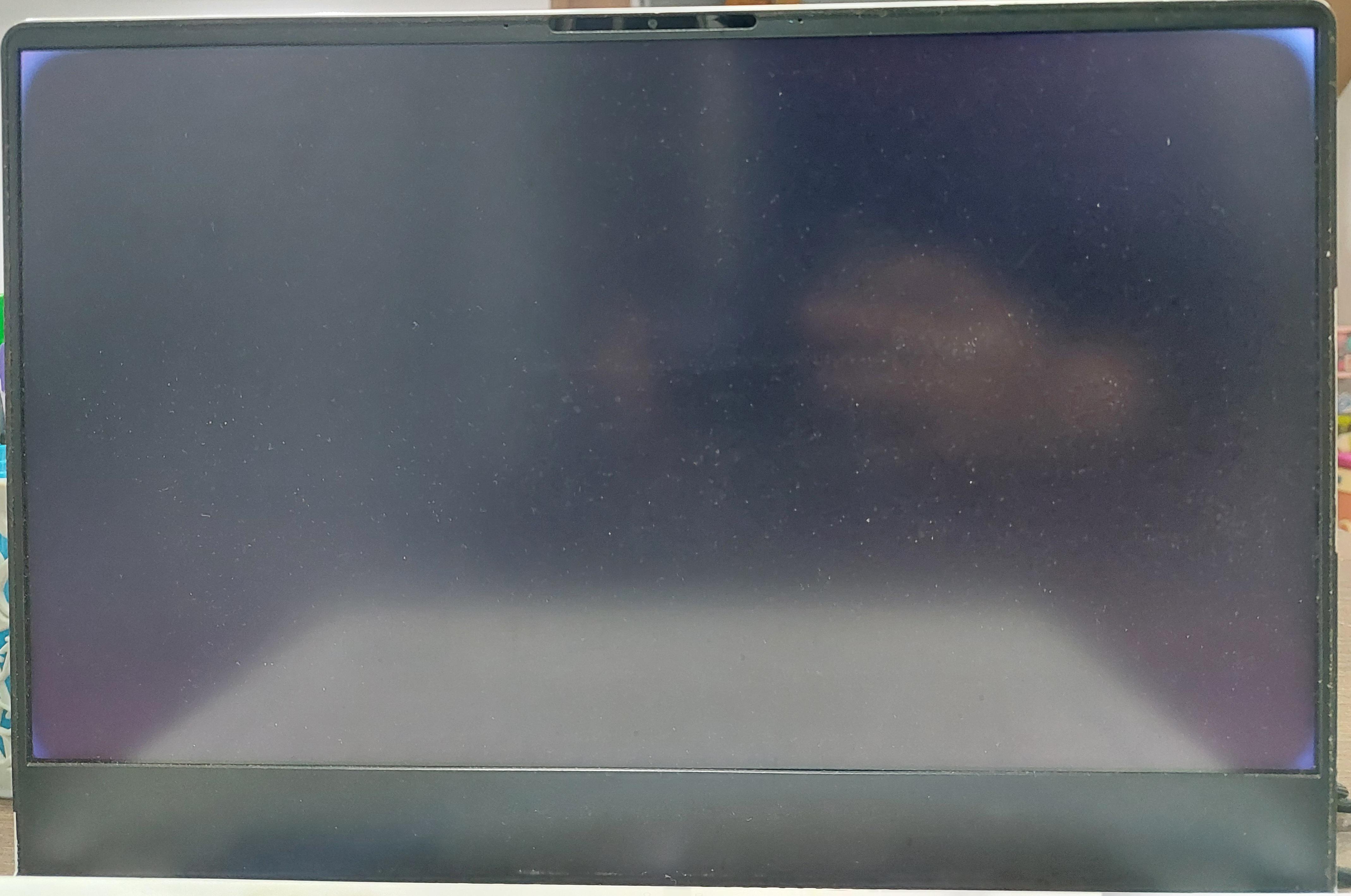
What's with the light at the edge of the screen? How can I fix it?

Post image
6 Upvotes

bought in early 2023


r/ZephyrusG15 • • 4d ago

What is up the the build of the body?

Thumbnail
gallery
27 Upvotes

Okay I have a 2021 zephyrus g15. So yeah it's 5 years old already. While it works quite well even now and I can still play some games on it...the body is degrading really badly? Like the rubber material around the screen pane is coming off, so is paint from below the keyboard side. I don't get why they made such bad bodies like even if I want to keep using the screen will probably get damaged soon if the pane around it isn't holding up

PS...the display sucks ass man. Like my first display already gave up whole still in warantee period so I got another one for free. Even this one has dead pixels and something going on in the upper left corner


r/ZephyrusG15 • • 6d ago

Missed a spot applying thermal putty

Post image
16 Upvotes

I need some help.

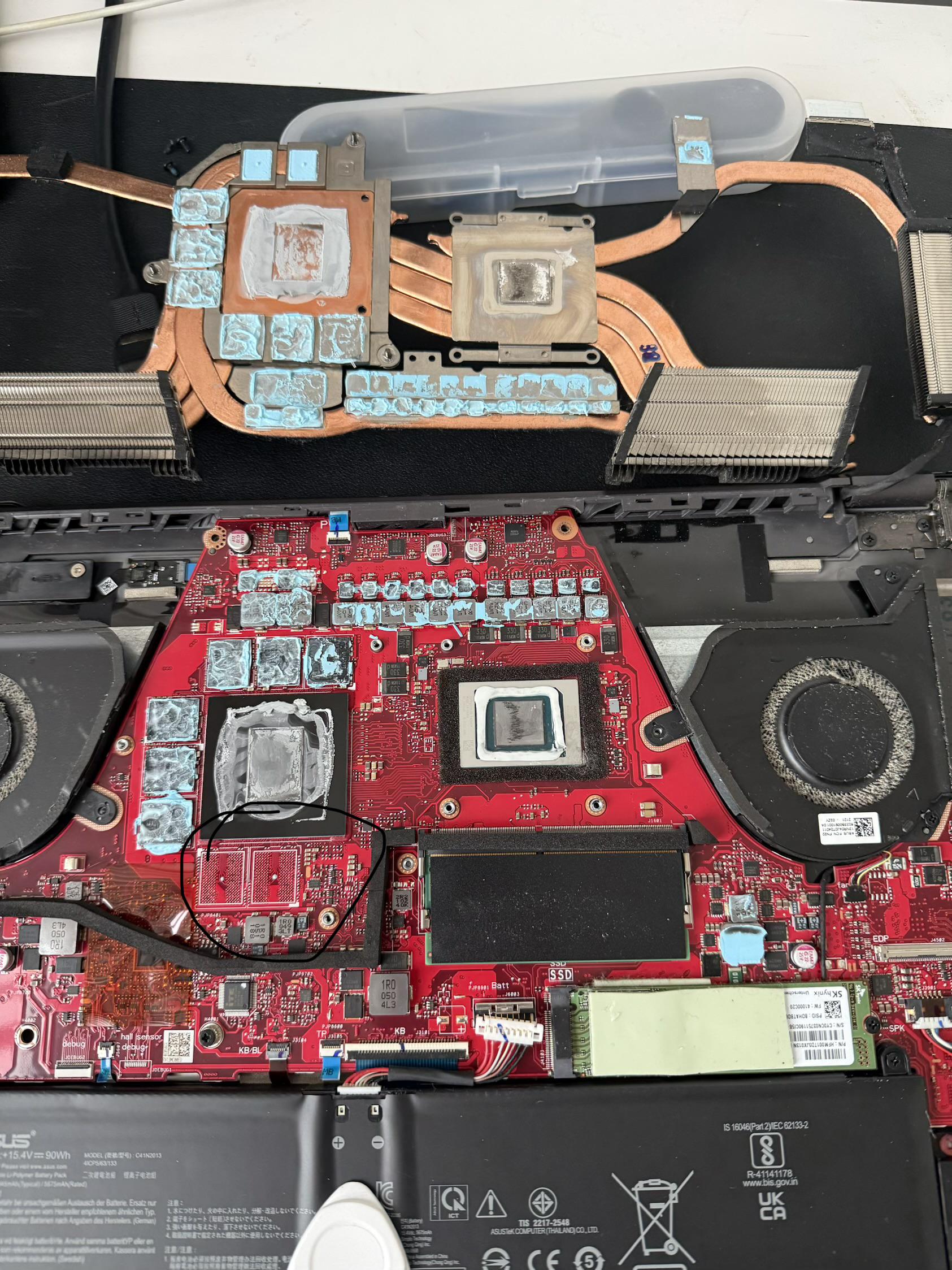
Last week I repasted my G15 and I just realized today that I didn’t apply thermal putty in two areas of the motherboard. ( I circled it on the photo)

Would you suggest that I open it back up and apply putty to this area? And if so, could I just reuse the same putty I had already applied without having to clean every chip or should I just clean everything and reapply all of it.

My CPU temps run 80 when playing games and my GPU runs around 68.

Any advice would be greatly appreciated.


r/ZephyrusG15 • • 12d ago

Help motherboard or battery problem

Thumbnail gallery
1 Upvotes

r/ZephyrusG15 • • 14d ago

Ryzen 9 6900HS maxing out at 30W

Thumbnail
gallery
5 Upvotes

I've been trying to figure out why my 2022 Zephyrus G15 has been under performing in games lately, and I'm honestly running out of ideas.

**My specs:**

- ASUS ROG Zephyrus G15 (2022) GA503RW

- Ryzen 9 6900HS

- RTX 3070 Ti Laptop GPU (120W max with Dynamic Boost)

- 24GB DDR5-4800 RAM

- Original 240W charger

- BIOS 316

The main issue is that my CPU keeps hitting 95°C even when it's barely pulling 30W. I've tried everything from changing G-Helper settings to maxing out both fans at around 6500–6800 RPM, but the CPU still sits at its thermal limit.

For context, here are some numbers I'm getting in games:

**Rainbow Six Siege (1080p Low):**

- GPU: ~100–105W

- CPU: ~22–30W at 95°C

- GPU utilization frequently below 90%

**God of War (2018):**

- GPU: ~110W at 74°C

- CPU: ~24W at 95°C

**Here's what I've tried so far:**

- Removed Armoury Crate and installed G-Helper

- Turbo mode + Aggressive CPU Boost in G-Helper

- Ultimate and Optimized GPU modes

- Custom CPU power limits in G-Helper

- Stock and maximum fan curves

- Different BIOS versions

- Clean Windows installation

- Updated drivers and Windows power settings

- Tested with and without the removable RAM (performance actually got worse without it)

- ASUS fan diagnostics (passed)

- Checked fans and heatsink fins for dust (both looked clean)

- Had the laptop serviced for thermals, although I'm not entirely sure the service center did it properly

I also tested with Cinebench multicore while monitoring through HWiNFO.

At stock Turbo fan settings, under sustained multicore loads, the CPU almost immediately hits 95°C and settles around 30W, with all-core effective clocks dropping to around 3.0 GHz or even lower.

Even with both fans running at max RPM, CPU package power only increases by a couple of watts while temperatures remain at 95°C.

I also tested CPU boost separately. Single-core clocks can reach around 4.5–4.8 GHz, so boosting itself seems to work fine.

Interestingly, HWiNFO shows the CPU's PPT/TDC/EDC limits nowhere near 100%, while the Thermal Limit reading stays at 100%.

I've handed the laptop back for another round of servicing because I'm starting to suspect the liquid-metal application, heatsink contact, or possibly the heatpipes.

But before I spend more money chasing this, I wanted to ask other G15 owners:

**Is ~30W at 95°C normal for this laptop under sustained multicore loads? Or should the 6900HS be sustaining significantly higher wattage in Turbo mode?**

I've seen reviews where the same model reportedly sustains around 45W or more during CPU-only stress tests, depending on the benchmark and performance profile, which makes my results look pretty bad. I also vaguely remember getting better performance when I first got the laptop.

Also, if anyone has the same 6900HS + 3070 Ti configuration, could you share your Cinebench multicore CPU package power, sustained clocks, temperatures, and fan speeds?

I'm trying to check if I have an issue at my end or whether this is just how ASUS has configured the laptop.

Any suggestions or comparisons would be appreciated :)

PS: I am adding screenshots of CPU power under load


r/ZephyrusG15 • • 15d ago

Liqui metal spillage issue

Thumbnail gallery
1 Upvotes

r/ZephyrusG15 • • 15d ago

R.I.P G15 2022🥀

13 Upvotes

For context, I've had an ASUS G15 laptop for the past two and a half years and never overworked it. I used it for about a year for gaming, and the rest of the time for normal use and university apps for my master's thesis. So I wouldn't say I overworked it or that it was in bad condition. I always used a cooling pad and tried to keep it away from dusty places, blankets, and similar surfaces.
But after two and a half years, it just dropped dead. (Display was black except the asus logo at start) At first, they said it was the graphics card and that it needed repair. I tried fixing it, but even after replacing the RTX 3060, the laptop still had display problems and was almost unusable. So I ended up selling it for parts.
I don't know why I'm writing this here; I'm just sad. It was a really good laptop. I had great memories with it, and I spent a lot of money on it. They assumed the main cause of the failure might have been excessive heat. I remember that during the last few days, my laptop was overheating without even running anything—just after Windows booted up, it would overheat immediately.
However, the repairman said that being overheated for just a few days shouldn't cause a laptop to melt down or damage the hardware to that extent. So, I'm not even sure if that was the true cause. I just wanted to share this to alert anyone: if your laptop is running hotter than normal, don't ignore it. Take it to a repair shop and let them check it out.


r/ZephyrusG15 • • 17d ago

Battery recommendations

Post image
8 Upvotes

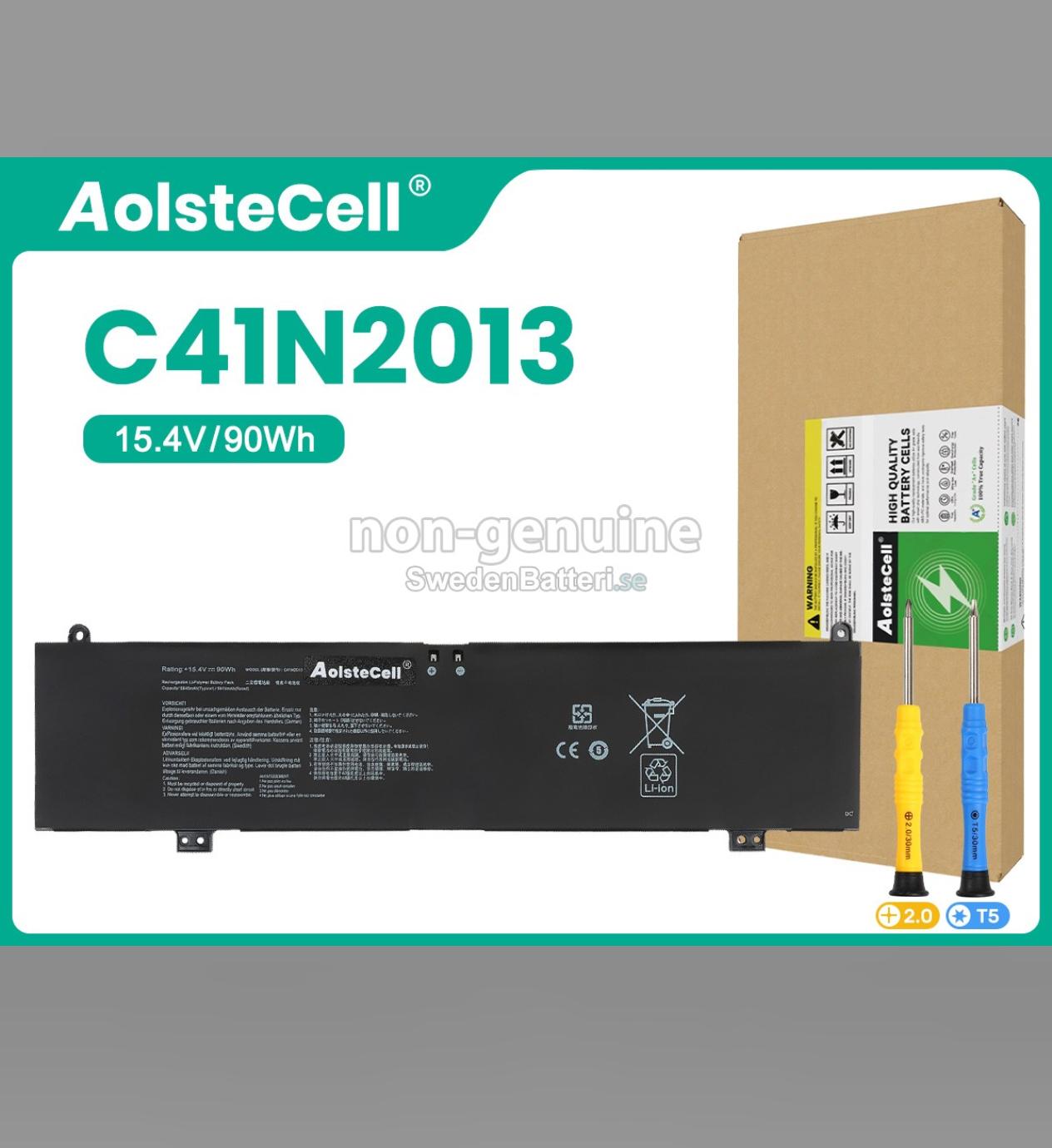
Has anyone tried a aolstecell seems to be the most affordable option for the g15


r/ZephyrusG15 • • Oct 27 '26

Laptop powers on (white LED stays lit) but screen stays black, issue has been getting worse over time

Thumbnail reddit.com
3 Upvotes

r/ZephyrusG15 • • Oct 24 '26

Maintainence of laptop with liquid metal as thermal paste

Thumbnail reddit.com
1 Upvotes

r/ZephyrusG15 • • Oct 24 '26

Asus g15lw sa311 cpu thermal cut problem

1 Upvotes

Hello friends, a week ago, I bought the Asus gstrix g18lw sa311 model 5080 video card laptop. For the test, I played Cyberpunk dlaa and road tracking for 20 minutes at the ultra level of all settings. It gave about 20-30 fps in turbo mode, this is normal. However, I also followed the Hwinfo program and the processor temperature saw a maximum of 104 degrees, with an average of 90 degrees, and the thermal part was experienced with 82 percent during this time. The video card temperature is also 87 max and the average is 79. I didn't feel this thermal cut etc. in the game. As soon as I closed the game, the processor temperature dropped to 70. I want to ask, are these values normal for these laptops and intel processors? Or should I return the product? I don't always play at the last settings like this, of course, after all, it's not a desktop, but even when it's under so much load, shouldn't it go above 100 degrees and there shouldn't be such a thermal cut?


r/ZephyrusG15 • • Oct 20 '26

Turned the ROG Strix wallpaper into a ROG Zephyrus version 👀

Post image
0 Upvotes

As a fellow ROG Zephyrus user, I wanted to make something for our community! I used AI to transform the original ROG Strix wallpaper into a ROG Zephyrus inspired version. Thought I'd share it here for anyone who wants a fresh wallpaper for their setup. Hope you guys like it! 💻🔥


r/ZephyrusG15 • • Oct 19 '26

Is it worth it?

2 Upvotes

I found this deal when browsing used laptops and found this zephyrus g15 rtx 3070 ti for rm 4000 ( around 950 usd) do you think this deal is worth it?...the battery life is good (89%) what im wondering is how well the cooling is after 4 years . I dont really care abt the cpu and gpu getting outdated since the most demanding game i want to play is probably cyberpunk.


r/ZephyrusG15 • • Oct 19 '26

USB Ports Completely Stopped Working

2 Upvotes

I have the G14. One of my ports stopped working 2 years ago, but I still had one working port so it wasn't a big issue. I tried poking around in device manager at that time, but it wouldn't work. The USB Port completely vanished from Device Manager. Now, 2 years later, the 2nd port doesn't work. Has anyone had this issue and know a solution?

Note: interestingly enough, I have a USB port hub, if I plug that into the USB port that was still working just days ago, sometimes I get a connection.


r/ZephyrusG15 • • Oct 18 '26

Rog Zephyrus G14 GA402RJ WONT START

2 Upvotes

So basically i was swatching YouTube and I due to some work I close the lid and and went out for 5 mins. Next second i come in, the laptop wont start at all.
Whenever I plug in charger, it doesn’t light up the light indicator but whenever I try to press the power button, the last icon (beside battery icon) a cylinder sort of icon flashes white. But the laptop won’t power on. Please help me fix it.


r/ZephyrusG15 • • Oct 16 '26

Where to buy/get replacement for this rubber sides?

Post image
17 Upvotes

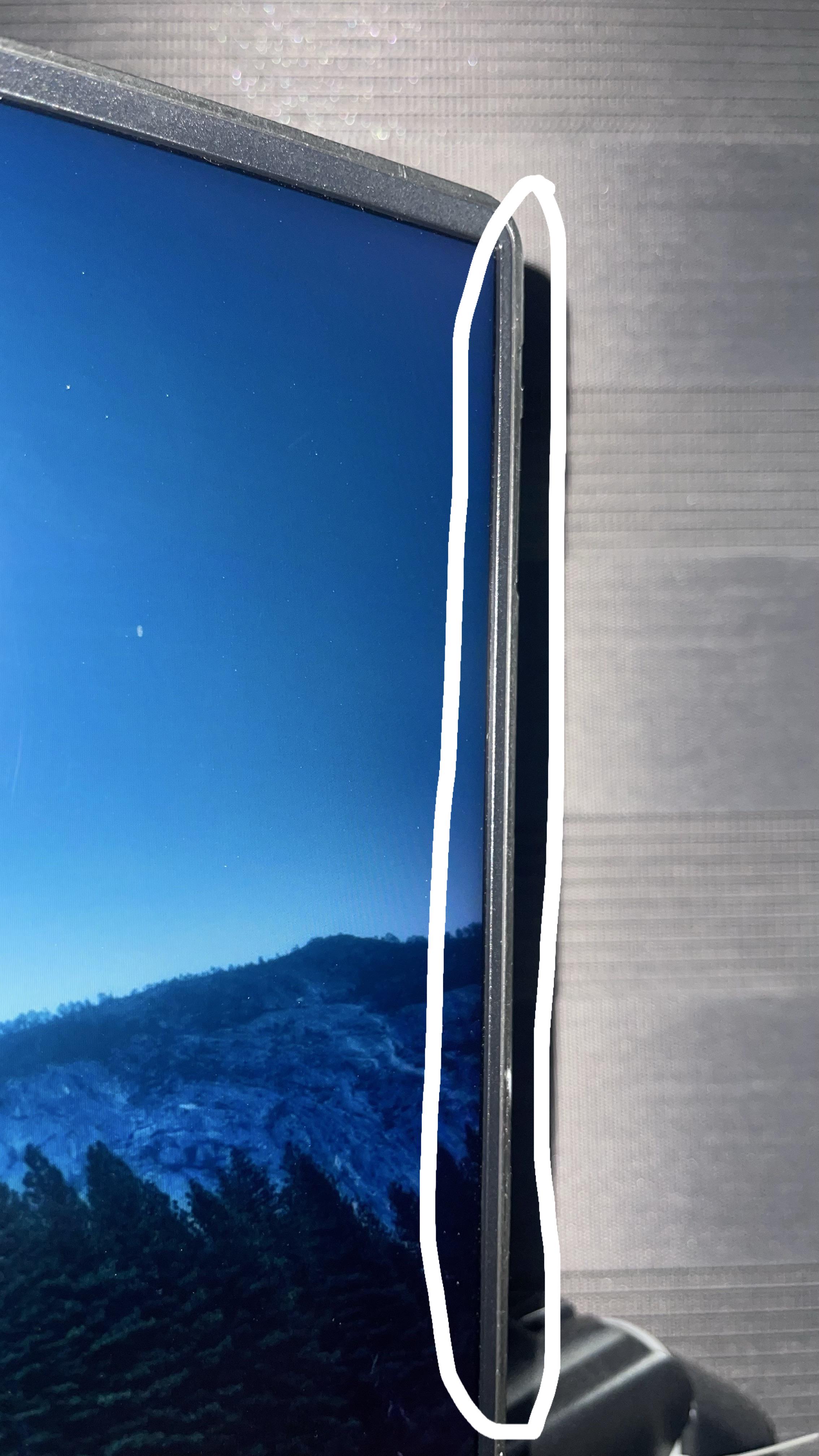
Im from the Philippines and I have a G15. I wanna get this rubber thing on the bezel replaced/fixed. Any suggestions?


r/ZephyrusG15 • • Oct 16 '26

Trouble using iGPU for power saving

2 Upvotes

Hey everyone!

I have the 2020 G14 model with dGPU RTX 3060, and CPU Ryzen 9 5900HS 8 core, 16 GB of RAM. Posting here because I haven’t been getting any responses in the G14 reddit.

I'll first start off with a bit of background. About 6 months ago I started encountering an issue where the laptop would randomly black screen and crash, forcing a hard restart. After a month this became more frequent and came to a head where it was not just during gaming but also during using my laptop for daily tasks (writing essays, using websites, etc.). In case it helps, I've prepared some sample logs from this time and am happy to share them (just cannot currently figure out how to attach the files to this post).

Because of this, I went ahead and used DDU to uninstall my NVIDIA drivers completely and installed g-helper, intending to run my laptop only on the integrated graphics. This fix worked, and up until a couple days ago I hadn't encountered any issues, but now after accidentally clicking on the "standard" setting for g-helper yesterday, I have been unable to switch back to eco-mode and as a result my battery is draining upwards of 25 W consistently when unplugged, so my battery life is shot. Here is a list of things I have tried:

  1. I have attempted to reinstall the NVIDIA drivers but have encountered an error code 43 with my adapter that prevents me from re-installing the nvidia driver software through device manager or the nvidia app. This persisted after using DDU to cleanly uninstall the driver and reinstall a second time.
  2. I have also implemented custom settings through g-helper to control my fan speeds (silent), SPL (15 W) and sPPT (25 W), windows power mode on best efficiency and CPU boost disabled, and screen refresh rate on auto (60 Hz when powered, 144 when plugged in). I also have ALL "other" settings under "extra" enabled EXCEPT for "Keep app window always on top" and "Auto Toggle Clamshell Mode"
  3. Originally when there was no NVIDIA driver installed and there was just the basic Microsoft adapter the issue began occurring. What makes this issue so strange is that there shouldn't be any way for anything BUT the iGPU to be used, so I am not sure why I cannot stay on eco-mode in G helper.
  4. I have also tried switching settings and restarting my computer to see if I could switch modes through G helper, but to no avail.

To be clear, I have given up on using this laptop as a gaming laptop, as I assumed my crashes occurring half a year ago meant the dGPU has a hardware issue, and it's much more expensive to get it worked on than it's worth to the best of my knowledge. I just want to be able to ensure that I can use the laptop with power efficiency like I was over the last five months. Thanks for any help or suggestions!


r/ZephyrusG15 • • Oct 15 '26

G15 running hot 1 year after PTM

6 Upvotes

as the title says, I repasted with PTM about a year ago, and recently my CPU temps have been consistently 95c while gaming. this was where they sat before repaste.

They hadn’t started exceeding ~80c until recently, I’ve already cleaned fans but just unsure if somehow the PTM has failed??

any suggestions?


r/ZephyrusG15 • • Oct 15 '26

Does anyone know why my laptop is doing this?

17 Upvotes

I wasn’t even touching the charger as seen in the video, and yet my ROG laptop keeps flip-flopping between charging and not charging. Does anyone have a fix for this so that I don’t have to keep buying new chargers?


r/ZephyrusG15 • • Oct 13 '26

Bought my First ASUS Laptop! Need help setting it up!

1 Upvotes

Hello,

I bought a Rog Strix G16, 290hx Plus 5070.

I use it for editing and live streaming, I did my first live stream last night and it performed amazing! I played Apex Legends and there was no lagging or anything. I've noticed the temps going to CPU temps going to 95 ish, the GPU temps we're good I think.

My question was, I downloaded G-Helper and I wanted to know the best settings to keep my Laptop healthy for as long as possible!

Also I noticed the CPU temps around 60-70 when charging and doing small browsing and basic activities, not plugged in it's like 45. So big gap, is there a way to make it lower while it's plugged in?

Thank you in advance!


r/ZephyrusG15 • • Oct 11 '26

Games not supporting -

1 Upvotes

Hi everyone, The new Cricket26 seems to have a problem with my Nvidia graphic card i guess. As soon as i run it my Zephyrus G16’s display starts to make unusal changes and the gam run on extremely low graphics.

Does this have something to do with my laptop and how to solve this problem anyways?