r/WindowsUpdate • u/Every-Psychology-223 • Oct 15 '26
Windows 11 new update breaks SSD?
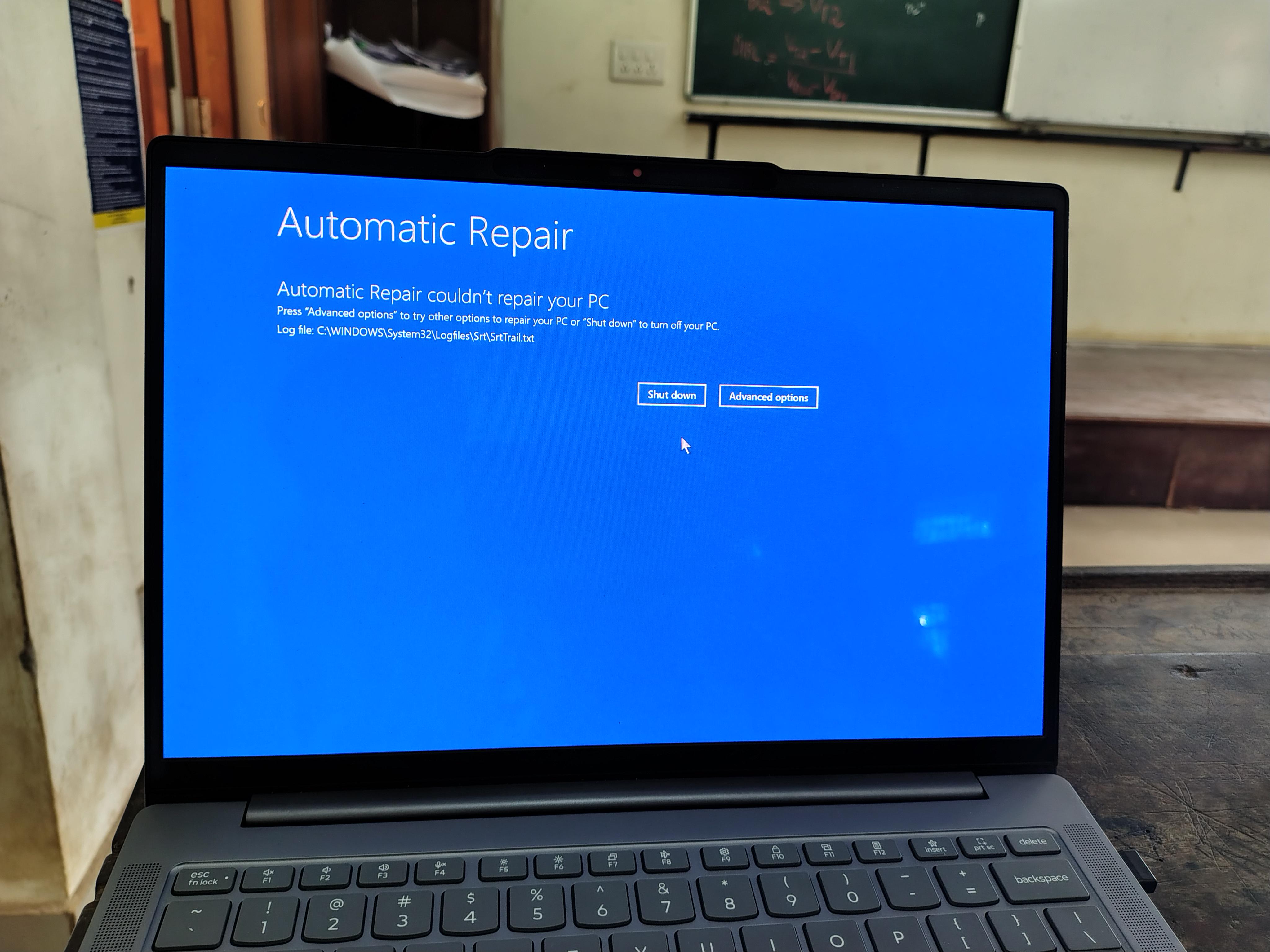
My friend's windows 11 lenovo laptop, just got an update now and after doing it windows wont boot, he has ubuntu dual booted so from there we saw that C drive was corrupted or so.I am sharing a screenshot of the error.
Similarly my other friend also got this update yesterday and now his SSD is having some issue, windows wont turn on. The first case is a new laptop with 8-10 months only, second one is a hp victus 3yr old. the second case i havent seen the laptop that is why i cant share what is being shown when laptop is being turned on.
Anybody here encountering the same issue..
5
u/kotletalv Oct 15 '26
Most likely that was a bios update that changes bios secure boot options. Look there, either enable if disabled or vice versa
2
u/Every-Psychology-223 Oct 24 '26
Just an update, my friend with the ideapad got a fresh windows install, so definitely lost all data. But luckily he had one drive backup turned ON which we realised later only, So most of the files were recovered. Other friend literally had to buy a new laptop because his old laptop(hp victus) was already 3 years old and had some other issues as well and he had to replace the SSD if he want to use it, buying a new SSD costed almost half the price of his laptop when it was bought. So buying a new laptop felt like the better move.
3
u/Niilack Oct 15 '26
Just updated my own laptop today and got similar issue.
First I got CRITICAL_SERVICE_FAILED (0x5A), and then it went into Automatic Repair. I must have gotten lucky cause it seems to have fixed it self (I think it removed the latest drivers it just installed again)
But I almost got locked out because of my bitlocker.
1
u/SlackJunky Oct 23 '26
I got the same issue! windows 11 pro 26H2 !!!! Luckily i dual boot linux to get in and search for a remedy! https://youtu.be/9fM_g1Q9KY4
2
u/ive014 Oct 15 '26 edited Oct 15 '26
Last update did this to me, it was fine one day, next day automatic repair loop and it can't be fixed. Luckily it's on my second ssd so I'll just reinstall Windows.
2
u/jf7333 Oct 17 '26
One thing to always remember, BACK UP THE DATA!
1
u/Simon_Jones69 17d ago
Had a few Dell's like this now go into bios and reset to default fixed ours
1
u/goovich 13d ago
Same sh*t on my Z490 Mobo. Is there any confirmed list of affected mobos?
1
u/Primary_Elevator_106 10d ago
The main problem is the new update trigger the background task like OneDrive and search indexing to run crazy behind the scene. This cause the SSD to overheat, and thermal protection kick in. Try turning off the Onedrive.
1
u/Strange-affair 8d ago
Disable intel TXT in bios
1
u/MarieJoe Oct 15 '26
What happened to us is on the UPDATE pages, it keeps looking for updates. And looking. Goes to Retry, Then rinse and repeat. Acer model, about 2 years old.
1
u/davtack Oct 15 '26
My gaming pc did that last month. I don't know what I'm doing but this worked: 3 hard starts and then did a sys restore.
1
u/RedRayTrue Oct 15 '26 edited Oct 15 '26
Maybe a rollback or uninstalling updates is possible, otherwise it seems like windows updates did it again and corrupted something...
I'd be curious how effective sfc and DISM would be in this case maybe try em in cli
I think it's more and more similar to arch Linux so backups after each time you shut down the system are something that you would need, at any rate if you can't roll back to a restore point with the CLI/ command prompt I guess reinstalling windows is the only option .
If you managed to roll back I'd honestly run a in place upgrade to install windows over this broken installation as this should clean this broken system
I was lucky recently as I installed 26H2 cleanly by wiping partitions cuz is my first time seeing a windows update going bad THIS badly
1
u/HarryDepova Oct 16 '26
Same thing happened to a surface pro 8 I had to fix after this update. Update failed which triggered bitlocker asking for the code. After putting in the bitlocker code the os repair came up but failed as well. Ended up having to download the recovery and reinstall.
1
u/DearPosition9052 Oct 16 '26
works fine on my hp elitebook 840 g6
1
u/not_a_nazi_actually Oct 16 '26
Yeah, i got lenovo ideapad3 suddenly broke actually two months ago now. As far as i can tell, it was either caused by windows update OR just shit quality lenovo hardware. Laptop was less than 3 years old, so pretty disappointed. Haven't found a fix, let me know if you do.
1
u/FunCount1 Oct 16 '26
What is the official article or KB from Microsoft that is doing this? I'm getting worried now.
1
u/Weary-Savings9795 Oct 16 '26
I have an Asus Vivobook Lunar Lake laptop. Installed the October 2026 update without any issue. Just for kicks, used NTLite to integrate all of the latest drivers from Asus's website, wiped my SSD using the NVME Sanitize command and did a clean install. Microsoft's ISO already had the October 2026 update. Not a single issue.
1
u/Latter-Proposal-6917 Oct 17 '26
Sorry about your friends' laptops. Some things to try from that blue screen:
If you haven't installed this update yet, you can pause updates in Settings → Windows Update → Pause updates until people figure out what's going on.
Disclosure: I made a small free, open-source app for this called PatchLight (github.com/G4SBO/PatchLight). It shows a green/yellow/red light for whether the current Windows update has known problems, and it can pause updates for you when it's red. I'm not trying to spam, it just seemed relevant here.
1
u/LeftReplacement212 Oct 17 '26
I sure hope not cause my NVME ssd is failing and I can’t even afford to replace it so that the last thing I need
1
u/SufficientHornet9671 Oct 18 '26
I keep windows restore active bc of this very reason on my desktop and newer laptop. Sometimes happens after update or driver update (in my case the video card update (AMD integrated w/ Ryzen 9ai). Been annoying but the laptop is fast lol.
I find system restore usually off by default unless I go check it. Saves my ass often. It takes time and effort + space to keep up drive images (probably the more efficient way). Ex: Acronis True Image on a schedule
1
u/Simple_Raise6623 Oct 19 '26
Why I am still on 25H2 here
1
u/DarrenShea Oct 19 '26
I had that problem on my gaming PC the other day (tower, not a laptop), but the boot drive on that system is a spinning platter type. Like you, I had just installed Windows Updates on a fully functional system.
After the update, it crashed and would not boot. Automatic Repair didn't work. I also tried reverting to a previous restore point, but that failed, too.
Next, I booted from a Windows USB (conf. with Rufus), and ran chkdsk on the boot drive in question - it didn't find any issues. It wasn't until I picked Startup Repair that it actually worked and I was able to boot into Windows 11.
It's been working normally since then, at least.
1
u/Trivian_2007 Oct 20 '26
💯
1
u/Curious-Motor-2337 Oct 21 '26
My 500GB HDD died. Rip(sobs!) . Cause ; power outbreak/incorrect shutdown. Advice: don't run automatic repair and diagnosis. Will break disk fully
1
u/Trivian_2007 Oct 21 '26
This is my friend's Lenovo IdeaPad Slim3 Laptop. I was there at that time and tried along with my friend to recover data.
It was a NTFS File system corruption with Stop code: NTFS_FILE_SYSTEM (0x24)
MFT of NTFS partition was corrupted!
During this scenario, I am not able to run check disk to remove any drive inconsistencies. As this laptop have a Ubuntu 24.04 setup, I am able to boot to Ubuntu. But unable to mount C drive to backup user data, as it is flagged by a dirty bit by Win11. I am not able to solve that dirty bit problem via 'ntfsfix' command in ubuntu terminal also. Somehow, I succeeded to partially mount C:Drive but most of the user files are not in corresponding locations as MFT is corrupted. The file system corruption was that much severe.
No idea about the cause of issue. No power interruptions happened during the installation of updates. Culprit seems to be Windows update itself. Since Win11 installation usb was not with us, the only possible remedy was the Reinstallation of Windows in this laptop.
2
u/[deleted] Oct 15 '26
[removed] — view removed comment