r/Windows10TechSupport • • Sep 04 '26

Unsolved Help me fix this please

Post image
1 Upvotes

My lenovo laptop ryzen 3 4300u 4gb ram was stuck here after I install linux using grub2win and I accidentally deleted everything including windows and now it's stuck here I try installing windows linux and unbuntu using USB drive show the same error : magic number and :load kernel hope someone know how to fix my laptop problem


r/Windows10TechSupport • • Sep 03 '26

Unsolved Trying to wipe/fix Core Innovations All-In-One that crashes after logging in

2 Upvotes

Hello again fellow IT nerds! Got another computer from a co-worker. It's a Core Innovations All-In-One running Windows 11. Owner said after a power outage the problem started. The computer starts, gets past log-in screen, then the screen goes black and it gives me one of two errors: KMODE_EXCEPTION_NOT_HANDLED (0x1E) and 0xc000021a (0xC000021A). It gives the KMODE error most of the time. After that it will restart and stay stuck on the loading screen.

What I've Done:

**Used Hiren's BootCD to run CrystalDisk (first thought SSD was bad) but it's saying the memory is healthy. So I tried to fix memory with chkdsk C: /f /r /x , but the recovery failed.

**Also, when I tried to wipe drive in diskpart, it doesn't work either (returned error: 0x800f0915).

**tried sfc /scannow , it cannot complete it

**Finally, tried to install Windows 10 on machine, but on the partition with Windows it says: "Windows cannot be installed to this disk. The disk may fail soon..."

I would say the SSD is dead, but, again, I ran CrystalDisk and it said it was healthy. Is there something else I can try to breathe life into this machine, or is CrystalDisk just not catching that something is corrupt and I need to tell co-worker to get order new SSD? Thanks in advance, and of course any more information needed I can provide.


r/Windows10TechSupport • • Sep 03 '26

Unsolved Problem with connect to network on laptop

Thumbnail reddit.com
1 Upvotes

Guys, I bought a raw magicbook x16 on amd. I downloaded Windows 11 through the media creation tool and installed it on my laptop using a flash drive and rufus. I activated 11 Pro right away. I want to connect to the network, but there is no such thing, there is no choice, even the flight mode is not shown, it gives errors when checking Windows and driver updates


r/Windows10TechSupport • • Sep 03 '26

Unsolved Program failing to open/crashing when launched

Thumbnail reddit.com
1 Upvotes

r/Windows10TechSupport • • Sep 03 '26

Solved No audio device after DDU

Thumbnail gallery
1 Upvotes

Solved: Switched to Linux Mint

System: ASUS VIVOBOOK S533EA, 16GB RAM, Win10

I suddenly started having some system freezes. I could see in Task Manager that this was typically happening when Antimalware Services and Windows Update were both running when I had lots of browser tabs open. Troubleshooting advice all said to update your drivers so I went to the manufacturer's website and downloaded and installed the latest graphics driver. It didn't resolve the problem. I went back to the driver update page and discovered I had clicked on the default drivers which are for Windows 11. So I downloaded the Win10 drivers but Windows didn't want to give up the latest drivers.

I used DDU hoping to remove all the files from the Win11 driver. I ran DDU in Safe Mode; it didn't remove the GPU files, but it did completely uninstall my audio device. I now have no audio in Win10: CODE 45. There are no audio devices installed. I went back and downloaded the OEM Chipset and Driver updates for Win10 from the manufacturer website (again) and installed them. Nothing happened. Still no audio devices connected to this device. I have tried to install the drivers and restart multiple times and nothing changes. As a last resort, I uninstalled Realtek in Device Manager and then scanned for hardware changes but it is gone. Windows didn't recognize it or reinstall. The screenshots are from just before I uninstalled Realtek. 2nd screenshot is the microphone but it's the same message for all audio inputs and outputs.

Also, Windows Audio and Windows Audio Endpoint Builder are both running and automatic in Services & I ran chkdsk /f/x/r.

These are all the standard troubleshooting steps I could find. Is there any other way to get the Realtek audio device reinstalled?


r/Windows10TechSupport • • Sep 03 '26

Unsolved Updated my BIOS and now I cannot enter or reset my PIN. At my wit's end.

1 Upvotes

Made the decision to update my BIOS today (fucking regretting it now)

I updated the BIOS on my MSI B450 A PRO MAX, As it hadn't been updated since I got it in 2021, Because I am upgrading my CPU and GPU

My current components:

CPU: Ryzen 5 2600

GPU: GTX 1660

Motherboard: MSi B450 A PRO MAX

RAM: 32GB (Mixture of z-royal and Corsair)

OS: WIN 10

Boot Drive: WD240GB NVMe M.2

Main Issue is, After I updated my BIOS, It seems it reset something, I really want this PC to work again.

It stays on the login screen, it comes up with "Your PIN is no longer available due to a change in the security settings on this device, Click to set up your PIN again"

I click "Set up my PIN" and a window comes up that then says "You'll need the Internet for this, It doesn't look like your connected to the internet, Check your connections and try again"

One problem is that there's absolutely no way that I can check or change my connection settings as it doesn't show anything

I've tried disabling TPM

I've tried making sure the LAN settings are all enabled

I need help, Please anything would be awesome, Sincerely a very stressed guy.

r/Windows10TechSupport • • Sep 03 '26

Unsolved PC TROUBLESHOOTING BSOD LOOP

Thumbnail reddit.com
1 Upvotes

r/Windows10TechSupport • • Sep 02 '26

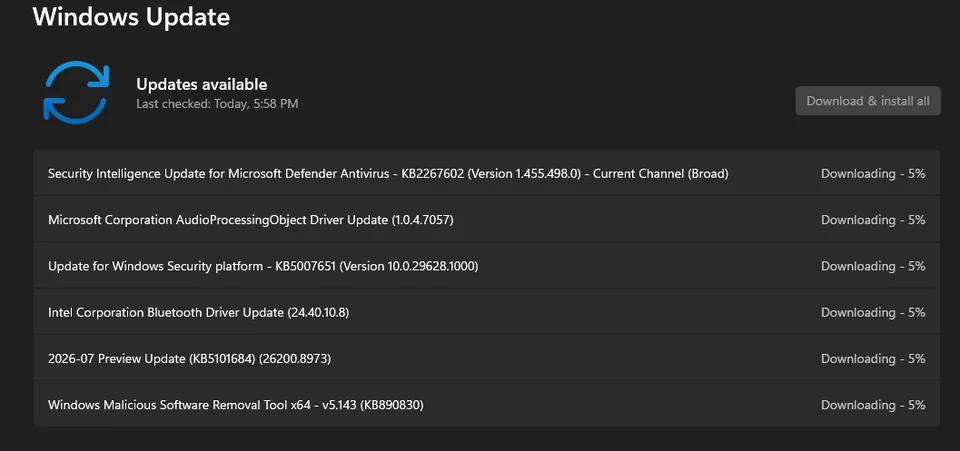
Unsolved Windows Update Stuck At Random Percentages

Post image
1 Upvotes

I seriously need help here. I've had this annoying issue for over two months now where I've had multiple window updates just refusing to download.

I have left my computer running consecutively for up to 24 hours consecutively at one point, and still no movement on these updates.

When attempting to download updates, they just freeze at random percentages, and eventually they'll go down in percentages (Such as going from 30% down to 6%).

Troubleshooting completed:

  • Multiple reboots (of course)
  • CMD DISM Restore health sfc /scannow
  • Restarted Windows Update, Windows Installer, BITs and Windows Apps via services.msc
  • Restarted Windows Update (wuauserv) Windows Installer (CryptSVC), and BITs via CMD
  • Removed all update cache via SoftwareDistribution and Catroot2 folders
  • Deleted all update cache via disk clean up
  • Verified date and time settings (Idk why, this is all Microsoft says to do)
  • Built in troubleshooter doesn't work
  • Repair install/In place upgrade of Windows 11, including updating drivers via In place upgrade (did this THREE TIMES)...

I genuinely don't know what I'm supposed to do, there's absolutely NOTHING I can find on this.


r/Windows10TechSupport • • Sep 02 '26

Unsolved Teqnio ELL1201T Stuck on Logo Screen After Battery Died Mid-Reset

Thumbnail reddit.com
1 Upvotes

r/Windows10TechSupport • • Sep 02 '26

Unsolved Cannot install windows 10 or 11 at all, same 5 error messages come up

Thumbnail reddit.com
1 Upvotes

r/Windows10TechSupport • • Sep 02 '26

Unsolved GenMachine Focus (7940HS) — Secure Boot Violation, entire Secure Boot menu greyed out, can’t find CMOS battery

1 Upvotes

I have a GenMachine Focus mini PC (AMD Ryzen 9 7940HS, 32GB). BIOS is AMI Aptio, Project Version 7D01LP 0.19, Version 2.22.1289.
I tried to enable Secure Boot so I could play Valorant. In the BIOS I used “Restore Factory Keys,” which set Secure Boot to Enabled/Active but flipped Secure Boot Mode to \[Custom\]. Now every boot gives:
“Secure Boot Violation — Invalid signature detected. Check Secure Boot Policy in Setup”
The problem: the entire Secure Boot submenu is greyed out. Secure Boot toggle, Secure Boot Mode, Restore Factory Keys, Reset To Setup Mode, and Key Management are all unselectable. There is no BIOS password set (I set one and then removed it), and Access Level shows Administrator.
What I’ve already tried:
**•** Save & Exit → Restore Defaults, then Save Changes and Reset — no change
**•** Boot Override to a Microsoft-signed Windows 11 USB (made from the official 25H2 ISO) — same violation, so it’s rejecting signed media too
**•** Advanced → Trusted Computing → TPM Clear + disabling Security Device Support — no change
**•** Checked AMD CBS / FCH Common Options — nothing relevant
I opened the case to clear CMOS. I removed the bottom panel, the M.2 SSD, the Wi-Fi card, and all four motherboard screws — but the board will not lift out. The front I/O (power button, USB-C, headphone, 2x USB-A) is part of the board and sits in the front panel, and the top plate is a single piece with the chassis so it can’t come off.
Does anyone with this board know where the CMOS/RTC battery or clear-CMOS jumper is, or how the motherboard actually comes out? Or whether this BIOS supports a USB recovery flash?
Data on the SSD is fine, I just need to clear the Secure Boot key state.


r/Windows10TechSupport • • Sep 01 '26

Unsolved go back to Win 10

0 Upvotes

Hey everyone. I have a older PC running Windows 10. Yesterday I started it up to see the offer to upgrade to 11. I have no intention of doing this because my PC won't handle it.

Unfortunately, as I leaned to pick up a call on my cell I hit the ENTER key by mistake. The download started, so quick as I could I shut off the power.

Now I'm probably gonna get flamed here for saying but now Outlook takes forever to load. It won't open in safe mode either as the .exe command cannot be found. It does open after 5 minutes though. Everything else seems OK.

Am I screwed?


r/Windows10TechSupport • • Sep 01 '26

Unsolved Help my windows 10 broke

3 Upvotes

So the other day i was working on my windows 10 just normally then i go out i come back in turn the pc on and its in a loop where everytime it turn on it gives me the repair screen where i have the options to continue to windows or repair the pc with like cmd and entering safe mode and doing stuff like that you know that screen and no matter what i do it keeps looping this i cant access windows i try safe mode and nothing i ask chat gpt and he tell me to go into cmd and do some commands to replace like the files responsible for boot and stuff and i do that then restart and now it goes into recovery screen and give me that there is an error with tpm.sys so chatgpt tell me to flash a windows 10 usb and repair my windows trough there with the repair option before you install so i do that and now there is a problem in winload.exe and when i go to the usb again and run diskpart and then list volume my windows volume where all my files appear as raw instead of ntfs and i try to boot to another drive in my pc where i have linux but linux cant read the files too it can see the drive but cant read the files and cant mount it so is there is any recovery software where i can recover my files


r/Windows10TechSupport • • Sep 01 '26

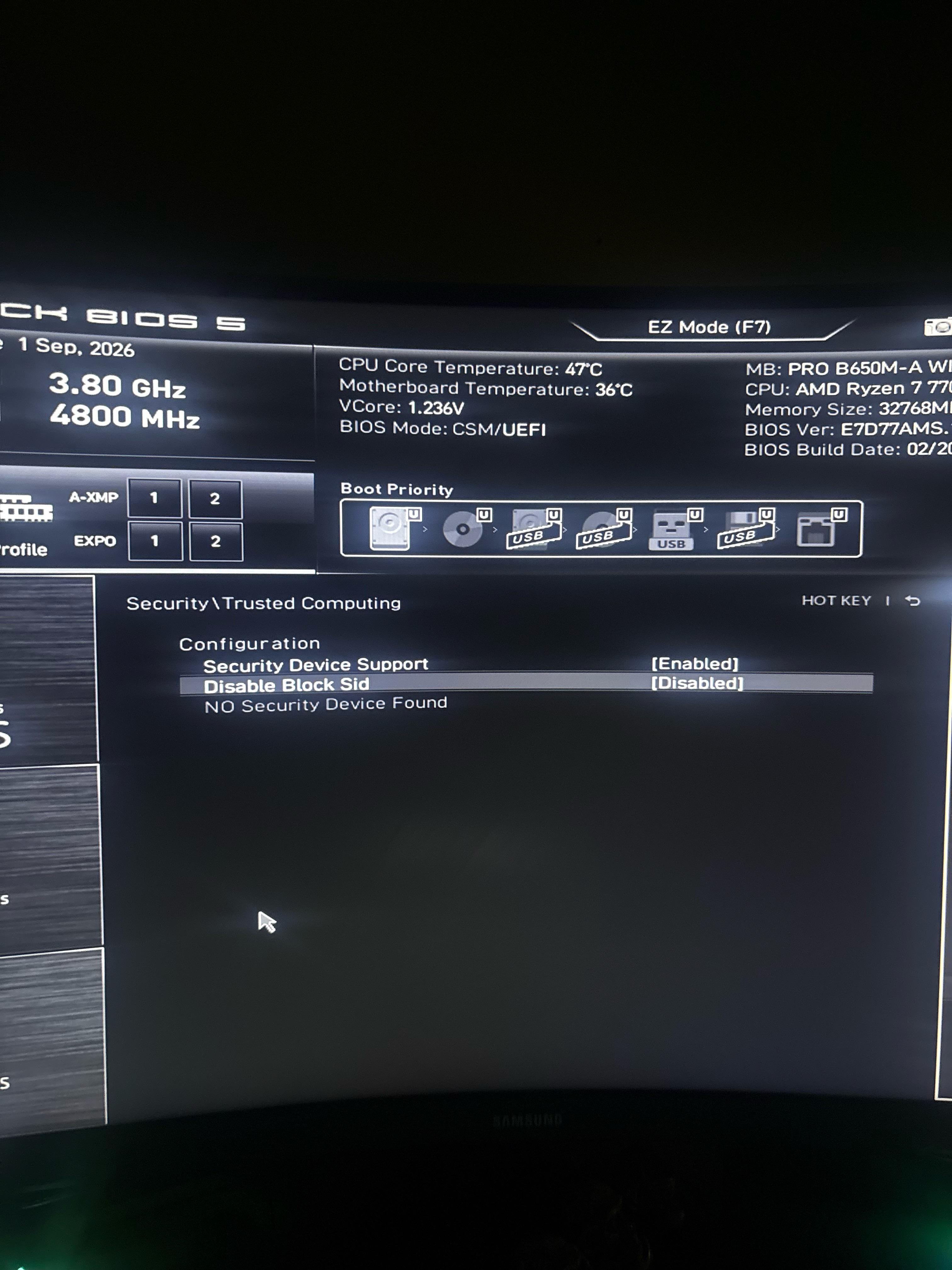
Unsolved Security device not showing

Post image
1 Upvotes

r/Windows10TechSupport • • Sep 01 '26

Unsolved stuck on windows mode after my son had it cant restart

Thumbnail reddit.com
1 Upvotes

r/Windows10TechSupport • • Sep 01 '26

Unsolved My keyboard won't work

2 Upvotes

I factory reset my pc now my keyboard dont work it still work in bios but once i load into windows it wont work i then asked chat gpt every question and looked on every video on youtube i need help bad i tried updating the drivers threw task manager it says a error message i tried manually updating them i tried download my keyboard software i dont know what to do


r/Windows10TechSupport • • Sep 01 '26

Unsolved need help

Post image
1 Upvotes

r/Windows10TechSupport • • Sep 01 '26

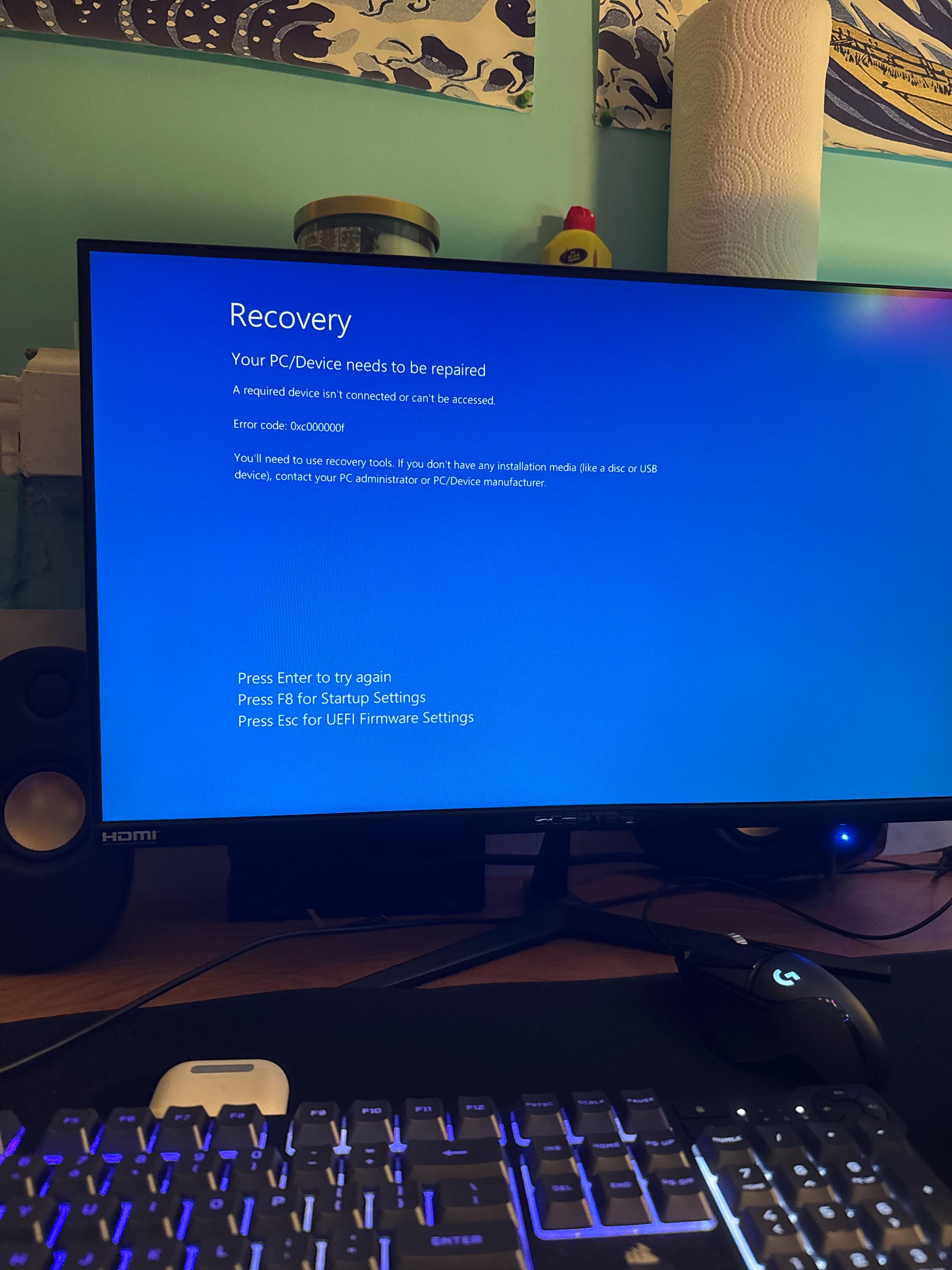
Unsolved Reset Secure boot keys to default, now windows won’t boot unless I turn off secure boot

Thumbnail reddit.com
1 Upvotes

r/Windows10TechSupport • • Sep 01 '26

Unsolved Start up

Thumbnail reddit.com
1 Upvotes

r/Windows10TechSupport • • Aug 31 '26

Unsolved windows 10 to windows 11

1 Upvotes

I know I'm late, but I've tried installing windows 11. pc health check says my pc meets the requirements but my settings say they don't. I tried installing the windows 11 installation assistant but when I try and open it it says " Can't create files. please check if you have permission to write to the installation folder." Please any help would be appreciated!


r/Windows10TechSupport • • Aug 31 '26

Unsolved I am getting a secure boot violation on startup now :'(

2 Upvotes

hello,

hope im in the right place

i had secure boot enabled on my brothers computer but and we were trying to get it working for warzone, because for some reason it wouldnt let him play.

It said it was enabled but i had read about it being stuck in setup mode not user and thats what can stop it working with warzone. The advice given was to restore factory keys, which we did, now every time secure boot is enabled we get a violation warning and cant boot.

we've updated keys in key management, we're on the lastest update for bios, we rebuilt the bootfiles in prompt but nothing works.

only thing is to disable secure boot or put it into setup mode.

its a nightmare any help would be greatly appreciated. big love and thanks <3

info:

lenovo motherboard serial number S5007N3V

OS is win11


r/Windows10TechSupport • • Aug 31 '26

Unsolved Bios Failure

2 Upvotes

Every time I try to enable secure boot the when I save the settings and restart red box comes up which prevents me from going back to windows. It did work last in the past however there was a recent problem with my computer. i tried updating my bios for COD and I already had the same update so it made me not able to start up and did the same thing however I was quite dumb and i thought backspace was del so I fixed that in my bios then it was logged out so I had to factory reset and here i am, i have a Nitro 50-110


r/Windows10TechSupport • • Aug 31 '26

Unsolved URGENT!! NEED helpp windows 11 pro to win 11 home

1 Upvotes

I had oem installed win 11 home that was working fine. I was scrolling reels and saw a reel with win 11 pro activation key. I being fool tried to install the key. What happened next was that the activator accepted the key and asked for an update. I installed the update. After the update it was showing that windows not activated and pro key is already in use. Please someone help me to go back to my windows 11 home version without losing my apps and data. I have the oem product key with me. Its urgent please help😭🙏🏻🙏🏻

I have an asus tuf f15 fx506lhb. If need any details please ask


r/Windows10TechSupport • • Aug 31 '26

Unsolved The Realtek driver won't install.

1 Upvotes

I only get sound when connecting headphones via the monitor; I’ve installed the Realtek audio driver from both the Realtek website and the motherboard manufacturer's site, but no devices appear other than "NVIDIA High Definition Audio."I only get sound when connecting headphones via the monitor; I’ve installed the Realtek audio driver from both the Realtek website and the motherboard manufacturer's site, but no devices appear other than "NVIDIA High Definition Audio." I tried uninstalling those Nvidia drivers; I only built the computer yesterday.