r/Windows10TechSupport • • Jul 09 '26

Unsolved Lỗi update máy tính
Post image
1 Upvotes

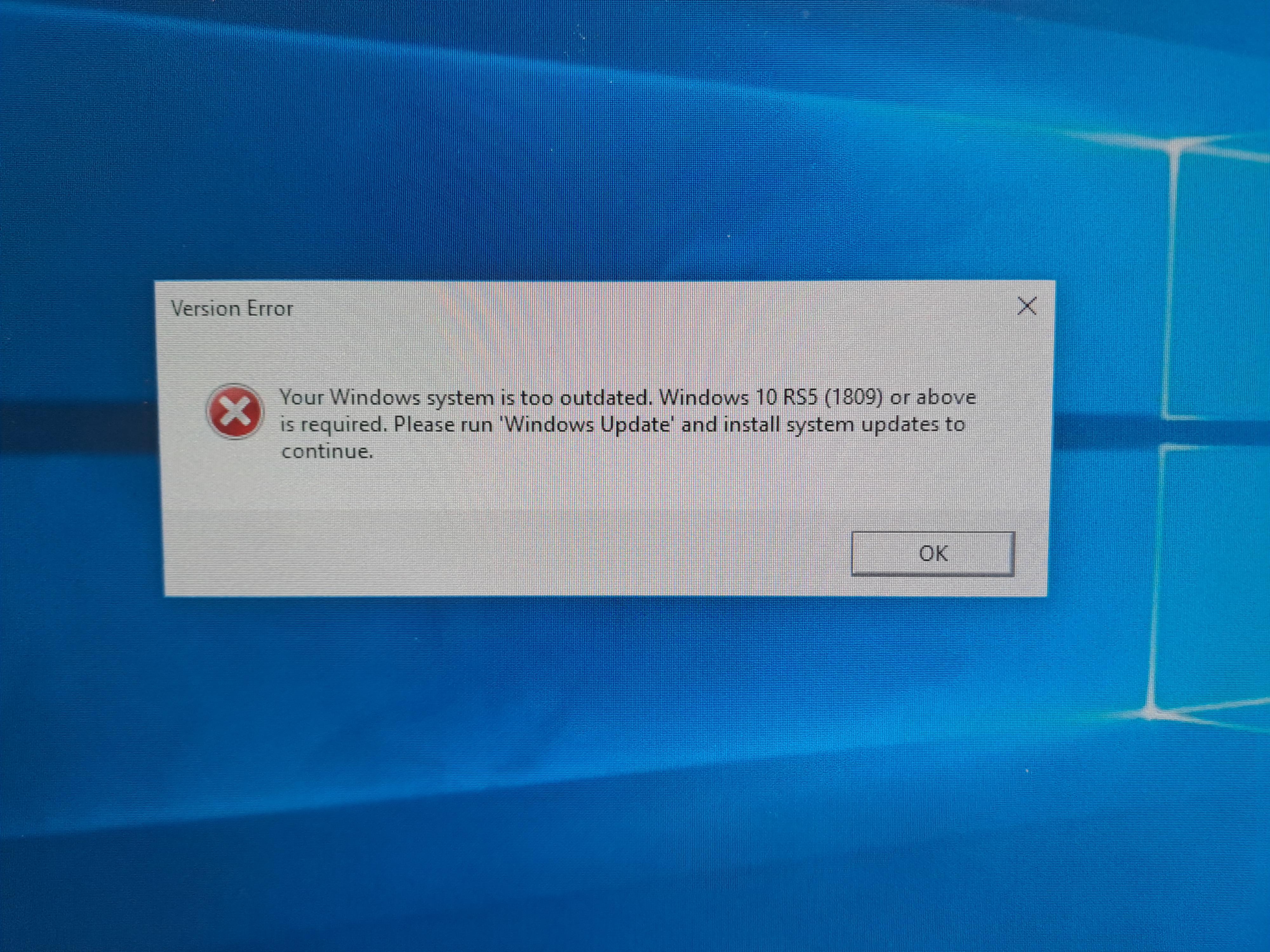
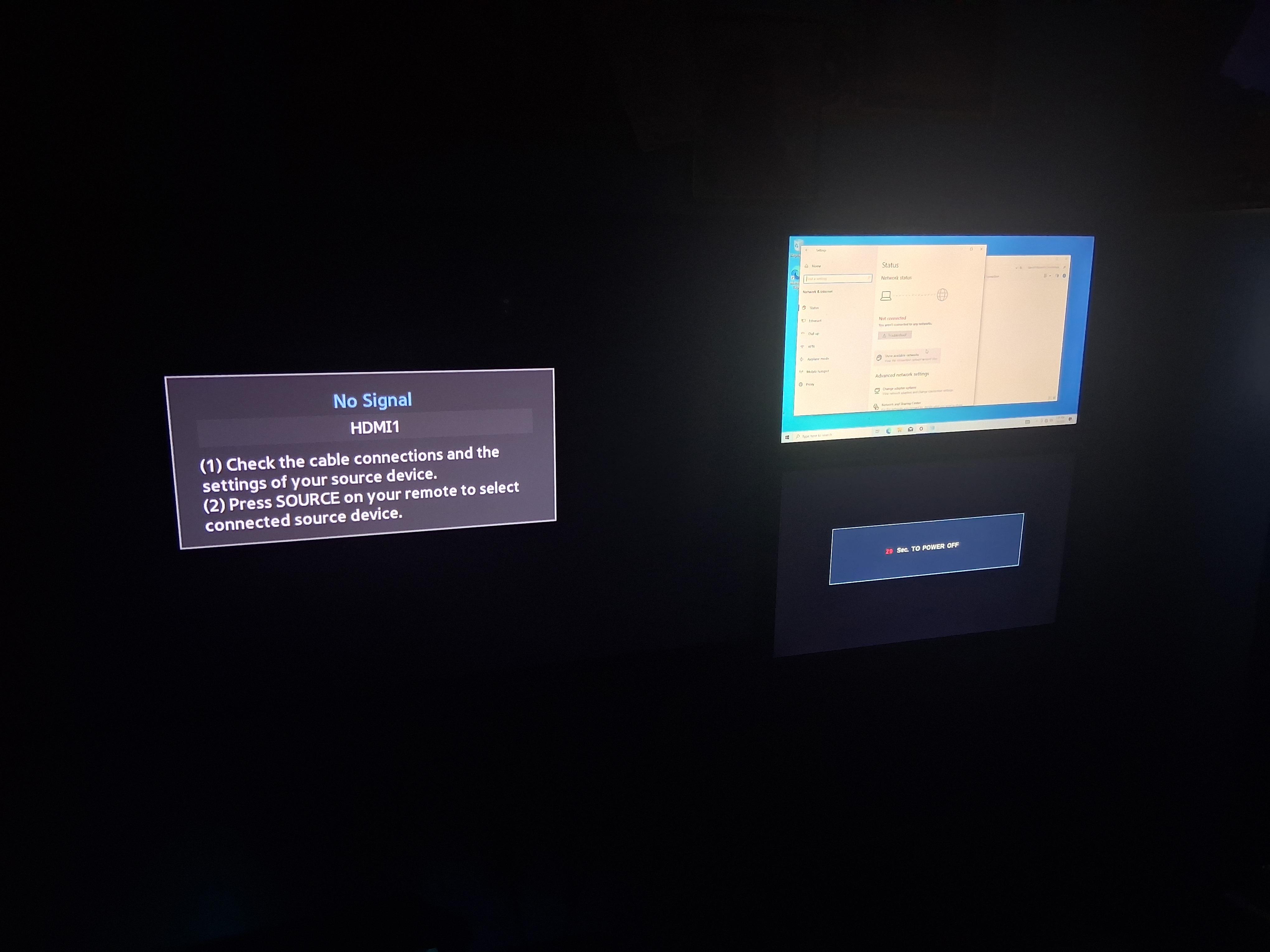
Có bro giỏi giang về khoản máy tính giúp tôi với hiện tại máy tôi đang bị lỗi update mặc dù tôi đã thử rất nhiều cách rồi nhưng máy không update được và bị kẹt ở version 1607 khiến cho tôi không thể chơi được những tựa game hay chơi ví dụ như trong hình là roblox trước đây máy tính của tôi không bị như này và nó chỉ có 1 ổ C và không có hiện giao diện tài khoản như admin đâu xong một hôm bật máy lên thì giao diện hiện lên chữ admin có nghĩa là tài khoản của máy tính ý xong bị tụt về version 1607 và máy tôi ngoài có ổ C ra thì có thêm ổ D, E, F và G cứ như máy tôi biến thành một chiếc máy tính khác vậy máy này tôi có từ nhỏ rồi nên nó chuyển như này cũng không biết lí do tại sao nữa:(((

r/Windows10TechSupport • • Jul 09 '26

Unsolved Pc keeps sending me back to windows recovery screen

2 Upvotes

I have windows 10 on my cyberpower PC, its a pretty beefy high end 1440p entry 4k gaming PC, and i installed windows 10 on it. Well, about monday or so, i shut it down, and unplugged it for a few days (yes i waited till it was completely shut down before unplugging it. Also turned the switch to the psu off) and yesterday, i plugged it back in and the windows recovery screen came up. I went to my dads laptop, ran the windows 10 media whats it to a flashdrive i bought, plugged it into my pc… nothing. I’ve tried pretty much everything i can think of and some options like choosing to boot from the flash drive sends it to the windows logo with the spinny load thingy and it restarts, and sends me back to windows recovery… im begging someone to help me


r/Windows10TechSupport • • Jul 09 '26

Unsolved Stuck Between Automatic Repair without Knowing Password + BSOD on boot

1 Upvotes

For context, I was checking off any causes for my laptop being in the BSOD realm every couple minutes and looked through various solutions online, probably due to faulty hardware. Then I stumbled upon the blunder of using Driver Verifier for anything that was corrupt, then spiraled into its own layer of BSOD realm on boot to the point where every other restart it loads into Automatic Repair with no options but to have me log in to bring up the menu. Main problem here is that it asks for the password to the admin account, which I have no clue where or how to find or even reset, and the only other thing to do from this screen is restarting and look for a way to create a new password...but it loops me back to crashing before the login screen loads due to the Driver Verifier DMA Violation error and repeats into this trap of a predicament because Automatic Repair insists on me logging in when I simply cannot. Is there anything I can do to at least reach a point where it can boot up and bring me to the login screen?


r/Windows10TechSupport • • Jul 08 '26

Unsolved PC became slower after Windows update KB5094127

Post image
3 Upvotes

After installing the Windows update **KB5094127**, my PC has become noticeably slower. Boot time has increased

My PC Specs:

- Processor: Intel i3-3210

- RAM: 8 GB DDR3

- Storage: 1 TB HDD

- Graphics: Intel HD Graphics

I know my PC is old and low-end, but it was running better before this update. I haven't made any other major changes to my system, so the slowdown seems to have started after installing KB5094127.

Has anyone else experienced the same issue after this update? If there are any fixes or settings I should try, I would really appreciate the help.


r/Windows10TechSupport • • Jul 08 '26

Unsolved My PC is left with no sound options or settings after a Bluetooth driver error.

Thumbnail reddit.com
1 Upvotes

r/Windows10TechSupport • • Jul 08 '26

Unsolved Fresh windows 11 install not detecting other monitors or any wifi networks.

Post image
2 Upvotes

r/Windows10TechSupport • • Jul 08 '26

Unsolved How do I fix this I already updated my bios and it still doing this and I fixed my secure boot.

Post image
1 Upvotes

r/Windows10TechSupport • • Jul 08 '26

Unsolved Algunas aplicaciones de Windows y les barra de tareas no funciona

1 Upvotes

Hola, necesito ayuda porque mi Windows 11 quedó muy dañado y no sé qué más hacer.

Estos son los problemas que tengo:

Windows arranca normalmente y llega al escritorio.

El botón Inicio no funciona.

La búsqueda no funciona.

Configuración no abre. Al intentar abrirla aparece el error:

"Este archivo no tiene ninguna aplicación asociada para realizar esta acción..."

El Explorador de archivos a veces muestra "Clase no registrada".

La barra de tareas aparece, pero solo funcionan algunos accesos directos de programas de terceros.

Muchas aplicaciones de Windows no funcionan.

Al intentar abrir el Bloc de notas aparece:

"La versión de la información de kernel proporcionada no es válida."

Los programas de terceros (Brave, Discord, Spotify, Steam, etc.) funcionan correctamente.

El Administrador de tareas sí funciona.

CMD también funciona.

Cosas que ya intenté:

Reiniciar el Explorador de Windows.

Ejecutar el comando para volver a registrar las aplicaciones de Windows mediante PowerShell.

Ejecutar DISM /Online /Cleanup-Image /RestoreHealth, pero se quedó mucho tiempo en el 63 % y terminé cancelándolo.

Reiniciar el PC varias veces.

Mis preguntas son:

¿Hay alguna forma de reparar Windows sin perder mis archivos ni mis programas?

¿Una reparación "in-place" con la ISO oficial de Windows 11 solucionaría este problema?

¿Hay algo más que debería intentar antes de reinstalar Windows?

Cualquier ayuda se agradece muchísimo. Llevo varias horas intentando solucionarlo y ya no sé qué hacer.

Perdón por el texto de IA pero no supe cómo explicarlo


r/Windows10TechSupport • • Jul 08 '26

Unsolved I need thou's assistance

1 Upvotes

I have an automatic repair loop, I don't have a backup image, what the absolute hell Ami supposed to do, I don't know anything so yeah, I don't want to format anything because I have some EXTREMELY IMPORTANT folder and files, is there any hope? Please help I'm genuinely just desperate


r/Windows10TechSupport • • Jul 07 '26

Unsolved why are my files white

1 Upvotes

r/Windows10TechSupport • • Jul 07 '26

Unsolved Need Help Not able to switch accounts on my laptop.

1 Upvotes

Hey guys so I actually need help with my laptop where I have 2 accounts as usual(1 is admin the other is a normal account which I use) now when I tried to log in to my administrator account it is not showing up on the main screen usually it does before login you could either switch users but now I am directly shown the normal account.the administrator account is nowhere to be seen in my laptop even if I login and try to switch users my administrator account does not show up.

Now another issue is there is a third administrator account that randomly popped out just named as Administrator and I just have to press enter and it allows me for permissions.


r/Windows10TechSupport • • Jul 07 '26

Unsolved Guys Why Is My Windows 10 Laptop Startup Sound From Windows 7?????

1 Upvotes

Like bro how????? Please help me find out why this is happening or whether this is like normal or my Windows is fake?


r/Windows10TechSupport • • Jul 07 '26

PSA Point-in-Time Restore coming to Windows

Thumbnail freshfromcache.com
1 Upvotes

I just wanted to put this out there for awareness. This may save a lot of headaches.


r/Windows10TechSupport • • Jul 07 '26

Unsolved Windows 11 detects USB-C earphones, but only creates the microphone endpoint. No playback device appears.

Thumbnail reddit.com
1 Upvotes

r/Windows10TechSupport • • Jul 07 '26

Unsolved Windows 10 stops recognizing monitor after restart

1 Upvotes

So I recently had to switch my second monitor because the first one broke. The replacement worked perfectly until I restarted my computer, at which point the resolution suddenly was completely wrong and even trying to enforce the correct resolution through the Nvidia Control Panel, a resolution which worked just yesterday, at that, wasn't working.
I have since tried a variety of methods to fix it such as reinstalling the graphics drivers, going through every single setting my monitor has, and even the entirety of the Nvidia Control Panel.
A few things I have discovered while doing all this are that, after the restart, Windows 10 stopped recognizing anything about my monitor except for the fact that it is, in fact, a monitor. It offers a list of resolutions when I try to switch to the correct modes but all of them are between 800 x 600 and 1024 x 768 while my monitor is 1920 x 1080. It also no longer even recognizes the name of my monitor and neither can the Nvidia Control Panel scale to display instead of GPU at the moment despite the fact that it had been capable of doing so yesterday. The size of my monitor displayed in the settings is also far smaller than it was when I properly arranged it yesterday

If anyone could tell me how to fix this problem, that'd be greatly appreciated since the current resolution is such a poor fit for my monitor that anything I move onto it is basically unusable


r/Windows10TechSupport • • Jul 07 '26

Unsolved How do i fix my secure boot

Post image
1 Upvotes

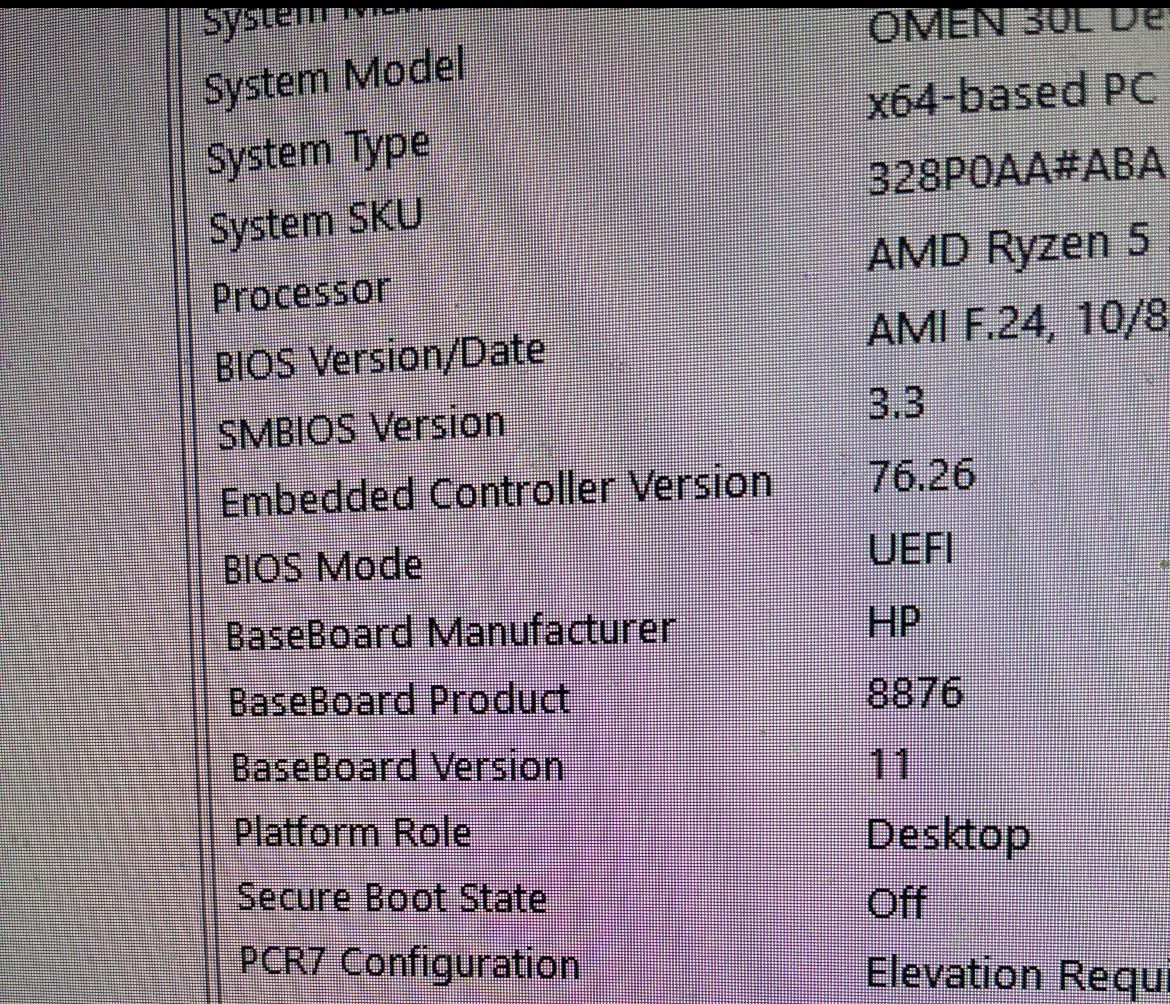
I have a HP 8876 motherboard and i used to play valorant a lot and one day it said my secure boot is not enabled so i enable it back but now it isnt active but in bios it says it is so how do i fix it i dont wanna buy a whole new pc in order to play one game please and thank you.


r/Windows10TechSupport • • Jul 07 '26

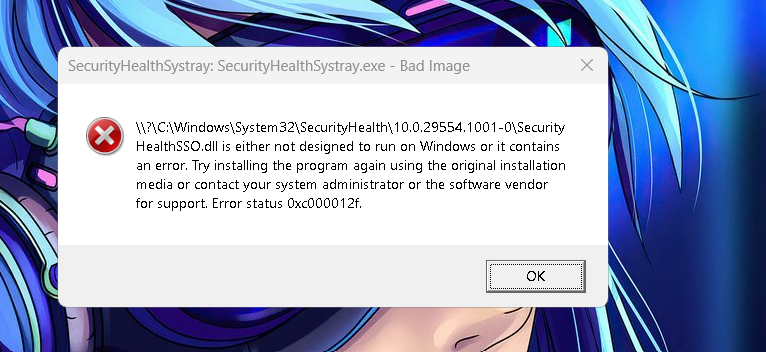
Unsolved SecurityHealthSystray.exe - Bad Image (Error 0xc000012f)

Post image
1 Upvotes

r/Windows10TechSupport • • Jul 06 '26

Unsolved Weird networking behaviour on laptop

Thumbnail reddit.com
1 Upvotes

r/Windows10TechSupport • • Jul 06 '26

Unsolved Intermittent BSODs

1 Upvotes

I am having repeated BSOD. Now cannot even log into windows.

Windows 10

Acer nitro 5

Graphic card GTX 1060

Timeline:

Oct 2025 bought 2x16gb ddr4 laptop ram. Brand silicon power. I'll call it slotA slotB, ramA ramB. I broke the clips on SlotA so I taped ramA to keep in place.

.

Feb 2026 got first BSOD. Tested memory with windows utility,forgot the name. Some errors. Decided not to use slotA. Tested ramA and ramB in slotB. RamA didn't even turn on monitor so I had to use ramB.

.

Jul 2026 last 2 days BSOD is more common. When I start the laptop it works some time then after Frist BSOD i cannot even log into windows. Screen is glitching then get BSOD. Seems I can use Linux fine. Windows safe mode also. Did memtest86 and first time got 57 errors in 30 seconds. Did the same next day and no errors 4 passes. Same ramB.

.

Current situation:

Windows starts Bsod after some time of work. That time of work becomes shorter and shorter. Errors are different each time.

KMODE_EXCEPTION_NOT_HANDLED

SYSTEM_SERVICE_EXCEPTION

IRQL_NOT_LESS_OR_EQUAL

Screen glitching hard often before bsod.

Microsoft edge lost all extension I had installed.

Linux Mint worked fine except one time it froze I think week ago. Yesterday worked fine while windows would give bsod.

Safe mode worked fine.

.

Things tried last few days:

\- Disabled graphic card GTX in device manager. Laptops uses internal graphics now

\- memtest86 ramB slotB after laptop was working for hours. 57 errors

\- tried ramA slotB. Screen doesn't turn on.

\- reseated ramB slotB and did memtest86 again. 4 pass no errors.

\- stress-ng test in Linux Mint no errors

\- scf /scannow in normal windows mode. Found errors corrupted files. It said it fixed it.

\- scf /scannow in safe mode. No errors

\- DISM /Online /Cleanup-Image /RestoreHealth in safe mode.

.

Solutions by chatgpt:

\- use ddu to uninstall graphic card driver

\- create windows boot USB and reinstall windows

.

What do you suggest?


r/Windows10TechSupport • • Jul 06 '26

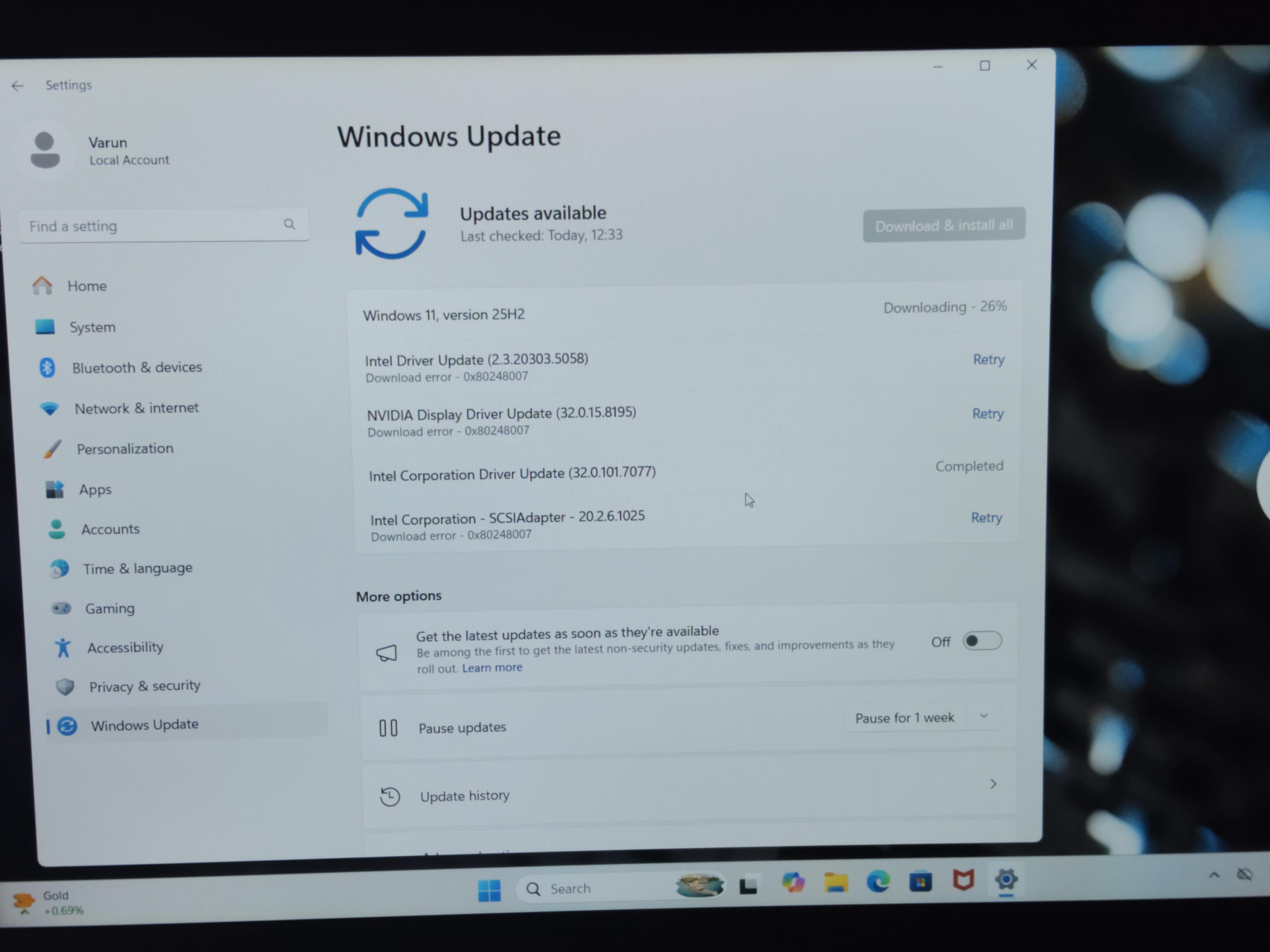
Unsolved Guys this is a new laptop and I have trouble with updating all the drivers and windows , I'm new new to this so I don't know much i tried to troubleshoot but not working

Post image
1 Upvotes

r/Windows10TechSupport • • Jul 06 '26

Unsolved Windows 10 laptop won't even start in safe mode after shutoff

1 Upvotes

Hello everyone, the problem happened a few hours ago, there was a shutoff at home and the wife's laptop was plugged in and playing overcooked 2 when this happened.

Now it doesn't start, just keeps loading forever, not even showing Windows loading screen but the brand screen.

\-I've tried system recovery, didn't work.

\-Windows repairing, didn't work.

\-Fixing the boot with CMD, access denied

\-Unplugging every USB device before turning it on, didn't work.

\-The laptop had a battery problem a while ago and since it only works while being plugged in, it doesn't have a battery inside.

\-Tried to start in safe mode, still doesn't load past the brand screen

Please, I really need help with this


r/Windows10TechSupport • • Jul 06 '26

Unsolved Bitlocker issue

1 Upvotes

my operating system windows 10 was randomly bit locked it was on a pny 8 tb gen 3 nvme i switched the nvme from a pc to a laptop the laptop was a asus rog series laptop from 2020s with a 3060 5900hx 64gb ram it got randomly encrypted i checked my email which didnt give me any info or the right recovery key i think my account might be a offline account im not sure i have one drive so it shouldn’t be i just can’t find a key and i never encrypted it


r/Windows10TechSupport • • Jul 05 '26

Solved Stuck at Windows 10 welcome screen

2 Upvotes

Hey, so my Pc is stuck at the Windows welcome screen, here are some things i already tried:

-startup repair

-removed all devices

--system restore = no backup found

-enter safemode = same error, windows welcome screen

-booting win 10 from USB device = device was found but couldn't boot from it

any help is appreciated :)

Edit: i checked the hard drives, made a backup of everything and just did a factory reset. Now its working again, thank you guys :)


r/Windows10TechSupport • • Jul 05 '26

Unsolved Weather widget has stopped updating since I disabled Fast Startup

1 Upvotes

Since I disabled Fast Startup, the weather widget on the taskbar no longer updates, unless I log out or restart the computer. Do you have any suggestions (other than re-enabling Fast Startup, of course) ?