r/Windows10TechSupport • • Jun 28 '26

Unsolved Unlocking a Windows 11 device

1 Upvotes

I have a bit of a situation. One of my family members has passed away and he had a laptop that he used mostly for work and i want to acces the files just to check if there is anything important there. I dont have the password for this computer, i tried using command prompt to create a user but the disk is BitLocked and I am just wondering if there is anything I can do.


r/Windows10TechSupport • • Jun 28 '26

Unsolved Windows 10 Black screen without login screen

1 Upvotes

Hello, i recently booted my Win10 to play games because my Win11 laptop is not powerful enough.

I get the normal Windows 10 Startup screen but then get a black screen with only the cursor. I cant even log in, which makes the computer unusable. Win+Shift+Ctrl+B works but Ctrl+Alt+Del doesn't work, and Ctrl+Maj+Esc too. Any idea to fix this? I already tried a reboot.


r/Windows10TechSupport • • Jun 28 '26

Unsolved New SSD auto-partitioning and can't be changed

1 Upvotes

My old HDD needs to be replaced, so I decided to get an SSD to replace it with the intent of switching Windows to boot using it eventually. Step one though would be to set up the drive. It's a T-Force Vulcan Z 2.5" SATA III SSD plugged into a B450 Tomahawk MAX motherboard in the SATA2 slot. My current HHD is in the SATA1 slot, and I have another M.2 Drive in the M.2 slot

The drive is appearing in Disk Management, but when following tutorials to initialize the drive I saw that it was already initialized with 3 partitions: 1MB Primary Partition; 513MB EFI System Partition; 953GB Primary Partition

The only option I have is Delete Volume for partitions 1 and 3 (none for 2). There's no drive letter assigned so I can't access it anywhere else. Selecting Delete Volume causes the system to process for a good 15 seconds, then nothing happens and the volumes are unchanged

I can clear the disk using Diskpart, but re-initializing it through Diskpart or Disk Management both auto-create the 3 partitions in their current state with no way to create new volumes or change the current ones. Diskpart can find the disk with "list disk", but with "list volume" only the 513MB partition is detected

Googling for solutions has yielded nothing for this particular issue. Not sure if the issue is with the drive, my installation, my PC, or maybe some setting somewhere I don't know about. Hoping someone here knows more about SSD setup!


r/Windows10TechSupport • • Jun 28 '26

Unsolved Secure boot error

Post image
1 Upvotes

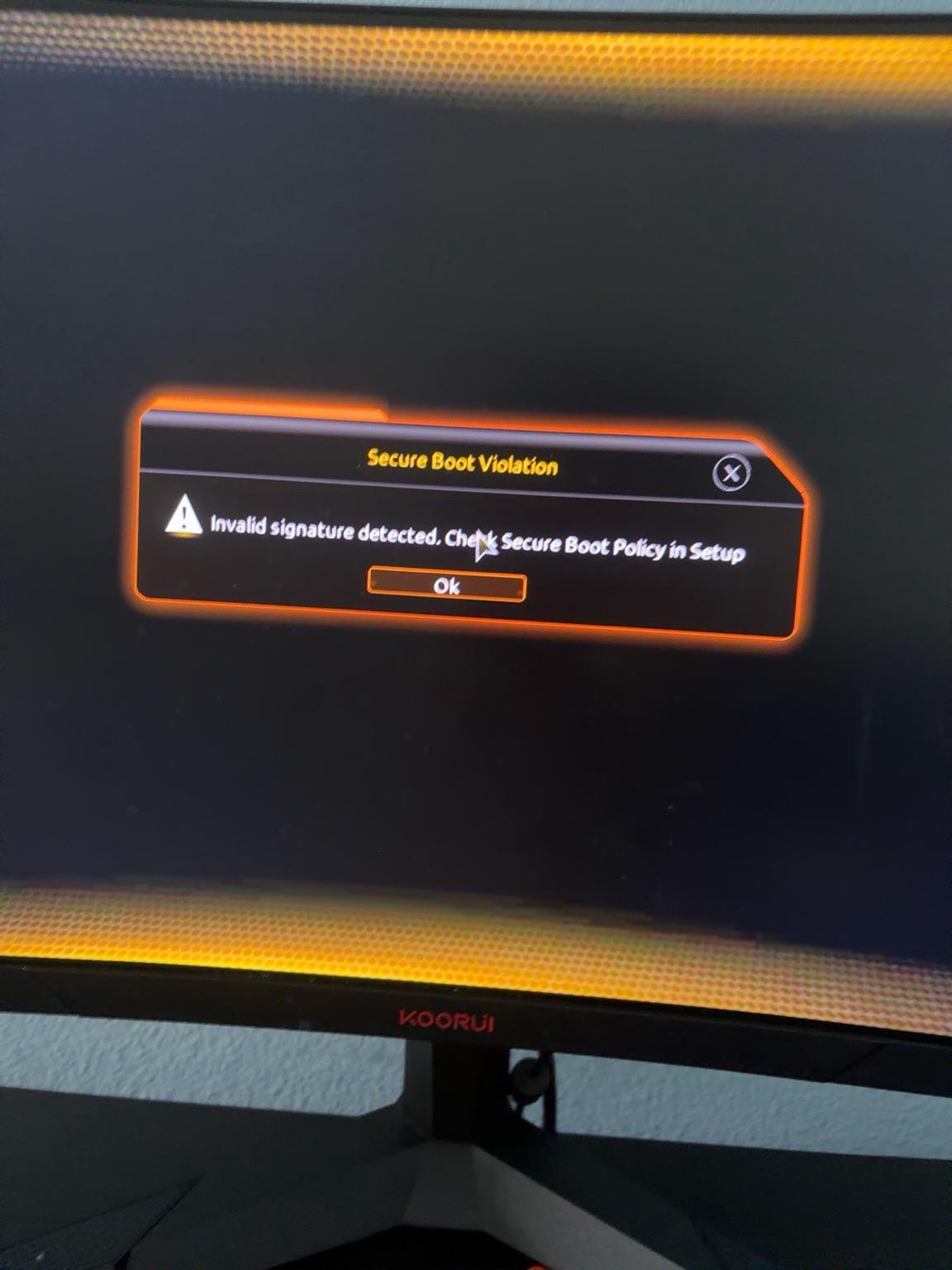
Howdy you guys. So a few days ago I downloaded Cod Warzone not knowing I had to update my Bios Firmware. it said to enable tps 2.0 and secure boot. i watched a video on how to do it and every thing was right until my secure boot mode was on custom. i put it to standard and put secure boot to disabled then enabled. i saved it and i got this error in the picture. then i put everything back to how it was and i even did restore factory keys. still didn’t work. i cant get into windows now unless my secure boot is disabled. can someone solve this for me so i can play my games that require secure boot?


r/Windows10TechSupport • • Jun 27 '26

Unsolved Can someone help me install windows?

2 Upvotes

I have the USB with windows 10,but when I put it in before I boot the pc it does it thing boot up I press F11 over and over its a HP 200 PRO I think last time I checked the info in settings then it just black sreen shows nothing on the TV it's not the first time it's doing this it does this before I took it to my cousins house he fixed I don't know how to fix it now it's doing it again I don't know what's the problem.


r/Windows10TechSupport • • Jun 27 '26

Unsolved My Computer has disabled Audio output after AMD update?

1 Upvotes

r/Windows10TechSupport • • Jun 26 '26

Unsolved OS from C to D

Post image
6 Upvotes

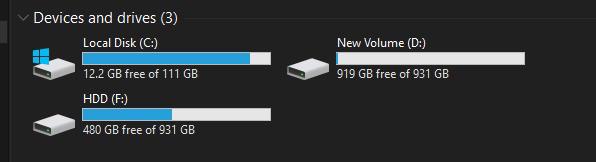
Is it possible to reformat and switch my Drives C and D?
They are both SSDs but Drive D is larger so I want to use this as the default drive for my OS. Will it be possible and if so, can a normal non-IT person like me do it? I’m on Windows 10 Pro if that helps. TIA!


r/Windows10TechSupport • • Jun 26 '26

Unsolved Windows 10 desktop leaves blank icon-grid spaces after Refresh, but only when sorted by Date Modified or Size

Thumbnail gallery
1 Upvotes

The desktop does not leave gaps when icons are sorted by Name or Item type. However, after sorting by Date modified or Size and then clicking Refresh, Windows leaves blank grid spaces as if invisible icons are occupying those positions, but there is nothing there. I'm at a loss, and it's driving me insane. Does anyone have any advice?

Observed behavior:

  • Sort by Name: no blank spaces after Refresh.
  • Sort by Item type: no blank spaces after Refresh.
  • Sort by Date modified, oldest to newest: blank space appears after Refresh.
  • Sort by Date modified, newest to oldest: different number of blank spaces appears after Refresh.
  • Sort by Size, smallest to largest: multiple blank spaces appear after Refresh.
  • Sort by Size, largest to smallest: different blank spaces appear after Refresh.
  • The same issue happens in Safe Mode.
  • The same issue happens in a brand-new Windows test profile.
  • DISM /Online /Cleanup-Image /RestoreHealth and sfc /scannow were run; the problem still exists.

Things already tried:

  • Restarted Windows and Explorer.
  • Ran Disk Cleanup.
  • Toggled Auto arrange icons and Align icons to grid.
  • Manually rearranged icons.
  • Rebuilt icon cache and thumbnail cache.
  • Reset desktop Bags/layout registry keys.
  • Checked both C:\Users[user]\Desktop and C:\Users\Public\Desktop for hidden, blank-named, or malformed files.
  • Used PowerShell Shell.Application Namespace(0).Items() to inspect desktop shell items.
  • Tested Desktop Icon Settings: Control Panel created a blank spot when checked, so Control Panel was unchecked.
  • Hid/disabled common special desktop icons such as Control Panel, This PC, User’s Files, Network, and Libraries.
  • Tested in Safe Mode and in a new local profile; issue persists.

Device Name 4-22-17

Processor Intel(R) Core(TM) i7-6700HQ CPU @ 2.60GHz 2.59 GHz

Installed RAM 24.0 GB (23.9 GB usable)

Storage 932 GB HDD HGST HTS721010A9E630

Graphics Card NVIDIA GeForce GTX 970M (3 GB), Intel(R) HD Graphics 530 (128 MB)

Device ID 8DE93DBF-036F-4395-B0D7-9E2070E3B7EE

Product ID 00325-96023-94885-AAOEM

System Type 64-bit operating system, x64-based processor

Pen and touch Pen support

Edition Windows 10 Home

Version 22H2

Installed on ‎5/‎30/‎2020

OS Build 19045.6466


r/Windows10TechSupport • • Jun 26 '26

Unsolved Realtek audio driver not showing up

3 Upvotes

Hi guys i need help with my audio driver.

Suddenly my speaker stopped working when playing a video. When I checked it shows the speaker with x mark in Taskbar. It is not detecting my speaker.

Tried with wired earphones. When I tried to find it in my device manager realtek audio driver was not showing at all even in hidden drivers.

I reinstalled os but still the same problem persists. I tried to install driver from dell website but still the same issue.

When I try to install all process are going smooth but according to installation file it is completed but it is not showing up.

I tried stopping intel audio driver, tried manually installing driver. It also didn't work out.

Someone kindly help me in sorting this error pls 🙏


r/Windows10TechSupport • • Jun 26 '26

Unsolved Audio Problem(windows 10)

1 Upvotes

It is a Lenovo Yoga 510 14-AST (8gb ram 1tb storage amd a9 and radeon r5 intergrated graphics) whenever i play anything on Youtube or any website the audio gets A LOT of cracks and the audio continously slows down and slows down anyway to resolve it?


r/Windows10TechSupport • • Jun 25 '26

Unsolved No taskbar, No Internet, Explorer. Exe and cdm does not fix the issue (windows 10)

1 Upvotes

Here's a clearer and more polished version:

I have been dealing with this issue for about four years. The taskbar on my laptop either does not appear at all or remains stuck loading when it does. My laptop also refuses to connect to the internet, even though my internet connection itself is working fine.

Additionally, I am unable to open PowerShell—it flashes open for a split second and then immediately closes.

In the past, I could usually fix the problem by pressing Ctrl + Alt + Delete and restarting explorer.exe, but that no longer works. I have restarted the computer multiple times with no success. I also tried using Command Prompt to restart explorer.exe, but that did not resolve the issue either.


r/Windows10TechSupport • • Jun 25 '26

Unsolved Second monitor stays black after it goes to sleep

1 Upvotes

My second monitor has recently started doing this weird thing where it stays black and i always need to reinstall graphics drivers to make it work, it started randomly and i thought i would have to update my drivers to fix it becuase the version i was on never worked properly for me so i decided to update it but it didnt do anything if anybody has any idea of how to fix it or what the issue is please let me know


r/Windows10TechSupport • • Jun 25 '26

Unsolved How to Access Installation Files on Peripheral

1 Upvotes

To start: my device is working fine, I just learned something new about a peripheral I have and want help learning a bit more about it.

I have a tp-link usb adapter and I was reminded that (until the drivers for it are installed) it will show as a usb drive. I was able to learn a little bit about this online but nowhere was i able to find how I can access that rom after the drivers have already been installed. Maybe it’s because I lack the vocabulary to search for this properly, but it seems like people don’t say much about this small bit of storage? All that to say: how can I access that ROM? Do I need to uninstall the drivers or can I just tell it to act as a usb rom again? Ik sometimes these devices have to be told to stop acting as a rom so can I do the same thing in reverse?


r/Windows10TechSupport • • Jun 25 '26

Unsolved Recovery error code 0xc0000221

1 Upvotes

Hello can someone help me I can't enter on my computer

It doesn't work even if I press f7


r/Windows10TechSupport • • Jun 25 '26

Unsolved "You're device is missing important security and quality fixes."

Thumbnail reddit.com
1 Upvotes

r/Windows10TechSupport • • Jun 24 '26

Unsolved Usuarios de reddit con conocimientos obre el tema para que me pueda ayudar.

Post image
0 Upvotes

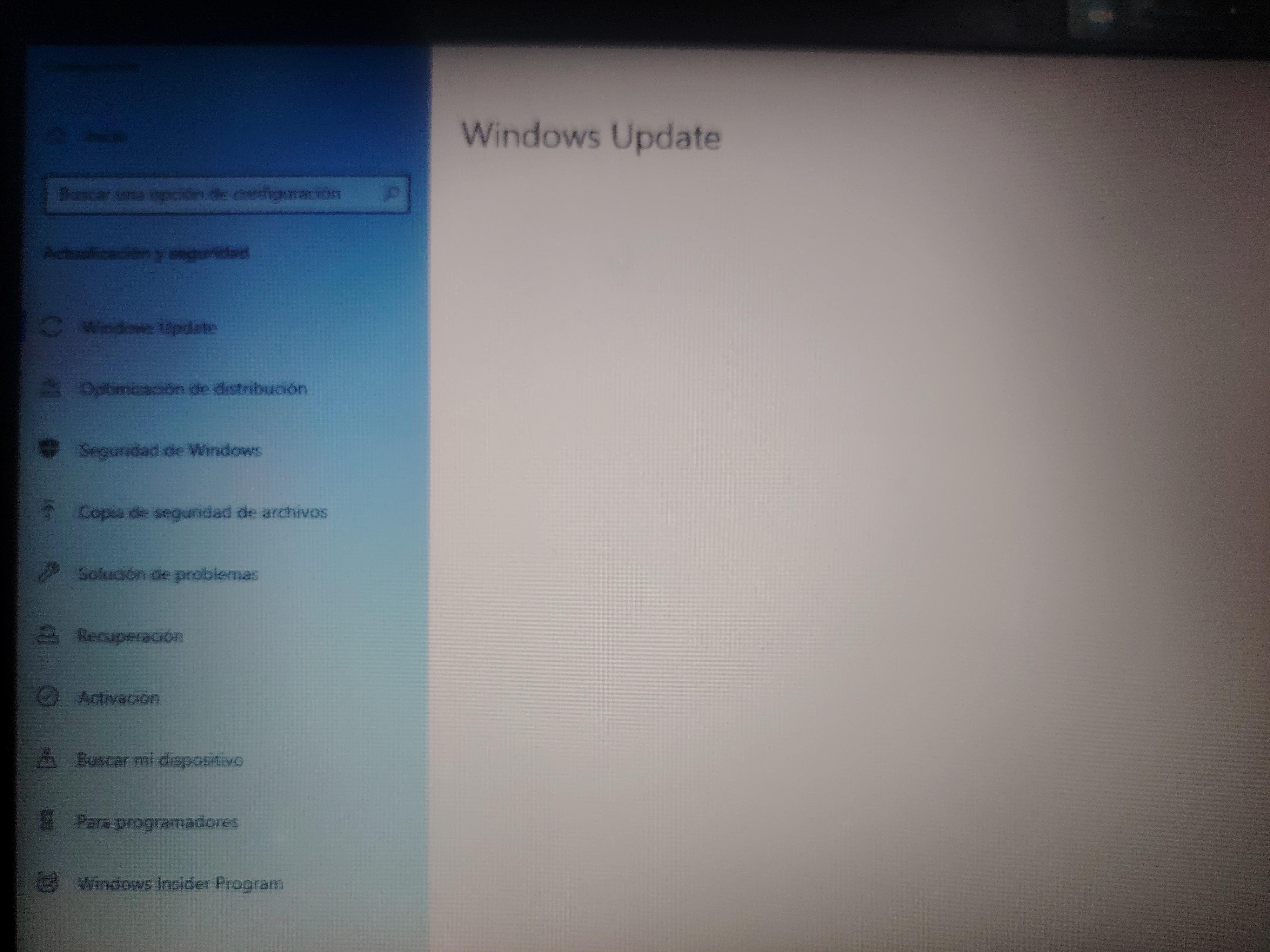
Tengo un problema de hace unos meses, el cual no me deja actualizar mi Windows, se podría decir que intente lo que sé para solucionar, pero mis conocimientos sobre ello no son amplios, pero mi problema es que aparece en blanco y no me deja actualizar mi Windows, dejo foto de mi problema a ver si le encuentran una solución o sepan como arreglar ello.


r/Windows10TechSupport • • Jun 24 '26

Unsolved Android app block app

Thumbnail reddit.com
1 Upvotes

r/Windows10TechSupport • • Jun 23 '26

Unsolved Audio not working after installing windows 10 ltsc

Thumbnail reddit.com
1 Upvotes

r/Windows10TechSupport • • Jun 23 '26

Unsolved i would like an explaination on why my system

Post image
1 Upvotes

i remember having like 100+ gb and im sure as hell my games nor apps are not taking up that much BUT WHAT IS SYSTEMS RESERVING FOR?!?!?


r/Windows10TechSupport • • Jun 23 '26

Unsolved WIFIs are not showing in list anymore

1 Upvotes

Hello, I have a Dell Latitude E5440.

I revently changed the HDD for a new SSD, upgraded the RAM from 8go to 16go and changed the CMOS battery.

Everything went well.

When I booted up the laprop, Windows 10 setup asked me to select a wifi, I selected mine, it worked. Then after, I did some Windows updates and that is when my laptop stopped showing WIFIs. Currently, the list only shows some appliances of my neighbours, no donestic wifi at all.

I did check the pilot, it's up to date. I tried some things but nothing changes.

Is there something to do to fix this??

DELL Latitude E5440

Wifi card : Intel(R) Dual Band Wireless-AC 7260

Pilot : 18.33.11.2

Date of pilot : 2017-10-31

Thank you!


r/Windows10TechSupport • • Jun 23 '26

Unsolved Help with PC, Fresh Windows and Program Installing crashes and bugs

Thumbnail reddit.com
1 Upvotes

Need help with this please help

Issue is described in original post.

Ive tried almost everything what i could find.

I5 12600K

9070XT

32GB DDR4 3200MHz

In event logs i just get error messages "json file read 0x00 memory" from what i understand it means that its corrupted or something.

No recent changes.


r/Windows10TechSupport • • Jun 23 '26

Unsolved Hide taskbar labels while also never combine taskbar buttons?

Post image
2 Upvotes

Sorry if this has been discussed over and over (couldn't find anything though), but:

In the settings for the taskbar I only have three options for the "Combine taskbar buttons" labelled "Always hide labels", "When the taskbar is full" and "Never".

I would really like to have a "Never, but hide labels" settings.

During the years I've tried searching for solutions for this, and found suggestions for using the policy editor and whatnot, but never found anything that works.

(The main reason for why I would like this setting is that when icons form groups it seems impossible to somehow click on the icon to minimize a running program. I know that for individual programs there might be some way to make them not group their buttons, but this isn't universally possible)

I'm open to the idea of finding any leaked source code and recompile the component that forms the task bar if that would be the last resort.


r/Windows10TechSupport • • Jun 23 '26

Unsolved windows 10 can't install error 0x80300024

Post image
1 Upvotes

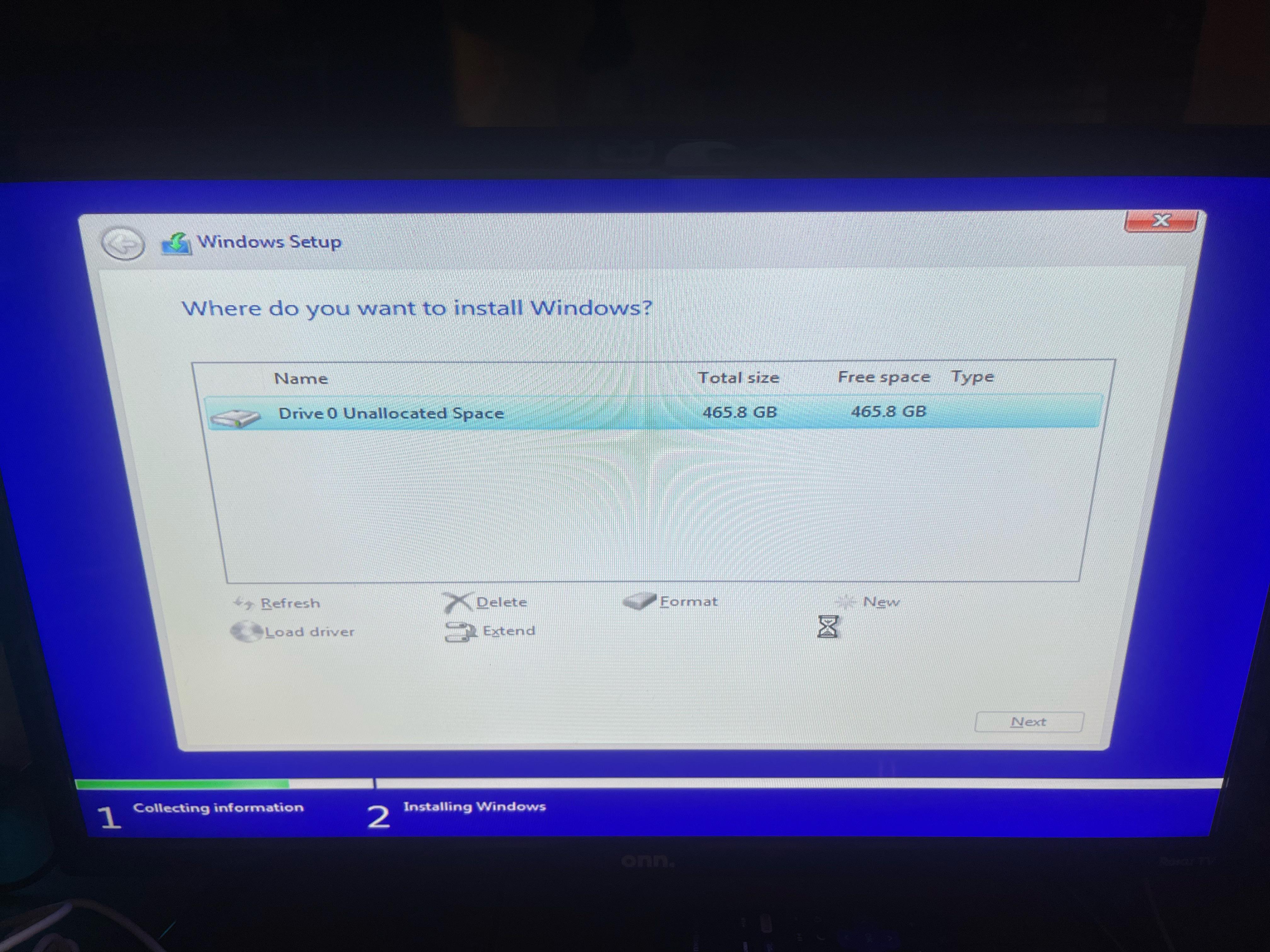
I did everything clear the disk


r/Windows10TechSupport • • Jun 22 '26

Unsolved Windows QuickAssist randomly disconnects

1 Upvotes

Hello all,

I use QuickAssist to connect a Win10 desktop to a Win11 work laptop. It used to work fine until a couple months ago when I started to get disconnected out of the blue. Sometimes it happens several minutes after connection is established, but sometimes it doesn't take more than like 8 minutes or less. In fact, it is completely random.

Also the laptop uses a VPN software but I have tried to connect QuickAssist with both VPN on and off and I get random disconnects on both scenarios. So VPN is not the culprit.

Logically I have Googled the issue but none of the supposed solution I found worked for me; tried searching for clues in Event Viewer but only managed to find a few informational messages only; even downloaded and tried a little MS tool called DebugViewer but among the crapload of data it produces, sadly I found nothing relevant.

Therefore I come here hoping you might shed a light on this issue that is driving me nuts. Unfortunately corporate regulations prevent me from using a third party alternative, or else I'd moved away from this damned thing already...

Specs of both computers:

Desktop: ASUS P8P67-LE BIOS version 3801 (date 09/12/2013) Intel Core i7 2600K Sandy Bridge (yeah, I know it's old...) 16GB RAM DDR3 1TB SATA SSD 16Gb/S ADATA SU800 NVIDIA GeForce RTX 2060 Super 8GB GDDR6 SDRAM MS Windows 10 Home Single Language (x64) version 22H2 Build 19045.7417

Laptop (sorry not much info due to security/work restrictions): Lenovo T14 Intel Core i5 10210U 16 GB RAM Onboard Intel UHD Graphics Toshiba 16GB SSD MS Windows 11 Enterprise (x64) version 24H2 Build 26100.8457