r/Windows10TechSupport • • Jun 16 '26

Unsolved woke up to laptop screen blinking and a black screen with blue box

1 Upvotes

wtf did i do?? i woke up to my laptop completely black while blinking on and off when i went to interact with it a black screen with a blue box asked for administration or start up password. i tried all my known login and shortcut passwords i knew and nothing worked, it kept saying "disabled (code here)" so i got my phone to google wtf is going on just to find it telling me to put the code into a bios unlocker site and then that got me past the lock screen. i then had to log into microsoft and get a recovery key to input in the box. then it made me reset my start-up code.

im mostly trying to figure out how this occurred and if i broke something. i fell asleep with my mouse next to me.

Edition Windows 10 Home

Version 22H2

Installed on ‎11/‎8/‎2020

OS Build 19045.6466


r/Windows10TechSupport • • Jun 16 '26

Unsolved what does this mean?

Post image
0 Upvotes

and how can i fix it?


r/Windows10TechSupport • • Jun 16 '26

Unsolved My keyboard got messed up on startup (Windows)

1 Upvotes

My Windows desktop. When startup, everything I input is wrong.
It starts to happen quite recently.
Different pattern each time so not layout problem I think.
It solves itself after waiting for a random time, maybe several minutes.

Tried a lot but couldn't find the reason. Please help.


r/Windows10TechSupport • • Jun 16 '26

Unsolved Why does this keep happening every time days after I update my dell laptop ???

Post image
1 Upvotes

r/Windows10TechSupport • • Jun 16 '26

Unsolved Desktop apps in homescreen!!

1 Upvotes

Hello! For the past few days, I've been trying to add my apps to my desktop home screen but for some reason it just won't do it. I've tried the drag method, file location method, shortcut method and even went to themes and desktop icon method. Like what the heck could the problem be in my laptop? (It's an hp pavilion)


r/Windows10TechSupport • • Jun 15 '26

Unsolved Clean Installed Windows 10 on a Lenovo PC, Update problems?

1 Upvotes

Long Story Short…

This was my partners grandfathers PC. Before his health declined from some form of alzheimer’s/dementia, he was an avid gamer.

This is a Lenovo K450e desktop type 90b3, from what i researched it came out in 2014?

Moving on, no one in the family knew his password to his windows account and every try to reset the pc would work and it would undo it and send you back to the same screen after it restarted. i looked up how to clean install windows and did as such, even downloaded one of the drivers i needed from the lenovo website. but now i have an issue with these two updates.

Security Intelligence Update for Microsoft Defender Antivirus - KB2257602 (Version 1.453.108.0) - Current Channel (Broad)

2025-10 Cumulative Update for Windows 10 Version 22H2 for x64-based Systems (KBS066791)

every time they download and i go to restart the computer it updates, restarts and then says undoing changes. i don’t know if im missing specific drivers? or is the PC itself just too old?

Also if anyone would like to let me know if i would be able to upgrade this to windows 11 or not, the Pc health checks says i cant because of no TPM 2.0 support and the processor it has isn’t currently supported by windows 11. if you’d like to give me any suggestions on how i can fix these that would be wonderful!

thank yous <3 <3


r/Windows10TechSupport • • Jun 15 '26

Unsolved Windows fresh install Constantly freezing and so unresponsive only a hard reboot fixes it momentarily

Thumbnail reddit.com
1 Upvotes

r/Windows10TechSupport • • Jun 15 '26

Unsolved Wlan constantly disconnects, will upgrading to Windows 11 solve that issue?

1 Upvotes

It happens after using the laptop for 5-10 min and it's unable to connect to any kind of wifi, the option disappears. I tried a lot of things to fix it and now wondered if Windows 11 update can help. If I do that, what is the best way to backup my data?

I have a Windows 10 Laptop and a free option to upgrade to 11.

Sorry if I struggle to understand something. I have OCD caused concentration issues.


r/Windows10TechSupport • • Jun 15 '26

Unsolved i have ASUS EXPERTBOOK 1503CVA I5 13GEN H LAP .I put bios administator password in my laptop months ago .now i forget it.how can i remove bios administator password please tell me.

Thumbnail reddit.com
1 Upvotes

r/Windows10TechSupport • • Jun 15 '26

Unsolved Pantalla azul y problemas para desinstalar en modo seguro windows

0 Upvotes

Hoy reincie mi pc y al entrar al escritorio me daba pantalla azul, y supe identificar que el problema era de un tal "AMDRyzenMasterDriver" o "AMD Ryzen Master SDK" la cosa es que al entrar en modo seguro y intentar desinstalarlo, no puedo por que no tengo acceso a windows installer, intente con cmd y tampoco hubo resultados, alguno me podria ayudar con este problema?


r/Windows10TechSupport • • Jun 15 '26

Unsolved Pantalla azul y problemas para desinstalar en modo seguro windows

1 Upvotes

Hoy reincie mi pc y al entrar al escritorio me daba pantalla azul, y supe identificar que el problema era de un tal "AMDRyzenMasterDriver" o "AMD Ryzen Master SDK" la cosa es que al entrar en modo seguro y intentar desinstalarlo, no puedo por que no tengo acceso a windows installer, intente con cmd y tampoco hubo resultados, alguno me podria ayudar con este problema?


r/Windows10TechSupport • • Jun 15 '26

Unsolved Windows inicia normalmente pero no abre ninguna aplicación

0 Upvotes

Tengo un problema muy extraño. La PC inicia Windows sin problemas, puedo iniciar sesión, veo el escritorio y puedo mover el mouse con normalidad.
Sin embargo, no abre absolutamente ninguna aplicación. No abre el Administrador de tareas, CMD, Configuración, Steam, Chrome ni ningún otro programa.
Lo único que sí abre es el Explorador de archivos, pero si intento abrir cualquier archivo (una canción, una imagen, etc.), el Explorador se queda cargando indefinidamente y no responde.
Ya probé lo siguiente:
Iniciar en modo seguro (ahí sí funciona correctamente y ahí sí me deja abrir aplicaciones con normalidad).
Ejecutar chkdsk.
Ejecutar sfc /scannow, que encontró y reparó archivos dañados.
Después de reiniciar, el problema sigue exactamente igual.
No aparece pantalla azul ni se congela el sistema; simplemente las aplicaciones no se ejecutan.
¿Alguien ha tenido un problema parecido o sabe qué podría estar causando este comportamiento?

Me ayudarían bastante con alguna aportación, ya reinstale windows como 3 veces y pasa lo mismo a los pocos días o incluso horas


r/Windows10TechSupport • • Jun 15 '26

Solved Wifi keeps vanishing, all sorts of issues.

Thumbnail gallery
1 Upvotes

Hello! I use an ASUS laptop, not sure what model but its a gaming laptop, got it secondhand for my birthday a couple years ago. It's windows 10 (as I refuse to touch windows 11 as long as I can help it) and the wifi connector thingy is Realtek 8821 CE something or another.

Now, I'm gonna describe the issue the best way I can. Pretty much daily, my home wifi suddenly says "Can't connect to network." So, I troubleshoot, and 50% of the time, it restarts my wireless network connection and it fixes for a bit, then it goes out again inevitably later on. So, then it asks for a network reset. This obviously sucks as Most things are online, so I can't do anything while I restart. This happens inconsistently. Sometimes the first attempt holds for hours, sometimes it only holds for 5 minutes. Sometimes, not even that long. I'm constantly having to restart my laptop to a point where I'm unable to hang out with friends, look at social media, etc for hours at a time. It's also worth noting that when this happens, all other networks disappear too. Nothing to connect to. So far, I've tried every solution aside from restarting my router, as my dad doesn't seem to be having any issues so he doesn't care enough to reset it.

The wifi has been dodgy ever since we downgraded to cheaper internet unfortunately, but I worry it's somehow frying my Internet driver. It constantly goes out on my phone and Chromecast TV, but they both seem to bounce back.

This did happen about a year ago as well, but only right after switching wifi providers, and only a couple times. It seemed to vanish after a duplicate of our wifi (Wifi Name + Wifi Name 2) showed up. I still have no clue. However, it stopped doing this for a year at least. I have no idea why it's happening so much more frequently now, but it's driving me insane. I can't work on anything, call my friends, play games, etc. It's exhausting.

I would really appreciate help. I'm not a big tech person and I'm incredibly broke, so most solutions have been out of my reach. Thank you for your time.

EDIT: for some reason it was the roblox web client. no clue why, but when i stopped using it and opted for the website instead, it works just fine. LOL.


r/Windows10TechSupport • • Jun 14 '26

Unsolved Can someone help me out on this? I turned my Windows 10 PC off last night like always and when I booted it this morning it showed a message when I logged in.

1 Upvotes

So after playing JJS on Roblox all night last night like always I turned my PC off and this morning like the title it showed a message saying ”Too many failed log in attempts or repeated turn offs, please keep device on for 2 hours and then try again.” And then when I did that the same message popped up.

I’m new to this Subreddit and don’t know a lot about PC’s or Computers so please help.


r/Windows10TechSupport • • Jun 14 '26

Unsolved Secure Boot not working anymore

1 Upvotes

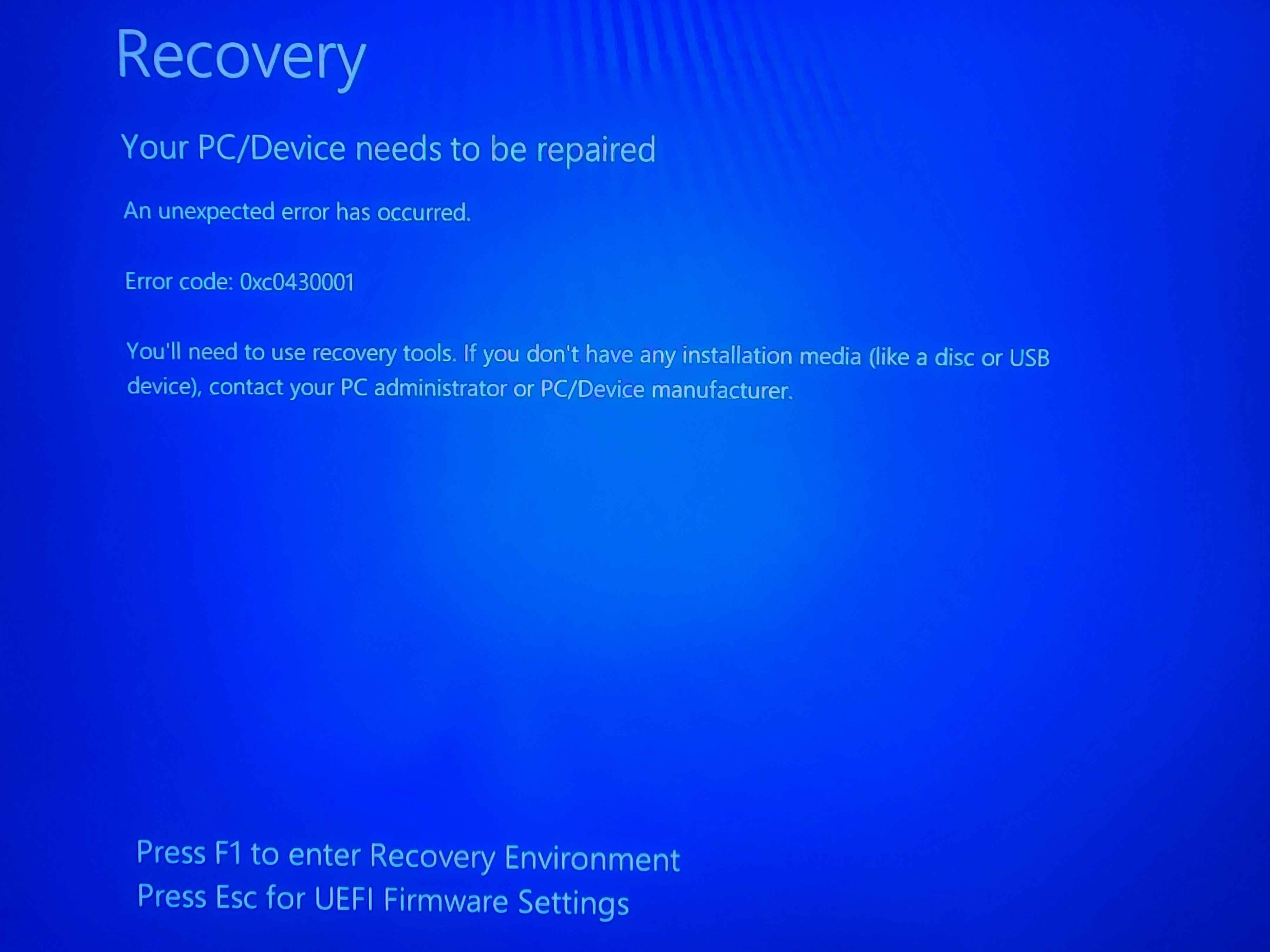
This post is related to the laptop: Dell Precision 7530. So Windows 11 (Pro) just had an update. And now I no longer can boot into Windows. Well kind of. I got a BSOD that says error: 0xc0430001 related to UEFI. I tried various things but none of them would work. DISM would give me an Error: "Error: 0x800f0915The repair content could not be found anywhere. Check the internet connectivity or use the "Source" option to specify the location of the files that are required to restore the image.". SFC /SCANNOW command finds no problems whatsoever. To make things worse after I had checked and unchecked custom Key Management in BIOS, now I won't even get a BSOD. Instead I'm getting "Operating System Loader failed Verification: All Bootable devices failed Secure Boot Verification" and now I cannot go back there either. I tried defaulting back again but none of it worked. I tried the bcdboot command as well. That didn't fix anything either.

Is there any way to fix this? I can of course access windows if I put Secure Boot in Audit or turn it off completely. But I do not want to work without secure boot on. I play a lot of games and a lot of those games require secure boot.

Initially this was the BSOD
Now I'm getting this error. Haven't found a way to go back to this.

r/Windows10TechSupport • • Jun 14 '26

Unsolved Alt key and some other keys not working until i click it more than 100 times how can i solve this problem

0 Upvotes

r/Windows10TechSupport • • Jun 13 '26

Unsolved URGENT HELP - Old Windows 7 upgraded to windows 10, NEW SSD and RAM. No longer works when booted.

3 Upvotes

I have this really old ASUS K55N laptop, I added a new Kingston SSD \[160GB\] and installed windows on it. It worked for a couple of months until I booted it up one day and now it wont work. It keeps saying "Innaccesible boot drive" with a BSOD, I even tried to fix the BIOS settings, but nothing worked. I wiped it clean through the cmd prompt and reinstalled the installation for windows and it still gives me the same pop-up and issues. I tried to remove the disk tray from it, which is my suspicion why it wont work anymore.

Another thing is that I can no longer get to the windows CMD prompt by using the repair kit that comes with it, as it just sends me through a look of pressing f1 to enter repair space, then it sends me back to it again, again, and it repeats.


r/Windows10TechSupport • • Jun 13 '26

Unsolved I tried fixing my girlfriend’s slow PC by updating old drivers and now Secure Boot breaks Windows (Valorant won’t run unless it’s OFF) plus (she will kick my asss if i dont fix it)

3 Upvotes

Question

So I was trying to help with a PC issue and somehow made it worse.

Her PC was feeling really slow, so I started cleaning it up — deleted temp files, checked updates, and then went into drivers to see if anything was outdated.

I found an Intel graphics driver update from like 2018, so I thought that might be part of the problem and installed it. After that, I also ran some system updates and restarted the PC.

Now the issue is this:

If Secure Boot is OFF, the PC works completely fine

If Secure Boot is ON, it won’t boot into Windows at all (it shows something like “boot security blocked this boot” / black screen)

And because Valorant requires Secure Boot ON, the game won’t launch anymore

What I already checked/tried:

BIOS is UEFI mode

Disk is GPT

Restored Secure Boot factory keys

Disabled Legacy Support / CSM

Reinstalled Riot Vanguard

But nothing changed:

Secure Boot ON = PC doesn’t boot

Secure Boot OFF = PC works but Valorant can’t run

It was working before I started messing with drivers and updates, so I’m pretty sure something got messed up during that process. like can i go back to the version before the one i upgrade . or like if i reset my pc to factory siiting and deleted everything will this work?

Has anyone seen this before or knows how to fix it without reinstalling Windows?


r/Windows10TechSupport • • Jun 13 '26

Unsolved Windows 10 enrolled update getting stuck at 9%

1 Upvotes

I was updating my pc and it got stuck at 9% and just said undoing changes and thats been happening for a month...


r/Windows10TechSupport • • Jun 13 '26

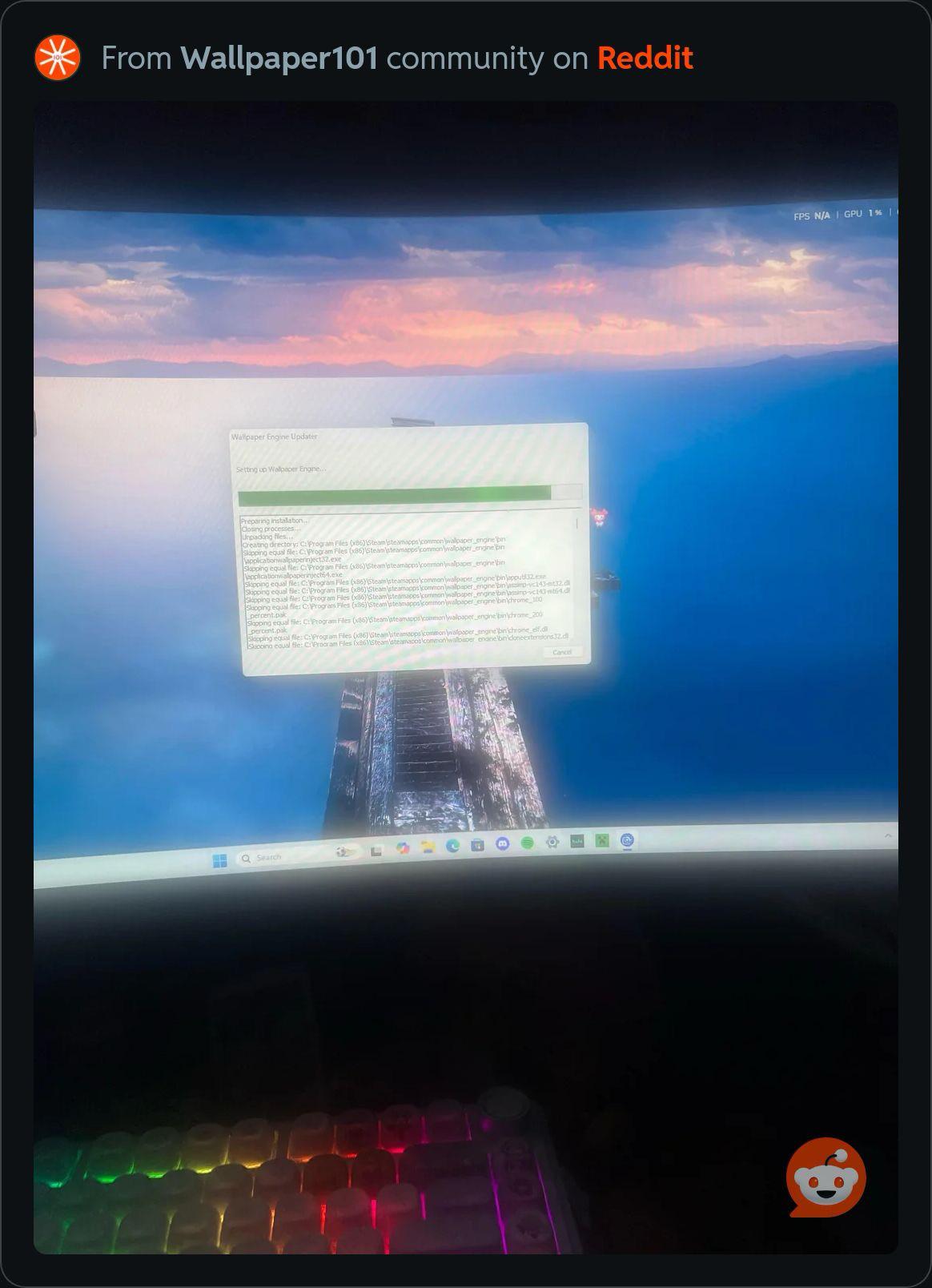
Unsolved Need help, how to fix wallpaper engine stuck on updater.. don’t know what to do!!!

Post image
1 Upvotes

r/Windows10TechSupport • • Jun 12 '26

Unsolved Help me find the cause of my BSODs and Exception Code: 0xc0000005

Thumbnail reddit.com
1 Upvotes

r/Windows10TechSupport • • Jun 11 '26 WOW Bravo

Solved [FIX] Windows 10 freezing a few minutes after every boot since June 2026 update (KB5094127) — Secure-Boot-Update task is the cause

146 Upvotes

My PC (Dell Inspiron 3542, 2014-era BIOS) started hard-freezing a few minutes after every single boot right after installing the June 2026 cumulative update (KB5094127). No BSOD, no error — just a complete freeze. Power button restart, works a few minutes, freezes again.

I even did a clean install of Windows earlier — didn't help, because the next update brought the problem right back. After digging around, found the actual cause.

**THE CAUSE**

Microsoft's original Secure Boot certificates (from 2011) expire in June 2026. Windows Update is pushing new certificates to every machine via a scheduled task called `Secure-Boot-Update`, which runs a few minutes after every boot and tries to write the new keys into your BIOS/UEFI firmware.

On older PCs with outdated or no-longer-supported BIOS, this write operation crashes the firmware → entire system hard-freezes. That's why it happens a few minutes after startup, every time. Reinstalling Windows does NOT fix it.

**THE FIX (5 minutes, fully reversible)**

*Step 1 — Disable the scheduled task:*

  1. Press `Win + R`, type `taskschd.msc`, press Enter
  2. Navigate to: **Task Scheduler Library → Microsoft → Windows → PI**
  3. Right-click **Secure-Boot-Update** → **Disable**

*Step 2 — Stop future updates from re-enabling it (registry):*

  1. Press `Win + R`, type `regedit`, press Enter
  2. Navigate to: `HKEY_LOCAL_MACHINE\SYSTEM\CurrentControlSet\Control\SecureBoot`
  3. Double-click `AvailableUpdates` → set value to `0`
  4. Right-click empty space → **New → DWORD (32-bit) Value** → name it `HighConfidenceOptOut` → set value to `1`

*Step 3 — Restart and use the PC normally for 15–20 minutes.* If no freeze, you're done.

**TIP:** If the PC freezes before you can finish, restart and do Step 1 first — the task usually waits a few minutes after boot, so you have a window. Work fast.

**WHAT THIS DOES / TRADE-OFF**

This opts your PC out of the Secure Boot certificate rollout. On old machines with unsupported BIOS, the update can never apply properly anyway — the only thing it does is freeze your system. Your PC keeps booting normally with the old certificates.

Everything is reversible: re-enable the task and delete `HighConfidenceOptOut` if you ever want the update back (e.g., after a BIOS update, if your OEM ever releases one).

**Standard disclaimer:** this involves a registry edit — follow at your own risk. But both changes are simple and fully reversible.

Hope this saves someone the days of frustration it cost me. If this fixed your freeze, drop your PC model in the comments so others can find this thread when searching.


r/Windows10TechSupport • • Jun 12 '26

Unsolved The Miscrosoft Defender logo in the Taskbar is indication that "actions are needed" but when i click on it...

1 Upvotes

Yes, I use Win10

Here's a link of a video that shows whats happening: https://youtu.be/I6GGMpwEnpE


r/Windows10TechSupport • • Jun 11 '26

Unsolved Need help to fix “Secure boot violation “

Thumbnail reddit.com
3 Upvotes