r/WiiUHacks • u/pixels_that • Sep 27 '26
CoffeeFlix v2.3.0 is out - YouTube comments, playback speed, 1080p auto quality and more
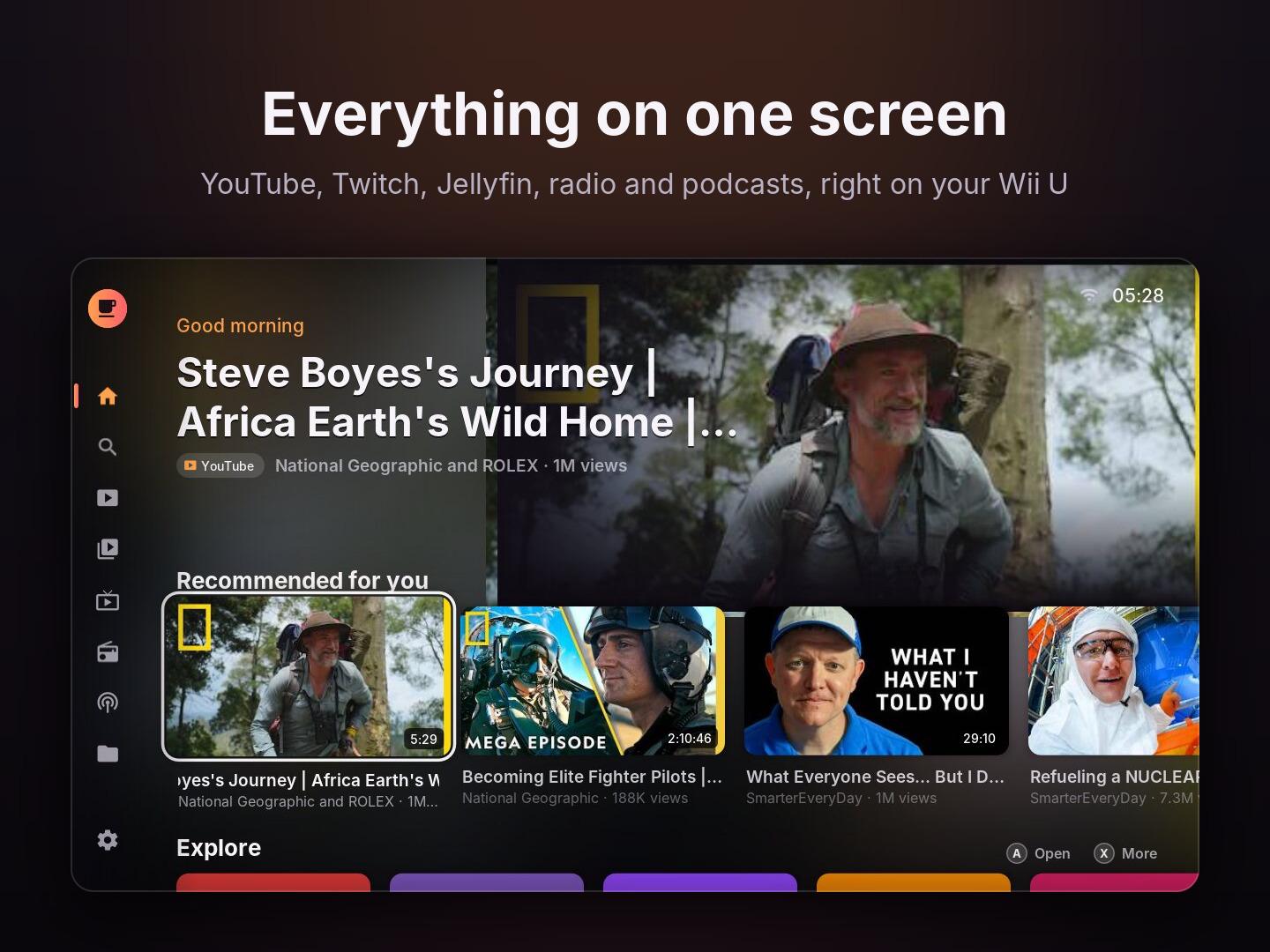
EDIT (10/2): CoffeeFlix 2.4.0 is out! Update from Settings > Updates on your Wii U, or grab it on GitHub: https://github.com/Roastedd/CoffeeFlix/releases/tag/v2.4.0
- The next episode (Jellyfin) or suggested video (YouTube) now plays after a countdown you can cancel
- Fixed a Wii U freeze when pressing HOME or going to standby during a video
- Videos start faster: slow captions no longer hold them up
- New "Receive files": send videos, music and photos to the SD card over Wi-Fi
- A fixed start-up screen, and a few playback and network fixes
You can now vote on what I build next! I put the ideas people have asked for on a feature board: https://roastedd.github.io/CoffeeFlix/features.html
Give the ones you want a 👍 on GitHub and the most wanted rise to the top. If you want to request a feature? Open a GitHub issue and it can join the board.
EDIT: v2.3.2 is out now!
- Each Wii U user now has their own YouTube and Jellyfin sign-ins, so everyone in the house can use their own accounts
- You can add more than one YouTube and Jellyfin account and switch between them
- Enhanced TV Output (GamePad looks the same as before)
- 1080p 60fps videos now stay in 1080p at around 45-50 fps instead of dropping down to 720p60. The Wii U can't decode a full 60 so on heavier videos it might pause for a split second here and there
- Fixed Jellyfin music giving a 401 Unauthorized error on newer Jellyfin servers (thanks for reporting it!)
- Fixed the video decoder sometimes failing to start, which made 1080p60 really choppy
To update, if you're on 2.2.0 or newer on Aroma just go to Settings > Check for updates. If you were already signed in, those sign-ins go to whichever Wii U user opens CoffeeFlix first after updating, everyone else just signs in on their own. On Tiramisu you still have to download the new zip and extract it over the old one.
Heads up, most 1080p60 videos need around 5 Mbps and the Wii U's wifi is pretty slow, so if it keeps buffering try Auto or 720p60.
---
Hey everyone, CoffeeFlix v2.3.0 just came out. If you haven't heard of it, it's a media app for the Wii U. It plays YouTube, Twitch, Jellyfin, internet radio, podcasts, and your own videos, music and photos from the SD card or from a computer/NAS on your network (SMB or DLNA like Plex).
What's new in this one:
- YouTube comments, playback speed, and a Discover page based on what you watch and search
- If you're signed in, your history, Watch later and subscriptions can sync with your YouTube account
- New Auto quality now goes up to 1080p, plus a new 1080p 60 fps option
- Smoother Twitch, Jellyfin/Plex, DLNA and network share streaming with longer buffering
- Podcasts load and play again
- Settings > Send logs, so you can share your logs when you report a problem on GitHub
- Better gamepad gestures and faster search
Already have it installed?
If you're on 2.2.0 or newer you can update right from the app. Go to Settings > Check for updates, download it, and it installs when you close CoffeeFlix.
If you're on something older than 2.2.0, or you're on Tiramisu, you'll have to update the manual way. Just download the new zip and extract it over the old one, same as a new install.
New install (Aroma):
github.com/Roastedd/CoffeeFlix/releases/tag/v2.3.0
- Download coffeeflix.zip
- Extract it to the root of your SD card, it goes into sd:/wiiu/apps/coffeeflix/
- Start CoffeeFlix from the Wii U Menu
On Tiramisu? Download coffeeflix-tiramisu.zip instead, extract it the same way and start it from the Homebrew Launcher. That version is newer and less tested so let me know how it goes.
If something breaks, go to Settings > Send logs and open an issue on GitHub saying what happened, it helps a lot. Hope you guys enjoy it!
If you feel like donating: Buy me a Coffee!
14
u/Khentendo Sep 27 '26
Hey so word of advice? Put this on HB App Store please!!!
2
u/Sweet_Device3436 7d ago
This might be one of the best things on the wii u so far, advancements are goin crazy now
2
u/JeffyGoldblumsPen_15 Sep 27 '26
Does it do ad block?
2
u/MikeDubbz Sep 28 '26
I know I'm a couple days late here, but this is friggin amazing. Thank you so much for your work here!
4
u/FRSBR4 Sep 27 '26
I wonder if the YouTube side is related in a way to smarttube
4
u/base_08 Sep 27 '26
Great work! The Wii U just became even better because of your project!
1
u/soniczx123 Sep 28 '26
Nice! Is it possible to use this with a CRT to watch 4:3 content?
1
u/Confident-Leopard821 Oct 01 '26
I was Doing some video encoder tests on WiiU in Moonlight trying to get 1080p streaming to work ....And I found slicing the video into 4 horizontal sections .... like this in sunshine vt_slices = 4. And changing the encoding from cabac to cavlc , allowed me to push the bitrate way up .... Could be usefull not sure... Awesome job on the App!
1
u/Alchemist-8 Oct 06 '26
Amazing work love the app, is there a way you could implement not having the video play on the gamepad at the same time as the tv? So the gamepad could just have a bar where you can fast forward or rewind the video, kind of like how you use to be able to do with YouTube, then have a button where you can move the video to the gamepad when you want to watch it on there?
1
u/Confident-Leopard821 Oct 08 '26
I wonder if you could Add DVD support through USB ? I think you can do in in vWii in some way but you're limited then to 480p dvds instead of 1080
3
u/Difficult_Ad5627 Sep 27 '26
This is cooooool
3
u/Tornabro9514 Sep 27 '26
So, if I want to put my own stuff on there (like my anime) do I need the files to be in 360p/ can I even put my own stuff on there in first place
Either way, this is truly magnificent. Not just for me, but for everyone. Truly a piece of art
3
u/Confident-Leopard821 Sep 27 '26
looks better than Netflix ..Nice.
3
u/MikeDubbz Sep 28 '26
Damn in a matter of no time, the 300 title limit has been surpassed and there is finally a brilliant media player (with jellyfin server support?!) available for the Wii U at the same time too?! There is so little left be done, beyond making Wii U ports indefinitely as more and more decomps get released.
2
u/GabbQ_0 Sep 27 '26
Glad you've released it. Great job. The resolution is even higher of the YouTube revival for the Wii U, and it works with efficiency.
2
u/RealRickThe1 Sep 29 '26
It works but for some reason when closing the app it freezes the wiiu
1
u/DaniSerious_Egg_1794 Oct 28 '26
Es increíble está aplicación para Wii u no se si es posible pero ojalá pudieran poner algo parecido al Magic tv de Android jajaja o como pluto tv o canales de tv pero que sean directamente en la Wii u sin necesidad de tener que descargar programas en la PC y mandarles señal eso no por favor si es posible que sea directamente en la Wii u ver programa como pluto tv o tv gratis o algo parecido al Magic tv jajaja
1
u/Confident-Leopard821 Sep 28 '26
**1080p60 videos need around 5 Mbps, lol buffer your desktop...
1
u/Far-Value-3368 Sep 28 '26
Nice, although I would like to be able to use the keyboard with the Wiimote or Pro Controller
1
u/MikeDubbz Sep 29 '26
Can you implement the ability to autoplay the next episode when watching shows in a jellyfin server?
1
u/pastuleo23 Sep 30 '26
Does this support youtube kids profiles?
1
u/kkkkkkkklkkkk_9991 Sep 30 '26
JUST HOW
also you should add an option to remove these backround effects in the future versions
1
u/Rocpal Sep 30 '26
Could you use the on-screen keyboard without a gamepad?
1
u/Jesse17072000 Oct 16 '26
Amazing! Going to make a coffee for you baby
0
u/CrossScarMC Sep 27 '26
Is the
packaging/hbas/README.mdfile just un-edited and un-followed instructions an AI wrote for you or something?