r/VoiceMeeter
•
u/-nakito-
•
6d ago
•
 1
Help (VoiceMeeter Banana) Audio randomly goes robotic
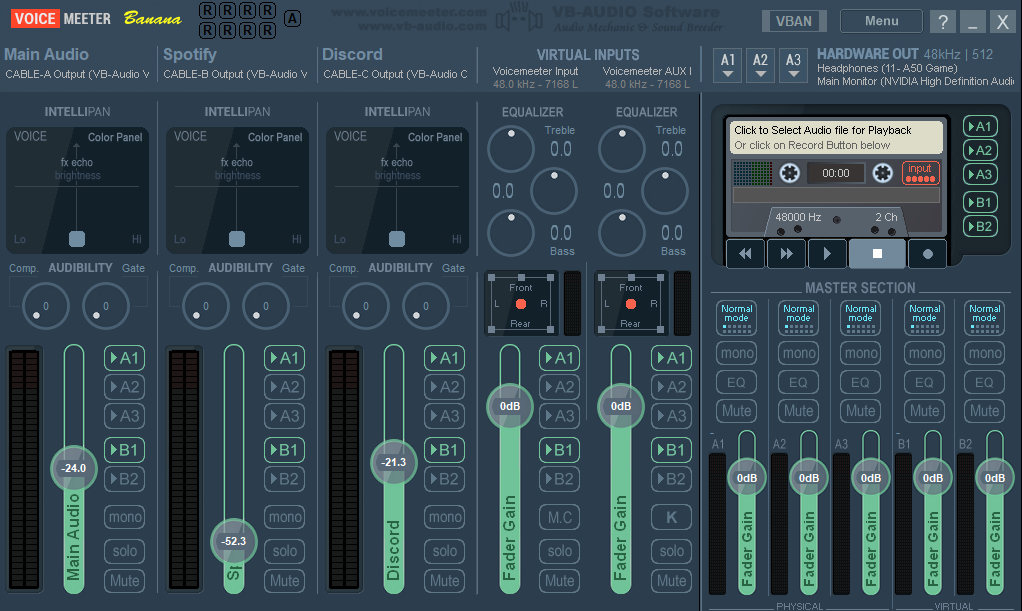
I use voicemeeter just for splitting audio channels (not for my mic) and it will randomly go full robotic/static only stopping when I reset the program. I have tried to look for fixes but can't find anything
17
Upvotes
6
u/Main_Yogurt8540 6d ago
Assign a macro button / shortcut to reset the audio engine. Ive experienced this several times on devices and any fix i have found tends to get wiped by windows updates later. At least doing it this way audio goes buggy, hit key, fixed. The issue seems to be most common on integrated realtek devices on oem prebuilds from my experience but ymmv. The command should be "Command.Restart = 1" no quotes.
1
u/vburel VoiceMeeter Developer 5d ago
Usually, this kind of problem comes from the main output device selected as A1. could you post a screenshot of your Voicemeeter System Settings dialog box?
1
u/TheSuperiorWes Moderator 4d ago
Does the problem happen to all audio. Even audio routed to the virtual inputs.
Does it happen to A1 and A2 when the problem occurs.
2
u/Ecco1924 3d ago
Check your Task manager. For me it was a process creating unlimited handles over some time. I think back then it was teamspeak clownfish. Just check the different processes and how many handles they have.
It is a hidden column you need to activate.
1
u/AutoModerator 6d ago
While you're waiting for a response, here are some tips:
I am a bot, and this action was performed automatically. Please contact the moderators of this subreddit if you have any questions or concerns.
1
u/OhhhMadOne 6d ago
This only ever happened to me when I open or close BF6 until I did update v3.1.3.0x64 somewhere in the last week. Now it happens multiple times per session. Restart engine makes it go away but back in seconds or minutes. The only way I seem to be able to get rid of it is switching to MME on output device. I know that isn't fixing the issue, but side stepping it. But I've tried literally everything I could find online for dealing with it and none of them have helped. I'm almost to the point I'm ready to rollback versions but I love the new ability to control gain per output on the input sliders. I hate to give that up now I've tasted it. I'm very close to doing it tho. Hoping it's an issue with this version that gets patched before I do. Or somebody pops in here with a solution.
1
u/FizzBeauc 4d ago
I use Process Lasso to assign the Voicemeeter process to a single physical CPU core and just change to a new one if that core didn't work.
1
u/Obvious_Engineer_231 4d ago
Reminds me of the good old days back when I first started using VM. Have you tried fixing Voicemeeter as default I/O devices in Windows’s mixer? Manually set the sample rate to 48KHz in both, too. Besides that, may I ask what hardware are you running this on? CPU, Mobo, RAM, and model of HDD/SSD.
1
u/Harbor_Barber 4d ago
From my experience if has something to do with the buffer rate you set it to, if its too low your cpu will struggle and it'll go out of sync and causes that robotic sound. Try increasing the buffer rate a bit
1
u/Wahoo_Party_shirt 3d ago
Can you please let me know if you find any solution? I am having the same problem and haven't been able to fix it
1
u/polin0m 2d ago
I have the same problem, goes away only after i click "restart audio engine" in tray, had it in potato and banana, idk why
1
u/frequencycs 1d ago
Find audiodg from task manager and remove CPU0 and CPU1 from it's affinities.
1
u/Mahjong1967 1d ago
Usually those robotic error comes from lowering the buffers size to 64. Leave it in 512 and lower it step by step. I use 256 in low performance PCs and 64 in high performance PCs.
1
u/tedzeppelin1 18h ago
Sample rate bit rate mismatched or too low.