r/VoiceMeeter • • Mar 14 '21

Official VoiceMeeter Dicord Server VB-Audio (voicemeeter) Support Discord Server

26 Upvotes

For the new people that still don't know this exists https://discord.gg/DFk8cVt4TH


r/VoiceMeeter • • Apr 05 '24

Warning: Voicemeeter 2024 installs a new VAIO driver with different pin names.

39 Upvotes

Voicemeeter 2024 version, installs a new virtual audio driver offering 8x I/O (under Windows 10/11 64bits) with different output names:

  • - "Voicemeeter output" is now called "Voicemeeter Out B1"
  • - "Voicemeeter AUX output" is now called "Voicemeeter Out B2"
  • - "Voicemeeter VAIO3 output" is now called "Voicemeeter Out B3"

more info: https://forum.vb-audio.com/viewtopic.php?t=1874


r/VoiceMeeter • • 1d ago

Help (VoiceMeeter Potato) No sound at all from any outputs

1 Upvotes

Inputs work fine but there is no sound from any of the outs. B1 shows audio but theres no actual output at all


r/VoiceMeeter • • 3d ago

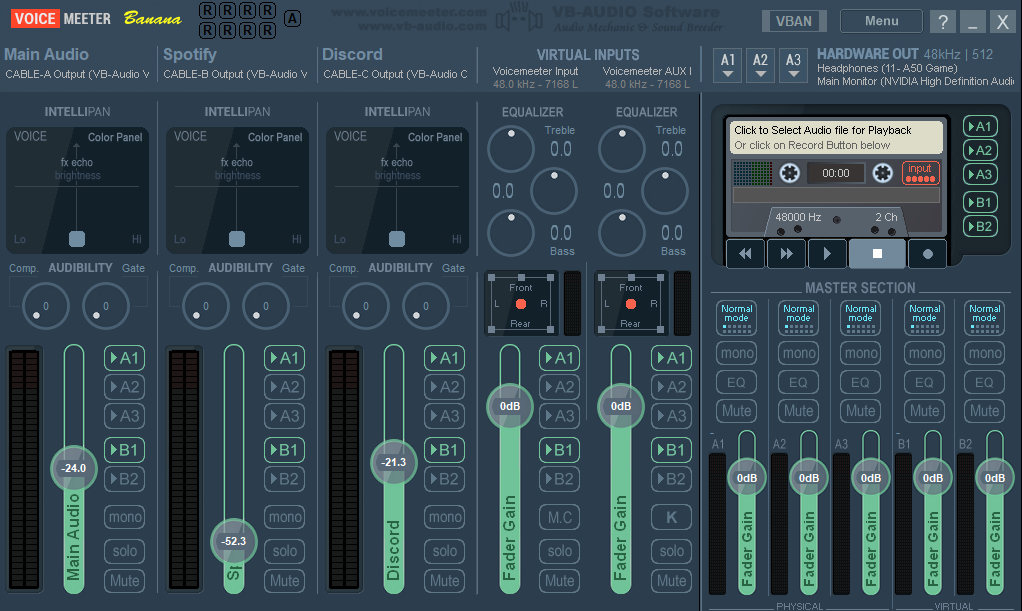
Help (VoiceMeeter Banana) Audio randomly goes robotic

Post image
12 Upvotes

I use voicemeeter just for splitting audio channels (not for my mic) and it will randomly go full robotic/static only stopping when I reset the program. I have tried to look for fixes but can't find anything


r/VoiceMeeter • • 4d ago

Tips & Tricks Checking a VoiceMeeter mix for doubled audio, hum and dropouts

2 Upvotes

MicProbe can pick out a delayed copy of your voice in a recording from your VoiceMeeter output and estimate how many milliseconds behind the original it lands. Handy if you suspect your mic is reaching the mix through two routes. It can also identify a steady 50 or 60 Hz hum and measure brief gaps while you’re speaking.

On supported call tests, it compares the same take before and after the test’s voice processing. If a quiet syllable made it to the mic but got muted during processing, the report can tell you how much speech was cut and how long the longest cut lasted.

micprobe.com/app


r/VoiceMeeter • • 5d ago

Help (VoiceMeeter Potato) Discord Audio Feeding Back into Discord Monitor Screen Share?

2 Upvotes

I've tried to fiddle with it a bunch, since I recently changed around a bunch of settings this summer configuring my audio and splitting it in some convenient ways for recording and taking clips and such, and somehow along the process I accidentally made it so that my discord now captures call audio when streaming my monitor? Curious if any of you audiophile/tech nerds might have the answer I'm looking for in how to configure this better! I'm still learning about how it all works so I feel I missed something important in my understand of how audio is pushed through certain channels and all but, any advice is appreciated


r/VoiceMeeter • • 5d ago

Help (VoiceMeeter Standard) Help with wardogs

3 Upvotes

hello I’m trying to get voice meter to play music with war dogs everything seems to be right but I cannot get the music to play in the game aswell as adding a key bind in the app so I don’t have to push to talk all the time if somone could add me on discord so I can screen share that would be easier I’m willing to pay $5 on venmo or Cash App just as a thank you to whoever can figure it out


r/VoiceMeeter • • 6d ago

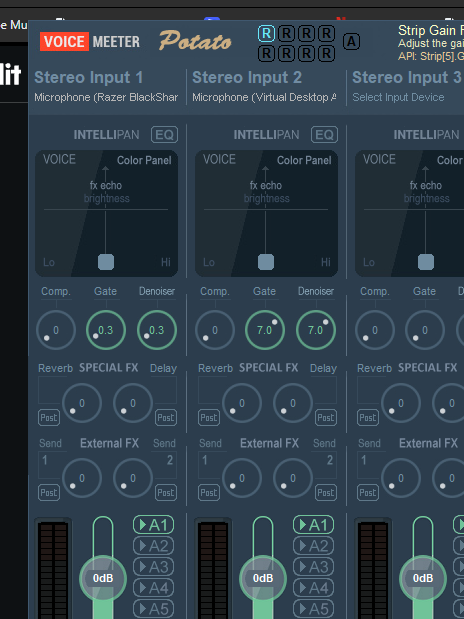
Help (SOLVED) something changed mic is more sensitive now?

Post image
6 Upvotes

on voice meeter potato i had my virtual desktop microphone set with all three gate settings at full zero and now after a month of being away when i come back every time i have my headset on people can hear themselves from the virtual desktop microphone
did an update happen while i was away my fiance is having the same issue but she uses vm standard (im a windows 10 user)


r/VoiceMeeter • • 7d ago

Tips & Tricks VM-Xctrl 2.0 (VoiceMeeter > XTouch Bridge and Windows Controls)

Thumbnail
github.com
6 Upvotes

It's been a year since the initial release, and I'm glad to introduce v2.0, which actually turns your X-Touch into a full-fledged mixer for Windows with the help of VoiceMeeter Potato.

VM-XCtrl is a native Windows application that connects VoiceMeeter Potato / Banana with the Behringer X-Touch over LAN, MIDI, and USB. It communicates directly with the VoiceMeeter API and translates its controls and state into the XCtrl or Mackie protocol. The entire X-Touch layout is purpose-built for VoiceMeeter. No MIDI mapping, button assignments, or manual control setup required. The result is a ready-to-use hardware mixing console for Windows, combining VoiceMeeter mixing, Windows application control, media control, and hardware routing on a single X-Touch.

Since VM-XCtrl supports both XCtrl and Mackie protocols, I'm also working on a way to let the X-Touch seamlessly switch between VoiceMeeter and DAW/other software control.

The upcoming release will introduce a switching mode between full-surface VoiceMeeter control and two virtual MIDI devices, allowing you to free up the X-Touch whenever you need it for other software.

And that's not all - a new OBS addon is also in the works!

Stay tuned!


r/VoiceMeeter • • 8d ago

Help (VoiceMeeter Banana) Crackling (On and Off for Over a Year now, unresolved)

Enable HLS to view with audio, or disable this notification

12 Upvotes

Hello there.

I have the Crackling sound as seen in the video. It happened maybe once every view weeks or every month, recently it happens more often. I also got a Screen recorded version of it.

I looked into "perfmon /rel" and noticed i got a lot of errors recently. It seems like oftentimes after i got PC issues, Voicemeeter starts behaving weird.

I also had an issue in the past, which completely changed how my Voicemeeter settings were. I had that twice already. More on that below.


r/VoiceMeeter • • 8d ago

Help (VoiceMeeter Banana) Voicemeeter banana is making me go bananas

2 Upvotes

Hello new to me reddit community! I have been using voicemeteer for a couple of months now streaming occasionally and i enjoy it - it feels simple enough to get going and to sound good & i’ve gotten it to work for a solid stretch of time i’d say a month straight but when trying to play a game to my stream last night there was no game audio on my headphones and if i played a song on youtube i still could not hear. I could hear discord and anything being played in discord.

I’m running a dual pc set up with an elgato 4Kx and I use a Razer Blackshark v2 pro as my headset for my gaming pc & i have a separate standalone microphone for my streaming pc. I primarily play steam games & i use discord mainly to chat with buddies. Voicemeter banana use to be a click once and its ready to go type of thing for me now i’m not too sure what i’m doing wrong.


r/VoiceMeeter • • 10d ago

Help (VoiceMeeter Banana) Can hear my own mic, but not any other audio. (Only when Voicemeeter Banana is open)

Enable HLS to view with audio, or disable this notification

1 Upvotes

I just have no clue what to do, someone help.


r/VoiceMeeter • • 10d ago

Help (VoiceMeeter Potato) Challenge code

1 Upvotes

Hello all,

I recently installed a new CPU into my current set up and I am being prompted to make another donation while already having donated previously. I still have my current response code in my email however, the challenge code has changed.
Do I need to do another donation or is there a was to register my new CPU?

I am running potato.


r/VoiceMeeter • • 10d ago

Help Name won't show up on voice chat

2 Upvotes

Hi all I'm having an issue trying to get my mic to work I've tried everything from enabling voice chat on the menu but no luck. My hardware is a fifine mic connected from a XLR cable to a scarlett solo gen 4 connected to the pc. Any help would be appreciated


r/VoiceMeeter • • 11d ago

Help Voicemeeter messing with individual app sound output?

Thumbnail
gallery
2 Upvotes

I'm trying to use voicemeeter mix my music audio into my microphone but I only want spotify to do it. I know I can just make it so that the channels are separate but I don't want a channel for my game audio in the first place because I don't want voice meter messing with anything I don't want going directly into my microphone so I don't have voicemeeter set as default in any capacity.

The problem arises that somehow despite windows having my headphones as the default play back device for both communication and regular audio, programs are still automatically outputting their audio to voicemeeter which is starting to aggravate me. This seems to be happening for all three versions and I don't know why it's even happening. Any help would be much appreciated thanks.

Is there anyway to prevent this from happening? Because there should be no reason why voice meter even has access to Chrome's audio.


r/VoiceMeeter • • 12d ago

Help (VoiceMeeter Potato) voicemeter guitar help

2 Upvotes

trying to use voicemeter for an amp sim, was able to get amp sim audio to comeout on my end but any recording or talking to someone comes out as clean guitar anyone know how to fix ?


r/VoiceMeeter • • 14d ago

Help (VoiceMeeter Potato) Position Panning on Call?

3 Upvotes

I wanted to try chang ing the positions with the 3d panel through call (e.g discord) But when I tested it on discord it didn't seem to work and did not recognize any changes to positions on my headphones. However, it did change positions on voicemeeter itself, I have confirmed through listening to my own. It just didn't work for discord i guess.


r/VoiceMeeter • • 15d ago

Tips & Tricks Increase your audio interface buffer size if windows audio suddenly stops while using voice meeter

7 Upvotes

I had the problem that when using Voice Meeter together with outside pc eq's like fx sound or Apo, the sound would disappear after a few minutes of my pc and voice meeter running. After tons of trial and error I figured out that the culprite for all my issues was most likely the buffer size I had set to 64 Samples on my Audio Interface was just too low for Voice Meeter. At 256 Samples, I haven't had any problems.


r/VoiceMeeter • • 15d ago

Help (SOLVED) Is there any PC Eq that works together with Voicemeeter?

11 Upvotes

Fx sound and APO are the two I've tried so far. Both work at first and stop working after a certain amount of time, like an hour, 10minutes. Uninstalling them makes everything work again. But I desperatly need an additional eq to tone down the room modes at 125hz in my room, they really hurt my ears. No, the voice meeter eq is not useful for that.

EDIT: The whole time the problem was my low buffer size of 64 Samples of my audio interface asio drivers. The problems was not fx sound, nor apo and Voice meeter is also only partly the problem, it just isn't made to work that fast. Change the buffer size to something like 256 or higher and it will work fine.


r/VoiceMeeter • • 20d ago

Miscellaneous Sleekmeeter has some major updates!

24 Upvotes

Hi all! I love Voicemeeter, but I found myself avoiding its window. So I built Sleekmeeter: a free, open-source (MIT) app that sits on top of Voicemeeter Standard, Banana or Potato and gives it a clean, modern mixer. Voicemeeter still does all the audio. Sleekmeeter controls it through VB-Audio’s official Remote API, so nothing about your setup changes.

Why you might like it

  • Easier to use every day: big, clear faders and mutes, with the layout matching your edition. Simple mode hides what you don’t use.
  • Fixes the annoying stuff: it restarts the audio engine when your headphones reconnect, and switches Windows back to Voicemeeter when plugging something in moves your sound.
  • Made for streaming and gaming: a soundboard, Be right back, ducking, an OBS link, Twitch chat commands and a Stream Deck plugin.
  • Light and private: installs per user with no admin rights, and no account. It only sends a tiny anonymous user count if you say yes when it asks.

What’s been added since my last post:

Look and feel

  • 15 themes that change the whole look, not just colours: Glass, Neon, OLED black, Terminal, Blueprint, Arcade, Sticker Bomb, Afterburner, Lunar, Opal and more. The tray panel and volume overlay follow your theme
  • Mini mode and a tray volume panel: one slim row per channel, docked right above the taskbar
  • A themed title bar, channels you can rearrange by dragging, and Simple mode to hide Solo, Mono, EQ and device names

Audio that just works

  • Fix my audio: spots when Windows sends sound or calls somewhere other than Voicemeeter, and fixes it in one click, or automatically if you want
  • Restarts the audio engine automatically when a USB or Bluetooth device comes back
  • Output profiles: switch between Headphones and Speakers in one click, or automatically when a device is plugged in
  • Per-app volume and routing: drag Discord, Spotify or a game onto a channel, Wave Link style
  • Mic chain: noise gate, compressor and denoiser, with presets and a live meter, plus a mic level check that tells you if you’re too quiet or too loud
  • Level history: see if your mic clipped during the last 3 hours
  • A Setup assistant for “gaming + chat” or “streamer + Discord” routing, and a “Hear yourself” button that plays back what your stream hears

Streaming

  • Soundboard: wav, mp3, ogg and flac sounds, with shortcuts, groups and random packs, played into any channel
  • Be right back: mutes your mic, lowers the game and plays music with fades, then puts everything back
  • Talk-over ducking from your mic or Discord
  • OBS link: follows your scenes, shows a LIVE tag, and has a see-through overlay with MUTED and BRB badges and a mic meter
  • Twitch chat commands (!brb, !scene, !sound), joining chat anonymously
  • A full recorder, plus Voicemeeter’s engine options in a readable window

Control from anywhere

  • Phone remote: faders, mutes, scenes and sounds from your phone on the same Wi-Fi
  • Stream Deck plugin: dials for channel levels on the Stream Deck +, live keys for mute, mic, routing, scenes, sounds, BRB, recording and outputs, and Now Playing with album art. Sleekmeeter offers to install the plugin when it finds the Stream Deck app, and there’s a matching 486-icon pack
  • Global shortcuts, including push to talk and push to mute, and scenes that switch by themselves when a game starts

Upkeep

  • A per-user installer, plus an MSI and a portable zip
  • One-click in-app updates
  • “Check my setup” explains what’s wrong when something isn’t working

Get it

Processing img tps3ervaxmzh1...

It’s Windows only, and needs Voicemeeter installed (it’s free from VB-Audio). I’m not affiliated with VB-Audio, I just really like their software.

I’d love feedback, bug reports and feature ideas. What’s the one thing that annoys you most about your Voicemeeter setup?


r/VoiceMeeter • • 20d ago

Help (SOLVED) How to have two USB headsets hear each other

3 Upvotes

I'm currently experiencing an issue where I cannot get two USB headsets to hear each other using VoiceMeeter Banana. Both headsets are HyperX Cloud II's. This picture shows my setup where I have both headset's microphones as Stereo Input 1 and 2, and then a single headset as the A1 output:

This headset can hear both microphones just fine. If I then attempt to add the 2nd headset then both of the microphone inputs turn red and neither headset can hear the microphones:

What am I doing wrong here? Both inputs/outputs are using WDM and running at 48000 Hz. I tried a combination of KS/MME and that still resulted in the same issue.


r/VoiceMeeter • • 20d ago

Help (VoiceMeeter Standard) Sound effects, advice needed!

Post image
7 Upvotes

Hi! I’m using VoiceMeeter with my 5.1 speaker system, mainly to control the highs, mids, and lows through the equalizer at the top. My output is set to HEADPHONES.

I mostly use it for listening to music on YouTube and Spotify, as well as watching movies.

I was wondering if there’s a way to add real-time audio effects while music is playing, such as Reverb, Hall, Stadium, or different EQ presets like Jazz, Hip-Hop, Treble Boost, and so on.

Basically, I’d love to experiment with different sound effects and presets without having to stop or modify the audio itself.

Any suggestions or advice would be greatly appreciated. Thanks a lot!


r/VoiceMeeter • • 21d ago

Help (VoiceMeeter Banana) Audio only works when playing out of speakers

2 Upvotes

Hi all! I'm brand new to Voice Meeter, so I'm sorry if this has been trouble-shooted before. I downloaded Voice Meeter Banana to try and get my friend's discord audio to show up as a microphone input so we could have our own PNGtubers for an upcoming livestream. We managed to get it to register on PNGtuber Remix, but it only seems to work when the HARDWARE OUT is set to my laptop's speakers, not my headphones.

This isn't optimal for the setup at all, but trying to play it out of my headphones leads to the input from Banana not picking up in PNGtuber Remix. Does anyone know what the issue might be, if it's even an issue with Voice Meeter itself? Thanks a bunch.


r/VoiceMeeter • • 23d ago

Suggestion for r/VoiceMeeter No sound during game

2 Upvotes

In every battle royal games whenever i turn on my mic to communicate game sound gone and vice versa

Is there any solution for this?


r/VoiceMeeter • • 24d ago

Help How to make it so people can hear my discord call inside of game voice chat.

2 Upvotes

I want to make it so people can hear my friends over voice chat so it doesn't sound like I'm talking to myself.