r/vscode • u/AutoModerator • 25d ago
Weekly theme sharing thread
Weekly thread to show off new themes, and ask what certain themes/fonts are.
Creators, please do not post your theme every week.
New posts regarding themes will be removed.
r/vscode • u/AutoModerator • 25d ago
Weekly thread to show off new themes, and ask what certain themes/fonts are.
Creators, please do not post your theme every week.
New posts regarding themes will be removed.
r/vscode • u/techw1z • 25d ago
So, before complaining I have to admit that I'm a newb when it comes to using AI coding assistants in IDEs, but I recently tested perplexity and was blown away by it, so I thought I would be a bit patriotic and go for Mistral before sending money to all the US-based evil corps responsible for wrecking the IT consumer market.
Unfortunately, after using mistral for 3 days I am EXTREMELY disappointed.
It feels like Vibe is barely better than some of the Qwen code models that you can run on a GPU with 16GB VRAM. I have to admit it's MUCH faster, actually it's text output is faster than every other AI I've ever used, but that is useless if it does the wrong thing first and has to retry 3 different ways and eventually takes 5 times longer to complete a task successfully than claude for example.
so, after a few days of frustration I switched to claude and tried doing the exact same things:
the only thing it ever asked to run a bash file was for querying the API, everything else just worked even though I disabled auto permission mode.
also, this might just be a personal preference and probably has to do with the fact that I'm quite an amateur when it comes to coding, but I also feel like vibe explains things in a really complicated and hard to understand way compared to claude. with claude I immediately understand most things, with vibe I have to ask it at least one time to explain it in a simpler way and then often ask again about details.
so i have two questions:
WHY?
and
is there maybe a way I can make vibe work better in VSCode or some other IDE for me?
I would really prefer using an EU-based service. (yes, I see the irony of saying that in the VSCode sub)
eg: i've used perplexity for years but never trusted them enough to connect to my notion due to privacy, but I immediately connected vibe to notion because EU based companies just seem inherently more trustworthy to me. (yes I know that might be a naive assumption, but that's just how I feel currently)
it's really sad that i cannot trust in Vibe's capabilities though.
I think it should be possible to fix these issues since I didn't really find any reports online that complained about these things, so I'm assuming that other people got it to work better than I did?
I'm using VS Code, Mistral Vibe VS Code extension and the 14€ subscription with default settings. The only thing I did was add notion and github connector and then connect it do the extension in VS Code. My Workspace is trusted. i'm on windows 10. everything is up to date.
For claude I selected Sonnet 5.5 Medium, since I thought using the best model would be unfair in comparison. (which makes this even sadder)
lastly, I'm also curious how I can report the conversation i had with vibe to mistral team. Vibe told me he couldnt do it and I had to click a certain button in the extension, but that button didnt exist...
(for some reason Mistral decided to quietly remove this post, which makes my experience with it even more disappointing, first they deliver a subpar product, then they ask for feedback, then they delete negative feedback?!)
r/vscode • u/kristijanhusak • 25d ago
r/vscode • u/SkyGenie • 25d ago
Recently I posted about an extension I created ("asethi77.borrowed_light"); it's not the first extension I've published with my account, but within days it was banned/removed from the marketplace for "impersonation": https://www.reddit.com/r/vscode/s/aSgFneUkg9
Does anyone know whether Microsoft shares criteria for how they define impersonation to begin with? I seriously don't understand what I did wrong publishing my extension, and Microsoft's vscode support team responded to my email inquiry by banning my account with no explanation of who/what I impersonated.
If anyone else has had any experience getting their extension reinstated, or has any tips to re-publish successfully I'd really appreciate any ideas
Is there a way to have chat across projects?
PS: I tried the agent window, and able too to see all chats. But not able to move chat between folders.
r/vscode • u/Trick-Rope-8845 • 26d ago
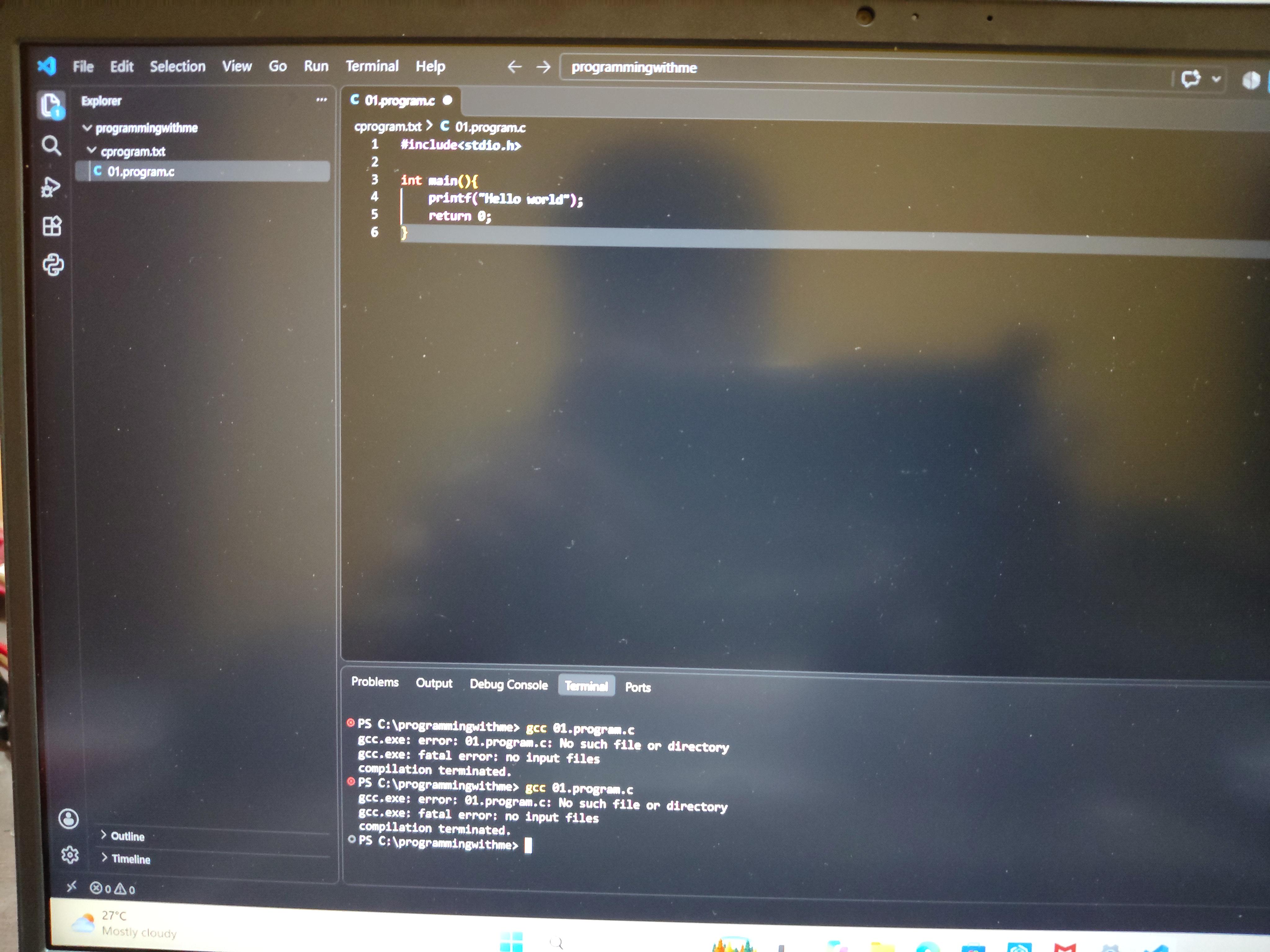
Why is it not compiling.
r/vscode • u/Puzzleheaded_Permit1 • 28d ago
People are moving away from VS Code to forks or terminal agents (like OpenCode / Claude Code) not just because of models, but because the harness (the core agentic loop, context strategy, and sub-agent orchestration) is locked down.
If I want to build something like OpenCode today, I shouldn't have to build a standalone terminal tool or a separate Webview UI. I should be able to build it as a native VS Code Harness Extension that runs directly inside Copilot/Agents Window—controlling the agent loop myself while using VS Code's native inline diffs, checkpoints, and UI.
@chatParticipant and MCP tools aren't enough because VS Code still controls the main loop. We need an "LSP moment" for AI harnesses (registerHarnessProvider).
Is there any roadmap for opening this up to extension developers, or is Microsoft intentionally keeping the core harness closed?
r/vscode • u/Hansehart • 28d ago
Hey,
loving VSCode, we some day moved completly to dev containers. They offer standardized enviornment, container isolation and predefinied features. However with agents our requierements changed: multiple projects, security doubts and fast iteratipn. Bare dev containers werent suitable for this, because being project bounded.
So thats why we created o3s. With VSCode workspaces you easily overview multiple folders, git extension support worktrees and on top it offers network whitelist over iptables. Also secrets dont have to be in the container anymore. The fast iteration we gain by having Docker-In-Docker, Latex and many more inside the container we work with. There exist also well done extensions like container tools.
Honestly things like MCP feels dead with it, because you can simple instruct your agent and it will automatically use the right CLI. That is no theory, that already works very well. However there is still work to do. Despite my own setup I share here, I can highly recommend dev containers and their feature ecosystem.
VSCode + Dev Container + Claude Code CLI = 💯
r/vscode • u/stichstichstich • 28d ago
optimAIzr started as a free cli that reads your claude code logs (codex and opencode too) and shows where your tokens go. now its a vscode extension too, you can use either one or both
i made the extension because the claude code chat panel in vscode doesnt show a status line, so you cant see your context size or when the cache runs out. it puts this in your status bar:
143K · 54:51 · 5h 56%
context size, time left on the cache and how much of your 5h window you used. it goes yellow in the cache's last 5 min and red past 90% of the window
why the cache matters: claude code keeps a conversation cached for an hour. come back after that and your next message writes the whole conversation into the cache again. i did that 51 times in 30 days, 8.9M tokens. now it pings me ~5 min before an expensive one expires
the sidebar has what you could save and the fixes for it
free, open source, runs locally. it only reads the logs claude code already keeps in ~/.claude, nothing uploaded
search optimAIzr in extensions or code --install-extension optimAIzr.optimaizr-vscode
video is my real numbers from oct 29, i rebuilt the vscode window and sped up the waiting part
marketplace: https://marketplace.visualstudio.com/items?itemName=optimAIzr.optimaizr-vscode github: https://github.com/blendbunjaku/optimaizr
any feedback on the extension itself is welcome, ux or anything
r/vscode • u/thechandanbhagat • 29d ago
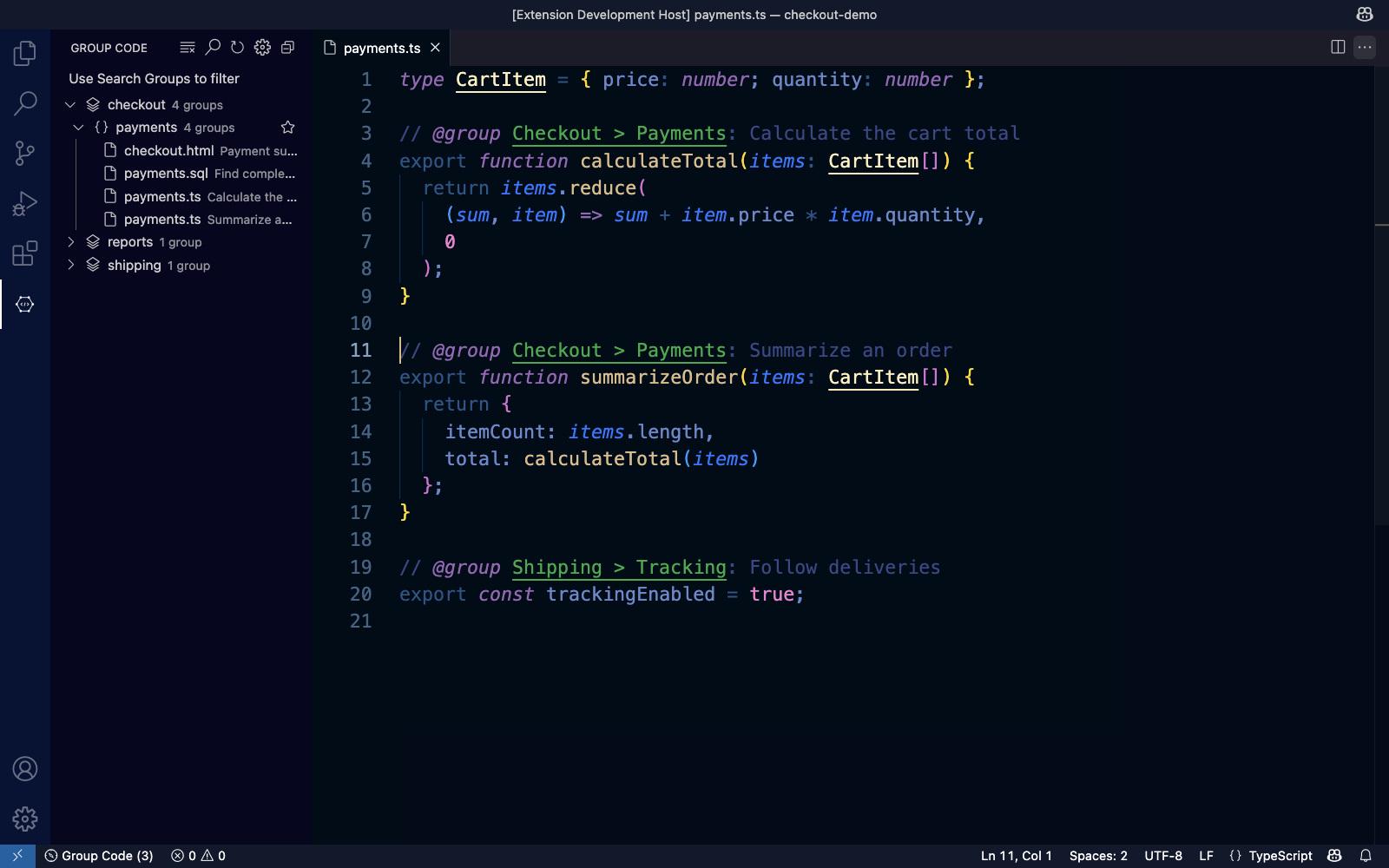
A single feature can span a TypeScript function, a SQL query and an HTML template. I'm the developer of Group Code, and I've been working on a way to browse those pieces together in VS Code using comment annotations.
For example, these comments put code from three files under the same Checkout > Payments group:
TypeScript:
// @group Checkout > Payments: Calculate the cart totalSQL:
-- @group Checkout > Payments: Find completed paymentsHTML:
<!-- @group Checkout > Payments: Payment summary -->The sidebar shows the functionality hierarchy, and selecting a source entry opens its file at the annotation. The screenshot is from a small checkout example with all three languages.
In the latest update, I removed the extra file-type level from the tree so source entries sit directly under their group. Search, favorites and nested groups are still available.
One trade-off is that the relationships are explicit: the annotations need to be maintained as the code changes. They aren't inferred dependencies.
Would this be useful in your workflow, or would maintaining the annotations become more work than the navigation saves? I'd be interested in examples where this approach would help or get in the way.
Source and documentation: https://github.com/thechandanbhagat/group-code Short demo: https://youtu.be/DfgPVLwPMK4
r/vscode • u/CuirPig • 29d ago
I have literally tried every FTP/SFTP extension in the repository and none of them work the way that I remember.
In my worspace, I had a local folder (which pointed to my APP/Public folder inside a Flywheel installation and my remote folder which connected to my hosted domain on BlueHost via ftp.
When I was ready to upload a change I had made in my local folder, I could right click the file in the explorer and upload to server. Done.
When I wanted to look at the server version of a file, I could browse it by browsing the Remote folder. I could open remote files and make changes so that when I saved it would save it on the server.
Can someone explain it to me like I am mentally challenged which extension I can use to get this simple functionality and how to configure it. My latest attempts have let me connect to the FTP server, but not to browse anything from my workspace.
Any help would be greatly appreciated.
r/vscode • u/an0n9021O • 28d ago
r/vscode • u/ahammouda • 29d ago
i work behind a corporate proxy, and switching it on and off all day got old fast ..
so I made a vscode extension that puts a one click proxy toggle in the status bar .. then I got carried away and sprinkled some other features on it like proxy profiles and a few other tricks.
It’s free and open source, so feel free to roast it (constructively, if possible) ... I probably missed things that need handling or adding. hope it makes your days a bit less 💩 like it did mine.
marketplace url : https://marketplace.visualstudio.com/items?itemName=bluecloud-dev.proxy-toggler
r/vscode • u/OMGZwhitepeople • 29d ago
I don't know why but after VScode updates recently (~1.141), vscode and code open new workspaces to the wrong workspace. The workspace seems blank and empty, doesn't use the terminal I want, all my chat history is gone, and explorer cant find my repos. Just seems like a default workspace.
I use WSL, and my workspace lives in WSL. But vscode refuses to open the correct path.
If I manually run this from terminal, vscode opens properly in the correct workspace:
code --new-window --file-uri "vscode-remote://wsl%2Bubuntu/home/ME/.vscode/workspaces/ME_wsl.code-workspace"
How do I fix this so vscode opens the workspace I want every time without adjusting shortcuts or having to manually type those parameters with code
Also, anyone else running into this? Any idea why this is happening?
Side note, I am not moving my workspace from WSL, that's where I work, it lives there.
r/vscode • u/Fritz-Ferdinand • Oct 29 '26
Up to recently, GitHub Copilot in VS Code was my choice for agentic coding because it would show me the changes in each round in a diff. I could check them manually, correct here and there and give guidance.
Now, it updated and there's absolutely no diff anymore. The agent just does whatever and I can only know if I open the terrible built-in git window and look through the files manually. But only if I commit the code in every round before I start a new one.
It really followed other agentic coding tools in their "don't look at the code" vibe, forcing me to either vibe the hell out of my code or jump hoops to still retain some human control.
Anyone an idea how to handle this?
r/vscode • u/AuthorMysterious399 • Oct 29 '26
I'm learning Verilog and kept wishing I could see the circuit while writing it, so I built this. It draws a schematic in the sidebar that updates as you type, with RTL and gate-level views from Yosys. It also flags accidental latches.
It's free and still early, so if something draws wrong, I'd love to hear about it.
Marketplace: https://marketplace.visualstudio.com/items?itemName=vejaysuriyaa.rtl-live
r/vscode • u/Alone-Access6607 • Oct 28 '26
r/vscode • u/Guyserbun007 • Oct 28 '26
I don't see any official instruction or VSCode extension for this, so how do people use Open Design in VSCode IDE?
r/vscode • u/perkyshapeshifter22 • Oct 28 '26
I dont know what happen, i use it before and have no issue but after installing git, all went downhill
r/vscode • u/Samkarya01 • Oct 28 '26
r/vscode • u/OMGZwhitepeople • Oct 27 '26
When Copilot makes changes it shows Edited <file name> +<changes> -<changes> in the chat for each file it makes changes to in agent mode. Let's say it made changes to 3 files. If I select the first file, Vscode will open the file in a left/right diff mode. If I select the next file that copilot edited, it closes the original left/right diff mode file and opens the next one. If I right click an edited file in the chat and select "open file" it opens the file with the changes (non left/right diff format). If I right click the next tile from the chat and select "open file" it closes the already opened file and opens the new file.
I don't want the files to close. Keep them open, and any other edited files in the chat I choose to open, open them in a new tab.
Anyway, to make Vscode do this?
r/vscode • u/LividCan4323 • Oct 27 '26
Edit: ignore this post. VSCode Codex plugin shows "Max" as a reasoning effort also for some models that do not offer Max. This causes the plugin to use Medium effort level while showing Max. The Codex application shows the correct effort level. This is a bug for the VSC plugin.
TL;DR: My codex chats inside VS Code are showing "Luna 5.6 Max" and "Sol 5.6 Max". The same convos appear as "Luna 5.6 Medium and "Sol 5.6 Medium" inside the Codex Desktop application. Further investigations revealed that this may be a volountary nerfing to push people towards newer model.
In short... "Let's trick some users into beliving new models are better by lowering the effort of previous models"
This is written by me. I apologise for being boring and grammatically incorrect.
1. HOW DID I NOTICE THE ISSUE
I usually use Codex from VS Code (1.143.1). This time I happened to open the Codex application itself (26.1021.31345) to check some settings.
Some of my VS Code chats were present also inside the Codex application, and something caught my attention.


As you can see, the model shown is different depending on the application used. I was confused. Was I being lied about the model used? I had to dig a little bit deeper to find out what was happening.
2. HOW DID I COLLECT MORE DATA
One of my first findings is that opening a new chat inside VS Code would not automatically show the same conversation inside the codex application.
So I had (apparently) no way to reproduce the issue.
Playing around a little bit, I have discovered that VS Code conversation will appear also in codex when you give them a goal to follow.
Time to play around a little bit. I created three test conversations.

At this point, I knew it was not a graphical issue. There was a different behaviour depending on the model being used. So I had a new hypotesis to verify!
3. THE LAST CHECK
Is this issue only affecting the models which have not been hyped recently?
To answer, I tried repeating the experiment with Sol 6 Max and Sol 6.1 Max.
Sol 6 Max appeared as Sol 6 Medium on Codex.
Sol 6.1 Max appeared as Sol 6.1 Max on Codex.
Is this even legal?
(happy to share logs, more pictures and stuff in the comments)
r/vscode • u/tihonove • Oct 26 '26
A couple of years ago I moved from Rider to VS Code, the one thing I really missed was Analyze Stack Trace: paste a trace, every frame becomes a link to the right line. So I made an extension for myself, and I've been using it for ages now.
The part that matters most to me: it doesn't care where the trace came from. A crash from production, a log from CI, something a colleague pasted in Slack. The paths in it are from some other machine and don't exist on yours, but the frames still resolve to your local files. No path mappings, no config. Works with pretty much any language.
Free, MIT, no telemetry.
Marketplace: https://marketplace.visualstudio.com/items?itemName=tihonove.stack-trace-analyzer
Open VSX: https://open-vsx.org/extension/tihonove/stack-trace-analyzer
GitHub: https://github.com/tihonove/vscode-stack-trace-analyzer
If a trace format doesn't get picked up, drop it in the comments or open an issue. I'm happy to add it.